Introducing QR Jacking: When Your Branded QR Codes Aren’t Yours
QR code SaaS platforms like QR Tiger allow anyone to claim a branded subdomain by only checking for a DNS record, with no ownership verification. An attacker can hijack abandoned subdomains and redirect them to phishing pages, exploiting the trust in legitimate corporate domains.

medium.com
Published on medium.com
Subdomain Takeover
The full write-up lives on its author's site
It belongs to its author, so we link to it rather than copy it. The other two tabs are our own rewrites, checked against it.
Context
QR Tiger is a QR code management platform that advertises Fortune 500 companies among its customers. Among its features is one called "Own Short Domain", which lets a business serve its QR codes from a branded subdomain such as qr.yourcompany.com instead of QR Tiger's default short URLs. The customer creates a DNS record pointing that subdomain at QR Tiger's infrastructure, registers the subdomain in the QR Tiger dashboard, and QR Tiger checks that the DNS record exists before activating the domain.
The author, Farzan Karimi of Castling Security, describes a vulnerability class he calls QR Jacking: taking over a company's branded QR subdomain on the QR platform itself, so that the company's own printed QR codes resolve to an attacker-controlled destination. He confirmed the pattern on multiple QR SaaS providers, starting with QR Tiger, and this post is Part 1 of a series. Responsible disclosures with additional vendors were in progress at the time of writing, and further findings were to be published as each disclosure closed.
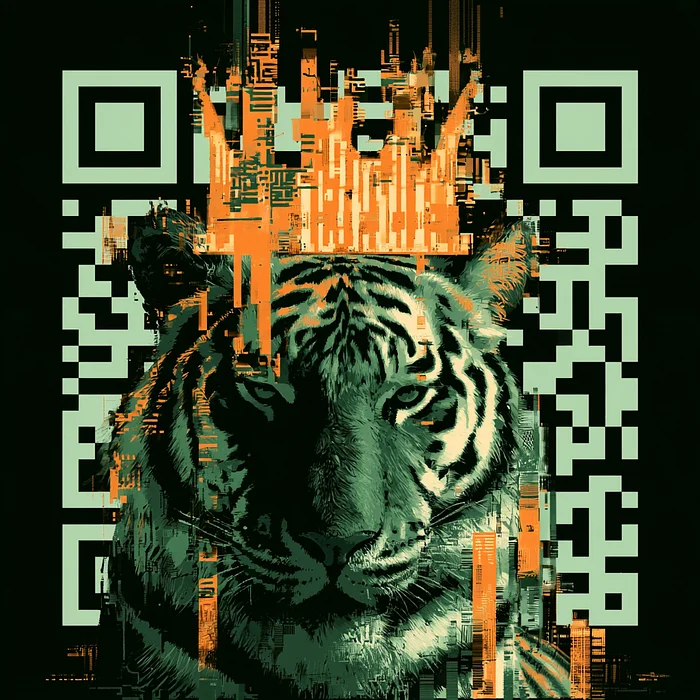
The attack is not the familiar one of sticking a fake QR sticker over a real one. The QR code, the domain and the DNS record are all genuine; what is hijacked is the platform-side claim on the subdomain.
Setup
The preconditions are minimal:
- A QR Tiger account. The author states that anyone with one can claim any unclaimed domain that points to QR Tiger's infrastructure.
- A target company that has, at some point, pointed a
qr.*subdomain at QR Tiger and then left it orphaned, meaning the DNS record still exists but nobody on the company's side owns or monitors the integration. - No access to the target's DNS, infrastructure or personnel is needed at any point.
The author also built a scanning tool, QR Tiger King, to find this pattern at scale. It combines dig queries with web probes and checks public top-domain lists: the Tranco Top 1M, Forbes Global 2000, Fortune 500 and Inc. 5000. The source was to be released on GitHub.
Finding it
The observation behind the class is that QR platforms which support custom branded domains verify ownership by checking for a DNS record and nothing else: no secondary challenge, no email confirmation, no proof of control. A DNS entry is treated as a green light. Wherever a subdomain is orphaned, that means anyone can claim someone else's domain on the platform.
The author notes that classic subdomain takeover scanners miss this. Tools such as subjack and nuclei look for HTTP response fingerprints, for example S3's "NoSuchBucket" or Heroku's "No such app". QR Tiger and other QR providers are architected differently: a dangling subdomain returns a generic "Forbidden" page that looks like any other 403. The signal is in DNS, not HTTP, which is why QR Tiger King pairs dig queries with web probes.
Exploitation
The author walks through the full takeover of a target, step by step.
Step 1: Find the target
A DNS lookup on qr.<target>.com reveals a CNAME pointing at QR Tiger's infrastructure (qr1.be).
$ dig qr.target.com +shortqr1.be. # CNAME → QR Tiger159.89.52.226 # A-record (QR Tiger's server)
The CNAME is the link to the platform: the subdomain points at QR Tiger's infrastructure, and the A-record shows the QR Tiger server it ultimately resolves to.
Step 2: Confirm it is unclaimed
Navigate to the subdomain in a browser. If it returns "Forbidden", nobody has claimed it on QR Tiger's platform yet, and it is takeover-ready. This is the generic 403 that makes the target invisible to HTTP-fingerprint scanners.
Step 3: Claim it
In QR Tiger's dashboard, go to Settings → Own Short Domain, enter the subdomain and click save. No ownership verification is performed and no confirmation is sent to the domain owner. The DNS record that was already there is the entire proof the platform asks for.
Step 4: Set the trap
Generate a Dynamic QR code and point it at an attacker-controlled URL. In the author's case this was https://castlingsecurity.com/poc, his security research domain.
Step 5: Hijack complete
Navigate to qr.<target>.com. The company's branded subdomain now redirects to the attacker's page.
The whole takeover takes under a minute. There is no exploitation of the target's infrastructure, no access to their DNS, and no interaction with the company at all: just a QR Tiger account.
The author recorded the full attack as a proof of concept: scanning a real company's physical QR code, watching the phone confirm a legitimate corporate domain, tapping through, and landing on the phishing page. In the real-world scenario he describes, a conference attendee scans a sponsor's booth QR code, sees qr.legitimate-company.com in the phone's URL display, taps it, lands on a login page and enters credentials. The QR code was real, the domain was real, and the company put it there themselves.
Root cause
The mistake is in the custom-domain activation flow: ownership is established by the presence of a DNS record alone. There is no secondary challenge, no email confirmation and no proof of control, so a CNAME is accepted as proof of ownership. Any account holder can therefore claim any unclaimed domain that points at QR Tiger's infrastructure, including abandoned subdomains belonging to Fortune 500 companies.
The design fails for orphaned records: the DNS record keeps pointing at the platform, and a DNS entry alone is accepted as proof of ownership.
Impact
Subdomain takeover is a well-known class: dangling DNS records pointing at deprovisioned cloud services such as S3 buckets, Heroku apps and Azure instances have been documented for years. The author argues QR Jacking differs because of a physical dimension that changes the threat model:
- Physical trust. People are trained to be suspicious of links in emails, but not of QR codes printed on products they just bought, posted in the lobby of their office, or printed on the badge they are wearing at a conference.
- Domain trust. The URL reads
qr.legitimate-company.com. Even users who check URLs before clicking see nothing wrong. - No patch available. Physical QR codes on shipped packaging, printed signage and distributed materials cannot be recalled with a software update. They remain in the wild indefinitely.
- Zero visibility. The attacker controls the destination through the QR platform's dashboard. The company has no logs, no alerts and no indication that its branded domain is now serving attacker content.
At scale, the author reports hundreds of companies with vulnerable subdomains across manufacturing, healthcare, financial services and tech, including names the reader would recognise immediately. He prioritised disclosure to healthcare and financial services companies first, on the reasoning that a vulnerable hospital domain is a different conversation from one at a SaaS company.
Fix
The author gives recommendations for both sides. These are proposed fixes; the report does not describe any change made by QR Tiger.
For QR Tiger and other QR SaaS platforms: implement domain ownership verification. A DNS TXT challenge, email verification or file-based proof, pick one. Every major SaaS platform that supports custom domains does this. A CNAME alone is not proof of ownership.
For companies: audit DNS for qr.* subdomains with records pointing at third-party QR platforms. If the record exists and nobody on the team owns that integration, remove it.
Disclosure timeline
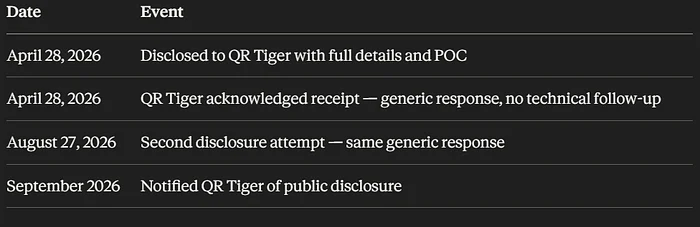
Five months after the disclosure, QR Tiger had not remediated the vulnerability, according to the author. The post links press coverage from ITNews, the Risky.Biz Risky Bulletin, SC Media and Cyber Insider, plus additional coverage listed as CISO AI, CyberStack and Tech Best.
Variants to test
- Enumerate
qr.*labels on your own or client domains. A CNAME to a QR platform's infrastructure (the report showsqr1.befor QR Tiger) is the starting signal. A positive result is aqr.*subdomain whose CNAME resolves to a third-party QR provider. - Probe the subdomain over HTTP. A generic "Forbidden" response, rather than a branded page, suggests the domain is unclaimed on the platform. Treat this as a lead, not proof, since the report notes the page looks like any other 403.
- Register the subdomain in the platform's custom-domain settings. If the platform accepts it with only the existing DNS record as evidence, and sends no confirmation to the domain owner, the takeover is confirmed. A positive result is the platform activating the domain and serving your chosen destination from the company's branded hostname.
What happened, in plain words
A security researcher called Farzan Karimi, who works at a company called Castling Security, found a way to take control of the branded web addresses that many companies use for their QR codes. He did this on a QR code management platform called QR Tiger, and he says he confirmed the same problem on several other QR platforms too. He gave the problem a name: QR Jacking.
To understand why this matters, you need to know what a QR code is. A QR code is that square barcode-like image you scan with your phone camera. When you scan it, your phone reads a web address hidden inside the image and offers to open it. Companies print these codes on product packaging, posters, shop windows, conference booths and staff badges, because it is easy for a customer to point a phone at one instead of typing a long address.
Normally, a QR code contains a link to a short address that the QR platform controls, something like a generic short URL. QR Tiger offers a feature called "Own Short Domain" that lets a business use its own branded address instead, for example qr.yourcompany.com. That looks much more trustworthy to a customer: the address contains the company's real name.
What the researcher found is that QR Tiger lets anyone claim one of these branded addresses as long as a particular technical record exists in the internet's address book, called DNS. It does not check that the person claiming the address actually owns the company or the domain. So if a company set this up once and later stopped using it, but left the technical record in place, a stranger with a QR Tiger account can walk in and claim the address. From then on, every printed QR code that points at that address sends people to whatever page the stranger chooses.
This is not the well-known trick of sticking a fake QR sticker over a real one. The QR code is genuine, the domain is genuine, and the company itself put the code there. Only the destination has changed hands.
The image above is the article's opening illustration, captioned "Long live the king. Your QR codes? Not so much." It sets the tone: the codes stay where they are, but the power over them moves to someone else.
The everyday version of the attack
The researcher describes a scene at a conference. You walk past a sponsor's booth and see a QR code, the same kind you have scanned a hundred times. You scan it. Your phone shows the address qr.legitimate-company.com. It looks right, so you tap it. You land on a login page, you type in your username and password, and you have just been phished.
Phishing means tricking someone into handing over information, usually a password, by showing them a fake page that looks real. You had no reason to suspect anything, because the QR code was real, the domain was real, and the company had printed it themselves.
The researcher recorded the whole attack as a proof of concept: scanning a real company's physical QR code, watching the phone confirm a legitimate corporate domain, tapping through, and landing on his phishing page. A proof of concept is a demonstration that an attack really works, rather than just a theory.
The root cause
A root cause is the underlying mistake that makes a whole class of attacks possible, as opposed to one specific bug in one specific place.
The root cause here is a pattern the researcher found across the QR code software industry. These platforms let customers use their own branded domains for QR codes, but they check ownership in only one way: they look for a DNS record and nothing else. There is no second challenge, no email confirmation, no proof that the person asking really controls the domain. Just a DNS entry, and the platform gives the green light.
So what is DNS? Think of it as the internet's phone book. Humans use names like qr.yourcompany.com; computers use numeric addresses. DNS translates one into the other. A DNS record is a single entry in that phone book. One common type is a CNAME record, short for Canonical Name, which is like a forwarding note: it says "this name is really just another name, go look that one up instead." Another type is an A record, which gives the actual numeric address of a server.
A subdomain is a name that sits under a larger one. If yourcompany.com is the company's main address, then qr.yourcompany.com is a subdomain of it, often used for one particular service.
Because the platform only checks that the DNS record exists, anyone can claim someone else's domain on the platform, as long as the subdomain is orphaned. Orphaned means the record still exists in DNS, but nobody at the company is looking after it any more: the person who set it up has left, the campaign has ended, the integration has been forgotten.
The researcher says responsible disclosures are in progress with additional vendors, and he will publish those findings as each disclosure closes. A responsible disclosure is the practice of telling a company about a security problem privately and giving them time to fix it before you tell the public. This post focuses on the first vendor: QR Tiger.
How it works, using QR Tiger as the example
QR Tiger is a popular platform for managing QR codes, and it advertises Fortune 500 companies among its customers. The Fortune 500 is a list of the 500 largest companies in the United States, so this is a way of saying its customers include very large, well-known organisations.
Its "Own Short Domain" feature lets a business use a branded subdomain like qr.yourcompany.com instead of QR Tiger's default short URLs. Setting it up is simple:
- The company creates a DNS record pointing
qr.yourcompany.comat QR Tiger's infrastructure. - The company registers that subdomain in QR Tiger's dashboard.
- QR Tiger checks that the DNS record exists and activates the domain.
That is the entire verification. Anyone with a QR Tiger account can claim any unclaimed domain that points at QR Tiger's infrastructure, including abandoned subdomains belonging to Fortune 500 companies.
A dashboard here just means the web page where a customer logs in and manages their settings. Infrastructure means the servers and systems the platform runs on.
Proof of concept, step by step
Here is the full takeover as the researcher describes it.
Step 1: Find the target
A DNS lookup on qr.<target>.com reveals a CNAME pointing at QR Tiger's infrastructure, which is qr1.be.
$ dig qr.target.com +shortqr1.be. # CNAME → QR Tiger159.89.52.226 # A-record (QR Tiger's server)
Line by line:
$ dig qr.target.com +shortis a command typed into a terminal.digis a standard tool for asking DNS questions.qr.target.comis the name being looked up, and+shortasks for a brief answer instead of a long report. The$at the start is just the prompt symbol showing it is a command line.qr1.be.is the answer: a CNAME record. It says thatqr.target.comis really an alias forqr1.be, which is QR Tiger's own domain. The trailing dot is a technical detail meaning "this is the full name, nothing to add."[redacted]is the A record, the numeric address of the server thatqr1.beultimately points to. The comment in the output labels it as QR Tiger's server.
Why this step? Because the researcher needs to know whether the company's qr.* subdomain is still pointing at QR Tiger. If it is, the company either still uses the platform or has forgotten to clean up. Either way, the subdomain is a candidate.
Step 2: Confirm it is unclaimed
Open the subdomain in a browser. If it returns "Forbidden", nobody has claimed it on QR Tiger's platform yet, and it is ready to be taken over.
Why this step? Because a domain that is already claimed by its real owner will show something, perhaps a branded page. A bare "Forbidden" message is a hint that the platform has the domain on file but no customer is using it. "Forbidden" is the standard web message for HTTP status code 403, which means the server understood the request but refuses to serve the content.
Step 3: Claim it
In QR Tiger's dashboard, go to Settings → Own Short Domain. Enter the subdomain and click save. No ownership verification is performed, and no confirmation is sent to the domain owner. The DNS record that was already there is the entire proof the platform asks for.
Why this step? Because this is the moment of takeover. The researcher is not breaking into anything; he is using the platform's normal customer feature, and the platform accepts him because the DNS record exists. The real owner is never asked, and never told.
Step 4: Set the trap
Generate a Dynamic QR code and point it at an attacker-controlled URL. In the researcher's case this was https://castlingsecurity.com/poc, his security research domain.
A Dynamic QR code is a QR code whose destination can be changed later without reprinting the code. The code itself contains a link to the platform, and the platform decides where to send the visitor. That is exactly what makes this attack possible: the printed code stays the same, but the destination behind it can be swapped.
Why this step? Because the researcher needs something to demonstrate the hijack. Pointing the code at his own page proves that he, not the company, now controls where visitors end up.
Step 5: Hijack complete
Open qr.<target>.com in a browser. The company's branded subdomain now redirects to the attacker's page.
A redirect is when one web address automatically sends your browser on to another address. You type or scan one thing, and you land somewhere else.
The whole takeover takes under a minute. There is no exploitation of the target's infrastructure, no access to their DNS, and no interaction with the company at all: just a QR Tiger account.
Why this is different from ordinary subdomain takeover
Subdomain takeover is a well-known problem. It happens when a company points a subdomain at an outside service, then stops using that service but leaves the DNS record behind. A stranger can then sign up for the same service and claim the name. Dangling DNS records pointing at retired cloud services such as S3 buckets, Heroku apps and Azure instances have been documented for years. S3, Heroku and Azure are all cloud platforms where you can rent space or run applications.
The researcher argues QR Jacking is different because it adds a physical dimension that changes the threat model. A threat model is simply a description of who might attack you, how, and what they could gain.
- Physical trust. People are trained to be suspicious of links in emails. They are not suspicious of QR codes printed on the products they just bought, posted in the lobby of their office, or printed on the badge they are wearing at a conference.
- Domain trust. The URL reads
qr.legitimate-company.com. Even users who check URLs before clicking see nothing wrong. - No patch available. Physical QR codes on shipped packaging, printed signage and distributed materials cannot be recalled with a software update. They are out in the world indefinitely. A patch is a software fix; you cannot patch a printed poster.
- Zero visibility. The attacker controls the destination through the QR platform's dashboard. The company has no logs, no alerts and no indication that its branded domain is now serving attacker content. Logs are records of what happened on a system, and alerts are automatic warnings; the company has neither, because the change happened on someone else's platform.
Scale
The researcher built a scanning tool called QR Tiger King, with source to be released on GitHub, that checks for this pattern across public lists of top domains: the Tranco Top 1M, Forbes Global 2000, Fortune 500 and Inc. 5000. These are published rankings of large or popular websites and companies, used as a starting list of interesting targets.
The results: hundreds of companies with vulnerable subdomains across manufacturing, healthcare, financial services and tech. Not obscure brands, but names you use and would recognise immediately.
He prioritised disclosure to companies in healthcare and financial services first. His reasoning is that a vulnerable hospital domain is a different conversation from one at a SaaS company.
Why traditional scanners miss this
Classic subdomain takeover tools such as subjack and nuclei look for fingerprints in the HTTP response, the reply a web server sends back. For example, S3 replies "NoSuchBucket" and Heroku replies "No such app" when a name is no longer claimed. Those messages are a giveaway.
QR Tiger and other QR providers are built differently. A dangling subdomain returns a generic "Forbidden" page that looks like any other 403. The signal is in DNS, not HTTP. That is why QR Tiger King combines dig queries with web probes: it asks DNS first, then checks the web page to confirm.
The fix
The researcher gives recommendations for both sides. These are proposed fixes; the report does not describe any change made by QR Tiger.
For QR Tiger and other QR software platforms: implement domain ownership verification. A DNS TXT challenge, email verification or file-based proof, pick one. Every major platform that supports custom domains does this. A CNAME alone is not proof of ownership.
A DNS TXT challenge means the platform asks you to add a special text record to your DNS, containing a value only the platform and the real owner know. If you can add it, you control the domain. Email verification means the platform sends a message to an address at the domain, which only the real owner can read. File-based proof means you upload a file to the website at that domain, which again only the real owner can do.
For companies: audit your DNS. Look for qr.* subdomains with records pointing at third-party QR platforms. If the record exists and nobody on your team owns that integration, remove it today. An audit here means going through your records and checking what is there and who is responsible for it.
QR Tiger disclosure timeline
The image above is the disclosure timeline for QR Tiger. Five months after the disclosure, QR Tiger had not remediated the vulnerability, according to the researcher. Remediation means actually fixing the problem.
Press coverage
The post links coverage from ITNews, the Risky.Biz Risky Bulletin, SC Media and Cyber Insider, plus additional coverage listed as CISO AI, CyberStack and Tech Best.
What comes next
This is Part 1. QR Tiger is not the only platform affected; responsible disclosures with additional vendors are in progress. Future posts will cover those platforms as each disclosure closes, along with a broader look at verification patterns across the QR software industry.
The researcher also plans to release the full QR Tiger King source code in the coming weeks so security teams can scan their own infrastructure.
His closing message to QR platform vendors: check your custom-domain flow. If it is CNAME-only, you have the same problem.
Variants to test
- Enumerate
qr.*labels on your own or client domains. A CNAME to a QR platform's infrastructure, such asqr1.befor QR Tiger, is the starting signal. A positive result is aqr.*subdomain whose CNAME resolves to a third-party QR provider. To enumerate means to list out all the candidates systematically. - Probe the subdomain over HTTP. A generic "Forbidden" response, rather than a branded page, suggests the domain is unclaimed on the platform. Treat this as a lead, not proof, since the page looks like any other 403.
- Register the subdomain in the platform's custom-domain settings. If the platform accepts it with only the existing DNS record as evidence, and sends no confirmation to the domain owner, the takeover is confirmed. A positive result is the platform activating the domain and serving your chosen destination from the company's branded hostname.
Glossary
- A record: a DNS entry that gives the numeric address of a server.
- Alert: an automatic warning that something has happened on a system.
- Audit: a systematic review of records or settings to see what exists and who is responsible.
- CNAME record: a DNS entry that says one name is an alias for another name.
- Dashboard: the web page where a customer logs in to manage a service.
- DNS: the internet's phone book, translating names into numeric addresses.
- DNS record: a single entry in that phone book.
- DNS TXT challenge: a verification method where you add a special text record to DNS to prove you control a domain.
- Domain: a name on the internet, such as
yourcompany.com. - Dynamic QR code: a QR code whose destination can be changed later without reprinting the code.
- Enumerate: to list out all candidates systematically.
- File-based proof: a verification method where you upload a file to a website to prove you control it.
- Forbidden: the standard web message for HTTP status code 403, meaning the server refuses to serve the content.
- HTTP: the protocol browsers and web servers use to exchange pages and responses.
- Infrastructure: the servers and systems a platform runs on.
- Logs: records of what happened on a system.
- Orphaned: a DNS record that still exists but is no longer looked after by anyone at the company.
- Patch: a software fix.
- Phishing: tricking someone into handing over information by showing a fake page that looks real.
- Proof of concept: a demonstration that an attack really works.
- QR code: a square barcode-like image that a phone camera can scan to open a web address.
- Redirect: when one web address automatically sends your browser on to another.
- Remediation: actually fixing a problem.
- Responsible disclosure: telling a company about a security problem privately and giving them time to fix it before telling the public.
- Root cause: the underlying mistake that makes a whole class of attacks possible.
- Subdomain: a name that sits under a larger one, such as
qr.yourcompany.comunderyourcompany.com. - Subdomain takeover: claiming a subdomain that a company has pointed at an outside service but no longer maintains.
- Threat model: a description of who might attack you, how, and what they could gain.
- URL: a web address.



