— The Unusual Way
The application exposed an AWS Cognito API call that returned temporary AWS credentials in its response. An attacker could use these credentials to gain read and write access to an S3 bucket, allowing them to list, upload, and delete files.
 Published on medium.com
A short tale of finding credentials of AWS instance from an unusual way and exploiting it to gain read/write access to bucket objects.
The full write-up lives on its author's site
It belongs to its author, so we link to it rather than copy it. The other two tabs are our own rewrites, checked against it.
Context
The target was an application described as a professional's networking platform, similar to LinkedIn. The feature in question is profile picture upload: the application stores uploaded images in an Elastic Beanstalk bucket, and to do that it uses temporary AWS credentials obtained from Amazon Cognito.
The author's stated goal was to reach the AWS instance metadata service and pull the temporary credentials it exposes. The usual route to that is SSRF against http://[redacted]/, the link-local address AWS uses for IMDS. The metadata service requires no special headers, so a request to the credentials path returns the AccessKeyID, SecretKey and Security Token for the instance role:
http://[redacted]/latest/meta-data/iam/security-credentials/ROLENAME
A typical test parameter looks like this:
filename.ext?url=http://[redacted]/latest/meta-data/iam/security-credentials/rolename
That was the plan. What actually happened was different: the credentials were not obtained through SSRF at all, but were sitting in the application's own HTTP traffic.
Setup
The write-up does not describe any account registration, role assignment or specific tool versions. The tooling was Burp Suite, used as a proxy with HTTP history enabled, plus the AWS CLI once credentials were in hand. The finding appeared in Burp's HTTP history, among requests the application itself had made.
Finding it
While testing the photo upload functionality the author found a blind SSRF: a request parameter caused the server to make an outbound request, but no response content came back, so there was nothing to read from it. The server pings resolved to EC2 instance IPs, which confirmed the application was running on AWS Elastic Beanstalk with EC2 instances behind it. The blind SSRF could not be escalated to read the metadata service.
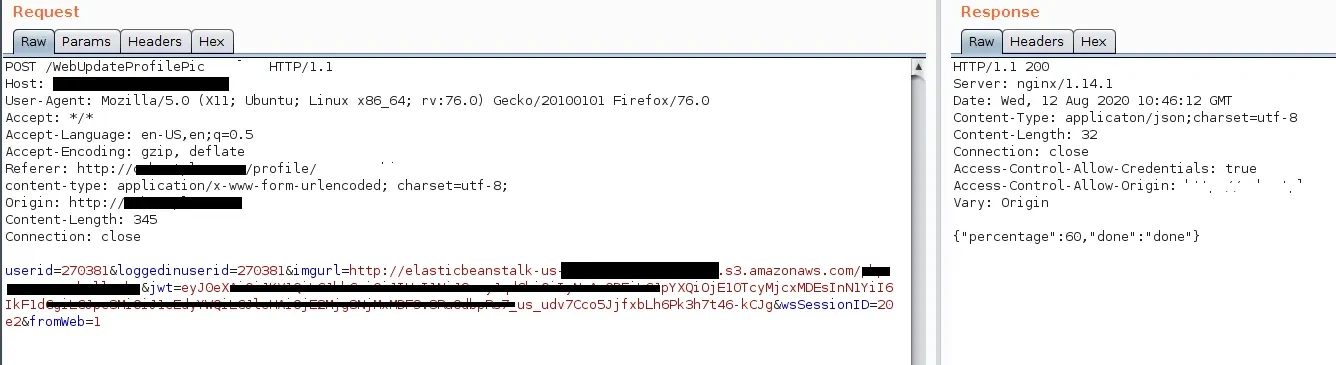
The request responsible for updating the profile picture, with the Elastic Beanstalk bucket URL, is shown below. The &imgurl= parameter is the one vulnerable to blind SSRF.
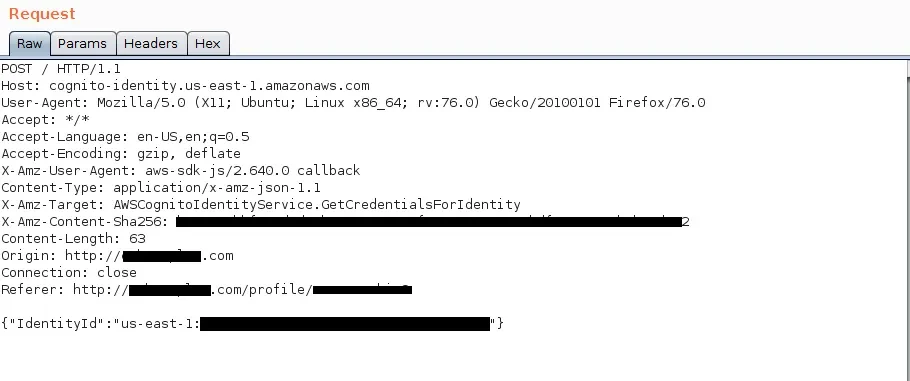
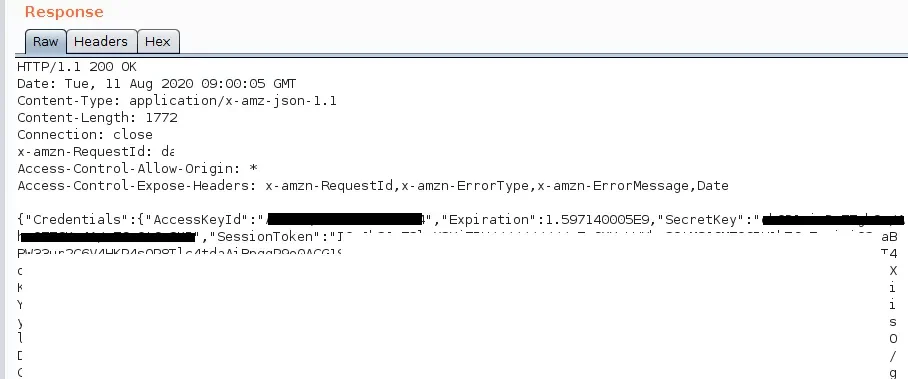
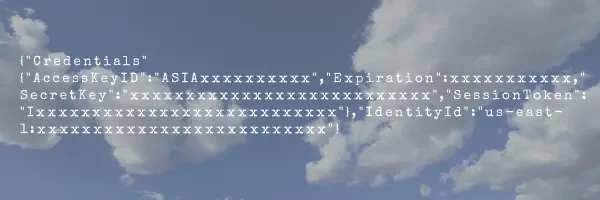
With no response to work with, the author went back to Burp's HTTP history. There, among the requests the application had already made, was an exposed AWS Cognito API call for GetCredentialsForIdentity. Its response contained the AccessKeyID, SecretKey and Security Token.
Cognito is AWS's identity and data synchronisation service. When a site uses other AWS services such as S3 or DynamoDB, Cognito can issue temporary credentials with limited privileges that the client uses to reach those resources. The GetCredentialsForIdentity API, as the author quotes, "Returns credentials for the provided identity ID".
Exploitation
Step 1: Understand the upload flow
The author rewound the application flow of the profile picture upload feature to see where the Cognito call fits.
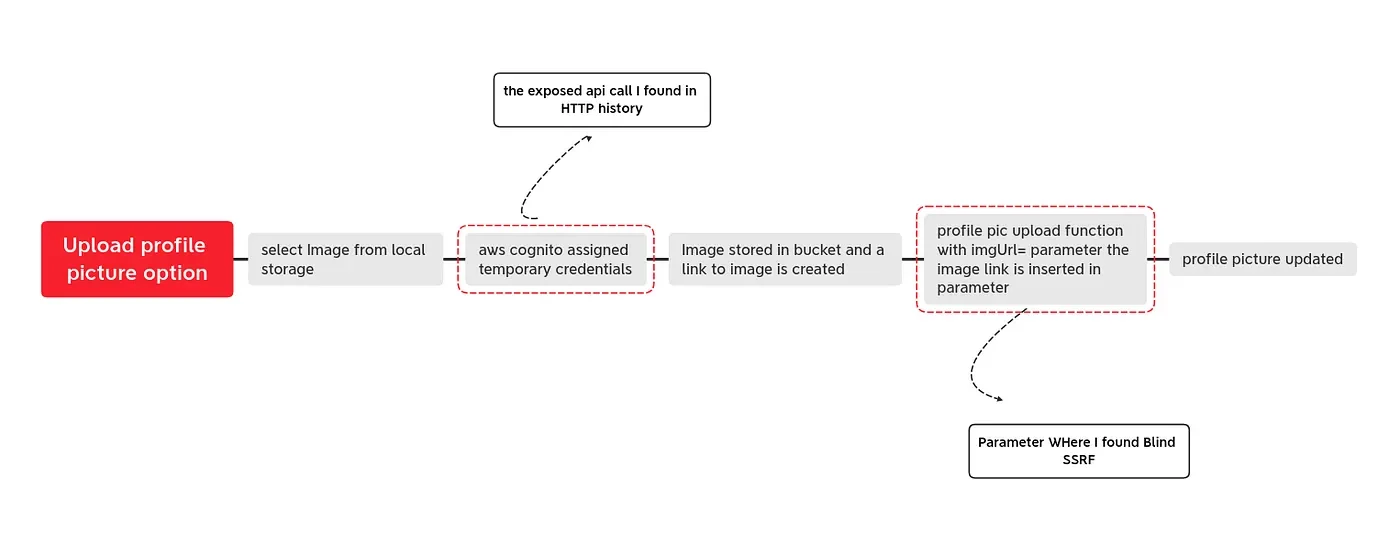
The exposed GetCredentialsForIdentity call is what lets the application put data into the bucket, by assigning temporary credentials to the client. That was the goal reached without any SSRF.
Step 2: Configure the AWS CLI
With the credentials in hand, the next step was to configure them for the AWS CLI.

Step 3: Confirm the identity
The first CLI command checks who the credentials belong to.

Step 4: List bucket objects
Listing the objects requires the bucket name; without it the API returns Access Denied. The author already knew the bucket name from the location of the profile picture images.
Step 5: Write and delete in the bucket
The author then moved files into the bucket and deleted a file from it. Both operations succeeded, which demonstrated read and write access to the bucket.
The exact CLI commands and their output are not reproduced in the write-up; the steps are described and illustrated with the screenshots above.
Root cause
The application made an exposed Cognito GetCredentialsForIdentity call whose response contained temporary AWS credentials, visible in the recorded HTTP history. Because those credentials carry the permissions the application needs to write to the bucket, anyone who obtains them inherits that access.
The blind SSRF in &imgurl= was a separate weakness and played no part in the escalation. The existing defence that would have blocked the metadata route, IMDSv2, is irrelevant here: the credentials never came from the metadata service.
Impact
With the leaked credentials the author had read and write access to the bucket, which was enough to show impact. Beyond that, an attacker could download all the data locally, delete the entire bucket, and recreate a bucket with the same name from their own account. The author also notes that the issue can be escalated to RCE by uploading a PHP webshell to the S3 bucket and executing system level commands there, referencing an external write-up on exploiting SSRF in AWS Elastic Beanstalk.
These outcomes depend on the privileges attached to the temporary credentials and on the bucket's configuration; the write-up does not enumerate the policy attached to the identity.
Fix
The write-up does not state what the application changed.
Variants to test
- Record the full upload flow with a proxy and inspect every request the application makes, not just the ones you send. A positive result is a response containing an AccessKeyID, SecretKey and session token.
- Take any leaked credentials to the AWS CLI and run
get-caller-identity, then try listing a known bucket by name. A positive result is a resolved identity and a successful listing rather than Access Denied. - Test write and delete operations against a bucket you are authorised to test. A positive result is a successful upload or deletion, which confirms the credentials carry more than read access.
- Where you do find SSRF, still try the metadata path, but expect IMDSv2 to block it on hardened instances; the Cognito route above does not depend on IMDS at all.
What happened, in plain words
A security researcher was testing a website that works like LinkedIn: a networking platform for professionals. The site lets you upload a profile picture. Behind the scenes, that picture is stored in an AWS bucket, and to do that the site uses a set of temporary keys that allow writing to that storage.
The researcher's original plan was to trick the site into fetching a special internal web address that AWS uses to hand out keys. That trick is called SSRF, and it is the classic route to this kind of data. It did not work here. Instead, while looking through the ordinary traffic the site itself was making, the researcher found a request that asked AWS for temporary credentials, and the answer to that request contained them in plain view. With those keys, the researcher could read, add and delete files in the site's storage bucket.
This article walks through the same story from the beginning, explaining each concept as it appears.
The usual way: SSRF against the metadata service
Before the story, some background. AWS runs virtual computers for its customers. Each of those computers is called an instance. AWS gives every instance a small internal service called the Instance Metadata Service, or IMDS. It is a way for software running on the instance to ask questions about itself: what is my network, what is my storage, and, importantly, what temporary keys am I allowed to use.
A useful comparison: think of the metadata service as a staff noticeboard inside an office building. Only people already inside the building can walk up to it, and it will hand out a temporary visitor badge to anyone who asks. The badge opens certain doors. If an outsider can convince someone inside to fetch something from the noticeboard on their behalf, the outsider gets a badge too.
The address of that noticeboard is a special one: http://[redacted]/. It is a link-local address, meaning it only makes sense from inside the machine itself. It is not reachable from the ordinary internet.
The metadata service does not ask for any special headers or passwords. So a request to the credentials path simply returns the AccessKeyID, the SecretKey and the Security Token for the instance's role. Those three values together are what you need to act as that instance in AWS.
http://[redacted]/latest/meta-data/iam/security-credentials/ROLENAME
Line by line:
http://is the ordinary web protocol.[redacted]is the fixed internal address AWS uses for the metadata service./latest/meta-data/is the part of the service that answers questions about the instance./iam/security-credentials/asks for the security credentials attached to the instance's identity.ROLENAMEis a placeholder for the name of that identity. In a real test you would put the actual role name there.
A typical test parameter looks like this:
filename.ext?url=http://[redacted]/latest/meta-data/iam/security-credentials/rolename
Line by line:
filename.extstands for any page or endpoint on the target that accepts a URL.?url=is a query parameter. Query parameters are thename=valuepairs after the question mark in a web address. They are how a page receives input.- The value after
url=is the internal metadata address. If the server fetches whatever URL you give it, it will fetch the metadata service from inside its own network, and the keys come back to you.
That is the theory. The researcher's goal was exactly this: reach the metadata service and pull the temporary credentials it exposes.
A small tip from the write-up: use CanaryTokens or a Pythonanywhere server to test for SSRF bugs. In plain words, those are services that give you a unique address you control, so when the target server fetches it, you can see the request arrive and know the server made it.
The scenario I came across
The target was a professional's networking platform, similar to LinkedIn. The researcher opened Burp Suite, a tool that sits between the browser and the website and records every request and response, and started looking for bugs.
A quick definition: a proxy is a middleman. Your browser sends its traffic to the proxy, the proxy forwards it to the site, and the proxy keeps a copy. Burp Suite is a security-focused proxy with a history view, so you can scroll back through everything that was sent and received.
While testing the photo upload functionality, the researcher found a blind SSRF. Blind means the server does make the outbound request, but the response content does not come back to you, so you cannot read what the server saw. There was no response message to work with, and no obvious way to escalate it to read the AWS metadata, which was the main goal.
The server pings resolved to EC2 instance IPs. In plain words, the addresses the server responded from belonged to Amazon's Elastic Compute Cloud, so the researcher knew the application was running on AWS Elastic Beanstalk with EC2 instances behind it. Elastic Beanstalk is AWS's service for running and scaling a web application; EC2 is the virtual computer underneath.
The request responsible for updating the profile picture, with the Elastic Beanstalk bucket URL, is shown below. The &imgurl= parameter is the one vulnerable to blind SSRF.
A parameter is simply one named input in a request. Here imgurl is the input that tells the server where the image lives. Because the server fetches that URL, it is a candidate for SSRF. But since the response was blind, it was of no use for reading the metadata.
The turn: looking at HTTP history
With no response to work with, the researcher went back to Burp's HTTP history. This is the list of every request and response the proxy has recorded, including the ones the application made on its own, not just the ones the researcher typed.
There, among the requests the application had already made, was an exposed AWS Cognito API call for GetCredentialsForIdentity. Its response contained the AccessKeyID, SecretKey and Security Token.
Some definitions:
- An API is a defined way for one piece of software to ask another for something. Think of a restaurant menu: you pick an item by name, the kitchen knows what to do, and a dish comes back. You do not need to know how the kitchen works.
- Amazon Cognito is AWS's identity and data synchronisation service. It manages user identities for apps across phones and computers, and it can issue temporary credentials with limited privileges so a client can reach other AWS services such as S3 or DynamoDB.
- S3 is AWS's object storage: a bucket holds files, called objects. DynamoDB is AWS's database service.
GetCredentialsForIdentityis the Cognito API that, as the write-up quotes, "Returns credentials for the provided identity ID". In plain words: give it an identity, get back temporary keys for that identity.
So the keys were not obtained through SSRF at all. They were sitting in the application's own traffic.
Step 1: Understand the upload flow
The researcher rewound the application flow of the profile picture upload feature to see where the Cognito call fits.
The exposed GetCredentialsForIdentity call is what lets the application put data into the bucket, by assigning temporary credentials to the client. That was the goal reached without any SSRF.
In plain words, the sequence is: you choose a picture, the site asks Cognito for temporary keys for your identity, and Cognito returns them. The problem is that the keys are visible in that exchange. The problem is that the keys were visible in the recorded HTTP history.
Step 2: Configure the AWS CLI
With the credentials in hand, the next step was to configure them for the AWS CLI. The AWS CLI is Amazon's command-line tool: a program you run in a terminal to talk to AWS services without using a web page.
Configuring the CLI means storing the AccessKeyID, the SecretKey and the session token so that later commands use them automatically. The write-up does not reproduce the exact configuration commands.
Step 3: Confirm the identity
The first CLI command checks who the credentials belong to. The write-up names it as get-caller-identity. In plain words, it asks AWS: whose keys are these, and which account do they belong to? If the answer comes back with an account and a user or role, the keys are valid.
Step 4: List bucket objects
Listing the objects requires the bucket name; without it the API returns Access Denied. The researcher already knew the bucket name from the location of the profile picture images. That is a useful habit: the URL of an image on the page often contains the bucket name, because S3 addresses look like a bucket name followed by the object path.
Step 5: Write and delete in the bucket
The researcher then moved files into the bucket and deleted a file from it. Both operations succeeded, which demonstrated read and write access to the bucket.
The exact CLI commands and their output are not reproduced in the write-up; the steps are described and illustrated with the screenshots above.
Why this worked
The application made an exposed Cognito GetCredentialsForIdentity call whose response contained temporary AWS credentials, visible in the recorded HTTP history. Because those credentials carry the permissions the application needs to write to the bucket, anyone who obtains them inherits that access.
The blind SSRF in &imgurl= was a separate weakness and played no part in the escalation. The existing defence that would have blocked the metadata route, IMDSv2, is irrelevant here: the credentials never came from the metadata service.
A word on IMDSv2: it is a newer version of the metadata service that requires a special session token before it answers, which makes the simple SSRF fetch fail. The write-up notes that many applications have not updated to it yet, so the old route still has chances to work elsewhere. But in this case it did not matter, because the keys came from Cognito, not from the metadata service.
What an attacker could do with this
With the leaked credentials the researcher had read and write access to the bucket, which was enough to show impact. Beyond that, an attacker could download all the data locally, delete the entire bucket, and recreate a bucket with the same name from their own account. The researcher also notes that the issue can be escalated to RCE by uploading a PHP webshell to the S3 bucket and executing system level commands there, referencing an external write-up on exploiting SSRF in AWS Elastic Beanstalk.
Two terms there:
- RCE, remote code execution, means running your own commands on someone else's server. It is the most serious kind of web vulnerability because the attacker stops being a visitor and starts being an operator.
- A webshell is a small script uploaded to a server that lets the attacker run commands through the browser.
These outcomes depend on the privileges attached to the temporary credentials and on the bucket's configuration; the write-up does not enumerate the policy attached to the identity.
How to fix it
The write-up does not state what the application changed. In plain words: do not hand the browser keys it does not need, and if you must, make those keys open as few doors as possible.
Things to try yourself
- Record the full upload flow with a proxy and inspect every request the application makes, not just the ones you send. A positive result is a response containing an AccessKeyID, SecretKey and session token.
- Take any leaked credentials to the AWS CLI and run
get-caller-identity, then try listing a known bucket by name. A positive result is a resolved identity and a successful listing rather than Access Denied. - Test write and delete operations against a bucket you are authorised to test. A positive result is a successful upload or deletion, which confirms the credentials carry more than read access.
- Where you do find SSRF, still try the metadata path, but expect IMDSv2 to block it on hardened instances; the Cognito route above does not depend on IMDS at all.
Glossary
- API: a defined way for one piece of software to ask another for something, like a menu you order from.
- AWS: Amazon Web Services, Amazon's cloud platform of rented computers, storage and services.
- AccessKeyID: the public half of an AWS key pair, identifying who is making a request.
- SecretKey: the private half of an AWS key pair, used to sign requests. It must never be shared.
- Security Token: an extra value that goes with temporary AWS credentials, proving they were issued by AWS.
- Blind SSRF: an SSRF where the server makes the outbound request but you cannot see the response.
- Bucket: a container in S3 that holds files, called objects.
- Burp Suite: a proxy tool that records and lets you modify traffic between your browser and a website.
- CanaryTokens: a service that gives you a unique address so you can tell when someone fetches it.
- Cognito: AWS's identity service that manages users and can issue temporary credentials.
- Credentials: the keys and tokens that prove who you are to a service.
- DynamoDB: AWS's database service.
- EC2: AWS's virtual computers, called instances.
- Elastic Beanstalk: AWS's service for running and scaling a web application.
- GetCredentialsForIdentity: the Cognito API that returns temporary credentials for a given identity ID.
- HTTP history: the recorded list of requests and responses in a proxy such as Burp.
- IMDS: the Instance Metadata Service, an internal AWS service that answers questions about an instance and can hand out temporary credentials.
- IMDSv2: a newer version of IMDS that requires a session token before answering, which blocks simple SSRF fetches.
- Instance: a single virtual computer running in AWS.
- Link-local address: an address such as
[redacted]that only works from inside the machine or local network. - Metadata service: see IMDS.
- Object: a file stored in an S3 bucket.
- Parameter: a named input in a request, such as
imgurlin&imgurl=. - PHP webshell: a small PHP script uploaded to a server that lets an attacker run commands through the browser.
- Proxy: a middleman that forwards traffic and can record it.
- Query parameter: the
name=valuepairs after the question mark in a URL. - RCE: remote code execution, running your own commands on someone else's server.
- Role: an AWS identity with a set of permissions that can be assumed by a service or user.
- S3: AWS's object storage service.
- SSRF: server-side request forgery, a bug where you make the server fetch a URL of your choosing.
- Temporary credentials: short-lived AWS keys issued by a service such as Cognito, usually with limited permissions.



