Leveraging Template injection to takeover an account.
 Published on infosecwriteups.com
Hi, I am back again with an interesting writeup, this is about a template injection bug I reported to a private program last year.
The full write-up lives on its author's site
It belongs to its author, so we link to it rather than copy it. The other two tabs are our own rewrites, checked against it.
Context
This is a write-up of a client-side template injection (CSTI) bug reported to a private program. The application had an account settings page and, separately, a feature that let users write a customised message for viewers visiting their page, something like a blog post with a customised greeting.
The interesting part of that feature was that it let users reference certain properties of the user object to build the message, and it also let users set default values for some properties. For example, a post could start with a greeting written as:
Hi user.name,XXXXXXXX
If a user named Akash visited the page, the output would be:
Hi Akash,XXXXXXXX
Many properties could be used to display different messages to users with different privileges on the application.
Setup
The report does not describe any special tooling, accounts or roles beyond a normal user account on the private program. The testing was done by browsing the application and interacting with the account settings page and the blog feature. The application turned out to be using AngularJS, which became relevant once the injection was found.
Finding it
The researcher started by browsing the application to understand what it does, then landed on the account settings page and tested the usual things one looks at on a settings page. After some time without finding anything meaningful, the settings page was left aside.
The next day, while exploring other functionality, the researcher found the customised message feature described above. To test how the user object properties were rendered, a blog post was created that began with:
Hi user.name,XXXXXXXX
Visiting that page from the researcher's own account displayed:
Hi 9,
That was unexpected. The researcher then recalled that, while testing the settings page earlier, the name had been set to:
and nothing had happened at the time, so the name was left unchanged and testing moved on.
The blog page was evaluating the expression {{3*3}} and displaying the result 9. This meant the application was vulnerable to a client-side template injection attack: the application was using AngularJS, and user-submitted input (the expression) in the name field under the account settings page was being evaluated on the blog page.
Exploitation
Step 1: confirm the injection
Setting the name to {{3*3}} on the account settings page and then viewing a blog post that references user.name rendered 9 instead of the literal string. The expression was evaluated by AngularJS on the blog page, confirming CSTI.
Step 2: look for a way to reach other users
On its own, this is a self-injection: the payload lives in the attacker's own name and only evaluates when the attacker's own blog page is viewed. The researcher went looking for an IDOR that would have allowed an attacker to change another user's name and replace it with a payload that sends that user's session cookies to a server controlled by the attacker, or programmatically changes the user's account email to take over the account.
No IDOR was found, and the conclusion at that point was that the behaviour alone was unexploitable, since it was just a harmless self-injection vulnerability.
Step 3: use the default-value feature
The feature allowed users to set default values for some properties. An attacker could therefore set a variable's default value to a CSTI payload. The researcher set this AngularJS CSTI payload as the default value for redacted_property:
{{a=toString().constructor.prototype;a.charAt=a.trim;$eval(‘a,alert(1),a’)}}
and then used redacted_property on the blog:
Hi user.name,user.redacted_propertyXXXXXXXX
Visiting this page greeted the researcher with an alert popup, just like a classic XSS proof of concept.
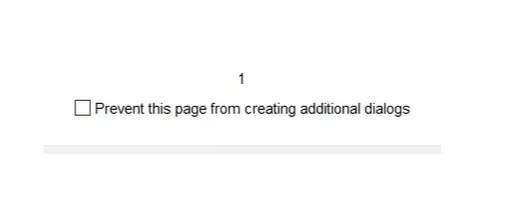
The alert is only the demonstration; the same position could run arbitrary script in the page.
Root cause
User-controlled input stored in the name field was rendered into an AngularJS template on the blog page, so AngularJS compiled and evaluated it as an expression rather than displaying it as text. The default-value feature widened the reach of the bug: instead of depending on the victim's own name field, an attacker could store the payload as a property default and reference that property from the blog, so the payload evaluated for anyone viewing the page.
The payload assigns toString().constructor.prototype to a, replaces charAt with trim, and calls $eval with alert(1).
Impact
Because the payload evaluates in the viewer's browser on the blog page, an attacker could, instead of popping an alert, steal the user's session cookie or simply change the user's email address and take over the account. The report frames this as what an attacker could do with the same primitive; the demonstrated result was the alert popup. The precondition is that a victim views the crafted blog page.
Fix
The report does not say what was changed. The fix should be to stop treating user-controlled values as template expressions: render the name and other properties as text rather than compiling them with AngularJS, and avoid evaluating stored defaults as expressions.
Variants to test
- Any feature that interpolates stored profile fields into an AngularJS template: set the field to
{{3*3}}and view a page that renders it. A rendered9instead of the literal string is a positive result. - Default-value or fallback settings for user properties: store a sandbox-escape payload such as the one above as a default and reference the property from a public page. An alert or other script execution in the viewer's browser is a positive result.
- Look for IDORs that let one user modify another user's profile fields, which would turn a self-injection into a stored attack against other accounts.
- Test other client-side frameworks that compile templates from user input, checking whether stored values are evaluated as expressions rather than escaped.
What happened, in plain words
A security researcher was testing a private web application. While exploring the account settings page, he typed a small piece of code into his name field. Nothing happened at the time, so he moved on.
The next day he found a feature that let users write a customised message for people visiting their page, a bit like a blog post with a personal greeting. That feature let the author insert special placeholders such as user.name, which the page replaced with the viewer's actual name. When the researcher viewed his own post, the page showed Hi 9, instead of his name. The 9 came from the code he had typed into his name field the day before: the page had done the maths instead of showing the text.
That is the bug. The site was treating something a user typed as instructions to run, rather than as plain text to display. This class of bug is called client-side template injection, or CSTI for short.
On its own the bug was harmless, because the code only ran on the researcher's own page. But the same feature also let users set default values for some properties, and by storing a more powerful piece of code as a default, the researcher made the page pop up an alert box for anyone who viewed it. An alert box is the classic harmless demonstration that code is running in someone else's browser. A real attacker could use the same trick to steal the viewer's login session or change the viewer's email address, which would let the attacker take over the account.
Background you need first
A few ideas come up again and again below, so here they are from zero.
The browser and the page. When you visit a website, your browser downloads a page made of HTML (the structure and text) plus JavaScript (small programs that run inside your browser). Anything that runs in your browser is called client-side, because your computer, the client, is doing the work.
AngularJS. AngularJS is a JavaScript library that many sites used to build interactive pages. One of its features is templates: the page author writes placeholders in double curly braces, like {{something}}, and AngularJS replaces each placeholder with a value when the page loads. Think of a mail-merge letter: you write "Dear {name}" and the software fills in each recipient's name. AngularJS does the same for web pages.
Expressions. The content inside {{ }} is not just a name to look up; it is a small expression, which AngularJS calculates. {{3*3}} is an expression meaning "three times three", so AngularJS replaces it with 9. This is the key point: if a user can get their own text into a placeholder, AngularJS may calculate it as code instead of showing it as text.
When this happens in the browser, it is called client-side template injection (CSTI). It is closely related to cross-site scripting (XSS), where an attacker gets their own JavaScript to run in someone else's browser. The difference is the route in: with CSTI the attacker abuses the template engine's own expression syntax.
The user object. Web applications usually keep information about the logged-in person in a bundle of data called the user object: name, email, role, and so on. The blog feature let authors read some of these fields, for example user.name, to personalise the greeting.
Session cookie. When you log in, the site usually gives your browser a small piece of data called a session cookie. Your browser sends it back with every request so the site knows who you are, like a wristband at an event that proves you are allowed in. If an attacker can copy someone's session cookie, they can often act as that person without knowing the password.
IDOR. IDOR stands for Insecure Direct Object Reference. It means the site lets you reach someone else's data or settings just by changing an identifier, for example editing a request so it points at another user's account. If an attacker can change another user's name through an IDOR, a bug that only affected the attacker's own page becomes an attack on everyone.
Sandbox. A sandbox is a restricted environment meant to contain code so it cannot do anything dangerous.
The setup
The researcher used nothing special: a normal user account on the private program and a browser. He browsed the application to understand what it does, then tested the account settings page, looking at the things a tester normally checks there. After a while without finding anything meaningful, he set the settings page aside.
The application was using AngularJS in the browser. That detail only becomes important once the injection is found, but it explains everything that follows.
Finding the bug
The next day, while exploring other parts of the application, the researcher found a feature that let users write a customised message for viewers, something like a blog post with a personal greeting. The interesting part was that it let authors reference certain properties of the user object to build the message, and it also let them set default values for some properties.
To see how those properties were rendered, he created a blog post that began with this greeting:
Hi user.name,XXXXXXXX
Line by line: Hi is ordinary text. user.name is a placeholder that the page is supposed to replace with the viewer's name. ,XXXXXXXX is just filler text after the comma. The idea is that the page should show something like Hi Akash,XXXXXXXX to a user named Akash.
When he visited that page from his own account, the page displayed:
Hi 9,
That was unexpected. The placeholder had not produced his name. It had produced 9, the result of a calculation. He then remembered that, while testing the settings page earlier, he had set his name to:
Line by line: the double curly braces are AngularJS template syntax. 3*3 is a multiplication. So this is an instruction to AngularJS: "calculate three times three and put the answer here". At the time, on the settings page, nothing had happened, so he left the name as it was and moved on to test something else.
Now the picture was clear. The blog page was evaluating the expression {{3*3}} and displaying the result, 9. In other words, the application was vulnerable to client-side template injection: it was using AngularJS, and text the user had submitted in the name field on the account settings page was being evaluated on the blog page.
Why does this matter? Because if the page calculates whatever is inside {{ }}, then an attacker who can put text into a field that later appears inside {{ }} can make the page run code of their choosing. The name field was exactly such a field.
Trying to exploit it
Step 1: confirm the injection
Setting the name to {{3*3}} on the account settings page and then viewing a blog post that references user.name rendered 9 instead of the literal text. That confirmed the expression was being evaluated by AngularJS on the blog page, and therefore that CSTI was present. The arithmetic is deliberately trivial: it proves code execution without doing anything harmful.
Step 2: look for a way to reach other users
On its own, this is a self-injection: the payload sits in the attacker's own name and only runs when the attacker's own blog page is viewed. That is not much of an attack, because the attacker is only attacking himself.
So the researcher went looking for an IDOR, a way to change another user's name. If he could change a victim's name to a payload, then whenever that victim's name appeared in a template, the payload would run in the victim's browser. The payload could send the victim's session cookie to a server controlled by the attacker, or programmatically change the victim's account email, which would let the attacker take over the account.
No IDOR was found. The conclusion at that point was that the behaviour alone was unexploitable, since it was just a harmless self-injection vulnerability. This is an important lesson for beginners: a bug that only affects your own account is usually not a real vulnerability, because an attacker gains nothing from attacking themselves.
Step 3: use the default-value feature
The feature allowed users to set default values for some properties. That changes everything. Instead of relying on the victim's own name field, an attacker can store a payload as the default value of a property, and then reference that property from a blog post. The payload then runs for anyone who views the page.
The researcher set this AngularJS CSTI payload as the default value for redacted_property:
{{a=toString().constructor.prototype;a.charAt=a.trim;$eval(‘a,alert(1),a’)}}
This one needs a slower walk-through, because it is doing several things at once.
- The outer
{{ }}tells AngularJS: treat what is inside as an expression and calculate it. a=toString().constructor.prototypestores a reference to the prototype of the string type in the variablea. In JavaScript, every value has a prototype, which is a shared object holding the methods that value can use. Strings, for example, share methods such ascharAtandtrim. Reaching the prototype means you can change those shared methods for every string in the page.a.charAt=a.trimreplaces the sharedcharAtmethod with thetrimmethod.alert(1)is the classic JavaScript demonstration: it opens a popup box showing the number 1. If that popup appears, code is running.
Then he used redacted_property on the blog:
Hi user.name,user.redacted_propertyXXXXXXXX
Line by line: Hi is text, user.name is the viewer's name placeholder, , is a comma, user.redacted_property is the placeholder for the property whose default value holds the payload, and XXXXXXXX is filler. Because the blog page compiles this whole line as an AngularJS template, the stored payload is evaluated when the page loads, for whoever is viewing it.
Visiting this page greeted the researcher with an alert popup, just like a classic XSS proof of concept.
The alert is only the demonstration. The same position could run arbitrary script in the page, which is why the researcher notes that, instead of popping an alert, an attacker could exploit this to steal the user's session cookie or simply change the user's email address and take over the account.
Why it worked
User-controlled input stored in the name field was rendered into an AngularJS template on the blog page. AngularJS therefore compiled and evaluated it as an expression rather than displaying it as text. That is the root cause: the site treated data supplied by a user as instructions.
The default-value feature widened the reach of the bug. Instead of depending on the victim's own name field, an attacker could store the payload as a property default and reference that property from the blog, so the payload evaluated for anyone viewing the page.
The payload assigns toString().constructor.prototype to a, replaces charAt with trim, and calls $eval with alert(1).
Impact
Because the payload evaluates in the viewer's browser on the blog page, an attacker could, instead of popping an alert, steal the user's session cookie or simply change the user's email address and take over the account. The report frames this as what an attacker could do with the same primitive; the demonstrated result was the alert popup. The precondition is that a victim views the crafted blog page.
Fix
The report does not say what was changed. The fix should be to stop treating user-controlled values as template expressions: render the name and other properties as text rather than compiling them with AngularJS, and avoid evaluating stored defaults as expressions.
Variants to test
If you want to look for similar bugs yourself, here are starting points.
- Any feature that interpolates stored profile fields into an AngularJS template: set the field to
{{3*3}}and view a page that renders it. A rendered9instead of the literal text is a positive result. - Default-value or fallback settings for user properties: store a sandbox-escape payload such as the one above as a default and reference the property from a public page. An alert or other script execution in the viewer's browser is a positive result.
- Look for IDORs that let one user modify another user's profile fields, which would turn a self-injection into a stored attack against other accounts.
- Test other client-side frameworks that compile templates from user input, checking whether stored values are evaluated as expressions rather than escaped.
Glossary
- AngularJS: a JavaScript library for building interactive web pages, which fills in placeholders written in double curly braces.
- Browser: the program on your computer that downloads and displays web pages and runs their JavaScript.
- Client-side: happening in the user's browser rather than on the website's server.
- Cookie: a small piece of data a site stores in your browser, often used to remember who you are.
- Expression: a short piece of code that produces a value, such as
3*3producing9. - IDOR (Insecure Direct Object Reference): a bug where changing an identifier lets you reach another user's data or settings.
- JavaScript: the programming language that runs inside web browsers.
- Payload: the piece of code an attacker wants the target to run.
- Placeholder: a marker in a template that gets replaced with a value when the page loads.
- Prototype: in JavaScript, the shared object that holds the methods available to values of a given type.
- Sandbox: a restricted environment meant to contain code so it cannot do anything dangerous.
- Self-injection: an injection that only affects the attacker's own account or page.
- Session cookie: the cookie that proves to a site that you are logged in; stealing it can let an attacker act as you.
- Template: a page or message with placeholders that a template engine fills in with values.
- User object: the bundle of data a site keeps about the logged-in user, such as name, email and role.
- XSS (cross-site scripting): a bug where an attacker gets their own JavaScript to run in someone else's browser.




