“Like” Bypass on Customer Reviews — €500 bounty
A review 'like' feature enforced its one-like-per-user limit using a cookie value, and clearing that cookie let the same account like a review repeatedly. An attacker could inflate a review's like count, potentially misleading buyers about a dealer's reputation.
 Published on medium.com
Hello! I’m Ashar Mahmood, a 22-year-old cybersecurity enthusiast with a passion for uncovering hidden vulnerabilities.
The full write-up lives on its author's site
It belongs to its author, so we link to it rather than copy it. The other two tabs are our own rewrites, checked against it.
Context
Ashar Mahmood (@Hx_0p) found a logic flaw on a popular automobiles platform that lets users leave reviews for dealers. Each customer review carries a "like" button, and the platform is supposed to allow a logged-in user to like a given review only once. The researcher found a way to bypass that limit and register as many likes as he wanted from a single account, and the report earned a €500 bounty.

The feature itself is simple: a logged-in user clicks "like" on a review, the platform records the like, and the button then refuses further likes from that user. The restriction is enforced per user per review, which is the behaviour the researcher set out to break.

Setup
The only tooling described is a browser session logged into a normal user account and Burp Suite, used to intercept the like request and replay it from the Repeater. No specific versions, endpoints, hostnames or account roles are given in the report. The precondition is simply a logged-in account and a dealer page that has at least one customer review.
Finding it
While browsing the platform, the researcher noticed that every customer review had a like button that could only be clicked once by any logged-in user. That one-per-user rule is what made the feature worth investigating: if the limit is enforced somewhere in the request handling, there may be a way to make the server treat a repeat request as a fresh like.
Exploitation
Step 1: Confirm the normal behaviour
The researcher logged into his account, navigated to a dealer's page with several customer reviews, picked one at random and clicked like. The like was registered and the platform then prevented a second like from the same account, as designed.
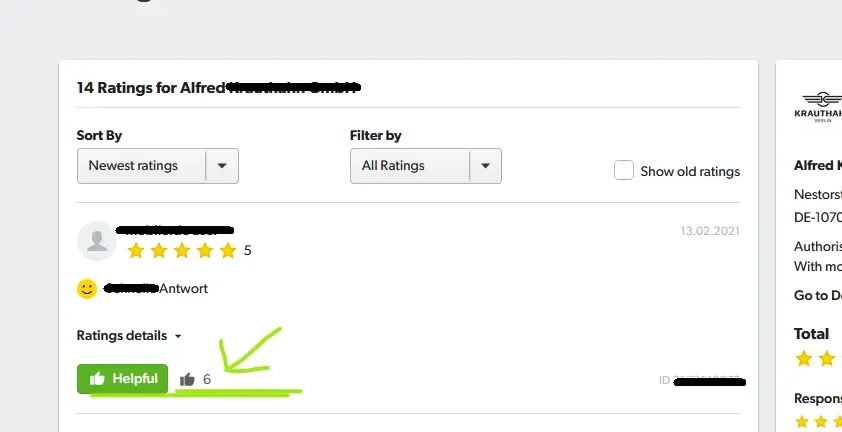
Step 2: Intercept the like request
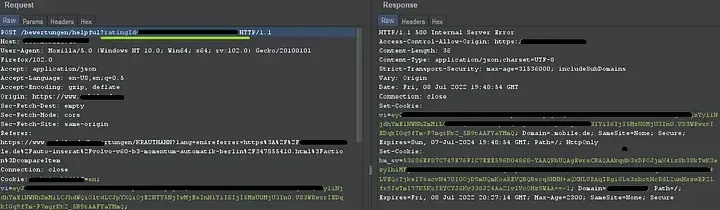
With Burp Suite running, the researcher clicked the like button again and intercepted the outgoing request, then sent it to the Repeater. Replaying the request as captured returned a 500 response, an error rather than a successful like.
Step 3: Inspect the cookie parameter
The request carried a cookie parameter labelled vi=;. The response echoed the exact same parameter. The report does not show the full request or response, only this parameter and the status codes.
Step 4: Strip the parameter and replay
The researcher resent the request with the parameter left empty. This time the server answered 200 OK and the like was registered again.

Step 5: Repeat the modified request
Sending the same modified request multiple times was accepted every time, so the like count on the review could be inflated at will from the one account.

Root cause
The report does not include the server-side code, so the exact mistake is not shown. What the behaviour implies is that the one-like-per-user check depends on the value of the vi cookie parameter: the replayed request fails with a 500, and the request is accepted as a new like. In other words, the server appears to trust a client-supplied cookie value when deciding whether this user has already liked the review, and the duplicate check appears to depend on that cookie value. This is likely a logic flaw in how the like state is keyed or validated rather than a missing authentication check, since the request still had to come from a logged-in session.
Impact
On its own the bug looks minor, but the researcher points to the wider consequences. Reviews are central to a marketplace for buying and selling automobiles, and dealers and customers rely on them. Anyone able to replay the modified request could artificially inflate the like count on a review, and a dealer could boost their own review ratings for an unfair advantage. The report frames the impact in terms of distorted review integrity and lost trust in the platform; it does not describe any further access, data exposure or account takeover.
Fix
The fix that follows from the behaviour is to stop deriving the per-user like state from a client-controlled cookie parameter and to key the duplicate check on the authenticated user and the review on the server side, rejecting repeats regardless of what the client sends. The 500 on the replayed request also suggests the handler should validate that parameter rather than erroring on it.
Variants to test
- Empty or altered cookie parameters on other one-per-user actions. Try likes, votes, follows and similar counters, clearing or changing any parameter that appears in both request and response. A positive result is a second successful action (200 OK) from the same account where the UI says it is not allowed.
- Replay after a successful action. Capture the request that performs the action once, then replay it unchanged and with the suspicious parameter stripped. A positive result is a duplicate record or an incremented counter on the second and later replays.
- Parameters echoed in the response. Any value the server reflects back is worth testing empty, duplicated and with unexpected types. A positive result is a change in server behaviour, such as a 500 turning into a 200, or a limit no longer being enforced.
- Counters that drive ranking or reputation. Where likes, ratings or votes feed a score, check whether the same bypass lets one account move the score repeatedly. A positive result is a visible change in the aggregated score from a single account.

The researcher's own takeaway is to examine every request closely and inspect any suspicious cookie or parameter, because the flaw here was hiding in a single cookie value.
What happened, in plain words
A security researcher named Ashar Mahmood found a small but meaningful flaw on a website for buying and selling cars. On that site, dealers have pages, and customers can leave reviews on those pages. Each review has a "like" button, a little way for readers to show that a review was helpful. The site is supposed to let each logged-in person like a given review only once. The researcher found a way to make the site accept the same like over and over from a single account, so the number of likes on a review could be pushed up as high as he wanted. He reported it and was paid a €500 bounty, which is a reward a company pays to someone who reports a security problem to it.
This kind of problem is called a logic flaw. It is not a break-in and not a stolen password. The site works exactly as it was built; the mistake is in the rule the site follows. Think of a cloakroom ticket: the attendant is supposed to hand back one coat per ticket, and the rule is fine until someone works out that a blank ticket also gets a coat. Nothing is broken, but the rule no longer does its job.
The feature, and why it was worth a look
The feature is simple. You are logged in, you open a dealer's page, you read a review, and you click "like". The site records your like and then stops you from liking that same review again. The limit is per person per review: one account, one like, on each review.
That limit is the interesting part. Whenever a website says "you may only do this once", the site has to remember that you already did it. It has to store something about you, or check something you send, to decide whether this click is your first or your second. If that check can be fooled, the limit disappears. So the researcher went looking at exactly how the site decides.
What you need to follow along
Two things only:
- A normal web browser, logged into an ordinary user account on the site.
- Burp Suite, a tool that sits between your browser and the website and lets you read and change what is sent.
To understand Burp Suite, imagine sending a letter and then being allowed to open the envelope at the post office, read the letter, rewrite parts of it, and post it again as many times as you like. Normally your browser writes the request and sends it, and you never see it. Burp Suite pauses it so you can look.
Two words come up constantly from here on:
- A request is the message your browser sends to the website when you click something: "please record a like on review number such-and-such, and here is who I am".
- A response is the website's reply: "done", or "no", or "something went wrong".
A cookie is a small piece of text that a website stores in your browser and that your browser sends back with every request to that site. It is how a website recognises you between clicks, because the web itself has no memory. Think of it as a wristband at an event: the staff give it to you at the door, and every time you come back to a stall you show it, and the stall knows you already paid. A cookie parameter is one named value inside that wristband, such as vi.
A status code is the three-digit number at the start of every response. 200 means "fine, done". 500 means "the server hit an error while trying to handle this". You have probably seen 404 for a page that does not exist; it is the same idea.
Step 1: Confirm the normal behaviour
The researcher logged in, opened a dealer's page that had several customer reviews, picked one at random, and clicked "like". The like was recorded, and the site then refused a second like from the same account. That is the site working as designed.
This step matters because you cannot claim you bypassed a limit until you have seen the limit work. It gives you a baseline: this is what a normal, accepted like looks like, and this is what a refused one looks like.
Step 2: Catch the request
With Burp Suite switched on, the researcher clicked the like button again. This time the request did not go straight to the site; Burp caught it. He sent it to a part of Burp called the Repeater, which is a panel where a captured request sits still and you can press "send" as many times as you want, editing it in between. It is the difference between a conversation you have to have in real time and a letter you can rewrite and repost at leisure.
When he replayed the request exactly as captured, the site answered with a 500 response. That is an error, not a successful like. So a straight copy of the request did not work.
Why replay at all? Because the first replay tells you what the site does with a duplicate. Here it did not politely say "you already liked this"; it fell over with an error. An error is a signal: something in the request did not match what the server expected, and that mismatch is worth understanding.
Step 3: Look closely at the cookie parameter
Reading the request, the researcher noticed a cookie parameter labelled:
Line by line, in plain words:
viis the name of the parameter. It is just a label the site chose; it could have been anything.=separates the name from the value.;is the character that ends one cookie parameter and starts the next. So here, the value ofviis empty: there is nothing between the=and the;.
The response came back showing the exact same parameter. In other words, the site was echoing back the value the browser had sent, rather than ignoring it.
That echo is the clue. If a value travels from your browser to the server and the server repeats it, the server is at least reading it. And if the server is reading a value that your browser controls, then you control that value. The question becomes: what is the server doing with it?
Step 4: Empty the parameter and send again
The researcher resent the request with that parameter left empty. This time the site answered 200 OK, and the like was registered again.
So the same action, from the same account, on the same review, went from "error" to "accepted" purely because of what was, or was not, inside one cookie value. That is the bypass. The site's one-like-per-user rule was not being checked against the account on the server; it was being decided using a value the browser supplied. Empty that value, and as far as the server was concerned this was a fresh like.
Step 5: Repeat it
He then sent the same modified request several more times. Every time, the site accepted the like.
That is the difference between a one-off glitch and a real flaw: it works again and again, predictably. From one account, the like count on a review could be raised as high as the researcher wanted.
Why it worked
The report does not include the site's own code, so nobody outside the company can point at the exact line that was wrong. What the behaviour tells us is this: the check for "has this person already liked this review?" was leaning on the vi cookie value. The replayed request produced a 500 error. With the value left empty, the request was treated as a brand-new like. The duplicate check appears to have depended on that cookie value.
This is a logic flaw rather than a broken login. The request still had to come from a logged-in session; the site knew who the user was. The mistake was in how it decided whether that user had already liked the review.
Why it matters
On its own, an inflated like count sounds trivial. But reviews are the whole point of a marketplace for cars. Buyers read them to decide whether to trust a dealer, and dealers live or die by them. If one person can push a review's likes up at will, a dealer could make their own reviews look far more popular than they are, and get an advantage they have not earned. The researcher frames the harm as distorted reviews and lost trust in the platform. He does not describe any further access, any leaked data, or anyone taking over an account.
How it should be fixed
The report does not say what the site actually changed. The fix that follows from the behaviour is to stop asking the browser whether this user has already liked the review. The server already knows who is logged in, so it should record the like against that account and the review, and refuse a repeat no matter what the browser sends. The 500 error on the replayed request is a second hint: the server should check that parameter properly instead of crashing on it.
Other places to look
Once you know the shape of a bug like this, you can look for it elsewhere. These are the same ideas in beginner terms:
- Other one-per-person buttons. Likes, votes, follows, upvotes: anything with a counter and a "once only" rule. Clear or change any value that appears in both the request and the response. You have found something if the site accepts a second action (200 OK) from the same account when the page says you cannot.
- Replaying a successful action. Capture the request that does the action once, then send it again unchanged, and again with the suspicious value removed. You have found something if a duplicate is recorded or the counter goes up on the second and later sends.
- Values the site repeats back to you. Anything the server echoes is worth trying empty, doubled, or with an odd value. You have found something if the site's behaviour changes, for example a 500 turning into a 200, or a limit that stops being enforced.
- Counters that feed a ranking or a score. Where likes, ratings or votes add up to a visible score, check whether the same trick lets one account move that score repeatedly. You have found something if the overall score visibly changes from a single account.
The researcher's own lesson is short: read every request carefully, and look hard at any cookie or parameter that seems odd. The flaw here was hiding in one cookie value.
Glossary
- Bounty: a reward a company pays to someone who reports a security problem to it.
- Logic flaw: a mistake in the rules a site follows, rather than in its locks; the site works as built, but the rule can be abused.
- Request: the message your browser sends to a website when you do something, such as clicking a button.
- Response: the website's reply to a request.
- Status code: the three-digit number at the start of a response; 200 means success, 500 means the server hit an error.
- Cookie: a small piece of text a site stores in your browser and your browser sends back with each request, so the site can recognise you.
- Cookie parameter: one named value inside a cookie, such as
vi. - Burp Suite: a tool that sits between your browser and a website so you can read, pause and change requests.
- Intercept: to catch a request in Burp Suite before it reaches the site.
- Repeater: the part of Burp Suite where a captured request waits while you edit it and send it again as often as you like.
- Replay: to send a captured request again, unchanged or edited.
- Bypass: getting past a restriction the site meant to enforce.
- Session: the period during which a site recognises you as logged in, kept going by cookies.
- Authenticated: proven to be logged in as a particular user.
- Root cause: the underlying mistake that produces a bug.
- Impact: the harm a bug could cause in the real world.
- Counter: a number on a page, such as a like count, that goes up when people act.
- Echo: when a server sends a value back in its response that the browser originally sent.
- Endpoint: the specific address on a site that a request is sent to.
- Parameter: a named value sent with a request, such as
vi. - Payload: the part of a request you deliberately craft or change to test the site.
- Vulnerability: a weakness in a site that someone could abuse.
- Exploitation: actually using a vulnerability to make something happen.
- Integrity: the idea that data, such as a review count, is accurate and has not been tampered with.
- Account takeover: when someone else gains control of your account; not what happened here.
- Data exposure: when information that should be private is revealed; not what happened here.
- Ranking: an order in which items are shown, often driven by counters such as likes or ratings.
- Reputation: the standing a dealer or user has on a platform, often built from reviews and ratings.
- Aggregated score: a single number or rating built by adding up many individual votes or likes.
- Handler: the part of a server that processes a particular request.
- Client: your side, the browser; the server is the website's side.
- Client-supplied: a value that comes from the browser and can therefore be changed by the user.
- Server-side: done on the website's own systems, where the user cannot reach in and change it.
- Duplicate check: the test a site runs to see whether an action has already been done by this user.
- Keyed on: what a check uses to tell one record from another, for example the user and the review.
- Validate: to check that a value is sensible and allowed before using it.
- Reflect: to send a value back to the browser in a response.
- Precondition: something that must be true before a test can be run, such as being logged in.
- Baseline: the normal, expected behaviour you record first so you can tell when something changes.
- Variants: other, similar places where the same kind of bug might exist.
- Positive result: in testing, a sign that the bug is present, such as a second action being accepted.




