Menemukan Bug XSS di Web Marketplace Jombang
The product search feature on a government e-commerce marketplace echoed the search term back into the results page without encoding markup characters. An attacker could craft a link that runs arbitrary JavaScript in a victim's browser when opened.

medium.com
Published on medium.com
Cybersecurity
The full write-up lives on its author's site
It belongs to its author, so we link to it rather than copy it. The other two tabs are our own rewrites, checked against it.
Context
Jomart Marketplace is the official e-commerce platform of the Jombang Regency Government, hosted at marketplace.jombangkab.go.id. The feature under test is the product search box on the front page: a visitor types a term, submits it, and the results page reports how many products matched and echoes the term back to the user.
That echo is the whole story. The search term is reflected into the results page, and the reflection is where the vulnerability lives.
Setup
The write-up describes no accounts, roles, tooling or versions. Testing was limited to proving the flaw existed, without accessing or changing any data, and the write-up was published only after the issue had been reported, verified and handled by the operators.
Finding it
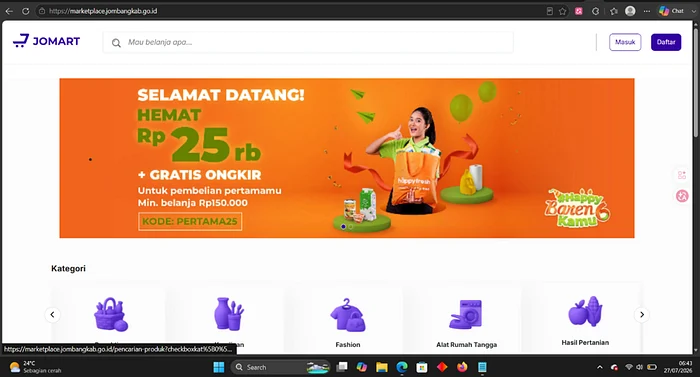
The researcher started with the product search box on the front page, on the grounds that search inputs are a classic test point because their input is almost always reflected into the results page.
The first probe was the simplest possible: a few special characters, to see how the application treats them.
test"<>
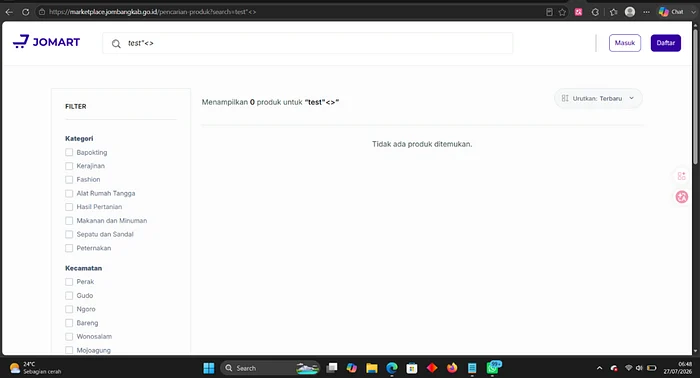
The application reflected the input verbatim into the results page, with no sanitisation:
Menampilkan 0 produk untuk "test"<>"
The ", < and > characters came back intact and unencoded. That is a strong indication that markup characters are not neutralised on output, which means the search parameter may be able to carry code.
Exploitation
Step 1: Confirm the reflection is unencoded
Submitting test"<> produced a results page containing the raw characters inside the message Menampilkan 0 produk untuk "test"<>". No entity encoding, no escaping.
Step 2: Send an XSS payload through the search parameter
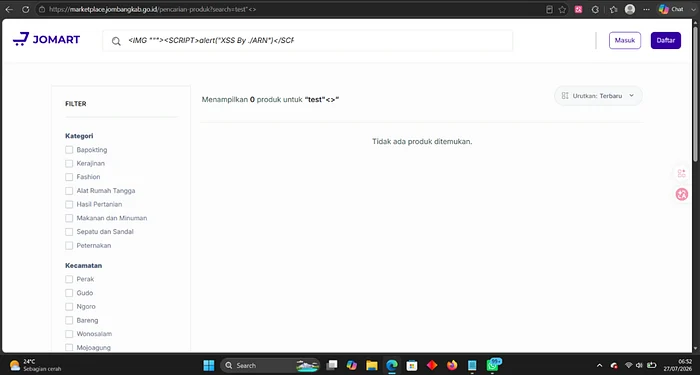
The researcher moved from special characters to an XSS payload:
<IMG """><SCRIPT>alert("XSS By ./ARN")</SCRIPT>">
Step 3: Reload and observe execution
After the payload was sent through the search parameter and the page was reloaded, the browser executed the injected script and displayed a dialog:
XSS By ./ARN
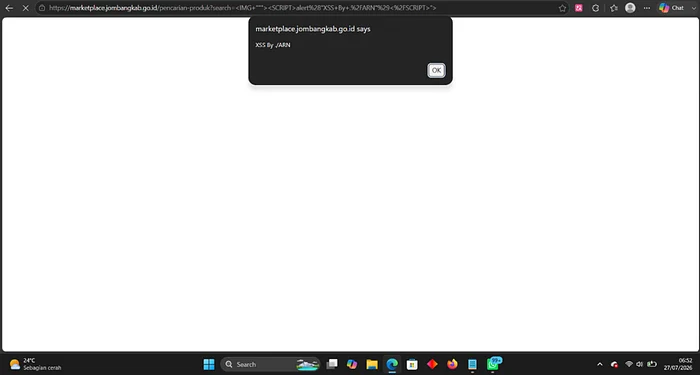
The dialog confirms that the search parameter can be used to run arbitrary JavaScript in a user's browser: a verified reflected XSS.
Root cause
The search term is written back into the results page without output encoding. The application reflects the input as-is, so characters that are significant in HTML (", <, >) reach the browser as markup rather than as text.
No input validation or context-aware output encoding is applied to the search parameter, and no Content-Security-Policy is mentioned as being in place to limit script execution. The write-up does not describe the server-side code, so the exact rendering mechanism is not shown; the observable behaviour is a raw reflection.
Impact
The researcher rates the issue Medium. On a government public service, reflected XSS can be abused to:
- run arbitrary JavaScript in the victim's browser;
- build convincing phishing pages, since they would sit on a trusted
.go.iddomain; - deface the page's appearance;
- redirect users to malicious sites;
- perform actions on the victim's behalf when chained with other vulnerabilities.
The real severity depends on the application context and on other security controls in place.
Fix
The write-up recommends two measures:
- Apply input validation and context-aware output encoding to the search feature, so user input is never rendered as HTML or JavaScript.
- Apply a strict Content-Security-Policy header to limit the impact of any residual XSS.
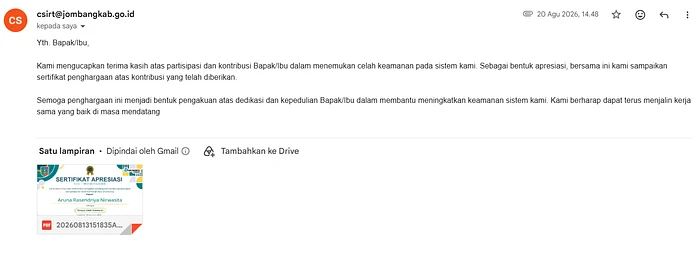
The report does not state which of these the operators implemented; it only records that the issue was verified and handled, with a certificate of appreciation issued by the Jombang Regency Government.
Timeline
| Date | Event |
|---|---|
| 27 July 2026 | Flaw found and reported |
| 11 August 2026 | Report answered and verified by the operators |
| 20 August 2026 | Certificate of appreciation issued |
The report was submitted to the relevant CSIRT through responsible disclosure.
- Other reflected parameters. Try every parameter that appears in the response body (search, filters, sort labels, error messages, pagination text). A positive result is the raw value appearing unencoded in the HTML source.
- Different reflection contexts. If the value lands inside an attribute, a JavaScript string or a URL, the payload shape changes. A positive result is a context-appropriate payload executing, for example a quote break-out followed by an event handler.
- Encoding bypasses. Where basic filtering exists, try HTML entities, double encoding and unusual tag or attribute casing. A positive result is the browser still parsing the injected markup as a tag.
- CSP absence. Check response headers for
Content-Security-Policy. A positive result for an attacker is a missing or permissive policy that allows inline script. - Chaining. Look for state-changing actions reachable from the reflected page. A positive result is an action performed with the victim's session when the crafted link is opened.
What happened, in plain words
A security researcher found a bug on a government shopping website. The website is called Jomart Marketplace, and it is the official online shop of the Jombang Regency Government, at marketplace.jombangkab.go.id. The bug is called reflected cross-site scripting, or reflected XSS for short.
Here is the idea in everyday terms. Imagine a shop assistant who repeats back whatever a customer says, word for word, without thinking. If a customer says "hello", the assistant says "hello". That is fine. But if a customer says something that sounds like an instruction, and the assistant repeats it as an instruction instead of as a quotation, things go wrong. A website search box works the same way. You type a word, and the results page shows it back to you: "Showing 0 products for ...". If the site repeats your word as plain text, all is well. If it repeats your word as if it were part of the page's own instructions (its code), then someone can type code instead of a word, and the browser will run it.
That is what happened here. The search box on the front page echoed the search term back into the results page without neutralising the special characters that mean something in the page's code. The researcher typed a few special characters, saw them come back untouched, then sent an HTML payload containing a script tag through the same box. The browser ran it and showed a pop-up dialog. That pop-up is the proof.
The researcher reported the bug to the operators through responsible disclosure, which means telling the people who run the site privately and giving them time to fix it before saying anything publicly. The report was answered and verified, and the government issued a certificate of appreciation. This article was published only after that.
The target and the feature
Jomart Marketplace is an e-commerce platform: a website where products are listed and, presumably, bought and sold. It belongs to the Jombang Regency Government, which is why its address ends in .go.id. That ending is Indonesia's government domain suffix, similar to how .gov works elsewhere. A domain is just the name of a site on the internet, and the ending tells you what kind of organisation owns it.
The feature the researcher looked at is the product search box on the front page. A visitor types a word, presses the search button, and the results page tells them how many products matched and repeats the word back: something like "Showing 0 products for shoes". That repetition is the important part. In web security, when a site takes something you typed and puts it back into the page, we call it a reflection. The place where it lands is the reflection point.
Why start with a search box? Because search boxes almost always reflect. The results page has to tell you what you searched for, so the site has to put your text somewhere in the page. That makes search a classic first place to look. The researcher says as much: search inputs are a classic test point because their input is almost always reflected into the results page.
The screenshot shows the Jomart Marketplace front page, with the product search feature that was the starting point of the testing.
The setup
The write-up does not describe any accounts, user roles, tools or software versions. The testing was deliberately limited: the goal was only to prove the flaw existed, without accessing or changing any data. The article was published only after the issue had been reported, verified and handled by the operators. That is the normal etiquette for this kind of work: find it, prove it, report it privately, wait, then write about it.
Finding it: the first probe
The researcher began with the simplest possible test: a few special characters, to see how the application treats them.
test"<>
Line by line, this is not really code. It is a short string of text made of four characters:
testis an ordinary word, there so the input looks like a normal search."is a double quote. In the code that makes up a web page, a double quote often marks where an attribute value starts or ends. If the site puts your text inside an attribute and does not neutralise the quote, your quote can end the attribute early and let you write something new.<is the less-than sign. In HTML (the language web pages are written in),<starts a tag, which is a piece of markup such as an image or a script. If your<reaches the page as markup, you can start writing your own tags.>is the greater-than sign, which closes a tag.
So the probe is a tiny question: does the site treat these three characters as text, or as code? If they come back as text, the site is careful. If they come back as themselves, the site is passing them through raw, and the door may be open.
The application reflected the input verbatim into the results page, with no sanitisation:
Menampilkan 0 produk untuk "test"<>"
This is the results page message. Line by line:
Menampilkan 0 produk untukis Indonesian for "Showing 0 products for". It is the site's own text, written by the developers."test"<>"is the researcher's input, dropped into the middle of that sentence exactly as typed. The double quotes, the less-than and the greater-than are all there, unchanged.
Sanitisation means cleaning input before using it. Encoding (also called escaping) means turning a character that has a special meaning in code into a harmless stand-in, so the browser shows the character but does not treat it as code. A careful site would have turned < into something like <, which the browser displays as < but never reads as the start of a tag. Here, nothing was converted. The ", < and > characters came back intact and unencoded.
That is a strong indication that markup characters are not neutralised on output, which means the search parameter may be able to carry code. In plain words: the site is repeating the customer's words as instructions, not as a quotation. The next question is whether a full tag can be introduced there.
The screenshot shows the special characters test\"<> reflected intact, without encoding, on the search results page.
Sending an XSS payload
Having seen that the special characters survive, the researcher moved from special characters to an actual XSS payload:
<IMG """><SCRIPT>alert("XSS By ./ARN")</SCRIPT>">
A payload is the piece of input that does the damage, as opposed to a harmless probe. This one is written in HTML, the language browsers read to build a page. Line by line, though it is all on one line:
<IMGstarts an image tag. The browser expects an image address next, written as an attribute, which is a setting on a tag such as its source or size.""">is a small trick. By sending three quote characters and a greater-than, the payload closes that quote, closes the tag, and leaves the browser ready to read a new tag. This is called breaking out of the context: escaping the spot the site intended your text to sit in.<SCRIPT>opens a script tag. Anything between it and the closing tag is treated by the browser as JavaScript to run.alert("XSS By ./ARN")is the JavaScript itself.alertis a built-in browser function that shows a pop-up dialog with a message. The message here isXSS By ./ARN, a marker the researcher chose so that the proof is unmistakable.</SCRIPT>closes the script tag.">at the end closes the leftover quote and angle bracket so the surrounding page markup stays syntactically plausible, meaning the rest of the page does not break and the browser keeps reading normally.
The string XSS By ./ARN is the marker the researcher expects to see in the dialog.
The screenshot shows the XSS payload inserted through the search parameter.
Reloading and watching it run
After the payload was sent through the search parameter and the page was reloaded, the browser executed the injected script and displayed a dialog:
XSS By ./ARN
This is the pop-up. The browser did not show the payload as text. It read the <SCRIPT> tag as a real instruction and ran the JavaScript inside it. The dialog confirms that the search parameter can be used to run arbitrary JavaScript in a user's browser: a verified reflected XSS.
The screenshot shows the dialog appearing, confirming that the payload executed and that the reflected XSS is real.
Why it works: the root cause
The search term is written back into the results page without output encoding. Output encoding is the step where a site converts characters that are special in HTML into harmless stand-ins before putting them in the page. The application reflects the input as-is, so characters that are significant in HTML (", <, >) reach the browser as markup rather than as text.
No input validation or context-aware output encoding is applied to the search parameter. Input validation means checking what came in and rejecting what should not be allowed. Context-aware encoding means encoding differently depending on where the text will land: inside a paragraph, inside an attribute, inside a script, inside a URL. Each place has its own rules, and one fixed encoding does not fit all. The write-up also does not mention a Content-Security-Policy being in place to limit script execution. A Content-Security-Policy, or CSP, is a header, a small piece of information the server sends with the page, that tells the browser which sources of script are allowed. A strict policy can stop an injected script from running even when the encoding is wrong.
The write-up does not describe the server-side code, so the exact rendering mechanism is not shown. What is observable is a raw reflection: the input goes in, the same characters come out.
What an attacker could do with it
The researcher rates the issue Medium. Severity ratings are a rough scale from low to critical, used to say how much attention a bug deserves. On a government public service, reflected XSS can be abused to:
- run arbitrary JavaScript in the victim's browser;
- build convincing phishing pages, since they would sit on a trusted
.go.iddomain; - deface the page's appearance;
- redirect users to malicious sites;
- perform actions on the victim's behalf when chained with other vulnerabilities.
A few of those need unpacking. Phishing is tricking someone into handing over information, usually by showing them a fake page that looks real. A fake login page on a trusted government domain is far more convincing than one on a strange address, because people are taught to check the domain. Defacement means changing how a page looks, for example replacing its content with a message. Chaining means combining two bugs so that the result is worse than either alone: one bug gets code running, another bug does something useful to the attacker, such as acting as the logged-in user.
The attacker cannot simply make the script run for everyone; they have to get a specific person to click a link. That is why it is called reflected: the payload bounces off the site and back to whoever opens the link.
The fix
The write-up recommends two measures:
- Apply input validation and context-aware output encoding to the search feature, so user input is never rendered as HTML or JavaScript.
- Apply a strict Content-Security-Policy header to limit the impact of any residual XSS.
The first is the real cure: stop treating user text as code. The second is a safety net: if something still slips through, a strict policy makes it much harder for the browser to run it. It only records that the issue was verified and handled, with a certificate of appreciation issued by the Jombang Regency Government.
The image shows the certificate of appreciation from the Jombang Regency Government.
Timeline
| Date | Event |
|---|---|
| 27 July 2026 | Flaw found and reported |
| 11 August 2026 | Report answered and verified by the operators |
| 20 August 2026 | Certificate of appreciation issued |
The report was submitted to the relevant CSIRT through responsible disclosure. A CSIRT is a computer security incident response team: the group an organisation sets up to receive and handle security reports. Responsible disclosure is the practice of telling the operators privately first, giving them time to fix the problem, and only then publishing.
Once you know the shape of this bug, you can look for it elsewhere. These are the variants the write-up suggests testing:
- Other reflected parameters. Try every parameter that appears in the response body: search, filters, sort labels, error messages, pagination text. A parameter is a named value in a web address, the part after a
?, such as?q=shoes. A positive result is the raw value appearing unencoded in the HTML source. The HTML source is what you see with the browser's "view source" option: the actual code the browser received, not the rendered page. - Different reflection contexts. If the value lands inside an attribute, a JavaScript string or a URL, the payload shape changes. A positive result is a context-appropriate payload executing, for example a quote break-out followed by an event handler. An event handler is a piece of JavaScript attached to something happening on the page, such as a mouse moving over an element.
- Encoding bypasses. Where basic filtering exists, try HTML entities, double encoding and unusual tag or attribute casing. An HTML entity is the encoded form of a character, such as
<for<. Double encoding means encoding the encoded form again. Unusual casing means writing<ScRiPt>instead of<script>, in case a filter only looks for the exact lowercase spelling. A positive result is the browser still parsing the injected markup as a tag. - CSP absence. Check response headers for
Content-Security-Policy. Response headers are the extra information a server sends alongside a page, before the page content. A positive result for an attacker is a missing or permissive policy that allows inline script. Inline script means JavaScript written directly inside the page rather than loaded from a separate file, which is exactly what an injected<SCRIPT>tag is. - Chaining. Look for state-changing actions reachable from the reflected page. A state-changing action is one that alters something, such as changing a password or placing an order. A positive result is an action performed with the victim's session when the crafted link is opened. A session is the browser's logged-in state, usually kept in a cookie, which is a small piece of data the site stores in your browser so it knows who you are on the next request.
Glossary
- Attribute: a setting on an HTML tag, such as an image's source address or its width.
- Browser: the program you use to view web pages, such as Chrome, Firefox or Safari.
- Chaining: combining two or more vulnerabilities so the combined effect is worse than either alone.
- Content-Security-Policy (CSP): a header a server sends to tell the browser which sources of script and other content are allowed, used as a safety net against injected code.
- Context-aware output encoding: encoding text differently depending on where it will appear (page text, attribute, script, URL), so it is always treated as data and never as code.
- Cookie: a small piece of data a site stores in your browser, often used to remember that you are logged in.
- CSIRT: computer security incident response team, the group that receives and handles security reports for an organisation.
- Defacement: changing how a web page looks, usually to display an attacker's message.
- Dialog: a small pop-up box shown by the browser, such as the one produced by
alert. - Domain: the name of a site on the internet, such as
marketplace.jombangkab.go.id; the ending (.go.id) indicates the type of organisation. - Double encoding: encoding an already encoded value a second time, sometimes used to slip past filters.
- Encoding (escaping): converting characters that are special in code into harmless stand-ins so they are displayed but not executed.
- Event handler: JavaScript attached to something that happens on a page, such as a click or a mouse movement.
- HTML: the language web pages are written in, made of tags that describe content.
- HTML entity: the encoded form of a character in HTML, such as
<for<. - Inline script: JavaScript written directly inside a page rather than loaded from a separate file.
- Input validation: checking incoming data and rejecting what should not be allowed.
- JavaScript: the programming language that browsers run to make pages interactive.
- Parameter: a named value in a web address, the part after a
?, such as?q=shoes. - Payload: the piece of input designed to trigger a vulnerability, as opposed to a harmless probe.
- Phishing: tricking someone into giving away information, often with a fake page that looks real.
- Reflected XSS: cross-site scripting where the malicious input bounces off the site and runs in the browser of whoever opens a crafted link.
- Reflection: when a site puts something you typed back into the page it returns.
- Reflection point: the place in the page where your input is inserted.
- Responsible disclosure: reporting a flaw privately to the operators first, giving them time to fix it, then publishing.
- Sanitisation: cleaning input before using it, removing or neutralising anything dangerous.
- Session: the browser's logged-in state, usually kept in a cookie, so the site recognises you across requests.
- Severity: a rough rating (low to critical) of how much attention a bug deserves.
- Tag: a piece of HTML markup such as
<IMG>or<SCRIPT>that tells the browser what to do. - XSS (cross-site scripting): a class of bug where an attacker gets their own code to run in someone else's browser through a website.




