More Than a Penetration Test (Microsoft Windows CVE-2019–1082)
During a penetration test of a Windows Server 2016 WSUS environment, the tester found that the update process copies DismHost.exe into the world-writable Windows temp directory and loads a DLL from there. Because any local user can write to that directory, a local attacker could place a malicious DLL and have it loaded as NT AUTHORITY\SYSTEM, gaining the highest privileges on the machine.

medium.com
Published on medium.com
During one of penetration tests I had chance to dug into Windows Server 2016 and WSUS environment. I have tested some common techniques for privileges escalation however it is really difficult to find some misconfigurations on a freshly installed stable systems with all updates.
The full write-up lives on its author's site
It belongs to its author, so we link to it rather than copy it. The other two tabs are our own rewrites, checked against it.
Context
During a penetration test I had the chance to dig into a Windows Server 2016 host and its WSUS environment. The main goal of the test was to check the WSUS updates functionality on the system and whether there was a possibility of exploitation. The host was a freshly installed, stable system with all updates applied, and the usual privilege escalation techniques turned up nothing: misconfigurations are hard to find on such a build.
The feature under scrutiny is the Windows update and servicing path. When updates run, the servicing stack launches a binary called DismHost.exe. On this system it was launched with the highest level of privileges available locally, NT AUTHORITY\SYSTEM.
Setup
The work was done on Windows Server 2016 in a WSUS environment. The main investigative tool was SysInternals Process Monitor (ProcMon), used to analyse how a process behaves when executed, which is a common technique for investigating loading behaviour on Windows. Updates were pushed several times through WSUS while ProcMon was running. Later, to widen the race window during exploitation, I used SetOpLock.exe from the Google Project Zero symboliclink-testing-tools repository:
https://github.com/googleprojectzero/symboliclink-testing-tools
No special account was needed beyond a normal system user, because the relevant directory is writable by all system users (see below).
Finding it
After running some system updates through WSUS, I found that the update launched DismHost.exe with NT AUTHORITY\SYSTEM privileges. A couple of months after reporting the vulnerability I came across an article about a UAC bypass with similar functionality in DismHost.exe:
https://enigma0x3.net/2016/07/22/bypassing-uac-on-windows-10-using-disk-cleanup/
The difference that mattered here is that in that case the binary was launched only with elevated/high integrity privileges, whereas in the WSUS update path it ran as SYSTEM.
After running updates several times via WSUS and grinding with ProcMon, I found that during an update DismHost.exe is copied to C:\Windows\Temp\{GUID} and it looks for some DLLs that are missing.

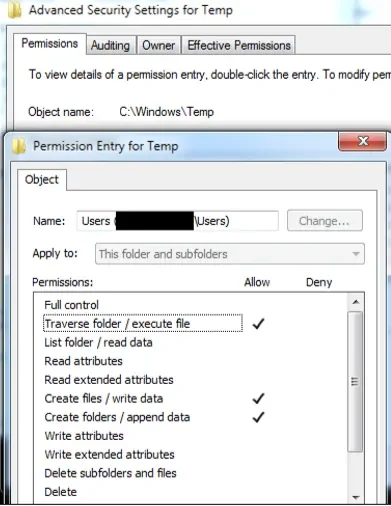
Because all system users have write access to the Windows %TEMP% directory, it is possible to copy DLLs into Windows %TEMP%, which could lead to DLL injection and have them loaded by dismhost.exe.
Exploitation
Exploitation was really difficult because it was a race condition to win against DismHost.exe: the DLL has to be in place in the temp directory before the process resolves the missing library.
Step 1: Identify a suitable DLL to plant
After closer examination I chose PEProvider.dll to be loaded.
Step 2: Widen the race window with an oplock
To increase the chance of winning, I used SetOpLock.exe and set an oplock on one of the resources that dismhost.exe used before loading PEProvider.dll. Setting the oplock on that resource was intended to increase the chance of winning the race.
Step 3: Get code execution as SYSTEM
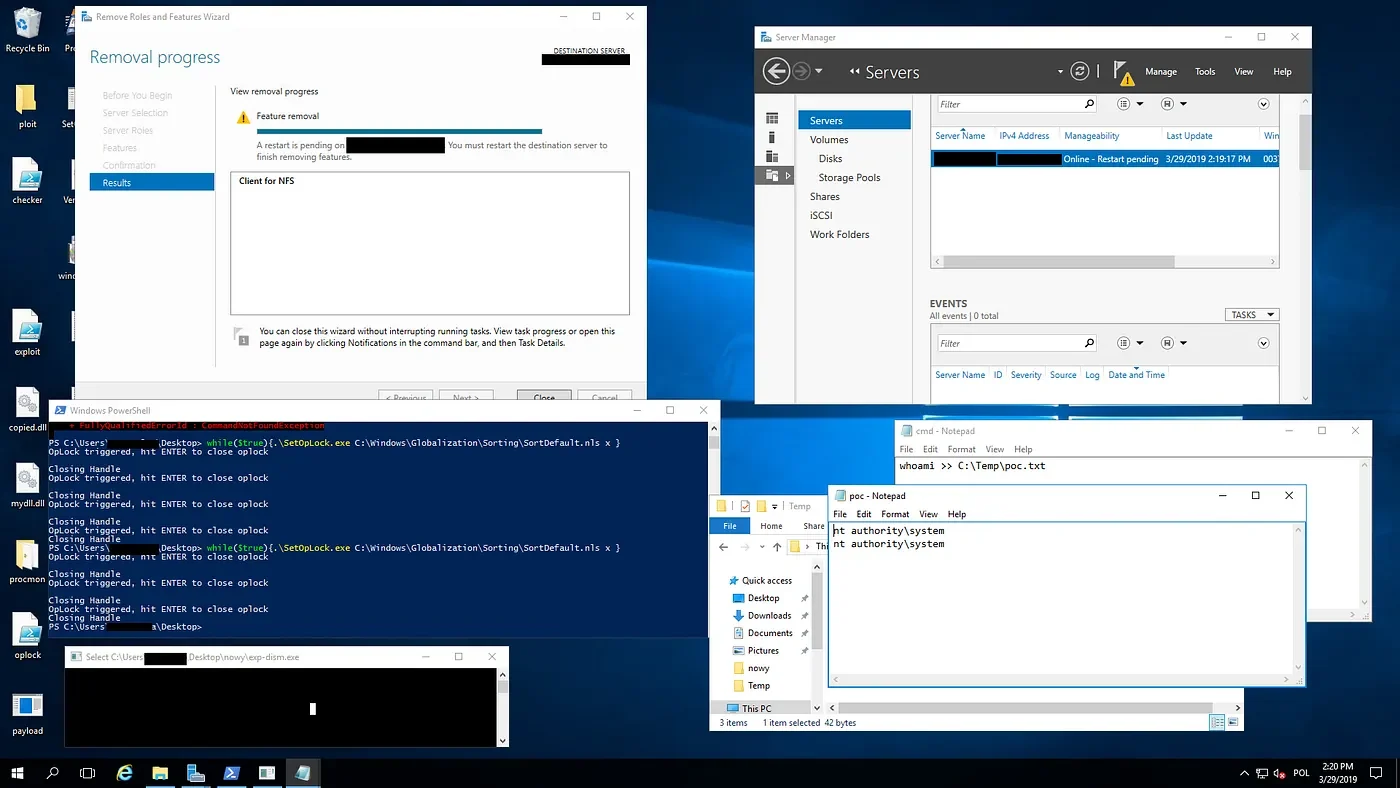
Once DismHost.exe loads our DLL, it loads it as NT AUTHORITY\SYSTEM, which is the highest privilege level on the system. The original screen from exploitation:
Root cause
The servicing binary DismHost.exe is copied into C:\Windows\Temp\{GUID} and resolves some of its DLLs from that location, but %TEMP% is writable by all system users. A low-privileged user can therefore place a DLL with the expected name in the directory the SYSTEM-level process searches, and the process loads it with its own privileges. The report describes the missing-DLL lookups and the writable temp directory; it does not name a design mistake. The only obstacle is timing, which is why the race condition, and the oplock used to slow the process down, are central to the exploit.
The same situation also happens in other servicing scenarios:
- adding and removing features (tested on Windows Server 2016);
- the "Windows Defender Verification" task, a default task enabled on clean Windows installations. This one was found to be run periodically, but the task has no triggers; I suppose it is run as part of "Automatic Maintenance" (tested on Windows Server 2016);
- during updates, but not all of them (tested on Windows Server 2016).
Impact
A user who can write to the Windows %TEMP% directory, which the report describes as all system users, can get code executed as NT AUTHORITY\SYSTEM by winning the race against DismHost.exe. The same primitive is reachable not only through WSUS-driven updates but also through adding and removing features and through the periodic "Windows Defender Verification" task, so the attack surface is wider than a single update operation. The practical limit is reliability: the exploit depends on winning a race condition, which the report describes as really difficult, and the oplock is used to improve the odds.
Fix
The report does not describe a fix or a vendor change. What the finding calls for is that the servicing process should not load libraries from a directory writable by unprivileged users, or that the temp directory used for DismHost.exe should be restricted so that ordinary users cannot write to it.
Variants to test
- Run ProcMon against other servicing and maintenance binaries launched as SYSTEM and look for DLLs resolved from writable paths.
- Observe the "Windows Defender Verification" task on a clean installation and watch for
DismHost.exeinC:\Windows\Temp\{GUID}. - Add and remove Windows features and repeat the ProcMon capture.
- Try the same technique on other Windows versions and builds than the Windows Server 2016 used here, since the report only states that testing was done on that version.
- Use
SetOpLock.exeon other resources touched before the DLL load to see whether the race can be made more reliable.
What happened, in plain words
A security tester was hired to look at a Windows Server 2016 machine, specifically at the part that handles Windows updates through a system called WSUS. The goal was to see whether the update mechanism could be abused. On a freshly installed, fully patched server, the usual tricks for getting more power on a machine (privilege escalation) turned up nothing, because there were no obvious misconfigurations to exploit.
While watching what happens during an update, the tester noticed that Windows launches a small program called DismHost.exe, and it launches it as NT AUTHORITY\SYSTEM. That name is the most powerful account on a Windows machine: it is the account the operating system itself uses, and it can do anything. The tester then found that this program is copied into a temporary folder, C:\Windows\Temp\{GUID}, and that it looks for some library files (DLLs) that are not there. Because ordinary users are allowed to write into that temp folder, a normal user could put a file with the right name there, and the powerful program would load it. That is a classic weakness: a powerful program trusting a folder that weaker users can write to.
The only difficulty is timing. The file has to be in place at the exact moment the program looks for it, so the tester had to win a race against the program. A tool called SetOpLock.exe was used to pause the program at the right moment and make the race winnable. The result: code written by a normal user runs with SYSTEM privileges.
This article walks through the same story step by step, explaining every term along the way.
The setting: a penetration test on Windows Server 2016 and WSUS
A penetration test is an authorised attack on your own systems, done to find weaknesses before real attackers do. The tester had access to a Windows Server 2016 machine and to its WSUS environment.
WSUS stands for Windows Server Update Services. Think of it as an internal post office for Windows updates: instead of every computer downloading patches from Microsoft directly, a company runs a WSUS server, and the computers ask that server which updates to install and where to get them. The main goal of the test was to check how this update functionality behaves and whether it could be exploited.
The machine was freshly installed, stable, and fully updated. That matters: the usual privilege escalation techniques (ways to go from a normal user to an administrator) found nothing, because a clean, patched system has few misconfigurations to abuse. So the tester looked somewhere less obvious: the update process itself.
Watching a program run: Process Monitor
A common technique for investigating how a program loads things on Windows is to use SysInternals Process Monitor, usually shortened to ProcMon. SysInternals is a set of free diagnostic tools from Microsoft. ProcMon records, in real time, what a program does: which files it opens, which folders it reads, which registry keys it touches, and which files it fails to find.
An everyday comparison: ProcMon is like a security camera pointed at a single worker. You see every drawer the worker opens, every shelf they look at, and every time they look for something that is not there.
The tester ran system updates several times through WSUS while ProcMon was recording. That is how the behaviour below was discovered: not by guessing, but by watching.
The discovery: DismHost.exe runs as SYSTEM and looks for missing DLLs
After running some system updates through WSUS, the tester found that the update launched a binary called DismHost.exe with the highest level of privileges on the local system, NT AUTHORITY\SYSTEM.
A binary is simply an executable program file. DismHost.exe is part of the Windows servicing stack, the machinery that installs, removes and repairs Windows components. NT AUTHORITY\SYSTEM is the local system account: the most privileged identity on the machine, higher than a normal administrator in everyday terms, because it is the account the operating system itself runs under.
A couple of months after reporting the vulnerability, the tester came across an article about a UAC bypass with similar functionality in DismHost.exe:
https://enigma0x3.net/2016/07/22/bypassing-uac-on-windows-10-using-disk-cleanup/
This is a link to a public article. UAC (User Account Control) is the Windows prompt that asks "Do you want to allow this app to make changes to your device?". A UAC bypass is a way to get elevated rights without that prompt appearing. The important difference for this finding: in that earlier case the binary was launched only with elevated or high integrity privileges, whereas in the WSUS update path it ran as SYSTEM. High integrity is a strong level, but SYSTEM is stronger still, which is why this path was more interesting.
Digging into the logs: the temp folder and the missing DLLs
After running updates several times via WSUS and grinding with ProcMon, the tester found that during an update DismHost.exe is copied to C:\Windows\Temp\{GUID} and it looks for some DLLs that are missing.
A DLL (Dynamic Link Library) is a file full of reusable code that a program loads when it needs it, instead of having everything built into one big executable. Think of a program as a cook and DLLs as recipe cards: the cook fetches a card when a dish requires it. If the card is missing, the cook looks around for it, and Windows has a defined order of places to look.
C:\Windows\Temp is the Windows temporary folder. {GUID} stands for a Globally Unique Identifier, a long random-looking string that Windows generates so that each run gets its own uniquely named subfolder, for example a folder name made of letters, digits and hyphens. The point is that the exact folder name changes every time, but the parent folder, C:\Windows\Temp, stays the same.
"Missing" here means the program asked Windows for a DLL and Windows did not find it in the places it searched.
Why this is dangerous: a writable folder used by a powerful program
Because all system users have write access to the Windows %TEMP% directory, it is possible to copy DLLs into Windows %TEMP%, which could lead to DLL injection and have them loaded by dismhost.exe.
%TEMP% is the environment variable that points at the current user's temporary folder. In this context the report is talking about the Windows temp directory that the servicing program uses, C:\Windows\Temp, and it states that all system users can write to it.
DLL injection, in this broad sense, means getting a program to load a library that the attacker supplied. If a program running as SYSTEM loads your DLL, your code now runs as SYSTEM. That is the whole game: you do not need to break any password or find an administrator account, you just need the powerful program to pick up your file.
An everyday comparison: imagine a bank manager who, every morning, picks up a sealed envelope from an open shelf in the lobby and follows the instructions inside. Anyone can put an envelope on that shelf. The manager's authority does the rest.
Exploitation: winning a race
Exploitation was really difficult because it was a race condition to win against DismHost.exe: the DLL has to be in place in the temp directory before the process resolves the missing library.
A race condition is a situation where the result depends on who gets there first. Here, the program starts, gets copied to the temp folder, and looks for its DLLs. The attacker has to create the file in the right place in the short window between the folder existing and the program asking for the library. If the attacker is too slow, the program has already moved on.
An everyday comparison: a delivery van stops at a loading bay for a few seconds. You have to put your parcel on the bay before the driver looks. Too early and it is not there yet, too late and the van has gone.
Step 1: choose which DLL to plant
After closer examination, the tester chose PEProvider.dll to be loaded.
Step 2: slow the program down with an oplock
To increase the chance of winning, the tester used SetOpLock.exe and set an oplock on one of the resources that dismhost.exe used before loading PEProvider.dll. Setting the oplock on that resource was intended to increase the chance of winning the race.
An oplock (opportunistic lock) is a lock that a program can place on a file so that it is notified, or made to wait, when another process tries to access that file. It is normally a performance feature of file systems, but security researchers use it as a brake: you lock a file the target program needs early in its run, the program pauses there, and you use the pause to prepare the next step.
SetOpLock.exe is a small utility from the Google Project Zero symboliclink-testing-tools repository:
https://github.com/googleprojectzero/symboliclink-testing-tools
This is a link to the public repository where the tool lives. Google Project Zero is a security research team at Google, and the repository collects tools for testing how Windows handles files and links.
Step 3: code runs as SYSTEM
Once DismHost.exe loads our DLL, it loads it as NT AUTHORITY\SYSTEM, which is the highest privilege level on the system. In other words, the planted library inherits the identity of the program that loaded it, and that identity is the most powerful one on the machine.
The original screen from exploitation:
The original screen from exploitation:
Why it works: the root cause
The servicing binary DismHost.exe is copied into C:\Windows\Temp\{GUID} and resolves some of its DLLs from that location, but %TEMP% is writable by all system users. A low-privileged user can therefore place a DLL with the expected name in the directory the SYSTEM-level process searches, and the process loads it with its own privileges.
The report describes the missing-DLL lookups and the writable temp directory; it does not name a design mistake. The only obstacle is timing, which is why the race condition, and the oplock used to slow the process down, are central to the exploit.
An everyday comparison: a company director keeps borrowing pens from a drawer in the reception area that any visitor can open. Nothing is broken, no lock is picked, but the director ends up writing with a pen a visitor supplied.
Other places the same thing happens
The same situation also happens in other servicing scenarios:
- adding and removing features (tested on Windows Server 2016);
- the "Windows Defender Verification" task, a default task enabled on clean Windows installations. This one was found to be run periodically, but the task has no triggers; the tester supposes it is run as part of "Automatic Maintenance" (tested on Windows Server 2016);
- during updates, but not all of them (tested on Windows Server 2016).
A few terms here. A Windows feature is an optional component of the operating system, such as a particular server role or tool, which you can add or remove through the system settings. A scheduled task is an automated job Windows runs on a schedule; a trigger is the condition that starts the task, such as a time of day or a system event. "Automatic Maintenance" is a Windows feature that performs housekeeping in the background when the machine is idle. The point of this list is that the weakness is not limited to one update operation: several servicing paths reach the same behaviour.
Impact
A user who can write to the Windows %TEMP% directory, which the report describes as all system users, can get code executed as NT AUTHORITY\SYSTEM by winning the race against DismHost.exe. The same primitive is reachable not only through WSUS-driven updates but also through adding and removing features and through the periodic "Windows Defender Verification" task, so the attack surface is wider than a single update operation. The practical limit is reliability: the exploit depends on winning a race condition, which the report describes as really difficult, and the oplock is used to improve the odds.
"Attack surface" simply means all the places an attacker could try to get in. "Primitive" here means a basic building block of an attack: the ability to get a file loaded by a privileged process.
Fix
The report does not describe a fix or a vendor change. What the finding calls for is that the servicing process should not load libraries from a directory writable by unprivileged users, or that the temp directory used for DismHost.exe should be restricted so that ordinary users cannot write to it.
Variants to test
If you want to look for similar behaviour yourself, these are directions to try:
- Run ProcMon against other servicing and maintenance binaries launched as SYSTEM and look for DLLs resolved from writable paths.
NAME NOT FOUNDis ProcMon's way of saying "the program asked for this file and it was not there". - Observe the "Windows Defender Verification" task on a clean installation and watch for
DismHost.exeinC:\Windows\Temp\{GUID}. - Add and remove Windows features and repeat the ProcMon capture.
- Try the same technique on other Windows versions and builds than the Windows Server 2016 used here, since the report only states that testing was done on that version.
- Use
SetOpLock.exeon other resources touched before the DLL load to see whether the race can be made more reliable.
Glossary
- Binary: an executable program file, such as
.exe. - DLL (Dynamic Link Library): a file of reusable code that a program loads when it needs it.
- DLL injection: getting a program to load a library supplied by someone else, so that the supplied code runs inside that program.
- DismHost.exe: the Windows servicing program that runs during update and maintenance operations and, in this finding, runs as SYSTEM.
- Exploitation: turning a weakness into a working attack.
- GUID: a long, practically unique identifier string that Windows uses to name things such as temporary folders.
- High integrity: a strong privilege level in Windows, below SYSTEM.
- NT AUTHORITY\SYSTEM: the local system account, the most privileged identity on a Windows machine.
- Oplock (opportunistic lock): a file lock that can pause or notify a program when another process touches the file; used here to slow the target down.
- Penetration test: an authorised attack on your own systems to find weaknesses before real attackers do.
- Privilege escalation: going from a lower-privileged account to a higher-privileged one.
- ProcMon (Process Monitor): a SysInternals tool that records what a program does with files, folders and registry keys in real time.
- Race condition: a situation where the outcome depends on who gets there first.
- Scheduled task: an automated job Windows runs on a schedule.
- Servicing stack: the part of Windows that installs, removes and repairs system components.
- SetOpLock.exe: a utility from the Google Project Zero symboliclink-testing-tools repository used to place oplocks.
- SysInternals: a set of free diagnostic tools from Microsoft.
- Trigger: the condition that starts a scheduled task.
- UAC (User Account Control): the Windows prompt asking whether to allow an app to make changes to the device.
- UAC bypass: a way to get elevated rights without the UAC prompt appearing.
- WSUS (Windows Server Update Services): an internal server that distributes Windows updates to computers in a company.
- %TEMP%: the environment variable pointing at a temporary folder; in this finding, the Windows temp directory that the servicing program uses and that all system users can write to.


