My First Bug: How I Was Able to Bypass the WAF and Uncover a Reflected XSS
A reflected cross-site scripting vulnerability existed in a parameter that was reflected without proper encoding, but a web application firewall (WAF) blocked common payloads containing angle brackets. The attacker bypassed the WAF by inserting equals signs after angle brackets, which were stripped by the server, allowing execution of JavaScript and potential theft of cookies.
 Published on fares7elsadek.medium.com
Hello everyone, I’m Fares. Today, I’ll share the story of how I successfully identified a reflected XSS vulnerability within a public bug bounty program.
The full write-up lives on its author's site
It belongs to its author, so we link to it rather than copy it. The other two tabs are our own rewrites, checked against it.
Context
This is the story of a reflected XSS found by hand in a public bug bounty program. The report does not name the program or the organisation behind it, and the endpoint is shown only in a generic form. What the feature does is also not described beyond the fact that a page under /domain/modules/ takes a parameter called ak and prints its value back into the HTML.
The endpoint looked like this:
https://example.domain.com/domain/modules/name.aspx
Because the program was public and complex, the author chose to review live hosts manually rather than rely on automation.
Setup
The only precondition was a public bug bounty program with a broad attack surface. The tools used were:
- Subfinder
- assetfinder
- httpx
- Burp Suite
No accounts, roles or special access are mentioned. The work started from subdomain enumeration and moved to manual inspection of the live hosts.
Finding it
Step 1: subdomain enumeration
Subdomains were collected with Subfinder and assetfinder:
subfinder -d $domain -all > subdomains.txt
assetfinder $domain -subs-only | grep $domain$ >> subdomains.txt
Duplicates were removed:
cat subdomains.txt | sort -u > sub-list.txt
Live hosts were then filtered with httpx:
cat sub-list.txt | httpx > live-sub.txt
Step 2: manual review
With the live list in hand, the author went through the hosts by hand. During this review an endpoint of the form https://example.domain.com/domain/modules/name.aspx stood out. The idea was to fuzz for parameter names, and ak turned out to be a valid one. Adding a FUZZ marker to it gave:
https://example.domain.com/domain/modules/name.aspx?ak=FUZZ
The response contained the marker verbatim inside the page:
<p><span class="red"><span id="ak">FUZZ</span></span></p>
A value that comes back unencoded in the response body is the classic sign of a reflected XSS candidate, so the next step was to try a script tag.
Exploitation
Step 1: the obvious payload is blocked
The first attempt was a plain script tag in the parameter:
https://example.domain.com/domain/modules/name.aspx?ak=<script>alert(“hacked”)</script>
This request was redirected to an error page. Payloads taken from the internet did not work either.
Step 2: working out what the filter reacts to
By testing many payloads, the author found that the presence of < and > in the value caused the redirect to the error page. Encoding and double encoding the angle brackets did not help.
A useful observation followed: when certain special characters were placed after the angle brackets, the value was reflected without triggering the redirect:
https://example.domain.com/domain/modules/name.aspx?ak=<&
<p><span class="red"><span id="ak"><&</span></span></p>
Many payloads built on this observation still failed.
Step 3: characters that are stripped
Further testing showed that . and = are removed from the value before it is written into the page:
https://example.domain.com/domain/modules/name.aspx?ak=hacked===.
<p><span class="red"><span id="ak">hacked</span></span></p>
Step 4: angle brackets plus equals signs
The next test put angle brackets around an equals sign:
https://example.domain.com/domain/modules/name.aspx?ak=<=hacked>=
<p><span class="red"><span id="ak"><hacked></span></span></p>
No redirect this time. The angle brackets survived and the = signs were stripped.
Step 5: the working payload
Using the same pattern, the author built a script tag where every = is followed by a character that gets stripped:
<=script>=alert("hacked")<=/scirpt>=
The response contained a working script element:
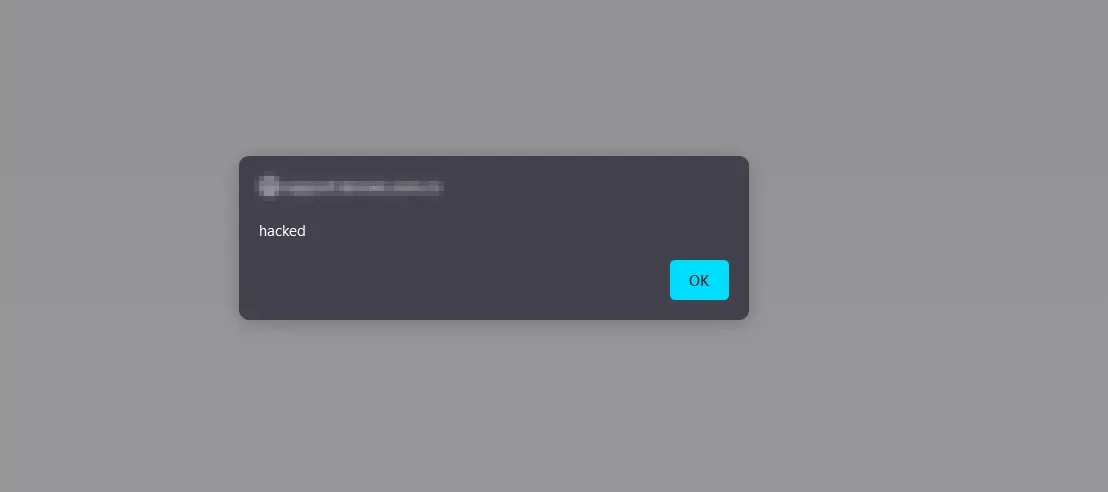
The screenshot accompanies the reflected response for this payload.
Step 6: the dot problem and a workaround
There was one remaining limitation: the server strips ., so document.cookie cannot be written directly. The author found a way to reach the cookie without a dot:
alret(document["cookie"])
The bracket notation avoids the dot symbol. The snippet as written in the report contains a typo in the function name (alret); the intended call is alert(document["cookie"]).
Root cause
The page reflects the ak parameter into the HTML body without output encoding, which is what makes the XSS possible. The observed behaviour is a redirect to an error page when < and > are present, and stripping of . and = from the input. That filter is a blacklist of characters rather than a structural defence, so it can be walked around: placing a character after = means the = is removed and the surrounding markup is left intact, and the same trick keeps the angle brackets from being treated as a blocked pattern. The report does not describe the filter implementation, so the exact matching logic is not known.
Impact
An attacker who can get a victim to open a crafted URL on the affected host can run JavaScript in the victim's session on that origin. The author proposes a dot free payload for reading the cookie, so session data may be exposed if it is reachable from JavaScript.
Fix
No fix is described in the report. The measure that would address the root cause is context aware output encoding of the ak value when it is written into the HTML body, so that <, >, ", ' and & are rendered as text. A blacklist that strips characters is not a substitute, as this report shows.
Variants to test
- Angle bracket filters that only look at the raw value. Send
<=tag>=style payloads where the=is followed by a character the filter removes, and check whether the tag appears intact in the response. - Stripping of
.and=. If those characters disappear from the reflection, try bracket notation such asdocument["cookie"]and attribute values built without=where the parser allows it. - Reflection inside an attribute or a script block. If the value lands in a different context, the same character tricks may need a different payload shape; a positive result is executable JavaScript in that context.
- Encoding and double encoding. The report says these did not work here, but on other targets a filter that decodes once may still pass a double encoded payload through to the browser.
- Error page redirects as a signal. A redirect on some payloads and not others tells you which characters the filter reacts to; map that behaviour before building the final payload.
I hope you enjoyed reading the writeup.
What happened, in plain words
A security researcher was taking part in a public bug bounty program. A bug bounty program is a scheme run by an organisation that invites outside people to look for security weaknesses in its websites and systems, and pays or credits them for reporting what they find. The researcher spent some time looking at the organisation's websites by hand, found a page that took a value from the address bar and printed it back into the page, and eventually got a small piece of JavaScript to run in that page. That kind of weakness is called reflected cross-site scripting, or reflected XSS for short.
To understand the story you only need a browser and a little patience. Everything below is explained from zero, in the order it happened.
The idea behind the attack
When you type an address into your browser, part of it can carry extra information. Look at this address:
The part after the question mark, q=shoes, is called a query string. It is a list of name and value pairs. Here the name is q and the value is shoes. The web server reads that value and usually uses it to build the page it sends back, for example a page of search results for shoes.
Now imagine the server takes the value and pastes it straight into the page's HTML without cleaning it. HTML is the language that describes what a web page contains: headings, paragraphs, links, images and so on. If the value contains ordinary text, the page just shows that text. But if the value contains HTML code, the browser will treat it as part of the page. And if the value contains a <script> element, the browser will run the JavaScript inside it. JavaScript is the programming language that runs inside web pages and can read things in the browser, change the page, and send data to other servers.
That is the whole idea of reflected XSS: an attacker builds a link whose query string contains code, sends the link to a victim, and when the victim opens it the server reflects the code back into the page and the victim's browser runs it. The word reflected is used because the value bounces off the server and comes back in the response. The word cross-site is used because the code runs as if it came from the victim's site, in the victim's session.
A session is the period during which a website remembers who you are. After you log in, the site gives your browser a small piece of data called a cookie, which the browser stores and sends back with every later request. The cookie acts like a wristband at an event: show it and you are let in without logging in again. If someone else can read your cookie, they can often pretend to be you. That is why reading cookies is a common goal of an XSS attack.
The target page
The researcher found a page shaped like this:
https://example.domain.com/domain/modules/name.aspx
This is a placeholder address. example.domain.com stands for the real host, and name.aspx stands for the real page name. The report does not say which organisation ran the program or what the page was for. What matters is that the page accepted a value in its query string under the name ak and printed that value back into the HTML.
A parameter is simply one of those name and value pairs in the query string. So ak is a parameter name, and whatever comes after ak= is its value.
Step 1: finding the hosts to look at
A large organisation usually has many websites and services, each on its own address. These addresses are called subdomains. If the main site is example.com, then shop.example.com, mail.example.com and blog.example.com are subdomains. Finding them is a standard first step, because each one is another possible way in.
The researcher used two tools for this. Subfinder and assetfinder are free programs that gather subdomain names from public sources. The first command was:
subfinder -d $domain -all > subdomains.txt
Line by line:
subfinderruns the Subfinder program.-d $domaintells it which domain to look at.$domainis a placeholder for the real domain name, which the report does not give.-allasks it to use all of its sources, not just the quick ones.> subdomains.txttakes whatever the program prints and saves it into a file calledsubdomains.txt. The>symbol means redirect the output into a file.
The second command was:
assetfinder $domain -subs-only | grep $domain$ >> subdomains.txt
Line by line:
assetfinder $domainruns the assetfinder program on the same domain.-subs-onlytells it to return only subdomains, not other kinds of results.|is a pipe. It takes the output of the program on the left and hands it to the program on the right.grep $domain$filters the lines, keeping only those that end with the domain name. The$at the end of the pattern means end of line.>> subdomains.txtappends the result to the same file instead of overwriting it. Two>symbols mean append.
Running two tools is a simple way to get more coverage, because each one draws on different public sources.
Next, duplicates were removed:
cat subdomains.txt | sort -u > sub-list.txt
Line by line:
cat subdomains.txtprints the contents of the file.| sort -usorts the lines and keeps only unique ones. The-ustands for unique.> sub-list.txtsaves the cleaned list into a new file.
Duplicates are removed because the two tools often find the same names, and a clean list saves time later.
Finally, the researcher checked which of those names were actually live, meaning a server was answering on them:
cat sub-list.txt | httpx > live-sub.txt
Line by line:
cat sub-list.txtprints the list of subdomains.| httpxfeeds each name to httpx, a tool that tries to connect to it and reports whether it responds.> live-sub.txtsaves the names that answered into a file.
This step matters because a long list of names is useless if most of them are dead. The live list is the shortlist of places worth looking at.
Step 2: looking by hand
With the live list ready, the researcher chose to visit the sites manually rather than run automated scanners. The reason given is that the program was public and complex, so human judgement was more useful than a tool that fires the same tests everywhere. This is a common choice: automation is fast but shallow, and a person can notice odd pages and follow a hunch.
During that review, a page under /domain/modules/ stood out. The researcher guessed that it might accept parameters and tried different names. One name, ak, turned out to be valid. To test it, the researcher put a marker word, FUZZ, as the value:
https://example.domain.com/domain/modules/name.aspx?ak=FUZZ
Line by line:
- The address is the page found earlier.
?starts the query string.ak=FUZZsets the parameterakto the valueFUZZ.
The word FUZZ is a common placeholder in security testing. You put it where you want to try different values, and you watch what changes.
The server sent back a page containing this HTML:
<p><span class="red"><span id="ak">FUZZ</span></span></p>
Line by line:
<p>starts a paragraph.<span class="red">starts an inline piece of text with a style class calledred, presumably to colour it.<span id="ak">starts another inline piece with the identifierak.FUZZis the value that was sent in the address.</span></span></p>closes the two spans and the paragraph.
The important part is that FUZZ came back exactly as it was sent, sitting inside the page's HTML. The server did not clean it or turn it into harmless text. When a value from the address appears unchanged in the page, it is a strong hint that the page may be vulnerable to reflected XSS. The next question is whether the browser will treat that value as code.
Step 3: the obvious attempt is blocked
The natural next test is to send a script element as the value:
https://example.domain.com/domain/modules/name.aspx?ak=<script>alert(“hacked”)</script>
Line by line:
ak=starts the parameter.<script>opens a script element. Everything until the closing tag is treated as JavaScript.alert(“hacked”)is a JavaScript instruction that opens a pop-up box with the text hacked. It is the traditional harmless proof that code is running.</script>closes the script element.
If the page reflected this unchanged, the browser would run the alert and the researcher would have proof. Instead, the request was redirected to an error page. A redirect is when the server answers with a message saying go somewhere else, and the browser follows it automatically. In this case the somewhere else was an error page, so the payload never reached the page.
The researcher also tried ready made payloads found on the internet, and none of them worked. That is normal: filters differ from site to site, and a payload that works on one site often fails on another.
Step 4: working out what the filter reacts to
A filter is a piece of code on the server that inspects incoming values and blocks or changes the ones it does not like. The researcher's task was to learn the filter's rules by experiment, the way you might learn a bouncer's rules by watching who gets turned away.
After many attempts, a pattern appeared: whenever the value contained < or >, the page redirected to the error page. Those two characters are called angle brackets, and they are the characters that start and end HTML tags. Blocking them is a common, crude defence against XSS.
Encoding was tried next. Encoding means replacing a character with a code that represents it, so that it is not read as the character itself. Double encoding means doing that twice. Neither worked here.
Then came a useful observation. When certain special characters were placed after the angle brackets, the value came back in the page without a redirect:
https://example.domain.com/domain/modules/name.aspx?ak=<&
Line by line:
ak=starts the parameter.<is a less than sign.&is an ampersand.
The response was:
<p><span class="red"><span id="ak"><&</span></span></p>
Line by line:
- The paragraph and spans are the same as before.
<&is the value that was sent, printed back unchanged.- The closing tags finish the paragraph.
So the filter did not simply block every <. Something about the combination mattered. The researcher tried many payloads built on this idea, and they still failed. The rule was not yet understood.
Step 5: characters that disappear
More testing showed something else. When the value contained a full stop (.) or an equals sign (=), those characters were removed before the value was printed. The test was:
https://example.domain.com/domain/modules/name.aspx?ak=hacked===.
Line by line:
ak=starts the parameter.hacked===.is the value: the word hacked, three equals signs and a full stop.
The response was:
<p><span class="red"><span id="ak">hacked</span></span></p>
Line by line:
- The word
hackedappears where the value goes. - The three equals signs and the full stop are gone.
So the filter strips those two characters. Stripping means deleting them from the value rather than rejecting the whole request. This is a different behaviour from the redirect: some characters cause the request to be thrown out, others are quietly removed.
Step 6: angle brackets around an equals sign
The next test combined the two observations. Angle brackets were placed around an equals sign:
https://example.domain.com/domain/modules/name.aspx?ak=<=hacked>=
Line by line:
ak=starts the parameter.<=hacked>=is the value: a less than sign, an equals sign, the word hacked, a greater than sign and another equals sign.
The response was:
<p><span class="red"><span id="ak"><hacked></span></span></p>
Line by line:
<hacked>appears in the page.- The two equals signs have been stripped.
This time there was no redirect. The angle brackets survived, and the equals signs vanished. The result is <hacked> in the page, with the equals signs removed. The researcher had found a way to get angle brackets past the filter: put an equals sign immediately after each one, because the filter removes the equals sign and leaves the bracket alone.
Step 7: the payload that works
Using the same pattern, the researcher built a script element in which every equals sign is followed by a character that gets stripped:
<=script>=alert("hacked")<=/scirpt>=
Line by line:
<=script>=is meant to become<script>. The equals signs after each bracket are stripped, leaving the opening tag.alert("hacked")is the JavaScript instruction that shows a pop-up.<=/scirpt>=is meant to become</script>. Note the spelling: the report writesscirpt, with the letters in a different order. Browsers are forgiving about some things, but this is worth pointing out because it is exactly as written in the report.
The response was:
Line by line:
- The paragraph and first span are as before.
<script>alert("hacked")</script>is now a real script element in the page, with the equals signs gone.- The closing tags finish the paragraph.
The response contains a script element, which a browser would run. That is the proof that the page is vulnerable to reflected XSS.
The screenshot accompanies the reflected response for this payload.
Step 8: the full stop problem and a way around it
There was one remaining obstacle. The most useful thing an attacker can do with XSS is read the victim's cookie, because the cookie is what proves who the victim is. In JavaScript, the cookie is reached with document.cookie. But that expression contains a full stop, and the filter strips full stops. So the obvious way to read the cookie was blocked.
The researcher found a way to reach the cookie without a full stop:
alret(document["cookie"])
Line by line:
documentis the object in the browser that represents the current page.["cookie"]is bracket notation. Instead of writingdocument.cookiewith a dot, you put the property name in square brackets as a string. The browser treats it the same way, and no dot is needed.alret(...)is meant to bealert(...), the pop-up function. The report writesalret, with the letters swapped. As written, this would not run; the intended call isalert(document["cookie"]).
The point is not the typo but the technique: when a filter removes dots, bracket notation lets you reach the same property.
Why this works, and what it means
The page takes the ak value and writes it into the HTML without encoding it. Encoding, in this context, means turning characters like <, >, ", ' and & into harmless text so the browser displays them instead of treating them as markup. If the page did that, the script element would appear as visible text and never run.
The observed behaviour is a redirect to an error page when angle brackets are present, and stripping of full stops and equals signs. That kind of filter is called a blacklist, because it lists characters to block or remove. Blacklists are fragile: they try to guess what an attack looks like, and an attacker only needs one shape the list does not cover. Here, putting an equals sign after each angle bracket meant the equals sign was removed and the bracket survived, so the tag came out intact.
The impact is that an attacker who can persuade a victim to open a crafted link on the affected host can run JavaScript in the victim's session on that site. The researcher proposes a dot free payload for reading the cookie, so session data may be exposed if it is reachable from JavaScript.
How to fix it
The measure that addresses the root cause is context aware output encoding: when the ak value is written into the HTML body, encode it so that <, >, ", ' and & are rendered as text. A filter that strips characters is not a substitute, as this story shows.
Other things to try
- Filters that only look at the raw value. Send
<=tag>=style payloads where the equals sign is followed by a character the filter removes, and check whether the tag appears intact in the response. - Stripping of full stops and equals signs. If those characters disappear from the reflection, try bracket notation such as
document["cookie"], and build attribute values without equals signs where the parser allows it. - Reflection in a different place. If the value lands inside an attribute or a script block rather than between tags, the same character tricks may need a different payload shape. A positive result is executable JavaScript in that context.
- Encoding and double encoding. The report says these did not work here, but on other targets a filter that decodes once may still pass a double encoded payload through to the browser.
- Error page redirects as a signal. A redirect on some payloads and not others tells you which characters the filter reacts to. Map that behaviour before building the final payload.
I hope you enjoyed reading the writeup.
Glossary
- Assetfinder: a free tool that collects subdomain names from public sources.
- Blacklist: a defence that lists characters or patterns to block or remove, rather than describing what safe input looks like.
- Bug bounty program: a scheme in which an organisation invites outside people to find and report security weaknesses, often for a reward or credit.
- Burp Suite: a tool used by security testers to intercept, inspect and modify web traffic between a browser and a server.
- Cookie: a small piece of data a website stores in your browser after you log in, sent back with later requests so the site recognises you.
- Cross-site scripting (XSS): a weakness where a site lets an attacker's code run in another user's browser as if it came from the site.
- Double encoding: encoding a value twice, so that a filter which decodes once still sees an encoded form.
- Encoding: replacing characters with codes that represent them, so they are not read as the characters themselves.
- Endpoint: a specific address on a server that accepts requests, such as a particular page.
- Filter: code on a server that inspects incoming values and blocks or changes the ones it does not like.
- Full stop (dot): the
.character, used in JavaScript to reach a property such asdocument.cookie. - HTML: the language that describes the structure and content of a web page.
- httpx: a tool that checks which subdomains are live by trying to connect to them.
- JavaScript: the programming language that runs inside web pages and can read and change things in the browser.
- Parameter: a name and value pair in a query string, such as
ak=FUZZ. - Payload: the value an attacker sends in order to trigger a weakness.
- Query string: the part of an address after the question mark, carrying name and value pairs.
- Redirect: a server response telling the browser to go to a different address instead.
- Reflected XSS: XSS where the attacker's value bounces off the server and comes back in the response page.
- Session: the period during which a website remembers who you are, usually via a cookie.
- Stripping: deleting certain characters from a value rather than rejecting the whole request.
- Subdomain: an address that sits under a main domain, such as
shop.example.comunderexample.com. - Subfinder: a free tool that collects subdomain names from public sources.
- Tag: an HTML element such as
<p>or<script>, written with angle brackets. - WAF (web application firewall): a filter that sits in front of a website and inspects requests before they reach it.




