My First Bug is RCE via SQL injection!
A login form was vulnerable to time-based SQL injection, which the author confirmed with a sleep payload and then exploited with SQLmap to obtain an operating system shell. The attacker could execute commands on the database server.

First, I collected subdomains from the awesome website https://chaos.projectdiscovery.io/. Since I didn’t want to waste my time collecting all the subdomains, I needed to focus on hunting.
The full write-up lives on its author's site
It belongs to its author, so we link to it rather than copy it. The other two tabs are our own rewrites, checked against it.
Context
This is a beginner's account of a first valid finding: a time-based SQL injection in a login panel that was escalated to remote code execution through SQLmap's --os-shell feature. The target is described only as target.com, a host the author picked at random from a VDP (vulnerability disclosure programme) after failing to get results on bounty-paying programmes. The report does not name the organisation, the application or the underlying DBMS beyond what the payloads reveal. The affected feature is an ordinary login form: a POST request carrying a login parameter.
Setup
The author had been hunting for about nine months, with 10 N/A reports and 3 duplicates before this one. On a friend's advice he moved to private programmes, but first needed points to qualify for an invitation, so he hunted on VDPs instead. The tooling is deliberately light:
- chaos.projectdiscovery.io for subdomain collection.
- A short bash script to merge the per-domain wordlists into one file.
httpxfor liveness checks and screenshots.- A browser and an intercepting proxy for the login request.
- SQLmap for the proof of concept.
Finding it
The workflow started with subdomain enumeration. Rather than collecting every subdomain, the author pulled the Chaos dataset and merged the per-domain files into a single list called allDomains.txt:
sed -i 's/\*\.//g' *.txtfor file in *.txt; do mv "$file" "${file%.*}_domains.txt"donecat *_domains.txt |sort -u|tee allDomains.txt rm *_domains.txt
The sed strips the leading *. wildcard notation from each line, the loop renames each file to a _domains.txt suffix, and the final pipeline concatenates everything, sorts it, removes duplicates and writes allDomains.txt.
Next, liveness and screenshots, split over two lines:
httpx -l allDomains.txt -o liveDomains.txthttpx -l liveDomains.txt -srd subsScreens -ss
The first line writes the live hosts to liveDomains.txt; the second takes screenshots (-ss) and stores them under the subsScreens directory (-srd).
With the screenshots collected, the author browsed them looking for easy targets: login panels, search banners and similar input surfaces.

Most login panels looked conventional, so he kept looking for something less ordinary.
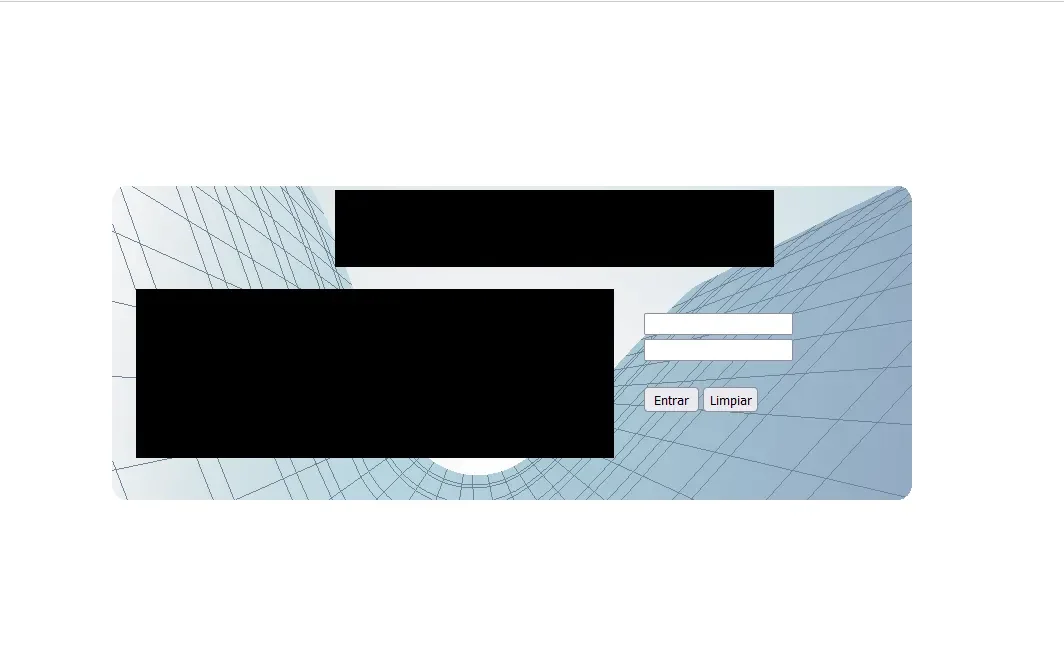
One panel stood out. Intercepting its login request, he considered the three usual avenues for a login form: response manipulation, default credentials, and injection. The first two failed. Changing true to false in the response did not get him past the check, and no default credentials worked.

Exploitation
Step 1: Boolean blind testing
The first injection attempt was boolean-based: sending conditions that should evaluate true or false and watching for a difference in the response. Nothing distinguishable came back, so the parameter did not look injectable that way. It was 3:00 AM, so he noted the panel and went to bed.
Step 2: Time-based testing
The next day he returned to the same request and switched technique to time-based blind injection, trying payloads for several DBMS. One worked:
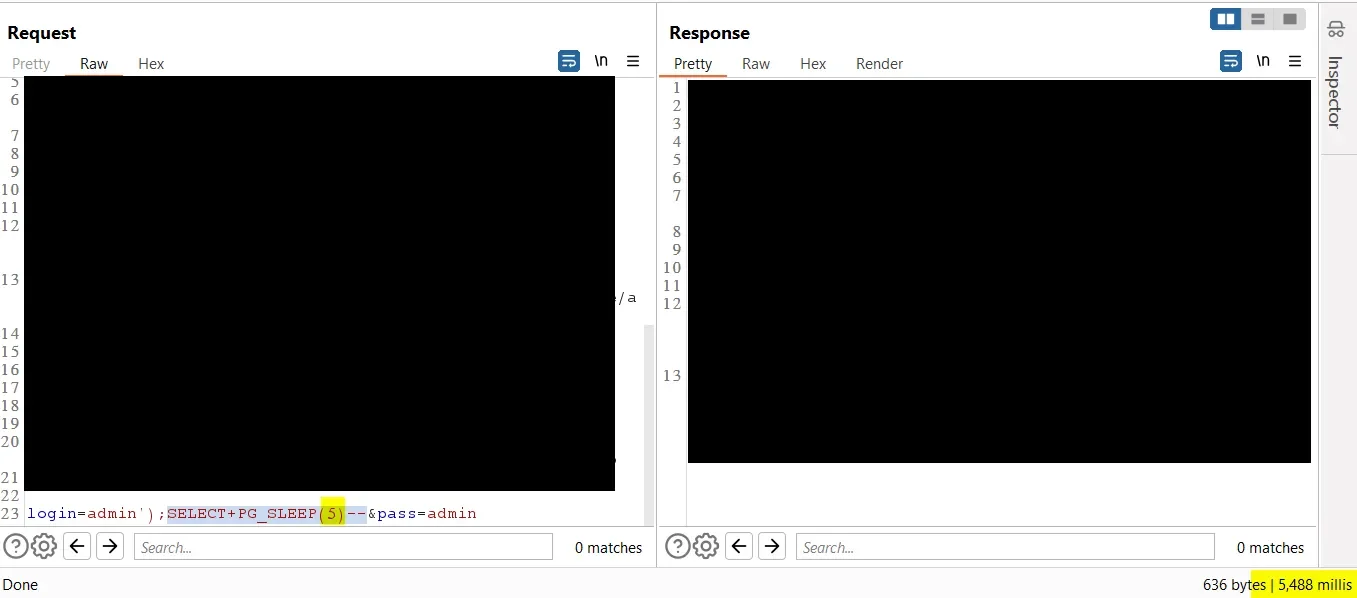
admin');SELECT PG_SLEEP(5)--
The payload closes the string literal and the surrounding statement with ');, then stacks a second statement that calls PG_SLEEP(5), a PostgreSQL function that pauses execution for five seconds. The trailing -- comments out whatever the application appended after the parameter. The payload worked, confirming that the injected SQL was executing on a PostgreSQL backend.
Step 3: Proving impact with SQLmap
The author notes that many of his earlier reports were closed as N/A because he had not demonstrated impact, so this time he set out to show a high-impact result. He saved the intercepted POST request to a file and marked the injection point with an asterisk inside the login parameter:
login=admin*
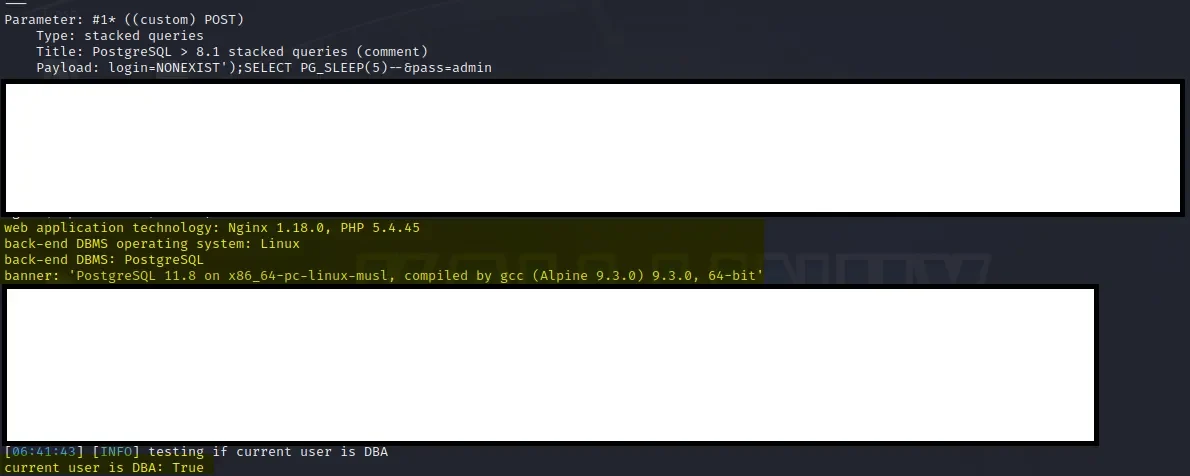
SQLmap then only tests that position. The first command fingerprints the backend and identifies the database user:
sqlmap -r target.txt --banner --current-user
-r loads the saved request, --banner retrieves the DBMS banner and --current-user retrieves the user the application connects as.
Step 4: From SQL injection to OS shell
After filing the initial report, the author read write-ups describing SQL injection escalated to RCE. The idea he took from them: if the current database user is a DBA and the backend is not Oracle, SQLmap can be used to obtain an operating system shell. He ran:
sqlmap -r target.txt --os-shell
--os-shell asks SQLmap to obtain command execution on the database host, typically by writing and calling a function or by uploading a shell through the DBMS's file facilities. The author reports that this achieved RCE.
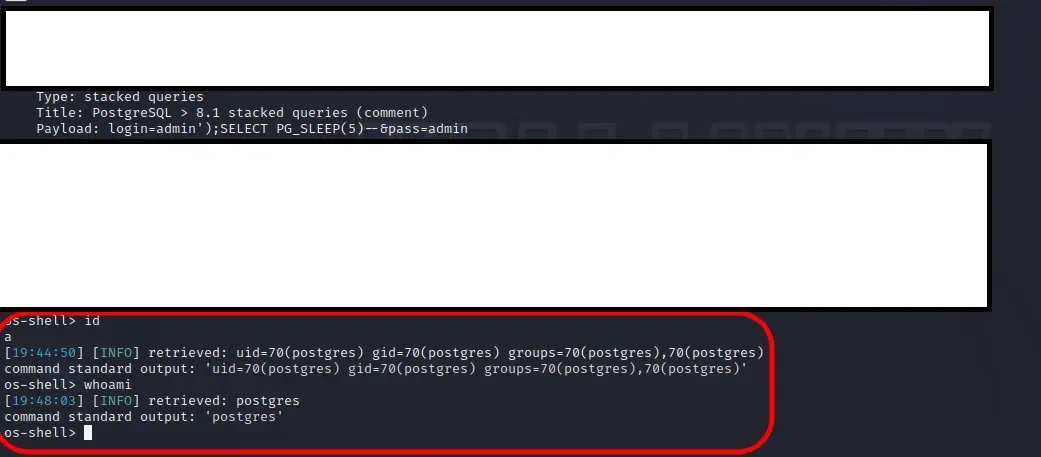
He updated the existing report with the RCE result rather than filing a new one. The finding was classified as critical.
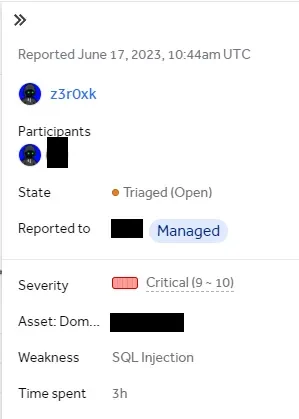
At the time of writing the report was in the triage/trigger stage awaiting acceptance, and the author promised to link the public report once it was disclosed.
Root cause
The payload's '); appears to terminate the developer's query and let the attacker append statements of their own. The report does not show the vulnerable query, so the exact concatenation is not visible; the behaviour is consistent with string building in the login handler.
Two further conditions made the escalation possible. The write-up the author followed said the technique works when the current user is a DBA on a non-Oracle backend. Second, the backend was PostgreSQL rather than Oracle, matching the precondition in the write-up the author followed.
Impact
The author demonstrated blind SQL injection and then obtained an OS shell through SQLmap. The author classifies the finding as critical and describes the impact as high, but the report does not enumerate what data was accessible or which hosts the shell reached. The write-up the author followed said the escalation requires a DBA user on a non-Oracle backend.
Fix
The appropriate fix is to use parameterised queries or prepared statements for the login lookup so the parameter can never alter statement structure, and to run the application's database account with the minimum privileges it needs rather than DBA. Disabling stacked queries at the driver level where the application does not need them adds a second layer.
Variants to test
- Time-based blind on other DBMS. Try
';SELECT SLEEP(5)--for MySQL,';WAITFOR DELAY '0:0:5'--for MSSQL and';SELECT PG_SLEEP(5)--for PostgreSQL. A positive result is a consistent delay of roughly the requested duration, repeatable across several requests. - Stacked queries in login forms. Where a single quote closes the statement cleanly, test whether a second statement executes at all. A positive result is a side effect such as a delay or a row change, not just a syntax error.
- Privilege check before escalation. Once injection is confirmed, retrieve the current user and its roles. A positive result for escalation is a user with DBA or equivalent rights on a non-Oracle backend.
- Response manipulation on the same panel. Flip boolean values in the response body or status code and see whether the client accepts them. A positive result is access granted without valid credentials, which is a separate bug from the injection.
- Default credentials. Test common pairs against the panel before assuming injection is the only path; a positive result is a successful login with a documented default account.
A final piece of advice from the author: keep trying, and read as many write-ups as you can.
What happened, in plain words
A security researcher found his first valid bug after about nine months of trying. The bug was in an ordinary login form on a website. A login form is the box where you type a username and password. Behind that box, the website checks the submitted details against stored data. A database is a program that stores and looks up data, a bit like a very fast, very strict filing cabinet that only understands a special language called SQL.
The problem was that the website built that question by gluing the text you type straight into the question. Imagine a form that says "Hello, [your name]" and you write your name as "Bob. Also, please open the safe." If the machine reads the whole line as an instruction, it opens the safe. That is what happened here: the researcher typed a special sequence of characters into the login box, and the database ran an extra command of his choosing.
He first proved the bug with a time-based payload that asks the database to pause. Then he used a free tool called SQLmap to show how serious it was, and finally to run commands on the server's operating system itself. Running your own commands on someone else's server is called remote code execution, or RCE. He reported it, updated the report with the RCE, and the finding was classified as critical.
The target is only ever called target.com in the write-up. The report does not name the organisation or the application.
Before the bug: how he got there
He had been hunting for about nine months. Bug hunting means looking for security mistakes in websites, usually ones that have agreed to receive such reports. He had submitted 10 reports that were closed as N/A (not applicable, meaning the site decided there was no real bug) and 3 that were duplicates (someone else had reported the same thing first). That is a lot of failure, and it is normal at the start.
A friend suggested private programmes. A private programme is a bug bounty or disclosure programme that only invited researchers can see. To get an invitation you usually need points, and points come from valid findings. So he went to VDPs instead. A VDP, or vulnerability disclosure programme, is a programme where a company accepts security reports but does not pay a reward.
He picked a target at random from a VDP. The tools he used were deliberately simple:
- chaos.projectdiscovery.io, a public collection of subdomain lists.
- A short bash script to merge those lists into one file. Bash is the command language of Linux and macOS terminals.
httpx, a command-line tool that checks which hosts are alive and can take screenshots of them.- A browser and an intercepting proxy. A proxy sits between your browser and the website and lets you read and edit the requests before they are sent. A request is the message your browser sends to a server, for example "here is my username and password, please log me in".
- SQLmap, a free tool that automates finding and exploiting SQL injection.
Finding it
Step 1: Collecting subdomains
A subdomain is a part of a company's domain, for example shop.example.com next to www.example.com. Companies often have many, and some are forgotten, old or less protected. Finding them is a standard first step because the main website is usually well tested while a side project may not be.
Rather than collecting every subdomain by hand, he downloaded the Chaos dataset and merged the per-domain files into one list called allDomains.txt:
sed -i 's/\*\.//g' *.txtfor file in *.txt; do mv "$file" "${file%.*}_domains.txt"donecat *_domains.txt |sort -u|tee allDomains.txt rm *_domains.txt
Line by line, in plain words:
sed -i 's/\*\.//g' *.txtedits every.txtfile in place and removes the characters*.wherever they appear. Subdomain lists often write entries as*.example.com, and the*.part is not a real hostname, so it is stripped.for file in *.txt; do ... doneis a loop: do the same thing for every.txtfile.mv "$file" "${file%.*}_domains.txt"renames each file, adding_domains.txtto its name.${file%.*}means "the file name without its extension". This keeps the files apart and makes them easy to match later with a pattern.cat *_domains.txtprints the contents of all the renamed files together.| sort -usorts the lines and removes duplicates (-umeans unique).| tee allDomains.txtwrites the result toallDomains.txtand also shows it on screen.rm *_domains.txtdeletes the temporary renamed files.
The author says this is not the best solution but it worked for a beginner. The point of the step is to end up with one clean list of candidate hostnames.
Step 2: Checking which hosts are alive, and screenshotting them
Next he checked which of those hostnames actually respond, and took a picture of each one:
httpx -l allDomains.txt -o liveDomains.txthttpx -l liveDomains.txt -srd subsScreens -ss
httpx -l allDomains.txt -o liveDomains.txtreads the list (-l) and writes the hosts that answer toliveDomains.txt(-o).httpx -l liveDomains.txt -srd subsScreens -ssreads the live list again, saves screenshots (-ss) and puts them in a directory calledsubsScreens(-srd).
Why screenshots? Because reading hundreds of pages is slow, but flicking through hundreds of pictures is fast. You are looking for anything that accepts input: a login box, a search field, a contact form.
He went through the screenshots looking for easy targets: login panels, search banners and similar places where a user can type something. Most login panels looked conventional, so he kept looking for something less ordinary.
Step 3: The three usual ideas for a login form
One panel stood out. He intercepted its login request with his proxy. At that point, three standard ideas come to mind for a login form:
- Response manipulation. The server sends back an answer, for example a message saying the login succeeded or failed. If the browser or the app trusts that answer blindly, you might be able to change it on the way and get in. He tried changing
truetofalsein the response and it did not work. - Default credentials. Many devices and apps ship with a well-known username and password, such as
admin/admin. If nobody changed them, you can simply log in. He found none that worked. - Injection. Instead of a real username, you send characters that change the meaning of the database question. This is the one that paid off.
Exploitation
Step 1: Boolean blind testing
His first injection attempt was boolean-based. "Boolean" means true or false. The idea is to send a condition that should be true and one that should be false, and compare the two answers. If the page behaves differently, the database is evaluating your condition, which means injection is possible. "Blind" means you cannot see the database output directly; you can only infer things from how the page behaves.
Nothing distinguishable came back, so the parameter did not look injectable that way. It was 3:00 AM, so he wrote a note about the panel and went to bed. This is worth noticing: stopping when tired and coming back with a fresh mind is part of the method, not a failure.
Step 2: Time-based testing
The next day he returned to the same request and switched to time-based blind injection. Instead of looking for a difference in the page, you ask the database to pause for a fixed number of seconds. If the answer arrives five seconds late, you know your command ran, even if the page looks identical.
He tried payloads for several DBMS. A DBMS is a database management system, the particular software that runs the database; different brands understand slightly different commands. One payload worked:
admin');SELECT PG_SLEEP(5)--
Piece by piece:
adminis an ordinary username, so the request looks normal at first glance.');closes the text string and the surrounding statement. The developer's code probably looked like... WHERE login = 'plus whatever you typed plus'. The single quote ends the string, the)closes a bracket, and the;ends the statement.SELECT PG_SLEEP(5)is a second, separate command.PG_SLEEP(5)is a PostgreSQL function that makes the database wait five seconds. PostgreSQL is one brand of DBMS.--starts a comment in SQL, so everything the application appends after your input is ignored.
The payload worked, confirming that the injected SQL was executing on a PostgreSQL backend.
Step 3: Proving impact with SQLmap
He notes that many of his earlier reports were closed as N/A because he had not shown impact. Impact means: what can an attacker actually do, and how bad is it? A report that says "there might be a bug" is weak; a report that shows the database waiting on command is strong.
So this time he set out to demonstrate a high-impact result. He saved the intercepted POST request to a file. POST is the method a browser uses when it sends data to a server, as opposed to GET, which is used when you simply ask for a page. He then marked the injection point with an asterisk inside the login parameter:
login=admin*
The asterisk tells SQLmap "test exactly here, not everywhere else". Without it, the tool might test many positions and produce noise or false results.
The first command fingerprints the backend and identifies the database user:
sqlmap -r target.txt --banner --current-user
-r target.txtloads the saved request from the file, so SQLmap sends exactly the same request your browser did.--bannerasks the database for its version banner, which identifies the DBMS and its version.--current-userasks which database user the application connects as. This matters enormously: a limited user can read some data, a powerful user can do much more.
Step 4: From SQL injection to OS shell
After filing the initial report, he read write-ups by other researchers describing how SQL injection can be escalated to RCE. A write-up is a public article explaining a finding. The idea he took from them: if the current database user is a DBA and the backend is not Oracle, SQLmap can be used to obtain an operating system shell. A DBA is a database administrator, the most powerful account in a database. Oracle is another DBMS brand, and the technique described did not apply to it.
He ran:
sqlmap -r target.txt --os-shell
-r target.txtagain loads the same saved request.--os-shellasks SQLmap to obtain command execution on the database host, typically by writing and calling a function or by uploading a shell through the DBMS's file facilities. In plain terms: the tool uses the database's own powers to place a small program on the server and run it.
The author reports that this achieved RCE. RCE means the attacker can run their own commands on the machine, not just read the database.
He updated the existing report with the RCE result rather than filing a new one. Updating is the right move: it keeps the history in one place and avoids a duplicate. The finding was classified as critical.
At the time of writing, the report was in the triage or trigger stage, awaiting acceptance. Triage is the step where the programme's team reviews a report and decides whether it is valid. The author promised to link the public report once it was disclosed.
Why the bug existed
The login parameter appears to be concatenated into a SQL statement instead of being passed as a bound parameter. "Concatenated" means glued together as text. A bound parameter, also called a prepared statement, is a way of sending the value separately from the command, so the database always treats it as data and never as instructions. It is the difference between handing a shop assistant a note that says "one apple" and handing them a note that says "one apple, and also empty the till".
Because the value was glued in, the '); in the payload terminated the developer's query and let the attacker append statements of their own. A stacked query is simply a second SQL statement sent after the first, separated by a semicolon.
The report does not show the vulnerable query, so the exact concatenation is not visible; the behaviour is consistent with string building in the login handler.
Two further conditions made the escalation possible. The write-up the author followed said the technique works when the current user is a DBA on a non-Oracle backend. Second, the backend was PostgreSQL rather than Oracle, matching the precondition in the write-up the author followed. A WAF is a web application firewall, a filter that inspects requests and blocks suspicious ones.
What an attacker could do
The author demonstrated blind SQL injection and then obtained an OS shell through SQLmap. "Unauthenticated" means without any account. The author classifies the finding as critical and describes the impact as high, but the report does not enumerate what data was accessible or which hosts the shell reached.
The write-up the author followed said the escalation requires a DBA user on a non-Oracle backend. That is a useful lesson: the same injection can be a moderate bug or a critical one depending on how the database account is configured.
How to fix it
The appropriate fix is to use parameterised queries or prepared statements for the login lookup, so the parameter can never alter statement structure. In everyday terms: keep the instruction and the data in separate envelopes, always.
Running the application's database account with the minimum privileges it needs, rather than DBA, is the second fix. If the account can only read and write the tables it needs, an injection is far less damaging. Disabling stacked queries at the driver level where the application does not need them adds a second layer.
Things to try on other targets
- Time-based blind on other DBMS. Try
';SELECT SLEEP(5)--for MySQL,';WAITFOR DELAY '0:0:5'--for MSSQL and';SELECT PG_SLEEP(5)--for PostgreSQL. A positive result is a consistent delay of roughly the requested duration, repeatable across several requests. Repeat it, because a slow network can also look like a delay. - Stacked queries in login forms. Where a single quote closes the statement cleanly, test whether a second statement executes at all. A positive result is a side effect such as a delay or a row change, not just a syntax error.
- Privilege check before escalation. Once injection is confirmed, retrieve the current user and its roles. A positive result for escalation is a user with DBA or equivalent rights on a non-Oracle backend.
- Response manipulation on the same panel. Flip boolean values in the response body or status code and see whether the client accepts them. A positive result is access granted without valid credentials, which is a separate bug from the injection.
- Default credentials. Test common pairs against the panel before assuming injection is the only path; a positive result is a successful login with a documented default account.
A final piece of advice from the author: keep trying, and read as many write-ups as you can.
Glossary
- API: an interface that lets one program talk to another, like a waiter taking your order to the kitchen.
- Bash: the command language used in Linux and macOS terminals.
- Blind injection: an injection where you cannot see the database output, so you infer results from the page's behaviour or timing.
- Boolean: a value that is either true or false.
- Bound parameter: a value sent separately from the SQL command so the database treats it as data, never as instructions.
- Bug bounty programme: a programme that pays researchers for valid security findings.
- Concatenation: gluing pieces of text together into one string.
- Cookie: a small piece of data a website stores in your browser, often used to remember that you are logged in.
- Critical: the highest severity rating, meaning the bug can cause severe damage.
- DBA: database administrator, the most powerful account in a database.
- DBMS: database management system, the software that runs a database, such as PostgreSQL, MySQL, MSSQL or Oracle.
- Duplicate: a report for a bug someone else already reported.
- GET / POST: the two common ways a browser sends a request; GET asks for a page, POST sends data such as a login form.
- Host: a single machine or website address on the internet.
- httpx: a command-line tool that checks which hosts are alive and can screenshot them.
- Impact: what an attacker can actually do with a bug, and how bad it is.
- Injection: sending input that changes the meaning of a command instead of being treated as plain data.
- Intercepting proxy: a tool that sits between your browser and a website so you can read and edit requests.
- Least privilege: giving an account only the permissions it truly needs, nothing more.
- N/A: not applicable, a report closed because the programme decided there was no real bug.
- Parameter: a named value sent with a request, such as
login=admin. - Payload: the exact text an attacker sends to trigger a bug.
- PostgreSQL: a popular open-source database system;
PG_SLEEPis one of its functions. - Prepared statement: a pre-built SQL command where values are filled in separately, preventing injection.
- Private programme: a bug programme visible only to invited researchers.
- RCE: remote code execution, running your own commands on someone else's machine.
- Request: the message a browser sends to a server.
- Response: the message a server sends back.
- Response manipulation: changing a server's answer on the way to the browser to trick the app.
- Screenshot: a picture of a web page, used to review many hosts quickly.
- sed: a command-line tool for editing text.
- Shell: a program that runs commands on a computer; an OS shell is one on the server's operating system.
- SQL: the language used to ask a database questions and give it instructions.
- SQL injection: a bug where user input is treated as part of a SQL command.
- Stacked query: a second SQL statement sent after the first, separated by a semicolon.
- Subdomain: a part of a domain, such as
shop.example.com. - Time-based injection: an injection proven by making the database pause and measuring the delay.
- Triage: the review step where a programme decides whether a report is valid.
- Unauthenticated: reachable without any account or login.
- VDP: vulnerability disclosure programme, which accepts reports but usually pays no reward.
- WAF: web application firewall, a filter that inspects requests and blocks suspicious ones.
- Write-up: a public article explaining a security finding.



