Story of a Information Disclosure and an Account Takeover | by Karthi
 Published on medium.com
Bug Bounty
The full write-up lives on its author's site
It belongs to its author, so we link to it rather than copy it. The other two tabs are our own rewrites, checked against it.
Context
This is the story of a first bug found on a Bugcrowd bug bounty program. The researcher selected a target on Bugcrowd the day before writing, and because the report was still in its early stages the company's identity is not revealed. The write-up asks the reader to assume the platform is icecream.com.
The feature at the centre of the finding is a chatbot. While intercepting the main corporate website with Burp Suite, the researcher found an endpoint that turned out to be a chatbot program. The agent first asked for a five-digit zip code. After a randomised code was entered, the chatbot granted access to an inbox. That inbox is where the injection was found.
Setup
- Target: a Bugcrowd program, referred to in the write-up as
icecream.com. - Recon tools: subfinder and amass for subdomain enumeration.
- Interception: Burp Suite, used against the main corporate website.
- Precondition: the chatbot asks for a five-digit zip code and, once one is supplied, opens an inbox. The chatbot asks for a five-digit zip code and, once one is supplied, opens an inbox.
Finding it
The recon phase started with subfinder and amass to gather the domains' subdomains, followed by collecting endpoints from the operational websites. The company uses many wildcards and subdomains, so this took a long time. An automated script was left running on a backup monitor while the researcher intercepted the main corporate website with Burp.
Registration was the first thing tried. When a new account was submitted, the page simply redirected to another page without saying whether the account had been opened. Repeated attempts produced no account. Looking for a help desk or anything else useful, the researcher noticed an interesting endpoint in Burp Suite. Visiting it revealed a chatbot program.

The image is captioned as the researcher's reaction to the discovery.
The agent asked for a five-digit zip code. A randomised code was entered, and the chatbot then granted access to an inbox. The researcher describes this inbox as the goldmine.
Exploitation
Step 1: Confirm HTML injection
A basic HTML payload was submitted to the chatbot:
<h1>Hi</h1>
The chatbox reflected it.
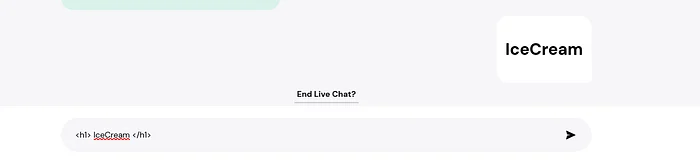
The image shows the chatbox reflecting the injected HTML.
Step 2: Decide on the exploitation path
With reflected HTML confirmed, the researcher looked for ways to turn it into a serious vulnerability, asking seniors and friends on social media as well. Two options were considered: CSRF, or XSS cookie theft. The out-of-scope section of the program made significant reference to CSRF, so the researcher went for cookie theft through HTML and XSS reflection instead, and prepared several payloads.
Step 3: Execute JavaScript through the reflected HTML
The payload used was a button whose click handler reads the document cookie:
<button onclick="alert(document.cookie)">XSS</button>
The chatbox responded to the submitted payload as shown below.
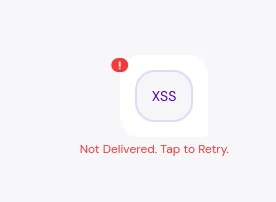
The image shows the payload reflected in the chatbox.
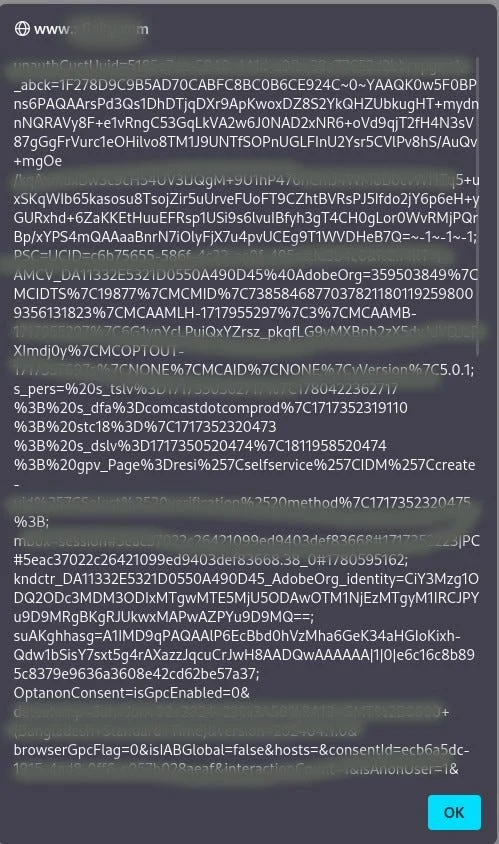
The image shows the chatbox response after the payload was sent, and then the pop-up that appeared once the XSS button was clicked.
Clicking the button rendered by the payload triggered the handler, and the pop-up with document.cookie appeared. That confirmed script execution in the context of the chatbot page.
Step 4: Report
The report with proof of concept was submitted the next morning, and the researcher waited for the response, hoping it would not be marked as a duplicate.

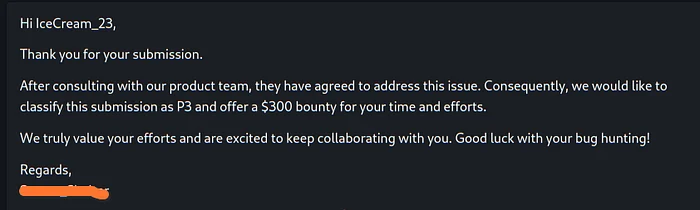
The image accompanies the note about submitting the report and waiting for the response.
An edit dated 01/08/2024 says: Finally It Triggered.
Root cause
The chatbox reflected the submitted HTML payload. Because the input was reflected into the page without neutralising markup, an attacker could supply their own elements, including one with an event handler. Clicking the button triggered the handler and the pop-up with document.cookie appeared. The report does not discuss any defences.
Impact
An attacker who can send input to the chatbot can execute JavaScript in the context of the chatbot page for anyone who views the reflected content and interacts with it, in this case by clicking the injected button. The researcher aimed at cookie theft, and the pop-up displayed document.cookie. The report does not show a session being taken over with a stolen cookie, and it does not state which cookies were present or how they were scoped. The write-up also notes that CSRF was considered but not pursued because of the program's out-of-scope section.
Fix
The report does not say what the program changed. The measure implied by the finding is to treat chat input as text: HTML-encode it on output so that markup such as <h1> or <button> is displayed rather than parsed, and avoid inserting user input into the page as raw HTML.
Variants to test
- Other chatbot or support widgets that echo input back into the conversation view. A positive result is your markup rendering as markup, for example a heading appearing as a heading rather than as literal text.
- Inputs that are stored and shown to a different user, such as an agent console or a transcript view. A positive result is the payload firing when the other party opens the conversation.
- Event handlers other than
onclick, such asonmouseoveroronfocus, where a click is unlikely. A positive result is the handler firing on the corresponding interaction. - Encoding and filter bypasses, such as mixed case in tag or attribute names, where a basic payload is blocked. A positive result is the same reflected execution with the modified payload.
- Cookie accessibility checks: after execution, inspect
document.cookieto see which cookies are readable and whetherHttpOnlyis set. A positive result is a session cookie appearing in the output. - The zip code step itself: try markup in the zip code field as well as in chat messages. A positive result is the same reflection at that stage of the flow.
What happened, in plain words
A security researcher spent a day hunting for bugs on a bug bounty program. A bug bounty program is a scheme run by a company (or by a platform such as Bugcrowd) that invites independent people to look for security weaknesses in its systems and pays or credits them for reporting what they find. The researcher picked a target on Bugcrowd the day before writing the story, and because the report was still being processed, the company's name is hidden. The write-up asks you to pretend the site is called icecream.com.
The researcher found a chatbot on the company's website. A chatbot is a small automated conversation window, the kind that pops up in the corner of a support page and asks you questions. This one asked for a five-digit zip code, and once a random number was typed in, it opened an inbox. An inbox here means a message area inside the chat where the conversation and its history live.
Inside that chat, the researcher typed some HTML. HTML is the language web pages are written in: the tags in it, like <h1> for a big heading or <button> for a clickable button, tell the browser how to display things. The chatbox reflected the payload. That is the bug: the chat treated whatever the visitor typed as page code rather than as plain words.
From there the researcher sent a button whose click runs a tiny piece of JavaScript. JavaScript is the programming language browsers run to make pages interactive. The button's code read document.cookie, which is the browser's storage for cookies. A cookie is a small piece of text a website asks your browser to keep and send back on later requests, and it is often used to remember who you are, so a stolen cookie can sometimes let someone else act as you. When the researcher clicked the injected button, a pop-up appeared showing the cookie contents. That proved code supplied through the chat was running inside the page.
The report, with a proof of concept (a demonstration that the bug really works), went in the next morning. The researcher waited, hoping it would not be marked a duplicate, meaning someone else had already reported the same thing. An edit dated 01/08/2024 says: Finally It Triggered.
Setup
Before any of that, there was preparation. Here is what the researcher used and why.
- Target: a Bugcrowd program, referred to in the write-up as
icecream.com. The real name is withheld while the report is open. - Recon tools: subfinder and amass. Recon, short for reconnaissance, is the information-gathering stage: finding out what the company owns on the internet before testing anything. Both tools are programs that collect subdomains. A subdomain is a smaller name under a main domain, so if the main site is
icecream.com, thenshop.icecream.comorhelp.icecream.comare subdomains. Each one can be a separate system with its own bugs. - Interception: Burp Suite. This is a tool that sits between your browser and the website and lets you read and change every request and response. A request is the message your browser sends to a server asking for a page or sending data; a response is what the server sends back. Being able to pause and inspect these is how testers see hidden endpoints. An endpoint is simply a specific address on a server that does something, like a door you can knock on.
- Precondition: the chatbot asks for a five-digit zip code and, once one is supplied, opens an inbox. The chatbot asks for a five-digit zip code and, once one is supplied, opens an inbox.
Finding it
The recon phase started with subfinder and amass to gather the domains' subdomains, followed by collecting endpoints from the operational websites. The company uses many wildcards and subdomains, so this took a long time. A wildcard in this context means a DNS setting that makes every possible subdomain name resolve, so the list of names becomes huge and noisy. An automated script was left running on a backup monitor, a second screen, while the researcher intercepted the main corporate website with Burp.
Registration was the first thing tried. When a new account was submitted, the page simply redirected to another page without saying whether the account had been opened. Repeated attempts produced no account. This is a common dead end: the form appears to work, but nothing tells you whether it did. Looking for a help desk or anything else useful, the researcher noticed an interesting endpoint in Burp Suite. Visiting it revealed a chatbot program.
The image is captioned as the researcher's reaction to the discovery: the moment a boring dead end turns into something worth testing.
The agent asked for a five-digit zip code. A randomised code was entered, and the chatbot then granted access to an inbox. The researcher describes this inbox as the goldmine. The lesson for a beginner: when a normal path is blocked, look at what else the site exposes. Support widgets, chat windows and help desks are often bolted on later and tested less carefully than the main login.
Exploitation
Step 1: Confirm HTML injection
A basic HTML payload was submitted to the chatbot:
<h1>Hi</h1>
Line by line: <h1> is the opening tag for a top-level heading, the biggest headline style on a page. Hi is the text that would appear. </h1> closes the heading. Nothing here is malicious; it is the simplest possible test.
The point of sending it is to answer one question: does the chat show my text as text, or does it build it into the page? If the chat is safe, you see the literal characters <h1>Hi</h1>. If it is unsafe, you see a large bold Hi. The chatbox reflected it. Reflected means your input comes back to you in the page. Escaped means special characters like < and > are converted into harmless codes so the browser displays them instead of acting on them.
The image shows the chatbox reflecting the injected HTML: the heading appears as a heading.
Step 2: Decide on the exploitation path
With reflected HTML confirmed, the researcher looked for ways to turn it into a serious vulnerability, asking seniors and friends on social media as well. Two options were considered: CSRF, or XSS cookie theft.
CSRF stands for Cross-Site Request Forgery. In plain terms, it is tricking a logged-in user's browser into sending a request the user did not intend, such as changing their password, because the browser automatically attaches their cookies. XSS stands for Cross-Site Scripting: getting your own code to run inside someone else's page, so it runs with that page's permissions. Cookie theft is one use of XSS: the injected code reads the victim's cookies and sends them to the attacker.
The out-of-scope section of the program made significant reference to CSRF. Out of scope means the program has said which kinds of findings it will not accept, so testing them is wasted effort. Because CSRF was effectively excluded, the researcher went for cookie theft through HTML and XSS reflection instead, and prepared several payloads. A payload is the actual piece of input you send to trigger a bug.
Step 3: Execute JavaScript through the reflected HTML
The payload used was a button whose click handler reads the document cookie:
<button onclick="alert(document.cookie)">XSS</button>
Line by line: <button starts a clickable button. onclick= is an event handler, an attribute that tells the browser what to do when the element is clicked. "alert(document.cookie)" is the action: document.cookie asks the browser for the cookies belonging to the current page, and alert(...) shows the result in a pop-up box. >XSS</button> is the label the visitor sees on the button and the closing tag. The word XSS on the button is just a label; the danger is in the handler.
The chatbox responded to the submitted payload as shown below.
The image shows the payload reflected in the chatbox.
The image shows the chatbox response after the payload was sent, and then the pop-up that appeared once the XSS button was clicked.
Clicking the button rendered by the payload triggered the handler, and the pop-up with document.cookie appeared. That confirmed script execution in the context of the chatbot page. In other words, the browser believed the code came from the site itself, so it allowed the code to read that site's cookies. This is the heart of XSS: the attacker's code inherits the trust the browser places in the page.
Step 4: Report
The report with proof of concept was submitted the next morning, and the researcher waited for the response, hoping it would not be marked as a duplicate. A duplicate is a report of a bug the program already knows about, usually from someone who reported it first, and it normally earns nothing.
The image accompanies the note about submitting the report and waiting for the response.
An edit dated 01/08/2024 records that the report was finally triggered.
Root cause
The chatbox reflected the submitted HTML payload. Because the input was reflected into the page without neutralising markup, an attacker could supply their own elements, including one with an event handler. Clicking the button triggered the handler and the pop-up with document.cookie appeared. Origin is the combination of scheme, host and port that the browser uses to decide which site a piece of code belongs to; code running in the site's origin can read that site's cookies.
The report does not discuss any defences. Output encoding is the fix where < becomes < and so on, so the browser shows the characters instead of parsing them. A Content Security Policy is a header a site can send to tell the browser which sources of script are allowed, which can block inline handlers like onclick.
Impact
An attacker who can send input to the chatbot can execute JavaScript in the context of the chatbot page for anyone who views the reflected content and interacts with it, in this case by clicking the injected button. The researcher aimed at cookie theft, and the pop-up displayed document.cookie. The report does not show a session being taken over with a stolen cookie, and it does not state which cookies were present or how they were scoped. The write-up also notes that CSRF was considered but not pursued because of the program's out-of-scope section.
The write-up shows the pop-up with document.cookie but no further exploitation.
Fix
The report does not say what the program changed. The measure implied by the finding is to treat chat input as text: HTML-encode it on output so that markup such as <h1> or <button> is displayed rather than parsed, and avoid inserting user input into the page as raw HTML.
Variants to test
If you want to look for the same class of bug yourself, these are the directions the write-up points to. Each one describes what a positive result looks like, so you know when to stop and report.
- Other chatbot or support widgets that echo input back into the conversation view. A positive result is your markup rendering as markup, for example a heading appearing as a heading rather than as literal text.
- Inputs that are stored and shown to a different user, such as an agent console or a transcript view. A positive result is the payload firing when the other party opens the conversation.
- Event handlers other than
onclick, such asonmouseoveroronfocus, where a click is unlikely. A positive result is the handler firing on the corresponding interaction. - Encoding and filter bypasses, such as mixed case in tag or attribute names, where a basic payload is blocked. A positive result is the same reflected execution with the modified payload.
- Cookie accessibility checks: after execution, inspect
document.cookieto see which cookies are readable and whetherHttpOnlyis set.HttpOnlyis a cookie flag that hides the cookie from JavaScript, so a session cookie with it set cannot be read this way. A positive result is a session cookie appearing in the output. - The zip code step itself: try markup in the zip code field as well as in chat messages. A positive result is the same reflection at that stage of the flow.
Glossary
- Bug bounty program: a scheme where a company invites outsiders to find and report security bugs, usually with a reward or credit.
- Bugcrowd: a platform that hosts bug bounty programs for companies.
- Recon: reconnaissance, the information-gathering stage before testing.
- Subdomain: a name under a main domain, such as
help.icecream.comundericecream.com. - Wildcard: a DNS setting that makes many or all subdomain names resolve, producing large noisy lists.
- subfinder / amass: tools that collect subdomains for a target.
- Endpoint: a specific address on a server that performs an action.
- Request: the message a browser sends to a server.
- Response: the message a server sends back.
- Burp Suite: a tool that intercepts, inspects and modifies requests and responses between browser and server.
- Chatbot: an automated conversation widget on a website.
- Inbox: here, the message area inside the chat where the conversation lives.
- HTML: the markup language that describes the structure of a web page.
- Tag: an HTML instruction such as
<h1>or<button>. - JavaScript: the programming language browsers run to make pages interactive.
- Cookie: a small piece of text a site stores in your browser and receives back on later requests, often used to identify you.
document.cookie: the browser property that exposes the current page's cookies to JavaScript.- Payload: the input you send to trigger a bug.
- Reflected: your input comes back to you in the page.
- Escaped / encoded: special characters converted into harmless codes so they display as text instead of being acted on.
- HTML injection: getting your own HTML into a page that then renders it.
- XSS (Cross-Site Scripting): getting your own code to run inside someone else's page with that page's permissions.
- CSRF (Cross-Site Request Forgery): tricking a logged-in user's browser into sending a request they did not intend.
- Out of scope: findings a program has said it will not accept.
- Event handler: an attribute such as
onclickthat runs code when something happens to an element. - Origin: the scheme, host and port that the browser uses to decide which site code belongs to.
- Content Security Policy: a header that restricts which scripts a page may run.
HttpOnly: a cookie flag that hides the cookie from JavaScript.- Proof of concept: a demonstration that a bug really works.
- Duplicate: a report of a bug the program already knows about, usually from an earlier reporter.
- Triggered: here, the report was accepted as valid.




