My First Un-Expected $$$$ Digit Bounty for an Un-Expected Vulnerability
The login page lacked rate limiting, allowing an attacker to perform a brute-force attack. The author successfully brute-forced the login and received a $1000 bounty.
 Published on medium.com
Hello readers, this is my first time I am writing any blog. I hope I won't waste your time and you will definitely take motivation from this.
The full write-up lives on its author's site
It belongs to its author, so we link to it rather than copy it. The other two tabs are our own rewrites, checked against it.
Context
This is a write-up of a bug bounty finding on improvmx.com, a program the author found through a public listing of open bug bounty and vulnerability disclosure programs. The feature involved is the main website's login page. The report does not describe what the product does beyond that, so I will not guess. The vulnerability class is a missing rate limit on the login endpoint, which allows a brute force attack against user credentials. The reward was $1000, and the report was published on 28 February 2023. The author notes that the finding happened about three years before writing, so the state of the site described here is historical.
Setup
The author had been doing bug bounty work since 2019, starting in the third year of college. Before this finding he had a run of duplicate and N/A reports and no recent payouts. On the day in question he closed all running programs, terminals and recon sessions and started fresh.
There were no special tools or versions recorded for the exploitation itself. The recon tools named in the report are:
- Google dorks for finding programs
waybackurls,ffufanddirsearchfor looking for information leakage- Manual browsing of the site and its login functionality
The only precondition for the attack was an account on the target site, which the author created himself. No credentials, session values or request captures are included in the report.
Finding it
The author began by searching for open bug bounty and VDP programs with Google dorks such as:
intext: Vulnerbility disclosureintitle: Security Bounty Program ...etc
He then filtered the results to recently launched programs by clicking the Tools button in Google and setting the time range to Past month.
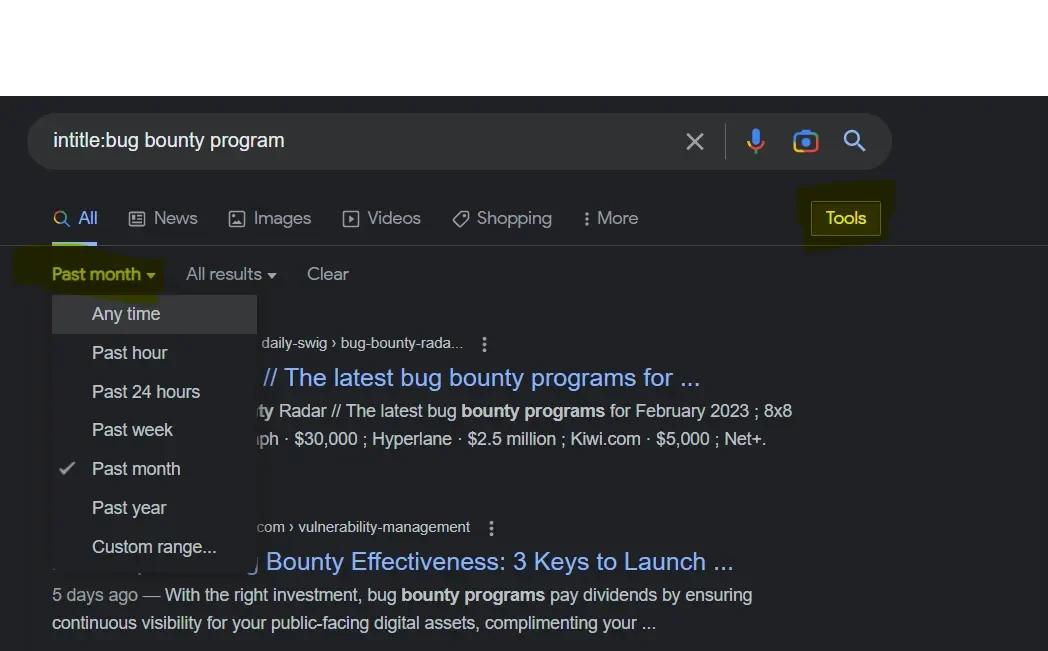
The post includes a screenshot at this point; the report does not describe its contents.
Among the results was a program launched about a week earlier. The author decided to try it and says he would disclose the name at the end, since the program had closed by the time of writing.
He read the scope and out of scope sections first. Subdomain enumeration turned up only four or five subdomains, with nothing major. He then browsed the main website manually and found a login button. Authentication is his preferred area, so he went straight to it, created accounts, and tested for CSRF, session expiration, session validation, IDOR, 2FA bypass and other issues in the p2 to p3 range. After about two hours he had found nothing and nearly gave up.
He returned to the main site and looked for sensitive information leakage through Google dorks, GitHub, and tools such as waybackurls, ffuf and dirsearch. That also produced nothing. He was about to move to another website but went back to the login page once more.
This time he re-read the qualifying and out of scope vulnerabilities and noticed that no rate limit was not listed as out of scope. He tested rate limiting on sensitive endpoints including the password reset function, the password change function, the invite team members function and other endpoints. All of them appeared protected. He took a break.
The next day he decided to test rate limiting on the login functionality alone. At the time he did not know the term brute force attack. The login page had no protection against brute force, and he was able to run a valid brute force attack against it.
He expected a p4 to p3 reward, at most $200, because the bug seemed minor. He submitted through the program's reporting form, which existed at the time, and received no confirmation email. After a week with no response he forgot about it and moved on to other programs. A month later he received an email, which he shows as an attachment in the post.
Exploitation
Step 1: Confirm the login page is reachable and create an account
The author created accounts on the site and used them while testing the authentication features.
Step 2: Test rate limiting on other sensitive endpoints
Before the login page, he tested rate limiting on the password reset function, the password change function, the invite team members function and other endpoints. All of them appeared protected, so no rate limit issue was found there.
Step 3: Test rate limiting on the login page
He sent repeated login attempts to the main login page. The report does not include the raw request, the payload list, the number of attempts, the response codes or the timing. What it states is that there was no protection against brute force and that a valid brute force attack was possible on the main login page.
Step 4: Report and wait
He submitted the finding through the program's reporting form. No confirmation email arrived. After a week there was still no response. A month later an email arrived, which the post includes as an attachment.
Root cause
What it shows is that the login endpoint accepted repeated authentication attempts without any effective throttling, lockout or challenge. The other sensitive endpoints he tested appeared protected, so the gap was specific to the login flow.
Impact
An attacker with network access to the login page could make repeated authentication attempts against user accounts. With no rate limit, this enables password guessing against any account whose password is weak or reused. The author's own expectation was a low severity, p4 to p3, with a maximum of $200, but the program paid $1000, which suggests the program rated it higher than he did.
Fix
Based on the finding, the login endpoint should enforce rate limiting per account and per source, with progressive delays or temporary lockout after repeated failures, and should log and alert on brute force patterns. The report does not confirm which of these were implemented.
Variants to test
- Password reset and password change endpoints. Send repeated requests and look for a consistent response with no throttling, lockout or delay. A positive result is many requests processed in a short window with the same response.
- Invite team members endpoint. Send repeated invitations and check whether the endpoint limits the number of requests per account or per IP. A positive result is a large number of invitations accepted without restriction.
- Other authentication flows. Test 2FA verification codes, email verification links and account recovery questions for the same missing throttle. A positive result is repeated guesses accepted without a lockout or delay.
- Login endpoints on subdomains. The author found only four or five subdomains, but each may expose its own login. Test each one for the same behaviour.
- Rate limit bypasses. If a limit exists, try changing headers, source addresses or account identifiers to see whether the limit is enforced per request rather than per account. A positive result is the limit resetting when the identifier changes.
Conclusion
Reward: $1000
Program Name: https://improvmx.com/
Vulnerability Name: No Rate Limit On Login Page (Brute Force Attack)
POC:
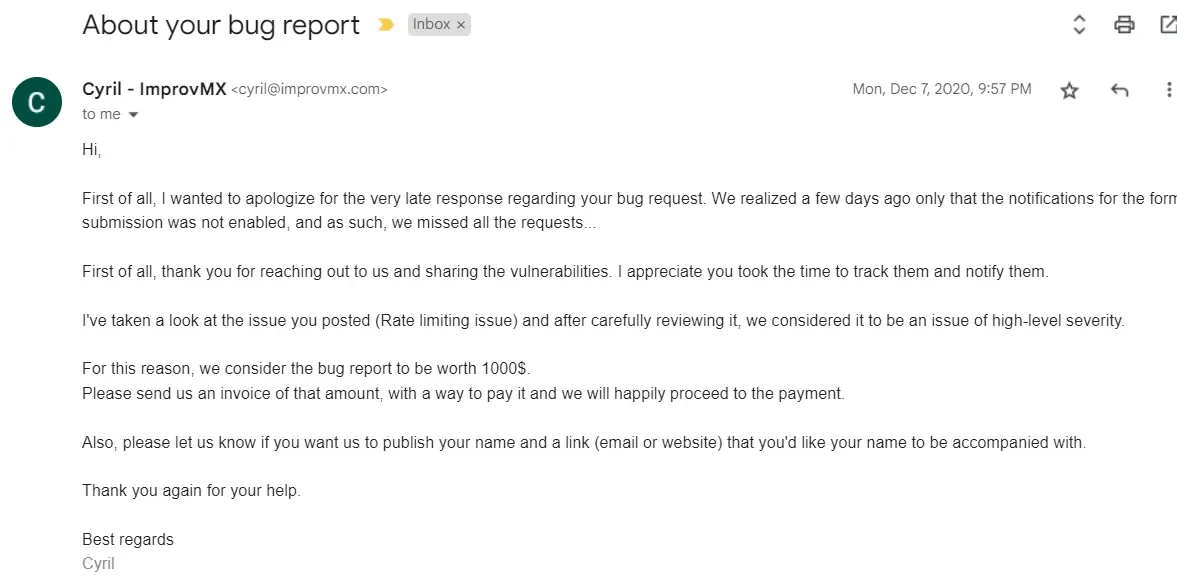
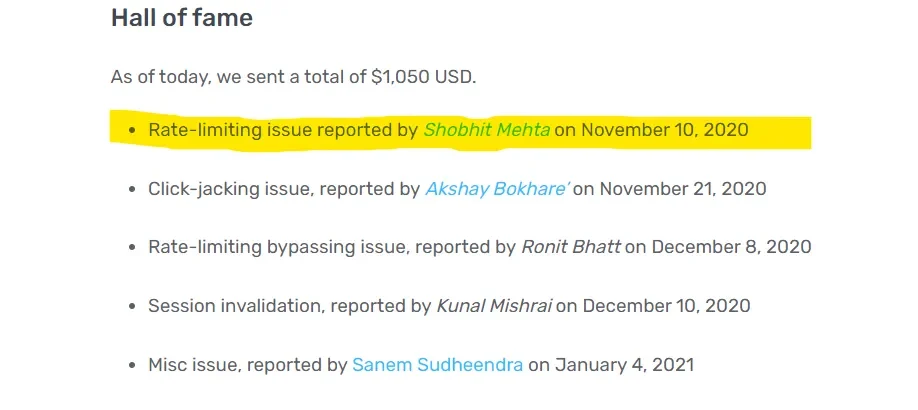
The lessons the author lists are: being consistent is the key; do not underestimate your findings and ask yourself whether something can really be an issue; do not put expectations before results; always be patient; and take a break whenever you feel lost.
What happened, in plain words
A security researcher found a website whose login page let you try passwords over and over with no limit. That kind of bug is called a missing rate limit, and it makes a brute force attack possible: guessing passwords by trying many of them quickly. He reported it expecting a small reward, heard nothing for a week, forgot about it, and a month later got an email saying he had been paid $1000. The site was improvmx.com, and the report was published on 28 February 2023. The finding itself happened about three years before he wrote it up, so what he describes is how the site was back then, not necessarily how it is now.
A few ideas first, because everything below depends on them.
- Bug bounty program: a company that invites outsiders to look for security problems in its systems and pays for good reports. A VDP (vulnerability disclosure program) is similar but usually does not pay; it just gives a safe way to report.
- Scope and out of scope: the list of what you are allowed to test and what you must leave alone. If something is out of scope, testing it can get you into trouble even if you find a real bug.
- Login page: the form where you type a username and password. Behind it, the server checks whether the pair is correct.
- Rate limit: a cap on how many times you can do something in a period, like a shop that only lets you buy two tickets per person. Without one, a computer can try thousands of passwords per minute.
- Brute force attack: guessing a secret by trying many possibilities in a row, usually with software, until one works.
Setup
The author started doing bug bounty work in 2019, while in the third year of college. Before this finding he had a bad run: his reports were coming back as duplicates (someone else had reported the same thing first) or N/A (not applicable, meaning the company did not consider it a valid issue), and he had no recent payouts.
On the day in question he closed every program he was working on, every terminal window running reconnaissance commands, and started from a clean slate. The point was to stop carrying half-finished work around and approach the next target with fresh attention.
No special tools or versions are recorded for the attack itself. The tools named in the report are:
- Google searches with special operators, called Google dorks, to find programs.
waybackurls,ffufanddirsearchto look for information that had leaked onto the internet.- Plain manual browsing of the site and its login page.
The only thing he needed before attacking was an account on the target site, which he created himself. The report contains no usernames, passwords, session values or captured requests.
Finding it
He began by searching for open bug bounty and VDP programs with Google dorks such as:
intext: Vulnerbility disclosureintitle: Security Bounty Program ...etc
Line by line, in plain words:
intext: Vulnerbility disclosuretells Google to return pages whose visible text contains the phrase "Vulnerbility disclosure". The spelling mistake is in the original and is copied as written; Google will simply match that misspelling.intitle: Security Bounty Programtells Google to return pages whose title contains "Security Bounty Program".- Putting two conditions next to each other means both must be true.
...etcis the author's shorthand for "and other dorks like this". It is not part of a real search.
A Google dork is just a search using Google's special keywords (intext:, intitle: and so on) to find pages with particular words in particular places, rather than searching the whole web loosely. Researchers use them to find companies that publicly invite reports.
He then narrowed the results to recently launched programs by clicking the Tools button in Google and setting the time range to Past month.
The post includes a screenshot at this point; the report does not describe its contents.
Among the results was a program launched about a week earlier. He decided to try it, and says he would name it at the end because by the time of writing the program had closed and was no longer accepting reports.
He read the scope and out of scope sections first. This is the equivalent of reading the rules of a competition before playing: it tells you where you may look and what the company already considers a known, accepted risk.
Subdomain enumeration came next. A subdomain is a prefix on a company's main address, like mail.example.com next to example.com; each one can be a separate application with its own behaviour. His enumeration turned up only four or five subdomains, nothing major.
He then browsed the main website by hand and found a login button. Authentication is his favourite area to test, so he went straight to it, created accounts, and tested for:
- CSRF (cross-site request forgery): tricking a logged-in user's browser into sending a request they did not intend.
- Session expiration: whether a logged-in state eventually times out.
- Session validation: whether the server properly checks that the session belongs to the person using it.
- IDOR (insecure direct object reference): changing an identifier in a request, such as a number in a URL, to reach someone else's data.
- 2FA bypass: getting past the second factor, the extra code some sites ask for after the password.
- Other issues in the p2 to p3 range, meaning medium severity on the program's own scale.
After about two hours he had found nothing and nearly gave up.
He went back to the main site and looked for sensitive information leakage: secrets such as passwords, keys or internal addresses that have ended up somewhere public. He searched Google dorks, GitHub, and used tools such as waybackurls, ffuf and dirsearch. In plain terms:
waybackurlscollects old URLs that have been archived over time, which can reveal pages that are no longer linked but still exist.ffufsends many requests with different guesses in a chosen part of the URL, to discover hidden pages or parameters.dirsearchdoes the same kind of guessing for directories and files on a web server.
That also produced nothing. He was about to move to another website but went back to the login page once more.
This time he re-read the qualifying and out of scope vulnerabilities and noticed that no rate limit was not listed as out of scope. In other words, the rules did not forbid testing it. That is why he tried it: a bug that is not excluded is fair game, even if it is not on the list of things the company is most interested in.
He tested rate limiting on sensitive endpoints, meaning the specific addresses on the server that handle particular actions. He tried the password reset function, the password change function, the invite team members function and other endpoints. All of them appeared protected. He took a break.
The next day he decided to test rate limiting on the login functionality alone. At the time he did not know the term brute force attack; he just knew he was sending the same kind of request many times. The login page had no protection against it, and he was able to run a valid brute force attack against it.
He expected a p4 to p3 reward, at most $200, because the bug seemed minor to him. He submitted through the program's reporting form, which existed at the time, and received no confirmation email. After a week with no response he forgot about it and moved on. A month later an email arrived, which he shows as an attachment in the post.
Exploitation
Step 1: Confirm the login page is reachable and create an account
He created accounts on the site and used them while testing the authentication features.
Step 2: Test rate limiting on other sensitive endpoints
Before the login page, he tested rate limiting on the password reset function, the password change function, the invite team members function and other endpoints. All of them appeared protected, so no rate limit issue was found there.
Step 3: Test rate limiting on the login page
He sent repeated login attempts to the main login page. The report does not include the raw request, the list of passwords tried, the number of attempts, the response codes or the timing. What it states is that there was no protection against brute force and that a valid brute force attack was possible on the main login page.
Step 4: Report and wait
He submitted the finding through the program's reporting form. No confirmation email arrived. After a week there was still no response. A month later an email arrived, which the post includes as an attachment.
Root cause
The report does not describe how the server was built. What it shows is that the login endpoint accepted repeated authentication attempts without any effective throttling, lockout or challenge. The other sensitive endpoints he tested appeared protected, so the gap was specific to the login flow.
Impact
An attacker with network access to the login page could make repeated authentication attempts against user accounts. With no rate limit, this enables password guessing against any account whose password is weak or reused. The author's own expectation was a low severity, p4 to p3, with a maximum of $200, but the program paid $1000, which suggests the program rated it higher than he did.
Fix
Based on the finding, the login endpoint should enforce rate limiting per account and per source, with progressive delays or temporary lockout after repeated failures, and should log and alert on brute force patterns. The report does not confirm which of these were implemented.
Variants to test
- Password reset and password change endpoints. Send repeated requests and look for a consistent response with no throttling, lockout or delay. A positive result is many requests processed in a short window with the same response.
- Invite team members endpoint. Send repeated invitations and check whether the endpoint limits the number of requests per account or per IP. A positive result is a large number of invitations accepted without restriction.
- Other authentication flows. Test 2FA verification codes, email verification links and account recovery questions for the same missing throttle. A positive result is repeated guesses accepted without a lockout or delay.
- Login endpoints on subdomains. The author found only four or five subdomains, but each may expose its own login. Test each one for the same behaviour.
- Rate limit bypasses. If a limit exists, try changing headers, source addresses or account identifiers to see whether the limit is enforced per request rather than per account. A positive result is the limit resetting when the identifier changes.
Conclusion
Reward: $1000
Program Name: https://improvmx.com/
Vulnerability Name: No Rate Limit On Login Page (Brute Force Attack)
POC:
The lessons the author lists are: being consistent is the key; do not underestimate your findings and ask yourself whether something can really be an issue; do not put expectations before results; always be patient; and take a break whenever you feel lost.
Glossary
- VDP (vulnerability disclosure program): a formal way for outsiders to report security problems, usually without payment.
- Scope: the parts of a company's systems that a researcher is allowed to test.
- Out of scope: the parts that must not be tested, or the kinds of issues the company does not want reported.
- Login page: the form where a user types a username and password so the server can check them.
- Rate limit: a cap on how many times an action can be performed in a period.
- Brute force attack: guessing a secret by trying many possibilities in a row until one works.
- Google dork: a Google search using special keywords such as
intext:orintitle:to find pages with particular words in particular places. - Subdomain: a prefix on a company's main address, such as
mail.example.comnext toexample.com, which can be a separate application. - Subdomain enumeration: finding the subdomains that exist for a target.
- Session: the server's record that a particular browser is logged in as a particular user.
- Session validation: whether the server properly checks that a session belongs to the person using it.
- 2FA (two-factor authentication): a second check after the password, such as a code sent to a phone.
- 2FA bypass: getting past that second check without the code.
- Severity (p2, p3, p4): the program's own ranking of how serious an issue is, usually from most to least severe.
- Sensitive information leakage: secrets such as passwords, keys or internal addresses that have ended up somewhere public.
- Endpoint: a specific address on a server that handles a particular action, such as logging in or resetting a password.
waybackurls: a tool that collects old URLs that have been archived over time.ffuf: a tool that sends many requests with different guesses in a chosen part of a URL to discover hidden pages or parameters.dirsearch: a tool that guesses directory and file names on a web server.- Throttling: deliberately slowing down or limiting repeated requests.
- Lockout: temporarily blocking an account after too many failed attempts.
- CAPTCHA: a challenge meant to be easy for a person and hard for software, used to slow down automated attempts.
- IP-based blocking: refusing requests that come from a particular network address.
- Proof of concept (POC): evidence, such as screenshots or a recording, that shows a reported issue really happened.