My Input Wasn’t the Payload. It Was the Address.
A hand-written routing script on a public course catalogue read a page path from the query string and, if the value contained a colon, treated it as a full URL, fetched it with jQuery ajax and inserted the response into the page with .html(). An attacker could host a response on their own server and get it rendered as script on the catalogue's origin, so a crafted link could run code in a visitor's browser.

infosecwriteups.com
Published on infosecwriteups.com
Bugbounty Writeup
The full write-up lives on its author's site
It belongs to its author, so we link to it rather than copy it. The other two tabs are our own rewrites, checked against it.
Context
The target is https://ex.example.com/, a public course catalogue with reading lists and a navigation menu. There is no login and nothing on the page that requires an account. The feature at the centre of the report is the site's own deep-linking scheme: links on the catalogue carry a query string that the front-end uses to decide which page to load into the current view.
The bug class is DOM XSS, but with a twist the author stresses from the start: the attacker's input never becomes a payload that the application filters. It becomes a hostname. The page takes a string from the address bar, uses it to decide which server to fetch its own content from, and renders whatever comes back. The payload arrives afterwards, from the attacker's server, inside a response body.
Setup
No accounts, roles or special tooling are described. The site is public and the researcher worked from the browser and from reading the site's JavaScript. The relevant file is core.js, described as 55 KB of jQuery with no build step and no framework, containing a hardcoded array of the site's own navigation paths maintained by hand at the top.
Finding it
What drew attention was the query string in the site's own links:
?directlink&nav-home/welcome&&&&&&&&
There are no key names, just values in slots, plus eight trailing ampersands that do nothing visible. The researcher's reading is that this is not a query string at all but an array with a URL wrapped around it, a format invented by hand rather than produced by the platform's own facilities. Hand-made formats imply hand-written parsers, and hand-written parsers tend to be written by people thinking about making links work rather than about hostile input.
That prompted a look at core.js.
Exploitation
Step 1: read the parser
The relevant code is:
var querystring = decodeURIComponent(location.search.substring(1));if (querystring.indexOf("directlink") != -1) { var getDirLink = querystring.split("&"); trackPgPath = getDirLink[1];}
It does not look for a parameter named directlink. It checks whether that string appears anywhere in the decoded query string, then splits the whole string on & and takes slot 1 as the page path. The trailing ampersands now make sense: later code reads higher slots without checking that they exist, so removing them causes a throw on undefined.length and kills the flow early. The padding is load bearing.
At this point the attacker-controlled string is a variable taken straight from the address bar, with nothing in between.
Step 2: follow the value to the sink
Forty lines further down:
if (page.indexOf(":") != -1) { holdUrl = page }var getPage = ajaxCall(holdUrl, '', 'html');$("#" + tagID).html(result);
A colon in the value flips its meaning from a local page name to a complete URL. That URL is passed to $.ajax with dataType: 'html', and the response is written into the page with .html(). The researcher is not injecting into the page; they are choosing where the page gets its body from.
Step 3: account for the fetch requirements
The response never touches the application's input handling, because it is not input, it is a fetch result, so there is no encoding to beat. The requirements move to the attacker's own infrastructure. The default method is POST, so the attacker's server has to answer POST and send Access-Control-Allow-Origin, otherwise the browser will not let the page read the response. The report frames this as a configuration line on a box the attacker controls, not a mitigation.
Step 4: get past the selector
The only real obstacle was accidental. Before the fetch runs, the same string is concatenated into a jQuery selector:
$("#nav_" + mainNav + " div")
Handing that a raw URL makes jQuery's selector engine throw unsupported pseudo, which kills the function before it reaches the sink. Keeping the string parseable as a selector is enough to get through.
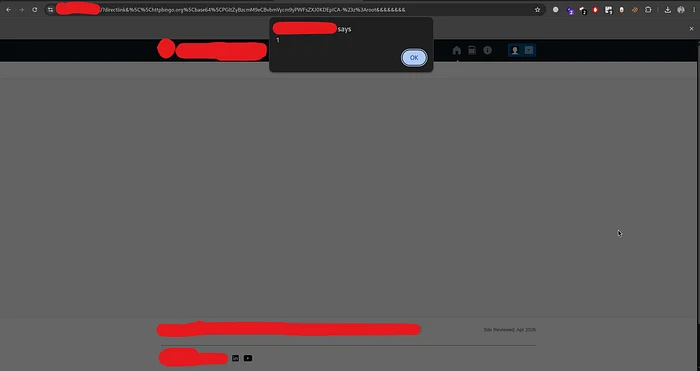
The report shows the issue marked as triaged.
Root cause
The application re-implemented routing by hand. Instead of taking a page name, looking it up and returning the template, it splits a hand-invented query format on &, takes a positional slot, and treats a colon in that value as permission to fetch an arbitrary URL and render the response as HTML. The safety properties that a framework router provides were re-implemented from memory while the author was thinking about the feature, and the result was, in the researcher's words, routing that accidentally implemented fetch a URL of the caller's choosing and render it.
The only thing standing between a hostile URL and script execution on the origin was a CSS selector that nobody wrote to validate anything. It exists because the menu lookup happens to run first. That is an accidental obstacle, not a defence.
Impact
Script on that origin runs inside its security boundary. It can hit the site's own endpoints as the visitor, rewrite the content to say anything, and keep doing so for as long as the tab stays open, all from a link that looks like an ordinary deep link. The report is explicit that the origin is a course catalogue with no login and nothing on the page to steal, which is exactly why it sat there untouched. Boring content and a boring origin are two different properties, and only one of them is a security boundary.
Fix
The report does not describe a specific patch. Its recommendation is to use the routing that the platform already provides: take the page name, look it up, return the template, so that no user input reaches the output. The flag to watch for is anyone solving that same problem by hand, with positional slots, string concatenation and a manually maintained list of their own page names.
Variants to test
- Look for query strings in a site's own links that contain no key names, repeated separators or trailing padding. A positive result is a format that only makes sense if a hand-written parser is splitting it positionally.
- Search front-end JavaScript for
location.searchfollowed bysplitand positional indexing. A positive result is a value taken from the address bar and used without a lookup against a fixed list. - Grep for tests on
indexOf(":")or similar checks that switch a value from a local name to a full URL. A positive result is a code path where a colon turns a page name into a fetch target. - Trace any
$.ajaxcall whose URL comes from that value and whose result reaches.html(). A positive result is a response body rendered into the page without encoding. - Check whether a selector concatenation runs before the sink, and whether a crafted value can stay parseable as a selector while still carrying a URL. A positive result is reaching the fetch without the selector engine throwing.
- Stand up a server that answers POST and returns
Access-Control-Allow-Origin, then confirm the page reads and renders the response. A positive result is attacker-controlled script executing on the target origin.
What happened, in plain words
A website had a feature that let its own links load different pages into the same view. The researcher noticed that the links looked odd, read the JavaScript that handled them, and found that the site would happily fetch a page from any address the visitor put in the link, then paste whatever came back into the page. Because the pasted content runs as if it came from the site itself, code from the researcher's server would run on the site, just by sending someone a link.
The unusual part is that the researcher never had to send a malicious-looking piece of text that the site might filter out. Their input was simply an address, a place for the site to fetch from. The dangerous content arrived later, from the researcher's own server, inside the reply.

The bug class: DOM XSS, and why this one is different
Most write-ups about a bug called DOM XSS follow the same pattern. First you find a sink: a place in the page's code where text gets inserted into the page. Then you find a source: a place where text enters from outside, such as the address bar. Then you spend the afternoon on the part in between, working out what the site strips out, what it encodes, which HTML tag survives, and whether you can sneak a quote character through. The payload, the malicious text itself, is the hard work.
This case skipped all of that. The researcher's input never became a payload. It became a hostname, the name of a server. The page took the researcher's string, used it to decide which server to fetch its own content from, and displayed whatever came back. The payload only appeared afterwards, from the researcher's machine, inside a response body.
There was nothing to filter, because filtering is something that happens to payloads, and no payload was ever sent.
A quick comparison: imagine a restaurant that lets you write the name of a dish on a card and the kitchen cooks it. Normally the danger is that you write something nasty on the card. Here, the danger is that you write the address of a different restaurant on the card, and the waiter goes there, picks up whatever food they hand him, and serves it to you on your plate. Nobody inspected your handwriting, because the problem was never the handwriting.
The target
https://ex.example.com/ is a public course catalogue. It has reading lists and a navigation menu, and no login. It is the kind of site you scroll past without a second thought.
What caught the researcher's attention was the query string in the site's own links. A query string is the part of a web address after the question mark, normally a list of names and values, like ?page=welcome&lang=en. Here it looked like this:
?directlink&nav-home/welcome&&&&&&&&
There are no names, only values sitting in slots, plus eight ampersands at the end that do nothing visible. An ampersand (&) is the character that normally separates one name-and-value pair from the next in a query string.
The researcher's reading was that this is not really a query string at all. It is more like a list of items with a web address wrapped around it, a format somebody invented by hand instead of using the tools the platform already provides. Hand-made formats come from hand-written parsers, and hand-written parsers tend to be written by people thinking about making links work, not about what a hostile visitor might type.
That was enough reason to open core.js, one of the site's JavaScript files.
Reading the code
core.js is described as 55 KB of jQuery. jQuery is an older, very widely used JavaScript library that makes it easier to find things on a page and to fetch data. There is no build step and no framework, and at the top there is a hardcoded list of the site's own navigation paths, maintained by hand. That tells you how much of this was designed carefully versus accumulated over time.
The relevant code is:
var querystring = decodeURIComponent(location.search.substring(1));if (querystring.indexOf("directlink") != -1) { var getDirLink = querystring.split("&"); trackPgPath = getDirLink[1];}
Line by line, in plain words:
location.searchis the part of the address bar starting with the question mark.substring(1)drops that question mark, so you are left with everything after it.decodeURIComponent(...)turns encoded characters back into normal ones. Web addresses cannot contain spaces and many symbols directly, so browsers encode them, for example a space becomes%20. This step undoes that encoding.querystring.indexOf("directlink") != -1asks a simple question: does the textdirectlinkappear anywhere in this string?indexOfreturns the position where it is found, or-1if it is not found at all. So this is not looking for a parameter nameddirectlink. It just checks whether the word appears somewhere.querystring.split("&")cuts the whole string into pieces at every ampersand and puts the pieces in a list.getDirLink[1]takes the second item in that list, because counting starts at zero. That item is treated as the page path, the name of the page to load.
The trailing ampersands now make sense. Later code reads items further down the list without first checking that they exist. If they are missing, the code tries to read something from nothing, throws an error, and the whole flow stops early. The padding is load bearing: it keeps the code running long enough to reach the interesting part.
At this point the researcher's string is a variable taken straight from the address bar, with nothing in between.
Following the value to the sink
Forty lines further down is this:
if (page.indexOf(":") != -1) { holdUrl = page }var getPage = ajaxCall(holdUrl, '', 'html');$("#" + tagID).html(result);
Again, line by line:
page.indexOf(":") != -1checks whether the value contains a colon (:). A colon is the character inhttps://that separates the scheme from the rest of a web address.- If there is a colon,
holdUrl = pagecopies the value into a variable calledholdUrl. In other words, a colon flips the meaning of the value from "the name of one of our own pages" to "a complete web address". ajaxCall(holdUrl, '', 'html')fetches that address. An AJAX call is a way for a page to ask a server for data in the background, without reloading the whole page. The'html'says the reply is expected to be HTML, the language web pages are written in.$("#" + tagID).html(result)finds an element on the page and puts the reply inside it..html()inserts the text as actual HTML, not as plain text, which means any tags or scripts in it are treated as part of the page.
The researcher is not injecting anything into the page directly. They are choosing where the page gets its body from.
What that changes
There is no encoding to beat. The reply never passes through the site's input handling, because it is not input. It is a fetch result. The site's defences were built to clean up what visitors type, and this content never went through that door.
The requirements move to the attacker's own server. By default this kind of fetch uses POST, a method a browser uses to send data to a server. So the researcher's server has to accept POST requests and send back a header called Access-Control-Allow-Origin. A header is a small piece of extra information a server sends alongside its reply. This particular header tells the browser which other sites are allowed to read the reply. Without it, the browser fetches the data but refuses to hand it to the page. That is not a defence, just one configuration line on a machine the attacker controls.
The only real obstacle was accidental. Before the fetch runs, the same string is glued into a jQuery selector:
$("#nav_" + mainNav + " div")
A selector is a pattern used to pick out elements on a page, a bit like a search query for the page's structure. #nav_ plus the value forms an element id, and div means "a div element inside it". If you hand this a raw web address, jQuery's selector engine does not understand it, throws an error reading unsupported pseudo, and the function dies before it ever reaches the fetch. Keep the string parseable as a selector and you get through.
That is the part worth sitting with. The only thing standing between a hostile address and code running on this site was a CSS selector that nobody wrote to validate anything. It is there only because the menu lookup happens to run first.
The report shows the issue marked as triaged.
The boring origin is the point
It is a course catalogue. Nobody logs in. There is nothing on the page to steal, which is exactly why it sat there untouched.
Browsers do not care what a page is about. Code running on that site runs inside its security boundary, the invisible fence that keeps one website's data away from another's. From inside that fence, code can call the site's own endpoints as the visitor, rewrite the content to say anything, and keep doing it for as long as the tab stays open. All of that from a link that looks like an ordinary deep link, the kind that jumps straight to a page inside a site.
Boring content and a boring origin are two different properties. Only one of them is a security boundary.
The lesson
Serving a page by name is a solved problem. Every framework ships a router: take the name, look it up, return the template. No visitor input ever reaches the output.
When you find someone solving that same problem by hand, with positional slots, string concatenation and a manually maintained list of their own page names, that is the flag. Not because hand-written code is bad, but because somebody decided the built-in way did not fit, stepped off it, and then re-implemented every safety property from memory while thinking about the feature.
Here they re-implemented routing and accidentally implemented fetch a URL of the caller's choosing and render it.
The tell was never a payload. It was eight ampersands, which said that a person had invented a parameter format. Everything after that was reading.
How to look for the same thing
- Look at the query strings in a site's own links. If you see no names, repeated separators or trailing padding, that is a format that only makes sense if a hand-written parser is splitting it by position.
- Search the front-end JavaScript for
location.searchfollowed bysplitand positional indexing. That is a value taken from the address bar and used without checking it against a fixed list. - Search for tests on
indexOf(":")or similar checks that switch a value from a local name to a full address. That is a code path where a colon turns a page name into a fetch target. - Trace any
$.ajaxcall whose address comes from that value and whose result reaches.html(). That is a reply being rendered into the page without encoding. - Check whether a selector concatenation runs before the sink, and whether a crafted value can stay parseable as a selector while still carrying a web address. That is how you reach the fetch without the selector engine throwing.
- Set up a server that answers POST and returns
Access-Control-Allow-Origin, then confirm the page reads and renders the reply. That is attacker-controlled code running on the target site.
Glossary
- Query string: the part of a web address after the question mark, normally a list of names and values.
- Ampersand (
&): the character that separates one name-and-value pair from the next in a query string. - Parser: code that reads a string and works out what it means, piece by piece.
- JavaScript: the programming language browsers run to make pages interactive.
- jQuery: a widely used JavaScript library that simplifies finding elements on a page and fetching data.
- DOM XSS: a bug where text from outside the page ends up being inserted into the page as code, entirely within the browser.
- Source: the place where outside text enters the page's code, such as the address bar.
- Sink: the place in the page's code where text is inserted into the page.
- Payload: the malicious text an attacker sends in order to trigger a bug.
- Hostname: the name of a server in a web address, such as
ex.example.com. location.search: the part of the address bar starting with the question mark.decodeURIComponent: a JavaScript function that turns encoded characters in a web address back into normal ones.indexOf: a JavaScript function that reports where a piece of text appears in a string, or-1if it does not appear.split: a JavaScript function that cuts a string into a list at every occurrence of a chosen character.- Array: an ordered list of items in JavaScript, where counting starts at zero.
- AJAX: a way for a page to ask a server for data in the background without reloading.
- POST: a method a browser uses to send data to a server.
- Header: a small piece of extra information a server sends alongside its reply.
Access-Control-Allow-Origin: a header that tells the browser which other sites are allowed to read a reply.- Selector: a pattern used to pick out elements on a page, for example
#nav_home div. - CSS: the language that describes how a page looks; selectors come from it.
- Origin: the combination of scheme, hostname and port that defines a website's security boundary.
- Security boundary: the invisible fence that keeps one website's data away from another's.
- Endpoint: a specific address on a server that a page can send requests to.
- Deep link: a link that jumps straight to a particular page inside a site.
- Router: the part of a framework that takes a page name, looks it up and returns the right template.
- Framework: a collection of ready-made code that handles common jobs so developers do not write them by hand.
- Triaged: reviewed by the receiving team and accepted as a real problem.



