New 100$ Bug in My Methodology!
The invite member feature allowed an inviter to set the first and last name of an invited user before they registered. By entering special characters in those name fields, the inviter could prevent the invited email from registering or using the forgot password feature.

Hello everyone! I’m Rem and I’m 23 years old.
The full write-up lives on its author's site
It belongs to its author, so we link to it rather than copy it. The other two tabs are our own rewrites, checked against it.
Context
This write-up describes a bug the author found on a public bug bounty program. The report does not name the program or the application, and it does not give the endpoint, parameter names, HTTP requests or responses involved. What it does describe is a feature that most multi-user applications have: an Invite Member section, where an existing user enters the email address of someone they want to bring into the system, together with a first name and a last name for that person.
The unusual part was that the invite form let the inviter set the first name and last name of the invited person. The author initially assumed those values were only used inside the invite section, but testing showed that after the invitation, the first name and last name were set on the invited user's account in the site itself. In other words, anyone could choose the name that would be attached to another person's account before that person had even registered.
Setup
The report gives no tooling, versions or account details. The author describes himself as new to bug hunting, with over a year of experience, and says this was his first time working on a public program after previously avoiding them because many other hunters were active on them. The report does not describe the account or access needed to reach the Invite Member section. The invited address does not need to belong to an existing user: the whole point is that the name is set before the invited person registers.
Finding it
The author's approach was to explore different sections of the application and look for abnormal behaviour rather than hunting for a specific bug class. In the Invite Member section he noticed that the form asked for a first name and a last name for the invitee. That is the first thing that looked wrong: normally an inviter should not be able to decide what name another person's account will carry.
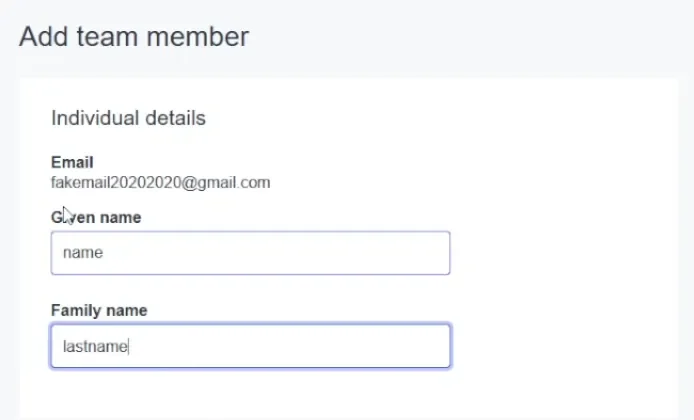
He then tested what happened to those values. After sending an invitation, the first name and last name he had entered were set on the invited user's account in the site. He notes that this is not a vulnerability by itself, but that the behaviour was uncommon, and he decided to look for a bug through it.
Exploitation
Step 1: Invite users with special characters in the name fields
The author invited several users by email, but instead of ordinary names he entered special characters in the first name and last name fields.
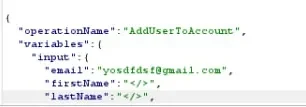
The report does not include the exact characters used, the request that carried them, or the response. The author entered special characters in the first name and last name fields when inviting users.
Step 2: Observe that the invited user can no longer register
The result was that the invited users could no longer register with the email address that had been invited. The invited users could no longer register with the email address that had been invited. The same applied to the forgot password feature: the invited user could not use it either.
Step 3: Repeat against any address
The author summarises the attack as follows. Pick an email address that is not registered on the site. In the invite section, enter that address, and put a special character in the first name field. An invitation email is sent to the address. From then on, if the owner of that address tries to register on the site, or tries to use the forgot password feature, they cannot. The author describes this as blocking the person from using the site.
No payloads, requests or responses are reproduced in the report, so the exact characters and the exact failure mode at registration are not documented here.
Root cause
The design flaw is that the invite flow lets one user write data (first name and last name) into another user's account record before that user has registered, and the registration and password reset paths then fail when that stored data contains special characters.
Impact
An attacker with an account on the target can prevent any email address that is not yet registered from registering on the site, and can also stop that address from using the forgot password feature. The author describes this as being able to disable any email in the system and block the person from using the site. The author describes the effect as blocking unregistered addresses from using the site.
Fix
Based on the described behaviour, the fix should be to stop trusting inviter-supplied names as account data: either keep the invited name scoped to the invitation only, or validate and normalise it before it is stored, and make registration and password reset robust to any stored name value so that an abnormal name cannot block those flows.
Variants to test
- Other pre-registration fields. Look for any invite or referral flow that lets the inviter set more than an email address, such as a display name, company, role or phone number. A positive result is that the value appears on the invited account and a later registration or password reset with that email fails.
- Different character classes. Try special characters, very long strings, whitespace-only values, Unicode and control characters in the name fields. A positive result is any value that is accepted at invite time and then breaks registration or password reset for the invited address.
- Other flows that consume the stored name. Test login, email change, profile update and any email template that renders the name. A positive result is an error, a blocked action or unexpected rendering tied to the attacker-chosen name.
- Injection classes in the same fields. The author's own checklist is to inject payloads such as XSS and CSTI into the first name and last name fields on every program. A positive result is script execution or template evaluation wherever the stored name is rendered.
- Bulk effect. Check whether invitations can be sent in bulk to many addresses, which would turn a single-address block into a wider denial of registration. A positive result is many addresses becoming unable to register after one batch of invitations.
What happened, in plain words
This is the story of a bug found on a public bug bounty program. A bug bounty program is a scheme run by a company that invites outside people to test its website or app and pays them for finding mistakes that could be abused. The author, who goes by Rem, does not name the company or the app, and he does not show the web addresses, form fields or network traffic involved. What he does describe is a feature that almost every website with user accounts has: an Invite Member section.
An Invite Member section is the part of a site where you, as an existing user, type in the email address of a friend or colleague so the site sends them an invitation to join. Usually you only supply the email address. Here, the form also asked for a first name and a last name for the person being invited.
That is the odd part. Normally the person who is invited decides their own name when they sign up. In this app, the person doing the inviting could decide it for them, before the invited person had even created an account. Rem tested what happened to those names, and found that they were written onto the invited person's account on the site itself, not just kept inside the invitation.
Then he tried something simple: instead of typing a normal name, he typed special characters into the first name and last name fields. The result was that the invited person could no longer register with that email address, and could not use the forgot password feature either. In effect, anyone with an account could stop an email address that had not yet signed up from registering or using forgot password.
This is a kind of denial of service. Denial of service (often shortened to DoS) means making something unavailable to the people who should be able to use it. It does not steal data or break in; it stops legitimate use. The author describes the denial as affecting email addresses that have not registered yet.
The setup
The report does not describe any tools, software versions or account details. Rem says he is new to bug hunting, with over a year of experience, and that this was his first time working on a public program. A public program is a bug bounty program that anyone can join, as opposed to a private one where only selected researchers are invited. He had previously avoided public programs because so many other hunters were active on them.

The image above sits right after that thought: he decided to enjoy the program and test it regardless of whether he found anything.
The report does not describe the account or access needed to reach the Invite Member section. The email address you invite does not need to belong to an existing user. That is the whole point: the name is set before the invited person registers.
Finding it
Rem's approach was not to hunt for one specific type of bug. Instead he clicked around different sections of the app and looked for behaviour that felt abnormal. In the Invite Member section he noticed that the form asked for a first name and a last name for the invitee.
That is the first thing that looked wrong. Think of it like a hotel booking: you can give the hotel the name of the guest you are booking for, but you should not be able to change the name on that guest's passport. Here, the inviter could decide what name another person's account would carry.
He then tested what happened to those values. After sending an invitation, the first name and last name he had entered appeared on the invited user's account in the site. He is careful to say that this is not a vulnerability by itself. It is just unusual behaviour. But unusual behaviour is exactly where bugs tend to hide, so he decided to look for one through it.
Exploitation
Step 1: Invite users with special characters in the name fields
Rem invited several users by email, but instead of ordinary names he entered special characters in the first name and last name fields.
The report does not include the exact characters he used, the request that carried them, or the response from the server. The author entered special characters in the first name and last name fields when inviting users.
A special character here means anything that is not a plain letter or digit: symbols like <, >, &, %, quotes, brackets, and so on. Many systems treat these characters carefully because they can have meaning in code, in web pages or in databases. When a form accepts them without checking, that is worth noting.
Step 2: Observe that the invited user can no longer register
The result was that the invited users could no longer register with the email address that had been invited. The invited users could no longer register with the email address that had been invited. The same applied to the forgot password feature: the invited user could not use it either.
Registration is the process of creating an account: you give an email address, choose a password, and the site creates a record for you. Forgot password is the flow where you ask the site to send you a reset link because you cannot log in. Both of these flows need to find or create the account record for that email address. If something in that record is malformed, the flow can break.
Step 3: Repeat against any address
Rem summarises the attack like this:
- Pick an email address that is not registered on the site.
- In the invite section, enter that address, and put a special character in the first name field.
- An invitation email is sent to the address.
- From then on, if the owner of that address tries to register on the site, or tries to use the forgot password feature, they cannot.
He describes this as blocking the person from using the site. The report does not reproduce any payloads, requests or responses, so the exact characters and the exact failure at registration are not documented.
Why it works
The design flaw is that the invite flow lets one user write data (first name and last name) into another user's account record before that user has registered. The registration and password reset paths then fail when that stored data contains special characters.
A likely explanation is that the name value is validated or processed during registration or password reset in a way that rejects the abnormal characters, and the failure blocks the whole flow rather than just the name field. Think of a form at a doctor's office: if the receptionist writes a symbol in the name box that the computer cannot handle, the whole check-in process stops, not just the name line.
Untrusted input means any data that comes from a user and could be malicious; a good system treats it with suspicion everywhere it is used.
Impact
An attacker with an account on the target can prevent any email address that is not yet registered from registering on the site, and can also stop that address from using the forgot password feature. Rem describes this as being able to disable any email in the system and block the person from using the site.
The author describes the effect as blocking unregistered addresses from using the site.
Fix
Based on the described behaviour, the fix should be to stop trusting inviter-supplied names as account data. Either keep the invited name scoped to the invitation only, or validate and normalise it before it is stored. Normalise means cleaning up a value into a standard, safe form. Registration and password reset should also be made robust to any stored name value, so that an abnormal name cannot block those flows.
Variants to test
- Other pre-registration fields. Look for any invite or referral flow that lets the inviter set more than an email address, such as a display name, company, role or phone number. A positive result is that the value appears on the invited account and a later registration or password reset with that email fails.
- Different character classes. Try special characters, very long strings, whitespace-only values, Unicode and control characters in the name fields. A positive result is any value that is accepted at invite time and then breaks registration or password reset for the invited address.
- Other flows that consume the stored name. Test login, email change, profile update and any email template that renders the name. A positive result is an error, a blocked action or unexpected rendering tied to the attacker-chosen name.
- Injection classes in the same fields. Rem's own checklist is to inject payloads such as XSS and CSTI into the first name and last name fields on every program. XSS (cross-site scripting) means getting your own code to run in someone else's browser through a website. CSTI (client-side template injection) means getting a web page's template engine to evaluate text you supplied as if it were code. A positive result is script execution or template evaluation wherever the stored name is rendered.
- Bulk effect. Check whether invitations can be sent in bulk to many addresses, which would turn a single-address block into a wider denial of registration. A positive result is many addresses becoming unable to register after one batch of invitations.
Glossary
- Bug bounty program: a scheme where a company pays outside researchers for reporting security mistakes in its products.
- Public program: a bug bounty program open to any researcher, as opposed to a private one limited to invited people.
- Invite Member: a feature that lets an existing user send an invitation by email to someone who is not yet registered.
- Denial of service (DoS): making a service unavailable to the people who should be able to use it, without necessarily stealing data.
- Registration: the process of creating an account with an email address and password.
- Forgot password: the flow where a user asks the site to send a password reset link.
- Special character: any character that is not a plain letter or digit, such as symbols, quotes or brackets.
- Untrusted input: data that comes from a user and could be malicious; a safe system treats it with suspicion everywhere it is used.
- Normalise: clean up a value into a standard, safe form before storing or using it.
- XSS (cross-site scripting): getting attacker-supplied code to run in another user's browser through a website.
- Payload: the specific piece of text or data an attacker sends to try to trigger a bug.
- Endpoint: a specific web address on a server that an app sends requests to.
- HTTP request: the message a browser sends to a server to ask for something or submit data.
- Response: the message a server sends back to the browser.
- Root cause: the underlying design or coding mistake that makes a bug possible.
- Impact: the real-world effect a bug has on users or the company.




