NO AI, How I Exposed a Database Without Injecting Anything
Sending the same agent-creation request twice caused a database unique-constraint error whose response included the full SQL statement, table and column names, and parameter values. An attacker could use this to learn the database schema and internal logic.

Hackerone
The full write-up lives on its author's site
It belongs to its author, so we link to it rather than copy it. The other two tabs are our own rewrites, checked against it.
Context
The target was an application that lets users create AI agents and chat with them. The feature at the centre of the write-up is agent creation: an authenticated user sends a request to create an agent, and the application provisions the corresponding record. The researcher found that repeating that same creation request causes the application to return a database error that discloses database tables, data types and the SQL statement behind the operation. No injection technique was involved; the trigger was simply sending the request twice.
Setup
The prerequisites were minimal. The researcher signed up for an account on the application and used the authenticated agent-creation request. The write-up does not name the program, the host, the token used, or any tooling beyond the HTTP requests themselves.
Finding it
The researcher describes the issue as a "very stupid vulnerability" that exposed database tables, ORM details and the logic behind the database itself. The observation was that when a user repeats the request that creates an AI agent, the whole application returns all the database tables and data types. The write-up does not explain why the application behaves this way; the author states plainly that they do not know the reason either.
Exploitation
Step 1: Create an account and send the creation request
After signing up, the researcher sent the agent-creation request once. The request as shown in the write-up:
POST /api/v1/create_agent HTTP/2 Host: Authorization: Token Content-Type: application/json { "title": "My Assistant", "name": "Assistant", etc.. }
The request is a JSON POST to /api/v1/create_agent carrying a token in the Authorization header. The body contains a title and a name for the agent, with the remaining fields elided in the write-up. The host, the token value and the full body are not given.
The normal response was a success envelope:
HTTP/2 200 OK { "success": true, "agent": { "I don't think I should be showing this in the writeup tho"} }
So a single request creates the agent and returns 200 OK with success: true and an agent object. The contents of that object are deliberately omitted from the write-up.
Step 2: Send the duplicate request
The researcher then sent the same creation request a second time. This is the trigger: no parameter was changed, no payload was injected, and no additional endpoint was called.
Step 3: Read the error response
The duplicate request produced a 500 response containing the database error:
{ "operation": "member_provision", "trace_id": "00000000-0000-0000-0000-000000000000", "detail": "(psycopg.errors.UniqueViolation) duplicate key value violates unique constraint \"accounts_member_handle_key\"\nDETAIL: Key (handle)=(org_ref:aaaaaaaa-aaaa-aaaa-aaaa-aaaaaaaaaaaa) already exists.\n[SQL: INSERT INTO accounts_member (secret_hash, last_seen, is_owner, handle, display_name, surname, contact_address, is_operator, enabled, created_at) VALUES (%(secret_hash)s::VARCHAR, %(last_seen)s::TIMESTAMP WITHOUT TIME ZONE, %(is_owner)s, %(handle)s::VARCHAR, %(display_name)s::VARCHAR, %(surname)s::VARCHAR, %(contact_address)s::VARCHAR, %(is_operator)s, %(enabled)s, %(created_at)s::TIMESTAMP WITHOUT TIME ZONE) RETURNING accounts_member.id]\n[parameters: {'secret_hash': '', 'last_seen': None, 'is_owner': False, 'handle': 'org_ref:aaaaaaaa-aaaa-aaaa-aaaa-aaaaaaaaaaaa', 'display_name': 'demo', 'surname': '', 'contact_address': '', 'is_operator': False, 'enabled': True, 'created_at': datetime.datetime(2025, 1, 1, 0, 0, 0, 0, tzinfo=datetime.timezone.utc)}]\n(Background on this error at: )", "status": 500, "reason": null, "backoff_seconds": null}
The response is a structured error object with an operation field set to member_provision, a trace_id, a detail string, status: 500, and null reason and backoff_seconds fields. The detail string is the interesting part. It contains:
- The database driver exception class,
psycopg.errors.UniqueViolation, and the message that a duplicate key value violates the unique constraintaccounts_member_handle_key. - A
DETAILline showing the conflicting key:handlewith the valueorg_ref:aaaaaaaa-aaaa-aaaa-aaaa-aaaaaaaaaaaa. - The full SQL statement being executed: an
INSERT INTO accounts_memberlisting the columnssecret_hash,last_seen,is_owner,handle,display_name,surname,contact_address,is_operator,enabledandcreated_at, with typed placeholders and aRETURNING accounts_member.idclause. - The bound parameters, including the handle value, the display name
demo, the boolean flags and a timestamp.
That single error therefore discloses the table name, every column name in the insert, the column types (for example VARCHAR and TIMESTAMP WITHOUT TIME ZONE), the unique constraint name, the internal handle format and the shape of the provisioning logic. The write-up presents this as the exposure of database tables, ORM details and the logic behind the database.
Root cause
The second identical request triggers an insert into accounts_member that the database rejects. The database rejects it on the unique constraint accounts_member_handle_key, and the resulting psycopg.errors.UniqueViolation is passed back to the client inside the detail field of the JSON error rather than being logged server-side only. The constraint violation reaches the driver and is returned to the client.
Impact
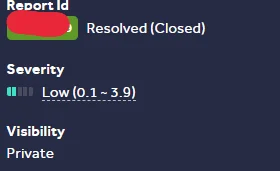
An authenticated user who can create an agent can obtain, with a single repeated request, the columns and types of the affected table, the constraint name, the internal handle format and the parameter values used in the insert. The write-up frames this as exposing database tables, ORM details and the logic behind the database. It does not demonstrate reading other users' data, and the parameters shown belong to the researcher's own request. The report was marked as LOW and rewarded.
Fix
The measure it points to is to stop returning raw database exceptions to clients: catch the unique-violation case and respond with a generic error, and keep the SQL, parameters and constraint names in server-side logs only.
Variants to test
- Repeat any state-changing request that creates a uniquely constrained record, such as account, organisation, team or resource creation. A positive result is a
500whose body contains a driver exception, a constraint name, a SQL statement or bound parameters. - Send the same request concurrently rather than sequentially, so both copies race past any existence check. A positive result is the same leaked exception from one of the two responses.
- Try other uniqueness collisions, for example reusing a name, handle, slug or email that already exists. A positive result is a constraint name and column list appearing in the response.
- Look for the same error envelope on other operations, since the
operationfield suggests a shared error format. A positive result is any other operation returning adetailstring with SQL or parameter values. - Check whether the leaked handle format (
org_ref:followed by a UUID in the example) can be supplied by the client in other requests. A positive result is the server accepting a client-chosen handle where it should generate one.
What happened, in plain words
A security researcher signed up for an ordinary account on a website that lets people create AI agents and chat with them. An AI agent here is just a chatbot persona you set up on the site: you give it a name and a title, and the site stores it for you. Creating one is a normal, everyday action, the kind of thing any logged-in user can do.
The researcher noticed something odd. When the same "create an agent" request was sent twice in a row, the second copy did not simply fail politely. Instead the website sent back a long technical error message that contained the inner workings of its database: table and column names, the types of data they hold, and even the exact database command it had tried to run.
Nothing clever was done to make this happen. No special characters were typed into a form, no attack tool was used, no trick was played on the database. The only thing that happened was pressing the same button twice. The researcher calls it a "very stupid vulnerability" and openly says they do not know why the application behaves this way.
The report was marked as LOW severity and rewarded, which the author notes is better than nothing.
To follow the rest of this article you only need to understand a handful of ideas, and each one is explained where it first appears.
Background: the pieces involved
What an API is
When you use a website, your browser and the website's server talk to each other. Often that conversation happens through an API (Application Programming Interface). Think of it as a waiter in a restaurant: you do not walk into the kitchen yourself, you tell the waiter what you want, and the waiter brings back a plate. An API is the same idea for software: your browser sends a request describing what you want, and the server sends back a response.
Each request has a few parts:
- A method, which says what kind of action you want.
GETmeans "give me something",POSTmeans "create something". - A path, which is the address of the specific feature, for example
/api/v1/create_agent. - Headers, which are small labels attached to the request, such as what format the body is in or who is asking.
- A body, which is the actual content, often written in JSON, a simple text format for structured data that looks like
{ "key": "value" }.
What a token is
A website needs to know who you are on every request. After you log in, the server gives your browser a piece of text called a token (sometimes stored in a cookie). Think of it as a wristband you get at an event: you show it at the door and staff know you already paid. On each request your browser sends that token in a header, usually called Authorization, so the server can recognise your account without asking for your password again.
What a database is
A database is where a website keeps its information in an organised way. Picture a set of spreadsheets. Each spreadsheet is called a table, each row is one record (one user, one agent), and each column is one field of that record (a name, an email address, a creation date). Each column also has a data type, which says what kind of value it holds, for example text (VARCHAR) or a date and time (TIMESTAMP).
What SQL is
To read or write those spreadsheets, the website's code speaks a language called SQL. A command like INSERT INTO accounts_member (...) means "add a new row to the table called accounts_member". A constraint is a rule on a table, for example "no two rows may have the same value in this column". If a command would break a rule, the database refuses it and reports an error.
What the vulnerability class is
This bug is not an injection. Injection means sneaking your own commands into a place where the website expects ordinary data, so the database ends up running code you wrote. Nothing like that happened here. The problem is the opposite: the website took an internal error message, which was meant for its own engineers, and handed it straight to the visitor. Security people call this verbose error disclosure or information leakage through error messages. The everyday comparison is a shop assistant who, instead of saying "sorry, that item is out of stock", reads out the supplier's address, the warehouse layout and the order form.
The setup
The preparation was minimal. The researcher created an ordinary account on the application and then used the normal, logged-in request that creates an AI agent. The write-up does not name the program, the website address, the token value, or any tool beyond the requests themselves.
Finding it
The researcher's observation was that when a user repeats the request that creates an AI agent, the whole application returns all the database tables and data types. The write-up does not explain why the application behaves this way; the author states plainly that they do not know the reason either.
Reproducing it, step by step
Step 1: Create an account and send the creation request once
After signing up, the researcher sent the agent-creation request a single time. This first request is the control: it shows what a normal, successful creation looks like, so that the second request can be compared against it. Here is the request as shown in the write-up:
POST /api/v1/create_agent HTTP/2 Host: Authorization: Token Content-Type: application/json { "title": "My Assistant", "name": "Assistant", etc.. }
Line by line, in plain words:
POST /api/v1/create_agentsays "create something" at the address/api/v1/create_agent. Thev1is just a version number in the address, so the site can change things later without breaking older clients.HTTP/2is the version of the language the browser and server use to exchange messages. It is a technical detail; you do not need to do anything with it.Host:is where the website's address would go. In the write-up it is left blank.Authorization: Tokenis the header that carries the wristband described earlier. The actual token value is not shown in the write-up.Content-Type: application/jsontells the server that the body is written in JSON, so it knows how to read it.- The body
{ "title": "My Assistant", "name": "Assistant", etc.. }gives the new agent a title and a name. Theetc..means the write-up leaves out the remaining fields; the full body is not given.
The normal response came back as a success:
HTTP/2 200 OK { "success": true, "agent": { "I don't think I should be showing this in the writeup tho"} }
Line by line:
HTTP/2 200 OKis the status line. The number200is the standard code for "everything went fine".{ "success": true, ... }is the body, again in JSON.success: trueconfirms the agent was created.- The
agentobject would normally contain the details of the new agent. The author deliberately replaced those details with a joking sentence rather than publishing them.
So one request creates the agent and returns a clean success. That is the expected behaviour, and it is what makes the next step interesting: the same request, sent again, should ideally produce an equally clean answer.
Step 2: Send the duplicate request
The researcher then sent the exact same creation request a second time. This is the whole trigger. No field was changed, no special text was inserted, and no other part of the site was touched. The reasoning behind the step is simple: if the first request created a record, the second request asks the site to create the very same record again, and the site has to decide what to do about that. Whatever it decides will be visible in the response.
Step 3: Read the error response
The duplicate request produced a 500 response. The number 500 is the standard code for "the server hit an internal problem". The body of that response is where the leak was:
{ "operation": "member_provision", "trace_id": "00000000-0000-0000-0000-000000000000", "detail": "(psycopg.errors.UniqueViolation) duplicate key value violates unique constraint \"accounts_member_handle_key\"\nDETAIL: Key (handle)=(org_ref:aaaaaaaa-aaaa-aaaa-aaaa-aaaaaaaaaaaa) already exists.\n[SQL: INSERT INTO accounts_member (secret_hash, last_seen, is_owner, handle, display_name, surname, contact_address, is_operator, enabled, created_at) VALUES (%(secret_hash)s::VARCHAR, %(last_seen)s::TIMESTAMP WITHOUT TIME ZONE, %(is_owner)s, %(handle)s::VARCHAR, %(display_name)s::VARCHAR, %(surname)s::VARCHAR, %(contact_address)s::VARCHAR, %(is_operator)s, %(enabled)s, %(created_at)s::TIMESTAMP WITHOUT TIME ZONE) RETURNING accounts_member.id]\n[parameters: {'secret_hash': '', 'last_seen': None, 'is_owner': False, 'handle': 'org_ref:aaaaaaaa-aaaa-aaaa-aaaa-aaaaaaaaaaaa', 'display_name': 'demo', 'surname': '', 'contact_address': '', 'is_operator': False, 'enabled': True, 'created_at': datetime.datetime(2025, 1, 1, 0, 0, 0, 0, tzinfo=datetime.timezone.utc)}]\n(Background on this error at: )", "status": 500, "reason": null, "backoff_seconds": null}
This is one JSON object with several fields. Going through them in plain words:
operationis set tomember_provision. This is the name the application gives to the internal job that was running when things went wrong. It hints that creating an agent also creates a member record behind the scenes.trace_idis an identifier the site uses to find this exact event in its own logs. In the write-up it is a placeholder made of zeros.detailis the long string, and it is the interesting part. It is the raw error message from the database, passed through to the visitor.status: 500repeats the "internal problem" code inside the body.reasonandbackoff_secondsare bothnull, meaning empty.backoff_secondsis a field a site might use to tell a client to wait before trying again; here it carries nothing.
Inside the detail string there are four separate pieces of information:
- The database driver's error class,
psycopg.errors.UniqueViolation, and the message that a duplicate key value violates the unique constraintaccounts_member_handle_key. A driver is the piece of software that lets the website's code talk to the database;psycopgis the name of one such driver.UniqueViolationis the driver's name for "you tried to create a duplicate of something that must be unique". - A
DETAILline showing the conflicting value: the columnhandlealready containsorg_ref:aaaaaaaa-aaaa-aaaa-aaaa-aaaaaaaaaaaa. A handle is an internal identifier for a record. Theorg_ref:prefix followed by a long identifier shows the internal format the site uses. - The full SQL statement being run:
INSERT INTO accounts_member, listing the columnssecret_hash,last_seen,is_owner,handle,display_name,surname,contact_address,is_operator,enabledandcreated_at. TheVALUES (...)part shows typed placeholders such as%(handle)s::VARCHARand%(created_at)s::TIMESTAMP WITHOUT TIME ZONE. A placeholder is a slot where the real value is filled in at the last moment; the::VARCHARpart states the data type of that slot.RETURNING accounts_member.idasks the database to hand back the identifier of the row it just created. - The bound parameters, meaning the actual values that were filled into those placeholders: the handle value, the display name
demo, several true/false flags such asis_owner: Falseandenabled: True, and a timestamp.
Put together, that single error message tells a reader the table name, every column name in the insert, the column types, the name of the unique rule, the internal handle format, and the shape of the logic that creates a member. That is exactly what the author means by exposing database tables, ORM details and the logic behind the database. ORM stands for Object Relational Mapper, a layer of code that lets programmers work with database tables as if they were ordinary objects in their programming language; the SQL shown here is what that layer generated.
Why it happens
The second, identical request triggers an insert into a member table. The second, identical request tries to create that same member record again. The database refuses, because the rule accounts_member_handle_key says the handle must be unique, and the driver raises a UniqueViolation. The problem is what happens next: instead of keeping that exception in the server's own logs, the application places it inside the detail field of the JSON error and sends it to the visitor.
A likely explanation is that the error handler formats the underlying database exception into the API response without stripping the SQL, the parameters or the constraint details. The violation travels all the way from the database to the client. So the violation travels all the way from the database to the client.
What the impact is
Any logged-in user who can create an agent can obtain, with one repeated request, the structure of the affected table, the column types, the constraint name, the internal handle format and the parameter values used in the insert. The write-up frames this as exposing database tables, ORM details and the logic behind the database. It does not demonstrate reading other users' data, and the parameters shown belong to the researcher's own request. The report was marked as LOW and rewarded.
The image sits at the end of the write-up, right after the sentence about the report being marked LOW and rewarded.
How to fix it
The measure it points to is to stop returning raw database exceptions to clients: catch the unique-violation case and respond with a generic error, and keep the SQL, parameters and constraint names in server-side logs only. In everyday terms, the shop assistant should say "sorry, that already exists" and write the warehouse details in the staff notebook, not read them out to the customer.
Other places to try the same idea
- Repeat any request that creates a record which must be unique, such as creating an account, an organisation, a team or a resource. A positive result is a
500whose body contains a driver exception, a constraint name, a SQL statement or bound parameters. - Send the same request at the same moment rather than one after the other, so both copies race past any existence check. A positive result is the same leaked exception in one of the two responses.
- Try other uniqueness collisions, for example reusing a name, handle, slug or email address that already exists. A positive result is a constraint name and column list appearing in the response.
- Look for the same error envelope on other operations, since the
operationfield suggests a shared error format. A positive result is any other operation returning adetailstring with SQL or parameter values. - Check whether the leaked handle format (
org_ref:followed by an identifier in the example) can be supplied by the client in other requests. A positive result is the server accepting a client-chosen handle where it should generate one.
Glossary
- API: the set of addresses and rules a website offers so that software can ask it to do things, like a waiter taking your order to the kitchen.
- Agent: in this application, a chatbot persona a user creates and chats with.
- Authorization header: the part of a request that carries your token, so the server knows which account is asking.
- Body: the content of a request or response, often written in JSON.
- Constraint: a rule on a database table, such as "values in this column must be unique".
- Cookie: a small piece of text a website stores in your browser, often used to remember that you are logged in.
- Data type: the kind of value a database column holds, for example text (
VARCHAR) or a date and time (TIMESTAMP). - Database: the organised store of a website's information, made of tables, rows and columns.
- Driver: the software that lets a website's code talk to its database;
psycopgis one example. - Handle: an internal identifier for a record, here in the form
org_ref:followed by an identifier. - Header: a small label attached to a request or response, such as
Content-TypeorAuthorization. - Idempotency check: a rule that makes the server ignore a request it has already processed, so repeating it has no extra effect.
- Injection: an attack where someone sneaks their own commands into data the website processes, so the database runs code the attacker wrote. Not used in this report.
- JSON: a simple text format for structured data, written with curly braces, names and values.
- Method: the part of a request that says what kind of action is wanted, such as
GET(read) orPOST(create). - ORM: Object Relational Mapper, a layer of code that lets programmers treat database tables as ordinary objects; it generates the SQL for them.
- Parameter (bound parameter): the actual value filled into a placeholder in a SQL statement.
- Placeholder: a slot in a SQL statement where a real value is inserted at the last moment.
- POST: the request method used to create something.
- Response: what the server sends back after a request.
- SQL: the language used to read and write data in a database.
- Status code: the number at the start of a response saying how it went, for example
200for success and500for an internal server problem. - Table: one spreadsheet-like collection of records inside a database.
- Token: a piece of text proving you are logged in, like a wristband at an event.
- Trace ID: an identifier a site uses to find a specific event in its own logs.
- Unique violation: the database's refusal to create a duplicate of a value that must be unique.
- Verbose error disclosure: a bug where a site sends internal error details, such as SQL or table names, to the visitor instead of a generic message.
- VARCHAR: a database data type for text of variable length.
- TIMESTAMP: a database data type for a date and time.




