[No Bounty] Git Exposed: How a Government Website Left Its Secrets Open | by Sachin Kewat
An exposed .git directory on a government website allowed the author to download the full source repository, which contained a database connection string with credentials. Using those credentials, the author connected to the database and accessed government data.

medium.com
Published on medium.com
Cybersecurity
The full write-up lives on its author's site
It belongs to its author, so we link to it rather than copy it. The other two tabs are our own rewrites, checked against it.
Context
This is an account of a chance discovery on a Maharashtra government website. The author does not name the site, saying only that it is a Maharashtra government website and that the name is redacted. The exposed asset was a .git directory on the site, which was reachable on port 80. A .git directory is the metadata store Git keeps beside a working tree: it holds the object database, refs, logs and configuration that together allow the full history of a repository to be reconstructed. When a deployment copies that directory to a web-accessible location, anyone who can reach the site can download it and rebuild the source tree, including anything that was ever committed.
Setup
The author describes himself as a graduate with a BSc in IT, hunting vulnerabilities in his own time. No accounts, roles or credentials were needed on the target: the finding was made from the outside, against a publicly reachable host. The only tool named is GitTools, and specifically its Dumper script, cloned from GitHub. The report gives no version numbers for the tool or for any server software.
Finding it
During reconnaissance the author came across the site and noted three things:
- An IP address that was publicly reachable.
- Port 80 open.
- A
.gitdirectory present and served by the web server.
An exposed .git directory is significant because the files inside it are not meant to be read by clients. If the server returns them, the repository can be reconstructed offline. The author's framing is that the directory was simply sitting there, and he proceeded to read it.
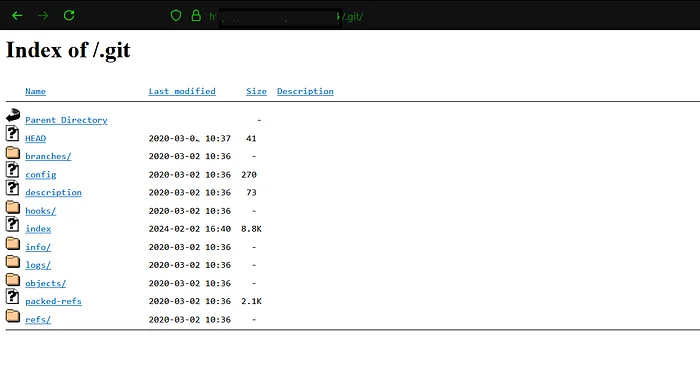
The image shows the ./git/ directory as it appeared on the site, which is what prompted the next step.
Exploitation
Step 1: Clone GitTools and dump the repository
The author used GitTools' Dumper against the .git path on the target:
git clone https://github.com/internetwache/GitTools.gitcd GitTools/Dumper./gitdumper.sh http://<target-website ip>/.git/ webisteclone
The command clones the GitTools repository, changes into its Dumper directory, and runs gitdumper.sh with two arguments: the URL of the exposed .git directory on the target, and the output directory name webisteclone. The author reports that this produced the entire Git repository.
Step 2: Read the commit history
With the repository reconstructed, the author inspected its history:
cd webisteclonegit log
git log lists the commits made by the developers. The author describes this as revealing every commit, and treats the history as the interesting part: commits record what changed and when, and old commits can still contain material that was later removed from the working tree.

The image shows the output of the history inspection in the cloned repository.
Step 3: Recover a database connection string and connect
The author reports finding a database connection string in the repository. He redacts it, and says he used the credentials to connect to the database with psql:
The host, user and password are all redacted in the report; the database name used was postgres. The author states that the connection succeeded and that the database contained tables of government data, including municipal records and infrastructure details. He also states that the data was not encrypted.

The image accompanies the description of what was found inside the database.
Root cause
The author attributes the exposure to two things:
- An exposed
.gitdirectory. The web server served the repository metadata to anyone who asked for it, so the full history could be downloaded. - Poor deployment practices. In the author's account,
.gitignorewas not used properly, so secrets ended up committed to the repository and shipped with the deployment.
The chain is straightforward: the deployment published .git, the history contained a database connection string, and the author used those credentials to connect to the database. The report does not describe any server configuration, framework or access control that would have limited the exposure, and it does not say how long the directory had been reachable.
Impact
Anyone who could reach the site could download the repository and read its full history, including the database connection string. With those credentials, the author connected to the database and found government data: municipal records and infrastructure details, unencrypted. The report does not quantify how many records or tables were present, does not name the database host, and does not say whether the credentials granted read-only or wider access. The author redacted the connection string and says he is not a villain.
Fix
The author reported the issue to the concerned authorities and says it was patched. He does not describe the patch itself. His recommendations are:
- Block access to
.git. Do not serve the directory at all. - Use
.gitignoreproperly. Keep passwords, configuration files and similar material out of the repository. - Secure deployment pipelines. Restrict who and what can deploy, and treat deployment as something that should not leak repository contents.
Variants to test
- Other VCS metadata paths. Request
/.git/HEAD,/.git/configand/.svn/entrieson other hosts. A positive result is a200with content that looks like repository metadata rather than an HTML error page. - Dumper against a candidate host. Run the same GitTools Dumper command against
http://<host>/.git/and check whether a repository is reconstructed. A positive result is a populated output directory with a validgit log. - History mining for secrets. In any recovered repository, search the full history, not just the current tree, for connection strings, keys and configuration files. A positive result is a credential or endpoint that is still live.
- Backup and archive files. Try common deployment leftovers such as
.env,config.php.bakand archive files in the web root. A positive result is a file served with its original contents. - Directory listing. Request the parent directory of a known path and see whether the server returns an index. A positive result is a listing that reveals files not linked from the site.
What happened, in plain words
A security researcher was browsing the web and came across a website belonging to the government of Maharashtra, a state in India. He does not name the site in his write-up, saying only that it is a Maharashtra government website and that he is keeping the name to himself. What he found was a folder called .git sitting on the public web server, where anyone with a browser could reach it.
That folder is not supposed to be public. It is the hidden storage that the version-control tool Git keeps next to a project's files, and it contains the complete history of that project: every version of every file that was ever saved, including things that were later deleted. The researcher was able to download the .git folder, rebuild the project from it, and read through its history. Inside the history he found a database connection string, which is a piece of text containing the address of a database plus the username and password needed to log into it. He used those credentials to connect to the database, and found tables of government data, including municipal records and infrastructure details, which he says were not encrypted.
He reported the problem to the authorities, and says it was fixed. This article walks through the same steps he describes, in the same order, explaining each idea from scratch along the way.
A little background on the author
The author introduces himself as Sachin Kewat, a cybersecurity enthusiast from Mumbai with a BSc in IT, who hunts for vulnerabilities in his own time while looking for a job. None of that background matters for understanding the finding, but it explains the tone of the write-up: this was a personal, unpaid discovery, not a formal engagement. No account, login or permission was needed on the target website. Everything described here was done from the outside, against a host that anyone on the internet could reach.

The only tool he names is GitTools, and specifically a script inside it called the Dumper. The report gives no version numbers for that tool or for any software running on the server.
Finding it
While looking around, the author noticed three things about the site:
- An IP address that was publicly reachable. An IP address is the numeric label that identifies a computer on a network, the way a street address identifies a building. If a machine has a public IP address, anyone on the internet can attempt to connect to it.
- Port 80 open. A port is a numbered channel on a computer; different services listen on different numbers. Port 80 is the standard channel for ordinary, unencrypted web traffic, the kind whose addresses begin with
http://rather thanhttps://. Saying port 80 is open means the web server was accepting connections there. - A
.gitdirectory present and being served by the web server.
That third point is the important one. To understand why, you need to know what Git is. Git is a tool that programmers use to keep track of changes to their code. Every time they save a batch of changes, they record a "commit": a snapshot of the project at that moment, with a note about what changed. Git stores all of these snapshots, plus its own settings and logs, in a folder named .git that sits inside the project folder. The leading dot is a convention that hides the folder from casual view on many systems, but it does not protect it in any way.
Normally the .git folder stays on the developer's computer or on a private server. When a website is deployed, only the finished files should be copied to the public web server. If the whole project folder, .git included, is copied instead, then the history goes public too. And because the history contains every version of every file, it can contain things that were deleted from the current version, such as passwords that someone once typed into a configuration file and later removed.
The author's comparison is that an exposed .git folder is like finding a diary labelled "Top Secret, DO NOT READ". Naturally, he read it.
The image shows the ./git/ directory as it appeared on the site, which is what prompted the next step.
Getting the repository out
Step 1: Download GitTools and dump the repository
GitTools is a free, publicly available collection of scripts hosted on GitHub, a website where programmers share code. One of its scripts, the Dumper, is built for exactly this situation: it asks a web server for the individual files that make up a .git folder, one request at a time, and reassembles them on your own computer into a working copy of the repository. The author ran:
git clone https://github.com/internetwache/GitTools.gitcd GitTools/Dumper./gitdumper.sh http://<target-website ip>/.git/ webisteclone
Line by line, in plain words:
git clone https://github.com/internetwache/GitTools.gitdownloads a copy of the GitTools project from GitHub onto the researcher's own machine. "Cloning" here just means copying a repository, history and all, from one place to another.cd GitTools/Dumpermoves into theDumpersubfolder of the downloaded project, so the next command can be run from there.cdstands for change directory../gitdumper.sh http://<target-website ip>/.git/ webistecloneruns the Dumper script../means "the script in the current folder". The first argument is the address of the exposed.gitfolder on the target site, with the site's IP address replaced by a placeholder in the write-up. The second argument,webisteclone, is the name of the folder the script will create on the researcher's machine to hold the recovered repository. The spelling is the author's.
Why this step: the .git folder cannot simply be opened in a browser and read like a normal web page. It is a collection of many small files in a specific structure. The Dumper automates fetching all of them and putting them back together. The author reports that the result was the entire Git repository.
Step 2: Read the commit history
With the repository rebuilt on his own machine, the author looked at its history:
cd webisteclonegit log
Line by line:
cd webisteclonemoves into the folder the Dumper created, which now holds the recovered repository.git logasks Git to list the commits in that repository, newest first, with their messages and dates.
Why this step: the current files of a website are usually not very interesting on their own. The history is where the value is. Each commit records what changed and when, and older commits still contain material that was later removed from the live site. Reading the history is like reading the developers' notes to each other over time, which is how the author describes it.
The image shows the output of the history inspection in the cloned repository.
Step 3: Find a database connection string and connect
Inside the recovered repository, the author found a database connection string. A connection string is a short piece of text that tells a program how to reach a database: the address of the machine it runs on, the username to log in as, and usually the password. It is the digital equivalent of writing a building's address, the door code and your name on a sticky note. He redacted it in his write-up, and says he used the credentials to connect with psql:
Line by line:
psqlis the standard command-line program for talking to PostgreSQL, a popular database system. A database is an organised store of information that a website reads from and writes to; the pages you see are usually generated from it.-h <redacted-host>tellspsqlwhich machine the database lives on. The actual address is replaced with a placeholder in the write-up.-U <redacted-user>tells it which user account to log in as. Also redacted.-d postgresselects the database to open.postgresis the name of the default database that ships with PostgreSQL.Password: <redacted-password>is the password prompt, answered with the password from the connection string, redacted here.
Why this step: the connection string was the payoff of reading the history. If the credentials in it are still valid, they let you log into the database directly, bypassing the website entirely. The author states that the connection succeeded. He also states that the database contained tables of government data, including municipal records and infrastructure details, and that the data was not encrypted. Encryption is the scrambling of data so that only someone with the right key can read it; unencrypted data is readable by anyone who can reach it.
The image accompanies the description of what was found inside the database.
Why it happened
The author puts the exposure down to two things:
- An exposed
.gitdirectory. The web server handed the repository's internal files to anyone who asked for them, so the full history could be downloaded. - Poor deployment practices. In the author's account,
.gitignorewas not used properly..gitignoreis a small file in a Git project that lists files Git should not track, such as local settings or files containing passwords. Used properly, it keeps secrets out of the repository. Used badly, secrets get committed, and once committed they stay in the history even if deleted later.
The chain is simple: the deployment published .git, the history contained a database connection string, and the author used those credentials to connect to the database. The report does not describe any server setting or access control that would have limited the exposure, and it does not say how long the folder had been reachable.
What the impact was
Anyone who could reach the site could download the repository and read its full history, including the connection string. With those credentials, the author connected to the database and found government data: municipal records and infrastructure details, unencrypted. The report does not say how many records or tables were present, does not name the database host, and does not say whether the credentials allowed only reading or also changing and deleting data. The author redacted the connection string and says he is not a villain.
The fix
The author reported the issue to the concerned authorities and says it was patched. He does not describe the patch itself. His recommendations are:
- Block access to
.git. Do not serve the folder at all. Do not serve the folder at all. - Use
.gitignoreproperly. Keep passwords, configuration files and similar material out of the repository in the first place. - Secure deployment pipelines. A deployment pipeline is the automated process that copies a finished website to its public server. Secure deployment pipelines so that deployment does not leak repository contents.
Other things worth trying
These are variations on the same idea, useful when checking other sites:
- Other version-control metadata paths. Request
/.git/HEAD,/.git/configand/.svn/entrieson other hosts. These are small files that sit inside the hidden folders of Git and of Subversion, another version-control tool. A positive result is a200response, meaning the server returned the file, with content that looks like repository metadata rather than an ordinary web page or an error. - Run the Dumper against a candidate host. Use the same GitTools Dumper command against
http://<host>/.git/and see whether a repository is rebuilt. A positive result is an output folder that fills up and agit logthat lists commits. - Search the whole history for secrets. In any recovered repository, look through every commit, not just the current files, for connection strings, keys and configuration files. A positive result is a credential or address that still works.
- Backup and archive files. Try common leftovers from deployment, such as
.env,config.php.bakand archive files in the web root. A.envfile is a plain text file often used to hold settings and passwords, and.bakis a common suffix for a backup copy. A positive result is a file served with its original contents. - Directory listing. Request the parent folder of a known path and see whether the server returns an index of its contents. A positive result is a list of files that are not linked from anywhere on the site.
Glossary
- IP address: the numeric label that identifies a computer on a network, like a street address for a building.
- Port: a numbered channel on a computer that a particular service listens on; port 80 is the standard channel for ordinary unencrypted web traffic.
- HTTP: the language browsers and web servers use to exchange pages and files; addresses starting with
http://use it unencrypted. - Git: a tool programmers use to record and track every change to their code over time.
- Repository: a project managed by Git, including all its files and the full record of changes.
- Commit: a saved snapshot of a project at one moment, with a note about what changed.
.gitdirectory: the hidden folder inside a Git project that holds its history, settings and logs.- Deployment: the process of copying a finished website from a development machine to the public server that serves it.
- GitTools: a free collection of scripts, hosted on GitHub, for working with Git repositories, including recovering one from an exposed
.gitfolder. - Dumper: the GitTools script that fetches the files of an exposed
.gitfolder over HTTP and rebuilds the repository locally. git clone: the Git command that copies a repository from one place to another, history included.cd: the command that changes which folder you are working in.git log: the Git command that lists the commits in a repository.- Database: an organised store of information that a website reads from and writes to.
- PostgreSQL: a popular database system;
psqlis its command-line client. - Connection string: a piece of text holding the address, username and usually password needed to reach a database.
- Credentials: the username and password (or similar) used to prove who you are when logging in.
- Encryption: scrambling data so that only someone with the right key can read it.
.gitignore: a file listing things Git should not track, used to keep secrets and local settings out of a repository.- Deployment pipeline: the automated process that copies a finished website to its public server.
200response: the status code a web server sends when it successfully returns the requested file.- Subversion: another version-control tool, which keeps its metadata in a
.svnfolder. .envfile: a plain text file often used to store settings and passwords for a website.- Directory listing: a web page a server can generate that shows the files in a folder, when no index page exists.



