One API Request Exposed 14,000+ Email Addresses
An API endpoint that loaded course discussion data returned the full email addresses and internal numeric user IDs of everyone enrolled in the course, including trainers and administrators, regardless of whether they had participated in discussions. An attacker could register an unverified account, enrol in a free course, and harvest over 14,000 unique email addresses for phishing and social engineering.

While testing an online internship and training platform, I came across a feature that allowed enrolled users to interact through course discussions.
The full write-up lives on its author's site
It belongs to its author, so we link to it rather than copy it. The other two tabs are our own rewrites, checked against it.
Context
The target was an online internship and training platform. Enrolled users can interact through course discussions, and the discussion section is backed by an API that loads discussion-related information into the page. The researcher was testing that feature when the API response turned out to carry far more than discussion content.
Setup
The tooling was Burp Suite, used to inspect the background API requests the discussion page makes and then to replay them in Repeater. The only precondition for reaching the data was an account on the platform and enrolment in a course, and the report shows that neither a verified email address nor any participation in discussions was required.
Finding it
While inspecting the requests behind the discussion feature, one request stood out: the one responsible for loading discussion-related information. It was sent to Repeater and the JSON response was examined.
Request
Nothing about the request itself looked unusual. The response did:
Response (sanitised excerpt)
{ "usersInfo": [ { "name": "[REDACTED]", "id": "[REDACTED]", "type": "C", "hasCustomImage": "false", "imageUrl": "[REDACTED]", "email": "[REDACTED]" }, { "name": "[REDACTED]", "id": "[REDACTED]", "type": "CL", "hasCustomImage": "false", "imageUrl": "[REDACTED]", "email": "[REDACTED]" } ]}
The usersInfo array contained full email addresses alongside internal numeric user IDs, plus a type field distinguishing user categories (C and CL in the excerpt) and profile image metadata. The initial assumption was that this information belonged only to people who had participated in discussions.
Exploitation
Step 1: Challenge the first assumption
Examining the response more closely showed the exposure was not limited to people who had posted comments. The API returned information about users enrolled in the course even if they had never interacted with the discussion feature. It did not stop at learners either: email addresses and internal IDs belonging to trainers and administrators were exposed as well. No comments, no interaction, just the API request.
Step 2: Look at registration and enrolment
Finding exposed information is one thing; showing how an attacker could realistically reach it is another. The researcher turned to the registration and enrolment process. Account registration did not require email verification, which raised the question of whether an attacker needed any existing relationship with the platform at all. Exploring the available courses turned up freely accessible courses that anyone could enrol in after creating an account.
Step 3: Reproduce from a fresh account
The exploitation path was:
- Register a fresh account using an unverified email address.
- Find a freely accessible course.
- Enrol in the course.
- Open its discussion section.
- Inspect the corresponding API response in Burp Suite.
Again, users did not need to participate in discussions for their information to appear. The investigation was repeated across freely accessible courses to understand the overall exposure.
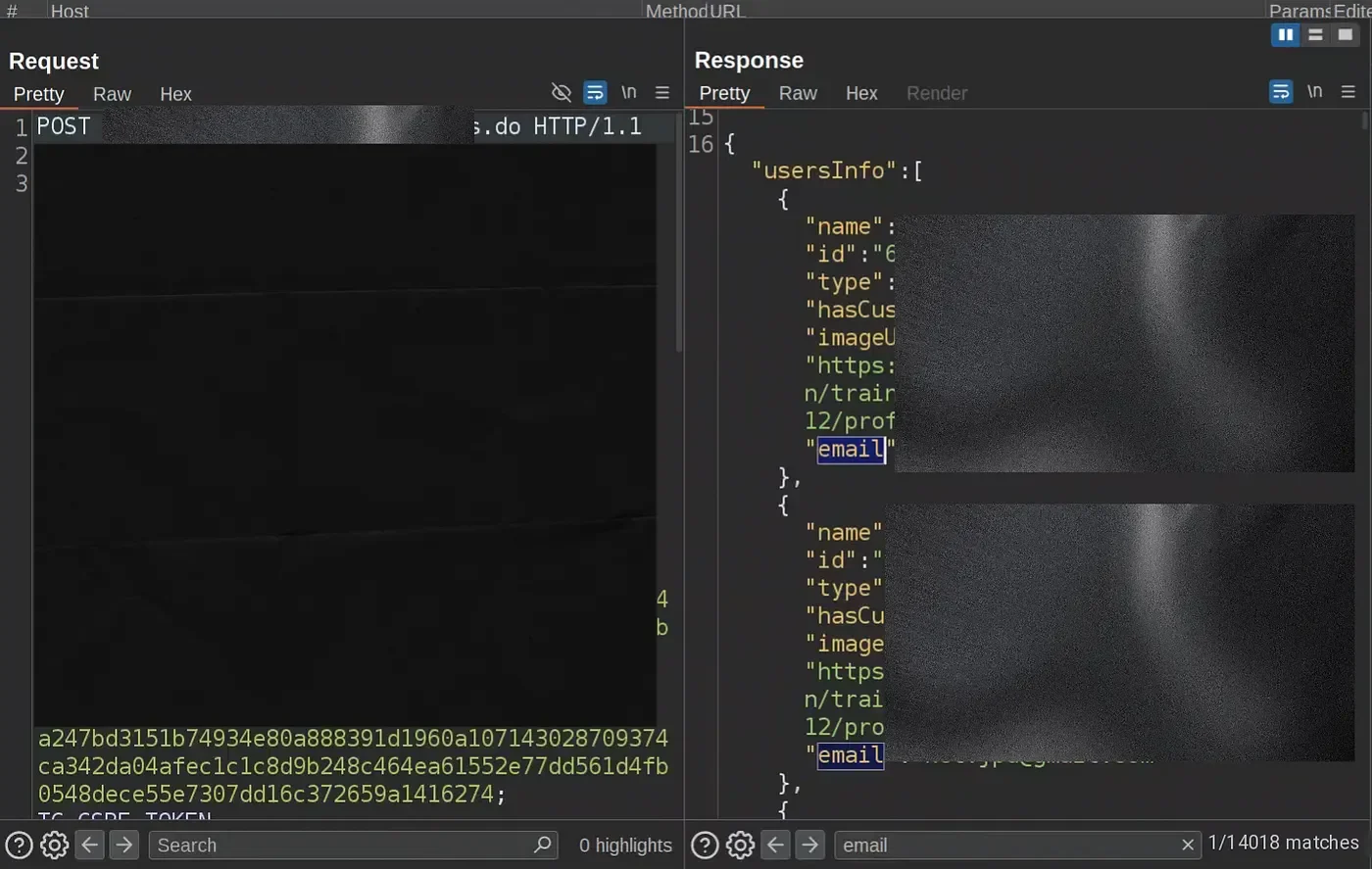
The image is captioned "AI-ASSISTED PRIVACY MASKING" and sits with the discussion of the aggregate exposure.
Step 4: Measure the scale
The total came to more than 14,000 unique email addresses, spanning learners, trainers and administrators. What started as a seemingly ordinary information disclosure had turned into a large-scale personal data exposure.
Root cause
The discussion stream endpoint returned a usersInfo collection that included everyone enrolled in the course, not just the participants in the discussion being loaded. Each entry carried the user's email address and internal numeric ID, so the response exposed personal data that had no reason to be in a discussion payload. Because the endpoint was reachable by any enrolled user, and enrolment in freely accessible courses required only an unverified account, the data was effectively open to anyone willing to register. The report does not state the precise reason the field was populated this way; what is clear is that the response was not scoped to the discussion participants and that an enrolled user received trainers' and administrators' details.
Impact
The exposed information included learners, trainers and administrators, and the users had no reason to expect their personal email addresses to be accessible to other course participants. The report lists the following potential uses for an attacker:
- Targeted phishing: build lists of actual platform users and send convincing emails.
- Social engineering: identify trainers and administrators for targeted attacks.
- Email harvesting: collect thousands of addresses for spam campaigns.
- Further enumeration: use the exposed internal IDs while investigating other endpoints for potential access-control weaknesses.
The conditions are what made this practical: registration without email verification, freely accessible courses open to any account, and an endpoint that returned the data to any enrolled user without requiring discussion participation.
Fix
The vulnerability was reported in May 2026 and fixed by the platform within a week. The report does not describe the change that was made. The reward was received in July 2026.
Variants to test
- Discussion and stream endpoints on other platforms. Replay the request that loads discussion content and inspect the JSON for user objects. A positive result is a
usersInfo-style array containing email addresses or internal IDs of users who never posted. - Enrolment-scoped collections. Look for any endpoint that returns the roster of a course, group or workspace rather than the participants of the specific thread. A positive result is a response listing every enrolled member, including staff roles, when you are only a learner.
- Role leakage in the same payload. Check whether the response distinguishes user types (the
typefield here) and whether privileged roles such as trainers and administrators appear. A positive result is staff accounts returned to a low-privilege enrolled user. - Registration without verification. Create an account with an address you do not control and see whether you can reach course content. A positive result is full access to enrolment and discussion features before any verification step.
- Free or open courses as an entry point. Enumerate courses that anyone can join and repeat the request against each. A positive result is the same personal data exposure across multiple courses.
- Internal ID reuse. Take the numeric IDs from the response and try them against other endpoints that accept a user identifier. A positive result is any endpoint that resolves another user's profile or data from an ID you should not be able to query.
What happened, in plain words
A security researcher was testing a website that offers online internships and training courses. On that site, people who are enrolled in a course can talk to each other in a discussion area attached to the course. Behind that discussion area, the website quietly asks its own servers for the information it needs to display, and one of those background requests was sending back far more than it should have: the full email addresses and internal user numbers of everyone enrolled in the course, including trainers and administrators who never posted anything.
Because anyone could create an account without proving they owned the email address, and because some courses were free for anyone to join, a stranger could register, enrol in a free course, open its discussion area, and receive thousands of other people's email addresses. In total, more than 14,000 unique email addresses were exposed. The researcher reported it in May 2026, the platform fixed it within a week, and a reward was paid in July 2026.
This article walks through the same story step by step, explaining every technical idea from scratch as it appears.
Some background ideas first
Before the steps make sense, here are a few everyday ideas.
A website is two halves talking to each other. One half is what you see in your browser: pages, buttons, forms. The other half is a program running on a computer somewhere else, called a server, which stores the data and decides what to send back. When you click something, your browser sends a message to the server and the server replies.
An API is the private language those two halves use. Think of a restaurant. You do not walk into the kitchen and cook; you tell the waiter what you want, and the waiter brings a plate back. The API is the waiter and the menu of requests. Your browser says "give me the discussion information for this course", and the server sends back a structured answer. You normally never see these messages, because the page redraws itself around them.
JSON is the shape of that answer. When the server replies with data rather than a finished web page, it usually uses JSON, a text format built from curly braces, square brackets, names and values. It looks a bit like a labelled form: "name": "something" means "the field called name holds the value something". Square brackets [ ] mean a list, so a JSON list can hold many entries one after another.
A cookie is a wristband. When you log in, the server gives your browser a small piece of text called a session cookie. Your browser shows it on every later request, like a festival wristband that proves you already paid to get in. The server reads the wristband and knows who you are, so it does not ask for your password again on every click.
Burp Suite is a microscope for that traffic. It is a tool that sits between your browser and the server and lets you read every message going each way. It also has a feature called Repeater, which lets you take one captured message, change it if you like, and send it again as many times as you want while watching the reply. Security testers use it because the interesting messages are usually invisible in the normal page.
Information disclosure is the name of this kind of bug. It means the server hands out data to someone who should not have it. Nothing is broken or crashed; the problem is that a reply contains more than the person asking is entitled to see. Think of a receptionist who, when asked for the meeting room number, also reads out the home addresses of everyone attending.
Enumeration means walking through a list. Once you have one piece of information, you can use it to ask for the next: one user number leads to another request, which leads to another. Attackers use it to map out what a system will tell them.
The feature being tested
The platform lets enrolled users interact through course discussions. Each course has a discussion area, and that area is backed by an API that loads discussion-related information into the page. The researcher was testing that feature when the API response turned out to carry far more than discussion content.
Setting up
The tool was Burp Suite. It was used to inspect the background API requests the discussion page makes, and then to replay them in Repeater. The only precondition for reaching the data was an account on the platform and enrolment in a course. As the report shows, neither a verified email address nor any participation in discussions was required.
Finding it
While inspecting the requests behind the discussion feature, one request stood out: the one responsible for loading discussion-related information. It was sent to Repeater and the JSON response was examined.
Request
Line by line, in plain words:
POST /api/v1/discussions/loadStreams.do HTTP/1.1is the first line of the message.POSTis the type of request, used when the browser is asking the server to do something or fetch something specific rather than just open a page./api/v1/discussions/loadStreams.dois the address on the server being asked, and the name suggests it loads the streams, meaning the discussion content.HTTP/1.1is simply the version of the language being spoken.Host: [REDACTED]names which website the request is for. The actual name has been hidden here.Cookie: [REDACTED SESSION COOKIES]is the wristband described earlier: the session cookies that prove the person making the request is logged in. They have been hidden too.
Nothing about the request itself looked unusual. The response did:
Response (sanitised excerpt)
{ "usersInfo": [ { "name": "[REDACTED]", "id": "[REDACTED]", "type": "C", "hasCustomImage": "false", "imageUrl": "[REDACTED]", "email": "[REDACTED]" }, { "name": "[REDACTED]", "id": "[REDACTED]", "type": "CL", "hasCustomImage": "false", "imageUrl": "[REDACTED]", "email": "[REDACTED]" } ]}
Line by line:
- The outer
{and}wrap the whole answer, which is one JSON object. "usersInfo": [starts a field calledusersInfo, meaning information about users, whose value is a list, opened by the square bracket.- Each
{ ... }inside that list is one user. The first user has aname, anid, atypeof"C", ahasCustomImageof"false", animageUrl, and anemail. - The second user has the same fields, with a
typeof"CL". - The closing
]ends the list of users, and the final}ends the whole answer.
So the usersInfo array, meaning that list of users, contained full email addresses alongside internal numeric user IDs. It also carried a type field distinguishing user categories (C and CL in the excerpt) and profile image metadata. The initial assumption was that this information belonged only to people who had participated in discussions.
Exploitation
Step 1: Challenge the first assumption
Looking at the response more closely showed the exposure was not limited to people who had posted comments. The API returned information about users enrolled in the course even if they had never interacted with the discussion feature. It did not stop at learners either: email addresses and internal IDs belonging to trainers and administrators were exposed as well. No comments, no interaction, just the API request.
Why this step matters: the first guess was that the list only held people who had spoken in the discussion, which would have been a much smaller problem. Checking the guess instead of trusting it is what turned a small finding into a serious one.
Step 2: Look at registration and enrolment
Finding exposed information is one thing; showing how an attacker could realistically reach it is another. The researcher turned to the registration and enrolment process. Account registration did not require email verification, which raised the question of whether an attacker needed any existing relationship with the platform at all. Exploring the available courses turned up freely accessible courses that anyone could enrol in after creating an account.
Email verification is the step where a site sends you a link or a code to prove the address is really yours. Without it, a site accepts any address you type, even one you do not own. Combined with free courses, that means the door to the discussion area is open to anyone who can fill in a form.
Step 3: Reproduce from a fresh account
The exploitation path was:
- Register a fresh account using an unverified email address.
- Find a freely accessible course.
- Enrol in the course.
- Open its discussion section.
- Inspect the corresponding API response in Burp Suite.
Again, users did not need to participate in discussions for their information to appear. The investigation was repeated across freely accessible courses to understand the overall exposure.
The image is captioned "AI-ASSISTED PRIVACY MASKING" and sits with the discussion of the aggregate exposure.
Step 4: Measure the scale
The total came to more than 14,000 unique email addresses, spanning learners, trainers and administrators. What started as a seemingly ordinary information disclosure had turned into a large-scale personal data exposure.
Root cause
The discussion stream endpoint returned a usersInfo collection built from everyone enrolled in the course, rather than from the participants in the discussion being loaded. Each entry carried the user's email address and internal numeric ID, so the response exposed personal data that had no reason to be in a discussion payload. Because the endpoint was reachable by any enrolled user, and enrolment in freely accessible courses required only an unverified account, the data was effectively open to anyone willing to register. The report does not describe the server-side code, so the precise reason the field was populated this way is not stated; what is clear is that the response was not scoped to the discussion participants and that no check prevented a low-privilege enrolled user from receiving trainers' and administrators' details.
In everyday terms: the waiter was asked for the guest list of one table and brought back the guest list of the whole building, including the staff. The fix would be to send only the people actually in that conversation.
Impact
The exposed information included learners, trainers and administrators, and the users had no reason to expect their personal email addresses to be accessible to other course participants. The report lists the following potential uses for an attacker:
- Targeted phishing: build lists of actual platform users and send convincing emails.
- Social engineering: identify trainers and administrators for targeted attacks.
- Email harvesting: collect thousands of addresses for spam campaigns.
- Further enumeration: use the exposed internal IDs while investigating other endpoints for potential access-control weaknesses.
Phishing is a fake message designed to make you click a link or hand over a password. It works far better when the sender knows your real name and the real service you use, which is exactly what this data provided. Social engineering is the same idea without the technology: convincing a person to do something by pretending to be someone they trust. Access control is the rule about who is allowed to see or do what; a weakness there means someone can reach data or actions meant for another role.
The conditions are what made this practical: registration without email verification, freely accessible courses open to any account, and an endpoint that returned the data to any enrolled user without requiring discussion participation.
Fix
The vulnerability was reported in May 2026 and fixed by the platform within a week. The report does not describe the change that was made. The reward was received in July 2026.
Variants to test
If you want to look for the same kind of mistake elsewhere, these are angles worth trying.
- Discussion and stream endpoints on other platforms. Replay the request that loads discussion content and inspect the JSON for user objects. A positive result is a
usersInfo-style array containing email addresses or internal IDs of users who never posted. - Enrolment-scoped collections. Look for any endpoint that returns the roster of a course, group or workspace rather than the participants of the specific thread. A positive result is a response listing every enrolled member, including staff roles, when you are only a learner.
- Role leakage in the same payload. Check whether the response distinguishes user types (the
typefield here) and whether privileged roles such as trainers and administrators appear. A positive result is staff accounts returned to a low-privilege enrolled user. - Registration without verification. Create an account with an address you do not control and see whether you can reach course content. A positive result is full access to enrolment and discussion features before any verification step.
- Free or open courses as an entry point. Enumerate courses that anyone can join and repeat the request against each. A positive result is the same personal data exposure across multiple courses.
- Internal ID reuse. Take the numeric IDs from the response and try them against other endpoints that accept a user identifier. A positive result is any endpoint that resolves another user's profile or data from an ID you should not be able to query.
Glossary
- API: the set of requests a website's front end uses to ask its server for data or actions, like a waiter carrying orders between you and the kitchen.
- Access control: the rules deciding who is allowed to see or do what on a system.
- Burp Suite: a tool that sits between your browser and a server so you can read, capture and replay the messages they exchange.
- Cookie: a small piece of text a site stores in your browser, often used to remember that you are logged in.
- Email harvesting: collecting large numbers of email addresses, usually for spam or phishing.
- Email verification: the step where a site proves you really own the address you registered with, typically by sending a link or code.
- Endpoint: a specific address on a server that accepts a particular request, such as the one that loads discussion content.
- Enumeration: systematically walking through values or lists to discover what a system will reveal.
- Information disclosure: a bug where a server sends data to someone who should not be allowed to see it.
- JSON: a text format for structured data, built from names, values, curly braces and square brackets.
- Phishing: a fake message that tries to make you click a link or give away information by pretending to be a trusted party.
- Repeater: the part of Burp Suite that lets you resend a captured request, unchanged or edited, and study the reply.
- Request: the message your browser sends to a server asking for something.
- Response: the message the server sends back.
- Root cause: the underlying reason a bug exists, as opposed to its visible symptom.
- Server: the computer and program that store a site's data and answer requests.
- Session: the period during which a site remembers who you are, usually carried by a cookie.
- Social engineering: manipulating a person into doing something by pretending to be someone trustworthy.
- Unique email addresses: addresses counted once each, so the same person appearing in several courses is not counted twice.
- User ID: an internal number a system uses to identify a user, separate from their name or email.



