One Click Full Control: Exploiting CSPT to Modify Organization
The invitation link's organization ID parameter was used by client-side code to build a PUT request, allowing path traversal to control the request path. An attacker could craft a link that, when clicked by a victim, changed folder permissions to Open Access, granting full access to all files in the folder.
 Published on medium.com
Bug Bounty
The full write-up lives on its author's site
It belongs to its author, so we link to it rather than copy it. The other two tabs are our own rewrites, checked against it.
Context
The target is a web application with organisations, workspaces and folders that contain files. The feature at the centre of this write-up is the invitation workflow: an existing user invites another account, and the invited user receives a link that, when opened, performs some action on the organisation on their behalf.
The second relevant feature is folder management. A folder has a permission setting with two values:
- Open Access
- View Only
When the owner sets a folder to View Only, other users cannot edit, delete or add new files. The permission is changed through a PUT request that carries the permissions in the request body.
The bug is a client-side path traversal (CSPT): a value taken from the invitation URL is used by client-side code to build the path of a PUT request, and by injecting ../ sequences into that value an attacker can redirect the request to a different endpoint. Chained with the folder permission endpoint, a single click on a crafted invitation link silently switches a victim's folder to Open Access.
Setup
The researcher invites a second account they control, and later opens the crafted link using the victim's account. The tooling is a browser plus Burp Suite, used to inspect the requests the browser sends after the invitation link is opened. No versions, headers or authentication details are given in the report.
The precondition is that the attacker can invite a user to an organisation, and that the victim opens the crafted link.
Finding it
The researcher's routine is to use the application as a normal user first, then look for actions the application does not allow ("NO" moments), taking notes along the way. User management, and in particular the invitation workflow, is tested first.
Inviting the attacker account produced an invitation link of this shape:
https://example.com/token/iosAmk5Faq4Sc/org?id=55555
The question the researcher starts from is simple: what happens after the invitation link is clicked? With Burp Suite open, the requests sent by the browser are inspected.
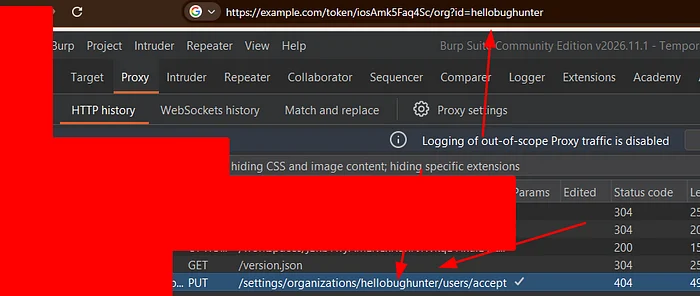
The interesting observation is that the organisation ID in the invitation URL is used by the application to build a PUT request. After the link is clicked, client-side code reads the organisation ID from the URL and uses it to create and send the PUT request automatically. Opening the link is therefore enough to trigger the request, with no further interaction.
That makes the id parameter a source the attacker controls, which is the necessary starting point for a client-side path traversal. The next question is whether the value can escape the organisation ID position and control more of the request path.
Exploitation
Step 1: Probe for traversal handling
The original ID was removed and replaced with test%2f..%2f..%2f. %2f is the URL-encoded form of /, so the value decodes to a path traversal sequence. The purpose of this first payload was to see whether the application applies any filter or restriction to the value.
The modified invitation URL:
https://example.com/token/iosAmk5Faq4Sc/org?id=test%2f..%2f..%2f
After the payloads were tested, the whole value was removed and replaced with just /test. At this point an interesting gadget had been found, but a second piece was needed: another PUT request, reachable through the same client-side construction, that performs a sensitive action.
Step 2: Find a sensitive PUT request
The researcher went back to the application to understand it further and enumerated the PUT requests it uses. This led to the folder management permissions feature described above, where the permission is set through a PUT request whose body carries the permissions rather than parameters in the request headers.
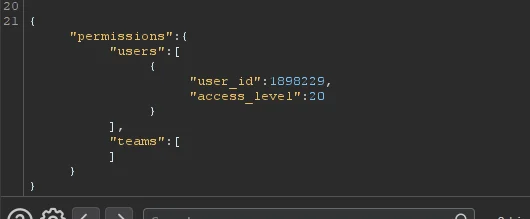
Step 3: Test the permission request without a body
The first test on that endpoint was to remove the entire request body and send the request in that reduced form.
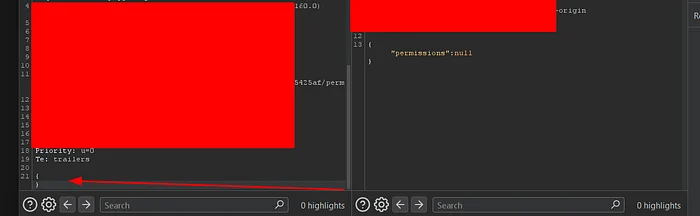
The request returned 200 OK, with a response body containing:
{ "permissions": null}
Checking the folder afterwards showed that its access had changed to the default Open Access. In other words, a permission request with no body does not fail: it resets the folder to the default, which lets every user have full access to the folder.
Step 4: Chain the traversal with the permission endpoint
The goal of the final step was to place the full path inside the id parameter so that the application would send this PUT request:
PUT /settings/workspaces/1452325/folders/01a1f405-a556-790a-98ae-34c77f5425af/permissions
The crafted invitation link that produces it:
https://example.com/token/iosAmk5Scgr8lTy1kpDs6/org?id=test%2f..%2f..%2f..%2fsettings%2fworkspaces%2f1452325/folders%2f01a1f405-a556-790a-98ae-34c77f5425af%2fpermissions
The id value carries the traversal and the full path to the folder permissions endpoint. Because the client-side code builds the request from this value and sends it automatically on page load, the victim only has to open the link.

The full crafted link was opened using the victim's account, and the folder was successfully changed to Open Access. The attacker could then access all the files inside the folder.
Root cause
The client-side code takes the organisation ID from the invitation URL and concatenates it into the path of a PUT request that it sends automatically when the link is opened. The value is not constrained to an identifier: encoded slashes and dot segments survive into the constructed path, letting the request reach the folder permissions endpoint.
The second half of the bug is server-side: the folder permission endpoint accepts a PUT with no body and treats the missing permissions as null, which the application resolves to the default Open Access. The two weaknesses combine into a one-click state change.
Impact
An attacker who can send an invitation can make a victim, merely by clicking the link while logged in, change a folder's permissions to Open Access. The attacker then has access to all files inside that folder.
The researcher describes this as likely a Medium-severity bug, while noting that CSPT is more dangerous than it looks: chained with the right functionality it can lead to much more critical vulnerabilities.
Fix
The report does not describe a fix or a vendor response. Based on the root cause, the client should not build request paths from URL-supplied identifiers without validating them against a strict format, and the permission endpoint should reject a PUT with a missing or empty body instead of defaulting to Open Access.
Variants to test
- Other client-side request builders. Look for any page that reads a value from the URL and uses it to construct a fetch or XHR path. A positive result is a request whose path changes when the value contains
%2f..%2f. - Other endpoints that accept a bodyless PUT or PATCH. Try removing the body from state-changing requests. A positive result is a
200with a default or null value applied, as happened withpermissions. - Other default-resolving fields. Where a missing field falls back to a permissive default (public, open, shared), a bodyless request may silently widen access. A positive result is a resource becoming more accessible after the request.
- Other automatic requests on link open. Invitation, password reset and magic-link pages that fire requests on load are good candidates. A positive result is a state-changing request triggered without user interaction beyond opening the link.
What happened, in plain words
A security researcher found a way to make a single click on a link quietly change the sharing settings of a folder in a web application. The application has workspaces, and inside them folders that hold files. Each folder has a permission setting: either Open Access or View Only (other people can look but not edit, delete or add files).
The researcher noticed that when you click an invitation link, the application reads a number out of the link (the organisation ID) and uses it to build a request that it sends automatically. Because the number comes from the link, whoever writes the link controls that value. By putting special characters into the value, the researcher could make the application send its automatic request to a completely different place: the endpoint that changes folder permissions. And that endpoint had a second flaw: if you send it a request with no details about the permissions at all, it does not refuse. It resets the folder to the default, which is Open Access.
Put together, an attacker who can invite someone to an organisation can send them a link. When the victim clicks it, their folder silently becomes Open Access, and the attacker can then access all the files inside it. The researcher calls this likely a Medium-severity bug, but points out that this class of bug, client-side path traversal, is more dangerous than it looks when chained with the right feature.
Background: the pieces you need to know
Before walking through the steps, here are the ideas the whole story depends on. None of them require any prior security knowledge.
What a web application and an API are
A web application is a website that does things, not just shows text: it lets you log in, create folders, invite people. Your browser shows you pages, but behind those pages it is constantly talking to the server. Each time you click something, the browser sends a small message to the server and the server sends one back. Those messages are called requests and responses.
An API (application programming interface) is the set of addresses on the server that accept these messages. Think of a restaurant: the menu is the API, the kitchen is the server, and the waiter is your browser. You cannot walk into the kitchen yourself; you order from the menu and the waiter carries the message. Each item on the menu is an endpoint: a specific address that does a specific job, such as "change this folder's permissions".
Request methods: GET, PUT and friends
Every request has a method, a word that says what kind of action it is. The two that matter here:
- GET is for reading something. Opening a page is usually a GET.
- PUT is for changing something on the server, such as updating a setting.
So a PUT request is a write action. That matters because the bug in this story is about making the victim's browser send a PUT request the victim never intended.
What a request body is
A request can carry extra information along with it, called the body. If you think of the request as an envelope, the address on the front is the endpoint and the method, and the body is the letter inside. When the application changes folder permissions, the new permission value travels in the body.
What a URL parameter is
Look at a URL like https://example.com/page?id=55555. Everything after the ? is a parameter: a named value passed along with the address. Here the parameter is called id and its value is 55555. Parameters are how a page can be told which item to show. They are also fully visible and fully editable by anyone who has the link, which is exactly why they are interesting to an attacker.
What URL encoding is
Some characters cannot appear literally in a URL, or would be misread. So they are written in an encoded form: a percent sign followed by two characters. The most important one in this story is %2f, which is the encoded form of the forward slash /. A URL containing %2f is understood by the application as containing a slash once it is decoded.
What ../ means and what path traversal is
On a computer, a path is a route to a file or resource, like settings/workspaces/folders. The two dots .. mean "go up one level", the same as the parent folder in a file manager. So ../ steps back out of the current place.
Path traversal is the trick of inserting ../ into a value that is later used to build a path, so that the resulting path points somewhere the author never intended. Imagine a building where a note says "deliver to room 5". If someone writes "deliver to room 5, then go up a floor, then up another floor, then into the manager's office", the delivery ends up somewhere else entirely. That is path traversal.
What client-side path traversal (CSPT) is
Normally path traversal happens on the server. Client-side path traversal is the same idea, but the path is built by code running in the victim's own browser. The browser reads a value from the URL, glues it into a request path, and sends the request. If the value contains ../, the request goes to a different endpoint than the developer planned. The attacker never touches the server directly; the victim's browser does the work.
What a cookie or token is
When you log in, the server gives your browser a small piece of data, often called a session cookie or token. Your browser attaches it to every request so the server knows who you are. Think of it as a wristband at an event: you show it once at the door, and after that staff recognise you without asking for your ID again. This is why a link that makes your browser send a request is dangerous: your browser automatically includes your wristband, so the request is made as you, with all your permissions.
What Burp Suite is
Burp Suite is a tool that sits between your browser and the server and records every request and response, so you can read exactly what the browser sent. It is like a logbook of every conversation the browser had. The researcher uses it here to see what happens after clicking the invitation link.
The application's structure
The application has a hierarchy:
- Organisation: the top level, a company or team.
- Workspace: a working area inside an organisation.
- Folder: a container inside a workspace, holding files.
Each folder has a permission setting with two values:
- Open Access: everyone can edit, delete and add files.
- View Only: other users can look but cannot edit, delete or add files.
The permission is changed through a PUT request that carries the new permission in the request body.
The researcher's routine
Before touching anything technical, the researcher follows a fixed routine on every new target.
Task 1: Understand the app like a normal user
Use the application the way an ordinary person would. Click around, create things, invite people, and learn what each feature does. You cannot spot something abnormal until you know what normal looks like. It is like walking around a new house before you start opening cupboards.
Task 2: Catch the "NO" moments
A "NO" moment is any action the application refuses to let you do, or any place where it behaves in a way you did not expect. These refusals are interesting because they mark where the application has rules, and rules are where mistakes tend to hide. The researcher writes all of these down; notes taken early often become useful later.
The invitation workflow
User management is the researcher's favourite area, and the first thing tested there is the invitation workflow: an existing user invites another account, and the invited person receives a link that, when opened, does something on the organisation on their behalf.
The researcher invites a second account, controlled by the researcher, and studies the link that arrives. It looks like this:
https://example.com/token/iosAmk5Faq4Sc/org?id=55555
Line by line:
https://example.comis the site's address./token/iosAmk5Faq4Sc/orgis the path of the invitation page. The middle part is a long random-looking string that identifies this particular invitation.?id=55555is the parameter carrying the organisation ID, here55555.
The researcher's starting question is simple: what actually happens after the invitation link is clicked? With Burp Suite recording, the browser opens the link and the requests are inspected.
What the researcher finds is this: the organisation ID in the invitation URL is used by the application to build a PUT request. After the link is clicked, code running in the browser reads the organisation ID out of the URL and uses it to create and send the PUT request automatically. Opening the link is enough; no further clicks are needed.
Why this matters: the id value comes from the URL, so whoever writes the URL controls it. That makes it a source the attacker controls, the necessary starting point for a client-side path traversal. The next question is whether the value can escape the organisation ID position and control more of the request path.
Step 1: Probe for traversal handling
The first test is deliberately simple. The original ID is removed and replaced with test%2f..%2f..%2f. Remember that %2f is the encoded form of /, so once decoded this value reads test/../../, a path traversal sequence.
The purpose is not yet to reach anything specific. It is to see whether the application applies any filter or restriction to the value at all. If the request changes shape, the door is open.
The modified invitation URL:
https://example.com/token/iosAmk5Faq4Sc/org?id=test%2f..%2f..%2f
Line by line:
- The address and path are unchanged from the original invitation link.
?id=still names the parameter.- The value is now
test%2f..%2f..%2f, which decodes totest/../../.
After testing the payloads, the researcher removes the whole value and replaces it with just /test. At this point an interesting gadget has been found, but a second piece is needed: another PUT request, reachable through the same client-side construction, that performs a sensitive action.
Step 2: Find a sensitive PUT request
The researcher goes back to the application to understand it more deeply and lists the PUT requests it uses. This leads to the folder management permissions feature described earlier, where the permission is set through a PUT request whose body carries the permissions rather than parameters in the request headers.
Why this is the right target: the researcher already has a way to redirect a request built by the browser. What was missing was a request worth redirecting to. A request that changes who can access a folder is exactly that.
Step 3: Test the permission request without a body
The first test on that endpoint is to remove the entire request body and send the request in that reduced form.
The request returned 200 OK, with a response body containing:
{ "permissions": null}
Line by line:
200 OKis the server's way of saying "done, no problem". It is the success code.permissionsis the field that holds the folder's permission setting.nullmeans "nothing", "no value". The server did not reject the missing body; it recorded the permission as empty.
Checking the folder afterwards showed that its access had changed to the default Open Access. In other words, a permission request with no body does not fail: it resets the folder to the default, which lets every user have full access to the folder.
This is the second half of the bug. The first half is the browser building a request from a URL value. The second half is the server treating a missing value as "use the default", and the default being the most permissive setting.
Step 4: Chain the traversal with the permission endpoint
The goal of the final step is to place the full path inside the id parameter so that the application sends this PUT request:
PUT /settings/workspaces/1452325/folders/01a1f405-a556-790a-98ae-34c77f5425af/permissions
Line by line:
PUTis the method: this request changes something./settings/workspaces/1452325is the workspace, identified by the number1452325./folders/01a1f405-a556-790a-98ae-34c77f5425afis the specific folder, identified by a long unique code./permissionsis the endpoint that changes who can access the folder.
The crafted invitation link that produces it:
https://example.com/token/iosAmk5Scgr8lTy1kpDs6/org?id=test%2f..%2f..%2f..%2fsettings%2fworkspaces%2f1452325/folders%2f01a1f405-a556-790a-98ae-34c77f5425af%2fpermissions
Line by line:
- The address and invitation path are the same as before, with a different invitation token.
?id=names the parameter the browser will read.- The value begins with
test%2f..%2f..%2f..%2f, which decodes totest/../../../, stepping up out of the organisation path. - Then comes
settings%2fworkspaces%2f1452325, which decodes tosettings/workspaces/1452325, the workspace. - Then
/folders%2f01a1f405-a556-790a-98ae-34c77f5425af, which decodes to the folder's unique code. - Finally
%2fpermissions, which decodes to/permissions, the endpoint that changes access.
Because the browser builds the request from this value and sends it automatically when the page loads, the victim only has to open the link. Their own browser, carrying their own login, sends the permission change.
The full crafted link was opened using the victim's account, and the folder was successfully changed to Open Access. The attacker could then access all the files inside the folder.
Why it works
Two separate weaknesses combine.
On the browser side, the code takes the organisation ID from the invitation URL and glues it into the path of a PUT request that it sends automatically when the link is opened. The value is never checked to be a plain identifier. Encoded slashes and dot segments survive into the constructed path, letting the request reach the folder permissions endpoint.
On the server side, the folder permission endpoint accepts a PUT with no body and treats the missing permissions as null, which the application resolves to the default Open Access.
Neither half is enough on its own. Together they produce a one-click change of state.
What an attacker gains
An attacker who can send an invitation can make a victim, merely by clicking the link while logged in, change a folder's permissions to Open Access. The attacker then has access to all files inside that folder.
The researcher describes this as likely a Medium-severity bug, while noting that CSPT is more dangerous than it looks: chained with the right functionality it can lead to much more critical vulnerabilities.
How to fix it
The report does not describe a fix or a vendor response. Based on the cause, the browser should not build request paths from URL-supplied identifiers without checking them against a strict format, and the permission endpoint should reject a PUT with a missing or empty body instead of defaulting to Open Access.
Other places to look
- Other pages that build requests from the URL. Look for any page that reads a value from the URL and uses it to construct a request path. A positive result is a request whose path changes when the value contains
%2f..%2f. - Other endpoints that accept a PUT or PATCH with no body. Try removing the body from requests that change state. A positive result is a
200with a default or null value applied, as happened withpermissions. - Other fields that fall back to a default. Where a missing field falls back to a permissive default (public, open, shared), a bodyless request may silently widen access. A positive result is a resource becoming more accessible after the request.
- Other requests fired automatically when a link opens. Invitation, password reset and magic-link pages that send requests on load are good candidates. A positive result is a state-changing request triggered without any user interaction beyond opening the link.
Glossary
- API: the set of addresses on a server that accept requests, like a menu you order from.
- Body (request body): the extra data carried inside a request, like the letter inside an envelope.
- Burp Suite: a tool that records the requests and responses between a browser and a server so they can be read.
- Client-side: happening in the user's own browser rather than on the server.
- Client-side path traversal (CSPT): a bug where a value from the URL is used by browser code to build a request path, and
../sequences in the value redirect the request elsewhere. - Cookie / token: a small piece of data the server gives the browser at login, sent with every request so the server knows who you are.
- Endpoint: a specific address on a server that performs a specific job.
- GET: a request method for reading something.
- Invitation workflow: the feature where an existing user invites another account, producing a link that performs an action when opened.
- Method: the word in a request (GET, PUT and so on) that says what kind of action it is.
- "NO" moment: an action the application refuses, or behaviour that surprises you; noted because rules are where mistakes hide.
- Open Access: the permissive folder setting where every user can edit, delete and add files.
- Organisation: the top level of the application's structure, a company or team.
- Parameter: a named value passed in a URL after the
?, such asid=55555. - Path: the route to a resource, like
settings/workspaces/folders. - Path traversal: inserting
../into a value used to build a path so it points somewhere unintended. - PUT: a request method for changing something on the server.
- Request / response: the message the browser sends to the server and the message the server sends back.
- Source: a value an attacker can control, which is the starting point of an attack.
- URL encoding: writing characters in a URL as a percent sign plus two characters, such as
%2ffor/. - View Only: the restrictive folder setting where other users can look but cannot edit, delete or add files.
- Workspace: a working area inside an organisation, containing folders and files.
../: "go up one level" in a path, the same as the parent folder in a file manager.%2f: the URL-encoded form of the forward slash/.null: a value meaning "nothing" or "no value".




