How clicking a link can give away your precise location
An exported deep link in the Shazam app loaded a URL in a WebView without validating the parameter, allowing an attacker to inject JavaScript that could access device APIs and retrieve the user's precise location. An attacker could steal location data by tricking a user into clicking a crafted link.
 Published on ash-king.co.uk
I found a vulnerability in the popular Shazam application that allowed an attacker to steal the precise location of a user simply by clicking a link! This was probably one of my most underrated vulnerabilities yet - it affected over 100 million users (at the time) and could access device features, protected by app…
The full write-up lives on its author's site
It belongs to its author, so we link to it rather than copy it. The other two tabs are our own rewrites, checked against it.
Context
Shazam is a mobile application for identifying music, distributed through the Google Play Store and also available on iOS. The app uses deeplinks throughout its navigation. One particular exported deeplink was responsible for loading a website inside a webview, and that webview was wired up to the native side through JavaScript interfaces, so that page content could call into the Android and iOS APIs.
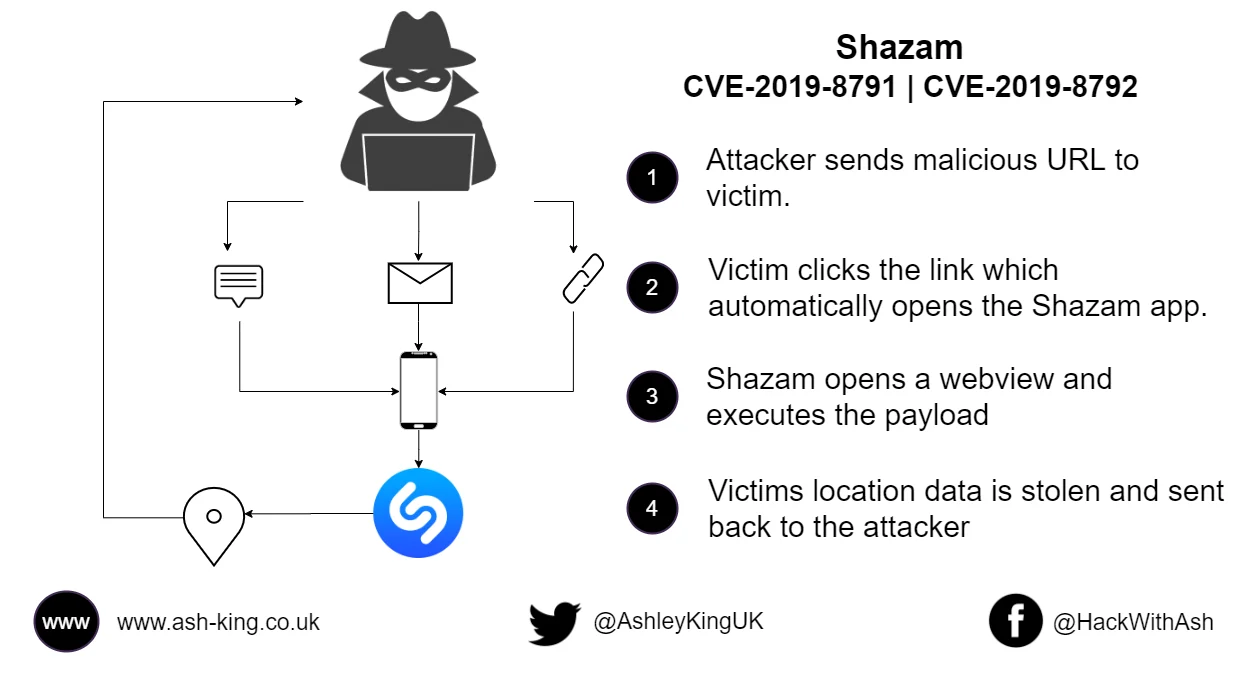
The researcher describes the issue as affecting over 100 million users at the time, and as reachable from a single click of a link. The same flaw was tracked under CVE-2019-8791 and CVE-2019-8792 and affected both Android and iOS devices.
Setup
The work was done by decompiling the mobile app and analysing how the JavaScript interfaces operated. No accounts, roles or specific tool versions are described. The report to Shazam's security team was made in December 2018, three months after the acquisition by Apple. Rather than a triage reply, the researcher was directed to raise the issue with [redacted] The vulnerability was fixed on 26 March 2019. It took another 8 months before Apple gave recognition and confirmed the issue was not eligible under their bug bounty program; Google's Google Play Security Rewards Program also did not consider location data a big enough security risk to award a bounty.
Finding it
The starting point was the app's use of deeplinks for navigation. The researcher found that a particular exported deeplink, the one responsible for loading a website inside a webview, was not validating its parameter, which allowed external resources to be in control of what the webview loaded.
The deeplink in question is:
shazam://launchurl?url=
The url parameter could either be a website or a script starting with the javascript scheme. That is the core of the finding: the parameter is attacker-controlled and is not restricted to trusted destinations or to a safe scheme.
Exploitation
Step 1: Load attacker-controlled content into the webview
Because the url parameter accepts either a website or a javascript scheme script, an attacker can make the app's webview render content of their choosing. The report does not give a concrete URL used in the attack.
Step 2: Reach the JavaScript bridge
Once the webview loads, the app attaches a JavaScript interface called WebViewJavascriptBridge, accessible under the window object. This is the bridge that lets page content communicate with the Android and iOS APIs, and through them pull back device-specific information and the last known precise location of the user.
Step 3: Use the bridge's two functions
After decompiling the app and working out how the interfaces operated, the researcher found that the object had two primary functions: setMessageHandler and sendMessage.
setMessageHandler is a function that can be overridden to catch the response of an action requested through sendMessage. It expects a JSON object passed through it containing an additional two parameters, type and data. After some further research and development the researcher produced a small proof of concept.
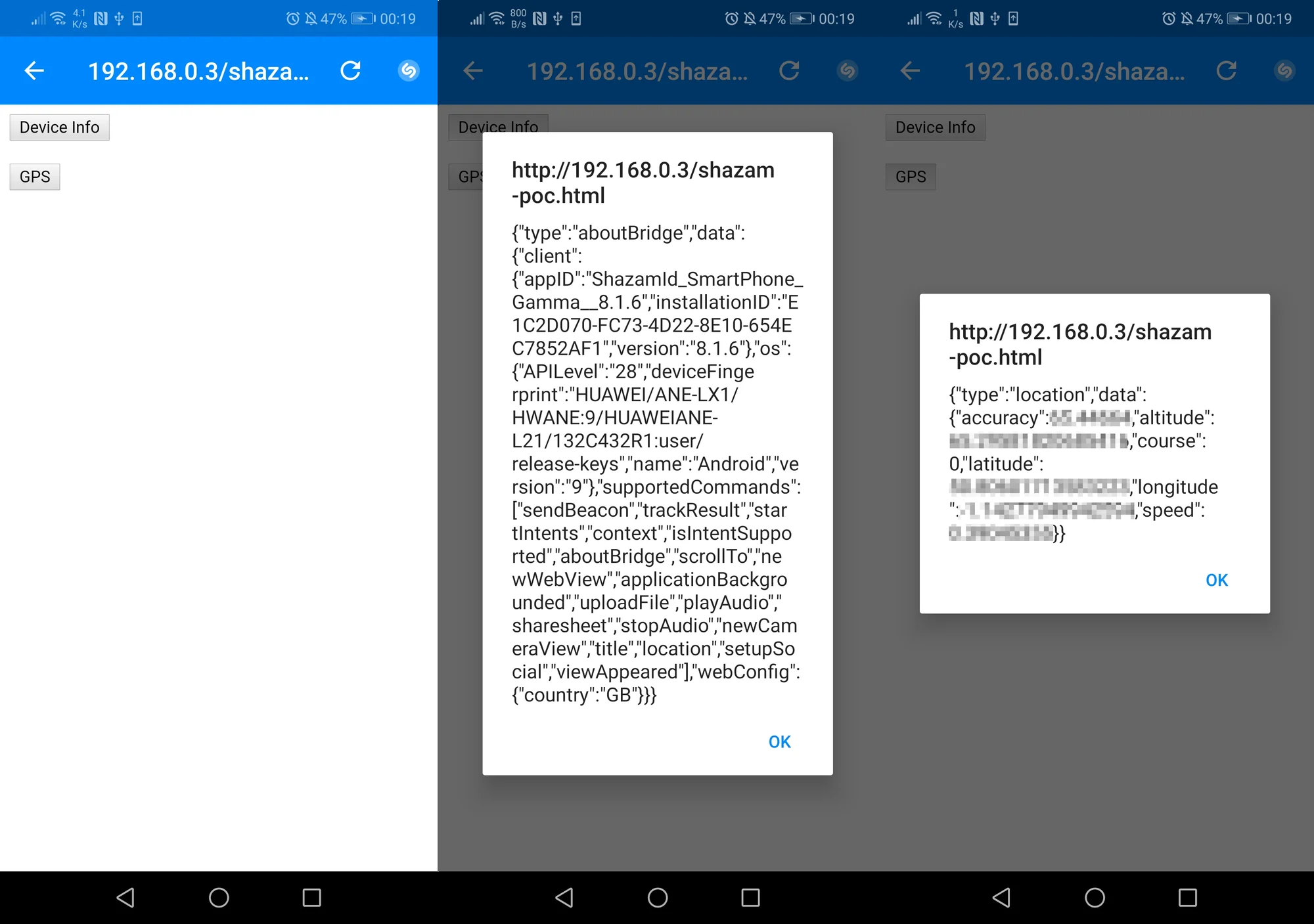
Step 4: Attack flow
An attack flow could look similar to this:
The researcher also notes that, getting creative, it was possible to make this a zero click vulnerability, though the report does not describe how.
Root cause
The exported deeplink shazam://launchurl?url= did not validate its parameter, so external resources could control what the webview loaded, including javascript scheme content. The webview then exposed the WebViewJavascriptBridge JavaScript interface on window, giving that content a path into the native Android and iOS APIs. The combination of an unvalidated deeplink parameter and a powerful JavaScript bridge is what turned a navigation feature into a way to read device-specific information and the last known precise location.
Impact
An attacker could steal the precise location of a user simply by getting them to click a link, and could access device features protected by app permissions from that single click. The researcher frames the impact in terms of de-anonymisation: targets could be identified with ease, and criminals hiding online behind a fake alias could be identified.
Fix
The vulnerability was fixed on 26 March 2019.
Variants to test
- Enumerate exported deeplinks that load content into a webview and check whether their parameters are validated. A positive result is a parameter that accepts an arbitrary URL or a
javascriptscheme value. - Look for JavaScript interfaces attached to webviews, such as
WebViewJavascriptBridge, and check what they expose. A positive result is a bridge reachable from attacker-controlled content that can call native APIs. - Test whether a bridge's message handler can be overridden to capture responses, as with
setMessageHandlerhere. A positive result is a response containing device-specific information or location data. - Check whether the same deeplink can be triggered without a click. A positive result is the flow completing with no user interaction.
What happened, in plain words
Shazam is a mobile app that listens to a few seconds of music and tells you the name of the song. It runs on Android phones and iPhones. Like many apps, it can be opened from a link, the same way a link on a web page can open a specific page in your browser. These special links are called deeplinks: a link that starts with the app's own name instead of http or https, and that tells the phone to open that app and go to a particular place inside it.
Ashley King found that one of Shazam's deeplinks was built to open a website inside the app, in a small built-in browser window. That window is called a webview: it is a browser view embedded inside an app, so the app can show web content without sending you out to a separate browser. The deeplink took the address of the page to show from a part of the link that anyone can write. The app did not check what was in that part. So an attacker could put their own page there, or even a piece of JavaScript (the programming language that web pages run in the browser) instead of a normal web address.
That would be bad enough on its own, but the webview in Shazam was also connected to the phone itself. The app had attached something called a JavaScript interface to the webview, which is a way for the page shown inside the app to talk to the app's own code, and through it to the phone's operating system. The report calls this bridge WebViewJavascriptBridge. Through that bridge, whatever page was loaded could ask the phone for information, including the last known precise location of the user.
Put together: an attacker sends a link, the victim taps it, Shazam opens the attacker's content in its webview, and that content uses the bridge to ask the phone where the user is. The researcher says this affected over 100 million users at the time and could be done with a single click. The same flaw was tracked under two identifiers, CVE-2019-8791 and CVE-2019-8792, and affected both Android and iOS devices. A CVE is a public catalogue number for a known security flaw, so that people can refer to the same issue unambiguously.
The report was sent to Shazam's security team in December 2018, three months after Apple acquired Shazam. Instead of the usual first reply from a triage team (the people who read incoming reports and decide whether they are real), the researcher was told to raise it with [redacted] After some back and forth, the flaw was fixed on 26 March 2019. It then took another 8 months before Apple gave recognition and confirmed the issue was not eligible under their bug bounty program. A bug bounty program is a scheme where a company offers money to people who report security flaws responsibly. Google's Google Play Security Rewards Program also did not consider location data a big enough security risk to award a bounty. So the issue was fixed, but no money was paid.
Setting up
To understand how the app worked, the researcher decompiled it. Decompiling means taking the finished app file that you install on a phone and turning it back into something close to readable source code, so you can see the instructions the app is made of. It is a bit like taking a flat-pack wardrobe apart to see how the pieces fit, except the pieces are instructions rather than wood. The researcher then analysed how the JavaScript interfaces operated, meaning how the bridge between the web page and the phone was wired up and what it could do.
The report does not describe any accounts, roles or specific tool versions used for this work.
Finding it
The starting point was the app's use of deeplinks for navigation. Apps often use deeplinks the way a website uses links between pages: one part of the app opens another. The researcher found that a particular exported deeplink was not validating its parameter. Exported, in this context, means the link is available to be triggered from outside the app, for example from a web page, a message or another app. Validating a parameter means checking the value that comes in against what is allowed, the way a bouncer checks a name against a guest list. Here there was no check at all, so external resources, meaning anyone outside the app, could be in control of what the webview loaded.
The deeplink in question is:
shazam://launchurl?url=
Line by line, in plain words:
shazam://is the scheme, the first part of the link. It tells the phone which app should handle the link, in this case Shazam. It works like thehttps://part of a web address, but for an app instead of a website.launchurlis the name of the action inside the app.?marks the start of the parameters, the extra pieces of information the link carries.url=is the parameter name, followed by an equals sign and then, in a real link, the value. The value is whatever comes after the equals sign, and that is the part the app failed to check.
The url parameter could either be a website or a script starting with the javascript scheme. A scheme is the part before the colon in a link that says what kind of thing the link is. javascript: is a scheme that means "run the code that follows as JavaScript" rather than "go to this web address". That is the core of the finding: the parameter is attacker-controlled, meaning the attacker chooses its value, and it is not restricted to trusted destinations or to a safe scheme.
Exploitation
Step 1: Load attacker-controlled content into the webview
Because the url parameter accepts either a website or a javascript scheme script, an attacker can make the app's webview render content of their choosing. Rendering here just means displaying and running. The attacker does not need to break into the phone or install anything; they only need the victim to open a link that contains their chosen value. The report does not give a concrete URL used in the attack.
Step 2: Reach the JavaScript bridge
Once the webview loads, the app attaches a JavaScript interface called WebViewJavascriptBridge, accessible under the window object. To unpack that: window is the global object in a web page, the place where the browser keeps the things a page can use. A JavaScript interface is a feature of the webview that lets the app put one of its own objects into that page, so the page's JavaScript can call it. It is like giving a visitor a phone with a few pre-dialled numbers: they cannot go anywhere, but they can reach the places you wired up. This is the bridge that lets page content communicate with the Android and iOS APIs, and through them pull back device-specific information and the last known precise location of the user. An API, short for application programming interface, is a defined set of ways one piece of software can ask another to do something or give it information. Here the API is the phone's own set of features, such as location.
Step 3: Use the bridge's two functions
After decompiling the app and working out how the interfaces operated, the researcher found that the object had two primary functions: setMessageHandler and sendMessage. A function is a named block of code that does something when it is called. setMessageHandler is the one that can be overridden to catch the answer to a request made through sendMessage.
setMessageHandler is a function that can be overridden to catch the response of an action requested through sendMessage. Overridden means replaced with your own version. So the attacker's page can say: when an answer comes back, run my code instead of the app's code, and let me look at the answer. It expects a JSON object passed through it containing an additional two parameters, type and data. JSON is a simple text format for structured data, made of names and values in curly brackets, and it is the usual way programs pass information to each other. It expects a JSON object containing an additional two parameters, type and data. After some further research and development the researcher produced a small proof of concept. A proof of concept is a minimal demonstration that the flaw is real, just enough to show it works, not a finished attack tool.
Step 4: Attack flow
An attack flow could look similar to this:
Zero click means the victim does not have to tap anything at all; the flaw triggers on its own.
Root cause
The exported deeplink shazam://launchurl?url= did not validate its parameter, so external resources could control what the webview loaded, including javascript scheme content. The webview then exposed the WebViewJavascriptBridge JavaScript interface on window, giving that content a path into the native Android and iOS APIs. Native here means the phone's own operating system code, as opposed to the web page running inside the app. The combination of an unvalidated deeplink parameter and a powerful JavaScript bridge is what turned a navigation feature into a way to read device-specific information and the last known precise location. In everyday terms, the front door was unlocked and the key cupboard was right behind it.
Impact
An attacker could steal the precise location of a user simply by getting them to click a link, and could access device features protected by app permissions from that single click. App permissions are the prompts a phone shows when an app wants to use something sensitive, such as the camera or location; the point here is that the attacker did not need to be granted anything themselves, because the app already had the permission and the attacker was borrowing it. The researcher frames the impact in terms of de-anonymisation: targets could be identified with ease, and criminals hiding online behind a fake alias could be identified. De-anonymisation means working out who a supposedly anonymous person really is.
Fix
The vulnerability was fixed on 26 March 2019. In plain words: check the guest list at the door, and do not hand every visitor the phone with all the numbers pre-dialled.
Variants to test
If you want to look for similar issues in other apps, these are the checks the report's reasoning suggests. Each one is a question you can ask about an app, and a positive result is what you would see if the answer is yes.
- Enumerate exported deeplinks that load content into a webview and check whether their parameters are validated. Enumerate means list them all, one by one. A positive result is a parameter that accepts an arbitrary URL or a
javascriptscheme value. - Look for JavaScript interfaces attached to webviews, such as
WebViewJavascriptBridge, and check what they expose. A positive result is a bridge reachable from attacker-controlled content that can call native APIs. - Test whether a bridge's message handler can be overridden to capture responses, as with
setMessageHandlerhere. A positive result is a response containing device-specific information or location data. - Check whether the same deeplink can be triggered without a click. A positive result is the flow completing with no user interaction.
Glossary
- API: a defined set of ways one piece of software can ask another to do something or give it information; here, the phone's own features such as location.
- App permissions: the prompts a phone shows when an app wants to use something sensitive, such as the camera or location.
- Bug bounty program: a scheme where a company offers money to people who report security flaws responsibly.
- CVE: a public catalogue number for a known security flaw, so people can refer to the same issue unambiguously.
- De-anonymisation: working out who a supposedly anonymous person really is.
- Decompiling: turning a finished app file back into something close to readable source code, so you can see the instructions it is made of.
- Deeplink: a link that starts with an app's own name instead of
httporhttps, telling the phone to open that app and go to a particular place inside it. - Enumerate: list items one by one.
- Exported (deeplink): available to be triggered from outside the app, for example from a web page, a message or another app.
- Function: a named block of code that does something when it is called.
- JavaScript: the programming language that web pages run in the browser.
- JavaScript interface: a feature of a webview that lets the app put one of its own objects into the page, so the page's JavaScript can call it.
- JSON: a simple text format for structured data, made of names and values in curly brackets, used for passing information between programs.
- Native: the phone's own operating system code, as opposed to a web page running inside an app.
- Overridden: replaced with your own version of a function.
- Parameter: an extra piece of information carried in a link, after the
?and written as a name, an equals sign and a value. - Proof of concept: a minimal demonstration that a flaw is real, just enough to show it works.
- Rendering: displaying and running content, as a browser or webview does with a page.
- Scheme: the part before the colon in a link that says what kind of thing the link is, such as
httpsorjavascript. - Triage: the first review of an incoming security report, where a team decides whether it is real and how serious it is.
- Validating: checking a value that comes in against what is allowed.
- Webview: a browser view embedded inside an app, so the app can show web content without sending you to a separate browser.
- Zero click: a flaw that triggers without the victim tapping anything at all.


