One GraphQL Mutation Let Me Change Another User’s Alert Settings
A GraphQL mutation for updating notification settings accepted a client-supplied userId without checking that it belonged to the authenticated user. An attacker with a valid session could change another user's alert channels and email configuration.
 Published on medium.com
Bug Bounty
The full write-up lives on its author's site
It belongs to its author, so we link to it rather than copy it. The other two tabs are our own rewrites, checked against it.
Context
While testing the alerting functionality of a multi-tenant SaaS platform, I found a GraphQL mutation responsible for updating notification settings. The mutation controlled several notification channels, including in-app, email and Slack alerts.
The interesting part was one field inside the request:
userId
The backend accepted this identifier directly from the client. That raised a simple question: what happens if I keep my authenticated session but replace my userId with another user's ID?
Authentication tells the API who I am. It does not mean I should be allowed to modify another user's settings.

Setup
I started with a normal authenticated account and opened the alert configuration page. I intercepted the GraphQL mutation responsible for updating the notification channels with an intercepting proxy, and used Burp Repeater to replay and modify it. I started with a normal authenticated account.
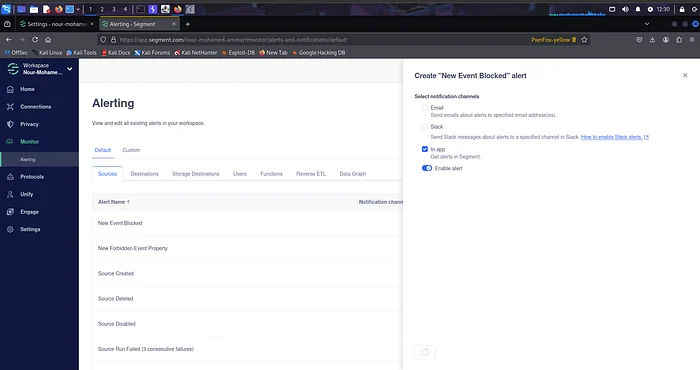
The request looked conceptually like this:
{ "input": { "category": "activity:sources:new_event_blocked", "workspaceId": "[REDACTED]", "userId": "[MY_USER_ID]", "enabled": true, "webConfig": { "enabled": true }, "emailConfig": { "enabled": false, "email": "[redacted]" } }}
The input object carries the alert category (activity:sources:new_event_blocked), the workspaceId, the target userId, an enabled flag, and per-channel configuration for web and email. Nothing unusual so far. The important question was whether the backend actually verified that userId belonged to the authenticated user.
Finding it
The mutation accepted the user identifier as a plain client-supplied field rather than deriving it from the session. That is the classic shape of an object-level authorization gap: the request names the object to act on, and the server has to check that the caller is allowed to act on that object. The field was the only thing standing between my session and another user's notification configuration, so it was worth testing directly.
Exploitation
Step 1: Capture the legitimate mutation
I opened the alert configuration page with my own account and intercepted the GraphQL mutation that updates the notification channels. The captured request is the one shown above, with my own userId and my own email address in emailConfig.
Step 2: Change only the user ID
I sent the request to Burp Repeater and changed:
userId: MY_USER_ID
to:
userId: ANOTHER_USER_ID
while keeping my own authenticated session. I also changed the notification email to an address I controlled:
"emailConfig": { "enabled": false, "email": "[redacted]"}
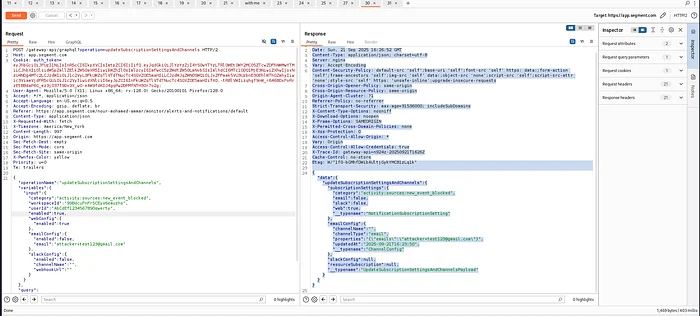
No victim session was used and no authentication token belonging to the other user was required. The only meaningful change was the target userId.
Step 3: Observe the response
Instead of rejecting the request with 403 Forbidden, the API returned:
HTTP/2 200 OK
More importantly, the GraphQL response reflected the modified notification configuration:
{  "data": {    "updateSubscriptionSettingsAndChannels": {      "subscriptionSettings": {        "category": "activity:sources:new_event_blocked",        "email": false,        "slack": false,        "web": true      },
      "emailConfig": {        "channelType": "email",        "properties": "[REDACTED]"      }    }  }}
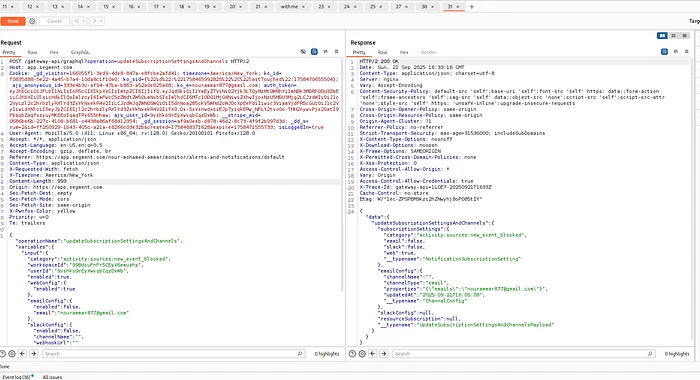
This meant the server was not merely accepting an arbitrary parameter. It was performing the update against a user selected by a client-controlled identifier.
Step 4: Confirm with controlled accounts
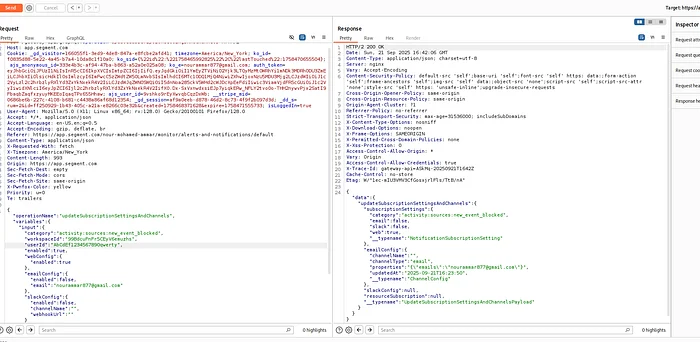
I repeated the test using controlled accounts to verify that the behaviour was consistent. The authenticated user could submit another user's identifier and modify that user's alert configuration.
Step 5: Final proof
To make sure this was not just a successful API response, I verified the behaviour one final time. The application accepted the request while targeting another user's ID, and the response reflected the modified notification configuration.
Final proof: the GraphQL mutation successfully updated another user's notification configuration using my authenticated session.
Root cause
The GraphQL mutation trusted a client-supplied userId without sufficiently enforcing object-level authorization before performing the update. The vulnerable authorization logic appeared to behave like:
Authenticated user+Valid userId=Update notification settings
when it should have enforced something equivalent to:
requestedUserIdmust be authorized forauthenticatedUser
Authentication answers who you are. Authorization must additionally answer whether you are allowed to modify this user's resource. The API successfully answered the first question but failed to enforce the second one for this operation.
Impact
This created a Broken Access Control / IDOR condition in a security-relevant notification feature. An attacker who could obtain another valid user identifier could potentially interfere with alerts by modifying notification channels or redirecting configuration associated with them.
Notification systems often carry operational information. Depending on the alerts configured in the affected workspace, unauthorised modification could cause users to miss important events or have notification configuration changed without their knowledge. The security boundary that failed was not authentication, since the attacker was authenticated; the problem was that authentication for User A was sufficient to perform an operation referencing User B.
Fix
The report does not describe a fix. The report does not describe a fix.
Disclosure
I responsibly reported the issue through the platform's bug bounty program. The report was accepted as a valid security issue and classified as:
Broken Access Control (BAC)→ Privilege Escalation
It was ultimately marked as a duplicate of an earlier report describing unauthorised modification of alerting settings. Although my submission was not the original report, the underlying authorization issue had already been independently identified.
Variants to test
A userId tells the backend which user you want to modify. It should never be what proves that you are allowed to modify them.

What happened, in plain words
A security researcher was testing the alerting functionality of a multi-tenant SaaS platform. This kind of product is often called a SaaS platform: software that runs on the vendor's servers and that many different companies log into over the internet. Each company gets its own separate area, called a workspace, so one customer's data does not mix with another's. That setup is what "multi-tenant" means: one building, many tenants, each with their own locked flat.
The feature under test was alerting. When something happens in the platform, for example a new event being blocked, the platform can tell you about it. It does that through notification channels: a message inside the app itself (in-app), an email, or a message to Slack, a chat tool many teams use. For each kind of alert, you can decide which channels should fire and where the messages should go.
To save those choices, the web page sends a request to the platform's API. An API is the part of a website that the page talks to behind the scenes: the page asks, the API answers, usually with data rather than a picture. In this case the API speaks GraphQL, a way of asking for and changing data where the request names exactly which operation it wants and what data goes with it. A single such operation is called a mutation when it changes something, as opposed to a query, which only reads.
The researcher noticed that the mutation for saving alert settings contained a field called userId. That is simply a number or code that identifies a user account. The browser sent it, and the server accepted it. That raised a very simple question: what if I keep my own logged-in session but put somebody else's userId in there? Would the server notice?
It did not. The server saved the settings against whichever user the request named, so a logged-in user could change another user's alert configuration. In security terms this is a broken access control problem, and more specifically an IDOR, short for Insecure Direct Object Reference: the request refers to an object (here, a user account) by an identifier the client controls, and the server fails to check that the caller is allowed to touch that object.
A useful comparison is a hotel. Your key card proves you are a guest; that is authentication. It does not mean you may open every door. The lock on each door has to check that this particular guest is allowed into this particular room; that is authorization. Here the hotel let any guest open any room as long as they knew the room number.
Authentication tells the API who I am. It does not mean I should be allowed to modify another user's settings.
The setup: what the researcher used and why
No special account was needed. The researcher started with a normal authenticated account, opened the alert configuration page, and used a tool that sits between the browser and the server to look at the traffic. Such a tool is called an intercepting proxy. Normally your browser talks straight to the website; with a proxy in the middle, every request can be paused, read and edited before it is forwarded. Burp is a well-known proxy suite, and Burp Repeater is one of its tools: you paste a captured request into it, change something, press send, and read the reply. It is like being able to rewrite a letter after you have posted it but before it arrives.
Why do this at all? Because the page's own form only lets you edit your own settings. The interesting question is what the server does when the request no longer matches what the page would normally send. The page is a polite suggestion; the server is the thing that decides. Testers therefore look at the raw request, not the form.
The captured request looked conceptually like this:
{ "input": { "category": "activity:sources:new_event_blocked", "workspaceId": "[REDACTED]", "userId": "[MY_USER_ID]", "enabled": true, "webConfig": { "enabled": true }, "emailConfig": { "enabled": false, "email": "[redacted]" } }}
Line by line, in plain words:
- The outer braces hold one object, a bundle of named values, much like a form with labelled boxes. The whole bundle sits under the name
input, which is the argument this mutation expects. categorynames which kind of alert these settings are for. The valueactivity:sources:new_event_blockedis the platform's internal label for one specific event type. Think of it as the name of a row in a table of alert types.workspaceIdidentifies the company area the settings belong to. The real value was removed before publishing, which is what[REDACTED]means: something was there, but it is hidden.userIdidentifies the user account whose settings are being saved. In the captured request this was the researcher's own account, shown as[MY_USER_ID].enabledis a simple on/off switch for this alert category as a whole.webConfigis a sub-bundle for the in-app channel, with its ownenabledswitch set totrue, meaning in-app notifications are on.emailConfigis a sub-bundle for the email channel:enabledisfalse, so email is off, andemailholds the destination address, here the researcher's own address.
Nothing unusual so far. Every value is something the page would legitimately send for the logged-in user. The important question was whether the backend actually checked that userId belonged to the authenticated user, that is, to the person whose session the request arrived with.
Finding it: why this one field mattered
The mutation took the user identifier as a plain value supplied by the client, instead of working it out from the session. That is the classic shape of an object-level authorization gap. The request says which object to act on, and the server has to check that the caller is allowed to act on that object. Here the userId field was the only thing standing between the researcher's session and another person's notification configuration, so it was worth testing directly.
A session, by the way, is how a website remembers that you logged in. After you sign in, the server gives your browser a small piece of data, often called a cookie or a token, and the browser sends it back with every request. It works like a wristband at an event: you show your ticket once, get the band, and from then on the band is what gets you in. The researcher kept their own wristband the whole time.
Exploitation, step by step
Step 1: Capture the legitimate mutation
The researcher opened the alert configuration page with their own account and intercepted the GraphQL mutation that updates the notification channels. The captured request is the one shown above, with their own userId and their own email address in emailConfig. Capturing first matters: you want a request you know the server accepts, so that any later difference in behaviour comes from your edit and nothing else.
Step 2: Change only the user ID
The request went to Burp Repeater, and one value was changed:
userId: MY_USER_ID
to:
userId: ANOTHER_USER_ID
while keeping the researcher's own authenticated session. The notification email was also changed to an address the researcher controlled:
"emailConfig": { "enabled": false, "email": "[redacted]"}
In plain words: the first block is the original value, the researcher's own identifier. The second block is the same field with a different user's identifier in it. The third block is the email sub-bundle with the destination swapped for an address the researcher controlled. The enabled flag stays false, exactly as in the captured request.
No victim session was used and no authentication token belonging to the other user was required. The only meaningful change was the target userId. That is the heart of the test: if the server accepts this, the check it is missing is not "are you logged in" but "are you allowed to touch this account".
Step 3: Observe the response
Instead of rejecting the request with 403 Forbidden, the API returned:
HTTP/2 200 OK
What those two lines mean: HTTP is the language browsers and servers use to exchange requests and responses, and every response starts with a status line. HTTP/2 is the version of that protocol in use. 200 OK is the code for success: the server did what was asked. 403 Forbidden is the code for "I understood you, and you are not allowed". A well-behaved server should have answered with the second one here, because the request was aimed at somebody else's account.
More importantly, the GraphQL response reflected the modified notification configuration:
{  "data": {    "updateSubscriptionSettingsAndChannels": {      "subscriptionSettings": {        "category": "activity:sources:new_event_blocked",        "email": false,        "slack": false,        "web": true      },
      "emailConfig": {        "channelType": "email",        "properties": "[REDACTED]"      }    }  }}
Line by line:
datais where a GraphQL server puts the result of a successful operation. Its presence means the operation ran rather than failing.updateSubscriptionSettingsAndChannelsis the name of the mutation that was called. The response echoes it back with the resulting state.subscriptionSettingsholds the saved settings for the alert category:categoryrepeats the event type,emailisfalse(email channel off),slackisfalse(Slack channel off) andwebistrue(in-app channel on). These match what was sent, which is the point: the server reports the settings as saved.emailConfigdescribes the email channel:channelTypesays it is the email channel, andpropertiesholds the channel's details, hidden here as[REDACTED].
This meant the server was not merely accepting an arbitrary parameter. It was performing the update against a user selected by a client-controlled identifier. In other words, the value was not ignored or quietly dropped; it was used to decide whose settings to write.
Step 4: Confirm with controlled accounts
One success can be a fluke: a cached page, a misread response, a coincidence. So the researcher repeated the test using controlled accounts to verify that the behaviour was consistent. The authenticated user could submit another user's identifier and modify that user's alert configuration.
Step 5: Final proof
To make sure this was not just a successful API response, the researcher verified the behaviour one final time. The application accepted the request while targeting another user's ID, and the response reflected the modified notification configuration.
Final proof: the GraphQL mutation successfully updated another user's notification configuration using the researcher's authenticated session.
Root cause: authentication versus authorization
The GraphQL mutation trusted a client-supplied userId without sufficiently enforcing object-level authorization before performing the update. Object-level authorization simply means checking, for this specific object, whether this specific caller may act on it.
The vulnerable authorization logic appeared to behave like:
Authenticated user+Valid userId=Update notification settings
Read that as a recipe with two ingredients: a logged-in user, plus any user identifier that exists, and the result is an update. Nothing in the recipe asks whether the two belong together.
when it should have enforced something equivalent to:
requestedUserIdmust be authorized forauthenticatedUser
That is: the identifier in the request must be checked against the person making the request, and the update should only proceed if the caller is entitled to that account.
Authentication answers who you are. Authorization must additionally answer whether you are allowed to modify this user's resource. The API successfully answered the first question but failed to enforce the second one for this operation. The existing defence, a valid session, did not help because the session was never tied to the object being modified. Back to the hotel: the key card was checked at the front door, but never at the room door.
Impact: why it matters
This created a Broken Access Control / IDOR condition in a security-relevant notification feature. Broken access control is the umbrella term for any case where the server lets someone do something they should not be allowed to do; IDOR is the specific pattern where the request names an object by an identifier and the server does not check ownership.
An attacker who could obtain another valid user identifier could potentially interfere with alerts by modifying notification channels or redirecting configuration associated with them.
Notification systems often carry operational information. Depending on the alerts configured in the affected workspace, unauthorised modification could cause users to miss important events or have notification configuration changed without their knowledge. A silenced alert is not a flashy break-in; it is a blindfold. If a team stops receiving warnings about blocked events, the first sign of trouble may be the trouble itself.
The security boundary that failed was not authentication, since the attacker was authenticated; the problem was that authentication for User A was sufficient to perform an operation referencing User B.
Fix
The report does not describe a fix. The report does not describe a fix.
In everyday terms: the server should read the name on the wristband itself, rather than believing the name the visitor writes on the form.
Disclosure: what happened after the report
The researcher responsibly reported the issue through the platform's bug bounty program. A bug bounty program is a scheme where a company invites outsiders to look for security problems and pays or credits them for valid findings, with rules about what may be tested and how findings are reported. "Responsibly" here means reporting privately to the company rather than publishing or exploiting it.
The report was accepted as a valid security issue and classified as:
Broken Access Control (BAC)→ Privilege Escalation
That line is a label with two parts: the broad category, Broken Access Control, abbreviated BAC, and after the arrow the more specific consequence, privilege escalation, meaning doing something with more power than your account should have.
It was ultimately marked as a duplicate of an earlier report describing unauthorised modification of alerting settings. A duplicate means somebody else had already reported the same underlying problem. Although this submission was not the original report, the underlying authorization issue had already been independently identified. Two people finding the same hole is not wasted effort; it is confirmation that the hole is easy to find.
Variants to test: where else to look
Once you have found one missing ownership check, the natural next question is where else the same mistake appears. These are the follow-ups worth trying, each with the sign that tells you it worked.
A UUID is a long random-looking identifier, and "encoded" means written in an alternative form such as URL encoding, where characters are replaced by percent codes.
A userId tells the backend which user you want to modify. It should never be what proves that you are allowed to modify them.
Glossary
- API: the part of a website or service that pages and apps talk to behind the scenes, receiving requests and returning data.
- Authentication: proving who you are, usually by logging in; the answer to "who are you?".
- Authorization: deciding what a proven identity is allowed to do; the answer to "are you allowed to do this?".
- Broken Access Control (BAC): a class of flaw where the server lets someone perform an action they should not be permitted to perform.
- Bug bounty program: a scheme where a company invites outside researchers to report security problems, usually with rewards and rules.
- Burp Repeater: a tool in the Burp proxy suite for resending a captured request after editing it, and reading the reply.
- Cookie: a small piece of data a site stores in your browser and your browser sends back with requests, often used to keep you logged in.
- Duplicate: a report describing a problem that has already been reported.
- GraphQL: a way for clients to ask a server for data or changes, where each request names the exact operation and the fields it needs.
- HTTP: the protocol browsers and servers use to exchange requests and responses.
- HTTP status code: the three-digit result at the start of a response, such as
200 OKfor success or403 Forbiddenfor "not allowed". - IDOR (Insecure Direct Object Reference): a flaw where a request names an object by an identifier the client controls and the server does not check that the caller owns or may access that object.
- In-app notification: an alert shown inside the product itself rather than sent out by email or chat.
- Intercepting proxy: a tool placed between browser and server that can pause, inspect and edit traffic.
- Multi-tenant: a setup where one platform serves many separate customer organisations, each with its own isolated area.
- Mutation: in GraphQL, an operation that changes data, as opposed to a query that only reads it.
- Notification channel: a route by which an alert is delivered, such as in-app, email or Slack.
- Object-level authorization: checking, for one specific object, whether this specific caller is allowed to act on it.
- Privilege escalation: gaining or exercising more power than your account should have.
- Redacted: hidden or removed before publishing, often shown as
[REDACTED]. - Request: the message a browser or tool sends to a server asking it to do something.
- Response: the message a server sends back, containing a status and usually data.
- SaaS (Software as a Service): software run by a vendor on its own servers and used by customers over the internet.
- Session: the server's memory of your logged-in state, kept alive by a cookie or token your browser sends each time.
- Slack: a chat tool used by teams, which can receive automated alerts.
- Token: a piece of data, similar in role to a cookie, that proves your session to the server.
- UUID: a long, random-looking identifier used to name objects uniquely.
- Workspace: a customer's separate area inside a multi-tenant platform, holding that customer's data and settings.


