Old Root Password Still Grants Root Access in ***** Linux
Changing the normal user's password does not update the root password, which was set to the same initial password during installation. An attacker with local terminal access who knows the original installation password can still authenticate as root after the user changes their password.
 Published on medium.com
Cybersecurity
The full write-up lives on its author's site
It belongs to its author, so we link to it rather than copy it. The other two tabs are our own rewrites, checked against it.
Context
The target is a Linux distribution whose name is partly masked in the write-up as ***** Linux. The feature under examination is password management: the installer sets up a normal user account and a root account, and the desktop environment offers a password change flow for the normal user.
Normally, rotating a user's password should invalidate the old credential for every account that shared it. Here it does not: the root account keeps the installation-time password after the normal user has changed theirs.
The author classifies the issue as Improper Password Management and gives it a reported severity of High (7.5). That rating is the researcher's own, not a platform-assigned score.
Setup
- A fresh installation of the affected Linux distribution.
- The same initial password chosen for the normal user and root during installation.
- Access to the normal user's session, including the graphical password change flow (
Update → Password → User) and a terminal. - Local terminal or TTY access for the attacker scenario described later.
Finding it
During installation, the distribution assigns the same initial password to both the normal user and the root account. The interesting question was what happens to the root credential when the user later rotates their own password. Testing showed that the root password is not touched: the original installation password still authenticates as root.
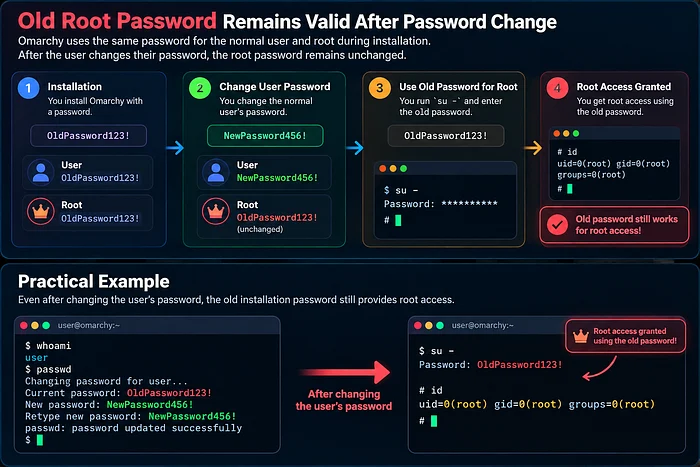
The image illustrates the core behaviour: after password rotation, the old password remains valid for root access.
Exploitation
Step 1: Install with a known password
Install the distribution and set the password to:
OldPassword123!
At this point the normal user and root share the same initial credential.
Step 2: Rotate the normal user's password
Change the normal user's password through the desktop flow:
Update → Password → User
Set the new password to:
NewPassword456!
Step 3: Attempt to become root
Open a terminal and run:
Step 4: Supply the original password
Enter the installation-time password:
OldPassword123!
The result is that root access is still granted:
uid=0(root) gid=0(root) groups=0(root)
The old credential still authenticates the root account.
Root cause
During installation the distribution assigns the same password hash to both the normal user and the root account. When the normal user changes their password, only that account's entry is updated. The root account's hash is left as it was, so the original installation password continues to work for root.
Impact
An attacker who knows the original installation password and has local terminal or TTY access can authenticate as root even after the user has changed their password. The write-up frames the consequence in terms of what that root session allows:
- Access sensitive files.
- Modify system configurations.
- Install malicious software.
- Execute commands with root privileges.
- Take full control of the affected system.
The condition is important: the attacker needs the original password and local access. This is not a remote privilege escalation on its own.
Fix
The write-up proposes three possible solutions:
- Update the root password when the normal user password changes.
- Disable direct password-based root authentication.
- Provide a separate root-password management option.
No fix is described as having been applied, and the report does not say whether the vendor changed anything.
Outcome
The finding had already been reported by another security researcher. It was marked as Duplicate and no monetary reward was paid.

The author describes the expectation of a $1,000 reward for a root-level finding.

The duplicate decision turned that expectation into no payout. The researcher still treats the exercise as worthwhile: password rotation has to handle privileged accounts and old credentials, not just the account whose password was changed.
What happened, in plain words
A security researcher installed a Linux distribution (the name is partly hidden in the write-up as ***** Linux) and found a problem with how it handles passwords. When you install this system, it asks for a password and uses that same password for two accounts: your everyday account (the "normal user") and the all-powerful administrator account called root.
Later, the researcher changed the password of the normal user through Update → Password → User. That looked like it worked. But when they opened a terminal and tried to log in as root using the old password, it still worked. The root account had kept the original password from installation, and changing the normal user's password never touched it.
The researcher rated this High (7.5) and called it Improper Password Management. They hoped for a $1,000 reward, but the issue had already been reported by someone else, so it was marked as a Duplicate and paid nothing.
Before going further, a few words you will see throughout:
- Linux: an operating system, like Windows or macOS, but free and open. Many servers run it.
- Root: the super-administrator account on Linux. It can do anything: read any file, change any setting, install any program. Think of it as the master key to the whole building.
- Normal user: your ordinary account. It can do everyday things but needs permission (or the root password) for system-wide changes.
- Terminal: a text window where you type commands instead of clicking buttons.
- Password rotation: the practice of changing a password regularly, or after something suspicious, so an old leaked password stops working.
1. Summary
The researcher found that on this Linux distribution, changing the normal user's password does not update the root password. During installation, the system gives the same starting password to both the normal user and root. When the user later changes their own password, the old one stays valid for root access.
The image illustrates the core behaviour: after the password is changed, the old password still works for root.
Why does this matter? Because the whole point of changing a password is to make the old one useless. If someone learned your original password (a colleague, a family member, anyone who watched you type it during setup), you would change it to lock them out. Here, changing it does not lock them out of root.
2. Steps to Reproduce
Step 1: Install the system and, when the installer asks for a password, use:
OldPassword123!
This is the password you type during setup. At this moment, the installer gives the same password to both your normal account and the root account. So both accounts start with the same secret.
Step 2: Change the normal user's password through the desktop menus:
Update → Password → User
Set the new password to:
NewPassword456!
Why do this step? Because it is exactly what a careful user does after installation: replace the setup password with a private one.
Step 3: Open a terminal and run:
su stands for "substitute user" and is the command to switch to another account. The - means "start a full login session as that user", which by default is root. When you run it, the system asks for the root password. This step is the test: can we still become root, and with which password?
Step 4: Type the original installation password:
OldPassword123!
This is the password the user believes they replaced. If the system were behaving correctly, this should be rejected. Instead, root access is granted:
uid=0(root) gid=0(root) groups=0(root)
This line is the system telling you who you now are. uid=0 means user ID zero, and on Linux user ID zero is always root. gid=0 and groups=0(root) mean you are in the root group as well. In plain words: you are now the administrator, with full power over the machine, using a password that was supposed to be gone.
3. Root Cause
Why does this happen? During installation, the system stores the same password hash for both the normal user and root. A password hash is not the password itself; it is a scrambled fingerprint of it. The system never stores your real password, only this fingerprint, and it checks a login by scrambling what you type and comparing fingerprints.
When the normal user changes their password, only that account's fingerprint is updated. The root account's fingerprint is left exactly as it was. So the original installation password still produces the matching fingerprint for root, and the login succeeds.
4. Security Impact
Who can abuse this? An attacker who knows the original installation password and can sit at the machine (a local terminal or TTY) can log in as root even after the user has changed their password. A TTY is simply a text console, the kind of screen you get without the graphical desktop.
With root access, the write-up says an attacker could:
- Access sensitive files.
- Modify system configurations.
- Install malicious software.
- Execute commands with root privileges.
- Take full control of the affected system.
In everyday terms: root is the master key, so anyone holding it can read your documents, change the locks, install spyware, or hand the whole machine over to someone else.
Two conditions matter. First, the attacker must already know the original password. Second, they need to be at the machine, not on the internet. So this is not a way to break in from afar by itself.
5. Recommended Fix
The researcher suggests three possible fixes:
- Update the root password when the normal user password changes.
- Disable direct password-based root authentication.
- Provide a separate root-password management option.
In plain words: either keep the two accounts in sync, or stop letting people log in as root with a password at all, or give users a clear, separate place to manage the root password. The write-up does not say whether the vendor applied any of these.
6. The $1,000 Dream
When the researcher found this, they were excited about how serious it could be. They imagined a $1,000 reward for it.
The image captures that hopeful feeling every bug hunter knows.
A quick note on terms: a bug bounty is a programme where companies pay researchers for reporting security problems responsibly. A bug hunter is the researcher doing that work.
7. Reality Hits: Duplicate
Unfortunately, another security researcher had already reported the same issue. The finding was marked as Duplicate, and no money was paid.
The image sums up the shift from hoping for $1,000 to receiving $0.
A duplicate means the company already knew about the problem from an earlier report, so a second report of the same thing does not earn a reward. It is common in bug bounty work.
8. Conclusion
Even though the finding was a duplicate, the researcher treats it as a valuable learning experience. The lesson: when you change a password, the system must handle every account that shared the old one, especially privileged accounts like root. Otherwise the old credential lives on where it matters most.
Glossary
- Linux: a free, open-source operating system used on many servers and desktops.
- Root: the super-administrator account on Linux, with unlimited power over the system.
- Normal user: an ordinary account without administrator rights.
- Terminal: a text window for typing commands.
- TTY: a text console, a screen without the graphical desktop.
- Password rotation: regularly changing a password so old ones stop working.
- Password hash: a scrambled fingerprint of a password, stored instead of the password itself.
- Improper Password Management: a weakness where passwords are handled incorrectly, for example old ones staying valid.
- Severity: a rating of how serious a security issue is; here High (7.5), the researcher's own rating.
su -: a Linux command to start a full login session as another user, root by default.- uid / gid: numeric IDs for a user and a group;
uid=0means root. - Bug bounty: a programme that pays researchers for responsibly reporting security bugs.
- Duplicate: a report of an issue that was already reported, so it earns no reward.



