The issue
Many organisations misconfigured their Atlassian Jira Service Desk to allow public sign-ups, exposing internal support portals. An attacker could sign up and create or assign tickets, potentially impersonating employees to request sensitive actions or leak email addresses.
 Published on medium.com
In the light of the COVID-19 crisis, millions of organisations across the globe had to quickly relocate their daily operations from an office to employee’s residences. As expected, this turned out to be a challenging task, even for companies already familiar with remote working solutions.
The full write-up lives on its author's site
It belongs to its author, so we link to it rather than copy it. The other two tabs are our own rewrites, checked against it.
Context
Atlassian JIRA Service Desk (now Jira Service Management) is a cloud product that lets an organisation run a customer-facing support portal on its own Atlassian site, at a namespace such as yourcompanyname.atlassian.net. Each service desk has its own customer portal, and administrators choose who may become a customer: anyone who signs up, customers the agent invites, or only accounts that already exist on the site.
The report is about organisations that turned a service desk into an internal ticketing tool (HR, IT, facilities, finance, security) but left the customer sign-up setting open to the public. The Atlassian site itself keeps its normal login page, which is protected, but the service desk exposes a second login portal that is reachable directly and, in this configuration, lets anyone register and open requests.
The researcher, Inti De Ceukelaire, framed the work around the sudden move to remote working during the COVID-19 crisis: with no way to walk over to a colleague and confirm a request, a ticket that looks internal is much easier to abuse.
Setup
The researcher created a demo service desk at https://yourcompanyname.atlassian.net to illustrate the configuration, and also looked at real instances. For the measurement he took a list of 10,000 popular domain names globally, derived the corresponding Atlassian namespace from each domain, and checked automatically whether sign-ups were enabled for that namespace. The workflow only extracted the domain name and checked whether sign-ups were enabled for that namespace; it did not check whether the company name differs from the domain name, or whether the service desk actually belongs to the company that shares the name. That makes the count a rough estimate.
No specific tooling, versions or credentials are described beyond that automated check and manual sign-ups. The only precondition for joining a misconfigured desk is the ability to reach the portal URL and complete the public sign-up.
Finding it
The starting observation is that the default Atlassian login page and the service desk customer login are two different entry points. An administrator who visits the site root sees a properly protected login and may conclude the desk is closed. The customer portal login lives at a separate path and, when public sign-up is enabled, offers a registration link to anyone.
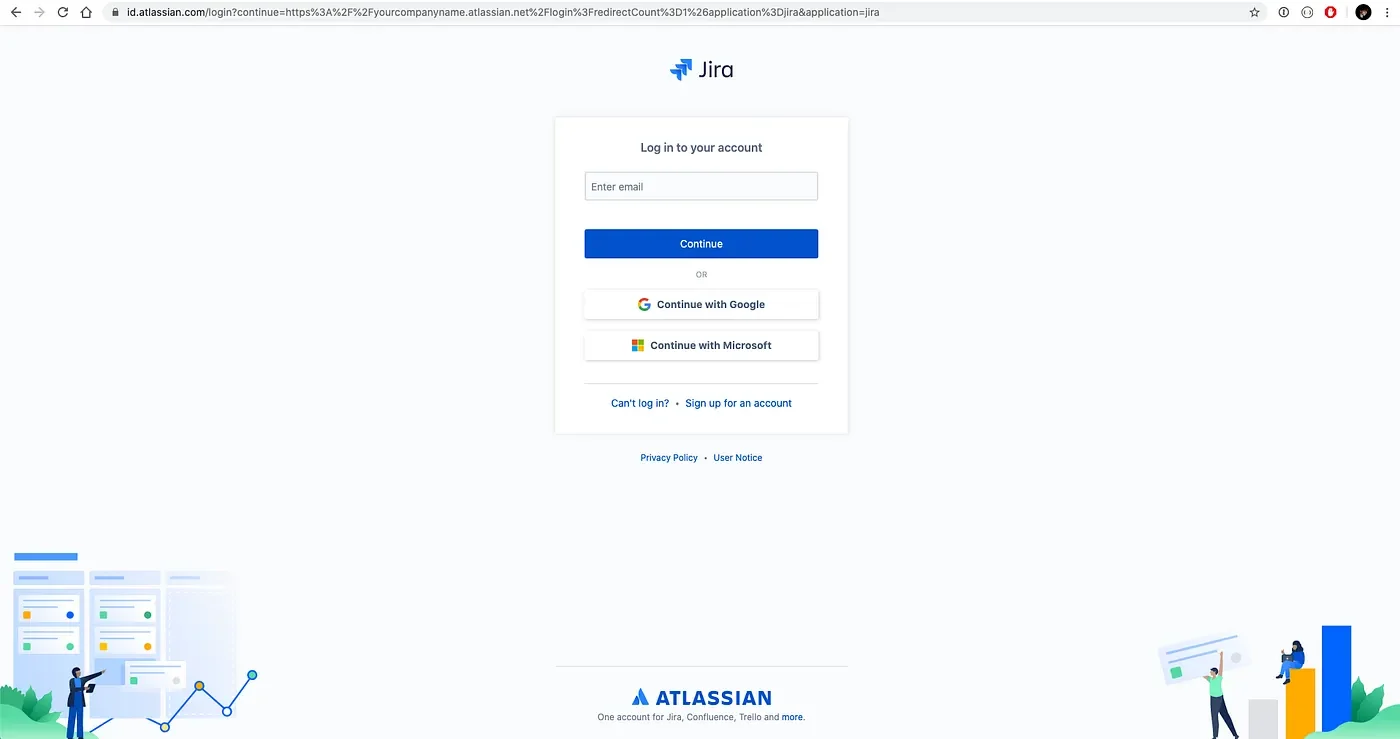
For the proof of concept, the instance root loads the default Atlassian login page, which is protected against external intruders:
The second portal is reached at this URL instead:
https://yourcompanyname.atlassian.net/servicedesk/customer/user/login
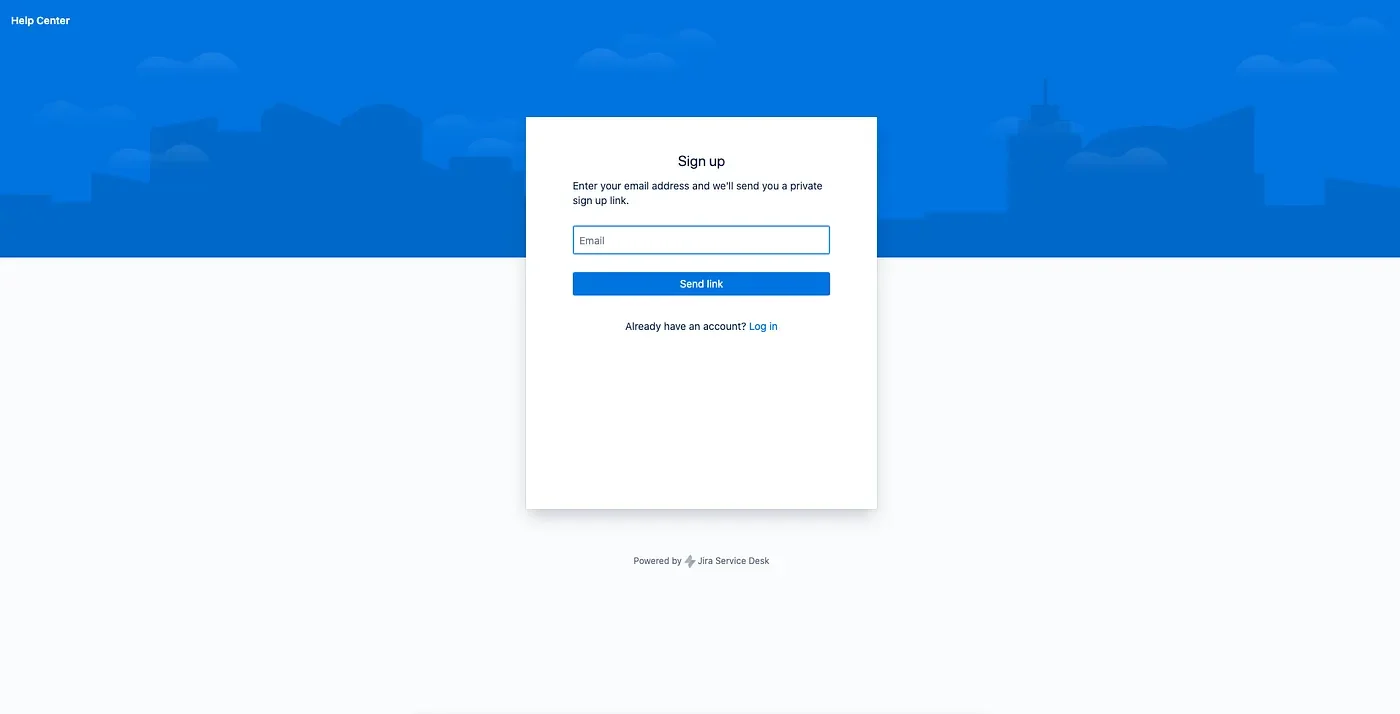
That page provides a second login portal which, in this configuration, allows everyone to sign up (via the sign up link) and access the support portals:
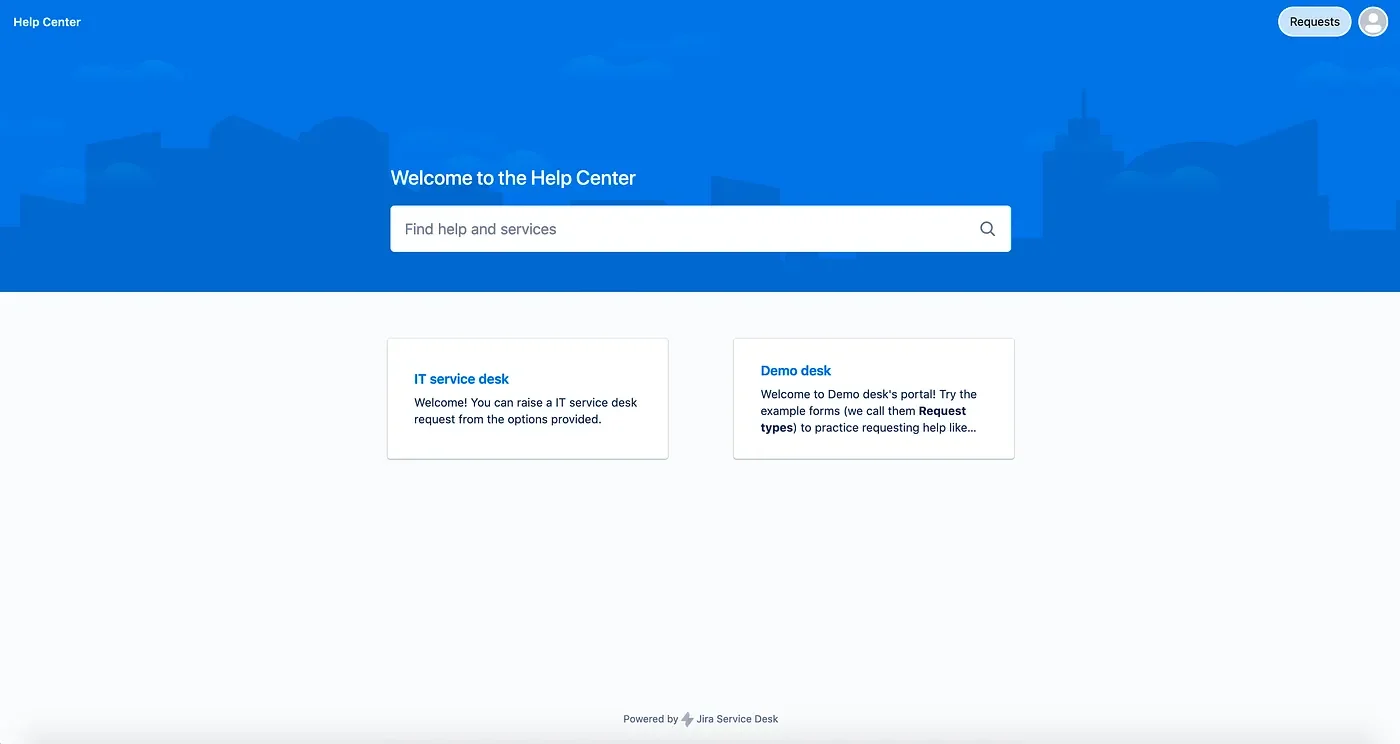
Our demo environment is obviously empty, so let's look at some real examples.
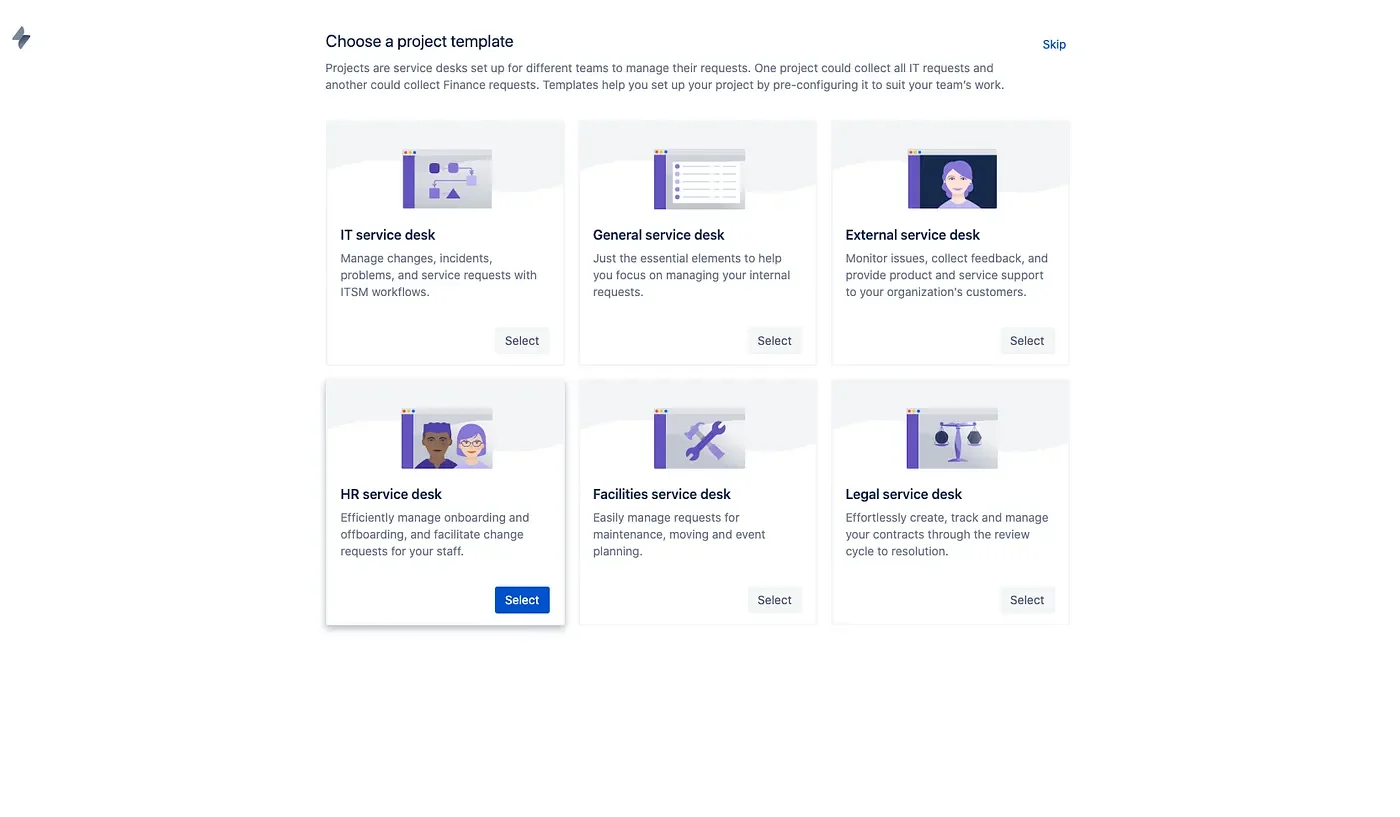
Projects can be set up for various purposes, such as IT, HR, Facilities, Finance & Legal, and this does not seem to affect the public registration settings:
Exploitation
Step 1: measure how many namespaces are open
The researcher ran the automated check over the 10,000-domain list. Of the domains, 1,972 corresponded to an Atlassian instance, and 288 of those (roughly 15%) had a service desk with public sign-ups enabled. That was an increase of 12% compared with tests conducted before the COVID-19 crisis, with the earliest scans dating back to the previous summer. The numbers are an estimate for the reasons given above.
Step 2: sign up and look at the portal
He then signed up for some of these service desks, since they were public. The titles alone showed that many should never have been exposed. The screenshots below are real but slightly modified to remove references to affected companies, with permission:
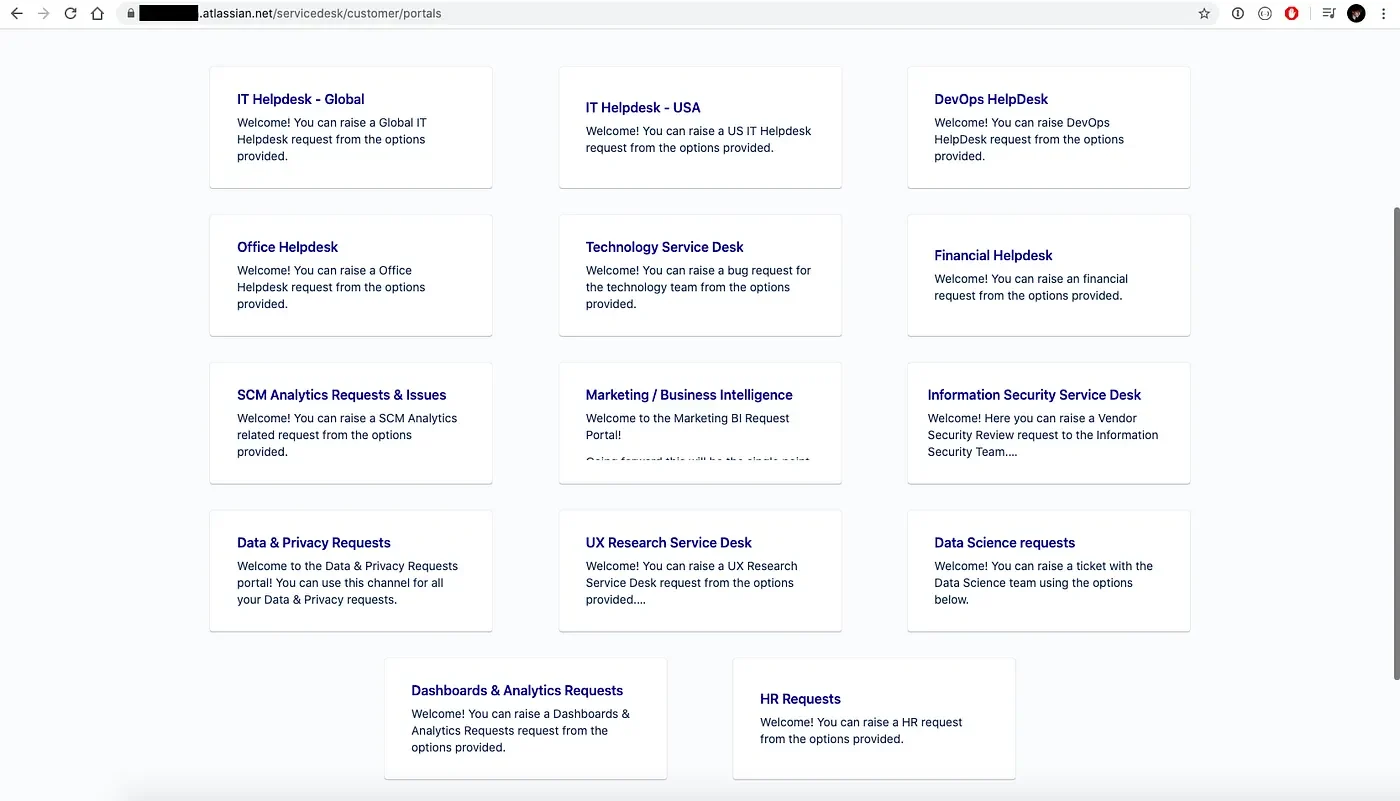
Just one of the hundreds of 'internal' service portals exposed to the internet.
The example is very similar to the numerous instances he tested. The support portals cover topics such as HR, internal IT troubleshooting, Developer Operations, Office Helpdesks, Data & Privacy Requests, Information Security, UX, Marketing and Data Science. Each portal contains sub-topics with the common requests internal employees can create:
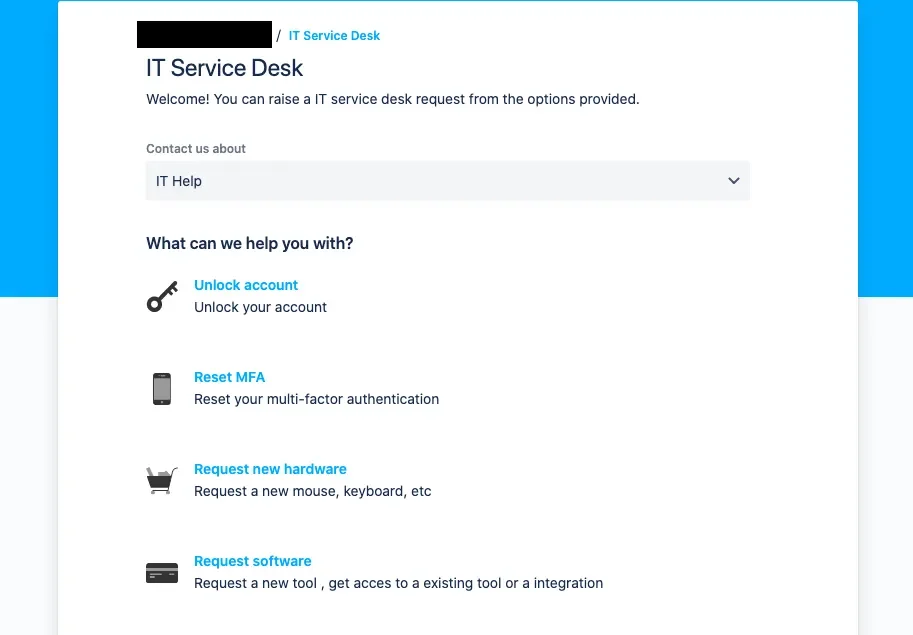
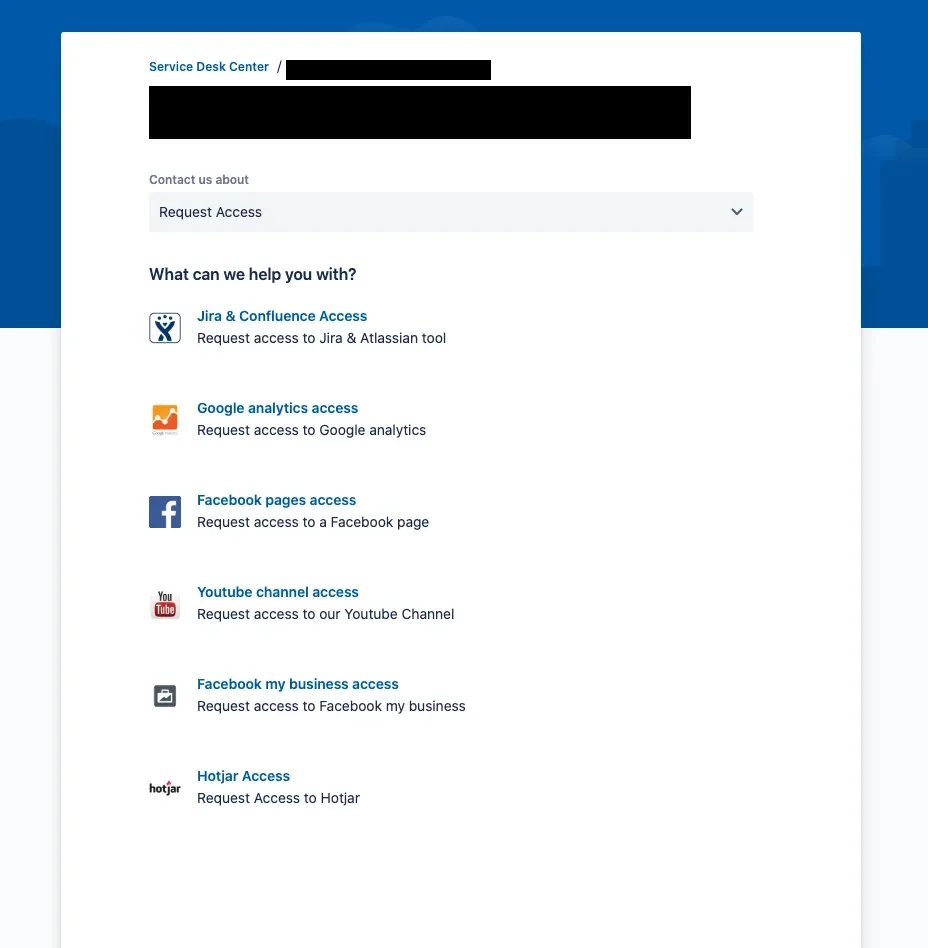
A selection of the request types he saw:
- Getting new access badges to the physical office delivered
- Onboarding new employees
- Requesting salary changes
- Requesting information about employees
- Requesting information about customers
- Requesting changes to online assets or webpages
- Requesting access to social media channels
- Requesting access to internal tools
- Requesting internal security assessment reports
- Unblocking users
- Resetting multi-factor authentication
- Declaring expenses
- Initiating a GDPR request for a customer
- VPN whitelisting
- Requesting execution of queries on the database
- Requesting code to be executed on the company's web server
Step 3: abuse ticket assignment to harvest e-mail addresses
About one third of the service desks he joined allowed him to assign tickets to other users. In certain configurations, users are created for any inbound support e-mail, with their display name automatically set to their e-mail address. Where that is the case, the assign functionality leaks the e-mail addresses of every user that has interacted with the external support channels:
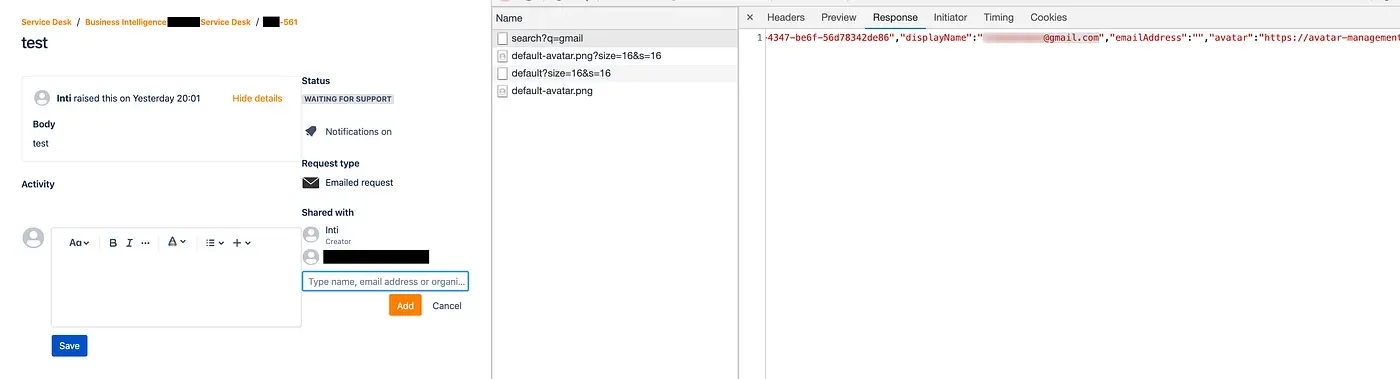
Some misconfigured service desks would leak (customer) e-mail addresses through the 'assign' functionality.
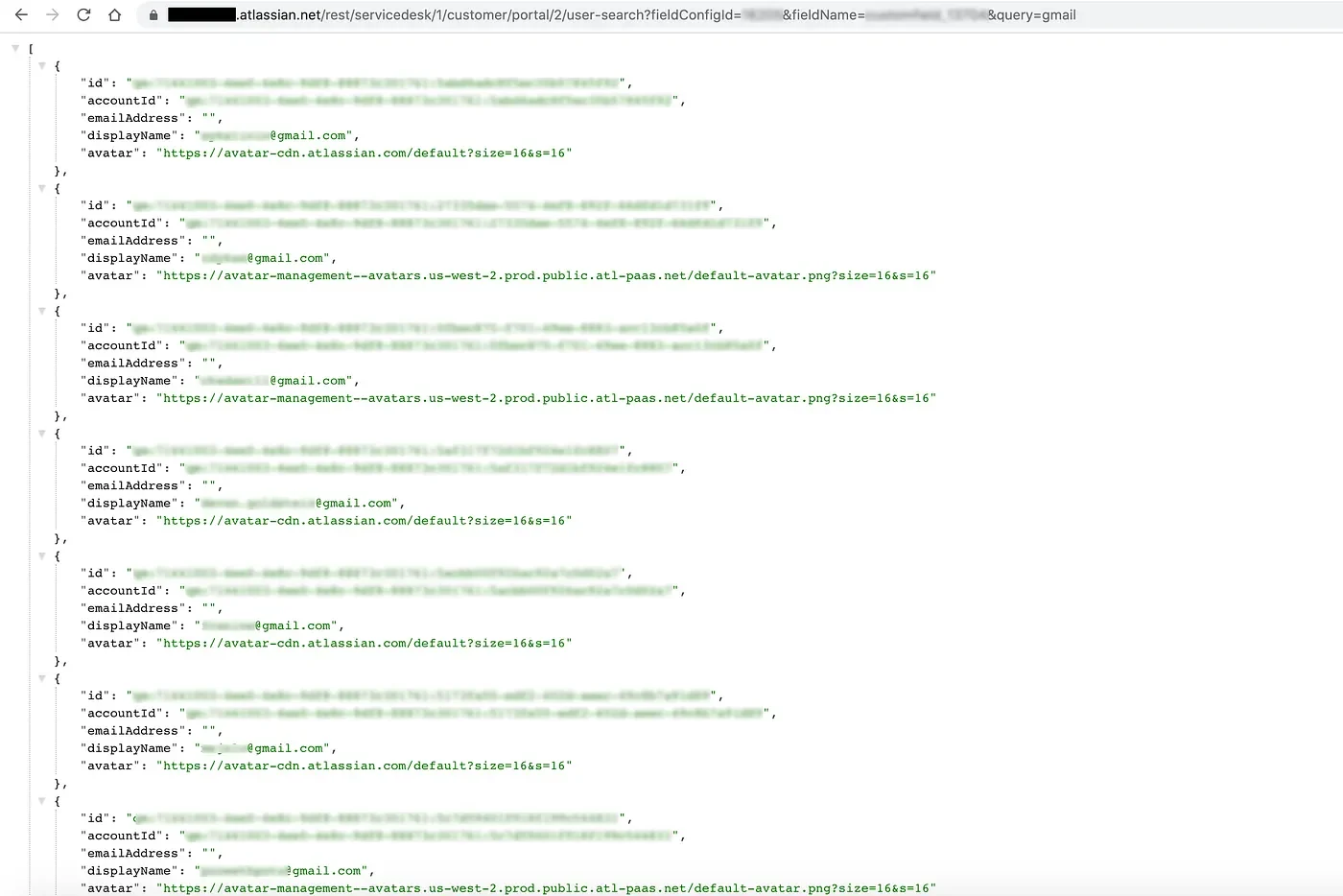
A service desk accidentally leaking personal e-mail addresses of its customers.
Step 4: disclosure
Because the only thing needed was to check whether a sign-up page existed, hundreds of companies could be tested without the risk of legal trouble: the desks were public. Once possible victims were identified, disclosure was painful. More than 85% of the vulnerable companies had no way to responsibly disclose a vulnerability to them. Creating an internal ticket was possible in that case, but the legal perception was uncertain. In some cases he contacted external customer service, and about half of those reach-outs were not escalated.
Over the past few weeks he worked with around 25 companies to secure their service desk. At least one had noticed rogue accounts other than his, so more hackers appear to be aware of the configuration flaw. Impact assessments varied from accepted risk to critical. Some companies awarded a monetary reward ranging from €50 to $10,000; in the $10,000 case he would have been able to run malicious code by submitting a code execution request through the service desk.
Root cause
The flaw is a misconfiguration by the individual companies, not a vulnerability in Atlassian products. A service desk that was meant to be public, or that was later reorganised to serve internal purposes, kept its customer sign-up setting open, so the customer portal accepts self-registration from the internet. The normal Atlassian login page still looks protected, so administrators might think they are protected. The report notes that Atlassian provides documentation on choosing customer permissions for a service desk and Jira site, which explains the correct settings for each intended purpose.
Impact
An external attacker can register on an exposed internal desk and impersonate an employee by creating legitimate-looking internal requests. The impact is highly contextual and depends on the expectation patterns of the support agent. In a customer-facing setting there are more reasons to be suspicious of unexpected requests than in an internal company tool. For bigger organisations the risk of malicious ticket handling seems more likely, because there are more possible ticket creators and teams involved; such companies would be expected to have strict procedures and checks to authorise requests, but the tests pointed out that the reality is different, and the vigilance agents have for external threats fades in a presumably authorised environment.
About one third of the joined desks allowed assigning tickets to other users, and in certain configurations this leaks the e-mail addresses of everyone who interacted with the external support channels. The researcher did not encounter any case in which newly created accounts had access to others' tickets. He also has no insight into whether the rogue account seen at one company was used for malicious purposes.
Fix
The researcher worked with around 25 companies to properly secure their service desk. The report does not describe the specific settings they changed. What should be done is to review the customer permissions of each service desk and Jira site and choose the settings that match the intended purpose, following Atlassian's documentation. A desk used internally should not allow public sign-up.
Separately, the report argues that every company should have a policy and a contact for reporting security vulnerabilities, from a simple security.txt to a bug bounty programme. The absence of such a channel is why thousands of internal service desks are most likely still exposed: the researcher had no way to escalate to the right people as an outsider.
Variants to test
-
Other Atlassian namespaces. Derive the namespace from a company domain and open
https://<namespace>.atlassian.net/servicedesk/customer/user/login. A positive result is a customer login page with a working sign up link, while the site root shows only the protected Atlassian login. -
Assignment behaviour. After joining, try assigning a ticket to another user. A positive result is an assignee list that includes users created from inbound support e-mail, with display names set to e-mail addresses, which discloses those addresses.
-
Request types with high impact. Look at the available request types for ones that grant access, reset MFA, unblock users, whitelist VPN addresses, run database queries or execute code on a web server. A positive result is a request form that an external account can submit for such an action.
What happened, in plain words
Imagine a company has a private suggestion box inside its office, where staff drop in requests like "please give me a new door badge" or "please reset my password". Now imagine someone accidentally moves that box to the pavement outside the building, still labelled "internal only". Anyone walking past can drop in a note that looks exactly like a real employee request, and the person emptying the box has no easy way to tell the difference.
That is roughly what this report describes. Many organisations use a cloud product called Atlassian JIRA Service Desk (today called Jira Service Management) to run a support portal. A support portal is a website where people submit requests and track answers. The product lives on the internet at an address of the form yourcompanyname.atlassian.net, where yourcompanyname is a short name, called a namespace, that the company picked. Each company gets its own space there.
Normally a service desk is meant for customers: people outside the company who need help. But during the COVID-19 crisis, when millions of employees suddenly started working from home, many companies repurposed their service desk as an internal tool. Staff now used it to ask HR for a salary change, to ask IT to unblock an account, or to ask security for a report. The problem: the setting that lets anyone sign up was often left switched on. So outsiders could register on what had become an internal helpdesk and file requests that looked like they came from employees.
The researcher, Inti De Ceukelaire, measured how common this was, signed up to some of the exposed desks to see what was inside, found that some of them leaked customers' e-mail addresses, and then tried to tell the affected companies. More than 85% of them had no way to receive a security report. He eventually worked with around 25 companies, and rewards ranged from €50 to $10,000.
A few words you will meet throughout, explained once here:
- Misconfiguration: a setting left in the wrong position. Nothing is broken in the software; the owner simply chose, or forgot to change, an option that opens the door. Compare it to leaving your house key under the doormat: the lock works fine, the key is just in the wrong place.
- Ticket: a single request in a helpdesk system, with a title, a description, a person who created it and a status (open, in progress, closed).
- Sign-up: the public form that lets a stranger create an account on a website.
- PII: personally identifiable information, meaning data that points to a specific person, such as a name, an e-mail address or a phone number.
The setup: two doors into the same building
The key observation of the report is that an Atlassian site has two different login pages, and they do not behave the same way.
The first one is the normal Atlassian login, the one you reach when you type the site address into your browser. It asks for a username and password and refuses strangers. An administrator who checks the site this way sees a locked door and may reasonably conclude that the whole service desk is closed to the public.
The second one is the customer login of the service desk itself. It lives at a different address, a different path on the same site. When the sign-up setting is open, this second page offers a sign up link to anyone who visits it. The first door is locked, the second is wide open, and the administrator may never have looked at the second.
To show this, the researcher created a demonstration service desk at https://yourcompanyname.atlassian.net. The instance root, meaning the main address of the site, loads the default Atlassian login page, which is properly protected against external intruders:
That screenshot shows the ordinary, protected login. This is what an administrator sees, and it is why the problem stays hidden.
The only thing an attacker needs to do is to navigate to this URL instead:
https://yourcompanyname.atlassian.net/servicedesk/customer/user/login
Line by line, in plain words:
https://is the protocol, the set of rules browsers use to fetch a page securely.yourcompanyname.atlassian.netis the address of the company's space on Atlassian's servers.atlassian.netis the shared domain;yourcompanynameis the namespace the company chose./servicedesk/customer/user/loginis the path, the part of the address that tells the server which page inside the site you want. Here it points at the customer login of the service desk, not at the main Atlassian login.
Typing that address is the whole trick. No special tool, no password, no exploit code: just a different page on the same website.
This link provides access to a second login portal, that allows everyone to sign up in this configuration (click on sign up) and access the support portals:
Our demo environment is obviously empty, so let's look at some real examples.
The two screenshots show the second portal and the empty demonstration environment behind it. The demo has no real content, which is why the next step was to look at real companies.
Projects can be set up for various purposes, such as IT, HR, Facilities, Finance & Legal, and this does not seem to affect the public registration settings:
That last screenshot shows that the purpose of a project, whether it is for IT, HR, facilities or finance, does not change the registration setting. A desk used for HR requests is just as open as one used for customer questions, if the setting was left on.
Measuring how many companies were exposed
To find out how widespread this was, the researcher automated the check. Automation here means writing a small program that repeats the same simple action many times, far faster than a person clicking.
The method:
- Take a list of 10,000 popular domain names globally. A domain name is the part of a web address that identifies an organisation, like
example.com. - For each domain, extract the corresponding Atlassian namespace and check whether sign-ups are enabled for it.
- Check whether sign-ups are enabled for that namespace.
Of the 10,000 domains, 1,972 corresponded to an Atlassian instance. Of those, 288, roughly 15%, had a service desk with public sign-ups enabled. That was an increase of 12% compared with tests conducted before the COVID-19 crisis, with the earliest scans dating back to the previous summer.
The researcher is careful about these numbers. The automated workflow only extracted the domain name and tested the namespace. It did not check whether the company name differs from the domain name, or whether the service desk actually belongs to the company that shares the name. So the count is a rough estimate, not a precise census.
Why do it this way? Because the check is harmless: you are only looking at whether a public sign-up page exists, not breaking into anything. That made it possible to test hundreds of companies without legal risk.
Looking inside the exposed desks
Numbers only tell you how many doors are open. To understand what is behind them, the researcher signed up for some of these service desks, since they were public. The titles alone showed that many should never have been exposed. The screenshots below are real but slightly modified to remove references to affected companies, with permission:
Just one of the hundreds of 'internal' service portals exposed to the internet.
This example is very similar to the numerous instances he tested. The support portals cover topics such as HR, internal IT troubleshooting, Developer Operations, Office Helpdesks, Data & Privacy Requests, Information Security, UX, Marketing and Data Science. Each portal contains sub-topics with the common requests internal employees can create:
These screenshots show the inside of a real portal: categories of requests that clearly belong to internal company life, not to outside customers.
A selection of the request types he saw:
- Getting new access badges to the physical office delivered
- Onboarding new employees
- Requesting salary changes
- Requesting information about employees
- Requesting information about customers
- Requesting changes to online assets or webpages
- Requesting access to social media channels
- Requesting access to internal tools
- Requesting internal security assessment reports
- Unblocking users
- Resetting multi-factor authentication
- Declaring expenses
- Initiating a GDPR request for a customer
- VPN whitelisting
- Requesting execution of queries on the database
- Requesting code to be executed on the company's web server
Some of these terms deserve a short explanation:
- Multi-factor authentication (MFA): logging in with two or more proofs of identity, for example a password plus a code from your phone. Resetting it for someone is a powerful action, because it can hand control of an account to whoever asks.
- VPN whitelisting: a VPN is a private tunnel into a company network. Whitelisting means adding an address to the list of addresses allowed through. If an outsider can request that, they can ask for their own connection to be let in.
- GDPR request: a formal request under European data protection law, for example to obtain or delete the data a company holds about a person.
- Database query: an instruction sent to the system that stores a company's data, for example to read or change records.
Notice the pattern: these are exactly the kinds of requests that, in an office, you would make in person to a colleague you can see. When everyone works from home, the ticket is the only channel, and the person handling it has no easy way to check that the requester really is who they claim to be.
Leaking e-mail addresses through ticket assignment
About one third of the service desks he joined allowed him to assign tickets to other users. Assigning means choosing which person a ticket belongs to, for example handing it to a colleague to handle. To do that, the system shows you a list of possible assignees, and that list is where the leak happens.
In certain configurations, users are created for any inbound support e-mail, with their display name automatically set to their e-mail address. In other words, whenever someone writes to the support address, the system quietly creates an account for them, and uses their e-mail address as the name shown in the interface. Where that is the case, the assign functionality leaks the e-mail addresses of every user that has interacted with the external support channels:
Some misconfigured service desks would leak (customer) e-mail addresses through the 'assign' functionality.
A service desk accidentally leaking personal e-mail addresses of its customers.
The screenshots show the assignee list filled with e-mail addresses instead of names. This is PII: personal contact details of customers, visible to anyone who managed to sign up. The researcher notes that he did not encounter any case in which newly created accounts had access to other people's tickets, so the leak was through the user list, not through reading the tickets themselves.
Trying to tell the companies
Because the only thing needed was to check whether a sign-up page existed, hundreds of companies could be tested without the risk of legal trouble: the desks were public. Once possible victims were identified, disclosure was painful. Disclosure here means telling the owner of a system about a security problem in a responsible way, usually privately, so they can fix it before anyone abuses it.
More than 85% of the vulnerable companies had no way to responsibly disclose a vulnerability to them. Creating an internal ticket was possible in that case, but the legal perception was uncertain: writing into the very system you are reporting is not a recognised reporting channel, and could be misunderstood. In some cases he contacted external customer service, and about half of those reach-outs were not escalated, meaning the message never reached the people who could act on it.
Over the past few weeks he worked with around 25 companies to secure their service desk. At least one had noticed rogue accounts other than his, so more hackers appear to be aware of the configuration flaw. Rogue account means an account created by someone who should not have one.
Impact assessments varied from accepted risk to critical. Some companies awarded a monetary reward ranging from €50 to $10,000. In the $10,000 case he would have been able to run malicious code by submitting a code execution request through the service desk. That is the worst outcome in this report: a request form that lets an outsider ask for code to be run on a company server, submitted through a portal that was supposed to be internal.
Why it happens
The flaw is a misconfiguration by the individual companies, not a vulnerability in Atlassian products. A service desk that was meant to be public, or that was later reorganised to serve internal purposes, kept its customer sign-up setting open, so the customer portal accepts self-registration from the internet. The normal Atlassian login page still looks protected, so administrators might think they are protected.
Atlassian provides documentation on choosing customer permissions for a service desk and Jira site, which explains the correct settings for each intended purpose. In plain terms: the product gives you a choice about who may become a customer, and the owner has to pick the one that matches what the desk is for.
What the impact really depends on
An external attacker can register on an exposed internal desk and impersonate an employee by creating legitimate-looking internal requests. Impersonate means pretending to be someone you are not, here simply by using a portal that treats every registered user as staff.
The impact is highly contextual, meaning it depends on the situation. It mainly depends on the expectation patterns of the support agent: what the person handling tickets is used to seeing. In a customer-facing setting there are more reasons to be suspicious of unexpected requests than in an internal company tool, where a request from a colleague is normal. For bigger organisations the risk of malicious ticket handling seems more likely, because there are more possible ticket creators and teams involved. Such companies would be expected to have strict procedures and checks to authorise requests, but the tests pointed out that the reality is different, and the vigilance agents have for external threats fades in a presumably authorised environment.
In everyday terms: a receptionist who expects strangers will ask questions, but a colleague who expects only familiar faces may hand over the keys without a second thought.
What should be done
The researcher worked with around 25 companies to properly secure their service desk. The report does not describe the specific settings they changed. What should be done is to review the customer permissions of each service desk and Jira site and choose the settings that match the intended purpose, following Atlassian's documentation. A desk used internally should not allow public sign-up.
Separately, every company should have a policy and a contact for reporting security vulnerabilities, from a simple security.txt to a bug bounty programme. security.txt is a small standard file a website can publish to say where security reports should be sent. A bug bounty programme is a scheme where a company invites researchers to report problems and pays rewards for valid ones. The absence of such a channel is why thousands of internal service desks are most likely still exposed: the researcher had no way to escalate to the right people as an outsider.
Variants to test
If you want to check your own organisation or one you are authorised to test, these are the variations the report describes. Each one is a way of looking, not a way of breaking in.
-
Other Atlassian namespaces. Derive the namespace from a company domain and open
https://<namespace>.atlassian.net/servicedesk/customer/user/login. A positive result is a customer login page with a working sign up link, while the site root shows only the protected Atlassian login. -
Assignment behaviour. After joining, try assigning a ticket to another user. A positive result is an assignee list that includes users created from inbound support e-mail, with display names set to e-mail addresses, which discloses those addresses.
-
Request types with high impact. Look at the available request types for ones that grant access, reset MFA, unblock users, whitelist VPN addresses, run database queries or execute code on a web server. A positive result is a request form that an external account can submit for such an action.
Glossary
- Assign (a ticket): choosing which person a ticket belongs to, which shows a list of possible assignees.
- Atlassian: the company that makes JIRA Service Desk and Jira Service Management, the products in this report.
- Bug bounty programme: a scheme where a company invites researchers to report security problems and pays rewards for valid reports.
- Customer portal: the public-facing part of a service desk where people submit requests.
- Disclosure: telling the owner of a system about a security problem, ideally privately so it can be fixed first.
- Domain name: the part of a web address that identifies an organisation, such as
example.com. - GDPR request: a formal request under European data protection law about the data a company holds on a person.
- Impersonate: pretend to be someone you are not.
- Instance: one company's own copy of a cloud product, here its own space on Atlassian's servers.
- JIRA Service Desk / Jira Service Management: Atlassian's product for running a support portal and handling tickets.
- Misconfiguration: a setting left in the wrong position, opening a door that the software itself keeps locked by default.
- Multi-factor authentication (MFA): logging in with more than one proof of identity, such as a password plus a code from a phone.
- Namespace: the short name a company picks for its space on a shared service, here the
yourcompanynameinyourcompanyname.atlassian.net. - Path: the part of a web address after the domain that points to a specific page, such as
/servicedesk/customer/user/login. - PII: personally identifiable information, data that points to a specific person, such as an e-mail address.
- Protocol: the set of rules a browser and a server use to exchange pages, such as
https. - Rogue account: an account created by someone who should not have one.
- security.txt: a small standard file a website can publish to say where security reports should be sent.
- Service desk: a system for receiving, tracking and answering requests, often called tickets.
- Ticket: a single request in a helpdesk system, with a title, description, creator and status.
- VPN: a private tunnel into a company network; whitelisting means adding an address to the list allowed through.
- Vulnerability: a weakness that lets someone do something they should not be able to do.




