This popular Facebook app publicly exposed your data for years
The NameTests Facebook quiz app served users' personal data and access tokens in a JavaScript file that any website could request, allowing an attacker to steal a visitor's profile, posts, photos and friends. The flaw persisted even after users deleted the app, and the data could be accessed for up to two months.
 Published on medium.com
Ever took a personality test on Facebook? For years, anyonecould have accessed your private information, friends, posts and photos.
The full write-up lives on its author's site
It belongs to its author, so we link to it rather than copy it. The other two tabs are our own rewrites, checked against it.
Context
NameTests is the website behind a family of Facebook quizzes, the kind that tell you which Disney Princess you are. Taking a quiz means authorising the NameTests Facebook application, which then reads profile data and, depending on the permissions granted, posts, photos and friends. According to Facebook, NameTests had more than 120 million active monthly users, and the researcher notes the site claims to generate more than 3 billion page views every month. The quizzes launched in early 2015.
The feature at the centre of this write-up is the page the quiz front end calls while it loads a test. It fetches the visitor's personal information so the site can display it. The researcher found that this data was served as a JavaScript file that any other website could request, including an access token that grants access to whatever the user authorised the application to access.
Setup
No special tooling is described. The researcher was a participant in Facebook's Bug Bounty Program and decided to try the newly launched data abuse bounty program. The method was to scroll through his own timeline, note which apps his friends were using, and then take a NameTests quiz himself, for the first time, to observe the traffic. The precondition for the leak to affect a user is that the user has taken a quiz and therefore holds NameTests cookies in the browser; the report notes that the site offers no logout functionality, so those cookies persist until manually deleted.
Finding it
Fitness trackers and Facebook quizzes topped the list of apps his friends were using. The quizzes had already been criticised for data harvesting and data-greedy permissions, so he took one.
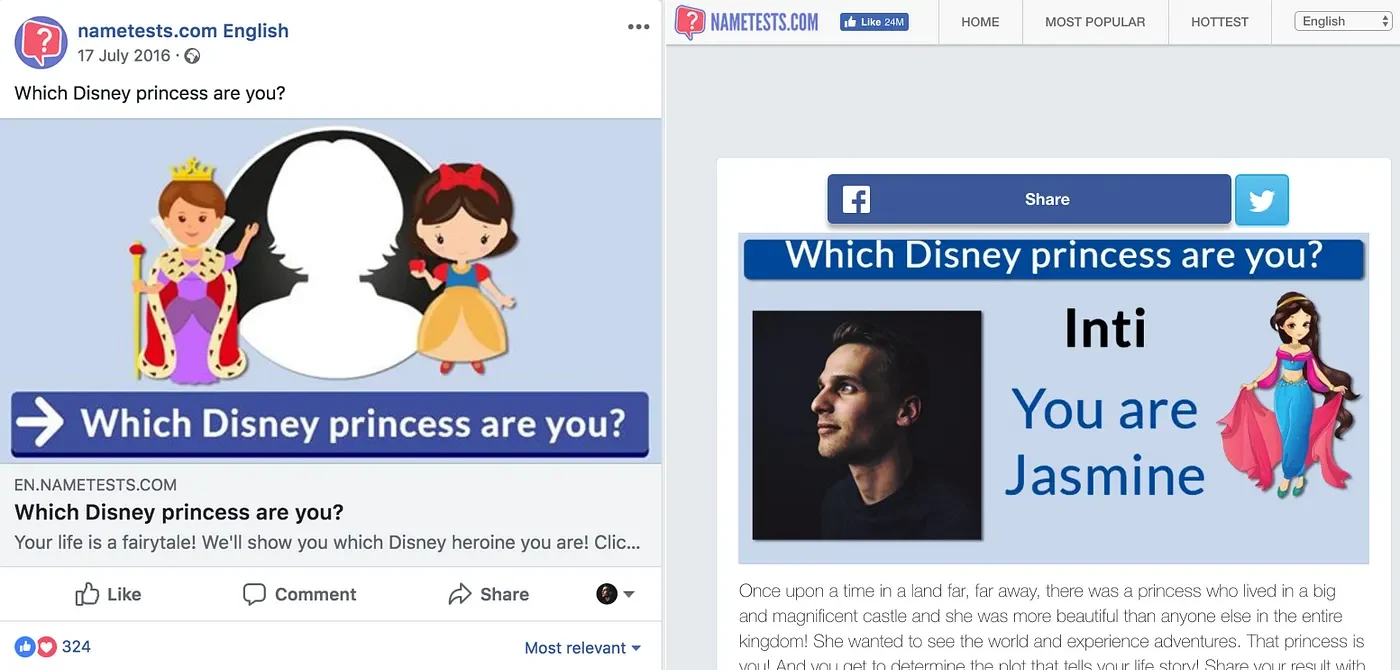
While loading a test, the website fetched his personal information and displayed it on the page. Looking at where that data came from, he found a single endpoint:
http://nametests.com/appconfig_user
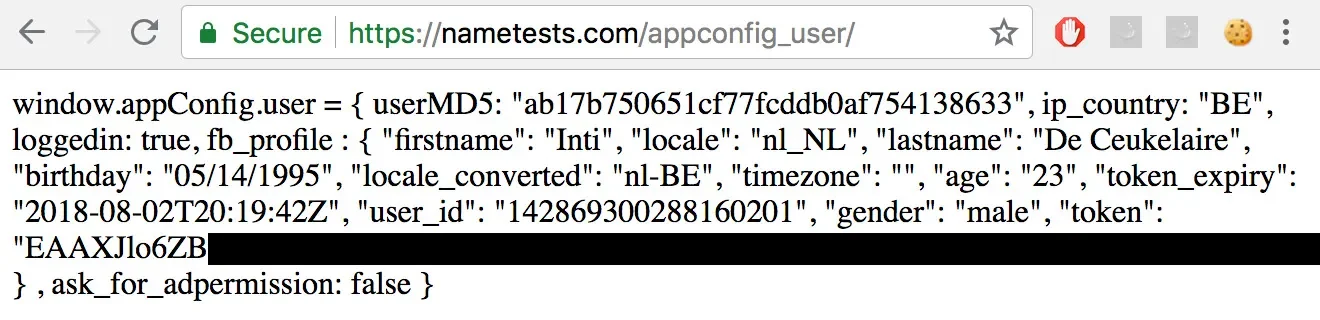
The response was a JavaScript file containing the user's personal data. It also contained a token, described in the report as giving access to all data the user authorised the application to access, such as photos, posts and friends. The data was publicly available to any third party that requested it.
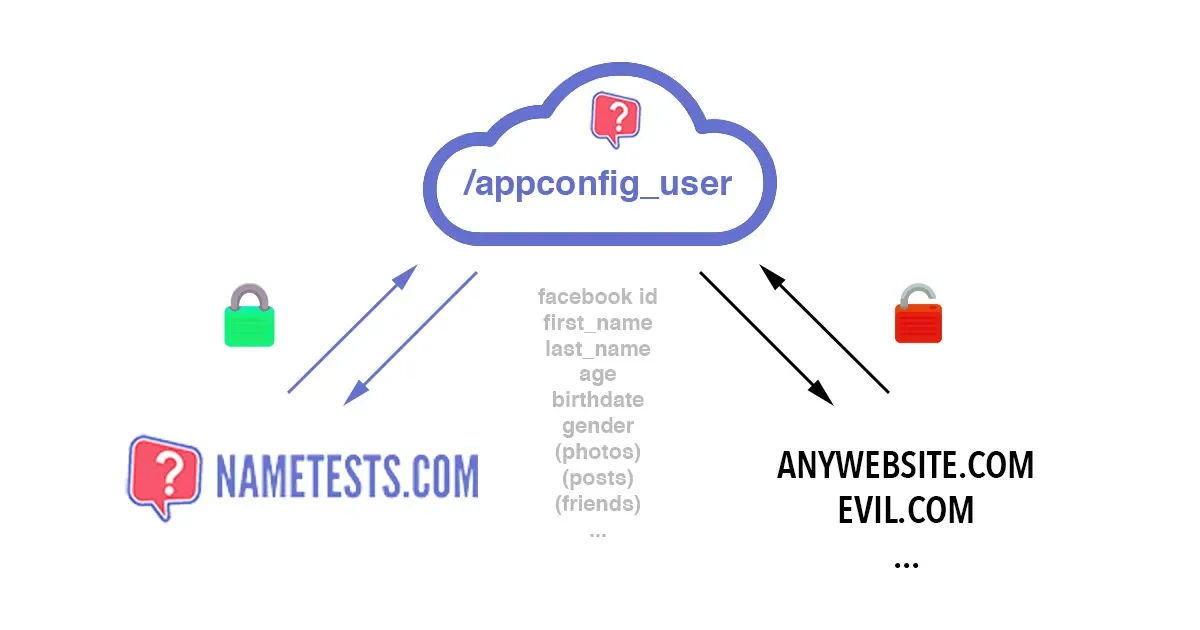
What made this wrong is the browser's normal isolation between origins. Other websites should not be able to read this information. JavaScript, however, is an exception to that rule: one of its basic principles is that it can be shared with other websites. Because NameTests rendered the user's personal data inside a JavaScript file, virtually any website could access it simply by requesting it.
Exploitation
Step 1: Build a page that requests the endpoint
To verify that stealing someone's information really was this easy, the researcher set up a website that would connect to NameTests and retrieve information about its visitor. The researcher set up a website that would connect to NameTests and retrieve information about its visitor.
Step 2: Receive the visitor's data and token
When a visitor loads the attacker's page, NameTests returns that visitor's data. NameTests also provides a secret key called an access token, which, depending on the permissions granted, can be used to gain access to the visitor's posts, photos and friends. The report does not reproduce the response body or the attacker's script.
Step 3: Use the token
With the access token in hand, the attacker can query for the data the user authorised the application to access. The report does not show the follow-up requests.
Step 4: Note the persistence
A single visit to the attacker's website was enough to gain access to someone's personal information for up to two months. The video proof shows an unauthorised website getting access to the researcher's Facebook information, and it also shows that NameTests would still reveal your identity even after deleting the app. To stop this, the user would have had to manually delete the cookies on their device, since NameTests.com does not offer a log out functionality.
Root cause
User-specific data, including an access token, was served as JavaScript that any other website could request. Browsers block a page on one origin from reading most cross-origin responses, but script inclusion is a long-standing exception, so wrapping the data in JavaScript handed it to any site that asked. The report does not describe the server-side code, so the exact implementation is not shown; the observable behaviour is that the endpoint returned the caller's data and token to any requesting origin.
Existing defences did not help because the protection that would normally apply, the same-origin policy, does not cover this pattern. Access to the visitor's information lasted up to two months, and the site had no logout, so deleting the app did not stop identity data being revealed.
On duration, archive.org shows the flaw existed at least since the end of 2016, while NameTests said they introduced the script on 24 January 2017. The researcher states he has no evidence that NameTests knew about it, and calls it possibly a rookie programming mistake, while noting that it went unnoticed since 2016.
Impact
Any website a quiz user visited could obtain that user's data and an access token. Depending on which quizzes the user had taken, the JavaScript could leak the Facebook ID, first name, last name, language, gender, date of birth, profile picture, cover photo, currency, devices used, when the information was last updated, posts and statuses, photos and friends. After the app was deleted, external websites could still read the Facebook ID, first name, last name, language, gender and date of birth, unless the user had manually cleared cookies.
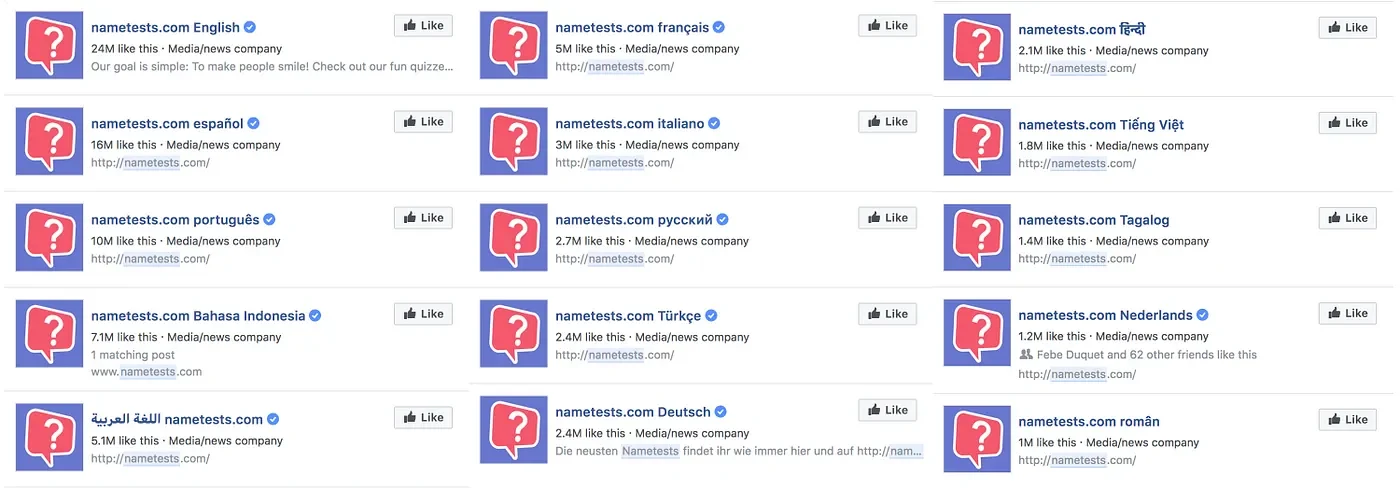
The report is careful about scale. NameTests has more than 120 million active monthly users according to Facebook, but the researcher has no insight into how many users gave their data to the app since launch, and stresses that if the flaw was ever abused, only users who actually visited the attacker's website would have had data leaked. The potential reach is still large: the researcher compiled a list of NameTests localised Facebook pages with more than one million likes, and notes that you do not even have to like the page to take a quiz.
He sketches two abuse scenarios: advertisers targeting political ads based on a visitor's Facebook posts and friends, and more explicit websites using the flaw to blackmail visitors by threatening to leak their browsing history to their friends. NameTests' public relations team said that, according to the data and knowledge they have, they found no evidence of abuse by a third party, and the researcher says it is hard to tell whether anyone else found the flaw earlier, given how easy it was to spot.
Fix
On 25 June the researcher noticed that NameTests had changed the way they process data: third parties could no longer access users' personal information. He contacted them about the fix, told them about the blog post and asked them to donate the bounty to the Freedom of the Press Foundation. NameTests said they had implemented additional tests to find such bugs and avoid them in future, and their Digital Protection Officer said they take data security very seriously.
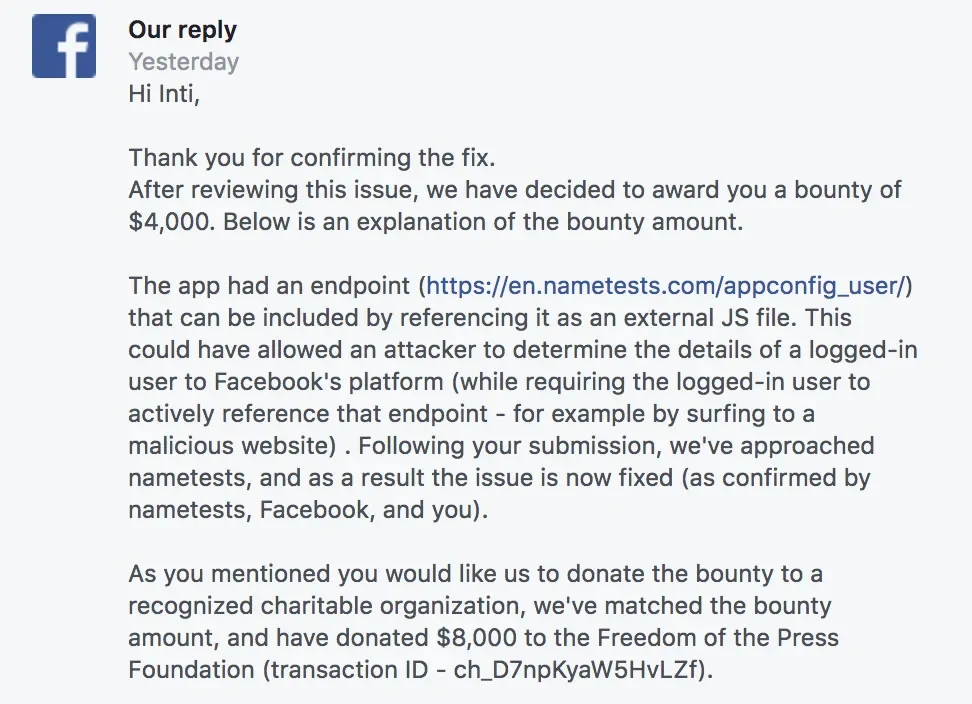
Facebook donated $8,000 ($4,000 bounty, doubled because the researcher chose to donate it to charity) to the Freedom of the Press Foundation as part of the data abuse bounty program.
The report's own protective advice for users is to delete apps they are not using, be wary when giving new apps access to their data, and delete cookies regularly.
Timeline
| Date | Event |
|---|---|
| 22 April | Reported to Facebook's Data Abuse program |
| 30 April | Initial response from Facebook, still looking into it |
| 14 May | Follow-up mail asking whether they had reached out to the developers |
| 22 May | Facebook said investigation could take three to six months; quizzes still running |
| 25 June | NameTests changed data processing; third parties could no longer access user data |
| 26 June | Contacted NameTests' Digital Protection Officer with questions |
| 27 June | Facebook confirmed the $8,000 donation |
| 28 June | Blog post published; Facebook issued a public statement |
Variants to test
- User-data JavaScript endpoints. Look for URLs that return per-user JSONP or JavaScript, such as configuration or bootstrap files, and request them from a page on another origin. A positive result is that your page can read the visitor's identifiers or a token from the response.
- Token in script responses. Check whether the JavaScript contains an access token or session value. A positive result is a token you can replay against the API for the permissions the user granted.
- Deleted-app persistence. Take a quiz, delete the app, then request the endpoint again with the same cookies. A positive result is that identity fields still come back, showing the token or cookie was not revoked.
- Logout behaviour. Look for a logout function on the quiz site. If there is none, test whether clearing cookies is the only way to stop the leak, and note the token lifetime.
- Archive history. Check archive.org snapshots of the endpoint to estimate how long the behaviour existed, as the researcher did for this case.
- Reach estimation. Enumerate localised pages of the same app and count likes to gauge how many users could be exposed, remembering that only visitors to an attacker's page would actually leak data.
What happened, in plain words
NameTests is a website that runs Facebook quizzes, the kind that tell you which Disney Princess you are. To take a quiz you have to let the NameTests Facebook application read parts of your Facebook account: your profile details and, depending on what you agree to, your posts, photos and friends. According to Facebook, NameTests had more than 120 million active monthly users, and the researcher notes the site claims to generate more than 3 billion page views every month. The quizzes launched in early 2015.
The feature at the centre of this story is the page the quiz front end calls while it loads a test. It fetches the visitor's personal information so the site can show it on screen. The researcher found that this data was served as a JavaScript file that any other website could request, and that the file also contained an access token. An access token is a secret string that works like a temporary key: whoever holds it can ask Facebook for whatever the user authorised the application to access.
Setup
No special tooling is described. The researcher was a participant in Facebook's Bug Bounty Program and decided to try the newly launched data abuse bounty program. A bug bounty program is a scheme where a company pays people for reporting security problems instead of punishing them. The method was simple: he scrolled through his own timeline, noted which apps his friends were using, and then took a NameTests quiz himself, for the first time, to watch what happened in the browser.
For the leak to affect a user, that user has to have taken a quiz and therefore hold NameTests cookies in the browser. A cookie is a small piece of data a website asks your browser to store and send back on later visits, so the site can recognise you. The report notes that the site offers no logout functionality, so those cookies stay in the browser until the user deletes them by hand.
Finding it
Fitness trackers and Facebook quizzes topped the list of apps his friends were using. The quizzes had already been criticised for data harvesting and data-greedy permissions, so he took one.
While loading a test, the website fetched his personal information and displayed it on the page. Looking at where that data came from, he found a single endpoint. An endpoint is simply a web address that a site's code calls to get or send data, like a service counter you walk up to for one specific thing.
http://nametests.com/appconfig_user
This line is the address of that endpoint. http is the protocol, the set of rules browsers and servers use to talk. nametests.com is the site. /appconfig_user is the path that identifies the specific piece of data being requested, here the configuration and user information the quiz page needs.
The response was a JavaScript file containing the user's personal data. JavaScript is the programming language that runs inside web pages and makes them interactive. The file also contained a token, described in the report as giving access to all data the user authorised the application to access, such as photos, posts and friends. The data was publicly available to any third party that requested it.
What made this wrong is the browser's normal isolation between origins. An origin is the combination of protocol, host and port that identifies a website, and browsers normally stop a page on one origin from reading responses that belong to another. Other websites should not be able to read this information. JavaScript, however, is an exception to that rule: one of its basic principles is that it can be shared with other websites. Because NameTests rendered the user's personal data inside a JavaScript file, virtually any website could access it simply by requesting it.
Exploitation
Step 1: Build a page that requests the endpoint
To verify that stealing someone's information really was this easy, the researcher set up a website that would connect to NameTests and retrieve information about its visitor. The researcher set up a website that would connect to NameTests and retrieve information about its visitor. Think of it as a shop that will hand a parcel to anyone who asks for it by name, without checking whether the person asking is the one the parcel belongs to.
Step 2: Receive the visitor's data and token
When a visitor who holds NameTests cookies loads the attacker's page, the request to http://nametests.com/appconfig_user is answered with that visitor's data. NameTests also provides a secret key called an access token, which, depending on the permissions granted, can be used to gain access to the visitor's posts, photos and friends. The report does not reproduce the response body or the attacker's script.
Step 3: Use the token
With the access token in hand, the attacker can query for the data the user authorised the application to access. The report does not show the follow-up requests.
Step 4: Note the persistence
A single visit to the attacker's website was enough to gain access to someone's personal information for up to two months. The video proof shows an unauthorised website getting access to the researcher's Facebook information, and it also shows that NameTests would still reveal your identity even after deleting the app. To stop this, the user would have had to manually delete the cookies on their device, since NameTests.com does not offer a log out functionality.
Root cause
User-specific data, including an access token, was served as JavaScript that any other website could request. A bearer token is a key that grants access to whoever presents it, with no further proof of identity, like a coat-check ticket. Browsers block a page on one origin from reading most cross-origin responses, but script inclusion is a long-standing exception, so wrapping the data in JavaScript handed it to any site that asked. The report does not describe the server-side code, so the exact implementation is not shown; the observable behaviour is that the endpoint returned the caller's data and token to any requesting origin.
Existing defences did not help because the protection that would normally apply, the same-origin policy, does not cover this pattern. The same-origin policy is the browser rule that keeps one website's pages from reading another website's data. Access to the visitor's information lasted up to two months, and the site had no logout, so deleting the app did not stop identity data being revealed.
On duration, archive.org shows the flaw existed at least since the end of 2016, while NameTests said they introduced the script on 24 January 2017. Archive.org is a service that keeps old copies of web pages, useful for seeing what a site looked like in the past. The researcher states he has no evidence that NameTests knew about it, and calls it possibly a rookie programming mistake, while noting that it went unnoticed since 2016.
Impact
Any website a quiz user visited could obtain that user's data and an access token. Depending on which quizzes the user had taken, the JavaScript could leak the Facebook ID, first name, last name, language, gender, date of birth, profile picture, cover photo, currency, devices used, when the information was last updated, posts and statuses, photos and friends. After the app was deleted, external websites could still read the Facebook ID, first name, last name, language, gender and date of birth, unless the user had manually cleared cookies.
The report is careful about scale. NameTests has more than 120 million active monthly users according to Facebook, but the researcher has no insight into how many users gave their data to the app since launch, and stresses that if the flaw was ever abused, only users who actually visited the attacker's website would have had data leaked. The potential reach is still large: the researcher compiled a list of NameTests localised Facebook pages with more than one million likes, and notes that you do not even have to like the page to take a quiz.
He sketches two abuse scenarios: advertisers targeting political ads based on a visitor's Facebook posts and friends, and more explicit websites using the flaw to blackmail visitors by threatening to leak their browsing history to their friends. NameTests' public relations team said that, according to the data and knowledge they have, they found no evidence of abuse by a third party, and the researcher says it is hard to tell whether anyone else found the flaw earlier, given how easy it was to spot.
Fix
On 25 June the researcher noticed that NameTests had changed the way they process data: third parties could no longer access users' personal information. He contacted them about the fix, told them about the blog post and asked them to donate the bounty to the Freedom of the Press Foundation. NameTests said they had implemented additional tests to find such bugs and avoid them in future, and their Digital Protection Officer said they take data security very seriously.
Facebook donated $8,000 ($4,000 bounty, doubled because the researcher chose to donate it to charity) to the Freedom of the Press Foundation as part of the data abuse bounty program.
The report's own protective advice for users is to delete apps they are not using, be wary when giving new apps access to their data, and delete cookies regularly.
Timeline
| Date | Event |
|---|---|
| 22 April | Reported to Facebook's Data Abuse program |
| 30 April | Initial response from Facebook, still looking into it |
| 14 May | Follow-up mail asking whether they had reached out to the developers |
| 22 May | Facebook said investigation could take three to six months; quizzes still running |
| 25 June | NameTests changed data processing; third parties could no longer access user data |
| 26 June | Contacted NameTests' Digital Protection Officer with questions |
| 27 June | Facebook confirmed the $8,000 donation |
| 28 June | Blog post published; Facebook issued a public statement |
Variants to test
- User-data JavaScript endpoints. Look for URLs that return per-user JSONP or JavaScript, such as configuration or bootstrap files, and request them from a page on another origin. JSONP is a technique for loading data as a script so a page can use it across origins. A positive result is that your page can read the visitor's identifiers or a token from the response.
- Token in script responses. Check whether the JavaScript contains an access token or session value. A positive result is a token you can replay against the API for the permissions the user granted. An API is the set of addresses a service offers so other software can ask it for data or actions.
- Deleted-app persistence. Take a quiz, delete the app, then request the endpoint again with the same cookies. A positive result is that identity fields still come back, showing the token or cookie was not revoked.
- Logout behaviour. Look for a logout function on the quiz site. If there is none, test whether clearing cookies is the only way to stop the leak, and note the token lifetime.
- Archive history. Check archive.org snapshots of the endpoint to estimate how long the behaviour existed, as the researcher did for this case.
- Reach estimation. Enumerate localised pages of the same app and count likes to gauge how many users could be exposed, remembering that only visitors to an attacker's page would actually leak data.
Glossary
- Access token: a secret string that acts as a key, letting whoever holds it ask a service for the data or actions the user allowed.
- API: the set of addresses and rules a service offers so other software can request its data or perform actions.
- Archive.org: a service that keeps old copies of web pages so you can see what a site looked like in the past.
- Bearer token: a token that grants access to whoever presents it, with no further proof of who they are.
- Bug bounty program: a scheme where a company pays people for reporting security problems.
- Cookie: a small piece of data a website asks your browser to store and send back on later visits, so the site can recognise you.
- Cross-origin script inclusion: loading a script from another website into your page, which lets your page read the values that script defines.
- Endpoint: a specific web address that a site's code calls to get or send data.
- JavaScript: the programming language that runs inside web pages and makes them interactive.
- JSONP: a technique for loading data as a script so a page can use it across origins.
- Origin: the combination of protocol, host and port that identifies a website.
- Same-origin policy: the browser rule that stops one website's pages from reading another website's data.
- Token: a string that stands in for a user's permission, used by software to prove access was granted.



