Abusing autoresponders and email bounces
Autoresponders and email bounces could leak sensitive information such as document titles, owner email addresses, and hidden email aliases. An attacker could exploit this by forcing a bounce, for example by filling a victim's inbox or using a strict DMARC policy, to receive confidential data.
 Published on medium.com
Being a bug bounty hunter, I face a lot of competition. Lots of companies are willing to issue rewards for vulnerabilities in their systems, but only if they haven’t been reported by someone else.
The full write-up lives on its author's site
It belongs to its author, so we link to it rather than copy it. The other two tabs are our own rewrites, checked against it.
Context
This write-up is about e-mail systems as an attack surface rather than a single web application. The author, a bug bounty hunter, argues that service e-mails (autoresponders, bounces, notifications) often carry sensitive information and tokens, yet run separately from the main application and its security model. The two features examined here are autoresponders, which automatically return information to incoming e-mails (out of office messages, bounces, service messages), and e-mail bounces, which are generated whenever an e-mail cannot be delivered.
The concrete targets discussed are Google Drive's 'Request access' flow and the hacker e-mail aliases used by bug bounty platforms, with intigriti as the real-life example. The report does not give versions, dates of testing or a CVSS score.
Setup
The approach needs no special accounts on the target side. The author works from an attacker-controlled domain (acme.com in the examples) and an attacker-controlled mailbox ([redacted]). For the alias-unmasking technique, the attacker domain must have a strict DMARC policy so that other services cannot easily spoof or forward mail from it. For the Google Drive case, the precondition is a protected document whose owner can be made to bounce mail, for instance by filling their inbox.
To avoid spamming targets while probing which aliases exist, the author uses the SMTP RCPT and VRFY commands to check whether an address exists before sending test e-mails.
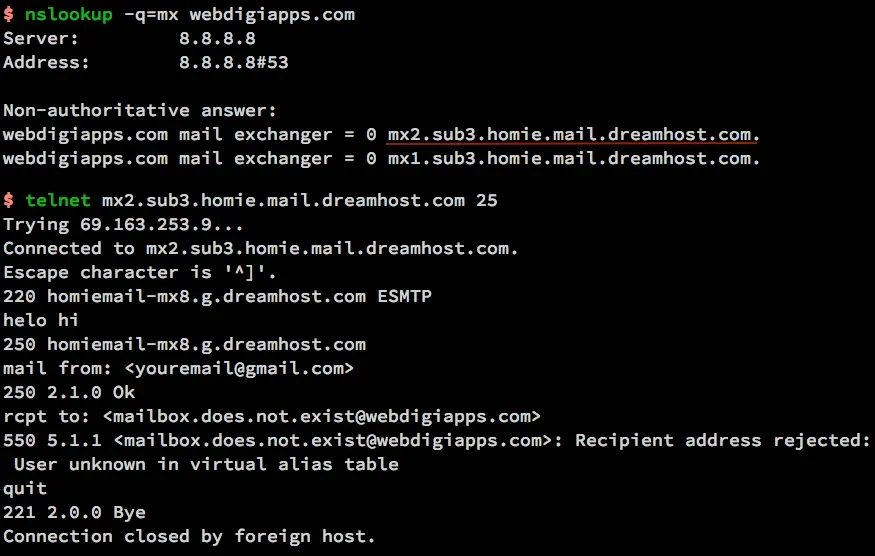
Use RCPT or VRFY to check whether an e-mail address exists
Aliases the author commonly encountered, and what they were worth:
- Support inboxes: support@, helpdesk@, customerservice@, help@. These are sometimes vulnerable to the 'Ticket Trick' described in an earlier write-up.
- Billing systems: billing@, finance@. Some billing systems automatically upload or parse incoming e-mail attachments, which can lead to blind XSS or, in the worst case, RCE through arbitrary file upload.
- Services: printer@, printing@, uploads@, ftp@, test@. Some of these lead to unauthorised actions; combined with e-mail spoofing, a printing@ address sometimes lets a remote attacker add documents to someone else's printer queue.
- Ticket trackers: tickets@, jira@, helpdesk@, bugs@, issues@. Many companies allow internal ticket creation over e-mail for convenience but do not restrict it to members of their own company.
Finding it
The author's starting observation is that autoresponders return information automatically, and that some of them include sensitive information an attacker can abuse to bypass authentication models. For ticket trackers, some internal issue tracker autoresponders are configured to create an account for every unknown user who submits an issue; others include a signup link in the response. Either way, a remote attacker ends up with access to parts of the internal ticket system, depending on its permission settings.
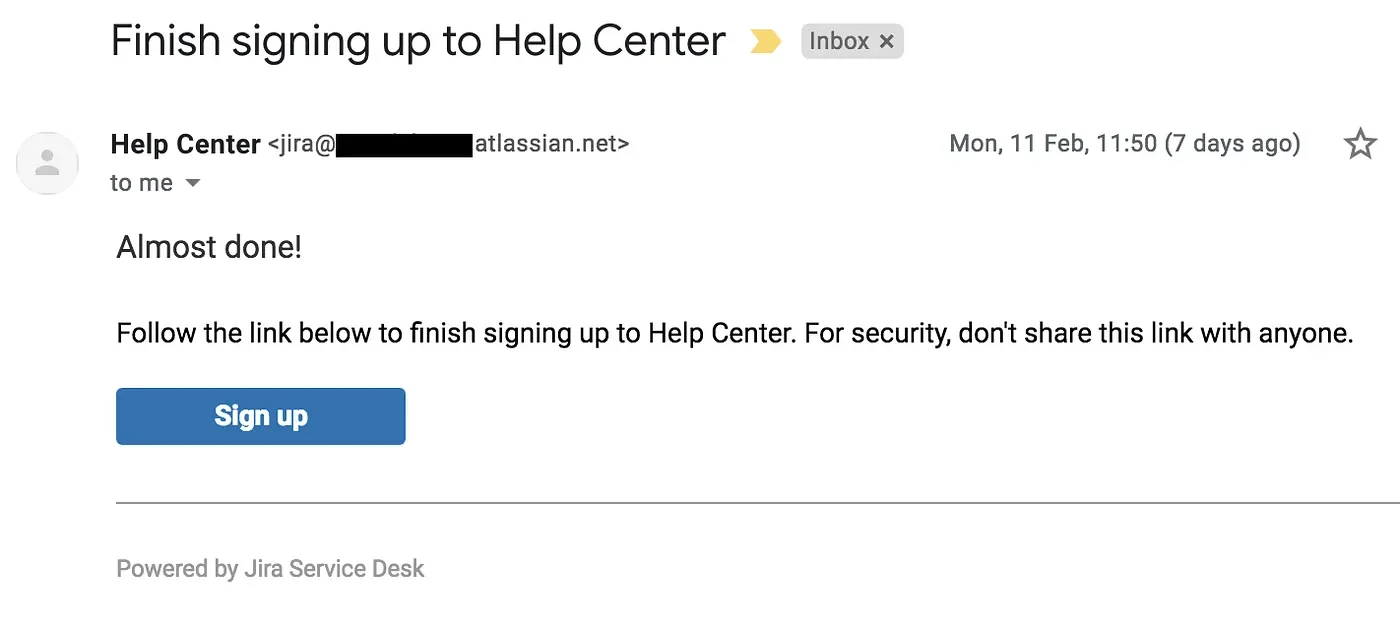
Insecurely configured autoresponders are happy to provide accounts for internal issue trackers for anyone
E-mail bounces look harmless at first: they only include the original e-mail sent by the attacker plus some metadata. The author's insight is that they become exploitable when that metadata is unknown to the attacker and contains confidential information.
Exploitation
Step 1: Request access to a protected Google Drive document
While doing reconnaissance, the author often finds protected Google Drive documents and clicks 'Request access', with a very slim success ratio.
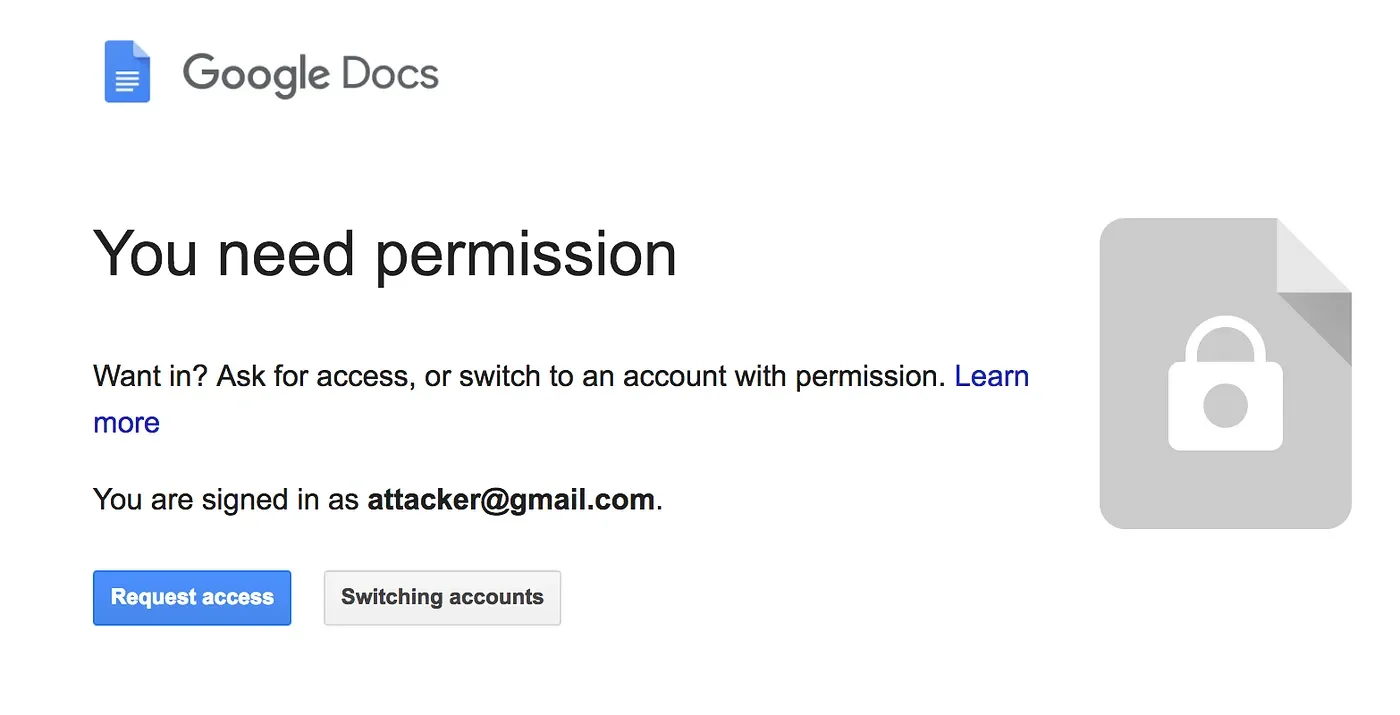
What struck the author was how the request is sent: behind the scenes, Google sends a request-for-access e-mail originating from the requester's e-mail address. The e-mail looks like this:
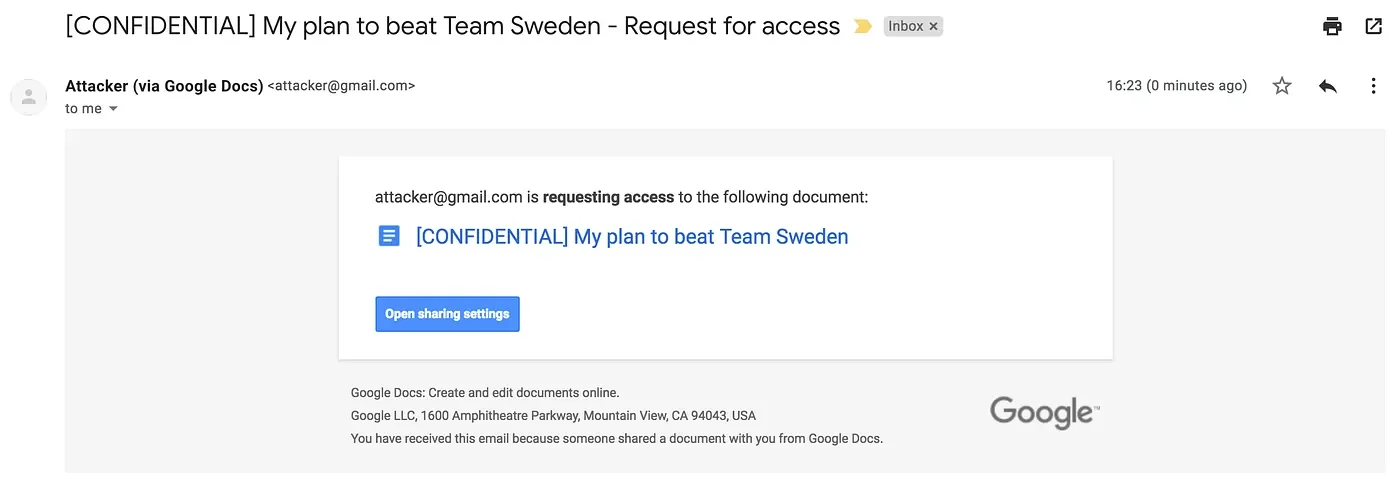
This e-mail originates from the attacker's email, yet includes confidential information
Because the FROM header and the Return-Path are set to the attacker's e-mail, any confidential information in that message would come back to the attacker in the event of a bounce. The remaining problem is how to make the request-for-access e-mail bounce.
Step 2: Force the bounce by filling the owner's inbox
One way to achieve this is e-mail bombing the target until the victim's inbox reaches its capacity limit. Once the victim's inbox is full, the access request e-mail bounces back to the attacker, disclosing the owner's e-mail address and the document title.
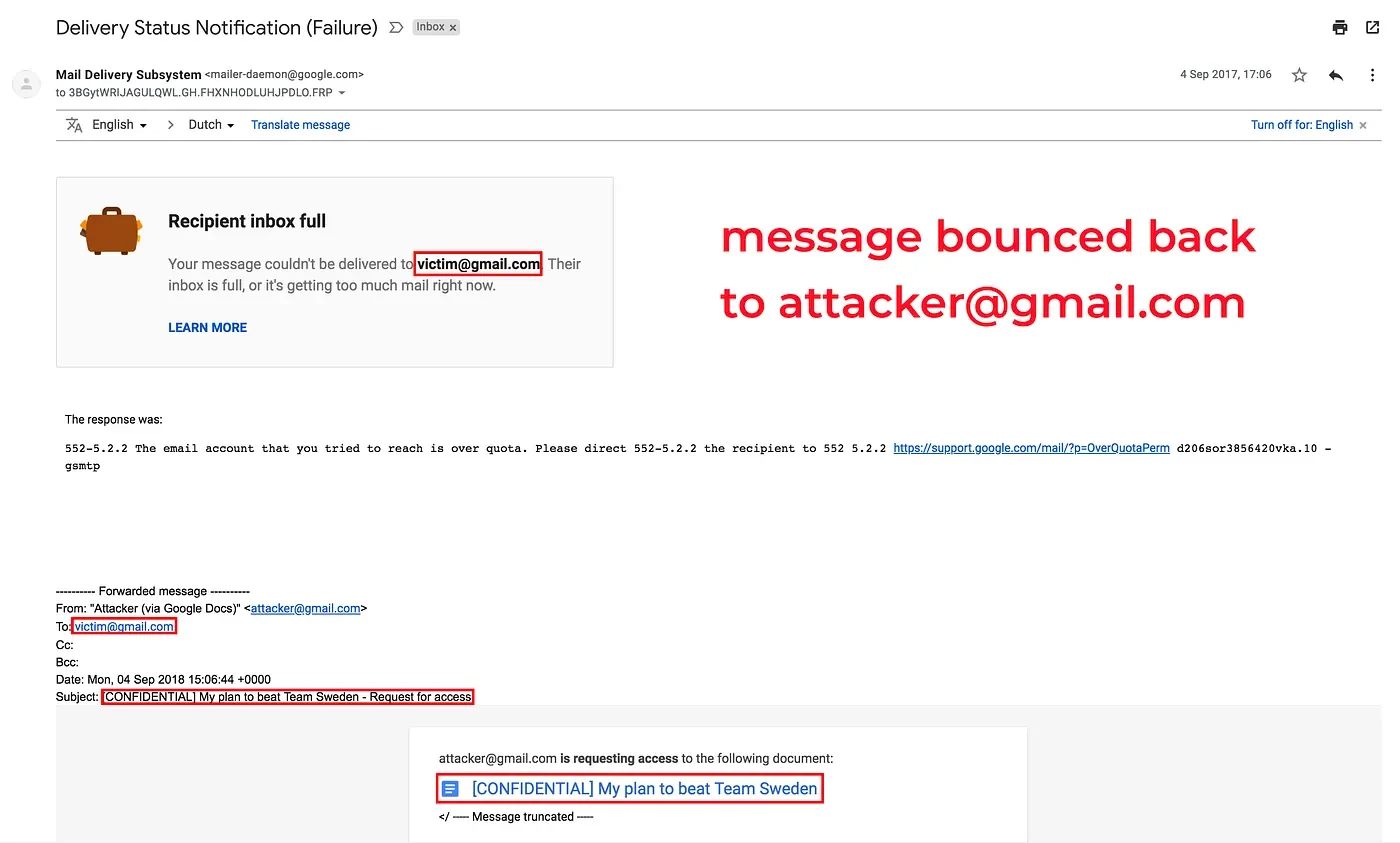
If a document owner's inbox was full, Google used to bounce back their e-mail address and the document title
Google resolved this issue and awarded a bounty as part of its vulnerability reporting program.
Step 3: Unmask a forwarder alias with a DMARC-triggered bounce
The same property of bounces, that they include the e-mail address of the recipient, can be used to determine the destination address hidden behind an e-mail forwarder alias. If [redacted] redirects e-mails to [redacted], a bounce to the webmaster address discloses john.doe's e-mail address:
[redacted] → [redacted] → [redacted]
Normally the attacker cannot see the final address, but if the attacker can force a bounce, [redacted] bounces the e-mail straight back to [redacted], disclosing the destination address. One way to force a bounce on john.doe's side is to configure a strict DMARC policy for the attacker-controlled acme.com, which makes sure other services cannot easily spoof or forward it. The attacker sends an unauthenticated e-mail to the forwarder, [redacted], which forwards it to the Gmail address. On arrival, Google's servers bounce it because it does not comply with the sender's DMARC policy, and the bounce includes the original e-mail address.
Step 4: Apply it to bug bounty platform aliases
Like many other bug bounty platforms, intigriti gives hackers a <username>@intigriti.me e-mail address on registration, which they use to sign up for the programs they test. Using the method above, it used to be possible to obtain the e-mail address linked to a username.
An unauthenticated e-mail from [redacted] to [redacted] results in the following bounce when acme.com has a strict DMARC policy:
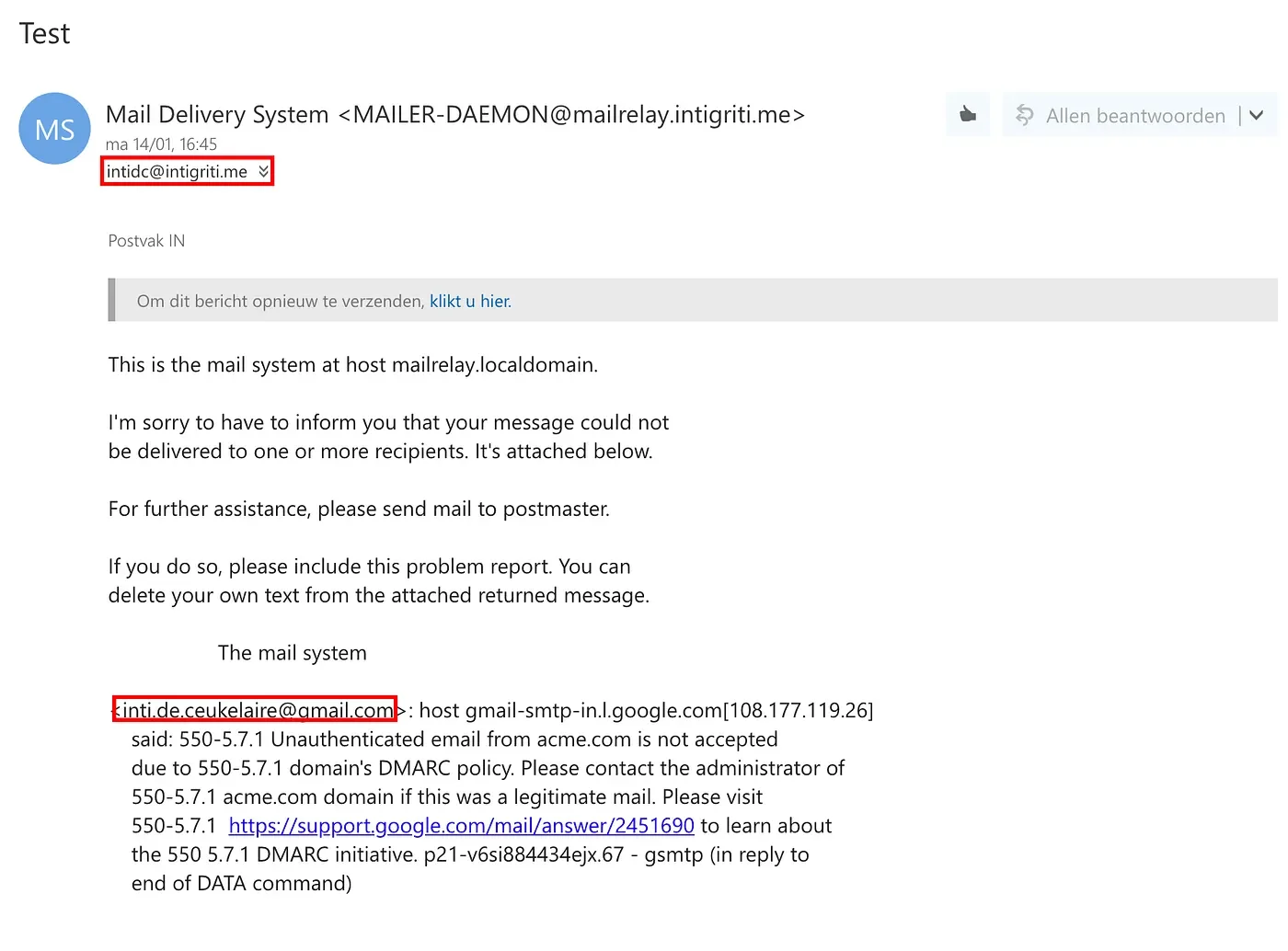
The bounce revealed the true e-mail address behind [redacted]
The bounce included the author's personal e-mail address, [redacted] The intigriti developers patched the vulnerability by no longer using the original e-mail address as the bounce address. The author also tested other bug bounty platforms, so there is no need to spam them with test e-mails.
Root cause
In both cases the automated e-mail carried the attacker's address as the sender, so a bounce returned confidential information to the attacker. Any confidential data the service places in the message body or headers, such as the document owner's address and the document title in the Google Drive case, or the resolved destination of a forwarder, then travels back to the attacker. In the Google Drive case the bounce depends on the recipient's mailbox being full, which the attacker can arrange. In the alias case the bounce depends on the attacker's own domain enforcing a strict DMARC policy, which the attacker controls. The report does not describe the internal implementation of either service.
Impact
An attacker can disclose confidential information that the service itself puts into automated e-mails: the owner's e-mail address and the document title of a protected Google Drive document, or the real address behind a forwarder alias such as a bug bounty platform username. For ticket trackers, insecurely configured autoresponders can hand out accounts or signup links to internal issue trackers to anyone who sends an e-mail, giving remote attackers access to parts of the internal ticket system depending on its permission settings. The Google Drive disclosure required the owner's inbox to be full, which the attacker could force by e-mail bombing. The alias disclosure required the attacker's domain to have a strict DMARC policy. The report does not assign a severity.
Fix
For companies generally, the author recommends reviewing the e-mail-enabled services and internal ticket trackers associated with your domain, and not relying on the originating e-mail address matching your company domain, since e-mails are easily spoofed and autoresponders can be used against you. E-mail flows should get the same security care as the main product, because they often process the same sensitive data.
Variants to test
- Ticket tracker autoresponders. Send an e-mail from an external address to tickets@, jira@, helpdesk@, bugs@ or issues@. A positive result is an automatic account creation or a signup link in the response that grants access to the internal tracker.
- Service aliases. Probe printer@, printing@, uploads@, ftp@ and test@ with RCPT and VRFY first, then send a spoofed message. A positive result is an unauthorised action such as a document added to someone else's printer queue.
- Billing parsers. Send an e-mail with an attachment to billing@ or finance@. A positive result is the attachment being parsed or uploaded in a way that triggers blind XSS or arbitrary file upload.
- Forwarder unmasking. Send an unauthenticated e-mail from a domain with a strict DMARC policy to a forwarder alias. A positive result is a bounce back to the attacker containing the final destination address.
- Document-sharing services. Request access to a protected document and check whether the notification originates from your address. A positive result is a bounce, after forcing the owner's inbox full, that contains the owner's address and the document title.
When testing, check the program's scope and avoid spamming; when in doubt, ask.
What happened, in plain words
A bug bounty hunter spends their time looking for security mistakes in companies' systems, hoping to be the first to report them and earn a reward. Because so many people do this, the same bug is often found by several hunters at once, and only the first report counts. The author's trick is to look at widely used functionalities and integrations, such as e-mail systems, rather than only the main website.
Two kinds of automated e-mail are at the centre of this story. An autoresponder is a program that replies to an incoming e-mail without a human doing anything: an out-of-office message, a "we received your request" note, or a message from a ticketing system. An e-mail bounce is the automatic reply you get when a message cannot be delivered, for example because the address does not exist or the recipient's mailbox is full. Both are generated by machines, both are easy to overlook, and both can carry information the sender was never meant to see.
The author describes several cases, including ticket tracker autoresponders, Google Drive and bug bounty platform aliases. First, Google Drive's "Request access" button: when you ask to see a protected document, Google sends an e-mail on your behalf to the document's owner, and if that e-mail bounces back to you, it can reveal the owner's real e-mail address and the document's title. Second, bug bounty platforms that give each hacker a username-based e-mail address: a carefully crafted bounce could reveal the real personal e-mail address behind that username. The platform intigriti was the real-life example, and it fixed the problem.
No special tools or accounts are needed to follow along. The author works from an e-mail domain and mailbox they control, and the rest is ordinary e-mail behaviour.
The idea: e-mail as a back door
Most security work focuses on a website: its login page, its forms, its database. The author points out that the e-mails a service sends are a separate system. They often contain sensitive information and secret links (called tokens), yet they are built and run apart from the main website and its protections. A company may lock its front door carefully and leave the side gate, the mail server, wide open.
Autoresponders are the clearest example. Their whole job is to send information back automatically. If that information includes something private, and if the person who sent the original e-mail can choose where the reply goes, then an attacker can make the service hand over private data without ever logging in.
Step 0: Finding which e-mail addresses exist, without spamming anyone
Before sending test e-mails to a company, the author wants to know which addresses actually exist, so as not to flood inboxes that do not. E-mail is delivered by a protocol called SMTP (Simple Mail Transfer Protocol), the language mail servers speak to each other. SMTP has two commands that let a sender ask, in effect, "does this address exist?" without sending a full message:
- RCPT (short for recipient) names the address being checked.
- VRFY (short for verify) asks the server to confirm an address or user.
Use RCPT or VRFY to check whether an e-mail address exists
The image shows these two commands being used to test whether an address is real before any message is sent. Think of it like knocking on a door and asking "is this the right flat?" before pushing a letter through the slot.
The author lists the kinds of address commonly found, and why each is interesting:
- Support inboxes: support@, helpdesk@, customerservice@, help@. These are sometimes vulnerable to a technique from an earlier write-up that the author calls "Ticket Trick".
- Billing systems: billing@, finance@. Some billing systems automatically upload or read attachments that arrive by e-mail. If an attacker can send a file, that can lead to blind XSS (a script that runs later, inside someone else's browser, when they view the data) or, in the worst case, RCE (remote code execution, meaning the attacker gets their own code running on the server) through uploading an arbitrary file.
- Services: printer@, printing@, uploads@, ftp@, test@. Some of these trigger actions. Combined with e-mail spoofing (pretending a message comes from someone else by faking the sender address), a printing@ address sometimes lets a remote attacker add documents to someone else's printer queue.
- Ticket trackers: tickets@, jira@, helpdesk@, bugs@, issues@. Many companies let staff create internal support tickets by e-mail because it is convenient, but forget to check that the sender actually works for the company.
Step 1: Autoresponders that hand out accounts
The author's starting observation is simple: autoresponders send information back automatically, and some of them send back information that lets an attacker get past a login system. For ticket trackers, some internal issue trackers are set up to create an account for every unknown person who submits an issue. Others reply with a signup link. Either way, an outsider ends up with access to part of the company's internal ticket system, depending on what permissions that account gets.
Insecurely configured autoresponders are happy to provide accounts for internal issue trackers for anyone
The image shows an autoresponder reply that offers an account or a signup link to an internal issue tracker to anyone who writes in. The comparison is a receptionist who, instead of asking for ID, hands a visitor badge to anyone who walks through the door.
E-mail bounces look harmless at first glance. A bounce only contains the original message the attacker sent plus some technical details about the delivery. The author's insight is that a bounce becomes dangerous when those technical details are something the attacker did not know and that the service considers confidential.
Step 2: Google Drive's "Request access" button
While looking around (the security word for this is reconnaissance, meaning exploring a target to see what is there), the author often finds Google Drive documents that are protected, meaning you need permission to open them. The author clicks "Request access", which rarely succeeds.
The image shows the "Request access" prompt on a protected Google Drive document. This is the ordinary button any user sees; nothing special is needed to reach it.
What caught the author's attention was how that request is actually delivered. Behind the scenes, Google sends a request-for-access e-mail that comes from the requester's own e-mail address. The message looks like this:
This e-mail originates from the attacker's email, yet includes confidential information
The image shows the request-for-access e-mail arriving with the attacker's address as the sender, while the body contains private details about the document. Two technical fields matter here:
- The FROM header is the "From:" line you see in any mail app, the address displayed as the sender.
- The Return-Path is a hidden field that tells mail servers where to send a message if it cannot be delivered. It is also called the envelope sender, by analogy with the return address written on a paper envelope rather than on the letter inside.
Because both the FROM header and the Return-Path are set to the attacker's address, anything confidential in that message would come back to the attacker if the message bounced. The only remaining problem is how to make it bounce.
Step 3: Making the bounce happen by filling the owner's inbox
A mailbox has a storage limit. Once it is full, new mail cannot be delivered, and the sending server is told so, which produces a bounce. The author's method is to send so much e-mail to the target that the victim's inbox reaches its limit, a technique called e-mail bombing. Once the victim's inbox is full, the request-for-access e-mail bounces back to the attacker, revealing the owner's e-mail address and the document title.
If a document owner's inbox was full, Google used to bounce back their e-mail address and the document title
The image shows the bounce message arriving in the attacker's mailbox, with the owner's address and the document title inside it. The comparison is a courier who cannot deliver a parcel because the recipient's hallway is crammed full, so they return it to the sender, and the return label happens to list the recipient's private details.
Google fixed this issue and paid a bounty under its vulnerability reporting programme.
Step 4: Revealing the real address behind a forwarding alias
The same property of bounces, that they include the recipient's e-mail address, can be used to find out where a forwarding address really leads. An e-mail forwarder alias is an address that does not have its own mailbox; it simply passes mail on to another address. If [redacted] forwards to [redacted], a bounce from the webmaster address reveals john.doe's address:
[redacted] → [redacted] → [redacted]
Line by line, this shows the path of a message: it starts at the attacker's address, goes to the public forwarding address, and is then passed on to the private Gmail address. Normally the attacker cannot see that final address. But if the attacker can force a bounce at the far end, the Gmail server sends the message straight back to [redacted], and the bounce names the destination.
How do you force a bounce on john.doe's side? By setting a strict DMARC policy on the attacker's own domain, acme.com. DMARC is a published rule that says which servers are allowed to send mail for a domain and what to do with mail that fails the check. A strict policy means other services cannot easily pretend to send mail from that domain, or forward it, without it being rejected. The attacker sends an unauthenticated e-mail to the forwarder, [redacted], which passes it on to the Gmail address. When it arrives, Google's servers bounce it because it does not comply with the sender's DMARC policy, and the bounce includes the original e-mail address.
Step 5: The same trick against bug bounty platform aliases
Like many bug bounty platforms, intigriti gives each hacker an address of the form <username>@intigriti.me when they register. Hackers use it to sign up for the programmes they test, so the platform knows which hacker is which without exposing their personal address. Using the method above, it used to be possible to obtain the real e-mail address linked to a username.
An unauthenticated e-mail from [redacted] to [redacted] produces the following bounce when acme.com has a strict DMARC policy:
The bounce revealed the true e-mail address behind [redacted]
The image shows the bounce that came back, with the author's personal e-mail address, [redacted], inside it. The comparison is a PO box: the box number is public, but a returned letter can show the home address it was redirected to.
The intigriti developers fixed the problem by no longer using the original e-mail address as the bounce address, the address a bounce is sent to. The author also tested other bug bounty platforms, so there is no need to send them test e-mails.
Why it worked
Automated e-mail flows take an address supplied by the person who triggered them and reuse it as the envelope sender, the Return-Path, and bounces are delivered to that address. Any private data the service puts into the message, such as the document owner's address and the document title in the Google Drive case, or the real destination of a forwarder, then travels back to the attacker.
In the Google Drive case the bounce depends on the recipient's mailbox being full, which the attacker can arrange. In the alias case the bounce depends on the attacker's own domain enforcing a strict DMARC policy, which the attacker controls.
What an attacker gets
An attacker can obtain confidential information that the service itself places in automated e-mails: the owner's e-mail address and the title of a protected Google Drive document, or the real address behind a forwarder alias such as a bug bounty platform username. For ticket trackers, badly configured autoresponders can hand out accounts or signup links to internal issue trackers to anyone who sends an e-mail, giving outsiders access to parts of the internal ticket system depending on its permission settings. The Google Drive disclosure required the owner's inbox to be full, which the attacker could force by e-mail bombing. The alias disclosure required the attacker's domain to have a strict DMARC policy.
How it was fixed, and what companies should do
Google resolved the Google Drive issue. intigriti patched its alias issue by no longer using the original e-mail address as the bounce address.
For companies in general, the author recommends reviewing the e-mail-enabled services and internal ticket trackers connected to your domain. Do not simply check that the sender's address matches your company domain, because e-mail addresses are easy to fake and your autoresponders can be turned against you. Treat your e-mail flows with the same security care as your main product, because they often process the same sensitive data.
Things to try
- Ticket tracker autoresponders. Send an e-mail from an outside address to tickets@, jira@, helpdesk@, bugs@ or issues@. A positive result is an automatic account creation or a signup link in the reply that gives access to the internal tracker.
- Service aliases. Check printer@, printing@, uploads@, ftp@ and test@ with RCPT and VRFY first, then send a spoofed message. A positive result is an unauthorised action, such as a document added to someone else's printer queue.
- Billing parsers. Send an e-mail with an attachment to billing@ or finance@. A positive result is the attachment being read or uploaded in a way that triggers blind XSS or arbitrary file upload.
- Forwarder unmasking. Send an unauthenticated e-mail from a domain with a strict DMARC policy to a forwarder alias. A positive result is a bounce back to the attacker containing the final destination address.
- Document-sharing services. Request access to a protected document and check whether the notification comes from your address. A positive result is a bounce, after forcing the owner's inbox full, that contains the owner's address and the document title.
When testing, check the programme's scope and avoid spamming; when in doubt, ask.
Glossary
- Autoresponder: a program that automatically replies to incoming e-mail, such as an out-of-office message or a ticket confirmation.
- Bounce: an automatic reply saying a message could not be delivered, usually sent back to the sender.
- SMTP: the protocol mail servers use to send and receive e-mail.
- RCPT: an SMTP command that names the recipient of a message, usable to check whether an address exists.
- VRFY: an SMTP command that asks a mail server to confirm an address or user.
- Alias: an e-mail address that is not a real mailbox but points to one or more other addresses.
- Forwarder alias: an alias that passes incoming mail on to another address.
- FROM header: the "From:" line shown in a mail app, naming the displayed sender.
- Return-Path: a hidden field telling mail servers where to send a bounce; also called the envelope sender.
- Envelope sender: the address used for delivery errors, separate from the visible From line.
- Bounce address: the address a bounce is delivered to.
- DMARC: a published domain rule saying which servers may send mail for that domain and what to do with mail that fails the check.
- E-mail spoofing: faking the sender address so a message appears to come from someone else.
- E-mail bombing: sending large volumes of e-mail to fill a mailbox or overwhelm its owner.
- Reconnaissance: exploring a target to learn what exists before attacking it.
- Token: a secret string, often in a link, that proves identity or grants access.
- XSS (cross-site scripting): injecting a script that runs in someone else's browser; blind XSS is one that fires later, when a different person views the stored data.
- RCE (remote code execution): getting your own code to run on a remote server.
- Bug bounty: a programme that pays people for reporting security flaws.
- Scope: the list of systems a programme allows you to test.



