1.CSS Injection + Clickjacking to Account Takeover
The report describes three separate vulnerability chains: CSS injection combined with clickjacking to change a victim's email and take over their account; a drag-and-drop XSS using jQuery's .html() and a cookie bomb to steal an OAuth token; and a self-XSS combined with login/logout CSRF and OAuth to take over an account. In each case, an attacker could take over a victim's account.
 Published on medium.com
During my bug bounty journey, I found a lot of bugs but I don’t have much time to write about them, In this blog, I share 3 of my reports which describe the less known tricks and bug chains for bigger impact.
The full write-up lives on its author's site
It belongs to its author, so we link to it rather than copy it. The other two tabs are our own rewrites, checked against it.
Context
This write-up collects three reports from my bug bounty work, each built around a less common trick or a chain that turns a low-impact bug into account takeover. The targets are three different web applications: a community platform with per-community subdomains and theming, an online photo editor with an OAuth login flow, and an older blog site running TinyMCE. The common thread is that each application had a small weakness that on its own looked uninteresting, and the impact came from combining it with something else.
1. CSS Injection + Clickjacking to Account Takeover
Context
The first application hosts custom communities on different subdomains. Any user can create a community and gets a subdomain assigned with all the application's functionality. For the write-up the site is called test.app1.com.
Community admins can edit their theme colours, background image and fonts. Those settings are applied to all pages, including the user settings page.
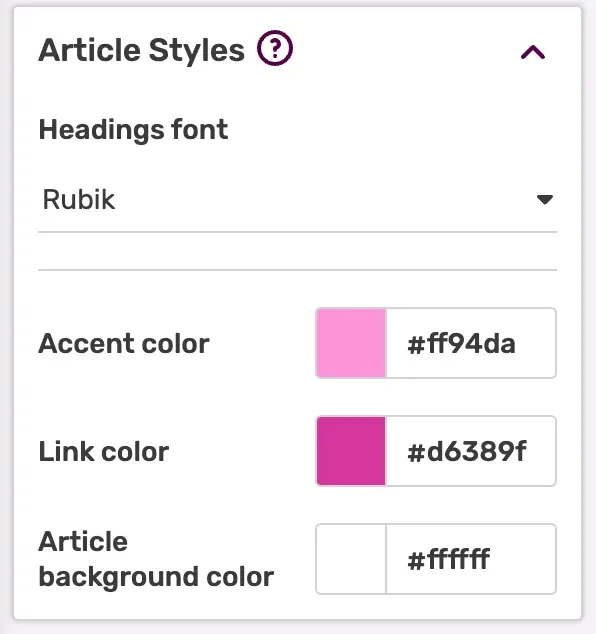
The style is applied to the page through an external CSS file loaded with <link href=...>.
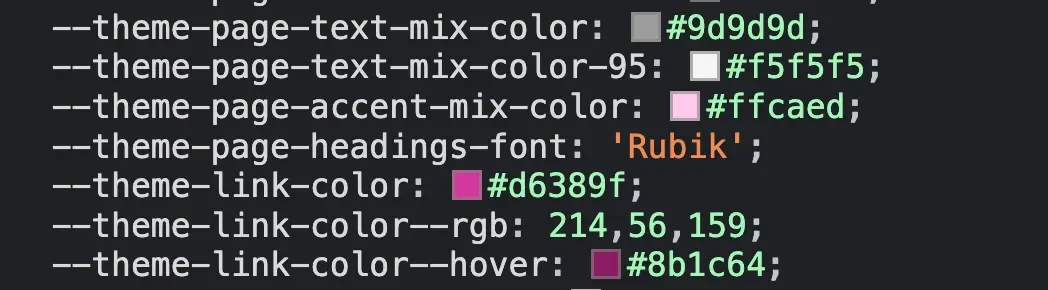
Finding it
While testing the theme inputs I found that single quotes ' were not escaped. That means the font value can be closed and arbitrary CSS injected into the community's stylesheet. With this payload:
Rubik’;}*{color:red;};
everything on all pages turns red.
My first idea was to use the CSS injection to leak CSRF tokens. That does not work here: the tokens change on every page refresh, and the recursive leak would not work anyway because the injection is not at the start of the CSS file. So I looked at what else the settings page offers.
Every community includes a settings page where users change settings that affect all other communities. One of those settings is the ability to change email. The process is simple: one input to change your email, a hidden input containing the CSRF token, and a Change Email button. The email change is sent as a POST request to /changeEmail, the same as the GET request form.
Playing with the inputs, I noticed that if you send an attacker-controlled email without sending the CSRF token, the email ends up inside the input but the request returns an error. This behaviour exists for the case where a user sits on the email change form for too long and submits an expired CSRF token, or the browser does not send the token for any reason: the email stays in the input and another click will change it.
Exploitation
Step 1: pre-fill the email input
I built a form that sends the controlled email address:
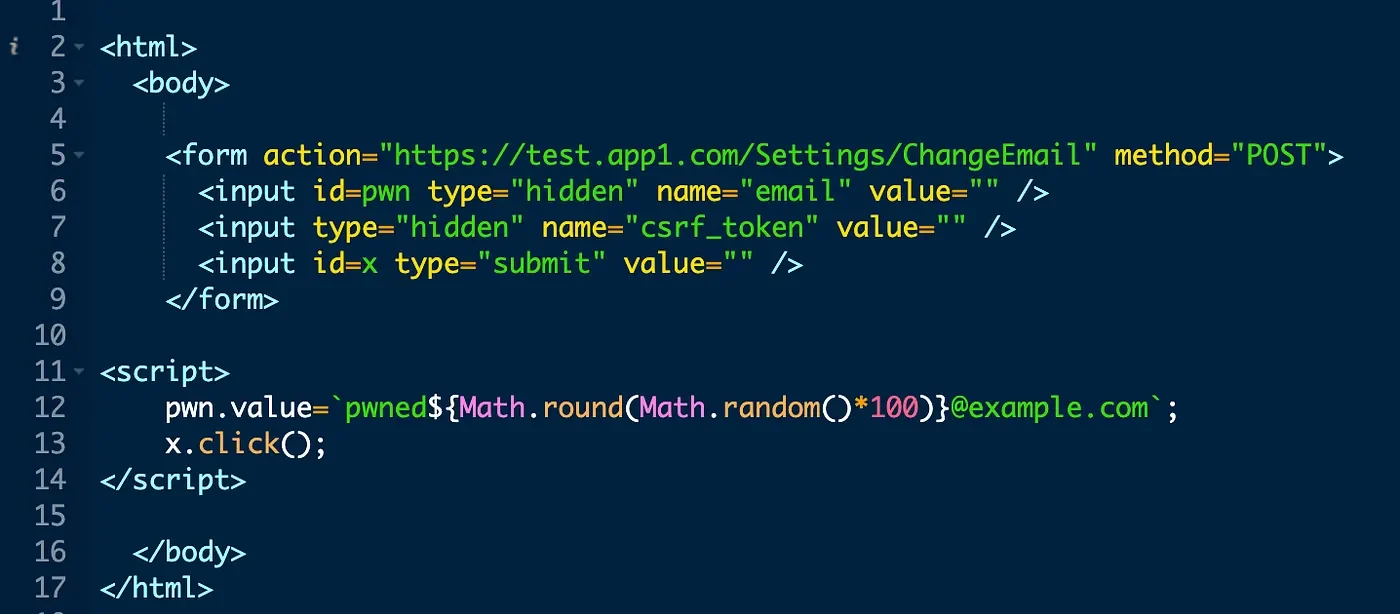
It submits automatically with my email address, which then sits inside the app's change email settings. The user still has to click the Change Email button for the change to happen. That is not reliable, and nobody would fall for it, so I needed a better way to make the victim click that button.
Step 2: disguise the button with the CSS injection
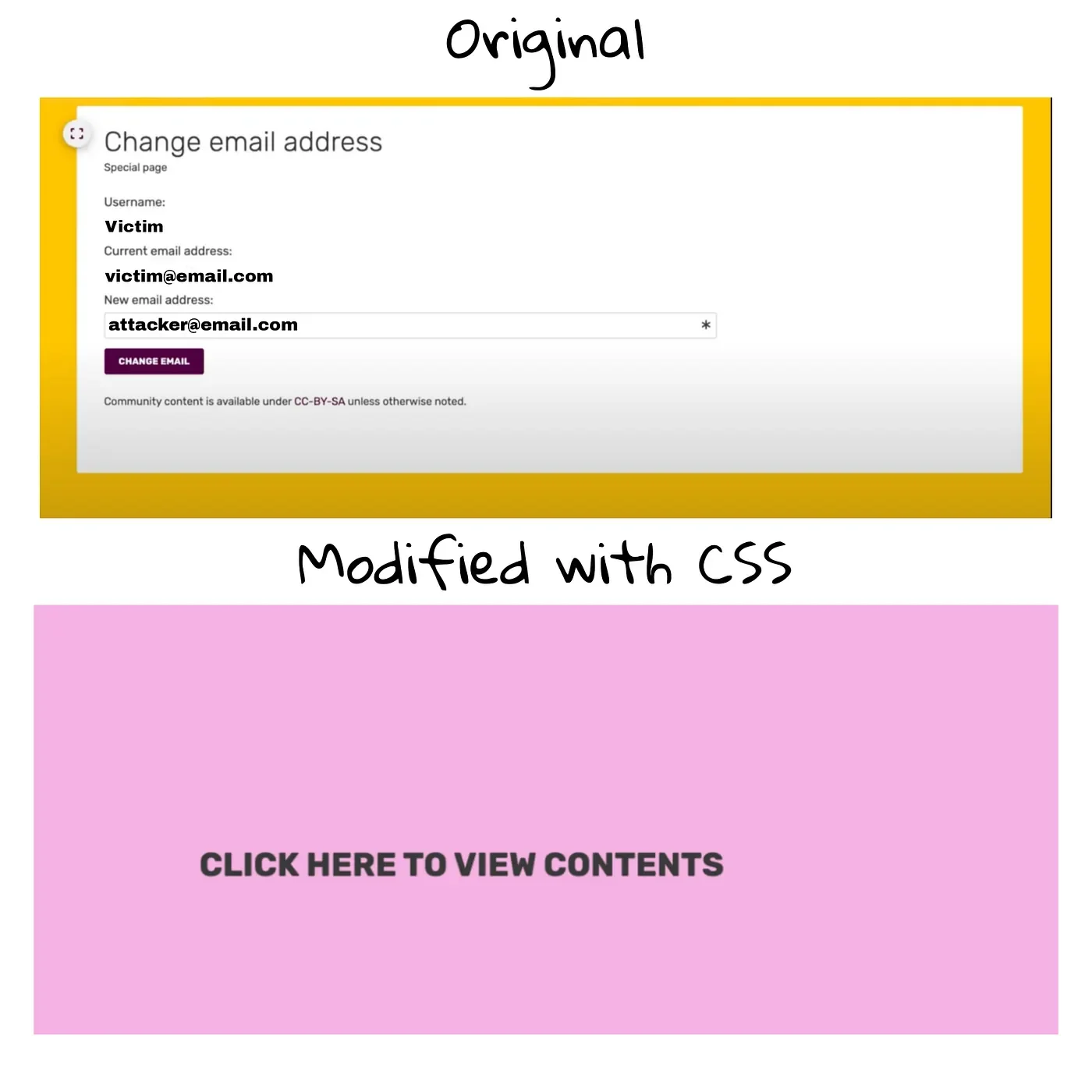
Back to the CSS injection. It can restyle the page and trick the victim as needed. First hide everything on the page except the change button, then use the :before CSS selector to change the text of the submit button. The final payload:
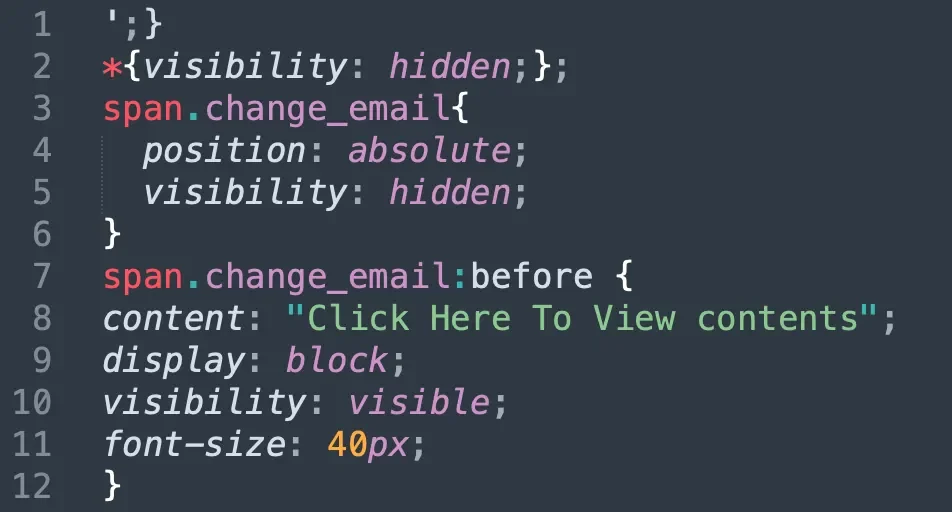
Here is the normal change email settings page next to the changed one:
Step 3: take over the account
The victim clicks the text, their email is changed to my controlled address, and the password reset flow then lets me take over the account. Bounty: $1,150.
Root cause
The theme font value is written into the external CSS file without escaping single quotes, so a community admin can break out of the font declaration and inject arbitrary CSS that is served to every page of the community, including the shared user settings page. The email change endpoint deliberately keeps the submitted email in the input when the CSRF token is missing or invalid, which is what allows the attacker's address to be pre-filled without a valid token. The CSRF protection itself was not bypassed: the final change still requires the victim's click, which the injected CSS makes deceptive.
Impact
An attacker who controls a community can inject CSS into pages served to users of that community, including the settings page, and combine it with a pre-filled email change form to get the victim to change their email to the attacker's address. A password reset then leads to account takeover. The victim has to click the disguised button.
Fix
The report does not describe a fix. The obvious changes are to escape quotes in the theme font value before it is written into the CSS file, and to avoid reflecting a submitted email back into the input when the CSRF token is missing or invalid.
2. Drag and Drop XSS, jQuery .html() and Cookie Bomb to Account Takeover
Context
The second target is an online photo editor. Users create accounts and add funds to them. Like many modern applications it lets you drop images onto the page instead of picking them from the file explorer.
Finding it
I looked at how the application handles a dropped file:
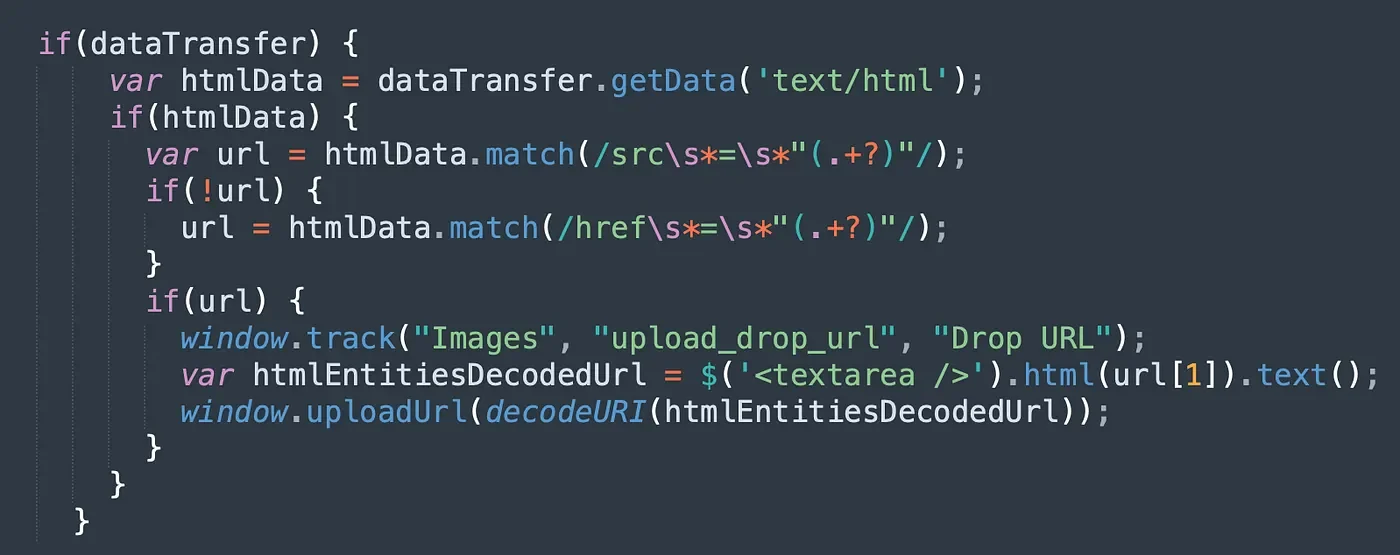
When you drop an image, I believe it is sometimes in HTML format, <a href=url...> or <img src=data:image/png;base64,AAA>. I am not sure about that and did not look into it, so let's jump to the last lines:
$(‘<textarea />’).html(url[1]).text();
This is a jQuery selector calling the dangerous .html() function, with a value taken from the dropped image's href. It does not look safe for two reasons.
First, in browsers you can override dragged images to any arbitrary value. We only need the victim to drag an image on our site, change its value to our controlled string with dataTransfer.setData, then redirect to the vulnerable site. In browsers, if a user drags an element and is then redirected to another origin, the element stays attached to the mouse and can be dropped there.
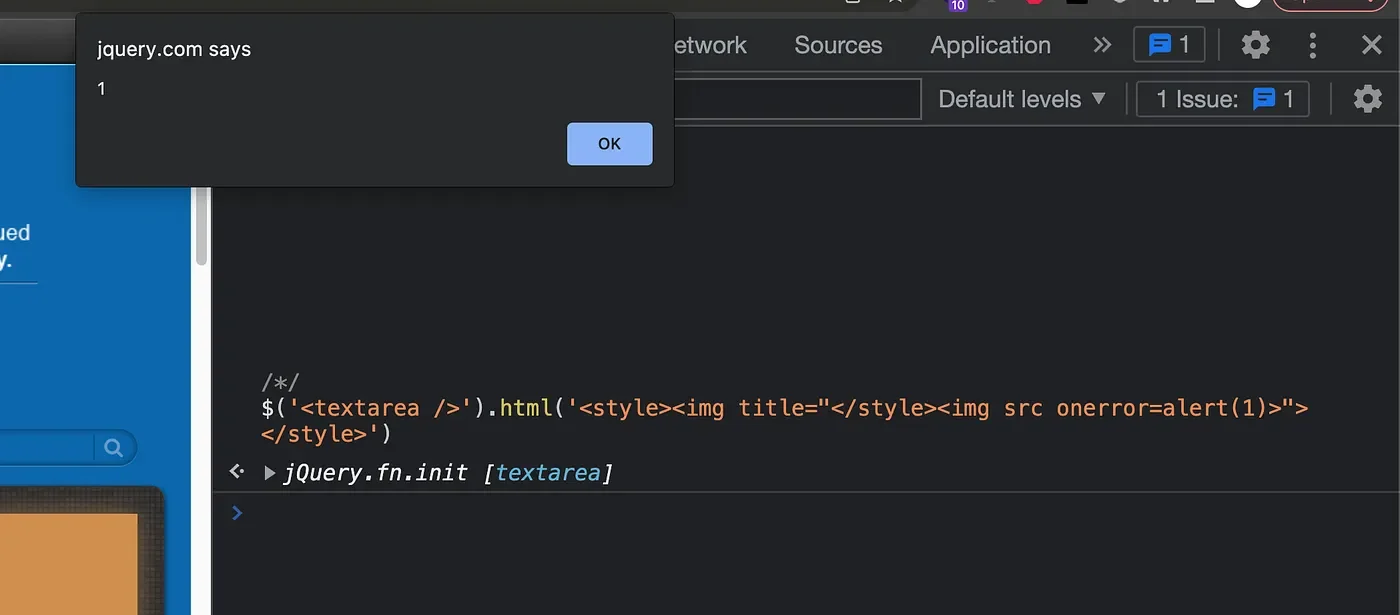
Second, <textarea> is not like other HTML elements: setting its innerHTML is just like setting a value on an input element. Developers may not know that jQuery .html() is not the same as innerHTML, because jQuery changes the structure of the string before setting it on the textarea. Playing with it, I grabbed an XSS payload from the XSS cheat sheet and it worked like a charm.
Exploitation
Step 1: get XSS through the dropped value
The dropped image's href reaches jQuery .html() on a <textarea>, and a payload from the XSS cheat sheet executes. On its own the XSS has little impact, so I looked for a way to raise the severity.
Step 2: understand the OAuth login flow
The application is app2.com and login uses OAuth from app2-parent.com. app2.com redirects to:
app2-parent.com/oauth/authorize?client_id=aa...&redirect_uri=https://app2.com/auth&response_type=code
The parent domain checks whether the user is logged in and redirects back to app2.com with the token in the URL. The application had no state parameter, which would let an attacker log into the victim's account from any browser if they have the OAuth token code.
Step 3: deal with the token being consumed
The plan is to request the login page and steal the token from the URL. The problem: when the token comes back to app2.com, the server uses it and invalidates it, so even if we steal it, it is expired and cannot be used to log in.
Step 4: cookie bomb to stop the request reaching the server
All servers have an HTTP request header limit and return bad request Header too large when it is exceeded. Apache's header limit is 8KB. In the browser we can set many cookies with large values each; when the browser sends the request it triggers the error and the request never reaches the server. The attacker can then steal the token and log into the victim's account without any authorisation. Here is the POC code I used:
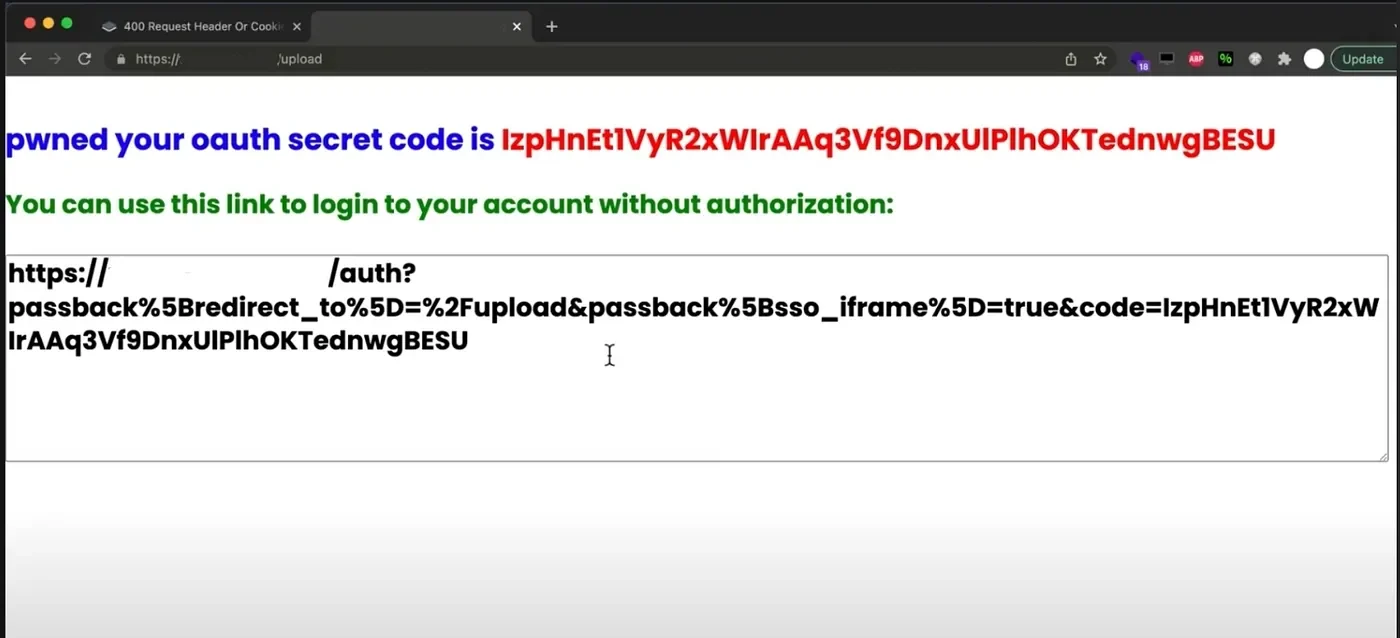
The drag-drop technique was the same as in my Opera RCE bug. The final POC looked like this. Bounty: $1,700.
Root cause
The dropped image's href is passed to jQuery .html() on a <textarea>. jQuery parses and restructures the string before assigning it, so HTML in the value is not treated as inert text the way a plain innerHTML assignment on a textarea would be, and script executes. The OAuth flow has no state parameter, so a stolen authorisation code can be replayed into the attacker's browser. The cookie bomb works because the server enforces a request header limit and rejects oversized requests before processing them, so the code is never consumed server-side.
Impact
An attacker can get script execution in the victim's browser on app2.com by getting them to drag an image from an attacker page and then redirecting them. Combined with the missing state parameter and the cookie bomb, the attacker can steal the OAuth code before the server consumes it and log into the victim's account. The victim must perform the drag and drop.
Fix
The report does not describe a fix. The likely changes are to stop passing dropped values to .html() (use .text() or .val() on the textarea), and to add and validate a state parameter in the OAuth flow.
3. Self XSS, Login Logout CSRF + OAuth to Account Takeover
Context
The third target is a blog website called app3.com where users share their thoughts and others interact with them. The app is old and uses an old version of TinyMCE which is vulnerable to XSS.
Finding it
I grabbed the POC payload and shared it on the website, but it did not work. Later I clicked the Edit button and the XSS alert box popped up: cool and not cool at the same time. Only the author of the blog can edit the post and see the XSS, so this is Stored Self-XSS.
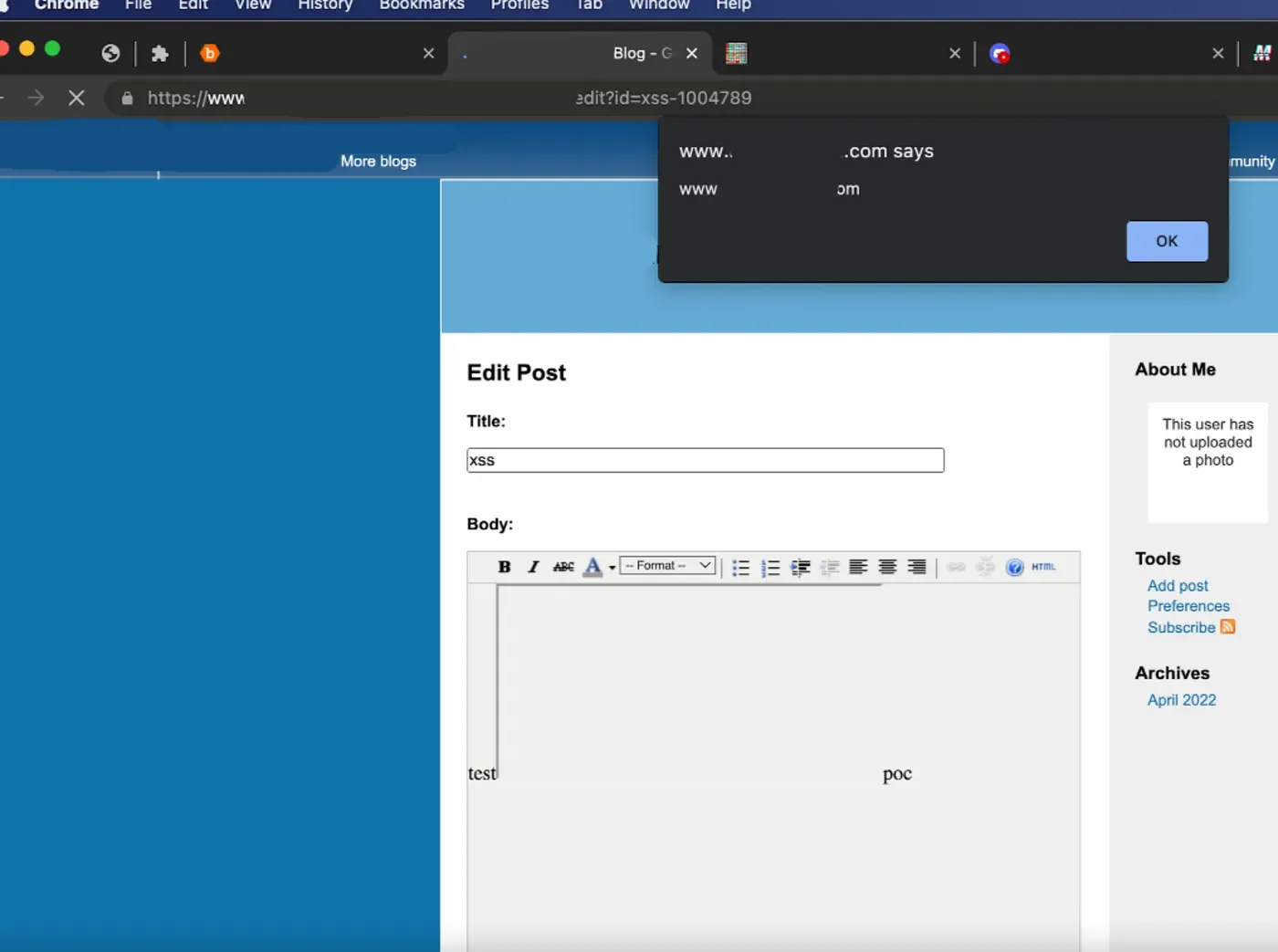
I looked around the site for a way to leverage it, but there was no way to XSS other users. Then I looked at the login flow: it was protected by anti-CSRF, so we cannot log our account into the victim's browser that way.
Exploitation
Step 1: OAuth login without a state check
The app also has login with Facebook using OAuth without an anti-CSRF token, but with a state parameter. I tested the flow and removed the state part, and luckily it worked. That means we can log the victim into our account using our social media account. One problem: the FB token worked only once per POC try, so we needed a new token each time. I found a creative way to make the POC stable.
Step 2: obtain a fresh token from the server side
From my browser I grabbed my FB cookies, then from my server sent a curl request to:
The response is a 301 redirect to:
app3.com/api/auth/callback/facebook?code=AQBB8bH…..#_=_
This way we can log the victim into our account every time.
Step 3: re-login the victim to their own account
Now we have XSS in the victim's browser, but the user is logged out of their account, so we need a way to log them back in. OAuth helps again. Using the XSS we open a new window pointing to:
app3.com/account/login?callbackUrl=https://app3.com/account/email_settings
Then click the Login with Facebook button. If the user is logged in to their FB account, it redirects automatically to the app and logs them in again without any notice.
Step 4: change the email and reset the password
Now we have an XSS window we control and another window in which the victim's account is logged in. Both are same-origin, so we can access that window. Using the XSS we change the FB email of the victim's account, then use the forgot password feature to reset the account password and access the account.
I did not use the cookie bomb to steal the victim's FB account token because the app was Flask and its cookie limit is much larger than the browser's limit, so we cannot get an error from the server and steal it. The token is also valid only once: upon server receipt it is useless to us.
Here is the code I used for the POC. Bounty: TBD, around $1k.
Root cause
The TinyMCE version in use is vulnerable to XSS, but the payload only fires for the author in the editor, so it is self-XSS on its own. The Facebook OAuth flow accepts a request with the state parameter removed, so an attacker can force a login into their own account. The anti-CSRF protection on the normal login does not cover the OAuth path. The cookie bomb does not apply because Flask's cookie limit is larger than the browser's, so the oversized request is not rejected.
Impact
An attacker can get script execution in the victim's browser through the self-XSS, force the victim into the attacker's account through the OAuth flow, then use the same-origin window to log the victim back into their own account, change the account email and reset the password. The victim must interact with the crafted post and the OAuth login.
Fix
The likely changes are to upgrade TinyMCE to a non-vulnerable version, and to require and validate the state parameter on the Facebook OAuth flow.
Variants to test
- Theme and profile inputs that reach a stylesheet. Try a single quote in font, colour or background values and look for it reflected unescaped in the generated CSS. A positive result is a payload like
Rubik’;}*{color:red;};changing the page. - Email or profile forms that keep the submitted value on CSRF failure. Submit a value without the token and check whether it is reflected into the input. A positive result is the attacker value sitting in the field with an error message.
- Drag and drop handlers that pass dropped data to
.html(). Drop an element with a controlledhrefand see whether HTML in the value is parsed. A positive result is script execution from the dropped value. - OAuth flows without a
stateparameter. Remove or tamper withstateand check whether the flow still completes. A positive result is a successful login with the parameter missing. - OAuth flows where the code is consumed server-side. Try a cookie bomb to stop the callback request reaching the server, then steal the code. A positive result is a
bad request Header too largeerror and a code that still works. - Old rich text editors. Check the TinyMCE or similar editor version against known XSS advisories and test the POC payload in the editor. A positive result is an alert when editing the content.
What happened, in plain words
This article describes three real bug bounty reports. A bug bounty is a programme where companies pay independent researchers for finding security problems in their websites and reporting them privately. The researcher here is Renwa. Each report is about a small weakness that looked harmless on its own, but when combined with another small weakness, allowed the researcher to take over another person's account. Taking over an account means logging in as that person without knowing their password.
The three targets are:
-
A community platform where anyone can create a subdomain (a separate address like test.app1.com) and customise its look. The researcher found a way to inject CSS (the language that styles web pages) and then trick a victim into clicking a disguised button, which changed the victim's email address to the attacker's. A password reset then gave the attacker the account.
-
An online photo editor. The researcher found a cross-site scripting (XSS) bug in how the app handled images dragged onto the page. XSS means running attacker-controlled JavaScript in the victim's browser. Combined with a missing security check in the login flow and a trick called a cookie bomb, the attacker could steal a login token and log in as the victim.
-
An old blog site using a vulnerable rich-text editor (TinyMCE). The XSS only fired for the author, so it was self-XSS. But the Facebook login flow could be abused to log the victim into the attacker's account, and then the attacker used the XSS to log the victim back into their own account, change the email, and reset the password.
Below, each report is explained from scratch, with the same requests and payloads as in the original, and with every technical term defined the first time it appears.
1. CSS Injection + Clickjacking to Account Takeover
Background: what is this app?
The first application hosts many separate communities. Each community gets its own subdomain, for example test.app1.com. A subdomain is a prefix added to a domain name: app1.com is the main site, and test.app1.com is a separate site under it. Anyone can create a community and become its admin. Admins can change the community's theme: colours, background image, and fonts. These settings apply to every page of that community, including the user settings page where users change their own account details.
The theme is applied by loading an external CSS file. CSS (Cascading Style Sheets) is the language that tells the browser how to display a page: colours, fonts, sizes, positions. An external CSS file is a separate file that the page links to, like this:
<link href=...>
This line tells the browser: fetch the stylesheet at the address given in href and apply its rules to this page. The important point is that the stylesheet is generated from the admin's theme settings. If an admin can put arbitrary text into that stylesheet, they control the styling of every page in the community.
Finding the CSS injection
A CSS injection is when an attacker can insert their own CSS rules into a page's stylesheet. The researcher tested the font input and found that single quotes (') were not escaped. Escaping means converting special characters into harmless text so they cannot break out of their context. In CSS, a font name is often written inside quotes, like font-family: 'Rubik';. If the quote is not escaped, an attacker can close the quote early and add their own CSS rules.
The payload used was:
Rubik’;}*{color:red;};
Let's break it down:
Rubik’is the font name the admin typed. The curly apostrophe here is the character that was not escaped.;ends the font declaration.}closes the block that contained the font setting.*{color:red;}is a new CSS rule:*means every element on the page, andcolor:redmakes the text red.;and the rest are extra characters to keep the CSS valid.
The result: every element on every page of that community turned red. That proved the injection worked.
The researcher first thought about using this CSS injection to steal CSRF tokens. A CSRF token is a secret value embedded in a form to prove the request came from the real site, not from an attacker. CSRF stands for Cross-Site Request Forgery: tricking a logged-in user's browser into sending a request the user did not intend. But stealing tokens this way would not work here for two reasons: the tokens change on every page refresh, and the injection is not at the start of the CSS file, so a technique that reads the stylesheet character by character (a recursive leak) would not work. So the researcher looked at other features of the settings page.
The email change feature
Every community has a settings page where users change settings that affect all their communities. One setting is the ability to change the email address. The form is simple: one input for the new email, a hidden input containing the CSRF token, and a Change Email button. The form sends a POST request to /changeEmail. POST is an HTTP method used to submit data; a GET request is used to retrieve data. The same endpoint (URL path) handles both.
While testing, the researcher noticed something: if you send an attacker-controlled email without sending the CSRF token, the email ends up inside the input field, but the server returns an error. This behaviour exists for a legitimate reason: if a user leaves the form open too long and the CSRF token expires, or the browser fails to send the token, the email stays in the input so the user can click again without retyping. The server rejects the change, but it reflects the submitted email back into the form.
Exploitation step 1: pre-fill the email input
The researcher built a form that automatically submits the attacker's email address to the change email endpoint:
This form sends the attacker's email without a valid CSRF token. The server rejects the change but puts the email into the input field. Now the victim's change email settings page shows the attacker's email in the box. The victim still has to click the Change Email button for the change to happen. That is not reliable: nobody would click a button that changes their email to a stranger's address without noticing. The researcher needed a way to make the victim click that button without realising what it does.
Exploitation step 2: disguise the button with CSS
The CSS injection can restyle the page. The researcher used it to hide everything on the page except the Change Email button, and then used the :before CSS selector to change the text shown on the button. The :before selector inserts content before an element's content. The final payload was:
The effect is described: the page is hidden except the button, and the button's text is replaced with something the victim is likely to click. The report compares the normal change email settings page with the changed one:
Exploitation step 3: take over the account
The victim sees what looks like a normal button with innocent text and clicks it. The click submits the form with the attacker's email already in the input. The email change succeeds. The attacker then uses the password reset feature to take over the account. Bounty: $1,150.
Why it worked (root cause)
The theme font value is written into the external CSS file without escaping single quotes. A community admin can break out of the font declaration and inject arbitrary CSS that is served to every page of the community, including the shared user settings page. The email change endpoint deliberately keeps the submitted email in the input when the CSRF token is missing or invalid, which allows the attacker's address to be pre-filled without a valid token. The CSRF protection itself was not bypassed: the final change still requires the victim's click, which the injected CSS makes deceptive. This combination of CSS injection and clickjacking (tricking a user into clicking something they did not intend) is what turns a styling bug into account takeover.
Impact
An attacker who controls a community can inject CSS into pages served to users of that community, including the settings page, and combine it with a pre-filled email change form to get the victim to change their email to the attacker's address. A password reset then leads to account takeover. The victim has to click the disguised button.
Fix
The report does not describe a fix. The obvious changes are to escape quotes in the theme font value before it is written into the CSS file, and to avoid reflecting a submitted email back into the input when the CSRF token is missing or invalid.
2. Drag and Drop XSS, jQuery .html() and Cookie Bomb to Account Takeover
Background: what is this app?
The second target is an online photo editor. Users create accounts and add funds to them. Like many modern applications, it lets you drop images onto the page instead of picking them from the file explorer. This is a convenience feature: you drag a file from your desktop and drop it onto the browser window.
Finding the XSS
The researcher looked at how the application handles a dropped file:
When you drop an image, the browser may provide it in HTML format, for example <a href=url...> or <img src=data:image/png;base64,AAA>. The researcher was not sure about that and did not look into it, so let's jump to the last lines:
$(‘<textarea />’).html(url[1]).text();
This is a line of JavaScript using jQuery. jQuery is a popular library that makes it easier to manipulate web pages. Let's break it down:
$('<textarea />')creates a new, empty<textarea>element in memory. A<textarea>is a multi-line text input box..html(url[1])sets the HTML content of that textarea to the value ofurl[1]. The.html()function is dangerous because it parses the string as HTML, not as plain text. If the string contains HTML tags or scripts, they are interpreted..text()then gets the text content back out.
The value url[1] comes from the dropped image's href attribute. An href is the address a link points to. The researcher saw two problems.
First, in browsers you can override dragged images to any arbitrary value. We only need the victim to drag an image on our site, change its value to our controlled string with dataTransfer.setData, then redirect to the vulnerable site. dataTransfer.setData is a browser API (a set of functions the browser provides) that lets a script set the data being dragged. In browsers, if a user drags an element and is then redirected to another origin, the element stays attached to the mouse and can be dropped there. Origin means the combination of protocol, domain, and port; two pages from different origins are isolated from each other by the browser's same-origin policy. But the drag operation itself survives the redirect.
Second, <textarea> is not like other HTML elements: setting its innerHTML is just like setting a value on an input element. Developers may not know that jQuery .html() is not the same as innerHTML, because jQuery changes the structure of the string before setting it on the textarea. In other words, jQuery parses the string and may turn parts of it into actual HTML elements, which can execute scripts. Playing with it, the researcher grabbed an XSS payload from the XSS cheat sheet (a public list of XSS test payloads) and it worked like a charm.
Exploitation step 1: get XSS through the dropped value
The dropped image's href reaches jQuery .html() on a <textarea>, and a payload from the XSS cheat sheet executes. On its own the XSS has little impact, so the researcher looked for a way to raise the severity.
Exploitation step 2: understand the OAuth login flow
The application is app2.com and login uses OAuth from app2-parent.com. OAuth is a protocol that lets a website log users in via another service (like "Log in with Google"). app2.com redirects to:
app2-parent.com/oauth/authorize?client_id=aa...&redirect_uri=https://app2.com/auth&response_type=code
This URL is an OAuth authorisation request. Let's break it down:
app2-parent.com/oauth/authorizeis the endpoint on the parent domain that handles authorisation.client_id=aa...identifies the application (app2.com) to the parent.redirect_uri=https://app2.com/authis where the parent should send the user after authorisation.response_type=codeasks for an authorisation code, a short-lived token that the app can exchange for access.
The parent domain checks whether the user is logged in and redirects back to app2.com with the token in the URL. The application had no state parameter. The state parameter is a random value that the app sends with the OAuth request and expects back unchanged; it prevents CSRF attacks on the OAuth flow. Without it, an attacker who obtains the OAuth token code can log into the victim's account from any browser.
Exploitation step 3: deal with the token being consumed
The plan is to request the login page and steal the token from the URL. The problem: when the token comes back to app2.com, the server uses it and invalidates it, so even if we steal it, it is expired and cannot be used to log in. The server consumes the code immediately.
Exploitation step 4: cookie bomb to stop the request reaching the server
All servers have an HTTP request header limit and return bad request Header too large when it is exceeded. HTTP headers are the metadata sent with every request, including cookies. A cookie is a small piece of data a website stores in your browser and that the browser sends back with every request to that site. Apache, a common web server, has a header limit of 8KB. In the browser we can set many cookies with large values each; when the browser sends the request it triggers the error and the request never reaches the server. This is called a cookie bomb: you flood the browser with cookies so that the request headers exceed the server's limit. The attacker can then steal the token and log into the victim's account without any authorisation. Here is the POC code used:
The drag-drop technique was the same as in the researcher's Opera RCE bug. The final POC looked like this. Bounty: $1,700.
Why it worked (root cause)
The dropped image's href is passed to jQuery .html() on a <textarea>. jQuery parses and restructures the string before assigning it, so HTML in the value is not treated as inert text the way a plain innerHTML assignment on a textarea would be, and script executes. The OAuth flow has no state parameter, so a stolen authorisation code can be replayed into the attacker's browser. The cookie bomb works because the server enforces a request header limit and rejects oversized requests before processing them, so the code is never consumed server-side.
Impact
An attacker can get script execution in the victim's browser on app2.com by getting them to drag an image from an attacker page and then redirecting them. Combined with the missing state parameter and the cookie bomb, the attacker can steal the OAuth code before the server consumes it and log into the victim's account. The victim must perform the drag and drop.
Fix
The report does not describe a fix. The likely changes are to stop passing dropped values to .html() (use .text() or .val() on the textarea), and to add and validate a state parameter in the OAuth flow.
3. Self XSS, Login Logout CSRF + OAuth to Account Takeover
Background: what is this app?
The third target is a blog website called app3.com where users share their thoughts and others interact with them. The app is old and uses an old version of TinyMCE, which is vulnerable to XSS. TinyMCE is a rich-text editor: a WYSIWYG (what you see is what you get) box that lets users format text with bold, italics, links, and so on. It is embedded in many websites.
Finding the self-XSS
The researcher grabbed the POC payload and shared it on the website, but it did not work. Later, when clicking the Edit button, the XSS alert box popped up: cool and not cool at the same time. Only the author of the blog can edit the post and see the XSS, so this is Stored Self-XSS. Stored means the payload is saved on the server (in the post). Self-XSS means the script only runs in the browser of the person who entered it, not in other users' browsers. On its own, self-XSS is not useful to an attacker because the victim would have to attack themselves.
The researcher looked around the site for a way to leverage it, but there was no way to XSS other users. Then the researcher looked at the login flow: it was protected by anti-CSRF, so we cannot log our account into the victim's browser that way. Anti-CSRF means the login form includes a token that prevents an attacker from submitting the form on the victim's behalf.
Exploitation step 1: OAuth login without a state check
The app also has login with Facebook using OAuth without an anti-CSRF token, but with a state parameter. The researcher tested the flow and removed the state part, and luckily it worked. That means we can log the victim into our account using our social media account. One problem: the FB token worked only once per POC try, so we needed a new token each time. The researcher found a creative way to make the POC stable.
Exploitation step 2: obtain a fresh token from the server side
From the browser the researcher grabbed their Facebook cookies, then from their server sent a curl request to:
Let's break it down:
curlis a command-line tool for sending HTTP requests.- The URL is Facebook's OAuth dialog endpoint.
client_id=112233identifies the app,scope=emailrequests access to the user's email,response_type=codeasks for an authorisation code, andredirect_uri=https://app3.com/api/auth/callback/facebookis where Facebook should send the user after authorisation. - The researcher grabbed their Facebook cookies and sent the request from their server.
The response is a 301 redirect to:
app3.com/api/auth/callback/facebook?code=AQBB8bH…..#_=_
A 301 is an HTTP status code meaning permanent redirect. The code parameter is the authorisation code. This way we can log the victim into our account every time.
Exploitation step 3: re-login the victim to their own account
Now we have XSS in the victim's browser, but the user is logged out of their account, so we need a way to log them back in. OAuth helps again. Using the XSS we open a new window pointing to:
app3.com/account/login?callbackUrl=https://app3.com/account/email_settings
Then click the Login with Facebook button. If the user is logged in to their FB account, it redirects automatically to the app and logs them in again without any notice. The callbackUrl parameter tells the app where to send the user after login.
Exploitation step 4: change the email and reset the password
Now we have an XSS window we control and another window in which the victim's account is logged in. Both are same-origin, so we can access that window. Same-origin means they share the same protocol, domain, and port; the browser allows scripts from one to read and modify the other. Using the XSS we change the FB email of the victim's account, then use the forgot password feature to reset the account password and access the account.
The researcher did not use the cookie bomb to steal the victim's FB account token because the app was Flask and its cookie limit is much larger than the browser's limit, so we cannot get an error from the server and steal it. Flask is a Python web framework. The token is also valid only once: upon server receipt it is useless to us.
Here is the code used for the POC. Bounty: TBD, around $1k.
Why it worked (root cause)
The TinyMCE version in use is vulnerable to XSS, but the payload only fires for the author in the editor, so it is self-XSS on its own. The Facebook OAuth flow accepts a request with the state parameter removed, so an attacker can force a login into their own account. The anti-CSRF protection on the normal login does not cover the OAuth path. The cookie bomb does not apply because Flask's cookie limit is larger than the browser's, so the oversized request is not rejected.
Impact
An attacker can get script execution in the victim's browser through the self-XSS, force the victim into the attacker's account through the OAuth flow, then use the same-origin window to log the victim back into their own account, change the account email and reset the password. The victim must be logged in to Facebook for the re-login step.
Fix
The likely changes are to upgrade TinyMCE to a non-vulnerable version, and to require and validate the state parameter on the Facebook OAuth flow.
Variants to test
- Theme and profile inputs that reach a stylesheet. Try a single quote in font, colour or background values and look for it reflected unescaped in the generated CSS. A positive result is a payload like
Rubik’;}*{color:red;};changing the page. - Email or profile forms that keep the submitted value on CSRF failure. Submit a value without the token and check whether it is reflected into the input. A positive result is the attacker value sitting in the field with an error message.
- Drag and drop handlers that pass dropped data to
.html(). Drop an element with a controlledhrefand see whether HTML in the value is parsed. A positive result is script execution from the dropped value. - OAuth flows without a
stateparameter. Remove or tamper withstateand check whether the flow still completes. A positive result is a successful login with the parameter missing. - OAuth flows where the code is consumed server-side. Try a cookie bomb to stop the callback request reaching the server, then steal the code. A positive result is a
bad request Header too largeerror and a code that still works. - Old rich text editors. Check the TinyMCE or similar editor version against known XSS advisories and test the POC payload in the editor. A positive result is an alert when editing the content.
Glossary
- Bug bounty: A programme where companies pay researchers for finding and reporting security vulnerabilities.
- Account takeover: Gaining unauthorised access to someone else's account.
- Subdomain: A prefix added to a domain name, like test.app1.com under app1.com.
- CSS (Cascading Style Sheets): The language that controls how a web page looks (colours, fonts, layout).
- CSS injection: Inserting attacker-controlled CSS rules into a page's stylesheet.
- Escaping: Converting special characters into harmless text so they cannot break out of their context.
- CSRF (Cross-Site Request Forgery): Tricking a logged-in user's browser into sending a request the user did not intend.
- CSRF token: A secret value in a form that proves the request came from the real site.
- POST request: An HTTP method used to submit data to a server.
- GET request: An HTTP method used to retrieve data from a server.
- Endpoint: A URL path that handles a specific function.
- Clickjacking: Tricking a user into clicking something they did not intend to click.
- XSS (Cross-Site Scripting): Running attacker-controlled JavaScript in a victim's browser.
- jQuery: A JavaScript library that simplifies HTML manipulation.
.html(): A jQuery function that sets or gets the HTML content of an element, parsing the string as HTML.<textarea>: A multi-line text input element.href: The attribute of a link that holds its destination address.dataTransfer.setData: A browser API that sets the data being dragged.- Origin: The combination of protocol, domain, and port that defines a security boundary in the browser.
- Same-origin policy: A browser rule that isolates pages from different origins.
- OAuth: A protocol that lets a website log users in via another service.
stateparameter: A random value in OAuth that prevents CSRF attacks on the flow.- Authorisation code: A short-lived token in OAuth that the app exchanges for access.
- HTTP headers: Metadata sent with every HTTP request, including cookies.
- Cookie: A small piece of data stored by a website in the browser and sent back with requests.
- Cookie bomb: Flooding the browser with large cookies so that request headers exceed the server's limit.
- Apache: A common web server.
- Flask: A Python web framework.
- TinyMCE: A rich-text editor embedded in websites.
- Self-XSS: XSS that only runs in the browser of the person who entered the payload.
- Stored XSS: XSS where the payload is saved on the server and served to other users.
- Anti-CSRF: Protection that prevents CSRF attacks, usually via a token.
- 301 redirect: An HTTP status code meaning permanent redirect.
- curl: A command-line tool for sending HTTP requests.
- POC (Proof of Concept): A demonstration that a vulnerability can be exploited.
- RCE (Remote Code Execution): Running arbitrary code on a remote system.
- Bounty: The reward paid for a bug report.





