One ID Was All It Took: How I Found an Unauthenticated IDOR
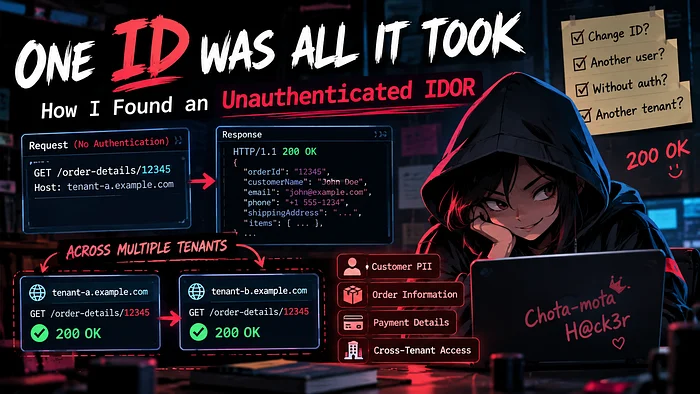
An order-details endpoint returned customer order data without requiring authentication and without checking whether the requester owned the order. An attacker who obtained a valid order identifier could read other customers' personal and payment-related information, including across tenants.
 Published on medium.com
Cybersecurity
The full write-up lives on its author's site
It belongs to its author, so we link to it rather than copy it. The other two tabs are our own rewrites, checked against it.
Context
The target was a web application that served order details through a URL path containing an order identifier, and that ran in several tenant environments, conceptually tenant-a.example.com and tenant-b.example.com. The feature itself is ordinary: a customer asks for one of their orders and the backend looks it up by the identifier in the path and returns the order record.
The write-up is about what happens when the server performs that lookup without asking whether the requester is allowed to see the result. The author describes the outcome as an unauthenticated IDOR exposing customer PII, and then as the same authorization issue reproduced across multiple tenants.
Setup
The only tool named in the report is Burp Suite, used to intercept the request. The author does not describe creating accounts, assigning roles, or any particular version of anything. Two preconditions matter for the story: the tester had an account on one of the tenant domains, and the testing was carried out within an authorised scope, which the author mentions when moving to the second tenant.
Finding it
While browsing the application, the author noticed an order-details endpoint that looked roughly like this:
GET /order-details/<ORDER_ID>Host: tenant-a.example.com
The reasoning is the one most hunters apply on sight: an identifier sits in the URL, so does the server actually check who owns this object? The author intercepted the request in Burp Suite and started testing.
Exploitation
Step 1: remove the session
The first test was to strip the authenticated session from the request. The author expected one of two answers:
401 Unauthorized
or perhaps:
403 Forbidden
Instead the server returned 200 OK, and the order details were still in the response. The endpoint was answering without any authenticated session at all.
Step 2: change the identifier
Next, the original order identifier was replaced with another valid order identifier:
GET /order-details/<ANOTHER_ORDER_ID>Host: tenant-a.example.com
The response was again 200 OK, but this time the data belonged to another customer. The response exposed:
- Customer name
- Email address
- Phone number
- Billing/shipping information
- Products and pricing
- Order status
- Payment-related information
No authenticated session was required for any of it. At that point the behaviour was clear: the backend was retrieving orders based on the supplied identifier without properly checking whether the requester was authorised to access them.
Step 3: repeat against another tenant
Because the application used multiple tenant environments, conceptually:
tenant-a.example.comtenant-b.example.com
the next question was whether the same thing happened there. The author tested the same request against another tenant within the authorised testing scope, and the same access-control flaw could be reproduced there as well.
The cross-tenant angle went further than simply repeating the request. In the author's words, an order ID from a domain where they had an account was used against another domain where they had no account, and the server still returned the order data. That demonstrated a cross-tenant authorization and isolation issue on top of the unauthenticated IDOR.

The author notes having accessed only the minimum data necessary to confirm the vulnerability, rather than dumping customer records to prove the point.
Root cause
The vulnerable backend logic was effectively behaving like this:
order = findOrder(orderId)return order
when it should have been closer to:
order = findOrder(orderId)if requester is not authorized to access order: deny()return order
The server knew which order was wanted. It simply never asked whether the person making the request should be allowed to see it. The report does not describe any defence that was present and failed; it says the backend retrieved orders without properly checking whether the requester was authorised, and that the same flaw reproduced on another tenant.
Impact
Because the endpoint was reachable without authentication, anyone who could obtain a valid order reference could potentially access information belonging to another customer. The exposed fields cover identity and contact data, billing and shipping details, the products and prices in the order, its status, and payment-related information.
The cross-tenant reproduction widens this: an identifier obtained on one tenant domain was accepted on another tenant domain where the requester had no account, so tenant isolation did not hold for this endpoint either. The author summarises the impact as customer PII exposure, order information disclosure, and cross-tenant data access, with the hedge that exploitation depends on possessing a valid order reference.
Fix
The report does not say what was changed, if anything. The correction it points to is the second code shape above: after loading the order by identifier, verify that the requester is authorised to access that order and deny the request otherwise, after loading the order by identifier, verify that the requester is authorised to access that order and deny the request otherwise..
Variants to test
The habit the author recommends is to pay attention whenever an identifier appears in a path such as:
/user/<ID>/order/<ID>/invoice/<ID>/document/<UUID>
and then ask a short set of questions of each one:
- Can I change the identifier? Can I change the identifier?
- Can another account access it? Can another account access it?
- Can I access it without authentication? Can I access it without authentication?
- What about another tenant? What about another tenant?
Sometimes the chain is complicated. Sometimes it is one changed ID and a 200 OK.
What happened, in plain words
A website let customers look at their own orders. Each order had a number, and the website used that number to find the order and show it. The researcher removed the login from the request and the website still showed the order. Then the researcher changed the number and the website showed someone else's order. Finally, the researcher took an order number from one version of the site and used it on a different version of the site, and that worked too.
That is the whole story. No clever tricks, no special tools beyond one that lets you pause and edit a request before it is sent. The lesson is that a website must check not only which thing you are asking for, but whether you are allowed to see it.
The pieces you need to know first
Before the steps make sense, here are a few everyday ideas.
A web page versus an API. When you type an address into your browser, you normally get back a page with buttons and pictures. Many websites also have a second, plainer way of answering: you ask for a specific piece of data by its address, and it sends back just the data, often in a compact text format. That plain channel is usually called an API (Application Programming Interface). Think of a restaurant: the menu with photos is the web page, and the waiter who takes "table 4, one soup" and brings back exactly one bowl is the API. The order-details endpoint in this story is that waiter.
An endpoint. An endpoint is simply one address the server listens on for one kind of request. GET /order-details/<ORDER_ID> is an endpoint: "give me the details of the order whose number is here".
GET and the path. GET is the word a browser uses to mean "please fetch this". The part after the domain, such as /order-details/1234, is the path. Anything in the path is visible to the server and is often used to identify a specific record.
A request and a response. Your browser sends a request (what you want) and the server sends back a response (the answer plus a status code).
Status codes. These are three-digit numbers that summarise the answer:
200 OKmeans "here you go, everything worked".401 Unauthorizedmeans "I do not know who you are, please log in".403 Forbiddenmeans "I know who you are, but you are not allowed".
A session, a cookie, a token. When you log in, the server needs a way to recognise you on the next request, because the web forgets everything between requests. So it gives your browser a small piece of text, usually stored as a cookie or sent as a token, and your browser shows it on every following request like a wristband at an event. Remove the wristband and the staff should treat you as a stranger. Much of this story is about what happens when they do not.
An identifier (ID). A number or code that names one specific record, such as one order. If IDs are simple and predictable (1, 2, 3...), anyone can guess a valid one.
IDOR. This stands for Insecure Direct Object Reference. It means the website takes an identifier straight from your request, fetches the matching record, and hands it over without checking that the record belongs to you. The comparison: a cloakroom that gives out any coat whose ticket number you read aloud, without checking that the ticket is yours.
Authentication versus authorisation. Authentication is who are you (logging in). Authorisation is what are you allowed to do (may you see this order). This bug is mostly an authorisation failure, and in the first test an authentication failure as well.
Tenant. Some products serve several separate organisations from the same software, each with its own address, such as tenant-a.example.com and tenant-b.example.com. Each organisation is a tenant. Data from one tenant should never appear on another tenant's address. Keeping them apart is called tenant isolation.
PII. Personally Identifiable Information: data that identifies a real person, such as a name, email address or phone number.
Burp Suite. A tool that sits between your browser and the website, so you can look at a request, pause it, edit it, and send it again. Think of it as an interceptor who lets you rewrite a letter before it reaches the recipient.
The setup
The target was a web application that showed order details through a web address containing an order number, and that ran in several tenant environments, conceptually tenant-a.example.com and tenant-b.example.com. The feature is ordinary: a customer asks for one of their orders, the server looks it up by the number in the address, and returns the order record.
The story is about what happens when the server does that lookup without asking whether the person asking is allowed to see the result. The researcher describes the outcome as an unauthenticated IDOR exposing customer PII, and then as the same authorisation problem reproduced across several tenants.
The only tool named is Burp Suite, used to intercept the request. Two things matter for the story: the researcher had an account on one of the tenant domains, and the testing was done within an authorised scope, which the researcher mentions when moving to the second tenant. In plain terms, this was testing on a site where testing was permitted, not poking at a random stranger's shop.
Finding it
While browsing the application, the researcher noticed an order-details endpoint that looked roughly like this:
GET /order-details/<ORDER_ID>Host: tenant-a.example.com
Line by line:
GET /order-details/<ORDER_ID>is the request: "fetch the details of the order whose number is<ORDER_ID>". The angle brackets are a placeholder, not literal text; the real request carried an actual number there.Host: tenant-a.example.comsays which site the request is aimed at. A single server can answer for many site names, and this line tells it which one you mean.
The reasoning is the one most hunters apply on sight: a number sits in the address, so does the server actually check who owns this object? The researcher intercepted the request in Burp Suite and started testing. Intercepting means catching the request on its way out so you can change it before it leaves.
Trying it out
Step 1: remove the session
The first test was to strip the logged-in session from the request. In other words, take off the wristband and see whether the staff still let you in. The researcher expected one of two answers:
401 Unauthorized
or perhaps:
403 Forbidden
These two lines are the expected status codes, not requests. 401 Unauthorized would mean "I do not know who you are". 403 Forbidden would mean "I know who you are, but no". Either would have been the correct, safe answer.
Instead the server returned 200 OK, and the order details were still in the response. The endpoint was answering with no logged-in session at all. That is the unauthenticated part of the title: no login needed.
Step 2: change the identifier
Next, the original order number was replaced with another valid order number:
GET /order-details/<ANOTHER_ORDER_ID>Host: tenant-a.example.com
Line by line:
GET /order-details/<ANOTHER_ORDER_ID>asks for a different order, one the researcher did not own. Again the angle brackets are a placeholder for a real number.Host: tenant-a.example.comkeeps the request aimed at the same tenant site as before.
The response was again 200 OK, but this time the data belonged to another customer. The response exposed:
- Customer name
- Email address
- Phone number
- Billing/shipping information
- Products and pricing
- Order status
- Payment-related information
No logged-in session was required for any of it. At that point the behaviour was clear: the backend was fetching orders based on the number supplied, without properly checking whether the requester was allowed to access them. The server knew which order was wanted; it never asked whether this person should see it.
Step 3: repeat against another tenant
Because the application used several tenant environments, conceptually:
tenant-a.example.comtenant-b.example.com
This block is just two site names written one after the other, with no separator, exactly as they appear in the report. Read them as two separate addresses: one for tenant A, one for tenant B. Each tenant is a separate organisation using the same software.
The next question was whether the same thing happened on the other tenant. The researcher tested the same request against another tenant within the authorised testing scope, and the same access-control flaw could be reproduced there as well.
The cross-tenant angle went further than simply repeating the request. In the researcher's words, an order number from a domain where they had an account was used against another domain where they had no account, and the server still returned the order data. That demonstrated a cross-tenant authorisation and isolation issue on top of the unauthenticated IDOR. In everyday terms: a cloakroom ticket from one hotel worked at a different hotel where you were not even a guest.
The researcher notes having accessed only the minimum data necessary to confirm the vulnerability, rather than dumping customer records to prove the point. That is the responsible way to test: take enough to show the door is open, not everything behind it.
Why it happens
The vulnerable backend logic was effectively behaving like this:
order = findOrder(orderId)return order
Line by line:
order = findOrder(orderId)means "look up the order whose number isorderIdand keep the result".return ordermeans "send that result back to whoever asked".
That is the whole logic. It fetches and returns, with no check in between.
It should have been closer to this:
order = findOrder(orderId)if requester is not authorized to access order: deny()return order
Line by line:
order = findOrder(orderId)looks up the order, same as before.if requester is not authorized to access order:asks the missing question: is the person making this request allowed to see this particular order?deny()refuses the request when the answer is no.return ordersends the order back only when the check passed.
The server knew which order was wanted. It simply never asked whether the person making the request should be allowed to see it. The report does not describe any defence that was present and failed; it says the backend fetched orders without properly checking whether the requester was allowed to access them, and that the same flaw reproduced on another tenant.
What the impact is
Because the endpoint was reachable without logging in, anyone who could obtain a valid order number could potentially access information belonging to another customer. The exposed fields cover identity and contact data, billing and shipping details, the products and prices in the order, its status, and payment-related information.
The cross-tenant reproduction widens this: a number obtained on one tenant domain was accepted on another tenant domain where the requester had no account, so tenant isolation did not hold for this endpoint either. The researcher sums up the impact as customer PII exposure, order information disclosure, and cross-tenant data access, with the caveat that exploitation depends on having a valid order number.
How it should be fixed
The report does not say what was changed, if anything. The correction it points to is the second code shape above: after loading the order by its number, check that the requester is allowed to access that order and refuse the request otherwise, after loading the order by its number, check that the requester is allowed to access that order and refuse the request otherwise..
Other places to look
The habit the researcher recommends is to pay attention whenever a number appears in an address such as:
/user/<ID>/order/<ID>/invoice/<ID>/document/<UUID>
Line by line, this is a list of example address shapes, each with a placeholder where a real number or code would sit:
/user/<ID>names a user./order/<ID>names an order./invoice/<ID>names an invoice./document/<UUID>names a document. A UUID is a long, random-looking code used as an identifier; it is harder to guess than a small number, but it is still just an identifier.
Then ask a short set of questions of each one:
- Can I change the number? Can I change the number?
- Can another account access it? Can another account access it?
- Can I access it without logging in? Can I access it without logging in?
- What about another tenant? What about another tenant?
Sometimes the chain is complicated. Sometimes it is one changed number and a 200 OK.
Glossary
- API: a plain channel a website offers for fetching or sending specific data, separate from the pages you see in a browser.
- Authentication: proving who you are, usually by logging in.
- Authorisation: deciding what a known person is allowed to see or do.
- Backend: the part of a website that runs on the server and does the actual work, as opposed to what your browser displays.
- Burp Suite: a tool that sits between your browser and a website so you can pause, inspect and edit requests.
- Cookie: a small piece of text a website stores in your browser, often used to recognise you between requests.
- Cross-tenant: reaching data that belongs to one tenant from another tenant's address.
- Endpoint: one specific address on a server that accepts one kind of request.
- GET: the word a browser uses to ask a server to fetch something.
- Host: the part of a request that says which site name the request is aimed at.
- ID: an identifier, a number or code that names one specific record.
- IDOR: Insecure Direct Object Reference, where a website fetches a record from an identifier you supply without checking that it belongs to you.
- Intercept: to catch a request on its way out so you can read or change it before it is sent.
- Path: the part of a web address after the domain, such as
/order-details/1234. - Request: what your browser sends to a server to ask for something.
- Response: what the server sends back, including a status code and the data.
- Session: the server's memory of you being logged in, carried between requests by a cookie or token.
- Status code: a three-digit number summarising a response, such as
200 OK,401 Unauthorizedor403 Forbidden. - Tenant: one organisation among several that share the same software, each with its own web address.
- Tenant isolation: keeping each tenant's data separate so it never appears on another tenant's address.
- Token: a piece of text, similar to a cookie, that proves who you are on a request.
- UUID: a long, random-looking code used as an identifier, harder to guess than a small number.
- 200 OK: the status code meaning the request succeeded and here is the data.
- 401 Unauthorized: the status code meaning the server does not know who you are.
- 403 Forbidden: the status code meaning the server knows who you are but you are not allowed.