One Modified Cookie, Any Account: Discovering a Session Forgery Vulnerability
The ses_id session cookie encoded the user ID in a way that could be changed by XORing specific bytes, and the server did not verify the cookie's integrity. An attacker could modify their own session to impersonate any other user, obtaining a valid JWT and accessing that account's data.

Bug Bounty Writeup
The full write-up lives on its author's site
It belongs to its author, so we link to it rather than copy it. The other two tabs are our own rewrites, checked against it.
Context
While testing target.com, BEN10 found that the ses_id session cookie did not properly protect the identity associated with it. The cookie carried an encoded structure: after URL decoding and Base64 decoding, it resolved to a 162 byte blob containing a user identifier. That identifier could be changed through predictable byte modifications, and the authentication service would then issue a valid JWT for the identity the modified session claimed to represent.
The write-up describes the web login flow, the authentication service that exchanges a session cookie for a JWT, and the main API that accepted the forged session. It also covers a later bypass in the targetPro application's GraphQL proxy after a partial fix was deployed.
Setup
The researcher used two disposable accounts registered specifically for the research. No victim password or existing victim session was needed. The only target information required by the observed behaviour was the numeric user ID, and target.com user IDs were publicly visible in profile URLs, contributor pages and comment author data:
https://www.target.com/members/<user_id>
That made the target identifier discoverable without access to the target account.
Finding it
The initial web login request was:
POST /members-admin/auth/signInByEmail HTTP/2Host: www.target.com
After a successful login, the application issued a cookie named ses_id:
ses_id: [redacted]
The next important endpoint was the authentication service:
POST /target.auth.Auth/Login HTTP/2Host: auth.api.target.comUser-Agent: Mozilla/5.0 (Macintosh; Intel Mac OS X 15_8_3) AppleWebKit/537.36 (KHTML, like Gecko) Chrome/[redacted] Safari/537.36Content-Type: application/json
Its request body used this structure:
{ "Token": "<session-cookie-value>", "Type": "UAPI"}
The service returned a JWT when the supplied session was accepted. That mattered because the authentication service was converting the supplied session credential into another authentication credential. The question was whether the identity inside the original session was protected against modification before the JWT was issued.
The first observation was that the ses_id value was Base64 encoded. After URL decoding and Base64 decoding, it produced a structure containing 162 bytes. The most interesting region was:
Byte offsets: 12–29Length: 18 bytes
Those 18 bytes represented a nine-digit user ID using nine doubled digit-pairs. The source account used during testing had this user ID:
285072144
Its corresponding digit-pair representation was:
228855007722114444
Rather than trying to understand every field in the cookie immediately, the researcher focused on the identity-related bytes and asked a simple question: if the user ID represented in this structure were changed, would the authentication service detect that the session had been modified?
Exploitation
Step 1: Compare source and target identities
The source and target user IDs were:
Source: 285072144Target: 285072202
Broken into individual digits:
Source: 2 8 5 0 7 2 1 4 4Target: 2 8 5 0 7 2 2 0 2
The first six digits were identical; only the last three differed. Examining how changes to the relevant bytes affected the decoded identity showed an XOR-based relationship. For each digit, the decoded value was calculated as:
digit = B[12 + 2*i] ^ B[12 + 2*i + 1] ^ C[i]
Here B is the decoded session structure, i is the digit position, and C[i] is a constant associated with that position.
Step 2: Calculate the deltas
To change a digit, the XOR difference between the original and desired values was calculated:
delta = old_digit ^ new_digit
The delta was then applied to one byte in the corresponding two-byte pair. Because XOR is reversible, applying the same delta changes the decoded digit to the desired value without modifying the other byte.
For the source and target IDs above, only the last three digits needed to change:
1 XOR 2 = 34 XOR 0 = 44 XOR 2 = 6
The required deltas were therefore 3, 4, 6, and the corresponding byte offsets were 24, 26, 28. Using zero-based indexing:
Position 6: 12 + (2 * 6) = 24Position 7: 12 + (2 * 7) = 26Position 8: 12 + (2 * 8) = 28
A simple XOR example illustrates the operation:
2 = 00108 = 100000101000----10101010 = 10 decimal = 0x0A
Applying the calculated XOR delta to one byte in the corresponding pair changed the digit produced by the decoding formula. Repeating the comparison across the identifier showed the same relationship.
This does not mean the entire session was simply encrypted using XOR. The finding was more specific: the identity-bearing bytes could be modified predictably, and the server did not effectively verify the integrity of the resulting session structure.
Step 3: Understand the session structure
The decoding pipeline was:
URL encoded Base64 | vBase64 decoding | v162 byte structure | vPer session XOR keystream | vJSON envelope (session.envelope)
The user ID was represented at bytes 12-29 as nine two-byte digit-pairs. For the source account:
User ID: 285072144Digit pairs: 228855007722114444
The session structure did not have an effective MAC, authenticated encryption tag, or signature covering the identity-bearing envelope. As a result, changes to the identity could be accepted as long as the resulting structure remained parseable.
Step 4: Establish a baseline with the original session
Before testing a modified session, the original session was submitted to:
The request used:
POST /target.auth.Auth/Login HTTP/2Host: auth.api.target.comUser-Agent: Mozilla/5.0 (Windows NT 10.0; Win64; x64) AppleWebKit/537.36 (KHTML, like Gecko) Chrome/[redacted] Safari/537.36Content-Type: application/json
With the original session, the service returned HTTP 200 and issued a JWT. Decoding the JWT payload gave these claims:
{ "iss": "target.com", "user_id": 285072144, "jti": "285072144"}
Step 5: Exchange the modified session for a JWT
With the modified session, the same exchange produced different claims:
Original session:user_id = 285072144jti = 285072144
Modified session:user_id = 285072202jti = 285072202
This was the key result: the authentication service had issued a genuine JWT associated with the target account.
Step 6: Use the JWT against the main API
The first endpoint tested was:
GET /api/users/info HTTP/2Host: api.target.comDomain-Id: wwwses-id: <forged session value>
The API returned HTTP 200. The response contained the target account's information, and the returned user ID was:
{ "userId": 285072202}
The response also contained profile fields, account settings, registration information, and an email field. For the controlled test account, the response included:
{ "userId": 285072202, "firstName": "***", "lastName": "**", "email":"******@***.com", "registrationDate": "2026-10-14 19:28:37", "isAdsFree": false, "settings": { "time_zone_id": "8", "time_zone": "US/Eastern" }}
Step 7: Test the partial fix
After the original vulnerability was reported, target.com deployed a fix on November 2. The modified ses_id was then rejected by both auth.api.target.com and api.target.com, which returned HTTP 403.
However, while testing the targetPro application, the researcher found that its GraphQL proxy was still accepting the same forged session. The affected endpoint was:
POST /***/_/***/query?raw=true HTTP/2Host: www.target.comCookie: ses_id=<FORGED_SES_ID>Content-Type: application/json
Unlike the fixed services, the Pro GraphQL proxy still processed the modified session.
Step 8: Reproduce the bypass
Two accounts were used:
- Source account A:
285072144 - Target account C:
285666404
First, a named GraphQL query was sent using the genuine session of account A:
query loadUserDetails { user { _id uid email active }}
The response returned account A's information. The identity bytes in A's ses_id were then modified to represent account C, and the same query was sent using the forged session. The request succeeded:
HTTP/2 200{ "data": { "user": { "_id": 5370674, "uid": "<TARGET_USER_UID>", "email": "<TARGET_EMAIL>", "active": true } }}
The response contained account C's identity, even though the session originally belonged to account A. Sending the exact forged session to the two services that had already been fixed resulted in HTTP 403 from both. This confirmed that the bypass was specific to the targetPro GraphQL proxy.
Root cause
The identity was encoded with a per-session XOR keystream over a JSON envelope, and the identity bytes could be modified predictably. Because the server did not effectively verify the integrity of the resulting session structure, changes to the identity were accepted as long as the structure remained parseable. The authentication service then converted the modified session into a JWT carrying the modified identity.
The partial fix addressed auth.api.target.com and api.target.com but not the targetPro GraphQL proxy, which continued to process the modified session. The report does not describe the implementation of the fix or the proxy's validation logic.
Impact
By modifying a few bytes in the ses_id cookie, an attacker could obtain a valid JWT for another account without knowing its password or original session. The authentication service issued a genuine JWT containing the target user's identity, and the same modified session was used to access authenticated API resources. The main API returned the target account's information, including profile fields, account settings, registration information, and an email field.
The only target information required by the observed behaviour was the numeric user ID, which was publicly visible in profile URLs, contributor pages and comment author data. The bypass in the targetPro GraphQL proxy allowed the same forged session to be used after the fix, returning the target account's _id, uid, email and active status.
Fix
The modified ses_id was then rejected by both auth.api.target.com and api.target.com with HTTP 403. The targetPro GraphQL proxy still accepted the same forged session during testing, so the fix was not complete.
Variants to test
- Session cookies with encoded identity fields. Decode the cookie (URL decode, Base64 decode) and look for a fixed-length region that changes when you log in as different accounts. A positive result is a region whose bytes map predictably to a user identifier.
- XOR relationships between identity bytes. Compare two accounts you control and check whether a single-byte XOR delta in a two-byte pair changes the decoded digit. A positive result is a reproducible delta that changes the identity without breaking parsing.
- Session-to-token exchange endpoints. Submit the original session to any endpoint that returns a JWT or similar credential, then submit a modified session. A positive result is a token whose claims reflect the modified identity.
- Downstream services after a fix. After a vendor reports a fix, replay the forged session against other services, proxies and GraphQL gateways. A positive result is any service that still returns data for the modified identity.
- GraphQL proxies with raw query parameters. Test endpoints such as
POST /***/_/***/query?raw=truewith a forged session cookie. A positive result is a 200 response containing the target account's fields.
What happened, in plain words
A security researcher was testing a website called target.com. When you log in to a website, the site usually gives your browser a small piece of data to remember who you are. That piece of data is called a session cookie. Think of it like a cloakroom ticket: you hand in your coat, you get a ticket, and later you show the ticket to get your coat back. The ticket does not contain your coat; it just tells the staff which coat is yours.
On target.com, the ticket (the cookie, named ses_id) was not just a random number. It was a small package of data that actually contained your user ID, which is the number the site uses to identify your account. The researcher found that this package was not protected against tampering. By changing a few bytes inside it, he could make the cookie claim to belong to a different account. The site's login service then believed the fake cookie and handed out a fresh JWT (another kind of ticket, used by the site's API) for the other account. With that, he could read the other account's profile information.
He reported it, the company fixed part of it, but one part of the site (a service called targetPro) still accepted the forged cookie. This article walks through the whole story from the beginning, explaining each idea as it comes up.
1. Understanding the authentication architecture
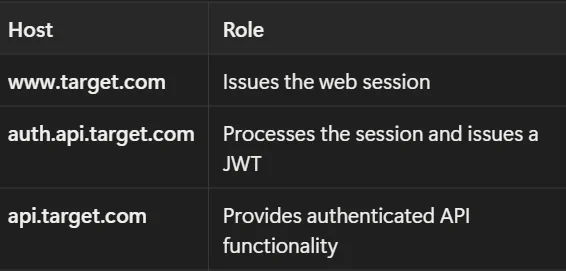
Before we look at the attack, we need to understand how logging in works on this site. There are three pieces:
- The web login page. You type your email and password, and the site checks them.
- The authentication service. A separate server that takes a session cookie and turns it into a JWT. A JWT (JSON Web Token) is a signed piece of text that says "this request comes from user X". Other servers can check the signature to trust it without asking the login server every time. Think of it like a stamped wristband at an event: once you have it, other staff can see it and let you in.
- The main API. The server that actually holds your data (profile, settings, etc.). An API is simply a way for one computer program to talk to another over the internet, using requests and responses. When your browser loads your profile page, it is often the browser (or the page's JavaScript) calling the API behind the scenes.
The first request the researcher looked at was the web login:
POST /members-admin/auth/signInByEmail HTTP/2Host: www.target.com
Line by line:
POST /members-admin/auth/signInByEmail HTTP/2means "send data to this address on the server".POSTis the HTTP method used when you are submitting something (like a login form).HTTP/2is the version of the web protocol being used.Host: www.target.comtells the server which website name the request is for. One server can host many websites, so this header picks the right one.
After a successful login, the site gave the browser a cookie named ses_id:
ses_id: [redacted]
A cookie is a small piece of text that a website asks your browser to store and send back on every later request to that site. It is how the site remembers you between page loads. The value above looks like random letters and numbers, but it is actually encoded data (we will decode it shortly).
The researcher then found a second endpoint, the authentication service:
POST /target.auth.Auth/Login HTTP/2Host: auth.api.target.comUser-Agent: Mozilla/5.0 (Macintosh; Intel Mac OS X 15_8_3) AppleWebKit/537.36 (KHTML, like Gecko) Chrome/[redacted] Safari/537.36Content-Type: application/json
Line by line:
POST /target.auth.Auth/Login HTTP/2is the address of the login exchange on the authentication server.Host: auth.api.target.comsays which server name this request is for. Notice it is a different host fromwww.target.com: this is the authentication service.User-Agent: ...is a header that tells the server what browser and operating system the client claims to be. It is mostly informational; servers sometimes use it for logging or compatibility.Content-Type: application/jsonsays the body of the request is in JSON format. JSON is a simple text format for structured data, using curly braces, quotes and colons. It is the most common way programs exchange data on the web.
The body of the request looked like this:
{ "Token": "<session-cookie-value>", "Type": "UAPI"}
Line by line:
"Token": "<session-cookie-value>"is where theses_idcookie value is placed. The server is being asked: "here is a session cookie, please tell me who it belongs to"."Type": "UAPI"is a label telling the service what kind of token this is. The report does not explain what UAPI stands for.
If the session was accepted, the service returned a JWT. This is the important part: the authentication service was taking one credential (the cookie) and turning it into another (the JWT). If the cookie can be faked, the JWT will be faked too. The researcher's question was: does the service check that the cookie has not been modified before it issues the JWT?
2. Inspecting the ses_id cookie
The first thing the researcher noticed was that the ses_id value was Base64 encoded. Base64 is a way of turning raw bytes into plain letters and digits so they can travel safely in text (cookies, URLs, email). It is not encryption: anyone can decode it. Think of it like writing a phone number in letters ("five five five...") so it fits on a form that only accepts letters. The meaning is still there; it is just written differently.
After URL decoding and Base64 decoding the value, he got a structure of 162 bytes. A byte is a unit of computer data, one number from 0 to 255. A 162-byte structure is a small block of data, roughly the length of a short sentence.
He then looked for fields that could be tied to the account. The most interesting region was:
Byte offsets: 12–29Length: 18 bytes
Line by line:
Byte offsets: 12–29means "starting at byte number 12 and ending at byte number 29". A byte offset is just a position, like a character position in a sentence. Counting starts at 0, so byte 0 is the first byte.Length: 18 bytesmeans this region is 18 bytes long. From position 12 to position 29 inclusive is 18 bytes (29 minus 12 plus 1).
Those 18 bytes represented a nine-digit user ID, stored as nine pairs of bytes, where each pair encodes one digit. The source account used during testing had this user ID:
285072144
Its corresponding digit-pair representation was:
228855007722114444
Line by line:
285072144is the user ID, a nine-digit number.228855007722114444is the same number written as pairs:22 88 55 00 77 22 11 44 44. Each pair corresponds to one digit of the user ID. The first digit2becomes22, the second digit8becomes88, and so on. The pattern is that each digit is doubled. This is a simple encoding, not encryption.
Instead of trying to understand every field in the cookie at once, the researcher focused on the identity bytes. The question was simple: if the user ID inside this structure were changed, would the authentication service notice that the session had been modified?
3. The test accounts
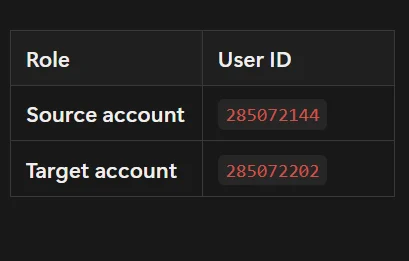
To test safely, the researcher used two disposable accounts that he registered specifically for this research. This is standard practice in security testing: never touch a real user's account. He did not need a victim's password or an existing victim session. The only target information required was the numeric user ID.
On target.com, user IDs were publicly visible in profile URLs, contributor pages and comment author data. For example:
https://www.target.com/members/<user_id>
Line by line:
https://www.target.com/members/is the address of a member profile page.<user_id>is a placeholder for the numeric ID. In a real URL, it would be replaced by a number, such as285072202.
This matters because it means the target identifier was discoverable without access to the target account. You could simply look at a public profile page and read the number in the URL. The researcher did not need to guess or steal anything to know which account he wanted to reach.
4. Discovering the XOR relationship
Now the researcher compared the source and target user IDs:
Source: 285072144Target: 285072202
Line by line:
Source: 285072144is the account he controlled and whose cookie he had.Target: 285072202is the account he wanted to reach.
Breaking them into individual digits:
Source: 2 8 5 0 7 2 1 4 4Target: 2 8 5 0 7 2 2 0 2
Line by line:
- The first six digits are identical:
2 8 5 0 7 2. - Only the last three digits differ: source has
1 4 4, target has2 0 2.
He then examined how changes to the relevant bytes affected the decoded identity, and found an XOR-based relationship. XOR (exclusive OR) is a simple operation on two numbers. In binary, it compares each bit: if the bits are different, the result is 1; if they are the same, the result is 0. For example, 2 XOR 8 = 10. XOR has a useful property: applying the same value twice brings you back to the start. That makes it easy to compute a "difference" between two values and apply it to change one into the other.
For each digit, the decoded value was calculated using this relationship:
digit = B[12 + 2*i] ^ B[12 + 2*i + 1] ^ C[i]
Line by line:
digitis the digit we want to recover (0 to 9).Bis the decoded session structure, the 162-byte block.iis the digit position, from 0 to 8 (nine digits).B[12 + 2*i]is the first byte of the pair for digiti. Fori = 0, that is byte 12; fori = 1, byte 14; and so on.B[12 + 2*i + 1]is the second byte of the pair.^means XOR.C[i]is a constant associated with that position. A constant is a fixed value that does not change between sessions. The report does not say where these constants come from.
In plain words: each digit is the XOR of the two bytes in its pair, plus a fixed constant for that position. If you know the constants, you can read the user ID straight out of the cookie.
To change a digit, the researcher calculated the XOR difference between the original and desired values:
delta = old_digit ^ new_digit
Line by line:
old_digitis the digit currently in the cookie.new_digitis the digit we want.deltais the XOR difference. If you XOR the old digit with the delta, you get the new digit.
He then applied this delta to one byte in the corresponding two-byte pair. Because XOR is reversible, applying the same delta changes the decoded digit to the desired value without needing to modify the other byte. Think of it like a combination lock: if you know the difference between the current number and the number you want, you can turn the dial by exactly that amount.
For example, the source and target IDs were:
Source: 285072144Target: 285072202
The first six digits were identical. Only the last three digits needed to change:
1 XOR 2 = 34 XOR 0 = 44 XOR 2 = 6
Line by line:
1 XOR 2 = 3: the first differing digit goes from1to2, so the delta is 3.4 XOR 0 = 4: the second differing digit goes from4to0, so the delta is 4.4 XOR 2 = 6: the third differing digit goes from4to2, so the delta is 6.
Therefore, the required deltas were:
3, 4, 6
The corresponding byte offsets were:
24, 26, 28
Using zero-based indexing:
Position 6: 12 + (2 * 6) = 24Position 7: 12 + (2 * 7) = 26Position 8: 12 + (2 * 8) = 28
Line by line:
Position 6is the seventh digit (counting from 0). Its pair starts at byte12 + 2*6 = 24.Position 7is the eighth digit. Its pair starts at byte12 + 2*7 = 26.Position 8is the ninth digit. Its pair starts at byte12 + 2*8 = 28.
So the researcher knew exactly which bytes to change and by how much.
A simple XOR example
To understand the operation, consider these two binary values:
2 = 00108 = 100000101000----10101010 = 10 decimal = 0x0A
Line by line:
2 = 0010is the number 2 in binary (four bits).8 = 1000is the number 8 in binary.- The two lines are placed one above the other, and XOR is applied bit by bit.
1010is the result:0 XOR 1 = 1,0 XOR 0 = 0,1 XOR 0 = 1,0 XOR 0 = 0, giving1010.1010 = 10 decimal = 0x0Asays the binary result is 10 in decimal, which is written0Ain hexadecimal (a base-16 number system often used for bytes).
The important observation was that applying the calculated XOR delta to one byte in the corresponding pair changed the digit produced by the decoding formula. He repeated this comparison across the identifier and observed the same relationship.
This does not mean the entire session was simply encrypted using XOR. The finding was more specific: the identity-bearing bytes could be modified predictably, and the server did not effectively verify the integrity of the resulting session structure. Integrity here means "proof that the data has not been changed". A good session cookie should have a signature or checksum that breaks if anyone edits it. This one did not.
5. Understanding the session structure
The decoding pipeline was:
URL encoded Base64 | vBase64 decoding | v162 byte structure | vPer session XOR keystream | vJSON envelope (session.envelope)
Line by line:
URL encoded Base64is the raw cookie value as it appears in the browser. URL encoding replaces special characters with%codes so they can travel safely in a URL or cookie.Base64 decodingturns the letters and digits back into raw bytes.162 byte structureis the decoded block of data.Per session XOR keystreammeans the bytes are combined with a stream of XOR values that is different for each session. A keystream is a sequence of values used to scramble data. The report says it is per session, so each login gets a different stream.JSON envelope (session.envelope)is the final readable structure, a JSON object that holds the session data.
The user ID was represented at bytes 12-29 as nine two-byte digit-pairs. For the source account:
User ID: 285072144Digit pairs: 228855007722114444
Line by line:
User ID: 285072144is the account number.Digit pairs: 228855007722114444is the same number encoded as doubled digits, as explained earlier.
The session structure did not have an effective MAC, authenticated encryption tag, or signature covering the identity-bearing envelope. These are three common ways to protect data:
- A MAC (message authentication code) is a short code computed from the data and a secret key. If anyone changes the data, the code no longer matches.
- An authenticated encryption tag is similar, but produced by an encryption scheme that both hides and protects the data.
- A signature is a cryptographic proof, usually made with a private key, that the data came from the server and was not altered.
None of these were effectively present. As a result, changes to the identity could be accepted as long as the resulting structure remained parseable. "Parseable" means the server could still read it as valid JSON; it did not check whether the contents were original.
6. Exchanging the original session for a JWT
Before testing a modified session, the researcher established a baseline. A baseline is a normal, unmodified result that you can compare against later. If the original session works, you know the endpoint is functioning; then you can see what changes when you tamper with it.
He submitted the original session to:
Line by line:
auth.api.target.Auth/Loginis the address of the authentication service's login exchange. It is the same service as before, written here without thehttps://prefix.
The request used:
POST /target.auth.Auth/Login HTTP/2Host: auth.api.target.comUser-Agent: Mozilla/5.0 (Windows NT 10.0; Win64; x64) AppleWebKit/537.36 (KHTML, like Gecko) Chrome/[redacted] Safari/537.36Content-Type: application/json
Line by line:
POST /target.auth.Auth/Login HTTP/2sends data to the login exchange.Host: auth.api.target.comtargets the authentication service.User-Agent: ...identifies the client as Chrome on Windows. This is just a label; it does not affect the security result.Content-Type: application/jsonsays the body is JSON.
With the original session, the service returned HTTP 200 and issued a JWT. HTTP 200 means "OK, success". After decoding the JWT payload, he found these claims:
{ "iss": "target.com", "user_id": 285072144, "jti": "285072144"}
Line by line:
"iss": "target.com"is the issuer: who created the token. Here it is target.com."user_id": 285072144is the user the token is about. This is the source account."jti": "285072144"is the JWT ID, a unique identifier for this token. Here it happens to be the same number as the user ID.
Compare that with the original result:
Original session:user_id = 285072144jti = 285072144
Line by line:
Original session:labels the block.user_id = 285072144is the identity in the token when the original cookie was used.jti = 285072144is the token ID, also the source account.
And the modified session:
Modified session:user_id = 285072202jti = 285072202
Line by line:
Modified session:labels the block.user_id = 285072202is the target account, the one the researcher wanted to reach.jti = 285072202is the token ID, now matching the target.
This was the key result: the authentication service had issued a genuine JWT associated with the target account. The service did not notice that the cookie had been edited.
He tested it against the main API. The first endpoint was:
GET /api/users/info HTTP/2Host: api.target.comDomain-Id: wwwses-id: <forged session value>
Line by line:
GET /api/users/info HTTP/2asks the API for user information.GETis the HTTP method for reading data.Host: api.target.comtargets the main API server.Domain-Id: wwwis a header telling the API which part of the site the request is for.ses-id: <forged session value>is the modified cookie being sent. The placeholder stands for the edited value.
The API returned HTTP 200. The response contained the target account's information. The returned user ID was:
{ "userId": 285072202}
Line by line:
"userId": 285072202is the target account's ID. The API believed the request came from that account.
The response also contained profile fields, account settings, registration information, and an email field. For the controlled test account, the response included:
{ "userId": 285072202, "firstName": "***", "lastName": "**", "email":"******@***.com", "registrationDate": "2026-10-14 19:28:37", "isAdsFree": false, "settings": { "time_zone_id": "8", "time_zone": "US/Eastern" }}
Line by line:
"userId": 285072202is the account ID."firstName": "***"and"lastName": "**"are the account holder's names, redacted here."email":"******@***.com"is the email address, redacted."registrationDate": "2026-10-14 19:28:37"is when the account was created."isAdsFree": falseis an account setting about advertising."settings": { ... }is a nested object with more settings."time_zone_id": "8"and"time_zone": "US/Eastern"are the account's time zone settings.
In plain words: the API returned the target account's profile data because it trusted the forged cookie.
The Fix Was Not Complete
After the original vulnerability was reported, target.com deployed a fix on November 2. The modified ses_id was now rejected by both auth.api.target.com and api.target.com, which returned HTTP 403. HTTP 403 means "forbidden": the server understood the request but refused to allow it. This is the correct response when a session has been tampered with.
However, while testing the targetPro application, the researcher found that its GraphQL proxy was still accepting the same forged session. A proxy is a middleman server that receives requests and forwards them to another service. GraphQL is a way for clients to ask an API for exactly the fields they want, using a query language. The proxy processed the forged session instead of rejecting it.
The affected endpoint was:
POST /***/_/***/query?raw=true HTTP/2Host: www.target.comCookie: ses_id=<FORGED_SES_ID>Content-Type: application/json
Line by line:
POST /***/_/***/query?raw=true HTTP/2sends a query to the proxy. The***parts are redacted path segments; the report does not reveal them.?raw=trueis a query parameter that likely tells the proxy to pass the query through without extra processing.Host: www.target.comtargets the main website host.Cookie: ses_id=<FORGED_SES_ID>sends the forged session cookie.
Unlike the fixed services, the Pro GraphQL proxy still processed the modified session.
Reproducing the Bypass
The researcher used two of his own accounts:
- Source account A:
285072144 - Target account C:
285666404
Line by line:
Source account A: 285072144is the account whose genuine session he had.Target account C: 285666404is the account he wanted to reach through the proxy.
First, he sent a named GraphQL query using the genuine session of account A:
query loadUserDetails { user { _id uid email active }}
Line by line:
query loadUserDetails {starts a GraphQL query namedloadUserDetails. The name is just a label.user {asks for theuserobject._id,uid,email,activeare the fields requested: internal ID, user ID, email address, and whether the account is active.- The closing braces end the selection.
The response returned account A's information. This is the baseline: with a genuine session, the query returns the right account.
He then modified the identity bytes in A's ses_id to represent account C and sent the same query using the forged session. The request succeeded:
HTTP/2 200{ "data": { "user": { "_id": 5370674, "uid": "<TARGET_USER_UID>", "email": "<TARGET_EMAIL>", "active": true } }}
Line by line:
HTTP/2 200is the status line: success."data": { ... }is the standard GraphQL response wrapper. Everything the query asked for is insidedata."user": { ... }is the user object."_id": 5370674is the internal database ID of the account."uid": "<TARGET_USER_UID>"is the user ID, redacted here."email": "<TARGET_EMAIL>"is the email address, redacted here."active": truesays the account is active.
The response contained account C's identity, even though the session originally belonged to account A. He sent this exact forged session to the two services that had already been fixed. Both rejected it with HTTP 403. This confirmed that the bypass was specific to the targetPro GraphQL proxy.
Conclusion
This finding shows how a small mistake in session integrity validation can lead to account takeover. Account takeover means an attacker can act as another user, here reading their data. By modifying a few bytes in the ses_id cookie, the researcher was able to obtain a valid JWT for another account without knowing its password or original session. The root cause was that the session structure had no effective MAC, authenticated encryption tag, or signature covering the identity-bearing envelope. The identity was encoded with a per-session XOR keystream over a JSON envelope, and the identity bytes could be modified predictably. The server did not effectively verify integrity, so changes were accepted as long as the structure remained parseable. The authentication service then converted the modified session into a JWT carrying the modified identity.
The partial fix addressed auth.api.target.com and api.target.com but not the targetPro GraphQL proxy, which continued to process the modified session.
The only target information required was the numeric user ID, which was publicly visible in profile URLs, contributor pages and comment author data. The bypass in the targetPro GraphQL proxy allowed the same forged session to be used after the fix, returning the target account's _id, uid, email and active status.
Variants to test
If you want to look for similar issues, here are the kinds of things to try. These are general ideas, not instructions to attack a site you do not own or have permission to test.
- Session cookies with encoded identity fields. Decode the cookie (URL decode, Base64 decode) and look for a fixed-length region that changes when you log in as different accounts. A positive result is a region whose bytes map predictably to a user identifier.
- XOR relationships between identity bytes. Compare two accounts you control and check whether a single-byte XOR delta in a two-byte pair changes the decoded digit. A positive result is a reproducible delta that changes the identity without breaking parsing.
- Session-to-token exchange endpoints. Submit the original session to any endpoint that returns a JWT or similar credential, then submit a modified session. A positive result is a token whose claims reflect the modified identity.
- Downstream services after a fix. After a vendor reports a fix, replay the forged session against other services, proxies and GraphQL gateways. A positive result is any service that still returns data for the modified identity.
- GraphQL proxies with raw query parameters. Test endpoints such as
POST /***/_/***/query?raw=truewith a forged session cookie. A positive result is a 200 response containing the target account's fields.
Glossary
- API: a way for one computer program to talk to another over the internet, using requests and responses.
- Account takeover: when an attacker can act as another user, reading or changing their data.
- Authenticated encryption tag: a short value produced by an encryption scheme that both hides data and proves it has not been altered.
- Base64: an encoding that turns raw bytes into letters and digits so they can travel safely in text. It is not encryption.
- Baseline: a normal, unmodified result used for comparison.
- Byte: a unit of computer data, a number from 0 to 255.
- Byte offset: the position of a byte in a sequence, counting from 0.
- Constant: a fixed value that does not change between sessions.
- Cookie: a small piece of text a website asks your browser to store and send back on later requests, used to remember you.
- Delta: the difference between two values, here computed with XOR.
- GraphQL: a query language that lets a client ask an API for exactly the fields it wants.
- HTTP 200: the status code meaning "OK, success".
- HTTP 403: the status code meaning "forbidden": the server understood the request but refused it.
- Integrity: proof that data has not been changed.
- Issuer (
iss): the claim in a JWT saying who created the token. - JSON: a simple text format for structured data, using curly braces, quotes and colons.
- JWT (JSON Web Token): a signed piece of text that says which user a request belongs to, so other servers can trust it.
- JWT ID (
jti): a unique identifier for a particular JWT. - Keystream: a sequence of values used to scramble data, here different for each session.
- MAC (message authentication code): a short code computed from data and a secret key; if the data changes, the code no longer matches.
- Parseable: able to be read as valid structured data, such as JSON.
- Proxy: a middleman server that receives requests and forwards them to another service.
- Session cookie: a cookie that identifies your logged-in session.
- Signature: a cryptographic proof, usually made with a private key, that data came from the server and was not altered.
- URL encoding: replacing special characters with
%codes so they can travel safely in a URL or cookie. - User-Agent: a header that tells the server what browser and operating system the client claims to be.
- XOR (exclusive OR): a simple operation on two numbers that compares bits: different bits give 1, same bits give 0. Applying the same value twice returns the original.