One Open Endpoint, 1,760 Files: How I Exposed MTN’s Staff Directory and Entire RBAC Blueprint
A production Directus CMS instance granted the Public role read access to the directus_files system collection, letting anyone list all 1,760 uploaded files without authentication. Because admin schema and data exports were stored in the same asset library, an attacker could download a staff directory, the full RBAC permission matrix, internal hostnames and a live API token.
 Published on nowisar.medium.com
Cybersecurity
The full write-up lives on its author's site
It belongs to its author, so we link to it rather than copy it. The other two tabs are our own rewrites, checked against it.
Context
MTN Group runs a set of digital-experience platforms built on Directus, an open-source headless CMS. Directus exposes a REST/GraphQL API for every collection it manages, and access to each collection is governed by role-based permissions. Among those roles is a special Public role that defines what an unauthenticated visitor can see.
One production Directus instance left its /files REST API readable by that Public role. Because Directus serves file downloads through /assets/:id and only checks that the referenced file record is readable, the open collection also opened the download endpoint. The same misconfiguration was reproducible across three separate production instances.
Setup
No account, cookie, token or special header was needed at any point. The researcher used curl against the Directus REST API and worked from the system collections that Directus manages itself.
Finding it
The starting point was a probe of the Directus system collections, /users, /roles, /files and /permissions, to see what the Public role could touch. Most of the time these are locked down. On this target, /files was not.
Misconfigured Public role permissions are a known Directus footgun: if an admin accidentally grants read on a system collection like directus_files to Public, anyone on the internet inherits that access. That is what the researcher went looking for.
Exploitation
Step 1: enumerate the file collection
curl -s "https://<redacted-subdomain>.mtn.com/files?limit=-1&fields=id,filename_download,type,folder,uploaded_on"
The response was HTTP 200 with a JSON array of 1,760 file records, returned with no cookie, no token and no header. Every asset ever uploaded to that instance's media library was fully enumerable: filenames, folder structure, upload timestamps and internal IDs.

The screenshot shows the /files output: the full list of 1,760 file records returned without any authentication.
Step 2: try the raw asset store
The first instinct was to hit /assets/ directly to see whether the raw asset store was browsable:
curl -s "https://<redacted-subdomain>.mtn.com/assets/"
That came back as:
{"errors":[{"message":"Route /assets/ doesn't exist.","extensions":{"path":"/assets/","code":"ROUTE_NOT_FOUND"}}]}
There was no directory listing. This is expected: /assets/ is not a route by itself in Directus, it is a prefix that needs a specific file id or UUID appended.
Step 3: download individual files by UUID
Instead of browsing blindly, the researcher went back to the /files enumeration output, picked out the id (UUID) of individual records, and requested each one directly:
That worked immediately, turning an "I can see filenames" bug into "I can download every file in the CMS." Most of the 1,760 assets were unremarkable: campaign images and marketing collateral. But scrolling through the filenames, a batch stood out: users.json, roles.json, permissions.json, flows.json, operations.json and settings.json, uploaded from the CMS back office across at least 8 separate export sessions on the same day. These are the exact filenames Directus produces when an admin uses its schema/data export feature, which means someone had exported sensitive internal configuration through the CMS and it landed in the same publicly readable asset store as the marketing images.
Step 4: read the exported data
users.json held the internal staff directory, 87 records in total. Each record included full name, corporate email address (@mtn.com / @ayoba.me), SSO provider (mostly Microsoft), role assignment, account status, and the last admin page the user had visited. The example structure below has its values genericised:
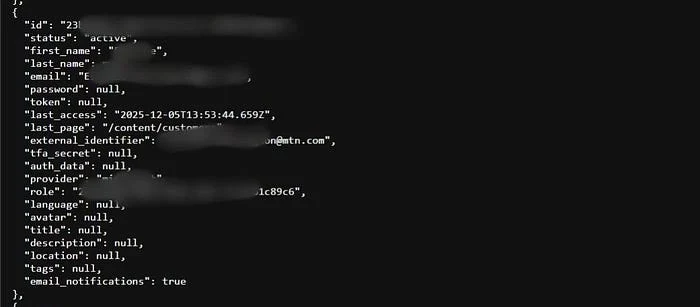
The screenshot shows the leaked data from the exported user records.
Root cause
The Directus Public role was granted read access to the directus_files system collection, and by extension to the /assets/:id download endpoint, which only checks that the referenced file record is readable. This is a classic "default-open" trap: Directus does not expose system collections to Public by default, so this had to be an explicit misconfiguration. It was likely made at some point to allow public access to specific media, such as website images, without realising that it grants blanket access to every file ever uploaded, including internal admin exports.

Impact
- Staff PII exposure: 87 employees' names, emails, roles and SSO providers, ready-made for phishing.
- Privilege escalation roadmap: the full RBAC map, showing exactly which role reaches which data.
- Internal infrastructure disclosure: internal hostnames and service references.
- Secret leakage risk: a live API token was found in a public export, and the pipeline stays world-readable. The report describes the token as since rotated.
Fix
The report does not describe a fix applied by the target. The change it implies is to remove read on directus_files from the Public role, so that neither the collection listing nor /assets/:id is reachable without authentication, and to keep admin schema and data exports out of the publicly readable asset store.
Variants to test
- Other system collections on Directus targets. Request
/users,/rolesand/permissionswith no credentials. A positive result is an HTTP 200 with records rather than an authorisation error. - Unbounded listing on
/files. Sendlimit=-1with afieldsselection. A positive result is a full JSON array of file records with IDs, filenames and timestamps. - Direct asset retrieval. Take an
idfrom the listing and request/assets/<file-uuid>. A positive result is the file body rather than an error. - Export artefacts in the media library. Look for filenames such as
users.json,roles.json,permissions.json,flows.json,operations.jsonandsettings.json, which indicate admin schema or data exports. A positive result is a downloadable export containing staff, permission or configuration data. - Repeat across sibling instances. The same misconfiguration appeared on three separate production instances, so check every instance of the same platform rather than stopping at the first.
What happened, in plain words
A large company, MTN Group, runs several websites and digital platforms. Those platforms are built on a piece of software called Directus, which is a content management system (CMS). A CMS is the back office where staff write pages, upload pictures and manage the content that visitors eventually see. Think of it like the stockroom behind a shop: customers see the shelves, but staff go into the back to add and arrange products.
Directus stores every file that staff upload (images, documents, exports) in one big media library. It also offers a way for other software to talk to it, called an API. An API is a set of web addresses that return data instead of web pages. If a website is a waiter bringing you a menu, the API is the kitchen hatch where other programs place orders and collect dishes.
Access to that data is controlled by roles. A role is a label attached to a user that says what they are allowed to do. Directus has a special role called Public, which means "anyone on the internet who has not logged in". By default Directus does not expose its system collections to the Public role. On this target, someone had accidentally given the Public role permission to read the list of files. Because of how Directus serves downloads, that one mistake also let anyone download every file in the library.
Among the 1,760 files were exports that an administrator had made from the CMS back office: a list of 87 staff members, the full map of which role can see what, internal server names, and an API token. The researcher, Mohamed Nowisar, found the same mistake on three separate production instances.
No password, no login, no special header was needed at any point. The only requirement was being able to reach the web address.
Background
Directus is open-source, meaning its code is publicly available for anyone to read and install. It is a headless CMS: it has no built-in public website of its own. Instead it stores content and hands it out through its API, and a separate front end (a website, a mobile app) asks for that content and displays it.
Every kind of data Directus manages is called a collection. A collection is like a spreadsheet tab: one tab for users, one for files, one for pages. Directus manages some collections itself, called system collections, and these hold the CMS's own plumbing:
/users: the accounts that can log in./roles: the roles those accounts can have./files: the media library, the record of every uploaded file./permissions: the rules saying which role may do what to which collection.
Each of these is reachable through the API at a web address ending in that name. Access to each collection is decided by role-based access control (RBAC). RBAC simply means permissions are attached to roles rather than to individual people: you give a role the right to read something, and everyone with that role inherits it.
The Public role is the role that applies to a visitor who has not logged in. If an administrator ticks the read box for Public on a collection, then literally anyone on the internet can read it. This is a well-known trap in Directus: it is easy to click, and the consequence is invisible from the back office. That is exactly what the researcher went looking for.
Discovery
The researcher's habit on any Directus target is to ask for the system collections first, just to see what the Public role can touch. Most of the time the answer is an error saying you are not allowed. On this target, /files answered.
curl -s "https://<redacted-subdomain>.mtn.com/files?limit=-1&fields=id,filename_download,type,folder,uploaded_on"
Line by line:
curlis a command-line tool that fetches a web address and prints whatever comes back. It is the same job your browser does, minus the page rendering.-smeans "silent": do not print progress bars or connection chatter, just the response body.- The address points at a subdomain of
mtn.com. A subdomain is a prefix on a domain name, like a named department inside a company. The exact name is hidden here. /filesis the API path for the file collection.?limit=-1starts the query string, the part of a URL after the question mark that passes settings to the server. In Directus,limit=-1means "no limit": return every record instead of the first page. Without it you would get a default page size and have to ask again and again.&fields=id,filename_download,type,folder,uploaded_onis a second setting joined with&. It tells Directus which columns to include: the record's unique ID, the downloadable filename, the file type, which folder it sits in, and when it was uploaded. Asking for fewer columns keeps the answer small and readable.
The response was HTTP 200. HTTP is the language browsers and servers use to talk, and every response carries a three-digit status code. 200 means "OK, here is your data". A 401 would mean "you are not logged in" and a 403 would mean "logged in, but not allowed". Getting 200 here, with no credentials at all, was the finding.
The body was a JSON array of 1,760 file records. JSON is a plain-text way of writing structured data: curly braces hold an object, square brackets hold a list, and each entry is a name: value pair. It is what most APIs speak. An array is just an ordered list.
So every asset ever uploaded to that instance's media library was fully enumerable. Enumerable means you can list them all out, one by one. The listing gave filenames, folder structure, upload timestamps and internal IDs. An ID here is a UUID, a long random-looking string that uniquely identifies one record, like a barcode on a box.
The screenshot shows the /files output: the full list of 1,760 file records returned without any authentication.
Trying the raw asset store
The next instinct was to see whether the folder where the actual files live could simply be browsed, the way some web servers let you see a list of files in a directory.
curl -s "https://<redacted-subdomain>.mtn.com/assets/"
This is the same curl call, aimed at /assets/ instead of /files. /assets is the path Directus uses to serve the actual file contents, as opposed to /files, which serves the records describing them. One is the catalogue card, the other is the book.
The answer was:
{"errors":[{"message":"Route /assets/ doesn't exist.","extensions":{"path":"/assets/","code":"ROUTE_NOT_FOUND"}}]}
This is a JSON error object. errors is a list, and inside it message says the route does not exist, while code gives the machine-readable reason: ROUTE_NOT_FOUND. A route is a path the server recognises. /assets/ on its own is not one, because in Directus /assets/ is only a prefix: you have to append a specific file ID to it. It is like a street name with no house number.
So there was no directory listing. That is expected behaviour, not a security control.
Downloading individual files
Rather than guessing filenames, the researcher went back to the /files listing, copied the id of individual records, and asked for each file directly.
Here <file-uuid> is a placeholder for the ID taken from the listing.
That worked immediately. The bug changed from "I can see filenames" to "I can download every file in the CMS". This is the difference between reading the label on a box and opening the box.
Most of the 1,760 assets were unremarkable: campaign images and marketing material. But scrolling through the filenames, a batch stood out: users.json, roles.json, permissions.json, flows.json, operations.json and settings.json. These are the exact filenames Directus produces when an administrator uses its schema/data export feature, which packages configuration and data into files for backup or transfer. Someone had exported sensitive internal configuration through the CMS, and those exports landed in the same publicly readable media library as the marketing pictures.
What was inside
users.json held the internal staff directory: 87 records. Each record included full name, corporate email address (@mtn.com / @ayoba.me), SSO provider (mostly Microsoft), role assignment, account status, and the last admin page the user had visited.
SSO, single sign-on, is the practice of logging in once with a company account and being let into many systems without typing a password again. The provider is the company that runs that login, here mostly Microsoft.
The example structure below has its values genericised:
Reading the fields:
id: the unique identifier for this user record.status: whether the account is active.first_name,last_name,email: the person's identity and work address.password:null, meaning empty.password:null, meaning empty in this record.token:null, meaning no personal API token is attached to this account.last_access: a timestamp in a standard machine format.last_page: the last admin screen this user opened, including a bookmark parameter.external_identifier: an identifier value, here the same email address.tfa_secret:null. TFA is two-factor authentication, a second proof of identity beyond a password. An empty value here means no secret is stored in this record.auth_data:null, no extra authentication data.role: the ID of the role assigned to this user.language,email_notifications: preferences.
The screenshot shows the leaked data from the exported user records.
Root cause
The Directus Public role had been granted read access to the directus_files system collection. Because the /assets/:id download endpoint only checks that the referenced file record is readable, the same permission also opened every download.
This is a classic "default-open" trap. Directus does not expose system collections to Public by default, so this had to be an explicit misconfiguration. It was likely made at some point to allow public access to specific media, such as website images, without realising that it grants blanket access to every file ever uploaded, including internal admin exports. It is the difference between propping open one shop window and unlocking the whole warehouse.
Impact
- Staff PII exposure: 87 employees' names, emails, roles and SSO providers, ready-made for phishing. PII is personally identifiable information, any data that points to a specific person. Phishing is a fake message designed to trick someone into handing over credentials or clicking something harmful; a real name, real email and real role make such a message far more convincing.
- Privilege escalation roadmap: the full RBAC map, showing exactly which role reaches which data. Privilege escalation means moving from a low level of access to a higher one; a map of who can reach what is the plan for doing so.
- Internal infrastructure disclosure: internal hostnames and service references. A hostname is the name of a machine on a network. Internal names are not meant to be visible from outside.
- Secret leakage risk: a live API token was found in a public export, and the pipeline stays world-readable. The report describes the token as since rotated. An API token is a long secret string that a program presents instead of a password. Rotated means it was replaced with a new one, so the old value no longer works.
Fix
The report does not describe a fix applied by the target. The change it implies is to remove read on directus_files from the Public role, so that neither the collection listing nor /assets/:id is reachable without authentication, and to keep admin schema and data exports out of the publicly readable asset store.
Variants to test
If you want to look for the same class of mistake on Directus sites, these are the checks, in order:
- Other system collections. Request
/users,/rolesand/permissionswith no credentials. A positive result is an HTTP 200 with records rather than an authorisation error. - Unbounded listing on
/files. Sendlimit=-1with afieldsselection. A positive result is a full JSON array of file records with IDs, filenames and timestamps. - Direct asset retrieval. Take an
idfrom the listing and request/assets/<file-uuid>. A positive result is the file body rather than an error. - Export artefacts in the media library. Look for filenames such as
users.json,roles.json,permissions.json,flows.json,operations.jsonandsettings.json, which indicate admin schema or data exports. A positive result is a downloadable export containing staff, permission or configuration data. - Repeat across sibling instances. The same misconfiguration appeared on three separate production instances, so check every instance of the same platform rather than stopping at the first.
Glossary
- API: a set of web addresses a program can call to read or change data, instead of loading a web page.
- Array: an ordered list of values in JSON, written inside square brackets.
- Authentication: proving who you are, usually by logging in.
- Authorisation: what an authenticated (or anonymous) user is allowed to do.
- Collection: in Directus, one kind of data, like a spreadsheet tab (users, files, pages).
- Content management system (CMS): back-office software for creating and managing website content.
- Cookie: a small piece of data a browser stores and sends back to a site, often used to remember a login session.
- Credentials: the proof of identity, such as a password, cookie or token.
- curl: a command-line tool that fetches a URL and prints the response.
- Default-open: a setting that allows access unless someone explicitly turns it off.
- Directus: an open-source headless CMS that exposes its data through a REST and GraphQL API.
- Enumerable: able to be listed out in full, item by item.
- Export (schema/data): a file an administrator generates from the CMS containing configuration or data, for backup or transfer.
- Headless CMS: a CMS with no built-in public website; it only stores content and serves it through an API.
- Hostname: the name of a machine on a network.
- HTTP: the protocol browsers and servers use to exchange requests and responses.
- HTTP status code: the three-digit result of a request, such as 200 (OK), 401 (not logged in) or 403 (not allowed).
- ID / UUID: a unique identifier for a record; a UUID is a long random-looking string used as one.
- JSON: a plain-text format for structured data, using braces for objects and brackets for lists.
- Media library: the store of every file uploaded to a CMS.
- Open-source: software whose code is publicly available.
- PII: personally identifiable information, data that points to a specific person.
- Phishing: a fake message that tricks someone into giving away credentials or clicking something harmful.
- Privilege escalation: gaining a higher level of access than you started with.
- Public role: in Directus, the role applied to visitors who have not logged in.
- Query string: the part of a URL after
?, used to pass settings to the server. - RBAC (role-based access control): attaching permissions to roles rather than to individual people.
- REST API: an API organised around web addresses and standard HTTP methods.
- Role: a label attached to a user that determines what they may do.
- Rotated (token): replaced with a new value so the old one stops working.
- Route: a path a server recognises and knows how to answer.
- Schema: the structure of the data, which collections and fields exist.
- SSO (single sign-on): logging in once with a company account and being let into many systems.
- Subdomain: a prefix on a domain name, like a named department inside a company.
- System collection: a collection Directus manages itself, such as users, roles, files and permissions.
- TFA (two-factor authentication): a second proof of identity beyond a password.
- Token: a long secret string a program presents instead of a password.
- Vulnerability: a weakness that lets someone do something they should not be able to do.




