[Open redirect] Developers are lazy(or maybe busy)
The login and signup pages accepted a 'next' parameter that was used for redirection, and by supplying two 'next' parameters the second one was not filtered, allowing an attacker to redirect users to an external site. The login page was fixed after a duplicate report, but the same flaw remained on the signup page.
 Published on medium.com
{{media:0}}
The full write-up lives on its author's site
It belongs to its author, so we link to it rather than copy it. The other two tabs are our own rewrites, checked against it.
Context
This is a write-up of an open redirect found in a private bug bounty program. The report refers to the target only as example.com, so the real host is not named. The affected feature is the account flow: the login page accepts a next parameter that carries a destination URL. The researcher found the parameter on the login URL and tested it for open redirect behaviour.
Setup
The only precondition described is registering an account on the target and poking around the application. No specific tools, versions or roles are mentioned. The researcher registered an account and tested the login and signup pages.
Finding it
While browsing after registration, the researcher came across this URL:
https://www.example.com/account/login?next=https%3A%2F%2Fwww.example.com
The next parameter holds a URL-encoded absolute URL pointing back to the same site. A parameter that carries a destination URL is a natural candidate for an open redirect, so the researcher decided to test it.
Exploitation
Step 1: straightforward payloads
The first attempt was the most direct one, pointing next at an external site:
https://www.example.com/account/login?next=https%3A%2F%2Fgoogle.com
This did not work. The researcher then tried a set of common bypasses: next=https://[redacted], //google.com, and javascript:alert(1) (an attempt to turn the redirect into XSS). None of these worked either.
Step 2: HTTP parameter pollution
Next the researcher tried sending the next parameter twice:
https://www.example.com/account/login?next=https%3A%2F%2Fwww.example.com&next=https%3A%2F%2Fgoogle.com
The expectation was low, but the result was informative. The browser's URL bar showed:
https://example.com%2Cwww.google.com
and the browser displayed an error message. The important observation is that the value of the second next parameter was not filtered the way the first one was. %2C is simply a comma, so the application appears to join the two next values with a comma and does not filter the second one.
Step 3: abusing the join with an @
Because the two values are concatenated with a comma, the researcher placed an @ in the second parameter:
https://www.example.com/account/login?next=https%3A%2F%2Fwww.example.com&[email protected]
The resulting redirect target becomes https://example.com,@google.com. In URL syntax the part before the @ is treated as user information and the host that actually receives the request is google.com, so the browser goes to Google. That made it a successful open redirect worth reporting.
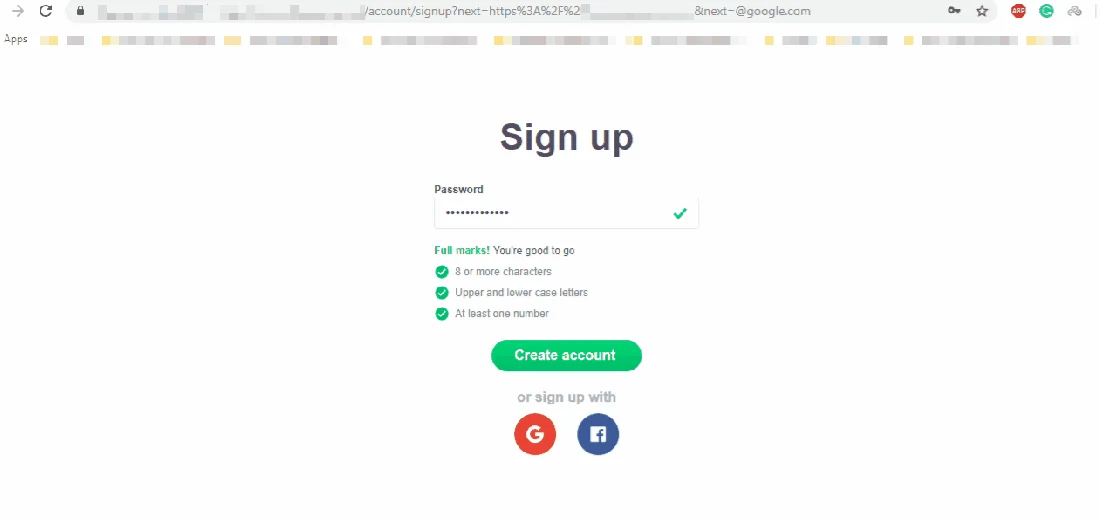
The researcher tried to escalate the redirect into something more severe but did not succeed.
Step 4: checking the fix on the login page
The next day the researcher was told the report was a duplicate and that the bug had been fixed. Rather than stop there, the researcher decided to check whether the fix was complete, on the theory that a fix can introduce or leave other mistakes. A large number of payloads were tried again on the login URL, and none of them worked any more. At that point it looked as though the login page had been fixed properly.
Step 5: the same payload on the signup page
The thought then was that other endpoints might still be vulnerable. Instead of the login page, the researcher applied the same payload to the signup page:
https://www.example.com/account/signup?next=https%3A%2F%2Fwww.example.com&[email protected]
This succeeded.

Root cause
The application takes the next parameter and uses it as a redirect destination. When the parameter is supplied twice, the application joins the two values with a comma. The first value is filtered, but the second one is not, so an attacker can append @google.com and produce a target such as https://example.com,@google.com, which browsers resolve to google.com.
The fix was applied to the login page only. The signup page was left untouched, so the identical payload still worked there. In other words, the developers forgot the signup page when they were fixing the login page.
Impact
An attacker can craft a link on the trusted example.com domain that sends a victim to an external site. The report does not describe any specific phishing or credential-theft scenario, and the researcher's attempt to escalate the redirect to a more severe bug failed. The bounty for the report was $150.
Fix
The report does not describe the fix that was applied. What it does show is that the login page was fixed while the signup page was not, so the fix needs to cover every endpoint that consumes the next parameter, not just the one where the bug was first reported.
Variants to test
- Send the same parameter twice with an
@in the second value, as in?next=https%3A%2F%2Fwww.example.com&[email protected]. A positive result is a redirect to the external host. - Try the same duplicated-parameter payload on every endpoint that accepts a redirect target, such as login, signup, logout, password reset and OAuth callbacks. A positive result is any of them redirecting off-site.
- Try other separators and user-information tricks in the second value, for example
?next=https%3A%2F%2Fwww.example.com&next=%2F%2Fgoogle.comor a value containing%40. A positive result is the browser landing on the external host. - After a fix is announced, re-test the original endpoint and then every sibling endpoint with the original payload. A positive result is the payload still working on an endpoint the fix missed.
What happened, in plain words
A security researcher found a bug on a website that let a link on the trusted site send visitors to a completely different site. This kind of bug is called an open redirect. The site is only referred to as example.com in the write-up, so the real name is not given. The bug was in the part of the site that handles logging in and signing up.
Websites often carry extra information in the web address, called a parameter. In this case the parameter was called next, and it held a destination address. The researcher noticed this and decided to test whether the site would let next point somewhere else entirely.
The story has a twist. The researcher reported the bug, and the next day was told it was a duplicate (someone else had already reported it) and that it had been fixed. Instead of walking away, the researcher checked whether the fix was complete. It was not: the same trick still worked on the signup page. The developers had fixed the login page but forgotten the signup page. The researcher earned a $150 bounty for the second report.
The setup
The only preparation described is registering an ordinary account on the target site and clicking around to see what was there. No special tools, software versions or user roles are mentioned. The researcher registered an account and looked at the login and signup pages.
Finding the bug
While browsing after registering, the researcher came across this web address:
https://www.example.com/account/login?next=https%3A%2F%2Fwww.example.com
Let us break this down piece by piece.
https://www.example.com/account/loginis the address of the login page. The part after the?is extra information sent along with the request.next=is the name of the parameter. Think of a parameter like a label on a form field: it tells the site what the value means. Here,nextmeans "where to go next".https%3A%2F%2Fwww.example.comis the value. It looks strange because some characters have been replaced by codes.%3Ais a colon (:) and%2Fis a slash (/). So the value really readshttps://www.example.com. This encoding is called URL encoding, and it is how browsers and servers safely carry special characters inside a web address.
So the whole address says: "log in, and afterwards send me to https://www.example.com". A parameter that carries a destination address is a natural place to look for an open redirect, because the site is trusting the visitor to say where they want to go. The researcher decided to test it.
Trying to exploit it
Step 1: the obvious attempts
The first try was the simplest possible: point next at a different website, Google.
https://www.example.com/account/login?next=https%3A%2F%2Fgoogle.com
- The address is the same login page.
next=now holdshttps%3A%2F%2Fgoogle.com, which decodes tohttps://google.com.- The idea is: if the site blindly trusts this value, it will send the visitor to Google after login.
It did not work. The site presumably checked the value and refused to redirect off-site.
The researcher then tried a handful of well-known tricks that people use to get past such checks:
next=https://[redacted]//google.comjavascript:alert(1)
None of these worked either. The last one, javascript:alert(1), is an attempt to turn the redirect into a different bug called XSS (cross-site scripting), where the browser runs code supplied by the attacker instead of just navigating. That did not work here.
Step 2: sending the parameter twice
Next the researcher tried something called HTTP parameter pollution, usually shortened to HPP. The idea is simple: if a web address normally has one next parameter, what happens if you put two of them in? Different parts of the site might read different copies, or the site might combine them in an unexpected way. It is a bit like handing someone two notes that both say "go here" and seeing which one they follow, or whether they try to follow both.
The payload was:
https://www.example.com/account/login?next=https%3A%2F%2Fwww.example.com&next=https%3A%2F%2Fgoogle.com
next=https%3A%2F%2Fwww.example.comis the first copy, pointing back to the site itself.&separates the two parameters in a web address.next=https%3A%2F%2Fgoogle.comis the second copy, pointing at Google.
The researcher did not expect much, but the result was revealing. The browser's address bar showed:
https://example.com%2Cwww.google.com
and the browser displayed an error message. Let us read that result carefully.
%2Cis the URL encoding for a comma (,). So the address really readshttps://example.com,www.google.com.- The two
nextvalues have been joined together with a comma. The first value washttps://www.example.comand the second washttps://google.com, and the site appears to have stitched them into one string. - The important point is that the second value was not filtered the way the first one was. The site checked the first
nextbut did not check the second.
The browser could not make sense of https://example.com,www.google.com as a real address, hence the error. But the researcher now knew the mechanism: the site joins the two values with a comma and does not filter the second one.
Step 3: using an @ to break out
Because the two values are joined with a comma, the researcher put an @ symbol in the second parameter:
https://www.example.com/account/login?next=https%3A%2F%2Fwww.example.com&[email protected]
- The first
nextis againhttps://www.example.com. - The second
nextis now@google.com. - Joined together with a comma, the site produces the destination
https://example.com,@google.com.
Why does that matter? In a web address, the @ symbol has a special meaning. Everything before the @ is treated as user information (a username, historically used for logging in to a server), and everything after the @ is the actual host that receives the request. So in https://example.com,@google.com, the browser reads example.com, as the username part and google.com as the real destination. The browser therefore goes to Google.
That made it a successful open redirect, and worth reporting.
The researcher tried to push the bug further and turn it into something more serious, but did not succeed.
Step 4: checking whether the fix was complete
The next day the researcher was told the report was a duplicate and that the bug had been fixed. Rather than stop there, the researcher decided to check whether the fix was actually complete. The reasoning: a fix is a change to code, and changes can introduce new mistakes or leave old ones in place. It is like patching one hole in a fence and forgetting to check the rest of the fence.
A large number of payloads were tried again on the login address, and none of them worked any more. At that point it looked as though the login page had been fixed properly.
Step 5: the same trick on the signup page
Then a thought: other pages might still be vulnerable. The login page was fixed, but the signup page uses the same kind of next parameter. So the researcher applied the same payload to the signup page:
https://www.example.com/account/signup?next=https%3A%2F%2Fwww.example.com&[email protected]
- The only difference from the login payload is the path:
/account/signupinstead of/account/login. - The two
nextparameters are identical to before. - The idea is that the signup page might use the same code to handle
next, and if the fix only touched the login page, the signup page would still be vulnerable.
This succeeded.
Why it worked
The site takes the next parameter and uses it as a redirect destination. When the parameter is supplied twice, the site joins the two values with a comma. The first value is filtered, but the second one is not. So an attacker can append @google.com and produce a destination like https://example.com,@google.com, which browsers resolve to google.com.
The fix was applied to the login page only. The signup page was left untouched, so the identical payload still worked there. In other words, the developers forgot the signup page when they were fixing the login page.
What an attacker could do with it
An attacker can craft a link on the trusted example.com domain that sends a victim to an external site. The report does not describe any specific phishing or credential-theft scenario, and the researcher's attempt to escalate the redirect to a more severe bug failed. The bounty for the report was $150.
The fix
The report does not describe the fix that was applied. What it does show is that the login page was fixed while the signup page was not. So the fix needs to cover every page that uses the next parameter, not just the one where the bug was first reported.
Other things to try
- Send the same parameter twice with an
@in the second value, as in?next=https%3A%2F%2Fwww.example.com&[email protected]. A positive result is a redirect to the external host. - Try the same duplicated-parameter payload on every page that accepts a redirect target, such as login, signup, logout, password reset and OAuth callbacks. A positive result is any of them redirecting off-site.
- Try other separators and user-information tricks in the second value, for example
?next=https%3A%2F%2Fwww.example.com&next=%2F%2Fgoogle.comor a value containing%40. A positive result is the browser landing on the external host. - After a fix is announced, re-test the original page and then every sibling page with the original payload. A positive result is the payload still working on a page the fix missed.
Glossary
- Open redirect: a bug where a website lets a visitor supply a destination address and then sends them there, even if the destination is a different site. It is often used in phishing because the link starts with a trusted domain.
- Parameter: a named piece of information attached to a web address after the
?, likenext=.... It tells the site what the visitor wants. - URL encoding: a way of writing special characters in a web address using
%codes, for example%3Afor:and%2Ffor/. It lets characters that would otherwise be confusing travel safely inside an address. - HTTP parameter pollution (HPP): sending the same parameter more than once in a request, to see whether the site reads one copy, the other, or combines them in an unexpected way.
- XSS (cross-site scripting): a bug where an attacker gets a website to run their own code in a victim's browser. Here it was attempted by using a
javascript:address as the redirect target. - User information: the part of a web address before an
@symbol, historically a username. Browsers treat everything after the@as the real host, which is whyhttps://example.com,@google.comgoes to Google. - Duplicate: a bug report that describes a bug someone else has already reported. It is usually not rewarded again.
- Bounty: a payment a company makes to a researcher who reports a valid security bug.
- Endpoint: a specific address or page on a website that does something, such as the login page or the signup page.
- Payload: the specific value or request a researcher sends to try to trigger a bug.
- OAuth callback: a page a website uses to finish a login that was handled by another service. It often accepts a redirect target, which makes it worth testing for open redirects.




