DOM based XSS or why you should not rely on cloudflare too much
The login page reflected a user-controlled 'Message' parameter directly into a JavaScript alert() call without filtering, allowing an attacker to break out of the string and execute arbitrary script. An attacker could craft a link that runs script in the victim's browser, for example to redirect them to a phishing page.
 Published on medium.com
{{media:0}}
The full write-up lives on its author's site
It belongs to its author, so we link to it rather than copy it. The other two tabs are our own rewrites, checked against it.
Context
The target was a website in a bug bounty program, referred to here as redacted.com. The site sits behind the Cloudflare WAF, which filtered many payloads. The feature involved is the register and sign in flow, specifically the login page at /Secure/Login.aspx. When an error occurs on that page, the application puts a Message parameter into the page: the value is reflected in the HTML body and also inserted into a JavaScript pop-up, directly inside alert("[value_here]"), with no filtering. That is the behaviour the researcher abused.
The author frames the finding as a counterexample to over-reliance on firewalls and security products, a point he had made in an internal presentation a few days earlier.
Setup
No special tooling is described. The researcher worked through the site's own register and sign in function, looking for application flaws. He registered an account using the email [redacted] without verifying it, then tried to sign up again with the same email address. The duplicate signup with an already registered email is what produces the error message.
Finding it
Signing up a second time with the same email produced an error pop-up.

The URL at that point had become:
The Message parameter carries the error text, and that text matched both the pop-up and the text shown at the top of the page.

Because the message appeared in the page body, the researcher first tried the obvious payload, <script>alert(1)</script>. The response was a Cloudflare block page.

That was expected: the payload is for dummies. Looking more closely, he noticed that the message is inserted into JavaScript directly rather than only into HTML.

Exploitation
Step 1: close the string and the call
Since the value lands inside alert("..."), the way out is to close the double quote and the parentheses, as the researcher puts it:
alert("something_here");evil_script_here// ")
After that point anything can be executed, and the trailing // comments out the remainder of the original line so the leftover ") does not break the script.
Step 2: the working payload
The payload used was:
This is an outdated page. You will now be redirected to our new page"); window.location="https://google.com"//
Read against the insertion point, the leading text is the visible message shown to the victim, "); closes the alert call, window.location="https://google.com" performs the redirect, and // comments out the rest. Google is used only for demonstration.
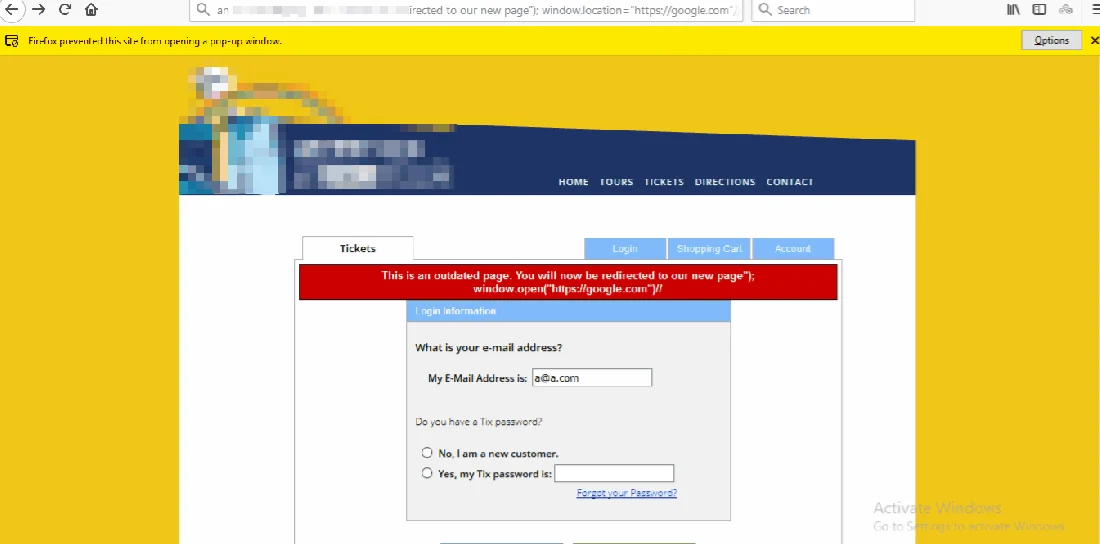
The result is that the page can tell the user it is outdated and send them elsewhere, which allows spoofing the user into believing they are going to an updated page and should log in again.
Root cause
The mistake is that the Message parameter is written into a JavaScript string inside alert("...") without any filtering or escaping. The value is also reflected into the HTML body. Cloudflare blocked the naive <script> payload, but the WAF did not stop the string-breakout payload. As the author puts it, good firewalls cannot save bad code. The report does not describe any server-side output encoding or content security policy that would have contained the injection.
Impact
An attacker who can get a victim to open a crafted Login.aspx URL with a malicious Message value can inject script into the page, as demonstrated by a fake outdated-page notice and a redirect. In the demonstrated case this was used to display a fake notice that the page is outdated and redirect the user to another site, with the aim of getting them to log in again there. The report does not state which users or roles are affected beyond anyone who follows the link, and it gives no bounty or severity information.
Fix
The fix implied by the finding is to stop placing the Message value into a JavaScript string unescaped, and to encode it properly for the HTML context where it is also reflected, so that quotes and parentheses in user input cannot terminate the string or the call.
Variants to test
- Look for error messages carried in a query parameter and rendered into the page. A positive result is the same text appearing both in the body and inside a script block.
- Check whether the value sits inside a quoted JavaScript string such as
alert("..."). A positive result is that a value containing");followed by your own statement and//executes, while a plain<script>payload is blocked by the WAF. - Try the same parameter with a payload that contains no angle brackets, to see whether the WAF rule set only covers tag-based injection. A positive result is execution of a string-breakout payload that the firewall lets through.
- Repeat the duplicate-registration flow that produced the error, since that is what generated the reflected message in the first place. A positive result is the error URL containing your input in the
Messageparameter.
What happened, in plain words
A security researcher was testing a website that pays people for finding bugs in it (a bug bounty program). The site is protected by Cloudflare, a service that sits in front of a website and tries to block malicious traffic before it reaches the site. Cloudflare includes a WAF, a Web Application Firewall: a filter that inspects incoming requests and rejects ones that look like attacks. Many attack attempts against this site were being blocked by that filter.
Despite the filter, the researcher found a cross-site scripting (XSS) bug. XSS means a website takes something an attacker controls and runs it as code in another visitor's browser. The site was built in a way that let a value from the URL end up inside a piece of JavaScript on the page, with no cleaning. Cloudflare blocked the obvious attack, but not the clever one, because the clever one did not look like the attacks the filter was watching for.
The author's point is simple: a firewall is a useful extra layer, but it cannot fix badly written code. A few days before finding this bug he had told colleagues in an internal presentation, "don't rely on firewalls / security products too much". This bug became his real example.
The target and the feature
The website is referred to here as redacted.com. It is in a bug bounty program, meaning the owner invites researchers to test it and report problems. The site is behind the Cloudflare WAF, which filtered many payloads. A payload is the piece of input an attacker sends to try to make the site do something it should not.
The feature involved is the register and sign in flow, specifically the login page at /Secure/Login.aspx. When something goes wrong on that page, the application takes a value called Message and puts it into the page in two places: in the visible HTML body, and inside a JavaScript pop-up, directly inside alert("[value_here]"). No filtering is applied to it. That is the behaviour the researcher abused.
To picture the problem, imagine a printed form letter with a blank line: "Dear ____, welcome." If the person filling in the blank can write anything, they can write extra sentences that change the meaning of the whole letter. Here the blank is inside a computer instruction, so the extra text is not just read, it is executed.
Setting up
No special tooling is described. The researcher worked through the site's own register and sign in function, looking for application flaws. He registered an account using the email [redacted] without verifying it, then tried to sign up again with the same email address. The duplicate signup with an already registered email is what produces the error message.
Why this step matters: he needed the site to generate an error message that contains text he supplied. The duplicate signup is a normal, allowed action that makes the site produce exactly that kind of message.
Finding it
Signing up a second time with the same email produced an error pop-up.
A pop-up here is a JavaScript alert box: a small dialog the browser shows with a line of text. The site was using it to tell the user that the email address was already registered.
The URL at that point had become:
Line by line, in plain words:
https://redacted.com/Secure/Login.aspxis the address of the login page.- The
?starts the query string: the part of a URL that carries extra values to the page. UserID=[redacted]passes the email address as a value namedUserID.ReturnUrl=is another value, left empty here.Message=...carries the error text. Everything afterMessage=up to the end is the value of that parameter.
The Message parameter carries the error text, and that text matched both the pop-up and the text shown at the top of the page.
Because the message appeared in the page body, the researcher first tried the obvious payload, <script>alert(1)</script>. In HTML, <script> starts a block of JavaScript and </script> ends it, so this payload asks the browser to run alert(1), which would show a pop-up containing the number 1. It is the classic, textbook test for XSS.
The response was a Cloudflare block page.
That was expected: the payload is for dummies. A filter that looks for <script> tags catches this instantly. Looking more closely, he noticed that the message is inserted into JavaScript directly rather than only into HTML.
This is the key observation. The page was not just printing the message as text. It was building a JavaScript instruction that looked like alert("the message"), and dropping the message inside the quotation marks. That changes everything, because inside a JavaScript string the dangerous characters are not angle brackets but quotes and parentheses.
Exploitation
Step 1: close the string and the call
Since the value lands inside alert("..."), the way out is to close the double quote and the parentheses, as the researcher puts it:
alert("something_here");evil_script_here// ")
Line by line, in plain words:
alert("something_here");is a complete, valid instruction: show a pop-up with the textsomething_here, then end the statement with the semicolon.evil_script_hereis a placeholder for whatever the attacker wants to run next. It is a separate instruction of the attacker's choosing.// "starts a comment. In JavaScript,//makes the rest of the line ignored, so the leftover")from the site's own code does not break the script.
After that point anything can be executed, and the trailing // comments out the remainder of the original line so the leftover ") does not break the script.
Step 2: the working payload
The payload used was:
This is an outdated page. You will now be redirected to our new page"); window.location="https://google.com"//
Read against the insertion point, the leading text is the visible message shown to the victim, "); closes the alert call, window.location="https://google.com" performs the redirect, and // comments out the rest. Google is used only for demonstration.
Line by line, in plain words:
This is an outdated page. You will now be redirected to our new pageis ordinary text. It is what the victim sees in the pop-up, and it is there to look convincing.");closes the quotation mark the site opened, closes thealert(call, and ends the statement. The site's instruction is now finished.window.location="https://google.com"is a new instruction.window.locationis the browser's way of referring to the current address; assigning a new address to it makes the browser navigate there.//turns the rest of the line into a comment, so the site's own closing")is ignored instead of causing an error.
The result is that the page can tell the user it is outdated and send them elsewhere, which allows spoofing the user into believing they are going to an updated page and should log in again. Spoofing means pretending to be something you are not; here the page itself, which the user trusts, delivers the fake notice.
Root cause
The mistake is that the Message parameter is written into a JavaScript string inside alert("...") without any filtering or escaping. Escaping means converting characters that have a special meaning (like " or )) into a harmless form so they cannot end the string or the instruction. The value is also reflected into the HTML body. Reflected means the site takes a value from the request and echoes it straight back into the response.
Cloudflare blocked the naive <script> payload, but the WAF did not stop the string-breakout payload. The filter was watching for one shape of attack and missed another. As the author puts it, good firewalls cannot save bad code. The report does not describe any server-side output encoding or content security policy that would have contained the injection.
Impact
An attacker who can get a victim to open a crafted Login.aspx URL with a malicious Message value can inject script into the page, as demonstrated by a fake outdated-page notice and a redirect. A session is the period a logged-in user is recognised by the site, usually via a cookie: a small piece of data the browser stores and sends back with each request. Script running on the site's own origin (its own address) can read and act with that session. In the demonstrated case this was used to display a fake notice that the page is outdated and redirect the user to another site, with the aim of getting them to log in again there. The report does not state which users or roles are affected beyond anyone who follows the link, and it gives no bounty or severity information.
Fix
The fix implied by the finding is to stop placing the Message value into a JavaScript string unescaped, and to encode it properly for the HTML context where it is also reflected, so that quotes and parentheses in user input cannot terminate the string or the call. Encoding means turning special characters into a representation that is displayed as text rather than interpreted as code.
Variants to test
If you want to look for the same kind of bug on a site you are allowed to test, these are the steps the finding suggests:
- Look for error messages carried in a query parameter and rendered into the page. A positive result is the same text appearing both in the body and inside a script block.
- Check whether the value sits inside a quoted JavaScript string such as
alert("..."). A positive result is that a value containing");followed by your own statement and//executes, while a plain<script>payload is blocked by the WAF. - Try the same parameter with a payload that contains no angle brackets, to see whether the WAF rule set only covers tag-based injection. A positive result is execution of a string-breakout payload that the firewall lets through.
- Repeat the duplicate-registration flow that produced the error, since that is what generated the reflected message in the first place. A positive result is the error URL containing your input in the
Messageparameter.
Glossary
- Bug bounty program: an arrangement where a company invites researchers to test its systems and pays or credits them for reporting security bugs.
- Cloudflare: a service that sits in front of a website and filters or caches traffic before it reaches the site.
- WAF (Web Application Firewall): a filter that inspects incoming requests and blocks ones that match patterns of known attacks.
- Payload: the piece of input an attacker sends to try to make a system behave in an unintended way.
- XSS (cross-site scripting): a bug where a site takes attacker-controlled input and runs it as code in another visitor's browser.
- DOM-based XSS: XSS where the dangerous handling happens in the browser's own page script rather than in the server's response.
- HTML: the language that describes the structure and text of a web page.
- JavaScript: the programming language browsers run to make pages interactive.
alert(): a JavaScript function that shows a pop-up dialog with a line of text.- Query string / parameter: the part of a URL after
?, made of name=value pairs that are passed to the page. - Reflected: describing input that a site echoes straight back into its response.
- Escaping / encoding: converting characters with special meaning into a harmless form so they are treated as text, not code.
- String: a piece of text in a program, usually enclosed in quotes.
- Comment (
//): text in code that the language ignores, used here to neutralise the leftover characters. window.location: the browser property that holds the current address; assigning to it navigates the browser elsewhere.- Spoofing: pretending to be something or someone you are not, to trick a user.
- Session: the period during which a site recognises a logged-in user, usually tracked with a cookie.
- Cookie: a small piece of data a site stores in the browser and receives back on later requests.
- Origin: the combination of scheme, host and port that identifies a site for security purposes.
- Content Security Policy (CSP): a browser rule set a site can send to restrict what scripts may run on its pages.



