Open-redirect [in email]
A feedback form accepted a user-supplied submission URL and placed it unvalidated into the destination parameter of a link in the acknowledgement email. An attacker could make that email link point to any external site, so a recipient clicking the heading would be sent to an attacker-chosen page.

Akhil
The full write-up lives on its author's site
It belongs to its author, so we link to it rather than copy it. The other two tabs are our own rewrites, checked against it.
Context
This write-up covers an open redirect that the researcher found in an acknowledgement email sent by a form-handling subdomain. The target was a private Bugcrowd programme with a limited scope; the researcher refers to it as private.com and to the in-scope subdomain as form.private.com. The subdomain hosts several forms, including a feedback form and a send CV/Resume form. The researcher chose the feedback form.
The feature under test is the feedback submission flow. A visitor fills in details such as an email address and a query, and the application sends an acknowledgement email to the address supplied. The email repeats the details that were submitted and contains a hyperlink in the heading Feedback on Home.
Setup
The researcher had a private invitation to the Bugcrowd programme. The only tooling described is Burp Suite, used to intercept the form submission, and a Burp Collaborator link, used as a canary for out-of-band interaction. The acknowledgement email was delivered to an email address the researcher controlled and supplied in the form.
Finding it
The researcher navigated to the feedback form, filled in the fields it asks for (email address, query and so on), and then inspected the resulting request in Burp Suite. The captured POST request carried this body:
The submissionUrl parameter stood out. The first instinct on seeing a URL in a request body is to test for SSRF, so the researcher replaced submissionUrl with a Burp Collaborator link. No DNS or HTTP interaction arrived at the Collaborator. The acknowledgement email did arrive at the supplied address, however, and it contained all the details that had been entered in the form.
One element of that email looked suspicious: the heading Feedback on Home was a hyperlink. Clicking it redirected to the Burp Collaborator link. That confirmed the value placed in submissionUrl was being used as the destination of the link in the email.
Exploitation
Step 1: Capture the submission request
Submit the feedback form with Burp Suite intercepting, and note the submissionUrl parameter in the POST body. In the captured request it holds the form's own URL with a key and an identifier:
Step 2: Test for SSRF with a Collaborator payload
Replace the value of submissionUrl with a Burp Collaborator link and send the request. No DNS or HTTP interaction is recorded, so the server is not fetching the URL. The acknowledgement email is still delivered to the address given in the form.
Step 3: Inspect the acknowledgement email
Open the email. It shows all the details submitted through the form. The heading Feedback on Home is a hyperlink. Clicking it redirects to the Collaborator link, which shows that the submitted submissionUrl value is reflected into the link target.
Step 4: Confirm with an external destination
Go back to the form, fill in all the details again, and this time set submissionUrl to https://google.com before sending the request. A similar acknowledgement email arrives. Clicking the heading now redirects to google.com. The link in the email has this shape:
https://app.private.com/app/xxx/-/log?se=xxxxx&dest=https://google.com&hash=xxxxxxxxxxxxxxxxx
The submitted value appears in the dest parameter of a link on app.private.com, and clicking the heading redirected to google.com.
Root cause
The application takes whatever is supplied in the submissionUrl parameter and reflects it as the redirect URL in the acknowledgement email. The SSRF test showed the server does not fetch the URL itself; the redirect happens in the recipient's browser when the link is clicked.
Impact
The link in the email points at an app.private.com URL, with the submitted destination carried in dest. The researcher frames this as an open redirect that becomes more serious when combined with other vulnerabilities and tricks. Exploitation requires the attacker to control the submissionUrl value in a submission and the recipient to click the heading in the resulting acknowledgement email.
Fix
The report does not describe a fix. The report does not describe a fix.
Variants to test
- Submit other forms on the same host (for example the send CV/Resume form) with a Collaborator link in any URL-like field, then inspect the acknowledgement email for a reflected link. A positive result is an email link that resolves to the Collaborator host.
- Try absolute URLs with different schemes and hosts in
submissionUrl, such ashttps://example.organd a scheme-relative//example.org, and check whether thedestparameter accepts each. A positive result is a link that navigates off-site. - Try bypass encodings in the value, such as percent-encoded characters or a userinfo prefix like
https://[redacted], and observe the generateddest. A positive result is a link that still lands on the external host. - Check whether the same
destparameter on the logging endpoint can be set directly in a browser request, without going through the form. A positive result is an immediate redirect to the supplied destination.
Bounty: 200$.
Regards,
Akhil
What happened, in plain words
A security researcher was invited to a private bug bounty programme on Bugcrowd. A bug bounty programme is a scheme where a company invites independent testers to look for security problems in its systems and pays them for valid findings. The programme had a limited scope, meaning only certain parts of the company's systems were allowed to be tested. The researcher calls the company private.com and the one in-scope part form.private.com.
That subdomain hosts several online forms, for example a feedback form and a form for sending a CV or résumé. The researcher picked the feedback form. When you fill in a feedback form, you type things like your email address and your question or comment, press send, and the site emails you back to confirm it received your message. That reply is called an acknowledgement email.
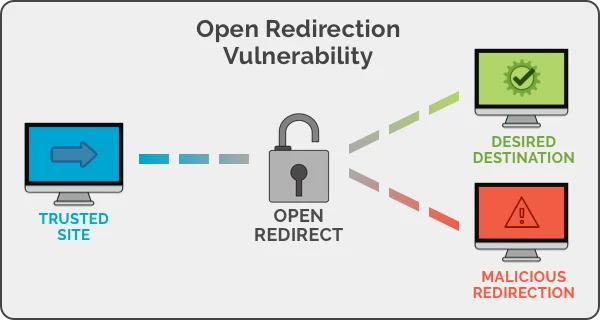
The researcher opened the acknowledgement email and noticed it contained a clickable heading, Feedback on Home. Clicking a heading normally takes you to a page on the same site. Here, however, the researcher found that the place the heading pointed to was controlled by a value the person filling in the form had supplied. By changing that value, the researcher could make the heading in the email send the recipient to an external site. That is an open redirect: a link on a trusted site that will forward you to a destination someone else chooses.
The screenshot above is the title card of the write-up, showing the article heading and the author's name.
What an open redirect is
An open redirect happens when a website or server takes a link that a user supplied and uses it to send the visitor on to another site, without checking where that link goes. A simple comparison: imagine a receptionist at an office who will walk you to any room number you name, without checking whether that room is in the building. If you say "room 12", fine. If you say "the café across the street", the receptionist still walks you there, and you trusted the receptionist because they work at the office.
On the web the "receptionist" is a link on a domain you trust. The address bar briefly shows the trusted domain, then the browser moves you to the other site. On its own this looks harmless: letting a user choose where to go next seems like a convenience. The danger is that attackers use the trusted domain to make a malicious destination look legitimate, and the trick becomes more powerful when combined with other attacks, for example a fake login page that the victim reaches through a link that appeared to belong to the real company.
The finding, step by step
Step 1: Open the form and look at what the browser sends
The researcher went to the feedback form and filled in the fields it asks for: an email address, a query, and so on. Then, instead of just pressing send and walking away, the researcher looked at the request the browser makes when the form is submitted.
A form submission is an HTTP request: a message the browser sends to the server saying "here is the data the user typed". The researcher used a tool called Burp Suite to pause that message and read it. Burp Suite is a program that sits between your browser and the website and lets you see and edit the traffic in both directions. Think of it as a transparent envelope you can open, read, change and reseal before it reaches the recipient.
The captured request was a POST request. POST is the HTTP method used when the browser is sending data to the server, as opposed to GET, which is mostly used when the browser is asking for a page. The body of the POST request, meaning the part that carries the data, looked like this:
Line by line, in plain words:
- The whole thing is written in JSON, a text format for structured data. Curly braces
{and}group things together, and each entry has a name in quotes, a colon, and a value. "submissionUrl"is the name of the first entry. Its value is"https://form.private.com/?k=jsdkjsdkhskdgjgs&d=228735228", which is the address of the form page itself, followed by a question mark and two pieces of extra information:k=jsdkjsdkhskdgjgsandd=228735228. The part after the?is called the query string; it is a way of passing small values along with a URL. Hereklooks like a random key anddlike an identifier number."fieldValues"is the name of the second entry. Its value is another pair of braces containing the answers the visitor typed."1861396"is the internal identifier of one form field, and"test"is the value entered for it."[redacted]"is the email address supplied.
The important observation is that the browser sends a URL, submissionUrl, as part of the form data. The researcher found that suspicious: why would a feedback form need to be told a URL?
Step 2: Test whether the server fetches that URL (SSRF)
When you see a URL in a request body, the usual first thought in security testing is SSRF, short for Server-Side Request Forgery. SSRF means tricking a server into making a request on your behalf, for example by giving it a URL and seeing whether the server itself goes and fetches that address. A comparison: you hand a shop assistant a note saying "please go and fetch the parcel from this address" and watch whether they actually leave the shop. If they do, you have made them run an errand you chose.
To test this, the researcher replaced the value of submissionUrl with a Burp Collaborator link. Burp Collaborator is a service that gives you a unique address and tells you if anything ever contacts it. It is like leaving a trap: if the server fetches your URL, the Collaborator records the visit, which proves the server made the request.
No DNS or HTTP interaction arrived at the Collaborator. DNS is the system that turns a domain name into a server address, and HTTP is the protocol browsers and servers use to exchange pages and data. In other words, nothing at all contacted the Collaborator address, so the server was not fetching the URL. The acknowledgement email did still arrive at the email address given in the form, and it contained all the details that had been entered.
Step 3: Read the acknowledgement email
The researcher opened the email. It repeated everything submitted through the form. One element stood out: the heading Feedback on Home was a hyperlink. A hyperlink is text or an image that, when clicked, takes the browser to another address; the address it points to is called the link target.
The screenshot above shows the captured request in Burp Suite, with the submissionUrl parameter visible in the body.
The screenshot above shows the acknowledgement email, with the heading Feedback on Home as a clickable link.
Clicking that heading took the researcher to the Burp Collaborator link. That is the key moment: the value that had been placed in submissionUrl was being used as the destination of the link in the email. The server was not fetching the URL, but the email was handing it to whoever read the email.
Step 4: Confirm with a well-known external site
To be sure this was not a quirk of the Collaborator address, the researcher went back to the form, filled in all the details again, and this time set submissionUrl to https://google.com before sending the request. A similar acknowledgement email arrived. Clicking the heading now redirected to google.com.
The link in the email had this shape:
https://app.private.com/app/xxx/-/log?se=xxxxx&dest=https://google.com&hash=xxxxxxxxxxxxxxxxx
Line by line, in plain words:
https://app.private.comis the domain of the link. It is a different subdomain from the form, but still under the company's domain, so it looks trustworthy to a recipient./app/xxx/-/logis the path on that server. Thexxxstands for a part of the path the report does not spell out.?se=xxxxxstarts the query string.seis a parameter name andxxxxxis a value the report does not spell out.&dest=https://google.comis the next parameter.destis short for destination, and its value is exactly the URL the researcher had put intosubmissionUrl. This is where the submitted value ended up.&hash=xxxxxxxxxxxxxxxxxis a final parameter, apparently some kind of checksum or identifier; the report does not say what it is for.
So the email contained a link to a real company address, and that address carried the attacker's chosen destination in the dest parameter. When the recipient clicks the heading, the browser follows the link and ends up at the destination in dest.
Why it works
The application takes whatever is supplied in the submissionUrl parameter and reflects it as the redirect URL in the acknowledgement email. "Reflects" means it copies the value straight into the output without changing or checking it. The value is placed into the dest parameter of the logging link. An allowlist is a list of things that are explicitly allowed; anything not on the list is refused. Because there is no such check, any URL the submitter chooses becomes the link target.
The SSRF test showed the server does not fetch the URL itself. The redirect happens in the recipient's browser when the link is clicked, not on the server.
What the impact is
The link in the email points at an app.private.com URL, with the submitted destination carried in dest. The researcher frames this as an open redirect that becomes more serious when combined with other vulnerabilities and tricks.
Exploitation requires two things: the attacker must control the submissionUrl value in a submission, and the recipient must click the heading in the resulting acknowledgement email.
How to fix it
The report does not describe a fix.
Other things worth testing
- Submit other forms on the same host (for example the send CV/Resume form) with a Collaborator link in any URL-like field, then inspect the acknowledgement email for a reflected link. A positive result is an email link that resolves to the Collaborator host.
- Try absolute URLs with different schemes and hosts in
submissionUrl, such ashttps://example.organd a scheme-relative//example.org, and check whether thedestparameter accepts each. A positive result is a link that navigates off-site. - Try bypass encodings in the value, such as percent-encoded characters or a userinfo prefix like
https://[redacted], and observe the generateddest. A positive result is a link that still lands on the external host. - Check whether the same
destparameter on the logging endpoint can be set directly in a browser request, without going through the form. A positive result is an immediate redirect to the supplied destination.
The researcher received a bounty of 200$.
Glossary
- Bug bounty programme: a scheme where a company invites independent testers to look for security problems and pays them for valid findings.
- Scope: the parts of a company's systems that a programme allows testers to examine.
- Subdomain: a part of a domain name, such as
form.private.comunderprivate.com. - Acknowledgement email: an automatic reply confirming that a form or message was received.
- Open redirect: a link on a trusted site that will forward the visitor to a destination someone else chooses, without checking it.
- HTTP request: a message a browser sends to a server, either asking for a page or sending data.
- POST request: an HTTP method used when the browser sends data to the server.
- Request body: the part of a request that carries the data being sent.
- JSON: a text format for structured data, using braces, names and values.
- Query string: the part of a URL after a
?, carrying small named values. - Parameter: a named value in a request or URL, such as
submissionUrlordest. - Burp Suite: a tool that sits between browser and website so traffic can be seen and edited.
- SSRF (Server-Side Request Forgery): tricking a server into making a request to an address the attacker chooses.
- Burp Collaborator: a service that gives a unique address and reports any contact made to it, used to detect server-side requests.
- DNS: the system that turns a domain name into a server address.
- Hyperlink: clickable text or an image that takes the browser to another address.
- Link target: the address a hyperlink points to.
- Reflection: copying a supplied value straight into the output without changing or checking it.
- Allowlist: a list of things that are explicitly allowed, with everything else refused.
- Validation: checking that a supplied value meets expected rules before using it.
- Bounty: the payment a programme gives for a valid finding.





