2FA Bypass via Forced Browsing
The signup endpoint could be accessed without the email OTP verification step, allowing an attacker to create a valid account with any email address. The attacker could then log in with the chosen password, bypassing the intended email verification.

I am Akhil, a student and Bug Bounty hunter. Today I would like to share one of my finding that I came across in one of the private programs, where I was able to bypass the email verification phase implemented by the application.
The full write-up lives on its author's site
It belongs to its author, so we link to it rather than copy it. The other two tabs are our own rewrites, checked against it.
Context
This write-up covers a finding from a private bug bounty program. The target is referred to only as redacted.com. The affected feature is the account signup flow, which is protected by an email verification step: a new account is only supposed to be created once the user has entered the 6 digit OTP that the application sends to the supplied email address.
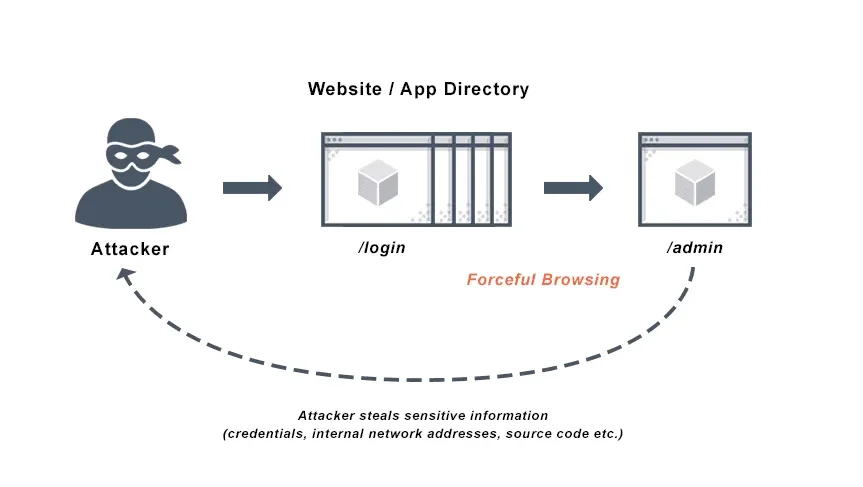
The researcher is Akhil, a student and bug bounty hunter. The technique used is forced browsing, which the report defines as an attack against badly protected websites and web applications that lets an attacker access resources they should not be able to access. The report attributes it to careless coding and links to Acunetix's definition of forced browsing as a reference.
Setup
The only tool the report names is Burp, used with interception turned on so that the signup request can be captured and modified. No versions, accounts or roles beyond a normal signup attempt are described.
Finding it
The normal signup flow works as follows. To create a new account the user enters the 6 digit OTP sent to the email address, and only if the OTP is valid is a valid account created for that email address.
While going through this flow the researcher observed that forced browsing makes it possible to create a valid account with any email address without entering the OTP at all. The researcher observed that forced browsing made it possible to create a valid account with any email address without entering the OTP.
Exploitation
Step 1: Start the signup
Navigate to the signup page and click signup with email.
Step 2: Fill in the form
Fill in all the details: username, email address and password.
Step 3: Turn on interception
Turn on Burp Intercept.
Step 4: Capture the verification request
Click Create account. This produces a POST request to the endpoint POST /_api/signup/verify, which is the request that carries the OTP verification step.
Step 5: Change the path
Remove /verify from the POST request, so that the request now targets the signup endpoint itself rather than the verification endpoint.
Step 6: Add the password to the body
In the body of that POST request add "password":"anypassword", taking care not to introduce any syntax mistakes. The final request, as shown in the report, looks like this:
POST /_ajax/signup HTTP/1.1
Host: www.redacted.com
User-Agent: Mozilla/5.0 (Windows NT 10.0; Win64; x64; rv:88.0) Gecko/20100101 Firefox/88.0
Accept: */*
Accept-Language: en-US,en;q=0.5
Accept-Encoding: gzip, deflate
Referer: https://www.redacted.com/en_in/
Content-Type: application/json;charset=UTF-8
Content-Length: 94
Origin: https://www.redacted.com
DNT: 1
Connection: close

{"xxxx":"xxxxx","sxxxxe":"xx-xx-xx","email":"[redacted]","password":"Password@123"}
The important parts are the path, which is now the signup endpoint rather than the verify endpoint, and the JSON body, which carries the email address together with a password field. The other body fields are masked in the report, so their names and values are not known.
Step 7: Send the request
Pass the modified request to the server. The modified request is passed to the server, and the researcher then logs in with the email address and password.
Step 8: Log in
Navigate to the login page and log in using the email address and the password that was set in the modified request.
Root cause
The verification step lives on a separate endpoint, /_api/signup/verify, and the account creation logic is reachable directly through the signup endpoint. Removing /verify from the path and supplying the password in the body is enough to skip the OTP check entirely. The report does not describe the server-side implementation, so the exact mechanism is likely a missing check of verification state at account creation time.
Impact
An attacker can create a valid account using any email address without access to that mailbox and without entering the OTP. The report does not describe any further consequences, such as what the account could then be used for or whether the real owner of the address is affected. The finding was made on a private program, and no bounty amount or severity is given.
Fix
Based on the finding, the account creation endpoint should not create an account unless the server itself has recorded that the email address passed OTP verification, and the password should not be accepted on a path that bypasses that state.
Variants to test
- Path truncation on verification endpoints. Take the request sent to a verify-style endpoint and remove the final path segment, as was done here with
/verify. A positive result is a success response that creates the account or resource without the verification step. - Direct calls to the underlying creation endpoint. Identify the endpoint that performs the actual creation and call it directly with the fields the client would normally send after verification. A positive result is a created account with an unverified email address.
- Adding the credential field to the creation body. Where the client only sends the password after verification, add the password field to the creation request body. A positive result is a usable login with that password.
- Verification state checks. After creating an account through the bypass, check whether the application treats the email as verified (for example, whether features gated on verification are available). A positive result shows the bypass also defeats downstream verification checks.
What happened, in plain words
A security researcher named Akhil was testing a website as part of a private bug bounty program. A bug bounty program is an arrangement where a company invites independent researchers to look for security problems in its systems and report them, often in exchange for a reward. The site is referred to only as redacted.com, so the real name is hidden.
The feature he looked at was the signup flow, the set of pages you go through to create a new account. This site tried to make sure the email address you typed really belonged to you. After you filled in the form, it sent a 6 digit OTP to that address. OTP stands for one-time password: a short code that is valid for a single use, sent to your email or phone, which you then type back into the site. The idea is that only the person who can open that mailbox can read the code. The site was only supposed to create the account once the correct code had been entered.
Akhil found that he could skip the code entirely. By changing one request that his browser sent to the server, he could create a working account for any email address, without ever seeing the OTP. The technique behind this is called forced browsing, and the report defines it as an attack against badly protected websites and web applications that lets an attacker access resources they should not be able to access. The report puts the cause down to careless coding and points to Acunetix's explanation of forced browsing as a reference.
The image above is captioned in the report as a photo from avinetworks.com.
To follow the rest of this article you only need to understand a few ideas, explained as they come up. The most important one is the difference between what a web page shows you and what actually happens behind the scenes.
The ideas you need first
Requests: how a browser talks to a server
When you fill in a form and press a button, your browser does not magically change anything on the website. It sends a message to the company's computer, called a server, asking it to do something. That message is an HTTP request. The server reads it, does the work, and sends back a reply.
A request has a few parts:
- A method, which says what kind of action you want.
GETusually means "give me a page".POSTusually means "here is some data, please do something with it", such as creating an account. - A path, which says which part of the site you are talking to, for example
/_api/signup/verify. - Headers, which are extra labels with information about the request, such as which browser you use or what kind of data you are sending.
- A body, which is the actual data, for example the username, email address and password you typed.
APIs and JSON
An API (application programming interface) is a set of addresses on a server that a program, rather than a person, is meant to talk to. When a web page needs to create an account, it does not reload a whole page; it quietly sends a request to an API address in the background. You will see paths starting with /_api/ or /_ajax/ in this story, which are typical API-style addresses.
JSON is a common format for the data in those requests. It looks like a list of labels and values in curly brackets, for example {"name":"value"}. Each label is called a key and is written in quotes, followed by a colon and the value. Commas separate the pairs. A single missing quote or comma makes the whole thing invalid, which is why the report warns about syntax mistakes.
Intercepting a request
The report uses a tool called Burp, short for Burp Suite. It is a program that sits between your browser and the website and can pause requests before they reach the server. This is called interception. When interception is turned on, you press a button in the browser, Burp catches the request that the browser was about to send, and you can read it, edit it, and then let it continue. Without a tool like this you would never see the request, because the browser sends it and forgets about it.
Forced browsing
Forced browsing means requesting addresses on a site that the normal interface never shows you, or that you are not supposed to reach directly. Think of a building where the front desk asks for your name before letting you into the office. If there is a side door with no guard, walking through it gets you in without ever talking to the front desk. On a website, the "side door" is a URL or API path that the server will answer even though the page you were using never linked to it. The report calls this a common issue caused by careless coding, because developers protect the path they expect people to use and forget that other paths lead to the same work.
The normal signup flow
On redacted.com, creating an account works like this. You enter your details, the site sends a 6 digit OTP to the email address you gave, and you type that code back in. Only if the code is valid is a valid account created for that email address. The verification is the gate, and the account is supposed to be created only after you pass through it.
Akhil noticed that the gate could be walked around. The account creation logic was still reachable through a different address, so he could create a valid account with any email address without entering the OTP at all.
Exploitation, step by step
Step 1: Start the signup
Navigate to the signup page and click signup with email. This puts you on the form the site expects new users to use, so that the requests you capture are the real ones the site sends.
Step 2: Fill in the form
Fill in all the details: username, email address and password.
Step 3: Turn on interception
Turn on Burp Intercept. From this point the browser's next request will be paused, so you can look at it before it reaches the server.
Step 4: Capture the verification request
Click Create account. The browser sends a POST request to the endpoint POST /_api/signup/verify. An endpoint is simply a specific address on the server that accepts requests. This particular one is the endpoint the report identifies as carrying the OTP verification step.
Step 5: Change the path
Remove /verify from the POST request. The path now points at the signup endpoint itself rather than the verification endpoint. Removing /verify makes the request target the signup endpoint rather than the verification endpoint.
Step 6: Add the password to the body
In the body of that POST request add "password":"anypassword", taking care not to introduce any syntax mistakes. Because the body is JSON, the new pair has to fit the existing pattern: a quoted key, a colon, a quoted value, and a comma in the right place. The final request, as shown in the report, looks like this:
POST /_ajax/signup HTTP/1.1
Host: www.redacted.com
User-Agent: Mozilla/5.0 (Windows NT 10.0; Win64; x64; rv:88.0) Gecko/20100101 Firefox/88.0
Accept: */*
Accept-Language: en-US,en;q=0.5
Accept-Encoding: gzip, deflate
Referer: https://www.redacted.com/en_in/
Content-Type: application/json;charset=UTF-8
Content-Length: 94
Origin: https://www.redacted.com
DNT: 1
Connection: close

{"xxxx":"xxxxx","sxxxxe":"xx-xx-xx","email":"[redacted]","password":"Password@123"}
Line by line, in plain words:
POST /_ajax/signup HTTP/1.1is the request line.POSTis the method, meaning "here is data, please act on it"./_ajax/signupis the path, now pointing at the signup endpoint with/verifyremoved.HTTP/1.1is the version of the protocol being spoken.Host: www.redacted.comtells the server which site the request is for. One server can host many sites, so it needs to know which one you mean.User-Agent: ...identifies the browser that sent the request. Here it is Firefox 88 on 64-bit Windows.Accept: */*says the browser will accept any kind of reply.Accept-Language: en-US,en;q=0.5says the browser prefers US English, with a fallback.Accept-Encoding: gzip, deflatesays the browser can accept compressed replies, which saves bandwidth.Referer: https://www.redacted.com/en_in/tells the server which page the request came from. It is spelled "Referer" in the protocol, a historical misspelling.Content-Type: application/json;charset=UTF-8says the body is JSON text, encoded in UTF-8, a standard way of representing characters.Content-Length: 94says the body is 94 bytes long, so the server knows where it ends.Origin: https://www.redacted.comsays which site the request originates from. Servers use it for cross-site checks.DNT: 1is the Do Not Track preference, a request not to be tracked.Connection: closeasks the server to close the connection after replying.- The blank line separates the headers from the body.
- The body
{"xxxx":"xxxxx","sxxxxe":"xx-xx-xx","email":"[redacted]","password":"Password@123"}is the JSON data. The first two pairs are masked in the report, so their real names and values are not known. Theemailpair carries the address the account is for. Thepasswordpair is the one that was added, and it sets the password the account will have.
The two parts that matter are the path, which is now the signup endpoint rather than the verify endpoint, and the body, which carries the email address together with a password field. The other body fields are masked in the report, so their names and values are not known.
Step 7: Send the request
Pass the modified request to the server. The account is created for the supplied email address without any OTP being entered. The modified request is passed to the server, and the researcher then logs in with the email address and password.
Step 8: Log in
Navigate to the login page and log in using the email address and the password that was set in the modified request.
Why it worked
The verification step lives on a separate endpoint, /_api/signup/verify, and the account creation logic is reachable directly through the signup endpoint. Removing /verify from the path and supplying the password in the body is enough to skip the OTP check entirely.
A useful comparison is a club where the person at the door checks your membership card, but the bar staff never ask to see it again. If you walk in through a different entrance, nobody checks anything. The report does not describe the server-side implementation, so the exact mechanism is likely a missing check of verification state at account creation time.
What an attacker could do with it
An attacker can create a valid account using any email address without access to that mailbox and without entering the OTP. The report does not describe any further consequences, such as what the account could then be used for or whether the real owner of the address is affected. The finding was made on a private program, and no bounty amount or severity is given.
How it should be fixed
Based on the finding, the account creation endpoint should not create an account unless the server itself has recorded that the email address passed OTP verification, and the password should not be accepted on a path that bypasses that state. In the club comparison, the bar staff would need to check the membership card themselves, not rely on the person at the door having done it.
Similar things to test
Once you understand the pattern, you can look for it elsewhere. These are variations on the same idea:
- Path truncation on verification endpoints. Take the request sent to a verify-style endpoint and remove the final path segment, as was done here with
/verify. A positive result is a success response that creates the account or resource without the verification step. - Direct calls to the underlying creation endpoint. Identify the endpoint that performs the actual creation and call it directly with the fields the client would normally send after verification. A positive result is a created account with an unverified email address.
- Adding the credential field to the creation body. Where the client only sends the password after verification, add the password field to the creation request body. A positive result is a usable login with that password.
- Verification state checks. After creating an account through the bypass, check whether the application treats the email as verified, for example whether features gated on verification are available. A positive result shows the bypass also defeats downstream verification checks.
Glossary
- API: a set of addresses on a server that programs talk to, rather than pages a person clicks through.
- Body: the part of an HTTP request that carries the actual data, such as a username or password.
- Bug bounty program: an arrangement where a company invites independent researchers to find and report security problems, often for a reward.
- Burp (Burp Suite): a tool that sits between a browser and a website and can pause, inspect and edit requests.
- Content-Type: a header that says what format the body is in, for example JSON.
- Endpoint: a specific address on a server that accepts requests.
- Forced browsing: requesting addresses on a site that the normal interface does not show, to reach resources you should not be able to access.
- GET: an HTTP method usually meaning "give me a page".
- Header: an extra label in a request carrying information such as the browser type or data format.
- Host: a header telling the server which site the request is for.
- HTTP: the protocol browsers and servers use to exchange requests and replies.
- Interception: pausing a request in a tool before it reaches the server so it can be read or changed.
- JSON: a text format for data made of quoted keys and values in curly brackets, separated by commas.
- Method: the part of a request that says what kind of action is wanted, such as GET or POST.
- Origin: a header saying which site a request originates from.
- OTP (one-time password): a short code valid for a single use, sent to an email address or phone, used to prove you control it.
- Path: the part of a request that says which address on the site you are talking to.
- POST: an HTTP method usually meaning "here is data, please act on it".
- Referer: a header telling the server which page the request came from.
- Request: the message a browser sends to a server asking it to do something.
- Server: the computer that runs a website and answers requests.
- User-Agent: a header identifying the browser that sent the request.
- UTF-8: a standard way of representing characters as bytes in text.