Bypass Two-Factor Authentication of Facebook Accounts
An Instagram sign-up endpoint lacked rate limiting on the SMS verification code, allowing an attacker to brute-force the code and create an Instagram account linked to a victim's phone number. By linking that Instagram account to the attacker's Facebook account in Meta Accounts Center, the confirmed phone number was transferred without re-verification, and adding it to the attacker's Facebook account removed it from the victim's account, disabling two-factor authentication.
 Published on medium.com
In this writeup, I will explain how I discovered a Two-Factor Authentication bypass in Facebook during Meta bug bounty Researchers conference in Seoul, South Korea, 2023 where I was awarded for $25,300 and ranked 2nd place on the conference Leaderboard. If you’re curious about the technical details, this writeup is…
The full write-up lives on its author's site
It belongs to its author, so we link to it rather than copy it. The other two tabs are our own rewrites, checked against it.
Context
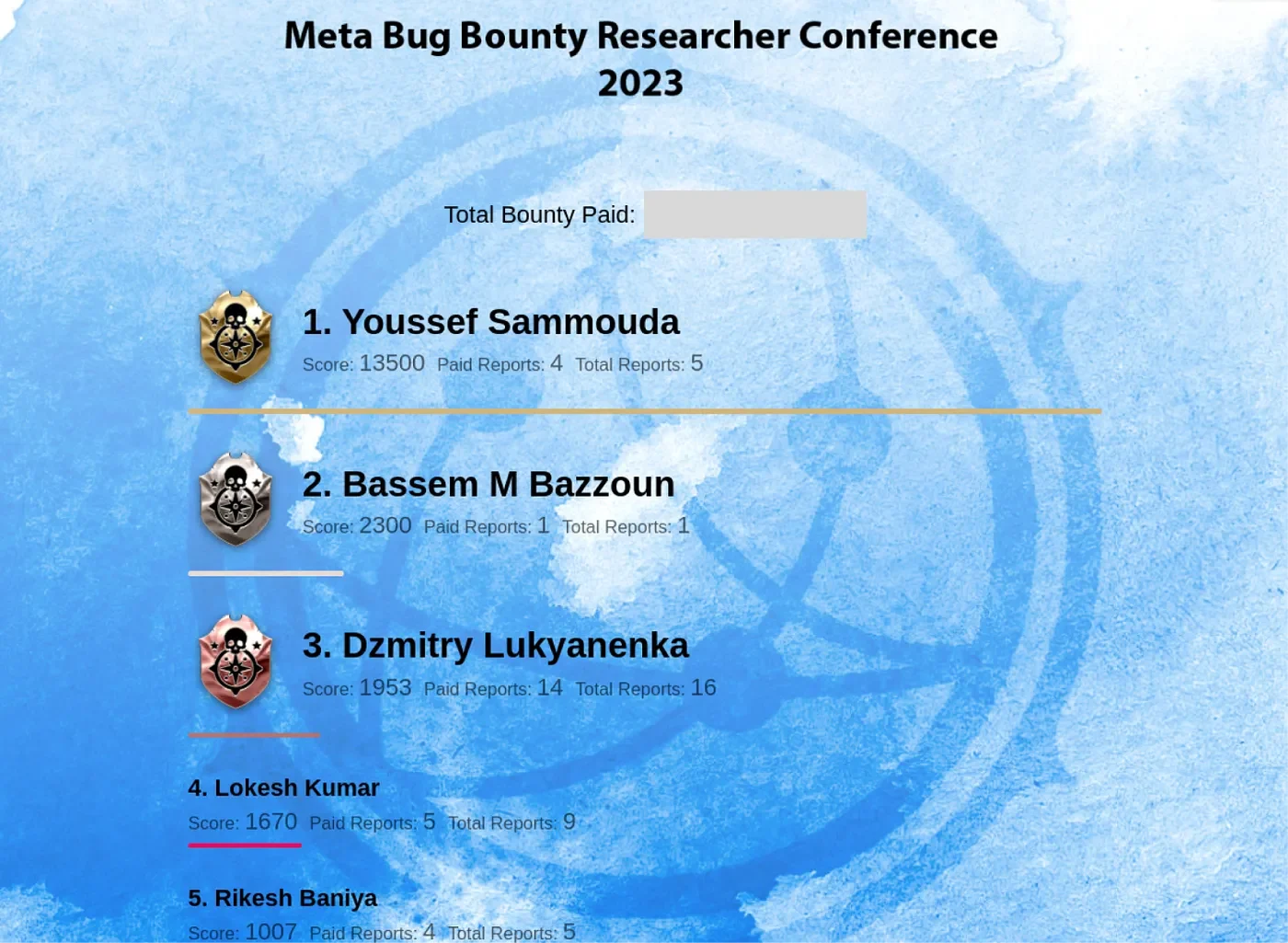
This write-up covers a Two-Factor Authentication bypass in Facebook that I found while taking part in Meta's bug bounty programme. I attended the Meta Bug Bounty Researchers Conference (formerly BountyCon) in Seoul, South Korea, in 2023, where I was awarded $25,300 and ranked 2nd place on the conference leaderboard.
The target is the account and contact-point machinery shared between Facebook and Instagram: the Instagram sign-up flow, the Facebook account centre, and the way a confirmed phone number is treated as a trusted contact point across both products. Facebook's 2FA model assumes the attacker already has the victim's email address and password. The purpose of 2FA is to stop an attacker who has stolen those credentials: they reach the two-factor authentication screen and cannot get in until they supply the correct verification code. The bug below removes the phone number that 2FA depends on, so the second factor disappears entirely.
Setup
- Programme: Meta / Facebook (including Instagram).
- Pre-submission window: opened three weeks before the conference, allowing vulnerabilities to be submitted in advance.
- Goal: critical bugs in Facebook, with focus on account takeover, 2FA bypass and contact point disclosure.
- Tools: Burp Suite, Turbo Intruder and Genymotion.
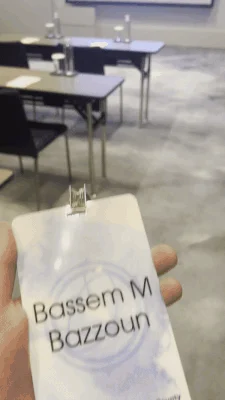
I received an invitation from Meta to attend the annual researchers conference. The most accomplished researchers in Meta's, Google's and other bug bounty programmes receive an exclusive invitation; the event includes a live hack, talks and networking with fellow researchers and the Meta security team.
Finding it
I started digging into the login pages and recovery flows of both Facebook and Instagram. On the Instagram sign-up page I noticed a behaviour: when you sign up for a new Instagram account and enter the same phone number and password as an existing account, Instagram logs you into the existing account instead of creating a new one.
For example, if an account already exists with phone number +1123456 and password password123, and you try to create a new account with the same phone number and the same password, Instagram lets you log into the existing account rather than creating a new one.
The obvious next thought is to try this with the victim's credentials and see whether Instagram logs you into the victim's account without a 2FA code. That does not work. The behaviour of logging you in instead of creating a new account is tied to the specific device and network: it only happens if you have already logged in from that device or network before.

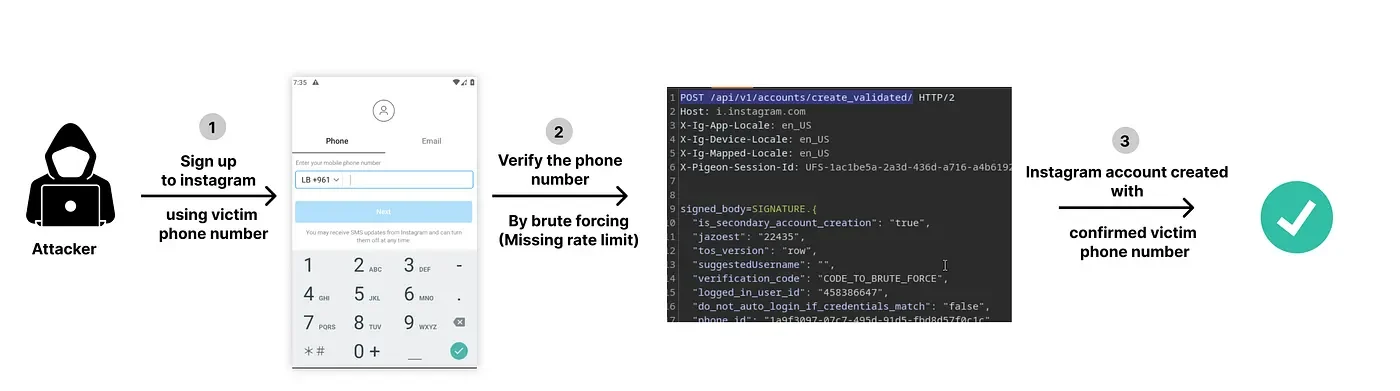
After several days of testing these endpoints, I found a vulnerable endpoint on Instagram's sign-up page that lacked proper rate limiting. It was, as I put it, like a needle in a haystack. The endpoint creates a new Instagram account from a given phone number and verification code. By brute-forcing the verification code I could create a new Instagram account linked to the victim's phone number. On its own this was worth around $3,000 for confirming any number on Instagram, because at that point I still could not bypass 2FA, only the phone number confirmation.

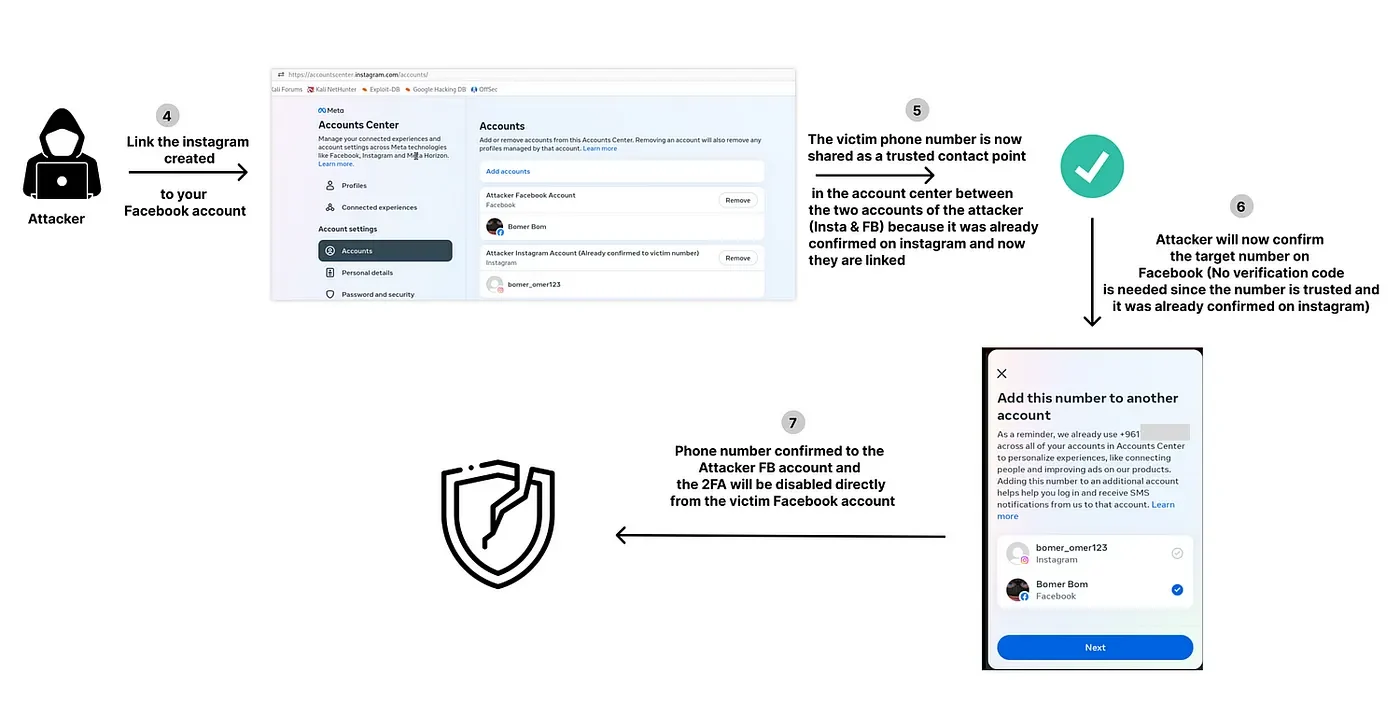
I kept going and tried to escalate it to a full 2FA bypass. I ended up in the Facebook account centre. My hypothesis: if I linked the newly created Instagram account (with the victim's confirmed phone number) to my own Facebook account, the confirmed phone number might be transferred to my Facebook account without a re-verification prompt. Since the number had already been confirmed on Instagram, I reasoned the transfer could go through.
The idea was correct. Linking the Instagram account transferred the phone number into the account centre. I could then add the phone number to my Facebook account without being asked to re-verify it. Adding the phone number to my Facebook account removes it from the victim's account, which disables the 2FA. Two-factor authentication is removed and we can enter the victim's account.

I found the bypass at around 5:00 AM and woke my brother, Kassem Bazzoun, to tell him, since we had been discussing the need to escalate it to a 2FA bypass for days. The excitement kept us awake until 9:00 AM, and then I reported it to Facebook directly.

The images below summarise the attack:
Exploitation
Step 1: send the verification code to the victim's phone number
This request triggers the sign-up SMS to the target phone number. The body is a signed body: the signed_body parameter carries a signature followed by the JSON payload. The payload identifies the device (phone_id, guid, device_id), the target (phone_number) and some build metadata (android_build_type, waterfall_id).
Step 2: brute-force the verification code and create the account
POST /api/v1/accounts/create_validated/ HTTP/2Host: i.instagram.com---Other headerssigned_body=SIGNATURE.{"verification_code": "CODE_TO_BRUTE_FORCE","enc_password": "ENCRYPTED_PASS","phone_number": "VICTIM_PHONE_NUMBER","username": "USERNAME_OF_THE_NEW_ACCOUNT_TO_CREATE","first_name": "",----other params}
This endpoint creates a new Instagram account from a phone number and a verification code. Because it lacked proper rate limiting, the verification_code could be brute-forced. A correct code creates an Instagram account tied to the victim's phone number. The other fields supply the encrypted password, the phone number, the username for the new account and a first name.
Step 3: link the Instagram account to the attacker's Facebook account
Go to https://accountscenter.facebook.com/ and link the Instagram account created in step 2 to your Facebook account via "Add accounts". This transfers the victim's phone number, confirmed in step 2, into the account centre under "Personal details".
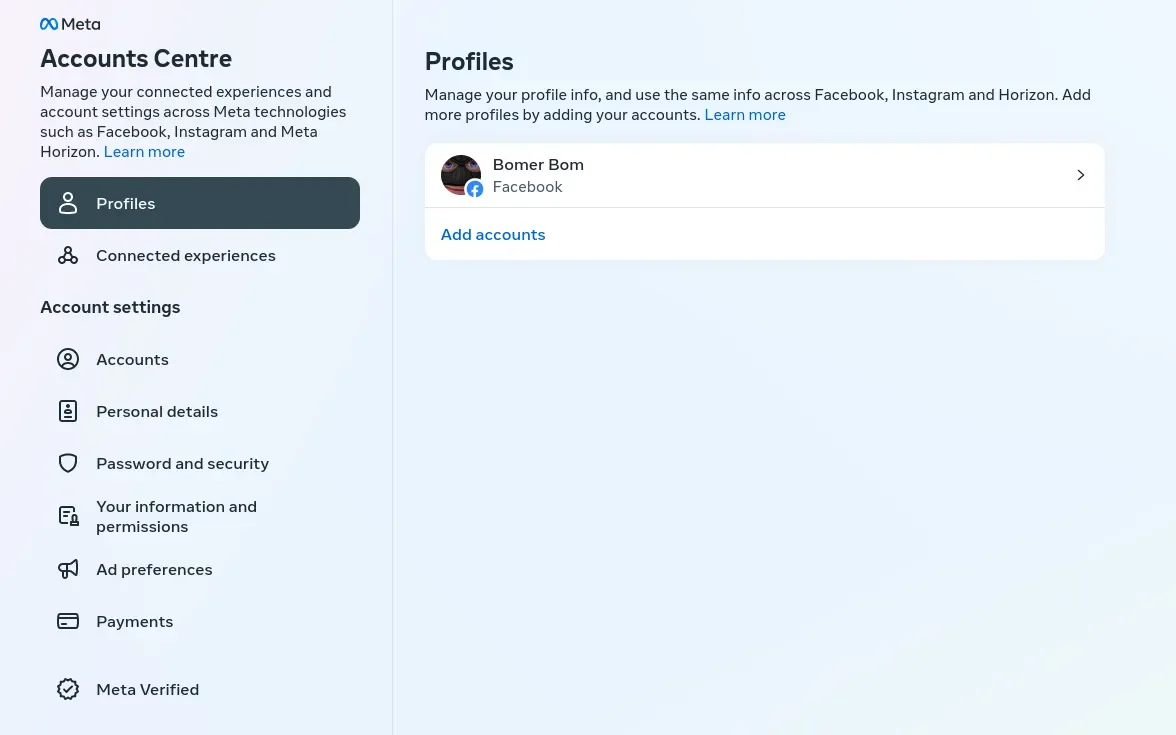
Step 4: add the phone number to the attacker's Facebook account
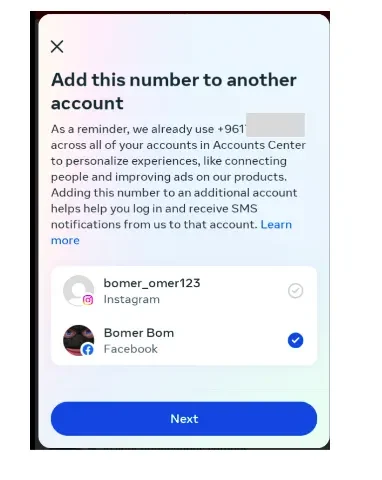
The victim's phone number now appears in the "Personal Details" section. Click Personal details and add the phone number to your Facebook account. Facebook does not ask to re-verify the phone number. This step removes the phone number from the victim's Facebook account and therefore disables the 2FA.
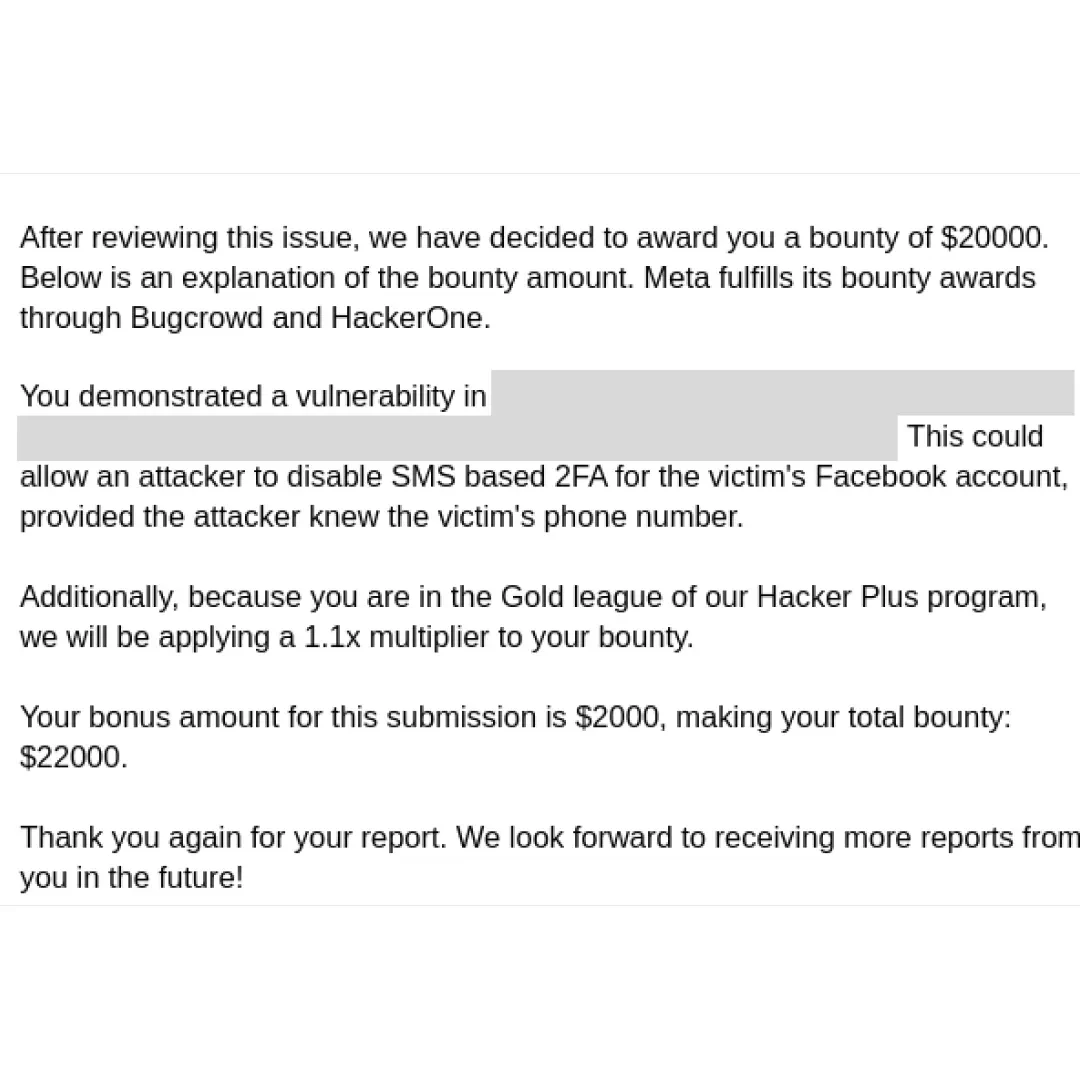
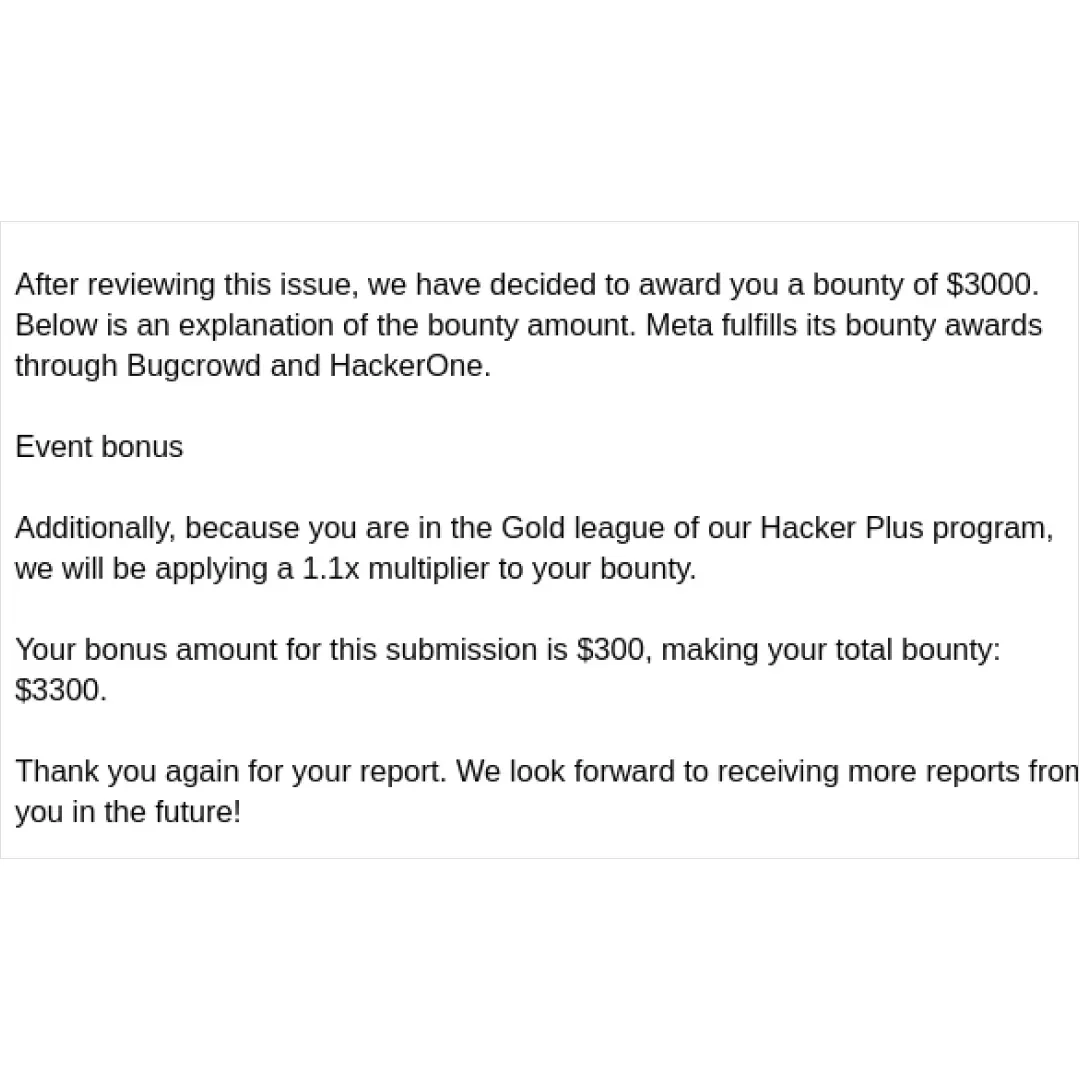
Facebook rewarded me with a bounty of $20,000, the maximum payout for a 2FA bypass, plus a Hacker Plus bonus and a Conference bonus, making a total of $25,300.
Root cause
The chain depends on two weaknesses that combine.
- Missing rate limiting on the Instagram sign-up verification endpoint. The endpoint that creates an account from a phone number and verification code did not limit attempts, so the code could be brute-forced. That gives an attacker an Instagram account bound to a phone number they do not control.
- Trusting a confirmed contact point across products without re-verification. Once the number is confirmed on Instagram, linking that Instagram account to a Facebook account through the account centre transfers the number into "Personal details". Adding it to the attacker's Facebook account does not trigger a re-verification prompt, and because a phone number can only belong to one account, it is removed from the victim's account. If that number was the victim's 2FA factor, the second factor is gone.
The design assumption that a confirmed phone number is a trustworthy identity anchor across Facebook and Instagram is what makes the escalation possible. The report does not describe any server-side check that would have caught the cross-product transfer; the behaviour is presented as the account centre working as designed.
Impact
An attacker who knows a victim's phone number can, under the conditions above, take over a Facebook account that uses that number for 2FA, without ever knowing the 2FA code. The attacker needs the victim's phone number. The attacker does not need the victim's password for the final step, because the 2FA factor is removed rather than satisfied. The report frames this as a full 2FA bypass and Meta paid it at the maximum 2FA bypass payout.
Fix
The report does not describe any fix or code change. Based on the root cause, the fixes that matter are rate limiting and attempt throttling on the sign-up verification endpoint, and requiring re-verification before a contact point confirmed on one product can be added to an account on another.
Variants to test
- Sign-up endpoints that accept a phone number and a code. Look for endpoints like
create_validatedon other products. A positive result is that repeated wrong codes are not throttled and a correct code creates an account bound to a number you do not own. - Cross-product contact point transfer. Link an account from product A to product B and check whether a confirmed phone number or email moves into the other account's personal details without a re-verification prompt. A positive result is the contact point appearing in the second account with no code sent.
- Contact point removal side effects. After transferring a contact point, check whether it is removed from the original account and whether that disables 2FA there. A positive result is the original account losing its second factor.
- Device and network binding. Test whether the "log in instead of sign up" behaviour is tied to device or network, as it was here. A positive result is that the shortcut only works from a previously used device or network.
Tools used: Burp Suite, Turbo Intruder and Genymotion.
What happened, in plain words
A security researcher found a way to get into a Facebook account protected by two-factor authentication (2FA) without knowing the 2FA code. He did it by abusing the sign-up page of Instagram, which is owned by the same company as Facebook (Meta), and then using a feature that links Instagram and Facebook accounts together.
The trick works in two parts. First, Instagram's sign-up page had a weakness: it let someone keep guessing the SMS verification code that Instagram sends to a phone number, because it did not limit how many guesses you could make. By guessing the code, the researcher could create an Instagram account tied to a phone number he did not own. Second, Facebook's account centre trusted that phone number because it was already confirmed on Instagram. When he linked that Instagram account to his own Facebook account, the phone number moved across without Facebook asking him to prove he owned it again. Adding the number to his Facebook account removed it from the victim's account, and since the victim's 2FA depended on that number, the 2FA was switched off.
He reported it to Meta, attended their bug bounty conference in Seoul in 2023, and was paid $25,300.
Background: the pieces you need to know
Before the steps make sense, here are the ideas involved, explained from scratch.
Two-factor authentication (2FA). Normally you log in with two things: something you know (your password) and something you have (a code sent to your phone). If someone steals your password, they still cannot get in without the code. The whole point of 2FA is to stop an attacker who already has your email address and password: they reach the 2FA screen and are stuck until they enter the correct verification code. The bug described here removes the phone number that 2FA relies on, so the second factor disappears completely.
Bug bounty programme. A company offers money to people who find and report security problems in its products. Meta runs one for Facebook and Instagram. Researchers who report serious bugs can be invited to an annual conference.
The conference. The Meta Bug Bounty Researchers Conference (formerly BountyCon) is an annual event for the most accomplished researchers in Meta's, Google's and other bug bounty programmes. Invitation is exclusive, and the event includes a live hack, talks and networking with fellow researchers and the Meta security team.
API and endpoint. An API (application programming interface) is the set of addresses a website or app uses behind the scenes to do things, like "send a code" or "create an account". Each address is called an endpoint. Think of a restaurant: the menu is the API, and each dish on it is an endpoint. You do not go into the kitchen; you ask for a dish by name.
HTTP request. The message your browser or phone app sends to a server to ask it to do something. It has a method (like POST, meaning "send data"), a path (the endpoint), a host (which server), headers (extra information) and a body (the data itself).
Rate limiting. A rule that stops someone from trying the same action too many times in a short period. Like a cash machine that swallows your card after three wrong PINs. Without rate limiting, an attacker can try thousands of guesses.
Brute force. Trying every possible value until one works. If a code has six digits, there are a million possibilities; a computer can try them all quickly if nothing slows it down.
Verification code. The short number a service sends by SMS to prove you own a phone number. You type it back to confirm.
Contact point. A phone number or email address attached to an account. Services treat a confirmed contact point as proof of identity, because confirming it required receiving a code.
Account centre. A Meta page where you manage the details shared between your Facebook and Instagram accounts, including linking them together.
Burp Suite, Turbo Intruder, Genymotion. Tools the researcher used. Burp Suite lets you watch and change the requests your browser or app sends. Turbo Intruder is an add-on for sending many requests very fast (useful for brute forcing). Genymotion is an Android emulator, a program that runs a virtual Android phone on a computer, so you can test the mobile app.
Finding it
The researcher started by looking at the login pages and account recovery flows of both Facebook and Instagram. On the Instagram sign-up page he noticed a behaviour: if you sign up for a new Instagram account using the same phone number and password as an existing account, Instagram logs you into the existing account instead of creating a new one.
For example, if an account already exists with phone number +1123456 and password password123, and you try to create a new account with the same phone number and the same password, Instagram lets you log into the existing account rather than making a new one.
The obvious next thought is to try this with the victim's credentials and see whether Instagram logs you into the victim's account without a 2FA code. That does not work. The behaviour of logging you in instead of creating a new account is tied to the specific device and network: it only happens if you have already logged in from that device or network before.
After several days of testing these endpoints, he found a vulnerable endpoint on Instagram's sign-up page that lacked proper rate limiting. He described it as like a needle in a haystack. This endpoint creates a new Instagram account from a given phone number and verification code. Because nothing limited the number of attempts, he could brute-force the verification code and create a new Instagram account linked to the victim's phone number. On its own this was worth around $3,000 for confirming any number on Instagram, because at that point he still could not bypass 2FA, only the phone number confirmation.
He kept going and tried to escalate it to a full 2FA bypass. He ended up in the Facebook account centre. His hypothesis: if he linked the newly created Instagram account (which held the victim's confirmed phone number) to his own Facebook account, the confirmed phone number might be transferred to his Facebook account without a re-verification prompt. Since the number had already been confirmed on Instagram, he reasoned the transfer could go through.
The idea was correct. Linking the Instagram account transferred the phone number into the account centre. He could then add the phone number to his Facebook account without being asked to re-verify it. Adding the phone number to his Facebook account removes it from the victim's account, which disables the 2FA. Two-factor authentication is removed and the victim's account can be entered.
He found the bypass at around 5:00 AM and woke his brother, Kassem Bazzoun, to tell him, since they had been discussing the need to escalate it to a 2FA bypass for days. The excitement kept them awake until 9:00 AM, and then he reported it to Facebook directly.
The images below summarise the attack:
Exploitation, step by step
Step 1: send the verification code to the victim's phone number
Line by line:
POST /api/v1/accounts/send_signup_sms_code/ HTTP/2is the request line.POSTmeans "I am sending data". The path/api/v1/accounts/send_signup_sms_code/is the endpoint that asks Instagram to send a sign-up SMS code.HTTP/2is the version of the web protocol used.Host: i.instagram.comsays which server is being addressed: Instagram's mobile API server.-other headers-stands for the usual extra headers that the app sends, which the report does not list.signed_body=SIGNATURE.{ ... }is the body of the request. It is a signed body: thesigned_bodyparameter carries a signature (a cryptographic stamp proving the request came from the real app) followed by a JSON payload. JSON is just a text format for structured data, like a labelled form.- Inside the JSON,
phone_id,guidanddevice_ididentify the device making the request.phone_numberis the target, the victim's number.android_build_typeandwaterfall_idare build metadata the app normally sends.
Why this step: the attacker needs Instagram to send a code to the victim's phone number, so that there is a code to guess in the next step.
Step 2: brute-force the verification code and create the account
POST /api/v1/accounts/create_validated/ HTTP/2Host: i.instagram.com---Other headerssigned_body=SIGNATURE.{"verification_code": "CODE_TO_BRUTE_FORCE","enc_password": "ENCRYPTED_PASS","phone_number": "VICTIM_PHONE_NUMBER","username": "USERNAME_OF_THE_NEW_ACCOUNT_TO_CREATE","first_name": "",----other params}
Line by line:
POST /api/v1/accounts/create_validated/ HTTP/2is the request line. This endpoint creates a new Instagram account from a phone number and a verification code.Host: i.instagram.comis again Instagram's mobile API server.---Other headersstands for the remaining headers, which the report does not list.signed_body=SIGNATURE.{ ... }is the signed body, same idea as before: a signature followed by JSON.verification_codeis the code being guessed. Because the endpoint lacked proper rate limiting, it could be brute-forced: try a code, if it fails try the next, over and over.enc_passwordis the encrypted password for the new account.phone_numberis the victim's phone number.usernameis the name for the new account being created.first_nameis left empty, and----other paramsstands for any other parameters the app normally sends.
Why this step: a correct code creates an Instagram account tied to the victim's phone number. That account is the foothold for the next step.
Step 3: link the Instagram account to the attacker's Facebook account
Go to https://accountscenter.facebook.com/ and link the Instagram account created in step 2 to your Facebook account via "Add accounts". This transfers the victim's phone number, confirmed in step 2, into the account centre under "Personal details".
Why this step: the account centre treats a confirmed phone number as trustworthy. Because the number was confirmed on Instagram, linking the accounts moves it across without asking for proof again.
Step 4: add the phone number to the attacker's Facebook account
The victim's phone number now appears in the "Personal Details" section. Click Personal details and add the phone number to your Facebook account. Facebook does not ask to re-verify the phone number. This step removes the phone number from the victim's Facebook account and therefore disables the 2FA.
Why this step: a phone number can only belong to one account. Adding it to the attacker's account takes it away from the victim's. If that number was the victim's 2FA factor, the second factor is gone, and the attacker can enter the account.
Facebook rewarded the researcher with a bounty of $20,000, the maximum payout for a 2FA bypass, plus a Hacker Plus bonus and a Conference bonus, making a total of $25,300.
Why it worked
The chain depends on two weaknesses that combine.
- Missing rate limiting on the Instagram sign-up verification endpoint. The endpoint that creates an account from a phone number and verification code did not limit attempts, so the code could be brute-forced. That gives an attacker an Instagram account bound to a phone number they do not control.
- Trusting a confirmed contact point across products without re-verification. Once the number is confirmed on Instagram, linking that Instagram account to a Facebook account through the account centre transfers the number into "Personal details". Adding it to the attacker's Facebook account does not trigger a re-verification prompt, and because a phone number can only belong to one account, it is removed from the victim's account. If that number was the victim's 2FA factor, the second factor is gone.
The design assumption that a confirmed phone number is a trustworthy identity anchor across Facebook and Instagram is what makes the escalation possible. The report does not describe any server-side check that would have caught the cross-product transfer; the behaviour is presented as the account centre working as designed.
What it means
An attacker who knows a victim's phone number can, under the conditions above, take over a Facebook account that uses that number for 2FA, without ever knowing the 2FA code. The attacker needs the victim's phone number. The attacker does not need the victim's password for the final step, because the 2FA factor is removed rather than satisfied. The report frames this as a full 2FA bypass, and Meta paid it at the maximum 2FA bypass payout.
The fix
The report does not describe any fix or code change. Based on the root cause, the fixes that matter are rate limiting and attempt throttling on the sign-up verification endpoint, and requiring re-verification before a contact point confirmed on one product can be added to an account on another.
Ideas to test on other products
- Sign-up endpoints that accept a phone number and a code. Look for endpoints like
create_validatedon other products. A positive result is that repeated wrong codes are not throttled and a correct code creates an account bound to a number you do not own. - Cross-product contact point transfer. Link an account from product A to product B and check whether a confirmed phone number or email moves into the other account's personal details without a re-verification prompt. A positive result is the contact point appearing in the second account with no code sent.
- Contact point removal side effects. After transferring a contact point, check whether it is removed from the original account and whether that disables 2FA there. A positive result is the original account losing its second factor.
- Device and network binding. Test whether the "log in instead of sign up" behaviour is tied to device or network, as it was here. A positive result is that the shortcut only works from a previously used device or network.
Tools used: Burp Suite, Turbo Intruder and Genymotion.
Glossary
- 2FA (two-factor authentication): logging in with two things, usually a password plus a code sent to your phone, so a stolen password alone is not enough.
- Account centre: Meta's page for managing details shared between Facebook and Instagram accounts, including linking them.
- API: the set of addresses a website or app uses behind the scenes to do things; each address is an endpoint.
- Bug bounty programme: a scheme where a company pays people who find and report security problems in its products.
- Burp Suite: a tool that lets you watch and change the requests your browser or app sends.
- Contact point: a phone number or email address attached to an account, treated as proof of identity once confirmed.
- Endpoint: a single address in an API that performs one action.
- Genymotion: an Android emulator, a program that runs a virtual Android phone on a computer.
- HTTP request: the message a browser or app sends to a server to ask it to do something, with a method, path, host, headers and body.
- JSON: a text format for structured data, like a labelled form.
- Rate limiting: a rule that stops someone from repeating an action too many times in a short period.
- Signed body: a request body that carries a cryptographic signature proving it came from the real app, followed by the data.
- Turbo Intruder: an add-on for Burp Suite that sends many requests very fast, useful for brute forcing.



