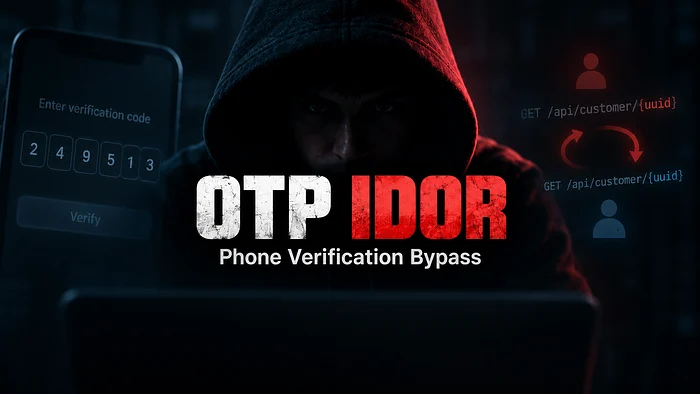
OTP IDOR: When One Code Verifies the Wrong Phone Number
The backend accepted a phone number from a country blocked in the UI and issued an OTP for it, and the verification endpoint accepted an OTP issued for one phone-number resource when applied to a different resource ID. An attacker could verify a blocked-country phone number and pass the onboarding gate.
 Published on scriptjacker.medium.com
Cybersecurity
The full write-up lives on its author's site
It belongs to its author, so we link to it rather than copy it. The other two tabs are our own rewrites, checked against it.
Context
Parth Narula (scriptjacker) was examining the onboarding flow of a platform whose name is redacted in the write-up. The platform required phone verification before a user could reach the dashboard. The sign-up interface presented a phone number input with a country code dropdown, and that dropdown offered only certain regions. India was not among them, so the interface was explicitly telling users that Indian numbers were not supported.
The feature under test was therefore a two-part gate: a frontend that restricted which country codes could be chosen, and a backend that issued one time passwords (OTPs) tied to a verification resource before a number was confirmed. The researcher broke both, not with a single flaw but by chaining two weaknesses: a parameter swap that bypassed the country restriction, and an OTP issued for one resource being accepted for another.
Setup
The only tool named in the report is Burp Suite, used as an intercepting proxy. The requests in the write-up carry a bearer token shown as my_token. The OTP was delivered to an Indian number he could read, which made the second half of the chain observable. He had no Argentinian phone number, which is why the first resource could not be verified legitimately.
No versions, account roles or additional preconditions are given.
Finding it
While walking the onboarding flow, the researcher noticed that the country code dropdown did not list India. That is a client-side restriction on a business rule, and it raised the obvious question of whether the backend enforced the same rule or simply trusted whatever the frontend sent.
He selected an allowed country, Argentina, and entered the number [redacted]. The interface accepted it, and clicking send code caused the application to fire a POST request to the backend.
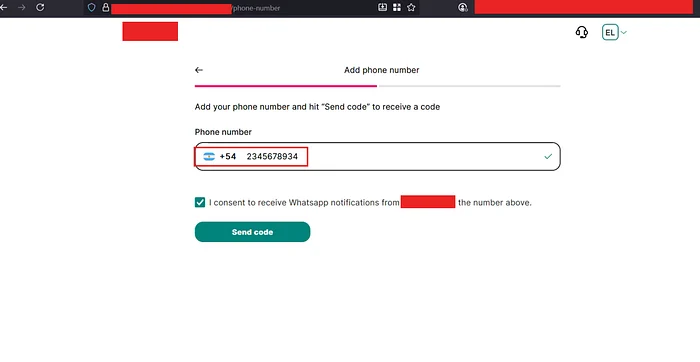
With Burp Suite running, he intercepted that request:
POST /api/customer/phone_numbers HTTP/2Host: REDACTEDAuthorization: Bearer my_tokenContent-Type: application/json{ "number": "[redacted]"}
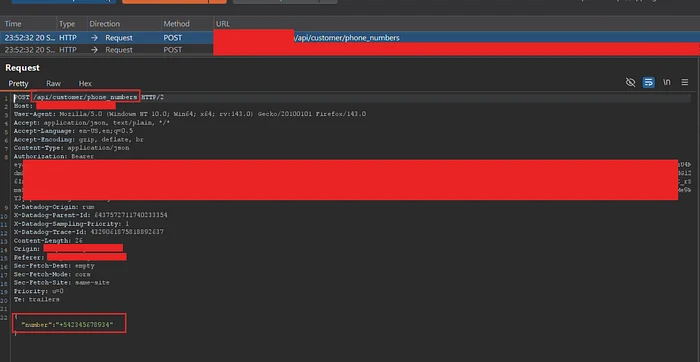
The server answered 201 Created. It generated a verification resource and assigned it a UUID. That resource is referred to in the write-up as resource A. Because he had no Argentinian phone, he could not complete the OTP step for it, so the flow stalled there.
Exploitation
Step 1: submit a blocked country code directly
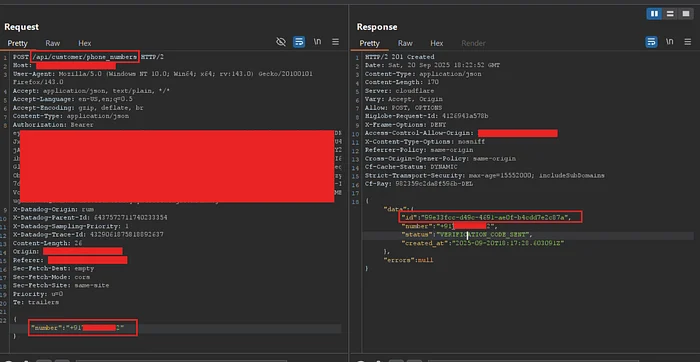
He returned to the add phone number step, filled the form again with the allowed Argentina country code, and this time enabled Burp intercept before clicking send code. The outgoing request looked like this:
The JSON body contains a single field, number. The frontend had formatted the value using the country code chosen from the dropdown, but the backend received it as plain text inside a JSON object. He replaced the allowed [redacted] with +917XXXXXXXX2, an Indian number whose country code appears nowhere in the dropdown and which the platform explicitly blocked. Everything else stayed identical: the same authorization token, the same headers, the same POST method.
He forwarded the request. The server responded 201 Created, with no error and no rejection. The backend accepted the blocked country code, created a second verification resource with a new UUID (resource B), sent the OTP to the Indian number, and treated the request as entirely legitimate.
The OTP arrived on his Indian number, three copies of it because he had pressed resend a couple of times. The code was 249513.
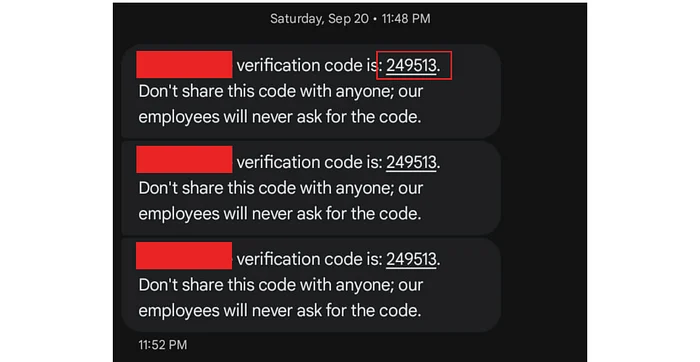
At this point the first flaw was confirmed: client-side validation was the only thing standing between him and a blocked region, and the backend had no idea the frontend was supposed to restrict anything.
Step 2: swap the resource UUID
He now owned two resources. Resource A was the Argentina number and resource B the Indian number, each with its own UUID. The platform expected resource B to be verified with the OTP sent to the Indian number.
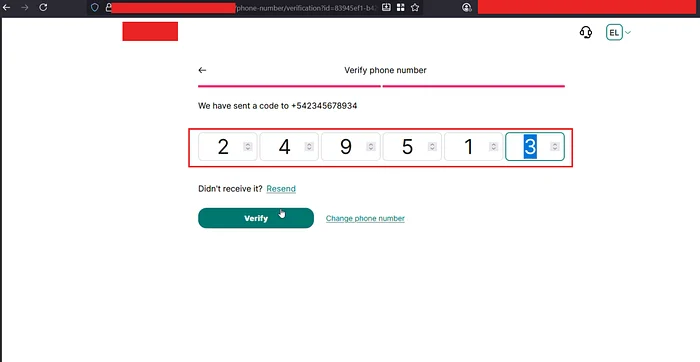
He took the verification request for resource B, the endpoint meant to confirm the Indian number, and replaced the UUID in the URL with the UUID of resource A, the Argentina number. That number had received a completely different OTP, if it had received one at all.
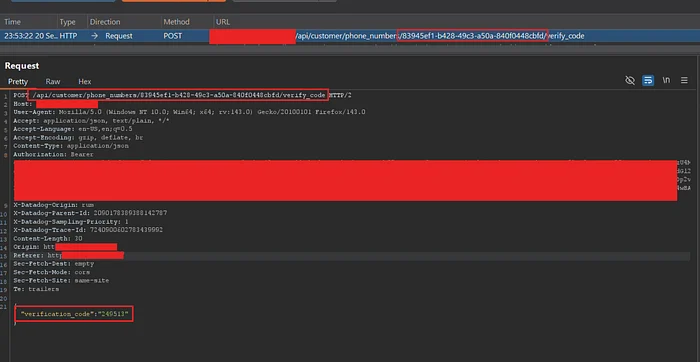
He kept the verification code identical: 249513, the OTP issued for the Indian number. He sent the request and the server responded HTTP/2 200 OK.
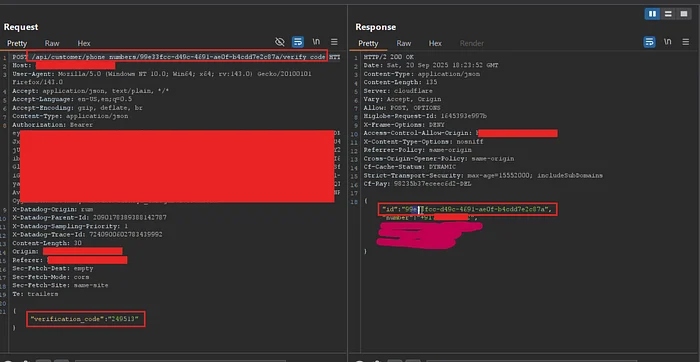
This was the decisive result. The backend accepted an OTP issued for resource B and applied it to resource A. It never checked whether the verification code belonged to the UUID in the URL. It simply saw a valid OTP for the authenticated user and marked the resource as verified.
Step 3: confirm the gate was actually passed
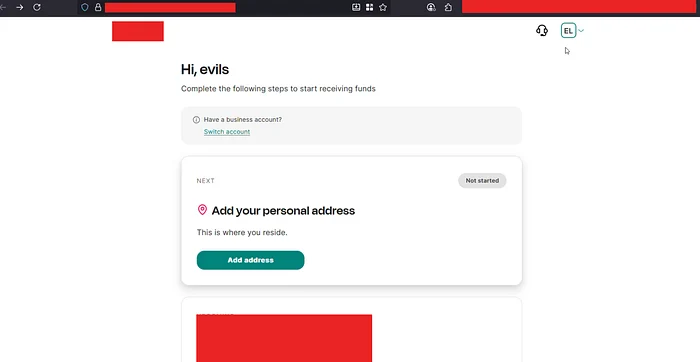
To rule out a misleading response, he checked the onboarding dashboard. The platform had moved him to the next step, "Add your personal address". The phone verification gate was satisfied, but not by the Indian number: by the Argentina number, verified with an OTP that was never meant for it.
Root cause
Two design mistakes combined.
- Business rules enforced only in the UI. The country restriction lived in the dropdown. The API accepted a number string the dropdown did not offer, so the server treated client-side validation as sufficient protection for a business rule. The write-up calls this one of the oldest mistakes in application security.
- OTPs not bound to a resource. The verification endpoint performed no authorization check tying the submitted code to the resource ID in the URL. OTPs were treated as global tokens for the user account rather than resource-specific secrets, so any OTP could verify any phone number resource the same user owned.
The report does not describe the server-side code, so the exact implementation of the check is not shown; the behaviour above is what the responses demonstrated.
Impact
The researcher verified a phone number from a country the platform intended to block, and satisfied the phone verification gate of onboarding with a number that had never received the OTP used to confirm it. In this case the researcher passed the gate with the Argentinian number while using a code issued for his Indian number. The write-up describes the issue as clear and critical, and the conditions are those of the flow: an authenticated account, at least two phone number resources owned by that user, and an OTP readable for one of them. No bounty amount, CVSS score or severity rating is given.
Fix
The vendor removed phone verification entirely from the onboarding flow. They removed phone verification entirely from the onboarding flow and rebuilt the authentication system around email and password with magic login links. The phone number step that had been bypassed no longer exists.
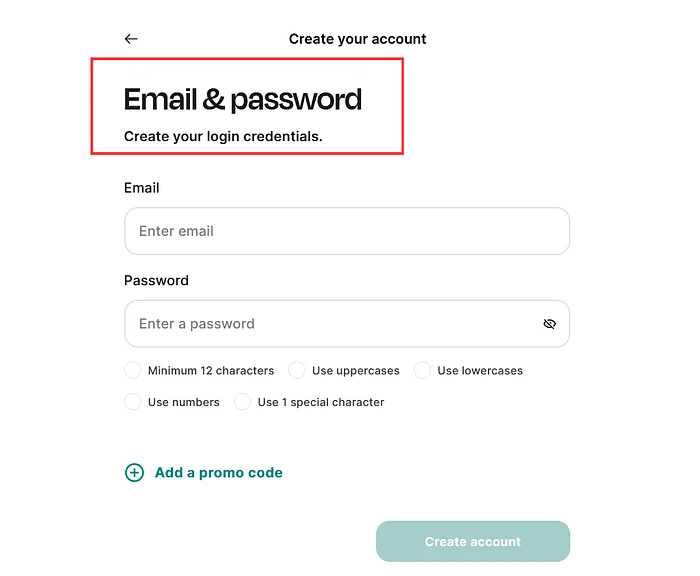
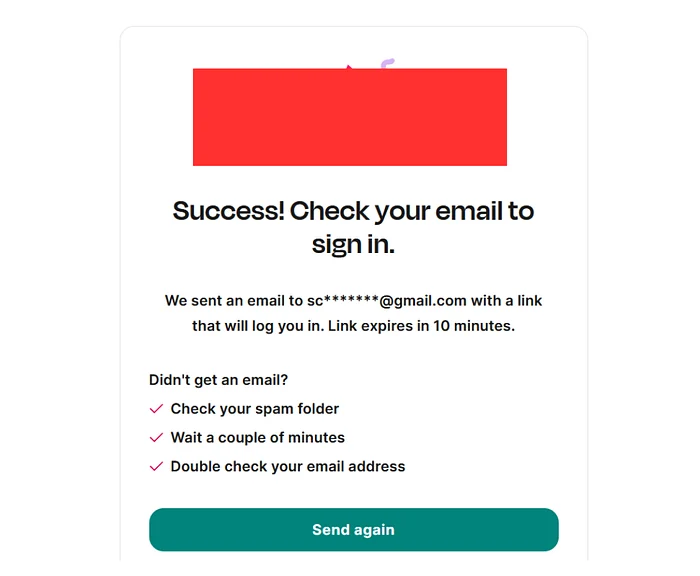
The write-up's own recommendation is the general form of the fix: an OTP should be cryptographically bound to a single verification resource rather than treated as a global account token, and the verification endpoint should validate that the submitted OTP was issued for the specific resource ID in the URL. Business rules such as allowed country codes must be enforced server-side, not only in the interface.
Variants to test
- Blocked values in dropdowns. Submit a value the UI does not offer (country code, plan, role, region) directly in the request body. A positive result is a
201or200that creates the resource instead of a validation error. - OTP reuse across resources. Create two verification resources for numbers you control, request codes for both, then submit resource B's code against resource A's UUID. A positive result is
200 OKand the resource marked verified. - OTP reuse across actions or sessions. Check whether the same code verifies a different action (password reset, login, phone change) or a resource created in another session for the same account. A positive result is acceptance where the code was never issued for that context.
- UUID swapping between owned resources. Replace the resource identifier in verification, reset and confirmation URLs with another identifier you own. A positive result is a successful state change on the wrong resource.
- Parameter relationships. Rather than testing each parameter in isolation, vary pairs (number and resource ID, code and resource ID, user and resource) and observe whether the server checks that they belong together.
Lesson learned
- Never trust client-side restrictions; test the backend directly.
- If a value is hidden or blocked in the UI, try modifying it manually in the request.
- For OTP flows, check what the OTP is actually bound to: user, phone number, resource ID, session or action.
- Create multiple resources and swap IDs, UUIDs, OTPs and tokens between them.
- Test relationships between parameters, not just whether each parameter is individually valid.
What happened, in plain words
A security researcher named Parth Narula was signing up for an online platform (its name is hidden in his write-up, shown only as REDACTED). Before you can reach the dashboard, it asks you to prove that a phone number belongs to you. It does this by sending a short numeric code to your phone, which you then type into the website. That code is called a one time password, or OTP. It is a password that works once and expires quickly, so that even if someone sees it later it is useless.
The platform had two rules it thought would keep things safe. First, the sign-up page only let you pick certain countries from a dropdown list, and India was not on that list. Second, the server was supposed to accept only a code it had sent out for a particular phone number.
Parth broke both rules, not with one clever trick but by joining two smaller weaknesses together. He sent the server a phone number from a country the page did not offer, and the server accepted it. Then he took the code that had been sent to his own Indian phone and used it to confirm a completely different phone number, one from Argentina. The platform believed the Argentinian number was verified, and let him through the sign-up gate.
This article walks through exactly what he did, in the order he did it, and explains every piece of jargon along the way. You only need to know how to use a browser to follow it.
The pieces you need to understand first
Before the story makes sense, here are a few ideas explained from scratch.
A website has two halves. The part you see and click is called the frontend or client. It runs inside your browser, on your own computer. The part that stores data and makes decisions is called the backend or server. It runs on a computer owned by the company. Your browser talks to the server by sending messages called requests, and the server answers with responses.
An API is the menu the server offers. API stands for Application Programming Interface. Think of a restaurant: the menu lists what you can order, and the kitchen makes it. You never walk into the kitchen yourself. In the same way, a website's API is the list of requests the server will accept, such as "add a phone number" or "check this code". Each request goes to a particular address, called an endpoint, which looks like a path such as /api/customer/phone_numbers.
A token is a wristband. When you log in, the server gives your browser a long string of characters. Your browser sends it back with every request so the server knows who you are, without asking for your password each time. It works like a wristband at an event: show it at the door and you get in. In the requests below it appears as Authorization: Bearer my_token. The word Bearer just means "whoever carries this token is the account holder".
JSON is a way of writing data as labelled boxes. When the browser sends information to the server, it often writes it in JSON, which stands for JavaScript Object Notation. It looks like { "number": "[redacted]" }. The curly braces hold a set of labelled values, and each label is called a key. Here the key is number and the value is the phone number. It is like a form with a field name printed next to a blank.
A UUID is a long random ID number. UUID stands for Universally Unique Identifier. It is a string of letters and digits so long and random that no two are ever the same. Companies use them to label individual records, such as one particular phone verification request, without anyone being able to guess the next one.
An IDOR is using someone else's ticket number. IDOR stands for Insecure Direct Object Reference. It happens when a website identifies a record by an ID in the request, and the server does not check that the person making the request is allowed to touch that record. Imagine a cloakroom that hands out numbered tickets: if you can swap your ticket number for someone else's and still collect their coat, the cloakroom has an IDOR. In this story the researcher swapped one verification record's ID for another's, both belonging to his own account, and the server did not notice.
Burp Suite is a pause button for web traffic. Normally your browser sends a request and the server answers, and you see nothing in between. Burp Suite is a program that sits in the middle. You tell your browser to send its traffic through Burp, and Burp lets you stop each request before it leaves, read it, change it, and then let it go. This is called an intercepting proxy. It is the main tool used in this report, and it is how the researcher edited requests that the website would never have let him type by hand.
A status code is the server's short reply. Every response starts with a number. 200 OK means "done, here is the result". 201 Created means "done, and I made a new record for you". A number starting with 4, such as 400 or 403, means the server refused. Watching these numbers tells you whether a request worked.
Setting up
The researcher was logged in on the platform, and the requests carry a bearer token shown as my_token. He also had an Indian phone number, so he could read the code sent to it. He had no Argentinian phone, which matters later: he could start a verification for an Argentinian number but could never finish it honestly, because the code would go to a phone he did not have.
Finding the first weakness
While going through the sign-up steps, he noticed the country code dropdown did not include India. That is a rule enforced only by the page in his browser. The page simply does not draw the option. Nothing about that stops a determined person from sending the server a request by hand, because the browser is under the user's control, not the company's.
So he picked a country that was allowed, Argentina, and typed the number [redacted]. The page accepted it. Clicking send code made the browser send a request to the server.
With Burp Suite running, he caught that request before it left:
POST /api/customer/phone_numbers HTTP/2Host: REDACTEDAuthorization: Bearer my_tokenContent-Type: application/json{ "number": "[redacted]"}
Line by line:
POST /api/customer/phone_numbers HTTP/2is the first line of the request.POSTis the type of action: it means "create something new"./api/customer/phone_numbersis the endpoint, the address on the server that handles phone numbers.HTTP/2is the version of the language browsers and servers use to talk.Host: REDACTEDnames the website being contacted. The real name is hidden in the write-up.Authorization: Bearer my_tokenis the wristband. It proves which account is making the request.my_tokenstands in for the real token, which is not published.Content-Type: application/jsontells the server that the body of the request is written in JSON, so it knows how to read it.{ "number": "[redacted]" }is the body: one key,number, holding the Argentinian phone number. The+54at the start is Argentina's country calling code.
The server replied 201 Created. It had made a new record for this verification attempt and given it a UUID. The write-up calls this record resource A. Because he had no Argentinian phone, he could not receive the code for resource A, so the flow stopped there.
That pause is where the interesting question came up: what if the server trusts the page too much? In other words, what if the country restriction exists only in the dropdown, and the server itself never checks which countries are allowed?
Step 1: sending a blocked country code straight to the server
He went back to the add phone number step and filled the form in again with the allowed Argentina country code. This time, before clicking send code, he switched on Burp's intercept so the request would be held for him to edit. The outgoing request looked like this:
This is the same request as before, with one change. The body still has a single key, number. The page had built that value using the country code chosen from the dropdown, but the server receives it as plain text inside the JSON. Nothing about the value is special to the server; it is just characters in a box.
So he replaced the allowed [redacted] with +917XXXXXXXX2, an Indian number. The +91 is India's country calling code, and it appears nowhere in the dropdown. Everything else stayed exactly the same: the same token, the same headers, the same POST method, the same endpoint. He changed one value and nothing else, so that if the server behaved differently, the only possible cause was that value.
He let the request go. The server answered 201 Created. No error, no refusal. The server accepted a country code the platform meant to block. It created a second verification record with a new UUID, which the write-up calls resource B, sent the code to the Indian number, and treated the whole thing as perfectly normal.
The code arrived on his Indian phone. In fact three copies arrived, because he had pressed resend a couple of times. The code was 249513.
That confirmed the first weakness: the only thing standing between him and a blocked country was validation in the page, and the server had no idea the page was supposed to restrict anything.
Step 2: using one record's code on another record
He now had two records. Resource A was the Argentinian number. Resource B was the Indian number. Each had its own UUID. The platform expected him to confirm resource B using the code sent to the Indian number, which is exactly what an honest user would do.
Instead he took the verification request for resource B, the one meant to confirm the Indian number, and changed the UUID in its address from resource B's to resource A's. Resource A was the Argentinian number, which had received a completely different code, if it had received one at all.
He left the code itself untouched: 249513, the code issued for the Indian number. Then he sent the request, and the server answered HTTP/2 200 OK.
That was the decisive result. The server took a code issued for resource B and applied it to resource A. It never checked whether the code belonged to the UUID in the address. It only saw a valid code for the logged-in user and marked the record as verified. In plain terms: the code was treated as a key to the whole account rather than a key to one specific door.
Step 3: checking that the gate really opened
A 200 OK could in theory be a misleading reply, so he checked the actual sign-up dashboard. The platform had moved him on to the next step, "Add your personal address". The phone verification gate was satisfied. But not by the Indian number: by the Argentinian number, confirmed with a code that was never meant for it.
Why it worked
Two design mistakes combined.
- The rule lived only in the page. The country restriction was in the dropdown. The server accepted a number string the dropdown did not offer, so it treated the page's validation as enough protection for a business rule. The write-up calls this one of the oldest mistakes in application security.
- Codes were not tied to a record. The verification endpoint did no check linking the submitted code to the record ID in the address. Codes were treated as global tokens for the account rather than secrets belonging to one record, so any code could confirm any phone number record the same user owned.
The report does not show the server's code, so the exact implementation of the check is not visible; the behaviour above is what the responses demonstrated.
What it meant in practice
The researcher confirmed a phone number from a country the platform intended to block, and passed the phone verification gate of sign-up with a number that had never received the code used to confirm it. Here the researcher passed the gate with the Argentinian number while using a code issued for his Indian number. The write-up describes the issue as clear and critical. The conditions are those of the flow: a logged-in account, at least two phone number records owned by that user, and a readable code for one of them. No bounty amount, CVSS score or severity rating is given.
How it was fixed
The company removed phone verification entirely from the sign-up flow. They removed phone verification entirely from the sign-up flow and rebuilt the login system around email and password with magic login links. A magic login link is a one-time web address emailed to you that logs you in when you click it, so you never type a password. The phone number step that had been bypassed no longer exists.
The write-up's own recommendation is the general form of the fix: a code should be cryptographically bound to a single verification record rather than treated as a global account token, and the verification endpoint should check that the submitted code was issued for the specific record ID in the address. Business rules such as allowed country codes must be enforced on the server, not only in the page.
Other things worth trying
- Blocked values in dropdowns. Send a value the page does not offer (country code, plan, role, region) directly in the request body. A positive result is a
201or200that creates the record instead of a validation error. - Code reuse across records. Create two verification records for numbers you control, request codes for both, then submit record B's code against record A's UUID. A positive result is
200 OKand the record marked verified. - Code reuse across actions or sessions. Check whether the same code confirms a different action (password reset, login, phone change) or a record created in another session for the same account. A positive result is acceptance where the code was never issued for that context.
- UUID swapping between your own records. Replace the record identifier in verification, reset and confirmation addresses with another identifier you own. A positive result is a successful change on the wrong record.
- Relationships between fields. Rather than testing each field alone, vary pairs (number and record ID, code and record ID, user and record) and watch whether the server checks that they belong together.
Lessons learned
- Never trust restrictions that live only in the page; test the server directly.
- If a value is hidden or blocked in the interface, try changing it by hand in the request.
- For code flows, check what the code is actually tied to: user, phone number, record ID, session or action.
- Create several records and swap IDs, UUIDs, codes and tokens between them.
- Test how fields relate to each other, not just whether each one is valid on its own.
Glossary
- API: the set of requests a server will accept, like a restaurant menu; the browser orders from it and the server does the work.
- Backend (server): the computer owned by the company that stores data and makes decisions; you never see it directly.
- Bearer token: a long string sent with requests to prove which account is asking, like a wristband at an event.
- Burp Suite: a program that sits between your browser and a website so you can pause, read and edit requests before they are sent; an intercepting proxy.
- Business rule: a policy the company wants to enforce, such as which countries are allowed to sign up.
- Client-side validation: checks performed by the page in your browser, which you can bypass because the browser is under your control.
- Content-Type: a header that tells the server what format the body of a request is written in, such as JSON.
- Country calling code: the short prefix at the start of an international phone number, such as
+54for Argentina or+91for India. - CVSS: a standard scoring system for rating how severe a vulnerability is; no score is given in this report.
- Endpoint: the address on a server that handles a particular kind of request, such as
/api/customer/phone_numbers. - Frontend (client): the part of a website you see and click, running in your browser.
- Header: extra labelled information attached to a request or response, such as
HostorAuthorization. - HTTP/2: the version of the language browsers and servers use to exchange requests and responses.
- IDOR (Insecure Direct Object Reference): a flaw where a record is identified by an ID in the request and the server does not check that you are allowed to touch that record, like swapping cloakroom tickets.
- Intercepting proxy: a tool that holds web traffic so you can inspect and change it before it reaches the server.
- JSON (JavaScript Object Notation): a way of writing data as labelled values inside curly braces, such as
{ "number": "[redacted]" }. - Key: the label in a JSON pair, such as
number. - Magic login link: a one-time web address emailed to you that logs you in when clicked, so you never type a password.
- OTP (one time password): a short code sent to your phone or email that works once and expires quickly, used to prove you control that phone or address.
- Parameter: a named value sent in a request, such as the
numberfield in the body or the UUID in the address. - POST: the type of request that asks the server to create something new.
- Request: the message your browser sends to a server asking it to do something.
- Resource: a single record on the server, here one phone verification attempt, identified by its own UUID.
- Response: the message the server sends back, starting with a status code.
- Severity rating: a label such as low, medium or high describing how serious a flaw is; none is given in this report.
- Status code: the number at the start of a response, such as
200 OKfor success or201 Createdfor a new record. - UUID (Universally Unique Identifier): a long random string of letters and digits used to label a single record so it cannot be guessed.
- Vulnerability: a weakness in a system that someone can use to make it behave in a way the owner did not intend.



