I Verified One Email and Claimed Another’s Invitation
The invitation flow allowed the invited email address to be edited during registration, so an attacker could verify a different email and still claim the invitation. The attacker could then access the invited membership using the alternate email, while the original invited address could not log in.
 Published on scriptjacker.medium.com
Cybersecurity
The full write-up lives on its author's site
It belongs to its author, so we link to it rather than copy it. The other two tabs are our own rewrites, checked against it.
Context
The target is a platform hosted at REDACTED where users can create communities called circles. As the owner of a test circle, the researcher could invite people by email and assign them a role. The member management page lives at:
/circles/{circle_slug}/manage?tab=members
Sign-in is handled by a separate authentication service, not by the application itself. The invitation flow is meant to bind an invitation, which is addressed to one email address, to the person who completes registration. The researcher's finding is that this binding is not enforced: the invitation was addressed to one address, but registration was completed with a different address, and the resulting account was added to the circle under the original invited address.
Setup
The researcher owned a test circle and used the member management page to send an invitation. The invitation went to [redacted] with the Contributor role. A test inbox was used to receive the invitation email and the verification codes. No interception proxy was needed at any point: every change was made directly through the page.
Finding it
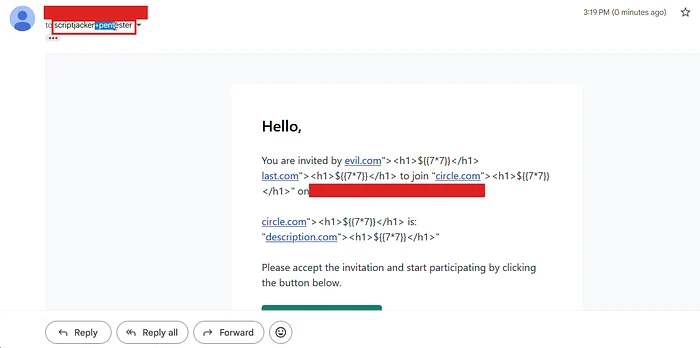
The invitation email contained an Accept invitation button. The link had this structure, with the circle name, invitation ID and token replaced by placeholders:
The URL points to a specific invitation and carries a token, so the researcher wanted to see how the application tied that invitation to the person completing registration.
Following the link opened the login page of the separate authentication service, with the invited email already filled in. The email field, however, was editable.
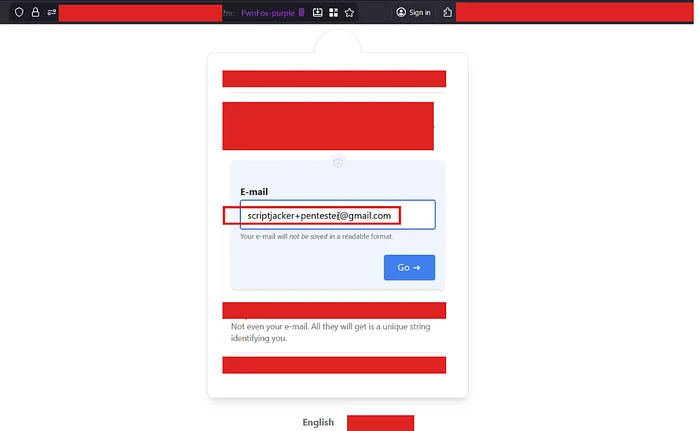
That raised the question the whole write-up turns on: what happens if a different email is verified while completing this invitation?
Exploitation
Step 1: change the email in the invitation flow
The researcher replaced [redacted] with [redacted] and continued. This was done directly in the page; no request had to be intercepted to change the field.
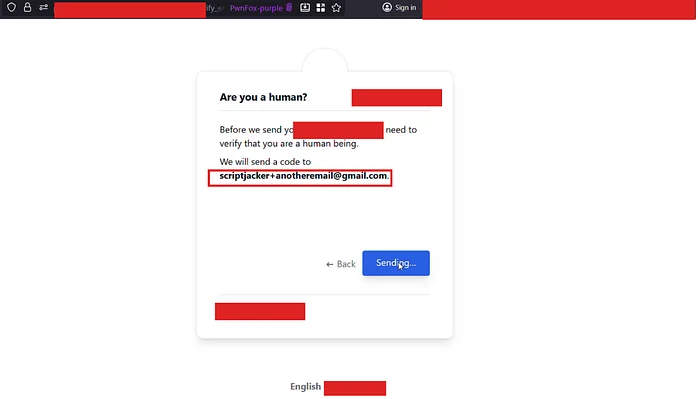
Step 2: verify the alternate address and set a password
The authentication service sent a verification code to the alternate address. The researcher copied the code from the test inbox, entered it on the verification page, and then created a password. At this point the second email was verified, while the invitation was still addressed to the first one.
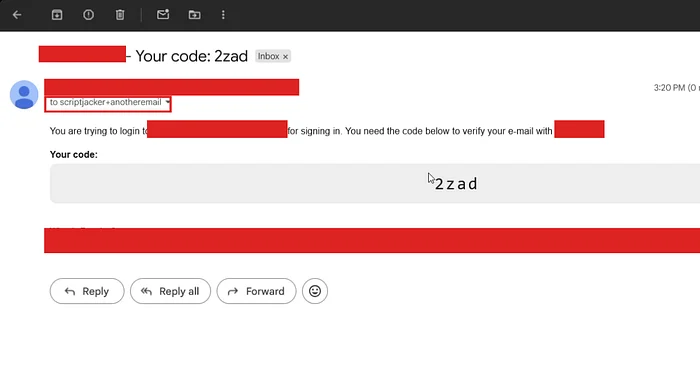
Step 3: return to the application
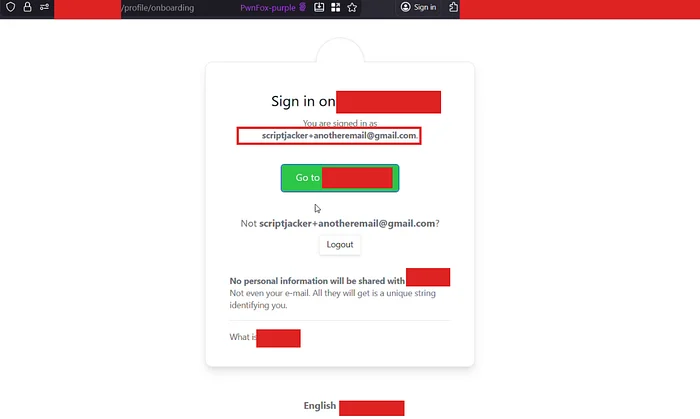
The next page confirmed that the session belonged to [redacted] and showed a button to return to the application. Clicking it continued into:
/profile/onboarding
The application did not ask the researcher to go back and authenticate with the invited address.
Step 4: check the member list
Back on the circle management page, the member list was refreshed. It had held three members and now held four. The new member had the Contributor role, and the email shown beside that member was [redacted], the original invited address.
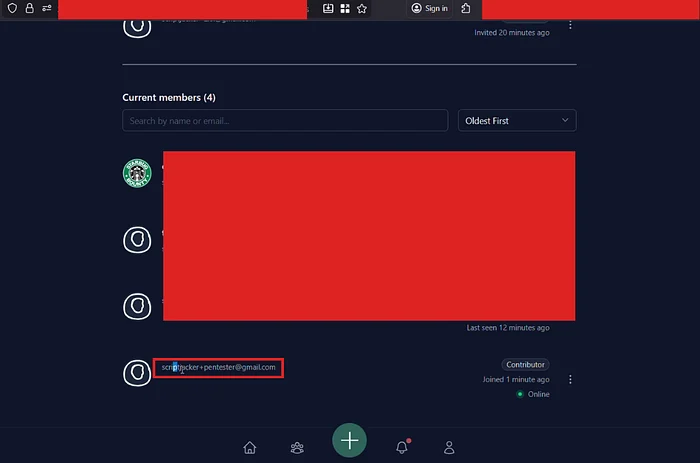
Authentication had been completed with one email, but the application had added the account under another.
Step 5: check the profile
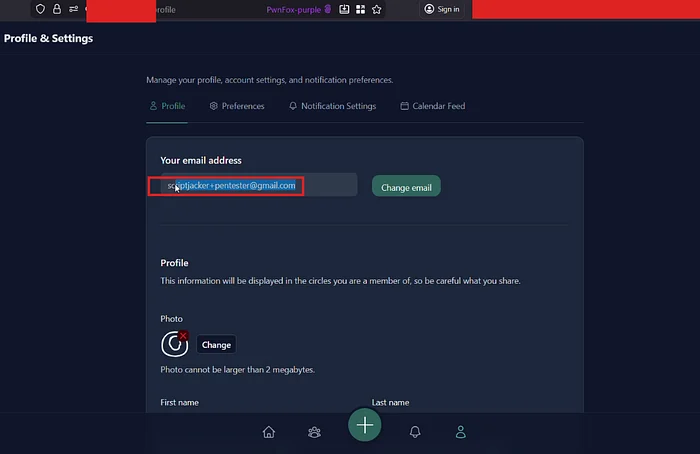
Opening /profile in the new session showed the same address, [redacted].
Step 6: test whether this is only a display issue
To see whether the mismatch affected access rather than just what was displayed, the researcher logged out and opened:
/session/new
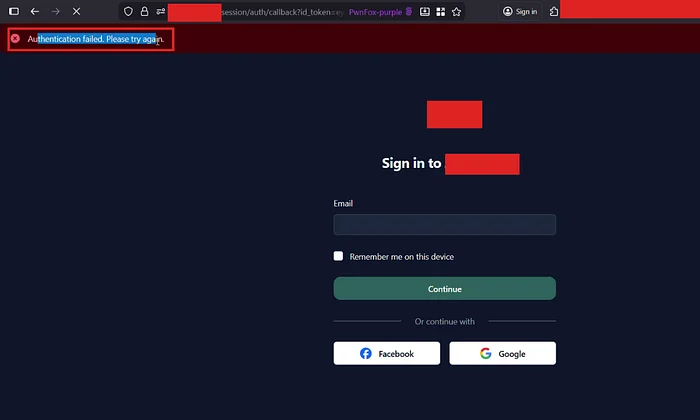
Signing in with the original invited address, [redacted], led the authentication service to ask for verification of that email and creation of a password. Those steps were completed through the test inbox. The browser then returned to the application through an authentication callback with this visible URL structure:
/session/auth/callback?id_token={REDACTED}
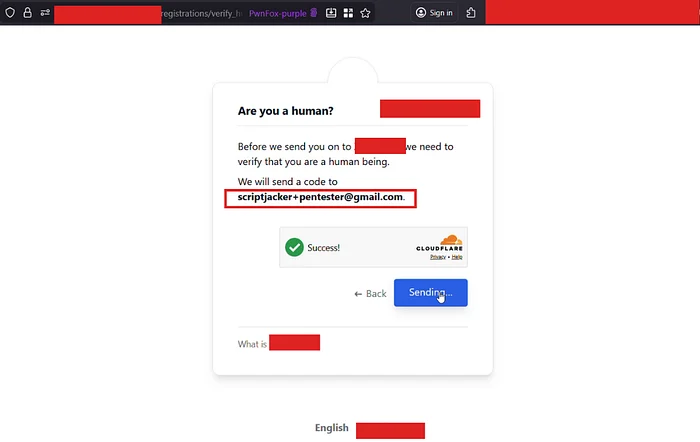
The page displayed:
Authentication failed. Please try again.
The account could not be accessed using the email shown on its profile.
Step 7: sign in with the alternate address
Next the researcher tried [redacted], entering the password created while accepting the invitation.
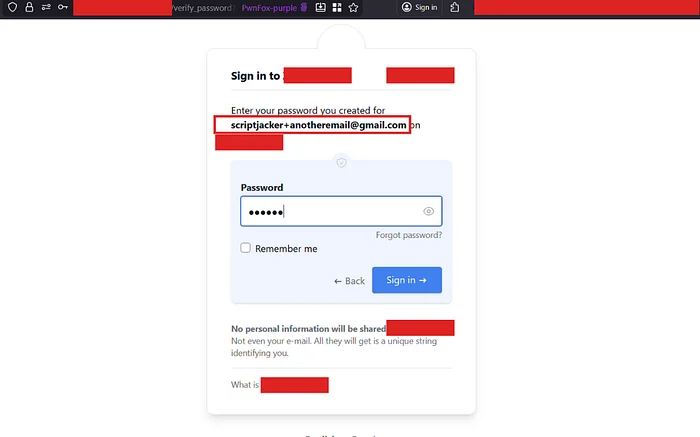
This time it worked. The application opened /circles and showed the circle that had been joined.
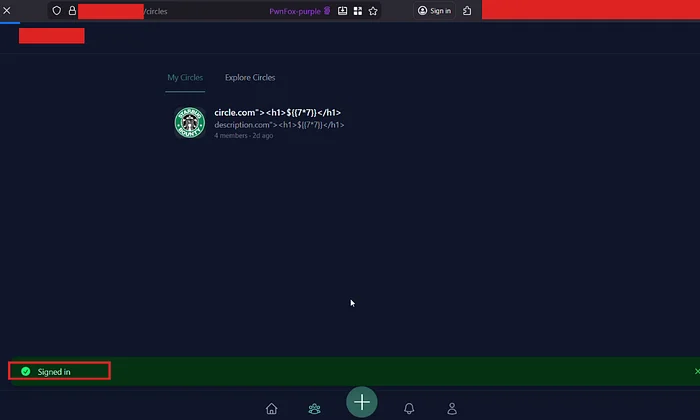
Opening /profile again still showed [redacted].
The results were consistent across the tests:
| Action | Result |
|---|---|
Login with [redacted] |
authentication failed |
Login with [redacted] |
access succeeded |
Email displayed on /profile |
[redacted] |
The mismatch persisted after logging out. The alternate identity could still access the invited membership, while the original identity could not, in these tests.
Root cause
The invitation is bound to an email address and a token, but the registration step that follows does not check that the address being verified matches the address the invitation was issued to. The authentication service verifies whichever address is submitted in the editable field, and the application then links the resulting session to the pending invitation, so the membership is created under the invited address while the credentials belong to the alternate one. The profile keeps displaying the invited address, which is why the two identities diverge.
Why the existing checks did not stop it: the verification code was valid, and the invitation token was valid, but neither was compared against the other. A valid verification code only proves control of the address that was entered, not that this address is the one the invitation was meant for. The exact server-side implementation is not shown in the report.
Impact
In the researcher's tests, an invitation sent to one address could be completed with a different address the researcher also controlled, and the membership appeared under the invited address. In the researcher's tests the invited membership was reachable only through the alternate credentials, and the address shown on the profile could not be used to sign in. The report does not describe attempts to claim an invitation addressed to a third party, so the practical reach beyond the researcher's own test addresses is not established here.
Fix
The report does not state what was changed. The check that should exist is a comparison, at the point the invitation is completed, between the verified address and the address stored on the invitation, rejecting the flow when they differ.
Variants to test
- Change the email in the invitation acceptance form to a second address you control, then check the member list. A positive result is a new member listed under the originally invited address while your session authenticates as the second one.
- After completing the flow, log out and try signing in with the invited address, then with the alternate one. A positive result is failure for the invited address and success for the alternate one, with the profile still showing the invited address.
- Compare the email on
/profilewith the identity used to authenticate. A positive result is a persistent mismatch after a fresh login. - Follow the flow through verification, registration and a fresh login rather than stopping at the onboarding page, since a display-only mismatch and an access mismatch look the same until you log out and back in.
What happened, in plain words
A website let people create small communities, which it called circles. The owner of a circle could invite other people by email and give them a role, such as Contributor. When an invited person clicked the link in the email, they were taken to a sign-in page where the invited email address was already filled in.
The researcher noticed that this filled-in email address could be edited. So he changed it to a second email address that he also controlled, verified that second address, and created a password for it. The website then added him to the circle anyway, but listed him under the first (invited) address. When he later tried to log in with the first address, it failed. When he logged in with the second address, it worked, and the profile still showed the first address.
In plain terms: the website checked that he owned some email address, but never checked that it was the same address the invitation had been sent to. That gap is a business logic flaw, a kind of bug where every individual step works as designed, but the steps can be combined in a way the designers did not intend.
Background you need first
Before walking through the steps, here are the ideas the story relies on.
- A web application is a program you use through a browser. You type a web address, the browser asks a server for a page, and the server sends back HTML (the page structure), which the browser draws on screen.
- A URL is the address of a page or resource, for example
/profile. The part after the domain is called the path. Some URLs also carry extra information after a?, called query parameters, written asname=valuepairs. - An API (Application Programming Interface) is the set of doors a program offers to other programs. Think of a restaurant: the menu is the API, the kitchen is the server, and you do not walk into the kitchen yourself. Your browser talks to the server through these doors, and each door has an address (an endpoint) and expects certain inputs (parameters).
- An endpoint is one specific door, usually identified by a URL path such as
/circles/{circle_slug}/manage?tab=members. - A token is a short string of characters that acts like a claim ticket. Whoever holds the ticket is treated as entitled to whatever the ticket is for. In this story, the invitation link contains a token, so the website can tell which invitation you are opening without you having to type anything.
- A cookie is a small piece of data the server asks your browser to store and send back on every request. It is how a website remembers who you are between page loads. A session cookie is the cookie that identifies your logged-in session.
- A session is the period during which the server remembers you as logged in. When you log out, the session ends.
- Authentication means proving who you are, usually with an email address plus a password or a one-time code. Authorisation means deciding what a proven identity is allowed to do.
- A verification code is a short number or string sent to an email address or phone. Entering it proves you can read messages sent to that address. It is a way of proving control of an address, not of proving identity in any deeper sense.
- A role is a label attached to a member of a group that says what they may do, for example Contributor or Owner.
- A business logic flaw is a bug where the code does what it was written to do, but the written behaviour does not match what the business intended. Nothing crashes; the rules are simply incomplete. A useful comparison is a nightclub that checks your ID at the door but never checks whether the ticket in your hand is for tonight.
- An interception proxy is a tool that sits between your browser and the server so you can read and edit requests in flight. The researcher did not need one here, because the page itself let him change the value.
The target and the feature
The platform is hosted at REDACTED, meaning the real domain has been removed from the write-up. Users can create communities called circles. As the owner of a test circle, the researcher could invite people by email and give them a role.
The member management page lives at:
/circles/{circle_slug}/manage?tab=members
Reading this path from left to right: /circles/ is the section for circles, {circle_slug} is a placeholder for the circle's short name (a slug is the URL-friendly version of a name, for example my-test-circle), /manage is the management area, and ?tab=members is a query parameter telling the page to open the members tab. The curly braces are not literal; they mark where a real value would go.
Sign-in is handled by a separate authentication service, not by the application itself. This is common: many products hand the job of checking passwords and sending codes to a dedicated service, then trust that service's answer. The invitation flow is meant to bind an invitation, which is addressed to one email address, to the person who completes registration. The researcher's finding is that this binding is not enforced: the invitation was addressed to one address, but registration was completed with a different address, and the resulting account was added to the circle under the original invited address.
Setup
The researcher owned a test circle and used the member management page to send an invitation. The invitation went to [redacted] with the Contributor role. A test inbox was used to receive the invitation email and the verification codes. No interception proxy was needed at any point: every change was made directly through the page.
The +pentester part of the address is a common trick: many email providers treat [redacted] as the same mailbox as [redacted], so one inbox can receive mail for many distinct-looking addresses. That makes it easy to test with several addresses without creating several accounts.
Finding it
The invitation email contained an Accept invitation button. The link had this structure, with the circle name, invitation ID and token replaced by placeholders:
Line by line: https://REDACTED is the site, with the domain removed. /circles/{circle_slug} points at a particular circle. /membership-invitations/{id} points at one specific invitation, identified by its ID. `?[redacted] carries the claim ticket that proves the link came from a genuine invitation. The URL points to a specific invitation and carries a token, so the researcher wanted to see how the application tied that invitation to the person completing registration. That is the key question: the invitation knows which email it was sent to, so does the registration step check that the person finishing it is that same email?
Following the link opened the login page of the separate authentication service, with the invited email already filled in. The email field, however, was editable.
That raised the question the whole write-up turns on: what happens if a different email is verified while completing this invitation? Pre-filling a field is a convenience, not a security control. If the field can be changed, the value the server receives is whatever the user typed, not what the invitation said.
Exploitation
Step 1: change the email in the invitation flow
The researcher replaced [redacted] with [redacted] and continued. This was done directly in the page; no request had to be intercepted to change the field.
Why this step matters: the researcher is testing whether the invitation's original address is remembered anywhere the server actually checks, or whether it was only ever a default value in a form. If the server later compares the verified address with the invited address, this substitution should be rejected. If it is not rejected, the two addresses have drifted apart.
Step 2: verify the alternate address and set a password
The authentication service sent a verification code to the alternate address. The researcher copied the code from the test inbox, entered it on the verification page, and then created a password. At this point the second email was verified, while the invitation was still addressed to the first one.
This is the heart of the problem. A verification code proves one thing: that whoever entered it can read mail sent to that address. It says nothing about whether that address is the one the invitation was meant for. The code was valid, the invitation token was valid, but nobody compared the two.
Step 3: return to the application
The next page confirmed that the session belonged to [redacted] and showed a button to return to the application. Clicking it continued into:
/profile/onboarding
This path is the page where a newly registered user is walked through setting up their profile. The application did not ask the researcher to go back and authenticate with the invited address.
At this point the session is clearly the alternate identity. The question is what the application does with the pending invitation when that session arrives.
Step 4: check the member list
Back on the circle management page, the member list was refreshed. It had held three members and now held four. The new member had the Contributor role, and the email shown beside that member was [redacted], the original invited address.
Authentication had been completed with one email, but the application had added the account under another. The invitation was consumed as if the invited person had accepted it, even though the credentials behind the session belonged to a different address.
Step 5: check the profile
Opening /profile in the new session showed the same address, [redacted].
So the account's visible identity and its actual login identity disagree. That is worth checking because it tells you which value the application treats as the account's name, and which value it treats as the credential.
Step 6: test whether this is only a display issue
To see whether the mismatch affected access rather than just what was displayed, the researcher logged out and opened:
/session/new
This is the sign-in page. Signing in with the original invited address, [redacted], led the authentication service to ask for verification of that email and creation of a password. Those steps were completed through the test inbox. The browser then returned to the application through an authentication callback with this visible URL structure:
/session/auth/callback?id_token={REDACTED}
A callback is the address the authentication service sends you back to once it has finished checking you. The id_token parameter is the proof it hands to the application, here redacted. The application is expected to read that proof and start a session.
The page displayed:
Authentication failed. Please try again.
The account could not be accessed using the email shown on its profile.
This is the important distinction. A mismatch that only affects what is displayed is cosmetic. A mismatch that changes who can log in is an access control problem. The failure here shows the account's real credential is not the address printed on the profile.
Step 7: sign in with the alternate address
Next the researcher tried [redacted], entering the password created while accepting the invitation.
This time it worked. The application opened /circles and showed the circle that had been joined.
Opening /profile again still showed [redacted].
The results were consistent across the tests:
| Action | Result |
|---|---|
Login with [redacted] |
authentication failed |
Login with [redacted] |
access succeeded |
Email displayed on /profile |
[redacted] |
The mismatch persisted after logging out. The alternate identity could still access the invited membership, while the original identity could not, in these tests.
Why it happens
The invitation is bound to an email address and a token, but the registration step that follows does not check that the address being verified matches the address the invitation was issued to. The authentication service verifies whichever address is submitted in the editable field, and the application then links the resulting session to the pending invitation, so the membership is created under the invited address while the credentials belong to the alternate one. The profile keeps displaying the invited address, which is why the two identities diverge.
Why the existing checks did not stop it: the verification code was valid, and the invitation token was valid, but neither was compared against the other. A valid verification code only proves control of the address that was entered, not that this address is the one the invitation was meant for. The exact server-side implementation is not shown in the report.
A useful comparison: a hotel receptionist checks that your key card opens some room, and checks that the booking exists, but never checks that the key card is for the booked room.
What an attacker could do with it
In the researcher's tests, an invitation sent to one address could be completed with a different address the researcher also controlled, and the membership appeared under the invited address. In the researcher's tests the invited membership was reachable only through the alternate credentials, and the address shown on the profile could not be used to sign in. The report does not describe attempts to claim an invitation addressed to a third party, so the practical reach beyond the researcher's own test addresses is not established here.
How it should be fixed
The report does not state what was changed. The check that should exist is a comparison, at the point the invitation is completed, between the verified address and the address stored on the invitation, rejecting the flow when they differ.
Things to try yourself
- Change the email in the invitation acceptance form to a second address you control, then check the member list. A positive result is a new member listed under the originally invited address while your session authenticates as the second one.
- After completing the flow, log out and try signing in with the invited address, then with the alternate one. A positive result is failure for the invited address and success for the alternate one, with the profile still showing the invited address.
- Compare the email on
/profilewith the identity used to authenticate. A positive result is a persistent mismatch after a fresh login. - Follow the flow through verification, registration and a fresh login rather than stopping at the onboarding page, since a display-only mismatch and an access mismatch look the same until you log out and back in.
Glossary
- API: the set of doors a program offers to other programs, each with an address and expected inputs.
- Authentication: proving who you are, usually with an email and a password or code.
- Authentication service: a separate system that handles sign-in on behalf of the main application.
- Authorisation: deciding what a proven identity is allowed to do.
- Business logic flaw: a bug where the code works as written but the written rules are incomplete, so steps can be combined in unintended ways.
- Callback: the address you are sent back to after an external service finishes checking you.
- Cookie: a small piece of data a site stores in your browser and gets back on each request, used to remember you.
- Endpoint: one specific door of an API, usually identified by a URL path.
- Interception proxy: a tool that sits between browser and server so requests can be read and edited in flight.
- Parameter: a named input to a request, often written as
name=valueafter a?in a URL. - Query parameter: the part of a URL after
?that carries extra values. - Role: a label on a group member that says what they may do.
- Session: the period during which the server remembers you as logged in.
- Slug: the URL-friendly version of a name, used in a path.
- Token: a string that acts as a claim ticket, entitling whoever holds it to whatever it is for.
- URL: the address of a page or resource on the web.
- Verification code: a short code sent to an email or phone; entering it proves you can read messages sent there.
- Web application: a program you use through a browser, where a server sends pages the browser draws.




