P1: Critical - Discovering and Foiling a Threat Actor
 Published on johnjhacking.com
How Jackson and I managed to land a Critical Vulnerability Bounty - and through persistence, ensure that justice was served.
The full write-up lives on its author's site
It belongs to its author, so we link to it rather than copy it. The other two tabs are our own rewrites, checked against it.
Context
This write-up covers a private bug bounty engagement run through HackerOne. Jackson (@JacksonHHax) and the author found client-side Laravel PHP debugging exposed on a web application, which led to full takeover of a SQL Server and account takeover of the Admin account of a Mail Marketing Application. The application was custom built and, as the investigation went on, turned out to be the focal point of a malicious mail marketing campaign.
The target was reached through an IP address that looked like a mail server of some sort; a quick scan revealed a web application behind it. The portal was unlike anything the researchers had seen before, and reverse image searches found no similar applications. The report gives the address only as http://X.X.X.X, and the unique nature of the portal meant no pictures of it could be included.
Setup
The work started with ordinary enumeration: subdomain finding with Amass, screenshots with Aquatone, Shodan queries and similar. No accounts, roles or product versions are described beyond that. The application was a PHP Laravel application with the debug bar enabled, and it functioned as a central email marketing console with 13 different servers connected and processes actively running.
The researchers state as a general rule that specific parts of the write-up are redacted and that homebrewed technology is left out entirely, so that the affected organisations are not given away and no further damage is caused.
Finding it
What stuck out on the login portal was a PHP Laravel Debugging Button.

Without being experts, the researchers judged that the button had some functionality baked into it. Clicking it produced many POST and GET requests in a neat and tidy list.
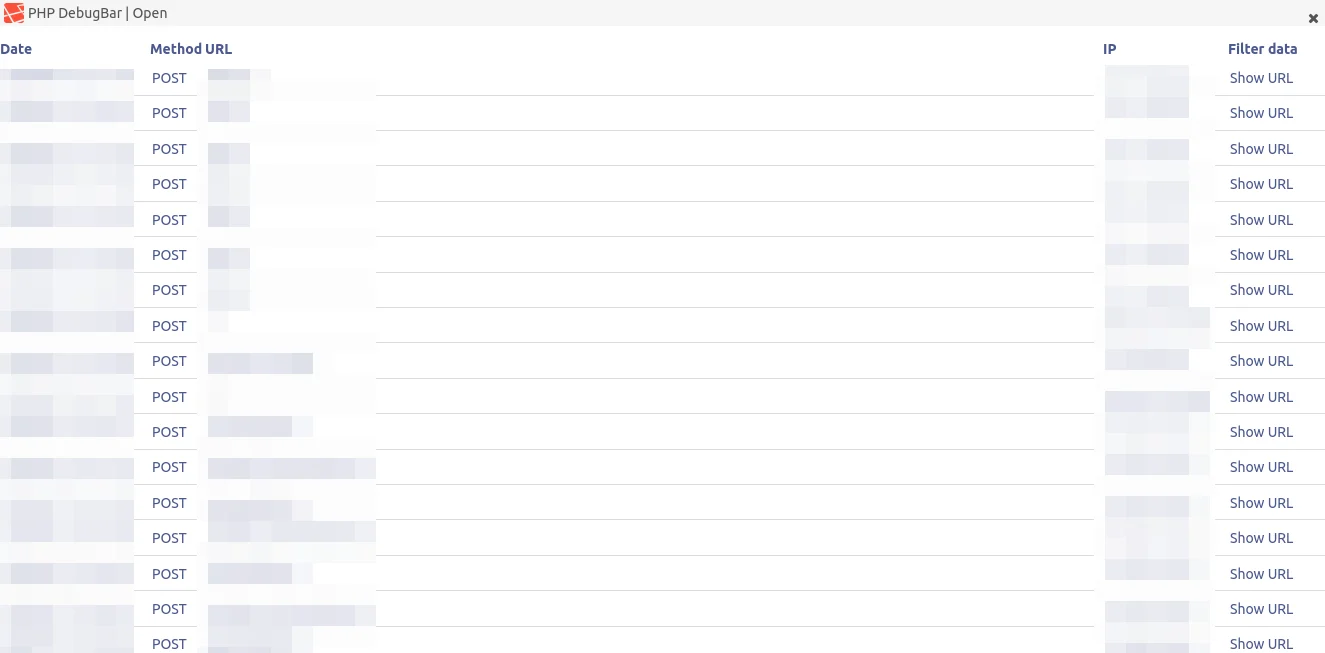
That list showed the client-side POST and GET requests, many of them carrying SQL queries sent to the backend. A little research explained the functionality of the PHP DebugBar, and the researchers began to see credentials, JWT tokens and full responses of the requests.

At that point the leaked sensitive information had to be documented and assessed.
Exploitation
Step 1: Admin credentials from a debug entry
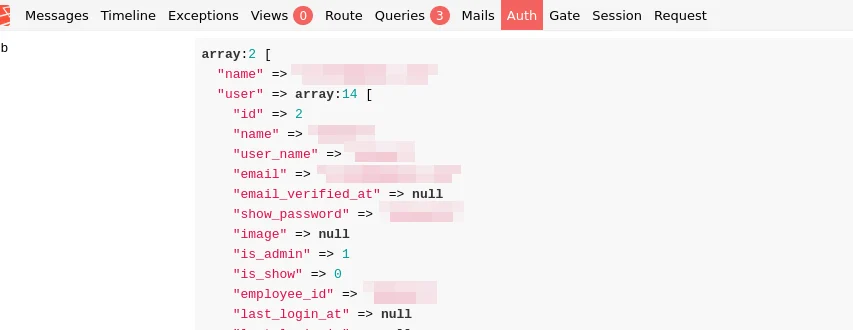
Immediately, admin credentials were found in a POST request to the login URL.
Step 2: Logging in to the marketing console
With those credentials the researchers logged in to the Mail Marketing Application and were immediately in. The application was a central Email Marketing console with 13 different servers connected, and it was actively running processes. To avoid disrupting production activity, they logged out. No pictures of this application could be included either.
Step 3: Exposed .env variables
Having control of the application was not enough. After discussion the researchers looked for something beyond account takeover, and with a little research found a URL that exposed .env variables on the client-side.
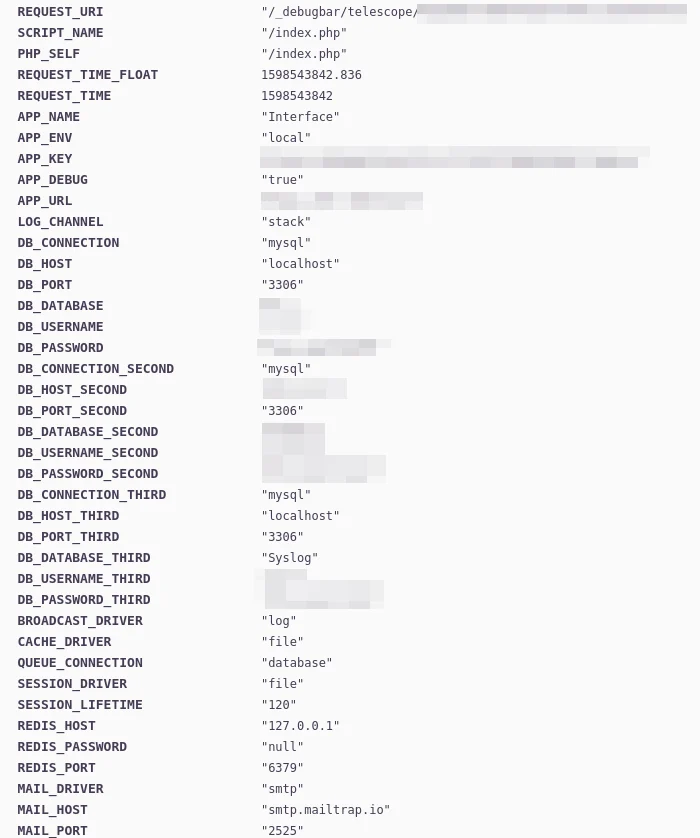
At this point they had full control of the application and, in their words, owned the backend for the application, maybe.
Step 4: Authenticating to MySQL
They tried to authenticate to the MySQL server:
mysql -h x.x.x.x -u username -p
The result was: WE'RE IN.
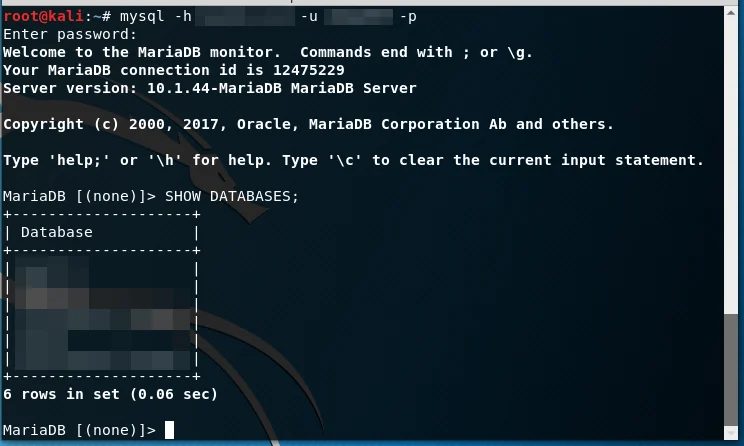
They stopped there. Exposing exceedingly sensitive database information, or running the risk of being held accountable, was the last thing they wanted; stopping once you have this much control is generally good practice. They went to report it to HackerOne.
Reporting
The researchers held a lot of information: they could have dumped the database, modified the applications, or sent emails on behalf of the servers. The findings were clearly critical, and they were brought to HackerOne. The reporting process was similar to what is described in another of their write-ups, but this bounty turned into a psychological thriller. The response contained the words researchers never want to hear:
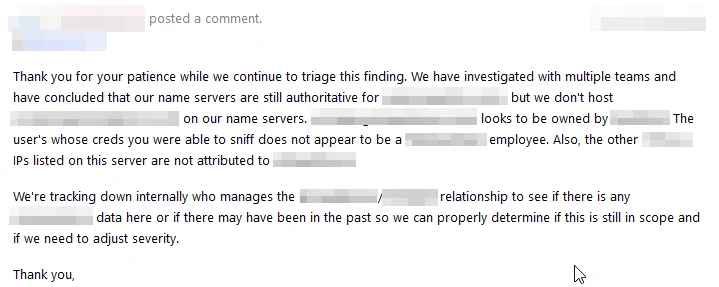
"We don't host 'x' on our name servers, looks to be owned by x."
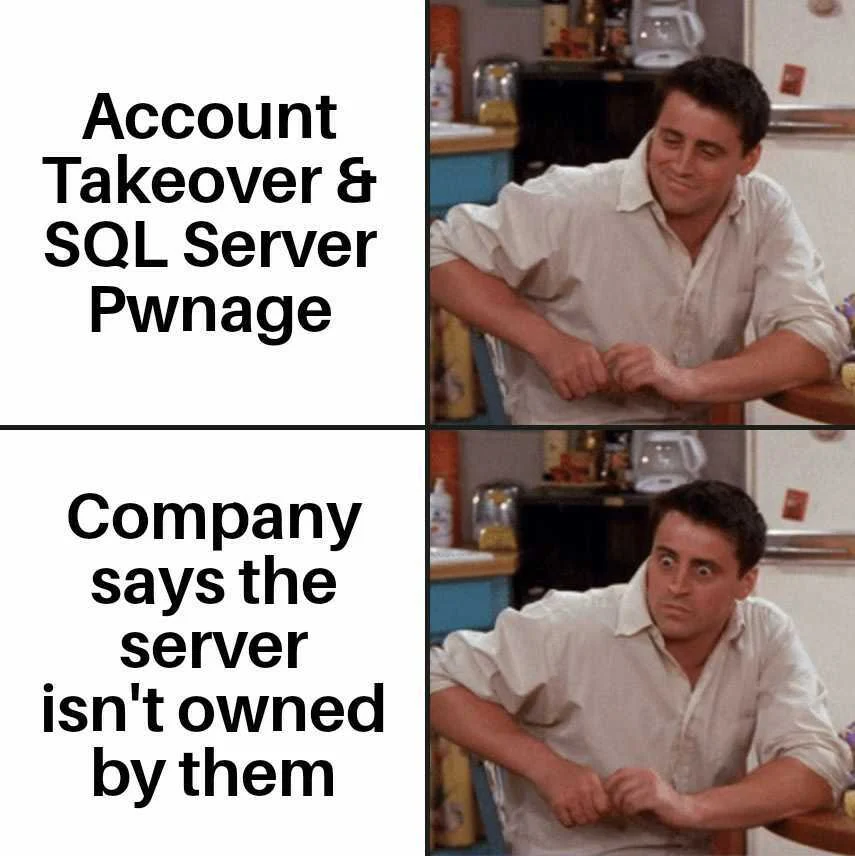
That opened another possibility: a threat actor actively exploiting the company that had been reported to.
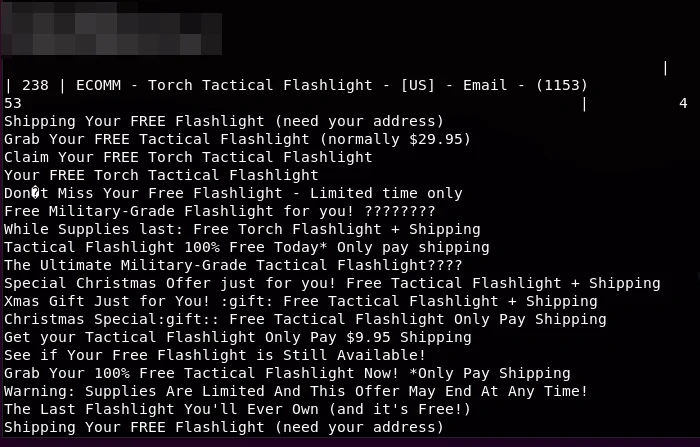
It looked like spam email marketing, but why would a legitimate company send those emails? The answer was simple: they didn't know it was happening.
Going back to the Email Marketing Application and logging in once again, enumeration showed that 13 separate companies' DNS nameservers were in this console, and they were not owned by the company that had been tested, as previously expected.
What exactly was being done was not clear at first, but the pieces came together into a final determination:
- Roughly 1.7+ million email addresses were in the database.
- Roughly 5+ million black hat marketing emails had been sent out.
- 13 separate companies had DNS nameservers possibly being abused, with one confirmed DNS nameserver abuse case.
The situation shifted completely: a malicious marketing campaign was running. How effectively it was running, and how many of the 13 companies were actively being exploited, is unknown, but at least one was confirmed, the company being reported to on HackerOne. The researchers then had to tell that company that its DNS nameserver was misconfigured and was being used to send spam marketing emails to millions of people.
Root cause
The report does not analyse the code. What it shows is client-side Laravel PHP debugging left enabled on a production application, which exposed POST and GET requests, SQL queries, credentials, JWT tokens and full responses, plus a URL that exposed .env variables on the client-side. The debug output gave application admin access, and the .env exposure was followed by a successful MySQL login. The DNS side is a separate misconfiguration: nameservers of 13 companies sat in the marketing console, and at least one company's nameserver was confirmed to be abused to send spam. Why the debug bar and the .env exposure were reachable in production is not stated.
Impact
Under the conditions found, an attacker could take over the admin account of the Mail Marketing Application, obtain full control of the application, which had 13 servers connected to it, and authenticate to the MySQL backend. From there the researchers note they could have dumped database information, modified the applications and sent emails on behalf of the servers. The SQL server logs showed roughly 1.7+ million email addresses, and roughly 5+ million black hat marketing emails had been sent. The report hedges on how many of the 13 companies were actually exploited: one confirmed case, the rest possible.
Fix
The report does not describe any remediation.
Mail Marketing Vendor Pays Us
The HackerOne program rated its part in the misconfiguration a low, $50, and the researchers respectfully disagree with that rationale. The Mail Marketing Company paid them for the findings on Bugcrowd instead, $1500, and they appreciate its kindness and understanding towards its clients' security. It was nice to make an extra $1550 for helping out.

Variants to test
- Look for a Laravel debug bar on production hosts reached through IP addresses and odd hostnames found during enumeration. A positive result is a button or panel that lists requests with SQL queries, credentials, tokens or full responses.
- Probe for URLs that render
.envcontents client-side. A positive result is key/value output including database credentials or application keys. - Reuse credentials and tokens seen in debug output against the login form and against the database host. A positive result is a successful login or a MySQL session.
- Check the SOA record of discovered mail infrastructure to see which nameserver it points to, and compare with what the program says it owns.
What happened, in plain words
Two researchers, Jackson and the author, were taking part in a private bug bounty programme on HackerOne. A bug bounty programme is a deal offered by an organisation: if you find a security problem in its systems and report it responsibly, it pays you a reward (the bounty) instead of calling the police. "Private" means you can only take part if you are invited.
While looking around, they found a web page that had been left in a special "debugging" mode. Debugging mode is a feature developers switch on while building a website so they can see what is going on inside it, a bit like leaving the service hatch of a machine open while you repair it. It should always be closed before the machine is handed to the public. Because it was left open, the page was showing the researchers things it should never show a visitor: the requests the page was making, the database commands behind them, usernames and passwords, and login tokens.
From those leaks they got into the admin account of an email marketing application (a web tool for sending bulk email), and later authenticated to the MySQL server. When they reported it, the company replied that the server was not actually theirs. That reply led to a much bigger discovery: someone was using the setup to send millions of spam marketing emails, and the company did not even know it was happening. The researchers told them, and the mail marketing vendor behind the tool paid them for the findings.
This is the beginner-friendly retelling of that story, step by step, with every command and screenshot in the same order as the original.
Context
This write-up covers a private bug bounty engagement run through HackerOne. Jackson (@JacksonHHax) and the author found client-side Laravel PHP debugging exposed on a web application. That led to full takeover of a SQL Server and account takeover of the Admin account of a Mail Marketing Application. The application was custom built and, as the investigation went on, turned out to be the focal point of a malicious mail marketing campaign.
A few words before we start, because the rest of the article leans on them:
- Web application: a program you use through your browser, like an online shop or webmail. Nothing is installed on your computer; the work happens on a server somewhere else.
- Server: a computer that stays switched on and answers requests from browsers. When you open a website, your browser asks a server for a page and the server sends it back.
- Laravel: a popular toolkit (a "framework") that programmers use to build web applications in the PHP programming language. It saves developers a lot of work, and it comes with helpful extras, one of which is the debug bar we will meet shortly.
- PHP: a programming language used a lot for websites.
- SQL Server / MySQL: database programs. A database is an organised store of information, like a very large, very strict spreadsheet. Websites keep user accounts, orders, email lists and so on in a database, and they talk to it using a language called SQL.
- Account takeover: getting into someone else's account, usually the administrator's, and being able to do everything that person could do.
- Client-side: happening in your browser, on your computer, rather than on the server. The opposite is server-side.
The target was reached through an IP address that looked like a mail server of some sort. An IP address is the numeric address of a computer on the internet, like a postal address but made of numbers; every website name you type is translated into one behind the scenes. A quick scan revealed a web application behind it. A scan is simply a program asking a computer which doors (network ports) are open and what is answering on them.
The portal was unlike anything the researchers had seen before, and reverse image searches found no similar applications. A reverse image search is when you give a search engine a picture and ask it to find pages with the same or similar pictures; the researchers used it to see whether this login page belonged to some known product. The report gives the address only as http://X.X.X.X, and the unique nature of the portal meant no pictures of it could be included.
Setup
The work started with ordinary enumeration. Enumeration is the patient first phase of any security test: listing everything that belongs to the target, the way a burglar might first walk around a building noting windows and doors, except here it is done with permission. The tools named are:
- Amass: a tool that finds subdomains. A subdomain is a name like
mail.example.comthat sits under a main domainexample.com; organisations often have many, and forgotten ones are a classic way in. - Aquatone: a tool that takes screenshots of many web pages automatically, so you can flip through them and spot the interesting ones.
- Shodan: a search engine for internet-connected devices and servers rather than for web pages. You can search it for, say, all servers running a particular piece of software.
No accounts, roles or product versions are described beyond that. The application was a PHP Laravel application with the debug bar enabled, and it functioned as a central email marketing console with 13 different servers connected and processes actively running. "Backed by" means the application stores its data in that database. "Processes actively running" means the console was not a dusty test system: it was doing real work at that moment.
The researchers state as a general rule that specific parts of the write-up are redacted and that homebrewed technology is left out entirely, so that the affected organisations are not given away and no further damage is caused. Redacted means details have been blacked out. This is normal in public write-ups: you want to teach, not to hand out a map to the vulnerable systems.
Finding it
What stuck out on the login portal was a PHP Laravel Debugging Button.
The screenshot shows that button on the login page. A login portal is simply the page where you type a username and password. The debug button is not part of the normal login experience; it is a leftover from development. Think of it as a maintenance hatch on a lift that the engineers use during servicing. It is fine while the building is being built, but if it is still there when the public moves in, anyone who presses it can see the lift's insides.
Without being experts, the researchers judged that the button had some functionality baked into it. Clicking it produced many POST and GET requests in a neat and tidy list.
Two terms appear here, and they are worth learning properly because they come up everywhere:
- GET request: the browser asking the server for something, like "please give me this page". The details of what you want can travel in the address itself.
- POST request: the browser sending data to the server, like submitting a form with your username and password. The data travels in the body of the request rather than in the address.
Every time you load a page or submit a form, your browser and the server exchange these requests and responses. Normally you never see them. The debug bar was showing them to anyone who clicked.
That list showed the client-side POST and GET requests, many of them carrying SQL queries sent to the backend. A SQL query is an instruction to the database, for example "find the user with this name" or "insert this row". Seeing the queries means seeing how the application thinks. A little research explained the functionality of the PHP DebugBar, and the researchers began to see credentials, JWT tokens and full responses of the requests.
- Credentials: the username and password pair used to log in.
- JWT token: a JSON Web Token. A token is a small piece of text that a server gives you after you log in, and that your browser sends back with every later request so the server knows who you are, instead of asking for your password each time. Think of the wristband you get at a festival: you show it once at the gate, and after that staff just glance at your wrist. A JWT is one common format for such a wristband, and it is often stored in a cookie, which is a small file a website asks your browser to keep for it.
- Full responses: the complete replies the server sent back, which can include personal data, internal messages and more.
This screenshot shows the debug panel listing requests and the SQL queries behind them. At that point the leaked sensitive information had to be documented and assessed. Documenting matters in a bounty: you need clear evidence of what you saw and when, both to convince the programme and to show you did not go further than necessary.
Exploitation
Exploitation means using a weakness you have found to actually do something with it, as opposed to just noticing it. The researchers moved carefully, one step at a time.
Step 1: Admin credentials from a debug entry
Immediately, admin credentials were found in a POST request to the login URL. In plain words: when someone logged in to the application, the browser sent their username and password to the server, and the debug bar recorded that request, password included, where anyone could read it.
The screenshot shows that recorded login request with the admin credentials in it. This is the equivalent of a security camera that films the keypad and then plays the recording on a screen in the lobby.
Step 2: Logging in to the marketing console
With those credentials the researchers logged in to the Mail Marketing Application and were immediately in. The application was a central Email Marketing console with 13 different servers connected, and it was actively running processes. To avoid disrupting production activity, they logged out. "Production" means the live system real customers are using, as opposed to a test copy. Logging out straight away was a deliberate, ethical choice: prove you can get in, then leave things exactly as you found them. No pictures of this application could be included either.
Step 3: Exposed .env variables
Having control of the application was not enough. After discussion the researchers looked for something beyond account takeover, and with a little research found a URL that exposed .env variables on the client-side.
A .env file is a small settings file that many web applications keep. It holds configuration values: where the database lives, which account to use, and the password for it. It is meant to stay on the server, private, like the key cabinet in a building. "Exposed on the client-side" means the browser could simply fetch it, so anyone with the address could read the key cabinet's contents.
The screenshot shows that page returning the .env contents. At this point they had full control of the application and, in their words, owned the backend for the application, maybe. The "maybe" is honest caution: having database credentials is not the same as having proved they work.
Step 4: Authenticating to MySQL
They tried to authenticate to the MySQL server:
mysql -h x.x.x.x -u username -p
Line by line, in plain words:
mysqlis the name of the standard command-line client for MySQL, a program that lets you talk to a MySQL database from a terminal.-h x.x.x.xtells it which host (which computer) to connect to. The address is masked here, as everywhere in this write-up.-u usernamegives the account name to log in with, taken from the leaked settings.-ptells the program to ask for the password interactively rather than putting it on the command line, where it could be seen by others on the same machine.
The result was: WE'RE IN.
This screenshot shows the successful connection. They stopped there. Exposing exceedingly sensitive database information, or running the risk of being held accountable, was the last thing they wanted; stopping once you have this much control is generally good practice. In bounty work the goal is to demonstrate the problem, not to rummage through other people's data. They went to report it to HackerOne.
Reporting
The researchers held a lot of information: they could have dumped the database, modified the applications, or sent emails on behalf of the servers. "Dumping" a database means copying all of its contents out. The findings were clearly critical, and they were brought to HackerOne. The reporting process was similar to what is described in another of their write-ups, but this bounty turned into a psychological thriller. The response contained the words researchers never want to hear:
"We don't host 'x' on our name servers, looks to be owned by x."
To understand why that reply matters, you need to know what a nameserver is. The internet's naming system, DNS, is the phone book of the internet: it translates names like example.com into IP addresses. A nameserver is the computer that holds the entries for a domain. If a company says "that name is not on our nameservers", it is saying: this thing is not ours, we do not manage it.
That opened another possibility: a threat actor actively exploiting the company that had been reported to. A threat actor is simply someone acting with malicious intent, an attacker.
It looked like spam email marketing, but why would a legitimate company send those emails? The answer was simple: they didn't know it was happening.
Going back to the Email Marketing Application and logging in once again, enumeration showed that 13 separate companies' DNS nameservers were in this console, and they were not owned by the company that had been tested, as previously expected.
What exactly was being done was not clear at first, but the pieces came together into a final determination:
- Roughly 1.7+ million email addresses were in the database.
- Roughly 5+ million black hat marketing emails had been sent out.
- 13 separate companies had DNS nameservers possibly being abused, with one confirmed DNS nameserver abuse case.
"Black hat" means doing it for malicious or dishonest reasons, as opposed to "white hat", which is testing with permission, as these researchers were. "Abused" here means the nameservers were being used for something their owners never agreed to.
The situation shifted completely: a malicious marketing campaign was running. How effectively it was running, and how many of the 13 companies were actively being exploited, is unknown, but at least one was confirmed, the company being reported to on HackerOne. The researchers then had to tell that company that its DNS nameserver was misconfigured and was being used to send spam marketing emails to millions of people. A misconfiguration is a setting that is wrong, not a bug in the software itself: the door was fitted correctly, but someone left it unlocked.
Root cause
The report does not analyse the code. What it shows is client-side Laravel PHP debugging left enabled on a production application, which exposed POST and GET requests, SQL queries, credentials, JWT tokens and full responses, plus a URL that exposed .env variables on the client-side. The debug output gave application admin access, and the .env exposure was followed by a successful MySQL login. The DNS side is a separate misconfiguration: nameservers of 13 companies sat in the marketing console, and at least one company's nameserver was confirmed to be abused to send spam. Why the debug bar and the .env exposure were reachable in production is not stated.
In everyday terms: the debug bar is a window into the application's insides, and the .env page is the key cabinet. Both were left open to the street. Separately, the nameserver settings let the mail system send on behalf of companies that had not agreed to it.
Impact
Under the conditions found, an attacker could take over the admin account of the Mail Marketing Application, obtain full control of the application, which had 13 servers connected to it, and authenticate to the MySQL backend. From there the researchers note they could have dumped database information, modified the applications and sent emails on behalf of the servers. The SQL server logs showed roughly 1.7+ million email addresses, and roughly 5+ million black hat marketing emails had been sent. The report hedges on how many of the 13 companies were actually exploited: one confirmed case, the rest possible.
Fix
The report does not describe any remediation. Remediation means the changes made to close a problem. In plain words: close the service hatch, lock the key cabinet, and fix the phone book entries so nobody else can send mail in your name.
Mail Marketing Vendor Pays Us
The HackerOne program rated its part in the misconfiguration a low, $50, and the researchers respectfully disagree with that rationale. The Mail Marketing Company paid them for the findings on Bugcrowd instead, $1500, and they appreciate its kindness and understanding towards its clients' security. Bugcrowd is another bug bounty platform, a competitor to HackerOne. It was nice to make an extra $1550 for helping out.
Variants to test
These are the lessons turned into things a beginner can try, on systems they are allowed to test:
- Look for a Laravel debug bar on production hosts reached through IP addresses and odd hostnames found during enumeration. A positive result is a button or panel that lists requests with SQL queries, credentials, tokens or full responses.
- JSON is a common text format for data, made of names and values.
- Probe for URLs that render
.envcontents client-side. A positive result is key/value output including database credentials or application keys. - Reuse credentials and tokens seen in debug output against the login form and against the database host. A positive result is a successful login or a MySQL session.
- Check the SOA record of discovered mail infrastructure to see which nameserver it points to, and compare with what the program says it owns. SOA stands for Start of Authority: the record that says which nameserver is the official source of truth for a domain. A positive result is a nameserver the target does not control but that is used by its mail flow.
Glossary
- Account takeover: gaining access to someone else's account, usually an administrator's, and being able to act as them.
- Amass: a tool that discovers subdomains of a domain.
- API: a defined way for one program to talk to another, like a service counter with agreed forms to fill in.
- Aquatone: a tool that automatically takes screenshots of many web pages.
- Backend: the part of a system that runs on the server, out of sight of the visitor, including the database.
- Black hat: malicious or dishonest activity, as opposed to testing with permission.
- Bug bounty programme: a scheme where an organisation pays people who report security problems to it responsibly.
- Bugcrowd: a bug bounty platform, a competitor to HackerOne.
- Client-side: happening in the visitor's browser rather than on the server.
- Cookie: a small piece of data a website asks your browser to store and send back with later requests, often used to remember that you are logged in.
- Credentials: a username and password pair used to log in.
- Database: an organised store of data, such as user accounts or email lists, managed by a database program.
- Debug bar / debug mode: a developer feature that shows what an application is doing internally; it should be switched off in production.
- DNS: the internet's naming system, which translates names like
example.cominto IP addresses. - Endpoint: a specific address on a server that answers a particular kind of request.
- Enumeration: systematically listing everything that belongs to a target, such as subdomains and open services.
.envfile: a settings file holding configuration values, often including database credentials, meant to stay private on the server.- Exploitation: using a discovered weakness to actually do something, rather than just noticing it.
- GET request: a request from the browser asking the server for something, with details carried in the address.
- HackerOne: a bug bounty platform where organisations run programmes and receive reports.
- IP address: the numeric address of a computer on the internet.
- JSON: a common text format for data, made of names and values.
- JWT (JSON Web Token): a token format used to prove who you are after logging in, without resending your password.
- Laravel: a popular framework for building web applications in PHP.
- Misconfiguration: a setting that is wrong, rather than a flaw in the software itself.
- MySQL: a widely used database program.
- Nameserver: the computer that holds the DNS entries for a domain.
- PHP: a programming language commonly used for websites.
- POST request: a request from the browser sending data to the server, such as a login form.
- Production: the live system real users are using, as opposed to a test copy.
- Redacted: hidden or blacked out, usually to protect identities or systems.
- Remediation: the changes made to close a security problem.
- Reverse image search: giving a search engine a picture and asking it to find similar ones online.
- Scan: a program asking a computer which network ports are open and what is answering on them.
- Server: a computer that stays on and answers requests from browsers.
- Shodan: a search engine for internet-connected devices and servers.
- SOA (Start of Authority): the DNS record naming the official source of truth for a domain's entries.
- SQL: the language used to give instructions to a database.
- SQL Server: a database program, mentioned in this report alongside MySQL.
- Subdomain: a name under a main domain, such as
mail.example.comunderexample.com. - Threat actor: someone acting with malicious intent; an attacker.
- Token: a piece of text issued after login that proves who you are on later requests.
- Web application: a program used through a browser, with the work done on a server.




