Palo Alto PAN-OS CVE-2026–0330: Panorama Root RCE Fix
A code injection flaw in Panorama lets an authenticated administrator with network access run arbitrary code as root. An attacker with admin credentials could gain full control of the underlying operating system.

medium.com
Published on medium.com
Security
The full write-up lives on its author's site
It belongs to its author, so we link to it rather than copy it. The other two tabs are our own rewrites, checked against it.
Context
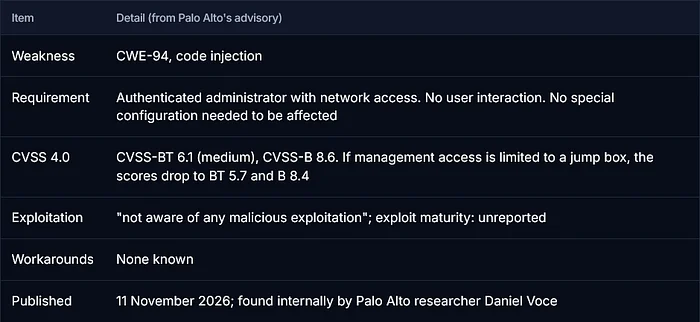
Palo Alto Networks published an advisory on 11 November 2026 for a PAN-OS flaw that lets an attacker run arbitrary code as root. The CVE is CVE-2026-0330, a code injection issue classified as CWE-94. The affected product is Panorama, the management server that administrators use to configure and oversee other firewalls. Cloud NGFW, Prisma Access and standalone PAN-OS firewalls are not affected.
The affected branches are PAN-OS 12.2, 12.1, 11.2, 11.1 and 10.2. The advisory rates the issue Medium, with urgency "moderate", and Palo Alto says it is not aware of any malicious exploitation. Exploit maturity is listed as unreported.
A second PAN-OS flaw, CVE-2026-0322, was exploited in October and is easy to confuse with this one. The two are covered separately below.

Setup
The precondition for CVE-2026-0330 is an authenticated administrator who can reach Panorama over the network. This is not an unauthenticated attack from the internet. In practical terms it is privilege escalation: a user who can log in as an administrator, a stolen admin credential, or a compromised admin session can turn that access into full control of the underlying operating system, below the level the product normally exposes.
No workaround is known. The fix is to upgrade Panorama to a fixed release.
Finding it
The advisory's headline, arbitrary code execution as root, is accurate but drops a condition: the attacker must already be an authenticated administrator with network access to Panorama. Root on a security appliance is about as bad as it gets, but the admin requirement changes who can reach that outcome.
That matters because Panorama manages other firewalls. Root on a management server can mean visibility into, or influence over, the configuration of every device it manages. That is the general role of Panorama, not a confirmed attack path for this CVE, and the advisory does not discuss one.
Exploitation
Step 1: understand the two scores
One news write-up called the two CVSS numbers, 6.1 and 8.6, inconsistent. They are not. They are not.
- CVSS-BT is the base score adjusted by threat information. Here, exploit maturity "unreported" pulls it down to 6.1.
- CVSS-B is the base score alone, 8.6, which is high because a successful attack has high impact on confidentiality, integrity and availability.
The advisory's urgency rating follows the lower, threat-adjusted score. That reading comes from the vector in the advisory, which includes the exploit maturity field, not from an explanation Palo Alto gives, so treat it as an interpretation.
Step 2: identify the affected and fixed versions
The advisory lists fixed releases per branch. Find your Panorama's branch, then check you are at or above the fixed hotfix for it.
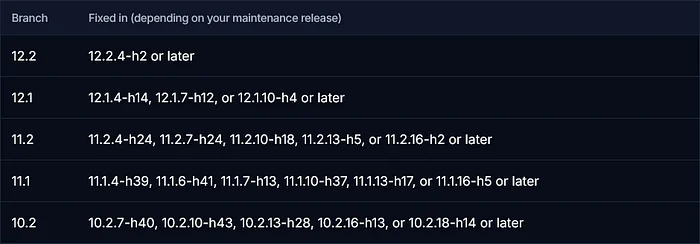
Unsupported older versions have no fix; the advisory says to upgrade to a supported fixed release. Hotfix versions work per line: 11.2.7-h24 fixes the 11.2.7 line, and it does not mean 11.2.7-h10 is fixed. The "or later" applies within a line, so match your maintenance release first. Where it is ambiguous, trust the advisory page over any table.
Step 3: read the installed version
On the Panorama CLI, the installed version can be read with:
show system info | match sw-version
That is the standard PAN-OS way to display the software version. The web interface shows the same value on the dashboard.
Step 4: reduce exposure while you schedule the upgrade
The advisory states that restricting management access to trusted internal IP addresses significantly reduces the risk, and gives a lower score when access goes through a jump box. In practice:
- Never expose Panorama's management interface to the internet or to general user networks.
- Allow management only from a small set of internal addresses or a dedicated jump host. In the PAN-OS web interface this is the management interface's permitted IP addresses setting. Check Palo Alto's documentation for the exact location in your version, as the menu path was not verified.
- Reduce the number of administrator accounts, remove stale ones and require MFA where you can. The flaw needs an administrator, so every admin account is part of the attack surface.
- Palo Alto notes that customers with a Threat Prevention subscription get limited coverage from Threat IDs
510045and510048, and that this requires SSL decryption. It is partial coverage, not a substitute for patching.
The advisory says access restriction reduces risk but does not replace the update.
Step 5: do not mix it up with CVE-2026-0322
The same weeks brought a second, better-known PAN-OS flaw:
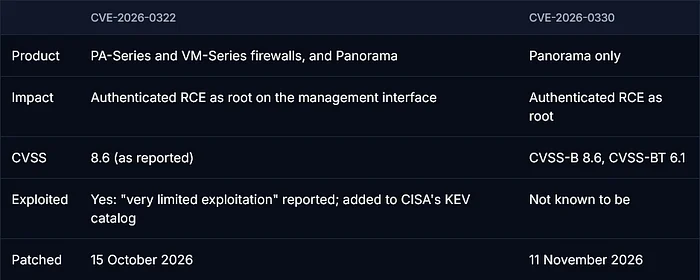
The 0322 details come from The Hacker News coverage, not the vendor page, which could not be opened. If you patched for 0322 in October, you may still need the new Panorama release for 0330. The fixed hotfix numbers differ.
The Hacker News also lists three IP addresses that Palo Alto assessed as linked to the 0322 activity: [redacted], [redacted] and [redacted]. If you keep management-interface access logs, a quick look is cheap:
grep -E -w '66\.42\.72\.14|208\.83\.239\.114|149\.248\.47\.234' /path/to/your/access.log
No hits do not mean you are clean, since attackers change addresses, and these are not indicators for CVE-2026-0330. The -w flag makes [redacted] not match [redacted]. The command was tested against a sample log.
Step 6: a sensible order of operations
- Inventory every Panorama (physical and virtual) and its PAN-OS version.
- Check that none are reachable from untrusted networks, and fix that first. It takes minutes.
- Schedule upgrades to the fixed release for each branch, starting with the most exposed.
- Review administrator accounts, API keys and recent admin logins.
- After the upgrade, confirm the new version and that managed devices still check in.
Root cause
The flaw is a code injection issue, CWE-94, affecting Panorama. The advisory does not describe the vulnerable code path, so the specific mistake is not public in the material available. What is clear from the advisory is the access condition: the injection is reachable by an authenticated administrator with network access, and a successful injection runs code with root privileges on the underlying operating system.
Restricting management access to trusted internal addresses reduces the risk, and the advisory gives a lower score when access goes through a jump box, but that is exposure reduction rather than a fix. Threat Prevention coverage from Threat IDs 510045 and 510048 is limited and requires SSL decryption, so it is partial coverage only.
Impact
An authenticated administrator with network access to Panorama can run arbitrary code with root privileges. That is privilege escalation from the product's administrative layer to full control of the underlying operating system. Because Panorama manages other firewalls, root on the management server can mean visibility into, or influence over, the configuration of every device it manages. That is the general role of Panorama, not a confirmed attack path for this CVE.
The advisory says Palo Alto is not aware of any malicious exploitation, and exploit maturity is listed as unreported. That can change, so check the advisory page. Cloud NGFW, Prisma Access and standalone PAN-OS firewalls are not affected by this CVE; CVE-2026-0322 is the one that covers firewalls.
Fix
Upgrade Panorama to a fixed release for your branch. No workaround is known. Unsupported older versions have no fix, so upgrade to a supported fixed release. Restricting management access lowers risk but does not fix the flaw.
Variants to test
- Check every Panorama instance, physical and virtual. A positive result is an instance on an affected branch (12.2, 12.1, 11.2, 11.1 or 10.2) below the fixed hotfix for its maintenance line.
- Check the exact hotfix line, not just the branch. A positive result is a version below the fixed hotfix for its maintenance line, since the "or later" applies within the line.
- Check management-interface reachability. A positive result is a Panorama management interface reachable from the internet or from general user networks rather than a small set of internal addresses or a dedicated jump host.
- Check administrator accounts. A positive result is stale or excess admin accounts, or admins without MFA, since every admin account is part of the attack surface for this flaw.
- Check for the 0322 indicators separately. A positive result is a hit in management-interface access logs for
[redacted],[redacted]or[redacted]; these are not indicators for CVE-2026-0330, and no hits do not mean you are clean. - Check whether a 0322 patch was mistaken for a 0330 fix. A positive result is a Panorama still below the fixed hotfix for 0330 after patching for 0322 in October, since the fixed hotfix numbers differ.
What happened, in plain words
On 11 November 2026, Palo Alto Networks published a security advisory about a flaw in one of its products. An advisory is the vendor's official notice that something is wrong, who is affected and what to do about it. This particular flaw lets someone run their own commands on the machine with the highest level of permission the machine has, called root. The flaw has an identifier, CVE-2026-0330. A CVE is a public catalogue number for a known security bug, so people around the world can refer to the same issue without confusion.
The product affected is Panorama. Panorama is not a firewall itself; it is the management server that administrators use to configure and watch over a group of firewalls. Think of a building's security office: the guards at the doors are the firewalls, and the office with the monitors and the master key cabinet is Panorama. If someone gets control of the office, they can change what every guard is told to do.
The headline sounds dramatic, and in part it is: root on a security appliance is about as bad as it gets. But the details matter more than the headline. The flaw needs an authenticated administrator, meaning someone who can already log in with an admin account, and Palo Alto says it is not aware of anyone actually using it against customers.
A second PAN-OS flaw, CVE-2026-0322, was exploited in October and is easy to confuse with this one. PAN-OS is the operating software that runs on Palo Alto's devices. Both flaws are covered below so you can tell them apart.
The short version
- What: CVE-2026-0330, a code injection flaw (CWE-94) that lets an authenticated administrator with network access run arbitrary code with root privileges. Code injection means the software takes something a user supplies and treats part of it as instructions to run, instead of as plain data. CWE-94 is the catalogue number for that whole family of mistakes.
- Where: Panorama running PAN-OS 12.2, 12.1, 11.2, 11.1 and 10.2. These are version numbers, like editions of a book: each branch is a line of releases that receives its own fixes. Cloud NGFW, Prisma Access and standalone PAN-OS firewalls are not affected.
- Severity: Medium, urgency "moderate" in the advisory, though the base score is high (see below). Severity is the vendor's attempt to say how much this should worry you.
- Exploited: Palo Alto says it is not aware of malicious exploitation. Exploit maturity is listed as unreported.
- Fix: upgrade Panorama to a fixed release. No workaround is known. A workaround is a change you can make to block the attack without installing the update.
What the advisory says
The advisory is the vendor's own page, and it is the thing to trust over any summary, including this one. It states the affected product and versions, the two scores discussed next, and the fixed releases. It also says Palo Alto is not aware of any exploitation.
Why 6.1 and 8.6 at the same time?
One news write-up called those two numbers inconsistent. They aren't. Both are CVSS scores. CVSS is a standard scoring system for security flaws, roughly like a star rating for how serious a bug is, but calculated from a fixed checklist instead of taste.
- CVSS-BT is the base score adjusted by threat information. Here, exploit maturity "unreported" pulls it down to 6.1. "Threat information" means what is known about real attacks: is there working attack code, is anyone using it, how reliable is it.
- CVSS-B is the base score alone, 8.6, which is high because a successful attack has high impact on confidentiality, integrity and availability. Those three words are the standard way to describe damage: confidentiality means keeping secrets secret, integrity means keeping data correct and unaltered, and availability means keeping the service running.
The advisory's urgency rating follows the lower, threat-adjusted score. That reading comes from the vector in the advisory, which includes the exploit maturity field, not from an explanation Palo Alto gives, so treat it as an interpretation. The "vector" is the short encoded string from which the score is calculated; it lists each factor, including exploit maturity.
Is "attackers can execute code as root" accurate?
Yes, with a condition that the headline drops: the attacker must already be an authenticated administrator who can reach Panorama over the network. This is not an unauthenticated attack from the internet. "Unauthenticated" means without logging in at all; that is the scarier kind, and this is not it.
In practical terms it is privilege escalation: a user who can log in as an administrator, a stolen admin credential, or a compromised admin session can turn that access into full control of the underlying operating system, below the level the product normally exposes. Privilege escalation means starting with some access and using a flaw to get more. A credential is a username and password, or a key or token that stands in for one. A session is the state of being logged in: after you sign in, the server remembers you, often with a cookie, which is a small piece of data your browser stores and sends back with each request so the server knows who you are.
That matters because Panorama manages other firewalls. Root on a management server can mean visibility into, or influence over, the configuration of every device it manages. That is the general role of Panorama, not a confirmed attack path for this CVE, and the advisory does not discuss one.
Affected and fixed versions
The advisory lists fixed releases per branch. Find your Panorama's branch, then check you are at or above the fixed hotfix for it. A hotfix is named with an -h suffix and a number, as in 11.2.7-h24.
Unsupported older versions have no fix; the advisory says to upgrade to a supported fixed release. Hotfix versions work per line: 11.2.7-h24 fixes the 11.2.7 line, and it does not mean 11.2.7-h10 is fixed. The "or later" applies within a line, so match your maintenance release first. Where it is ambiguous, trust the advisory page over any table.
On the Panorama CLI, the installed version can be read with:
show system info | match sw-version
Line by line, in plain words:
show system infoasks the device to print a summary of its system information, including the software version.- The vertical bar
|is a pipe. It takes the output of the command on its left and hands it to the command on its right, like passing a printed page to someone with a highlighter. match sw-versionfilters that output down to the lines containing the textsw-version, which is the field holding the software version. So the whole line means: print the system summary, then show me only the software version line.
The CLI is the command line interface, a text prompt where you type commands instead of clicking. That is the standard PAN-OS way to display the software version. The web interface shows the same value on the dashboard.
Reduce exposure while you schedule the upgrade
The advisory states that restricting management access to trusted internal IP addresses significantly reduces the risk, and gives a lower score when access goes through a jump box. An IP address is the numeric address of a machine on a network, like a postal address for computers. A jump box, or jump host, is a single hardened machine that administrators connect through before reaching the sensitive systems, so the sensitive systems only ever see that one address.
In practice:
- Never expose Panorama's management interface to the internet or to general user networks. The management interface is the web page and command line where administrators log in; exposing it is like leaving the security office door open onto the street.
- Allow management only from a small set of internal addresses or a dedicated jump host. In the PAN-OS web interface this is the management interface's permitted IP addresses setting. Check Palo Alto's documentation for the exact location in your version, as the menu path was not verified.
- Reduce the number of administrator accounts, remove stale ones and require MFA where you can. MFA, multi-factor authentication, means logging in with something beyond a password, such as a code from a phone app. The flaw needs an administrator, so every admin account is part of the attack surface. Attack surface is the total set of ways in, so fewer accounts means fewer ways in.
- Palo Alto notes that customers with a Threat Prevention subscription get limited coverage from Threat IDs
510045and510048, and that this requires SSL decryption. Threat Prevention is a subscription that provides coverage identified by Threat IDs. SSL decryption means the device decrypts encrypted traffic so it can inspect it, which is why the coverage only works when that is enabled. It is partial coverage, not a substitute for patching.
The advisory says access restriction reduces risk but does not replace the update.
Don't mix it up with CVE-2026-0322
The same weeks brought a second, better-known PAN-OS flaw:
The 0322 details come from The Hacker News coverage, not the vendor page, which could not be opened. If you patched for 0322 in October, you may still need the new Panorama release for 0330. The fixed hotfix numbers differ.
The Hacker News also lists three IP addresses that Palo Alto assessed as linked to the 0322 activity: [redacted], [redacted] and [redacted]. If you keep management-interface access logs, a quick look is cheap. An access log is a record of who connected to a service, when and from where.
grep -E -w '66\.42\.72\.14|208\.83\.239\.114|149\.248\.47\.234' /path/to/your/access.log
Line by line, in plain words:
grepis a standard command that searches text for a pattern and prints the matching lines.-Etells it to use extended regular expressions, a richer pattern language where|means "or".-wtells it to match whole words only, so[redacted]will not match inside[redacted].- The quoted string is the pattern: any of the three addresses, separated by
|. /path/to/your/access.logis a placeholder for the real path of your log file; you replace it with the actual location on your system.
No hits do not mean you are clean, since attackers change addresses, and these are not indicators for CVE-2026-0330. An indicator is a clue, such as an address or file name, that suggests an attack happened. The -w flag makes [redacted] not match [redacted]. The command was tested against a sample log.
A sensible order of operations
- Inventory every Panorama (physical and virtual) and its PAN-OS version. An inventory is simply a list of what you have; you cannot fix what you have not counted.
- Check that none are reachable from untrusted networks, and fix that first. It takes minutes. Untrusted networks are any networks you do not control, the internet above all.
- Schedule upgrades to the fixed release for each branch, starting with the most exposed.
- Review administrator accounts, API keys and recent admin logins. An API key is a long secret string that lets a program log in on your behalf, so it is as sensitive as a password.
- After the upgrade, confirm the new version and that managed devices still check in. Managed devices are the firewalls Panorama oversees; they regularly contact it, and that contact is how you know the relationship still works.
Common mistakes
- Assuming "medium" means "can wait" on a device with root-level impact. A moderate score reflects the admin requirement and no known exploitation, not harmlessness.
- Confusing the two CVEs, and patching only one.
- Checking firewalls but forgetting Panorama.
- Applying the wrong hotfix for your maintenance line.
- Treating a management interface behind a VPN as safe without limiting who can log in. A VPN is an encrypted tunnel into a network; it keeps outsiders out, but it does not decide which insiders may reach which system.
Frequently asked questions
Does CVE-2026-0330 affect my PA-Series firewall?
According to the advisory, standalone PAN-OS firewalls, Cloud NGFW and Prisma Access are not affected by this CVE. CVE-2026-0322 is the one that covers firewalls.
Is it exploited in the wild?
Palo Alto says it is not aware of any malicious exploitation of CVE-2026-0330. That can change, so check the advisory page.
Can an unauthenticated attacker use it?
The advisory requires an authenticated administrator with network access.
Is there a workaround?
None known. Restricting management access lowers risk but does not fix the flaw.
Glossary
- Advisory: the vendor's official notice about a security flaw, who is affected and what to do.
- API key: a long secret string that lets a program authenticate on your behalf, as sensitive as a password.
- Attack surface: the total set of ways an attacker could get in.
- Authenticated: having logged in successfully with valid credentials.
- Availability: keeping a service running and reachable; one of the three standard kinds of impact.
- Branch: a line of software releases, such as 11.2, that receives its own fixes.
- CLI (command line interface): a text prompt where you type commands instead of clicking.
- Code injection: a flaw where user-supplied input is treated as instructions and run, instead of as plain data.
- Confidentiality: keeping secrets secret; one of the three standard kinds of impact.
- Cookie: a small piece of data a browser stores and sends back so a server can recognise a logged-in session.
- Credential: a username and password, or a key or token that stands in for one.
- CVE: a public catalogue number for a known security vulnerability.
- CVSS: a standard scoring system for the severity of security flaws.
- CVSS-B: the base CVSS score, calculated from the flaw's characteristics alone.
- CVSS-BT: the base CVSS score adjusted by threat information such as exploit maturity.
- CWE-94: the catalogue entry for code injection flaws.
- Exploit maturity: how far real-world attack code for a flaw has progressed; here listed as unreported.
- Hotfix: a small, targeted update on top of a release, named with an
-hsuffix and a number. - Indicator: a clue, such as an IP address or file name, that suggests an attack occurred.
- Integrity: keeping data correct and unaltered; one of the three standard kinds of impact.
- Inventory: a list of the systems you have and their versions.
- IP address: the numeric address of a machine on a network.
- Jump box (jump host): a single hardened machine administrators connect through to reach sensitive systems.
- Management interface: the web page and command line where administrators log in to a device.
- Managed devices: the firewalls that Panorama oversees and configures.
- MFA (multi-factor authentication): logging in with something beyond a password, such as a code from a phone app.
- PAN-OS: the operating software that runs on Palo Alto's devices.
- Panorama: Palo Alto's management server, used to configure and oversee other firewalls.
- Pipe (
|): a way to pass the output of one command as input to another. - Privilege escalation: using a flaw to turn limited access into greater access.
- Root: the highest permission level on a Unix-like system, able to do anything on the machine.
- Session: the state of being logged in, remembered by the server across requests.
- SSL decryption: decrypting encrypted traffic so a device can inspect it.
- Threat ID: the number identifying a specific attack pattern in Threat Prevention.
- Threat Prevention: a subscription that inspects network traffic for known attack patterns and blocks them.
- Unauthenticated: without logging in at all.
- Untrusted network: any network you do not control, the internet above all.
- Vector: the short encoded string from which a CVSS score is calculated, listing each factor.
- VPN: an encrypted tunnel into a network; it keeps outsiders out but does not decide which insiders reach which system.
- Workaround: a change that blocks an attack without installing the update.


