Param Hunting to Injections
A reflected parameter on a login page and a password reset page allowed HTML injection after bypassing a WAF with a closing div tag, and an iframe was then used. The authors also describe a method for building a custom parameter wordlist to find hidden parameters.

So recently we have been working on a private project . Let’s call it redacted.com .
The full write-up lives on its author's site
It belongs to its author, so we link to it rather than copy it. The other two tabs are our own rewrites, checked against it.
Context
This is a write-up about parameter hunting that led to an HTML injection on a private project, referred to throughout as redacted.com. The target was a subdomain, written as <Sub.redacted.com>, that hosted a login page and a password reset feature. The login page responds to invalid credentials by putting an error parameter into the URL, and the password reset flow accepts an email address. The report does not describe the wider application beyond these two features.
The interesting part of the write-up is not the payload itself but the route to it: a workflow for building a target-specific parameter wordlist, then using it to find hidden parameters that generic tools miss.
Setup
The work was done on a private project, so no program name, bounty or severity is given. The tools named in the report are:
- getAllParams (GAP), a Burp Suite extension, used to extract parameters seen while browsing.
- Param Miner, a Burp extension, used to discover hidden parameters once a custom wordlist exists.
- gau, wayback, Katana, or any other URL-gathering tool, used to collect URLs for parameter extraction.
- unfurl, used in a one-liner to pull query strings out of those URLs.
- Param-Extract, a small script the authors wrote to extract parameters from gathered URLs.
- Arjun and x8 are mentioned as alternatives for hidden-parameter discovery.
No versions are given for any of these tools.
Finding it
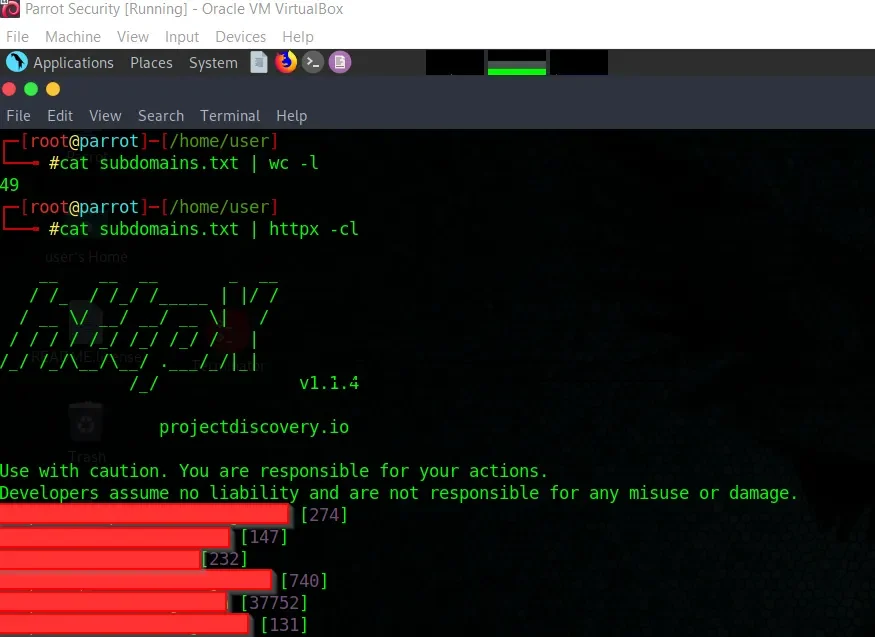
Because the scope had a lot of subdomains, the authors filtered them by content-length to surface the ones offering the largest number of functionalities. That filtering led them to <Sub.redacted.com>, which had a login page.
They were initially looking for broken access control. While doing that, they noticed that submitting invalid credentials on the login page produced an error parameter in the URL. That error parameter was the first lead.
Exploitation
Step 1: XSS attempts on the login error parameter
They injected XSS payloads into the error parameter on the login page. The report does not reproduce any of these payloads. The result was negative: they could not bypass the filtering.

Step 2: Moving to password reset
They then tested the password reset functionality. Entering an invalid email produced no error parameter in the URL, so they added the parameter manually. The parameter reflected their input.
Step 3: XSS blocked by the WAF, then HTML injection
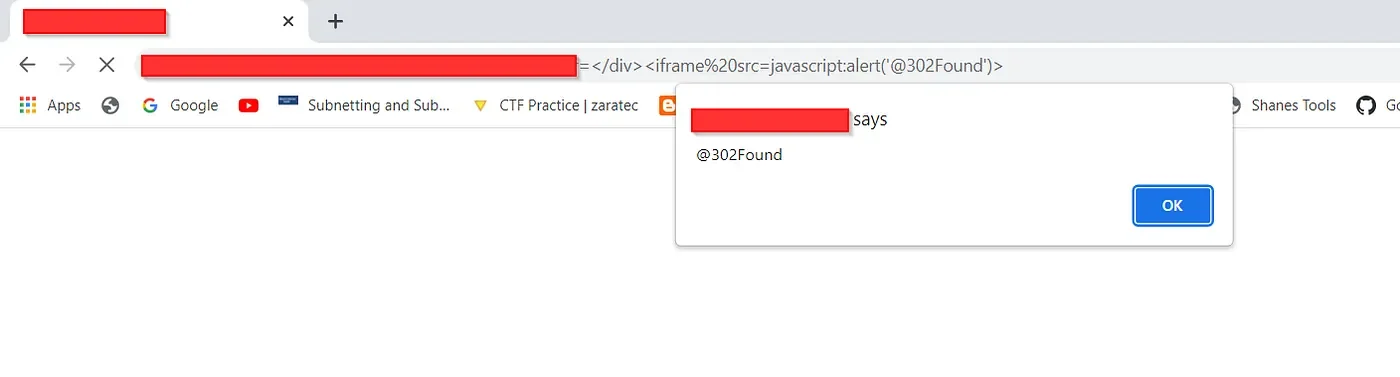
They tried XSS payloads again on this reflected parameter, but the WAF blocked everything. The breakthrough was to balance the markup with a </div> tag. That produced HTML injection. The report does not include the exact payload used. An IFRAME then did the rest of the work, meaning the injected HTML was used to embed an iframe.

Root cause
The report does not analyse the server-side code. What it shows is a reflected parameter whose value is written into the page without sufficient output encoding, and a WAF that blocks common XSS patterns but not a balanced </div> followed by other markup. The login page's error parameter stopped their XSS attempts; on the password reset parameter the WAF blocked XSS payloads, and only a balanced </div> produced HTML injection. Whether the difference is in the application's encoding or only in the WAF rules is not stated.
Impact
The report demonstrates HTML injection with an iframe on a login-related page. It does not describe what the iframe loaded, whether the injection could be delivered to another user, or any session or credential impact. The authors present it as the outcome of the parameter-hunting workflow rather than as a fully weaponised finding.
Fix
The implied fix is proper output encoding of the reflected parameter so that markup such as </div> and iframe tags cannot break out of their context, rather than relying on WAF pattern blocking alone.
Finding hidden parameters
The second half of the write-up is the methodology that the authors say made the difference. Param Miner, Arjun and x8 did not find the parameter in their case, likely because it was not in the default word lists. Active parameter hunting addresses that by building a wordlist specific to the target.
Step 1: Install and configure getAllParams
Download and configure the getAllParams extension in Burp Suite.
Step 2: Crawl the site
Crawl the website both automatically and manually. The authors note that a combination of manual testing and automation gives better results than blindly running scripts.
Step 3: Extract parameters from the sitemap
In Burp, go to Target, then Sitemap, choose the target, right click, open Extensions, and select Get All Params (GAP).
Step 4: Save the extracted parameters
Save all extracted parameters to a file.
Step 5: Extract parameters from gathered URLs
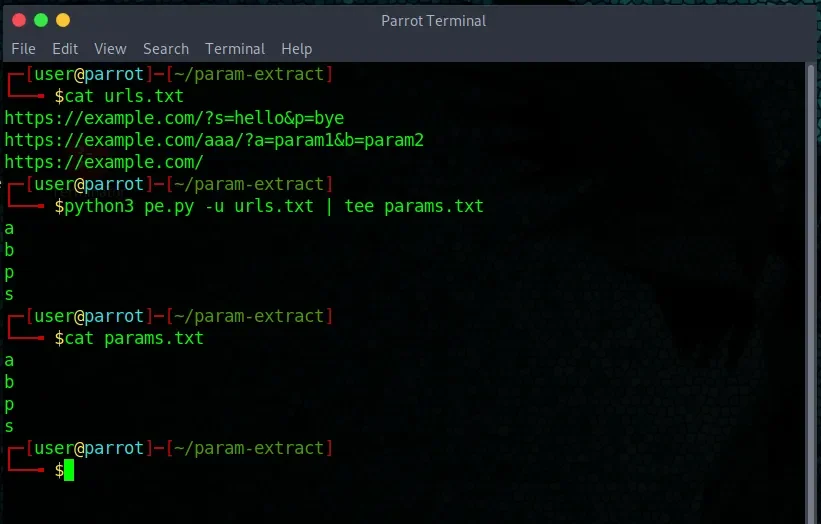
Collect URLs with gau, wayback, Katana or another tool, then extract parameters from them. The authors wrote a basic script for this, Param-Extract, and also give a one-liner using unfurl:
cat urls | unfurl format %q | cut -d “=” -f1 | sort -u > params.txt
This takes each URL, keeps only the query string, cuts at the first =, and sorts the unique parameter names into params.txt.
Step 6: Merge the lists
Merge both parameter files and run sort -u to deduplicate.
Step 7: Run Param Miner
Use the Param Miner Burp extension with the custom wordlist to discover hidden parameters.
Step 8: Test the hidden parameters
For each hidden parameter found, test for injection and other bug classes appropriate to the case.
Variants to test
- Reflected error parameters on login and reset flows. Submit invalid input and watch the URL for a new parameter. A positive result is a parameter whose value appears in the response body.
- Manually added parameters. Where a flow does not generate an error parameter, add one by hand, as the authors did on password reset. A positive result is the value reflecting back.
- WAF bypass by balancing markup. When common XSS payloads are blocked, try closing an open element with
</div>before the payload. A positive result is injected markup rendering in the page. - Iframe injection. Once HTML injection works, try embedding an iframe. A positive result is the iframe rendering.
- Custom wordlists from GAP and URL gathering. Build a target-specific parameter list and run Param Miner against it. A positive result is a hidden parameter that responds differently from the baseline.
- Content-length filtering of subdomains. Sort subdomains by response size to find feature-rich hosts. A positive result is a host with more functionality and therefore more attack surface.
What happened, in plain words
A small team of security testers was given permission to look for weaknesses in a private web project. Throughout their notes they hide the real name of the site and call it redacted.com. The site had many subdomains, which are like separate buildings on the same campus: shop.example.com, mail.example.com and so on all belong to example.com but each can run a different application. One of those buildings, written as <Sub.redacted.com>, had a login page and a password reset feature.
The testers were not originally hunting for the bug they found. They were looking for broken access control, which means checking whether one user can reach things that belong to another user or to an administrator. While poking at the login page they noticed something small but interesting: when you type a wrong username or password, the page sends you back to a URL that now contains an extra piece of text, an error parameter. A parameter is simply a named value attached to a web address, the part after the ? sign. If a page takes a value from the address and prints it back into the page, that is called reflection, and reflection is often the doorway to injection bugs.
They tried to turn that reflection into cross-site scripting (XSS), a bug where an attacker gets their own JavaScript to run inside someone else's browser session on the victim site. The login page's filtering stopped them. They then moved to the password reset feature, found that it did not create an error parameter by itself, added one by hand, saw their value reflected, tried XSS again, and were blocked this time by a web application firewall (WAF), a filter that inspects incoming requests and blocks ones that look malicious. The breakthrough was to shape the input so the WAF did not recognise it as an attack: they closed an open HTML element with a </div> tag and then added their own markup. That produced HTML injection, a milder relative of XSS where you can insert your own HTML into a page but not necessarily run script. An iframe, which is a way to embed one web page inside another, then did the rest of the work.
The second half of the story is about how they found the parameter in the first place. Standard tools that guess parameter names from a built-in list did not find it, probably because the name was not on that list. So they built a list of parameter names specific to this target, by collecting every parameter the site itself used while they browsed it, and then used that list to hunt for hidden ones.

The setup
The work was done on a private project, so there is no bug bounty program name, no reward and no severity rating in the report. The tools named are:
- getAllParams (often shortened to GAP), an extension for Burp Suite. Burp Suite is a program that sits between your browser and a website so you can see and change every request and response. An extension is an add-on that gives Burp extra abilities. GAP's job is to collect the parameter names it sees while you browse.
- Param Miner, another Burp extension, used to discover hidden parameters once you have a wordlist. A wordlist here is just a text file with one candidate name per line.
- gau, wayback, Katana, or any other URL-gathering tool. These collect web addresses that are known to exist, for example from public archives or by crawling a site.
- unfurl, a command-line tool that takes URLs apart into their components.
- Param-Extract, a small script the authors wrote themselves to pull parameter names out of gathered URLs.
- Arjun and x8 are mentioned as alternative tools for hidden-parameter discovery.
No versions are given for any of these tools.
Finding the target
With a large number of subdomains in scope, the testers needed a way to decide which ones were worth their time. They filtered the subdomains by content-length, which is the size of the response a server sends back. The reasoning is practical: a page that returns a lot of content is likely to offer more features, and more features mean more places where something can go wrong. Think of it as choosing which shop to browse by looking at how big the shop window is.
That filtering led them to <Sub.redacted.com>, which had a login page.
They were initially looking for broken access control. While doing that, they noticed that submitting invalid credentials on the login page produced an error parameter in the URL. That error parameter was the first lead.
Exploitation
Step 1: XSS attempts on the login error parameter
They injected XSS payloads into the error parameter on the login page. A payload is the piece of input you send to try to trigger a bug. The report does not reproduce any of these payloads. The result was negative: they could not bypass the filtering.
Step 2: Moving to password reset
They then tested the password reset functionality. Entering an invalid email produced no error parameter in the URL, so they added the parameter manually. The parameter reflected their input. The lesson here is that a feature which does not create a parameter on its own may still reflect one if you add it yourself.
Step 3: XSS blocked by the WAF, then HTML injection
They tried XSS payloads again on this reflected parameter, but the WAF blocked everything. The breakthrough was to balance the markup with a </div> tag. That produced HTML injection. The report does not include the exact payload used. An IFRAME then did the rest of the work, meaning the injected HTML was used to embed an iframe.
The idea behind balancing is that the page already has HTML elements open around the place where your input lands. If your input is dropped inside a <div>, the browser is still expecting that </div> to close it. Sending </div> first closes the page's own element, and everything after it is treated as new markup at the level you want, rather than as text trapped inside the existing element.
Root cause
The report does not analyse the server-side code. What it shows is a reflected parameter whose value is written into the page without sufficient output encoding, and a WAF that blocks common XSS patterns but not a balanced </div> followed by other markup. Output encoding means converting characters that have special meaning in HTML, such as < and >, into harmless equivalents so the browser displays them as text instead of treating them as instructions. The login page's error parameter stopped their XSS attempts; on the password reset parameter the WAF blocked XSS payloads, and only a balanced </div> produced HTML injection. Whether the difference is in the application's encoding or only in the WAF rules is not stated.
Impact
The report demonstrates HTML injection with an iframe on a login-related page. It does not describe what the iframe loaded, whether the injection could be delivered to another user, or any session or credential impact. The authors present it as the outcome of the parameter-hunting workflow rather than as a fully weaponised finding.
Fix
The report does not say what was changed. The implied fix is proper output encoding of the reflected parameter so that markup such as </div> and iframe tags cannot break out of their context, rather than relying on WAF pattern blocking alone. A WAF is a filter in front of the application; encoding is a property of the application itself, and only the second one holds when the filter is bypassed.
Finding hidden parameters
The second half of the write-up is the methodology that the authors say made the difference. Param Miner, Arjun and x8 did not find the parameter in their case, likely because it was not in the default word lists. Active parameter hunting addresses that by building a wordlist specific to the target.
Step 1: Install and configure getAllParams
Download and configure the getAllParams extension in Burp Suite.
Step 2: Crawl the site
Crawl the website both automatically and manually. Crawling means visiting pages and following links so that the tool records every request. The authors note that a combination of manual testing and automation gives better results than blindly running scripts, because a human clicking through a feature will reach places a crawler never guesses.
Step 3: Extract parameters from the sitemap
In Burp, go to Target, then Sitemap, choose the target, right click, open Extensions, and select Get All Params (GAP). The sitemap is Burp's running list of every address it has seen during your session.
Step 4: Save the extracted parameters
Save all extracted parameters to a file.
Step 5: Extract parameters from gathered URLs
Collect URLs with gau, wayback, Katana or another tool, then extract parameters from them. The authors wrote a basic script for this, Param-Extract, and also give a one-liner using unfurl:
cat urls | unfurl format %q | cut -d “=” -f1 | sort -u > params.txt
Line by line:
cat urlsprints the contents of a file calledurls, which holds one web address per line.|is a pipe: it passes that output to the next command instead of printing it on screen.unfurl format %qtakes each URL and keeps only its query string, the part after the?that carries the parameters.| cut -d “=” -f1splits each line at the=character and keeps the first field, which is the parameter name without its value.| sort -usorts the names alphabetically and removes duplicates, so each name appears once.> params.txtwrites the result into a new file calledparams.txt.
Step 6: Merge the lists
Merge both parameter files and run sort -u to deduplicate. You now have one list containing every parameter name the target has been seen to use, from both your browsing and the archived URLs.
Step 7: Run Param Miner
Use the Param Miner Burp extension with the custom wordlist to discover hidden parameters. Hidden parameters are names the application understands but never advertises in its links, so a normal visitor would never see them.
Step 8: Test the hidden parameters
For each hidden parameter found, test for injection and other bug classes appropriate to the case. A parameter that changes the response when you supply it is worth a closer look.
Variants to test
- Reflected error parameters on login and reset flows. Submit invalid input and watch the URL for a new parameter. A positive result is a parameter whose value appears in the response body.
- Manually added parameters. Where a flow does not generate an error parameter, add one by hand, as the authors did on password reset. A positive result is the value reflecting back.
- WAF bypass by balancing markup. When common XSS payloads are blocked, try closing an open element with
</div>before the payload. A positive result is injected markup rendering in the page. - Iframe injection. Once HTML injection works, try embedding an iframe. A positive result is the iframe rendering.
- Custom wordlists from GAP and URL gathering. Build a target-specific parameter list and run Param Miner against it. A positive result is a hidden parameter that responds differently from the baseline.
- Content-length filtering of subdomains. Sort subdomains by response size to find feature-rich hosts. A positive result is a host with more functionality and therefore more attack surface.
Glossary
- Parameter: a named value attached to a web address after the
?, such as?error=bad; the application reads the name and uses the value. - Subdomain: a prefix on a domain name that points to a separate service, for example
shopinshop.example.com. - Content-length: the size in bytes of the response a server sends back; used here as a rough signal of how much functionality a host offers.
- Broken access control (BAC): a weakness where a user can reach data or actions they should not be allowed to, such as another user's account or an admin page.
- Reflection: when a value you supplied in a request is printed back into the response page.
- XSS (cross-site scripting): a bug where an attacker's JavaScript runs in another user's browser in the context of the vulnerable site.
- Payload: the specific piece of input you send to try to trigger a bug.
- WAF (web application firewall): a filter in front of a web application that inspects requests and blocks ones matching attack patterns.
- HTML injection: a bug where an attacker can insert their own HTML markup into a page, without necessarily being able to run script.
- Output encoding: converting characters with special meaning in HTML into harmless equivalents so the browser shows them as text.
</div>tag: the closing tag for adivelement; sending one can close an element the page left open and let following input be treated as new markup.- IFRAME: an HTML element that embeds one web page inside another.
- Burp Suite: a tool that sits between your browser and a website so you can inspect and modify requests and responses.
- Extension: an add-on that gives Burp Suite extra features.
- getAllParams (GAP): a Burp extension that collects parameter names seen while browsing.
- Param Miner: a Burp extension that discovers hidden parameters using a wordlist.
- Arjun and x8: alternative tools for hidden-parameter discovery.
- gau, wayback, Katana: tools that gather known URLs, from archives or by crawling.
- unfurl: a command-line tool that splits URLs into their components.
- Param-Extract: a small script written by the authors to pull parameter names out of gathered URLs.
- Wordlist: a text file with one candidate name per line, used by guessing tools.
- Crawling: automatically visiting pages and following links to record every request.
- Sitemap (in Burp): Burp's running list of every address it has seen during your session.
- Query string: the part of a URL after the
?that carries parameters. - Pipe (
|): a shell operator that passes the output of one command into the next. sort -u: a shell command that sorts lines and removes duplicates.- Hidden parameter: a parameter name the application accepts but never shows in its own links.
- Attack surface: the total set of inputs and features an attacker could try to abuse.




