Pavel Thought robots.txt Was a Lock. It Was a Welcome Mat.
A club website listed private paths in its robots.txt file, and one of those paths served an internal members-only bulletin with no authentication. Anyone who read the file and visited the path could view the internal content, including a flag.

medium.com
Published on medium.com
Cybersecurity
The full write-up lives on its author's site
It belongs to its author, so we link to it rather than copy it. The other two tabs are our own rewrites, checked against it.
Context
The target was Sundial Observatory, a small astronomy club site. The design is clean with a soft dark theme, the kind of site a hobbyist group runs because someone in the club happens to know HTML. The homepage covers meetups, telescopes and moon phases, and nothing on it suggests a vulnerable application.
The feature at the centre of this walkthrough is the site's robots.txt file, the standard crawler-exclusion file that a site publishes at its root. Normally it tells search engine crawlers which paths they should not crawl. It is a convention that crawlers follow voluntarily, not an access control mechanism.
The author describes this as an information disclosure bug that needed no exploit, only curiosity and a text file.
Setup
The write-up does not describe any accounts, roles, tooling versions or special preconditions. The only thing needed was a browser and the target's base URL. The author expected something technical, perhaps a login bypass or a parameter worth fuzzing, but the first action taken turned out to be the only one required.
Finding it
The first step on any target, done almost out of habit, was to request the crawler-exclusion file:
/robots.txt
Most people glance past this file because it appears to be for bots. The author's reasoning is the opposite: robots.txt is one of the most honest files on a website, because it is a developer or administrator stating in plain text exactly where they do not want anyone looking.
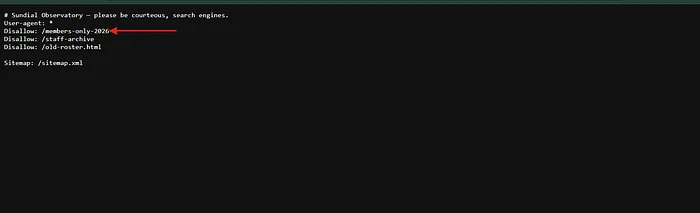
The file listed three paths, three places someone had decided were private. The author's point is that Disallow is not a lock. It is a note taped to a door asking people not to open it, and it relies entirely on good behaviour from search engine crawlers. It does nothing to stop a human with a browser.
Exploitation
Step 1: Read the disallowed paths
The robots.txt response disclosed three paths that the site owner considered private. The file listed three paths, shown in the report as an image. The author went straight for the first one.
Step 2: Request the first disallowed path
/members-only-2026
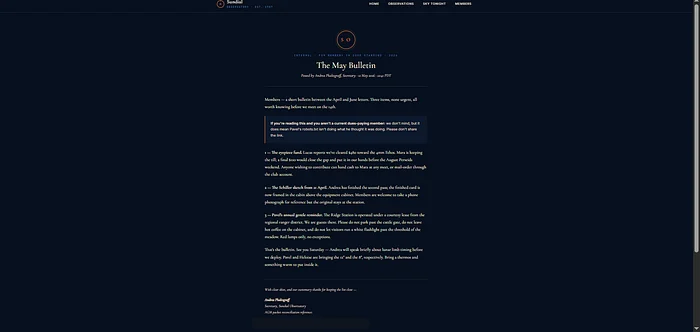
The response was not a login screen, not a 403 and not a redirect. The page simply loaded. What came back was not a generic placeholder but a real internal bulletin, written as if an actual club secretary had typed it for actual members. It contained budget updates, a note about a telescope eyepiece fund, and reminders about red lamps at the observation site.
The bulletin also contained a line that read as though the page knew it was being read by someone it was not meant for:
"If you're reading this and you aren't a current dues-paying member: we don't mind, but it does mean Pavel's robots.txt isn't doing what he thought it was doing."
The author treats that line as the whole lesson in one sentence. Pavel had built something and had thought about privacy, but trusted the wrong mechanism to enforce it.
Step 3: Read the flag
At the bottom of the bulletin the flag was present in plain orange text, with no encoding and no obfuscation. The report does not reproduce the flag value.
Root cause
The mistake is a design one: sensitive content was placed at a predictable path and the only measure keeping it away from visitors was a robots.txt Disallow entry. That directive is a request to well-behaved crawlers, not a control enforced by the server. Nothing in front of /members-only-2026 performed authentication or authorisation, so any human who read the file and followed the path received the page in full. The existing defence, the robots.txt entry, did not stop the request because it was never designed to.
The author notes that this pattern appears in real environments constantly: staging subdomains, "hidden" admin panels and internal documents quietly listed in robots.txt because someone wanted search engines to skip them, without realising they had published a map for anyone willing to look.
Impact
An unauthenticated visitor could read the internal members bulletin, including budget updates, a note about a telescope eyepiece fund, reminders about red lamps at the observation site, and the flag. The disclosure required no skill and no bypass, only reading a file that was sitting in the open and following where it pointed. The report describes a lab environment, so the impact statement is about the pattern rather than a production victim: wherever a sensitive path is protected only by robots.txt, anyone who reads the file can reach it.
Fix
The report frames the fix as guidance rather than describing a change that was made:
- Do not rely on
robots.txtto hide anything sensitive; assume it will be read. - If a path must not be public, put real authentication in front of it.
- If a path should not be indexed and is already protected,
robots.txtor anoindextag is fine, because it is a crawler hint, not a security boundary.
The underlying principle is that robots.txt is a request, not a control. The moment something needs to stay private, the job belongs to authentication and authorisation, not etiquette.
- Read
robots.txton every target first. A positive result is a list ofDisallowentries pointing at admin panels, staging paths, internal documents or backup directories. - Request each disallowed path without credentials. A positive result is a 200 response containing real content rather than a login screen, a 403 or a redirect.
- Check for staging subdomains and hidden admin panels named in the file. A positive result is a reachable environment or panel that serves data to an unauthenticated visitor.
- Look for internal documents listed as disallowed. A positive result is a document that reads as though it was written for staff or members only.
- Check whether protected paths also carry a
noindextag orrobots.txtentry. A positive result here is not a finding on its own; it confirms the path is already protected and the crawler hint is being used correctly.
What happened, in plain words
A security learner opened a practice website called Sundial Observatory, a small astronomy club site. The design is clean with a soft dark theme, the kind of site a hobbyist group runs because someone in the club happens to know HTML. The homepage covers meetups, telescopes and moon phases, and nothing on it suggests anything is wrong.
The learner expected to have to work for it: maybe a login bypass, maybe a parameter worth fuzzing for an hour. Instead, the first thing they did turned out to be the only thing they needed to do. They opened one plain text file that every website can publish, called robots.txt, read the list of places the site owner had asked search engines to stay away from, and then simply visited the first one in a browser. The page loaded in full, with no password and no barrier, and it contained an internal members bulletin plus a flag.
That is the whole story. No clever trick, no special tool, no breaking in. Just reading a file that was sitting in the open and following where it pointed. The write-up calls this an information disclosure bug: a problem where information that was meant to stay private is handed out to anyone who asks.
The idea you need first: what robots.txt is
Search engines work by sending out programs called crawlers (also called bots or spiders). A crawler visits a website, follows links, reads pages and copies what it finds back to the search engine so the pages can appear in search results.
Site owners sometimes have pages they would rather search engines did not copy: a test area, an internal document, an old backup folder. There is a long-standing convention for telling crawlers to skip those places. The site publishes a plain text file at the top level of its domain, always at the same address, /robots.txt, and inside it lists rules. The most common rule is Disallow, followed by a path, which means "crawler, please do not visit this path".
Here is the crucial part, and it is the heart of the whole lesson: this file is a request, not a lock. Nothing in the web server checks it. Nothing stops a browser from loading a path just because the file says Disallow. The file only works because the big search engines have agreed, voluntarily, to respect it. A human typing an address into a browser is not a crawler and has agreed to nothing.
A useful everyday comparison: imagine a shop with a sign on the door saying "staff only, please do not enter". A polite delivery driver reads the sign and waits outside. Anyone who chooses to ignore the sign simply walks in, because the sign is not a lock. robots.txt is that sign. Authentication, which we will come to, is the lock.
Setup
The write-up does not describe any accounts, roles, tooling versions or special preconditions. The only things needed were a browser and the target's base address. That is worth pausing on for a beginner: there was no scanner, no proxy, no script. If you can type a web address and press Enter, you had everything required.
Finding it
The first step on any target, done almost out of habit, was to request the crawler-exclusion file:
/robots.txt
Line by line, in plain words:
- The leading
/means "the top level of this website". If the site ishttps://example.com, then/robots.txtmeanshttps://example.com/robots.txt. robots.txtis the fixed, conventional filename. Every site that uses the convention puts it at exactly this address, which is why it is the first thing to try.- There is no code, no parameter and no special syntax here. It is just an address you can paste into the browser's address bar, exactly like any other page.
Why do this first? Because most people glance past this file. It feels boring, since it appears to be for bots. The author's reasoning is the opposite: robots.txt is one of the most honest files on a website. It is a developer or administrator stating, in plain text, exactly where they do not want anyone looking. If you want to know which doors someone has labelled private, read the list of labels.
The file listed three paths, three places someone had decided were private. The file listed three paths, shown in the report as an image. The author's point about those entries is that Disallow is not a lock. It is a note taped to a door asking people not to open it, and it relies entirely on good behaviour from search engine crawlers. It does nothing to stop a human with a browser.
Exploitation
Step 1: Read the disallowed paths
The robots.txt response disclosed three paths that the site owner considered private. The author went straight for the first one. The reasoning is simple: the file had just handed over a short list of the most interesting places on the site, so there was no need to guess or wander.
Step 2: Request the first disallowed path
/members-only-2026
Line by line, in plain words:
- Again the leading
/means "from the top of this website", so this is a page on the same site, not somewhere else on the internet. members-onlyis a human-readable name that strongly suggests the page is meant for signed-in club members.-2026looks like a year, suggesting the page belongs to a particular season or year of the club.- As before, this is just an address. Typing it into the address bar and pressing Enter sends a normal request for that page, with no credentials attached.
Why take this step? Because the whole question is whether the Disallow entry was backed by anything real. If the page is genuinely protected, asking for it without logging in should produce a login screen, a refusal, or a redirect somewhere else. If it is not protected, the page will simply arrive.
The response was not a login screen, not a 403 and not a redirect. The page simply loaded. To unpack those three things for a newcomer:
- A login screen would mean the server checked who you are before showing content, and sent you to sign in.
- A 403 is the standard web status code for "forbidden": the server understood the request and refused it.
- A redirect is the server sending your browser to a different address, typically the login page.
None of those happened. What came back was not a generic placeholder but a real internal bulletin, written as if an actual club secretary had typed it for actual members. It contained budget updates, a note about a telescope eyepiece fund, and reminders about red lamps at the observation site. In other words, the content was real and specific, not a decoy page.
The bulletin also contained a line that read as though the page knew it was being read by someone it was not meant for:
"If you're reading this and you aren't a current dues-paying member: we don't mind, but it does mean Pavel's robots.txt isn't doing what he thought it was doing."
The author treats that line as the whole lesson in one sentence. Pavel had built something and had thought about privacy. He just trusted the wrong mechanism to enforce it. He asked politely instead of locking the door.
Step 3: Read the flag
At the bottom of the bulletin the flag was present in plain orange text, with no encoding and no obfuscation. The report does not reproduce the flag value.
A flag is a short piece of text placed in a practice environment to prove you reached a place you were not supposed to reach. In a real incident the equivalent would be a password, a customer list, an internal document or a private key. "No encoding and no obfuscation" means the text was not scrambled, hidden in an image, or split up: it was simply written on the page, readable as-is.
Root cause
The mistake is a design one. Sensitive content was placed at a predictable path, and the only measure keeping it away from visitors was a robots.txt Disallow entry. That directive is a request to well-behaved crawlers, not a control enforced by the server. Nothing in front of /members-only-2026 performed authentication or authorisation, so any human who read the file and followed the path received the page in full. The existing defence, the robots.txt entry, did not stop the request because it was never designed to.
Two words in that paragraph deserve a plain explanation, because they are the real fix for this class of bug:
- Authentication answers the question "who are you?". It is the login step: a username and password, a code from your phone, a fingerprint. Until you pass it, the server does not know you.
- Authorisation answers the question "what are you allowed to do?". Even once the server knows you, it still has to decide whether you may see this particular page. A logged-in club member may see the members bulletin; a logged-in stranger may not.
robots.txt does neither of these. It does not ask who you are, and it does not check what you may see. It only asks crawlers to be nice.
The author notes that this pattern appears in real environments constantly: staging subdomains, "hidden" admin panels and internal documents quietly listed in robots.txt because someone wanted search engines to skip them, without realising they had published a map for anyone willing to look. A staging subdomain is a copy of a site kept for testing before changes go live, often at an address like staging.example.com; these copies frequently hold test data and weaker protections than the real site.
Impact
An unauthenticated visitor could read the internal members bulletin, including budget updates, a note about a telescope eyepiece fund, reminders about red lamps at the observation site, and the flag. "Unauthenticated" simply means not logged in: no account, no password, no session.
The disclosure required no skill and no bypass, only reading a file that was sitting in the open and following where it pointed. The report describes a lab environment, so the impact statement is about the pattern rather than a production victim: wherever a sensitive path is protected only by robots.txt, anyone who reads the file can reach it.
Fix
The report frames the fix as guidance rather than describing a change that was made:
- Do not rely on
robots.txtto hide anything sensitive; assume it will be read. - If a path must not be public, put real authentication in front of it.
- If a path should not be indexed and is already protected,
robots.txtor anoindextag is fine, because it is a crawler hint, not a security boundary.
A noindex tag is a small instruction placed inside a web page telling search engines not to include that page in their results. Like robots.txt, it is a polite request to search engines, not a lock.
The underlying principle is that robots.txt is a request, not a control. The moment something needs to stay private, the job belongs to authentication and authorisation, not etiquette.
Variants to test
- Read
robots.txton every target first. A positive result is a list ofDisallowentries pointing at admin panels, staging paths, internal documents or backup directories. In a browser, this is one address typed into the bar. - Request each disallowed path without credentials. A positive result is a 200 response containing real content rather than a login screen, a 403 or a redirect. A 200 is the standard web status code for "here is the page, successfully delivered".
- Check for staging subdomains and hidden admin panels named in the file. A positive result is a reachable environment or panel that serves data to an unauthenticated visitor.
- Look for internal documents listed as disallowed. A positive result is a document that reads as though it was written for staff or members only.
- Check whether protected paths also carry a
noindextag orrobots.txtentry. A positive result here is not a finding on its own; it confirms the path is already protected and the crawler hint is being used correctly.
Glossary
- Authentication: the process of proving who you are, usually by logging in, so the server knows your identity.
- Authorisation: the process of deciding what an identified user is allowed to see or do.
- Crawler: an automated program, run by a search engine, that visits websites and follows links to collect pages for indexing. Also called a bot or spider.
Disallow: a line inrobots.txtasking crawlers not to visit a particular path. It is a request, not an enforced restriction.- Flag: a short piece of text placed in a practice environment to prove that a tester reached a place they were not meant to reach.
- 403: the standard web status code meaning "forbidden": the server understood the request and refused it.
- 200: the standard web status code meaning the request succeeded and the page was delivered.
- Information disclosure: a bug where information meant to stay private is handed out to someone who should not have it.
noindextag: an instruction inside a web page asking search engines not to list that page in results. A polite request, not a lock.- Redirect: the server telling the browser to go to a different address instead of returning the requested page.
robots.txt: a plain text file published at the top level of a website, listing paths that crawlers are asked to skip. Followed voluntarily by search engines and ignored by browsers.- Staging subdomain: a copy of a website kept for testing before changes go live, often at a separate address and often less protected than the real site.
- Unauthenticated: not logged in; no account, password or session has been presented.



