Paypal Access Token Leaked
The PayPal OAuth authorisation server validated the redirect_uri parameter using a regex that could be bypassed, allowing an attacker to redirect the authorisation code to a localhost URL under their control. An attacker could then steal the victim's PayPal access token.

blog.intothesymmetry.com
Published on blog.intothesymmetry.com
{{media:0}} |
The full write-up lives on its author's site
It belongs to its author, so we link to it rather than copy it. The other two tabs are our own rewrites, checked against it.
What the report shows
The target is PayPal's OAuth authorisation flow, and the weakness the write-up names is stealing an access token. The report is short: it opens with guidance for OAuth client developers, then presents the PayPal issue under a heading and an image, and stops. There is no step-by-step request sequence, no payload, no affected endpoint and no response captured in the text.
The guidance at the top is the substance of the piece. When you register a redirect URI with an authorisation server, register it as specifically as you can:
- DO register https://yourouauthclient.com/oauth/oauthprovider/callback
- NOT JUST https://yourouauthclient.com/ or https://yourouauthclient.com/oauth
The report then states the rule it wants authorisation servers to follow: the only safe way to validate a redirect URI is exact matching. The diagram below, taken from OAuth 2 In Action by Justin Richer and Antonio Sanso, illustrates the flow the rule applies to.
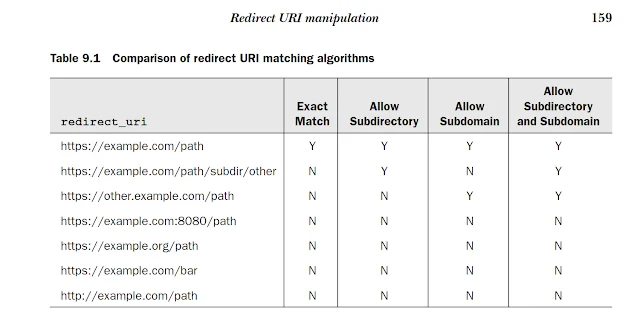
The author points to two earlier cases of the same class: Egor Homakov's GitHub write-up and the author's own Facebook write-up, in which a regex-based redirect URI validation was bypassed. The PayPal section itself carries the title "All your Paypal tokens belong to me - localhost for the win" and a single image.
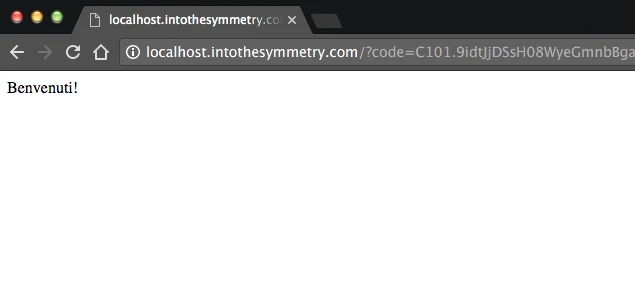
The phrase "localhost for the win" is the only hint at the mechanism, but the report does not explain it. The report does not show the request that achieved this, the client it was registered against, the token that was issued, or any response. It also lists "Disclosure timeline" and "Acknowledgement" as headings with nothing under them. No bounty, severity rating or fix is given.
Root cause
The report recommends exact matching for redirect URI validation but does not describe PayPal's comparison logic.
Impact
If an attacker can make the authorisation server send a code or token to a redirect URI they control, they receive the victim's authorisation artefact. The report's title claims PayPal tokens can be obtained, but the text does not show it. It does not demonstrate a victim interaction, a stolen token or access to any account, so the practical impact on PayPal is asserted rather than shown.
How this kind of bug works
In the authorisation code and implicit flows, the authorisation server sends the user back to the client using the redirect_uri supplied in the request. It must only do so if that value matches one the client registered. If the check is loose, an attacker can craft an authorisation link whose redirect_uri passes validation but points somewhere the attacker can read, such as a host they own or a local listener. When a victim follows the link and approves the request, the code or token lands with the attacker, who exchanges or uses it.
Loose checks take several forms: prefix matching, substring matching, regexes that do not anchor at both ends, ignoring the path or query, or accepting extra path segments and parameters appended to a valid URI. The defence is exact string comparison of the full URI against the registered value, with no normalisation that widens the match, and rejection of any request whose redirect_uri is absent when one was registered.
How to test for it
- Identify the OAuth clients of the target and the redirect URIs they use. Authorisation endpoints, client registration pages and public client source often reveal them.
- Start an authorisation request with the legitimate
redirect_uriand confirm the server accepts it and returns a redirect to that exact location. - Mutate the value one change at a time: append a path segment, add a trailing dot or slash, add a query parameter, change the host to a lookalike or to a host you control, and try a localhost or loopback address. Keep the rest of the request identical.
- A positive result is a redirect (or an error page that still issues a redirect) to your mutated location, or a code or token delivered there. Watch the
Locationheader rather than the rendered page. - Common false positives: the server redirects to an error page on the same host, the client rejects the code afterwards, or the mutated URI only works for a client you registered yourself, which proves nothing about other clients. Confirm the artefact is actually usable before reporting.
How it is fixed
Authorisation servers should compare the full redirect_uri byte for byte against the registered value and reject anything else. Where multiple URIs are allowed, each must be registered and matched exactly. Clients should register the most specific callback path they can, as the report advises, rather than a bare host or a broad path prefix. Servers should also require the redirect_uri on the token request to match the one used in the authorisation request, and should avoid wildcard or regex matching entirely.
Hunting notes
This class hides in older or complex OAuth deployments: multiple clients, mobile and desktop clients that use loopback redirects, and servers that have accumulated regex rules over time. Recon signals include authorisation endpoints that accept a redirect_uri parameter, client IDs visible in public JavaScript, and documentation listing broad callback paths. To make a report land, show the exact mutated request, the redirect response, and, where possible, that the resulting code or token grants access. Without that chain the finding reads as a validation quirk rather than a token theft.
What happened, in plain words
This report is about PayPal's login system for apps, built on a standard called OAuth 2. OAuth 2 is the set of rules that lets you press a button like "Sign in with PayPal" on some other website, approve the request on PayPal, and get sent back to that website already logged in, without ever handing your PayPal password to the other site.
The report is very short. It opens with advice for people who build these "Sign in with" buttons, then shows the PayPal issue under a heading and a picture, and stops. There is no step-by-step request, no payload, no named endpoint and no captured response in the text. What it does give is the general lesson, and that lesson is the useful part for a beginner.
The advice at the top
When a website wants to use PayPal (or any OAuth provider) for login, it must first register a redirect URI with the provider. The redirect URI is the address the provider will send the user back to after they approve. Think of it like a return address on an envelope: the provider is only supposed to deliver the user to an address the website has already declared.
The report says: register that address as specifically as you can.
- DO register https://yourouauthclient.com/oauth/oauthprovider/callback
- NOT JUST https://yourouauthclient.com/ or https://yourouauthclient.com/oauth
The difference matters. The first address names one exact page. The second names the whole site, and the third names a whole folder. If the provider accepts a broad address, then anyone who can get a link to point at a different page under that site, or at a similar-looking address, may be able to receive the user's login result instead of the real site.
The report then states the rule it wants providers to follow: the only safe way to check a redirect URI is exact matching. That means the provider compares the address it was given, character for character, against the one on file, and rejects anything that is not identical.
The diagram above comes from the book OAuth 2 In Action by Justin Richer and Antonio Sanso and illustrates the flow this rule applies to.
The author points to two earlier cases of the same kind of mistake: Egor Homakov's write-up about GitHub, and the author's own earlier write-up about Facebook, where a check based on a regex (a pattern-matching rule) was bypassed. Both are examples of the same idea: a loose check lets an address through that should never have been accepted.
The PayPal issue
The PayPal section carries the title "All your Paypal tokens belong to me - localhost for the win". The phrase "localhost for the win" is the only hint at how it worked, and the report does not explain it.
The report does not show the request that achieved this, which client it was registered against, the token that was issued, or any response. It also lists "Disclosure timeline" and "Acknowledgement" as headings with nothing under them. No bounty, severity rating or fix is given.
In general, how this kind of bug works
In OAuth, after the user approves, the provider sends them back to the address given in a parameter called redirect_uri. Along with the user, it sends a short-lived authorisation code, or in some flows an access token directly. An access token is like a temporary key: whoever holds it can act as the user towards the provider's services, without needing the password.
So the whole security of the hand-back rests on one question: is this redirect_uri really the address the website registered? If the check is loose, an attacker can build a login link whose redirect_uri passes the check but points at a place the attacker controls, such as a server they own or a listener on their own machine. When a victim clicks the link and approves, the code or token is delivered to the attacker, who can then use it.
Loose checks come in several shapes: matching only the start of the address, matching any part of it, using a regex that does not pin both ends, ignoring the path or the query string, or accepting extra path segments and parameters tacked onto a valid address. The defence is exact comparison of the full address against the registered value, with no loosening, and rejection of any request that leaves the redirect_uri out when one was registered.
In general, how to test for it
- Find the OAuth clients of the target and the redirect URIs they use. Authorisation endpoints, client registration pages and public client source often reveal them.
- Start an authorisation request with the legitimate
redirect_uriand confirm the server accepts it and redirects to that exact location. - Change the value one thing at a time: append a path segment, add a trailing dot or slash, add a query parameter, change the host to a lookalike or to a host you control, and try a localhost or loopback address. Keep the rest of the request identical.
- A positive result is a redirect to your changed location, or a code or token delivered there. Watch the
Locationheader in the response rather than the page you see, because that header is where the browser is told to go next. - Common false positives: the server redirects to an error page on the same host, the client rejects the code afterwards, or the changed URI only works for a client you registered yourself, which proves nothing about other clients. Confirm the result is actually usable before reporting.
In general, how it is fixed
Providers should compare the full redirect_uri byte for byte against the registered value and reject anything else. Where several addresses are allowed, each must be registered and matched exactly. Clients should register the most specific callback path they can, as the report advises, rather than a bare host or a broad path prefix. Providers should also require the redirect_uri on the token request to match the one used in the authorisation request, and should avoid wildcard or regex matching entirely.
Glossary
- OAuth 2: a standard that lets a website get limited access to your account on another service, usually for "Sign in with" buttons, without sharing your password.
- Redirect URI: the address a provider sends the user back to after they approve a request.
- Exact matching: comparing two values character for character and accepting only a perfect match.
- Regex: a pattern-matching rule used to test text; if it is not pinned at both ends it can accept more than intended.
- Authorisation code: a short-lived value the provider hands back after approval, which the website exchanges for an access token.
- Access token: a temporary key that lets whoever holds it act as the user towards the provider's services.
- localhost: the name a computer uses for itself; a redirect to localhost sends the result back to the machine running the browser.
- Loopback address: an address that points back at the same machine, such as localhost.
redirect_uriparameter: the field in an OAuth request that carries the return address.Locationheader: the part of an HTTP response that tells the browser where to go next.- False positive: a test result that looks like a bug but is not one.

