PHP2Shell Without The Panic: A Lab, A Safe Probe And Where The Money Really Is
Two critical bugs in PHP itself, one a use-after-free in the session upload progress feature and one a memory exhaustion handling flaw, could allow memory disclosure and code execution as the web user before application code runs. The author builds a lab to demonstrate a benign probe that writes attacker-chosen text into server-side session storage without authentication.
 Published on kd-200.medium.com
Right now I am making a video on PHP2Shell. Before I started, I watched the one video that already existed on it, and it annoyed me.
The full write-up lives on its author's site
It belongs to its author, so we link to it rather than copy it. The other two tabs are our own rewrites, checked against it.
Context: what PHP2Shell actually is
PHP2Shell is the name Wiz gave to two critical bugs in PHP itself, disclosed in October 2026. The point that matters for everything below is that the bug is not in your application. WordPress, Laravel, a custom panel or a hello-world page all sit on top of the same runtime, and if the PHP version is affected and it serves web requests, it is in play.
The name comes from CVE-2026-109619, which lives in a feature called session upload progress. When a POST request contains a field named PHP_SESSION_UPLOAD_PROGRESS, PHP starts writing upload progress into the session, before your application code runs at all. The second bug, CVE-2026-109618, is triggered when PHP runs out of memory while parsing a very large form: it bails out halfway and the shutdown code trusts half-built state.
The timeline is tight. On 20 October 2026 the PHP project announced an emergency release for two critical bugs in PHP itself, and details leaked the same day. Patches landed on 21 October: 8.2.35, 8.3.36, 8.4.27 and 8.5.12. On 26 October CISA added both CVEs to its Known Exploited Vulnerabilities catalogue. Amazon later said its honeypots had seen an exploitation attempt dated 17 October, four days before the public disclosure.
The exposure numbers are what make this worth a lab. Qualys looked across more than 10,000 customers and found 167 million PHP installations, 156 million with a known version, 73% of them on internet-facing machines. 110 million were on end-of-life branches (5.4 to 8.1). In the first 12 hours after the patch, only about 199,000 had been updated. James Pavur put a standard PHP 8.4.26 server online as a "steal my bitcoin" challenge, and somebody broke it 19 hours after he installed it.
Setup: three containers that look the same from outside
The lab runs on a Kali box and nothing leaves it. It is three containers: one vulnerable, one patched, and one hardened the way the PHP team recommends. Make a folder called php2shell-lab with this docker-compose.yml:
services:
  vuln:
    image: php:8.3.35-apache      # last 8.3 release before the fix
    ports: ["8081:80"]
    volumes: ["./app:/var/www/html", "./lab.ini:/usr/local/etc/php/conf.d/lab.ini"]
  patched:
    image: php:8.3.36-apache      # the fixed release
    ports: ["8082:80"]
    volumes: ["./app:/var/www/html", "./lab.ini:/usr/local/etc/php/conf.d/lab.ini"]
  hardened:
    image: php:8.3.36-apache      # fixed, and the feature switched off
    ports: ["8083:80"]
    volumes: ["./app:/var/www/html", "./hardened.ini:/usr/local/etc/php/conf.d/lab.ini"]
If a tag is missing on Docker Hub for your branch, use the last release below the fixed one: 8.2.34, 8.4.26 or 8.5.11.
lab.ini keeps the feature at its default (on) but stops PHP from cleaning up the progress record, so it can be read afterwards. In real life PHP deletes it as soon as the upload finishes, which is exactly why attackers race it.
session.upload_progress.enabled = On
session.upload_progress.cleanup = Off
session.save_path = /tmp
hardened.ini:
session.upload_progress.enabled = Off
session.save_path = /tmp
Two tiny files in app/. The first is a plain hello world, because PHP2Shell does not need more:
<?php
// app/index.php - a plain hello world. PHP2Shell does not need more.
echo "hello from PHP " . PHP_VERSION . " via " . PHP_SAPI . "\n";
The second reports what the web-facing PHP really runs with:
<?php
// app/ini.php - what the web-facing PHP really runs with
header('Content-Type: text/plain');
foreach (['session.upload_progress.enabled', 'session.upload_progress.cleanup',
          'session.upload_progress.name', 'session.use_strict_mode'] as $k) {
    echo $k . ' = ' . var_export(ini_get($k), true) . "\n";
}
Start it:
cd php2shell-lab && docker compose up -d
for p in 8081 8082 8083; do curl -s localhost:$p/; done
Finding it: the producer, before your code runs
Session upload progress is a feature: when a POST request contains a field named PHP_SESSION_UPLOAD_PROGRESS, PHP starts writing upload progress into the session. The trigger is a POST field named PHP_SESSION_UPLOAD_PROGRESS. On a vulnerable build, PHP keeps pointers to request memory after that memory has been freed, and a later request on the same worker uses them. That is a use-after-free. With careful work it becomes memory disclosure and then code execution as the web user.
Wiz reported that even a minimal hello-world app on an affected version may be vulnerable. The core request for CVE-2026-109619 is only about 450 bytes, so size-based firewall rules do nothing. PHP-FPM, Apache with mod_php, php-cgi, FrankenPHP and LiteSpeed are all affected, and the PHP advisory rates Apache mod_php as the highest-risk setup.
Both bugs were found with AI reading a language runtime. A researcher at Calif found one bug in August while auditing PHP's source with GPT-5.6 Sol as part of OpenAI's Patch the Planet project. Wiz found both independently using Gemini 4 Argon, GPT-5.6 Sol and its own tooling, and named it PHP2Shell.
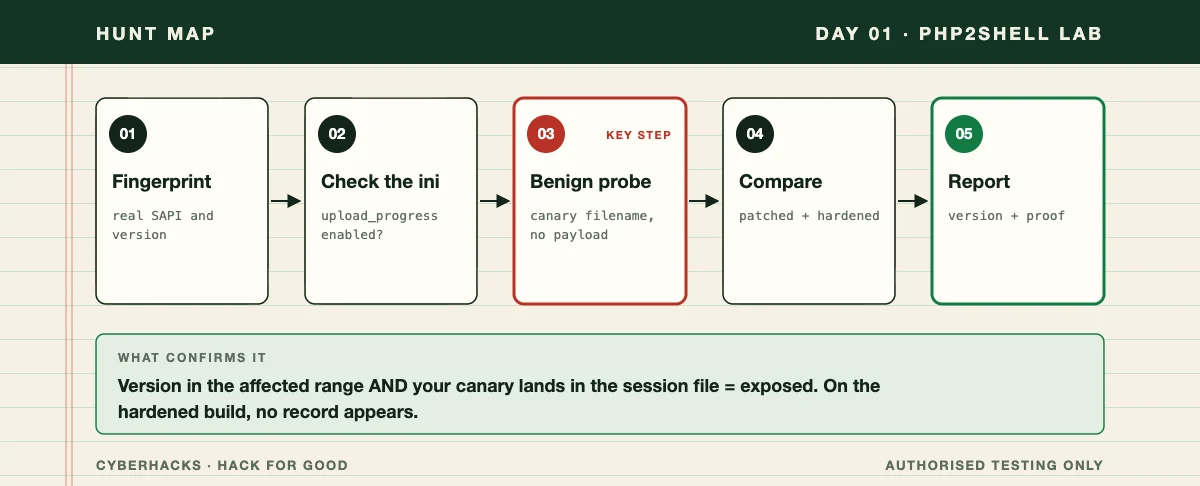
The hunt map is fingerprint, check the ini, benign probe, compare, report.
Exploitation: the lab, step by step
Step 1: fingerprint the PHP that actually serves the web
curl -sI <http://localhost:8081/> | grep -i x-powered-by
curl -s  <http://localhost:8081/ini.php>
What to look for is X-Powered-By: PHP/8.3.35. The trap is running php -v on a server and trusting it. Qualys points out that the command-line PHP can be a different installation from the one serving web requests, so always check through the web.
On real, in-scope targets:
httpx -l hosts.txt -sc -title -td -silent | grep -i php
curl -sI <https://target.example> | grep -iE 'x-powered-by|server'
Debian, Ubuntu, Red Hat, cPanel and CloudLinux all ship backported fixes without changing the upstream version number. A banner is a lead, never proof.
Step 2: check the entry point is switched on
curl -s localhost:8081/ini.php shows session.upload_progress.enabled = '1'. The hardened container shows '0'. That one setting is the door CVE-2026-109619 walks through.
Step 3: the benign probe (lab only)
No payload, no memory tricks, just a canary filename:
curl -s <http://localhost:8081/> \
  -b 'PHPSESSID=nitinlab01' \
  -F 'PHP_SESSION_UPLOAD_PROGRESS=canary' \
  -F 'file=@/etc/hostname;filename=nitin-canary.txt' > /dev/null
Then read the session file inside the container:
docker compose exec vuln cat /tmp/sess_nitinlab01
What confirms it is a record that starts upload_progress_canary|a:5:{ with nitin-canary.txt inside it. A request from nobody, with no login, just wrote text it chose into server-side session storage, before the application ran a single line. That is the producer.
The field order matters: PHP_SESSION_UPLOAD_PROGRESS must come before the file field, and you must send a session ID or PHP will not track the upload.
Step 4: compare, and learn the lesson that matters
Run the same probe against 8082 (patched). The record still appears. The patch fixed the memory handling, not the feature. Now run it against 8083 (hardened): no session file at all.
That difference is the whole point. Patched is not the same as closed. The PHP team's own advice is to keep upload progress off if you do not use it, even after patching. In a client report, that one line is worth more than three paragraphs of CVSS.
Step 5: read the fix with an AI sitting next to you
git clone --filter=blob:none <https://github.com/php/php-src> && cd php-src
git diff php-8.3.35 php-8.3.36 --stat
git diff php-8.3.35 php-8.3.36 -- main/rfc1867.c ext/session/ > php2shell.diff
Give php2shell.diff to your LLM with a prompt like: explain what changed in plain English, which pointers were cached, what lifetime bug the patch closes, and what would show up in logs if someone tried it. You are not asking it for an exploit. You are training yourself to read fixes fast, which is how you get ahead of the crowd on the next runtime bug.
What about the full chain?
Public proof-of-concepts were circulating before the embargo even ended. The write-up does not reproduce one, and anything run on camera stays inside these containers. If you study one, do it in these containers with the network cut.
One detail from Wiz worth keeping: some tools calling themselves PHP2Shell scanners were not using the PHP bug at all. They relied on session poisoning plus a separate file-inclusion bug in the application. An old trick wearing a new name. When you see "PHP2Shell" in a log, check what the request really does.
Root cause
The memory mistake behind CVE-2026-109619 is a use-after-free: on a vulnerable build, PHP keeps pointers to request memory after that memory has been freed, and a later request on the same worker uses them. The producer is the upload progress feature, which writes attacker-chosen text into server-side session storage before application code runs. CVE-2026-109618 is a different failure: when PHP runs out of memory while parsing a very large form, it bails out halfway and the shutdown code trusts half-built state.
The vulnerable path runs before the application does, and the core request is only about 450 bytes, so size-based firewall rules do nothing. The patch fixed the memory handling, not the feature, which is why a patched build still writes the progress record.
Impact
With careful work the use-after-free becomes memory disclosure and then code execution as the web user. Wiz reported that even a minimal hello-world app on an affected version may be vulnerable, so the application's own code is not a mitigating factor. If the PHP version is affected and it serves web requests, it is in play; the PHP advisory rates Apache mod_php as the highest-risk setup.
In the wild, Cloudflare saw early signs and pushed temporary firewall rules, and watchTowr observed exploitation in its honeypots by 21 October. F5 Labs saw scanners announcing themselves in user agents such as php2shell-scan and php2shell-version-check, authorised or not. Wiz reported roughly a 67% drop in internet-exposed vulnerable machines within days. The window closes fast for hunters, and stays open for years on forgotten servers. Wikimedia shut down many services, and the Internet Archive went down briefly while teams patched.
Fix
Beyond upgrading, the PHP team's own advice is to keep upload progress off if you do not use it, even after patching, which is what the hardened container demonstrates. Restart every worker, because long-lived workers keep the vulnerable state. Then retest and show the 8083-style result.
Variants to test
- The same probe against a patched build. Positive result: the session record still appears, confirming the feature is open even though the memory bug is closed.
- The same probe against a hardened build. Positive result: no session file at all, confirming
session.upload_progress.enabled = Off. - A different SAPI. PHP-FPM, Apache with mod_php, php-cgi, FrankenPHP and LiteSpeed are all affected; the advisory rates Apache mod_php as the highest-risk setup.
- A different branch. If a tag is missing on Docker Hub for your branch, use the last release below the fixed one: 8.2.34, 8.4.26 or 8.5.11.
- A "PHP2Shell scanner" in the logs. Check what the request really does: some relied on session poisoning plus a separate file-inclusion bug in the application, not on the PHP bug.
Hunting notes
For bug hunters, PHP2Shell is not a jackpot. Programmes pay for proof on their own assets, and many have a waiting period before they accept known CVEs in third-party software (GitHub, for example, waits 30 days). The money is in two places: client work, because 110 million installs on dead branches need someone to check, plan and verify (a fixed-scope exposure check priced at $200 is roughly ₹18,800 at around ₹94 to the dollar), and knowledge, because whoever understands these bugs first writes the detection templates, the client reports and the blog posts that bring the clients.
During recon, fingerprint through the web rather than the shell, and treat the version as a lead: check distro backports and read the CVE rules. Then check whether the entry point is switched on. A version banner alone gets closed as informative, so check the policy for known CVEs and waiting periods first, then report version evidence, configuration evidence and only the impact proof the programme explicitly allows.
For a client, inventory first (the web-facing version, and whether the branch is end-of-life), then the upload-progress setting, then the fix: upgrade, restart every worker, switch off upload progress if unused, and a retest section that shows the 8083-style result.
Detection notes for your own servers and clients:
- PHP error logs: fatal errors that say "tried to allocate" and end with "in Unknown on line 0", meaning allocation outside normal script execution.
- Bursts of large POSTs (1 MB and up) to PHP endpoints from one source.
- Apache error logs full of
AH00052child exits. - Shells spawned by the web user:
sh -c,bash -c,id,whoami,curl,wget,base64. - New PHP files in the web root, changes in
/tmpor/dev/shm, newauthorized_keyslines or cron jobs for the web user. - Hunt from 20 October 2026, not from the day you patched.
The checklist, in order: build vuln (8081), patched (8082) and hardened (8083) containers; read X-Powered-By and ini.php through the web, never trust php -v; run the canary probe and read /tmp/sess_nitinlab01 in the vulnerable container; confirm the record still appears on patched and disappears on hardened; diff php-8.3.35 against php-8.3.36 and have an LLM explain the fix; on in-scope targets, treat the version as a lead, check distro backports, read the CVE rules; for clients, signed scope, upgrade, restart every worker, disable upload progress if unused, retest; search logs from 20 October for "tried to allocate" in "Unknown on line 0".
What happened, in plain words
In October 2026 the people who make PHP, the programming language that runs a huge share of the world's websites, had to rush out an emergency fix for two serious mistakes in PHP itself. Wiz gave the pair of bugs a nickname: PHP2Shell.
The most important thing to understand, even if you have never touched a server, is where the mistake lives. It is not in WordPress, not in a shop plugin, not in the code a website owner wrote. It is in PHP, the engine underneath all of that. Think of a restaurant: the bug is not in any dish on the menu, it is in the kitchen itself. Every dish made in that kitchen is affected, including a plate of plain toast. That is why a website showing nothing but the words "hello world" can still be exposed.
This article walks through a small practice setup, called a lab, that you can build on your own computer. It has three containers that look the same from outside: one vulnerable, one patched, and one hardened the way the PHP team recommends. You will compare them, see the difference with your own eyes, and learn how to tell whether a real server is exposed. Everything stays on your machine.
You do not need to be a programmer to follow along. Every command is explained line by line, and every strange word is defined the first time it appears.
Why this one matters right now
On 20 October 2026 the PHP project announced an emergency release for two critical bugs in PHP itself. Details leaked the same day. Patches landed on 21 October: 8.2.35, 8.3.36, 8.4.27 and 8.5.12. On 26 October CISA added both CVEs to its Known Exploited Vulnerabilities catalogue. Amazon later said its honeypots had seen an exploitation attempt dated 17 October, four days before the public disclosure.
A few of those words need unpacking.
- A patch is a small update that repairs a mistake in software, like a garage sending you a replacement part for a faulty brake.
- A CVE is a public identifier for a specific known security flaw, so anyone can look it up.
- CISA is a United States government cybersecurity agency. Its Known Exploited Vulnerabilities catalogue is a list of flaws that have evidence of being exploited in the wild.
- A honeypot is a decoy system set up to look interesting so that attackers try it, letting defenders observe their activity.
Now the numbers that made me sit up. Qualys looked across more than 10,000 customers and found 167 million PHP installations, 156 million with a known version, 73% of them on internet-facing machines. 110 million were on end-of-life branches (5.4 to 8.1). In the first 12 hours after the patch, only about 199,000 had been updated.
- Qualys is a security company that scans large numbers of organisations.
- Internet-facing means the machine can be reached from the open internet, not just from inside an office.
- End-of-life means the software version no longer receives updates at all, including security fixes. It is like driving a car whose manufacturer stopped making spare parts years ago.
And one researcher, James Pavur, put a standard PHP 8.4.26 server online as a "steal my bitcoin" challenge. Somebody broke it 19 hours after he installed it.
The money translation. For most bug hunters, PHP2Shell is not a jackpot. Programmes pay for proof on their own assets, and many have a waiting period before they accept known CVEs in third-party software (GitHub, for example, waits 30 days). The real money is in two places:
- Client work. 110 million installs on dead branches need someone to check, plan and verify. A fixed-scope exposure check priced at $200 is roughly ₹18,800 at around ₹94 to the dollar. Day 28 is the full playbook for this.
- Knowledge. This bug was found with AI reading a language runtime. That is the new normal. Whoever understands these bugs first writes the detection templates, the client reports and the blog posts that bring the clients.
A bug bounty programme is a scheme where a company invites outsiders to report flaws in its systems, often with a reward for good reports. An asset is one of the things the company owns and has put in scope, such as a particular website. A waiting period is a rule saying "do not report a flaw in software we merely use until the maker has had time to fix it".
How it works, in plain words
- It is a bug in PHP, not in your app. WordPress, Laravel, a custom panel, a hello-world page. If the PHP version is affected and it serves web requests, it is in play.
- CVE-2026-109619 is the one the name comes from. It lives in a feature called session upload progress. When a POST request contains a field named
PHP_SESSION_UPLOAD_PROGRESS, PHP starts writing upload progress into the session, before your application code runs at all. - The memory mistake. On a vulnerable build, PHP keeps pointers to request memory after that memory has been freed, and a later request on the same worker uses them. That is a use-after-free. With careful work it becomes memory disclosure and then code execution as the web user.
- CVE-2026-109618 is the second bug. When PHP runs out of memory while parsing a very large form, it bails out halfway and the shutdown code trusts half-built state.
- Before your code runs is the scary part. Wiz reported that even a minimal hello-world app on an affected version may be vulnerable. The core request for 109619 is only about 450 bytes, so size-based firewall rules do nothing.
- Where it lands. PHP-FPM, Apache with mod_php, php-cgi, FrankenPHP and LiteSpeed are all affected. The PHP advisory rates Apache mod_php as the highest-risk setup.
- Found with AI. A researcher at Calif found one bug in August while auditing PHP's source with GPT-5.6 Sol as part of OpenAI's Patch the Planet project. Wiz found both independently using Gemini 4 Argon, GPT-5.6 Sol and its own tooling, and named it PHP2Shell.
That list is dense, so here is each idea from zero.
What PHP is. PHP is a programming language that runs on a web server. When you open a page, the server runs a PHP script, which produces the page you see. WordPress, Laravel and countless custom sites are all written in PHP and all rely on the same PHP engine underneath.
What a POST request is. When you fill in a form and press submit, your browser sends the contents to the server. That kind of message is called a POST request. It carries named pieces of data, called fields, like a parcel with labelled compartments.
What a session is. A website needs to remember who you are between page loads, because the web itself has no memory. It does this with a session: a small store of information kept on the server, tagged with a random identifier. Your browser holds that identifier in a cookie, a tiny label the site asks your browser to keep and show again on the next visit. Think of a cloakroom ticket: the coat stays behind the counter, you carry the number.
What session upload progress is. Uploading a big file takes time. This PHP feature lets the website show a progress bar by writing "the upload is 40% done" into the session while the file is still arriving. It is a convenience feature, and many sites never use it.
What a use-after-free is. Imagine a hotel receptionist who writes a guest's room number on a sticky note, throws the note away, and then reads the old note later to decide where to send the next guest. The information was supposed to be gone, but a stale reference still points at it. In software, memory is handed out and taken back constantly; a use-after-free means the program keeps using a reference to memory it has already given back. Attackers can sometimes arrange for their own data to land in that reused space, which is how a memory bug turns into reading secrets (memory disclosure) and eventually into running the attacker's commands (code execution).
What "as the web user" means. A web server runs under a limited account, not as an administrator, precisely so that a break-in does less damage. Code execution as the web user means the attacker's commands run with that account's permissions.
What a worker is. Web servers keep several helper processes, called workers, ready to handle requests. A request lands on one worker, which may then handle the next request too. That is why a bug can span two requests: the first leaves something behind, the second picks it up.
What a firewall is, and why size rules fail here. A firewall is a filter that inspects network traffic and blocks or allows it according to rules. A common shortcut is to block very large requests. The core request for this bug is only about 450 bytes, smaller than a short email, so that shortcut does nothing.
What PHP-FPM, mod_php, php-cgi, FrankenPHP and LiteSpeed are. These are different ways of connecting a web server to the PHP engine. PHP-FPM is a common standalone arrangement; mod_php plugs PHP directly into the Apache web server; php-cgi is an older method; FrankenPHP and LiteSpeed are newer or commercial servers. All of them are affected, and the PHP advisory rates Apache mod_php as the highest-risk setup.
What an advisory is. An official notice from the software's maintainers describing a flaw and what to do about it.
What "auditing source with AI" means. The source is the human-written code of PHP itself. Reading it looking for mistakes is called auditing. Here, AI models were used as assistants to read that code, and they helped surface the bugs.
Build the lab
Keep this part separate from everything else. It runs on your Kali box, nothing leaves it.
Kali is a Linux distribution made for security work. A container is a lightweight, self-contained box that holds one piece of software and everything it needs, so it cannot interfere with the rest of your computer. Docker is the tool that builds and runs containers, and Docker Compose is a way of describing several containers in one file so they start together.
Make a folder called php2shell-lab with this docker-compose.yml:
services:
  vuln:
    image: php:8.3.35-apache      # last 8.3 release before the fix
    ports: ["8081:80"]
    volumes: ["./app:/var/www/html", "./lab.ini:/usr/local/etc/php/conf.d/lab.ini"]
  patched:
    image: php:8.3.36-apache      # the fixed release
    ports: ["8082:80"]
    volumes: ["./app:/var/www/html", "./lab.ini:/usr/local/etc/php/conf.d/lab.ini"]
  hardened:
    image: php:8.3.36-apache      # fixed, and the feature switched off
    ports: ["8083:80"]
    volumes: ["./app:/var/www/html", "./hardened.ini:/usr/local/etc/php/conf.d/lab.ini"]
Line by line:
services:starts the list of containers we want.vuln:is the name of the first container. The name is just a label for us.image: php:8.3.35-apachesays which ready-made software package to use. This one is PHP version 8.3.35 running with the Apache web server. The comment notes it is the last 8.3 release before the fix, so it still has the bug.ports: ["8081:80"]connects port 8081 on your computer to port 80 inside the container. A port is a numbered doorway on a machine; web traffic normally uses 80. This line means "when I visit localhost:8081 in my browser, send me to the web server inside this container".volumes:shares folders between your computer and the container../app:/var/www/htmlmeans the localappfolder appears inside the container as the website's document folder../lab.ini:/usr/local/etc/php/conf.d/lab.iniplaces our settings file where PHP reads extra configuration.patched:is the second container, using 8.3.36, the fixed release, on port 8082.hardened:is the third, also on 8.3.36, but it loadshardened.iniinstead, which switches the risky feature off. It listens on 8083.
If a tag is missing on Docker Hub for your branch, use the last release below the fixed one: 8.2.34, 8.4.26 or 8.5.11.
A tag is the version label on a software package. Docker Hub is the public library where these packages are stored. A branch here means a version line, such as 8.2, 8.3, 8.4 or 8.5.
lab.ini keeps the feature at its default (on) but stops PHP from cleaning up the progress record, so we can read it afterwards. In real life PHP deletes it as soon as the upload finishes, which is exactly why attackers race it.
session.upload_progress.enabled = On
session.upload_progress.cleanup = Off
session.save_path = /tmp
session.upload_progress.enabled = Onturns the upload progress feature on. This is the default, so we are not changing anything here; we are writing it down so it is visible.session.upload_progress.cleanup = Offstops PHP from deleting the progress record when the upload ends. In a real server this cleanup is on, and it is the reason an attacker has to act quickly. In the lab we switch it off so we can look at the record calmly afterwards.session.save_path = /tmpsays where session files are stored./tmpis a temporary folder on the machine.
hardened.ini:
session.upload_progress.enabled = Off
session.save_path = /tmp
session.upload_progress.enabled = Offswitches the feature off completely. This is the setting the PHP team recommends for anyone who does not use upload progress.session.save_path = /tmpkeeps the same storage location, so the only difference from the other containers is the feature switch.
Two tiny files in app/:
<?php
// app/index.php - a plain hello world. PHP2Shell does not need more.
echo "hello from PHP " . PHP_VERSION . " via " . PHP_SAPI . "\n";
<?phpmarks the start of PHP code.- The
//line is a comment, ignored by the computer, written for humans. echoprints text.PHP_VERSIONis a built-in value holding the PHP version number, andPHP_SAPIsays which connection method is in use, such as Apache. The dots join the pieces together, and\nadds a line break.
The point of this file is that it does nothing interesting. It is a hello-world page, and the bug does not need anything more.
<?php
// app/ini.php - what the web-facing PHP really runs with
header('Content-Type: text/plain');
foreach (['session.upload_progress.enabled', 'session.upload_progress.cleanup',
          'session.upload_progress.name', 'session.use_strict_mode'] as $k) {
    echo $k . ' = ' . var_export(ini_get($k), true) . "\n";
}
header('Content-Type: text/plain');tells the browser to treat the reply as plain text, not as a web page, so it displays exactly as written.foreach (... as $k)loops over a list of four setting names, one at a time, calling each one$k.ini_get($k)asks PHP for the current value of that setting.var_export(..., true)turns that value into readable text, andechoprints the setting name, an equals sign and the value.
This file is a mirror. It shows what the PHP that actually answers web requests is configured to do, which is not always the same as what a command typed on the server would report.
Start it:
cd php2shell-lab && docker compose up -d
for p in 8081 8082 8083; do curl -s localhost:$p/; done
cd php2shell-labmoves you into the folder you created.docker compose up -dbuilds and starts all three containers. The-dmeans "in the background", so your terminal stays usable.for p in 8081 8082 8083; do ...; donerepeats the command in the middle once for each of the three port numbers.curl -s localhost:$p/fetches the front page from each container.curlis a command-line tool for making web requests, and-skeeps it quiet about progress.localhostmeans this computer.
If all three print a hello message, the lab is running.
The hunt, step by step
Step 1: fingerprint the PHP that actually serves the web
curl -sI <http://localhost:8081/> | grep -i x-powered-by
curl -s  <http://localhost:8081/ini.php>
curl -sIfetches only the response headers, the short block of information a server sends before the page itself.-Iasks for headers only.- The vertical bar
|passes the result to the next command. grep -i x-powered-bysearches that text for the phrasex-powered-by, ignoring upper and lower case because of-i.- The second line fetches our settings mirror page and prints it.
What to look for: X-Powered-By: PHP/8.3.35. X-Powered-By is a header many servers add to say what software produced the page. It is a name badge, and name badges can be wrong or missing.
The trap I see people fall into: running php -v on a server and trusting it. Qualys points out that the command-line PHP can be a different installation from the one serving web requests. In everyday terms, checking the engine in the car park tells you nothing about the engine under the bonnet. Always check through the web.
On real, in-scope targets:
httpx -l hosts.txt -sc -title -td -silent | grep -i php
curl -sI <https://target.example> | grep -iE 'x-powered-by|server'
httpxis a tool that probes many hosts at once.-l hosts.txtreads the list of hosts from a file.-scshows the response status code,-titleshows the page title,-tdshows technology details, and-silenttrims the output.grep -i phpkeeps only the lines mentioning PHP.- The second command fetches headers from a target and keeps lines mentioning either
x-powered-byorserver.-Eallows the pattern to mean "this or that".
In scope means the owner of the target has given permission to test it. Never probe a system you do not have permission to test.
Remember: Debian, Ubuntu, Red Hat, cPanel and CloudLinux all ship backported fixes without changing the upstream version number. A banner is a lead, never proof.
Those names are Linux distributions and hosting control panels. A backport is when a fix is copied into an older version without renaming it, so the version number stays the same even though the flaw is gone. That is why a version banner is only a hint.
Step 2: check the entry point is switched on
curl -s localhost:8081/ini.php shows session.upload_progress.enabled = '1'. The hardened container shows '0'. That one setting is the door CVE-2026-109619 walks through.
In plain terms: the bug needs the upload progress feature to be on. If it is off, the door is bricked up, whatever version of PHP is running.
Step 3: the benign probe (lab only)
No payload, no memory tricks. Just a canary filename.
A payload is the part of an attack that does the damage. A canary is a harmless marker used to see whether something happened, like a canary in a mine. Here we send a file with a distinctive name and then look for that name on the server.
curl -s <http://localhost:8081/> \
  -b 'PHPSESSID=nitinlab01' \
  -F 'PHP_SESSION_UPLOAD_PROGRESS=canary' \
  -F 'file=@/etc/hostname;filename=nitin-canary.txt' > /dev/null
curl -smakes a quiet web request.-b 'PHPSESSID=nitinlab01'sends a cookie.PHPSESSIDis the standard cookie name PHP uses for the session identifier, andnitinlab01is a value we chose. Sending it is like handing over a cloakroom ticket with a number we picked ourselves.-F 'PHP_SESSION_UPLOAD_PROGRESS=canary'sends a form field with that exact name and the valuecanary. This is the trigger: PHP sees the field and starts tracking upload progress.-F 'file=@/etc/hostname;filename=nitin-canary.txt'sends a file.@/etc/hostnamemeans "read this small file from my machine", andfilename=sets the name the server will see,nitin-canary.txt.> /dev/nullthrows away the reply, because we do not care about it.
docker compose exec vuln cat /tmp/sess_nitinlab01
docker compose exec vulnruns a command inside the container namedvuln.catprints a file./tmp/sess_nitinlab01is the session file. PHP names session filessess_followed by the session identifier, and we chosenitinlab01.
What confirms it: a record that starts upload_progress_canary|a:5:{ with nitin-canary.txt inside it. Read that slowly. A request from nobody, with no login, just wrote text it chose into server-side session storage, before the application ran a single line. That is the producer.
The word producer here means the part of the bug that puts attacker-chosen data where it should not be. The dangerous memory reuse comes later; this is the step that feeds it.
The field order matters: PHP_SESSION_UPLOAD_PROGRESS must come before the file field, and you must send a session ID or PHP will not track the upload.
Step 4: compare, and learn the lesson that matters
Run the same probe against 8082 (patched). The record still appears. The patch fixed the memory handling, not the feature. Now run it against 8083 (hardened): no session file at all.
That difference is the whole point. Patched is not the same as closed. The PHP team's own advice is to keep upload progress off if you do not use it, even after patching. When you write a client report, that one line is worth more than three paragraphs of CVSS.
CVSS is a scoring system that turns the severity of a flaw into a number. It is useful shorthand, but it does not tell a client what to do. "Switch this feature off if you do not need it" does.
Step 5: read the fix with an AI sitting next to you
git clone --filter=blob:none <https://github.com/php/php-src> && cd php-src
git diff php-8.3.35 php-8.3.36 --stat
git diff php-8.3.35 php-8.3.36 -- main/rfc1867.c ext/session/ > php2shell.diff
gitis a tool for tracking changes in code. GitHub is a website that hosts such code publicly.git clonedownloads a copy of a project.--filter=blob:nonedownloads the history without every old file, which is faster. The address is the official PHP source repository.&& cd php-srcmoves into the downloaded folder, but only if the download succeeded.git diff php-8.3.35 php-8.3.36 --statcompares the two versions and shows a summary of which files changed and by how much.- The last line compares the same two versions but only for the relevant files,
main/rfc1867.cand theext/session/folder, and saves the full comparison to a file calledphp2shell.diff. The>symbol means "write the output here".
Give php2shell.diff to your LLM with a prompt like: explain what changed in plain English, which pointers were cached, what lifetime bug the patch closes, and what would show up in logs if someone tried it. You are not asking it for an exploit. You are training yourself to read fixes fast, which is how you get ahead of the crowd on the next runtime bug.
An LLM is a large language model, the kind of AI assistant you chat with. A pointer is a reference to a place in memory, like a street address. Cached means kept for later use. A runtime is the engine that executes a program, here PHP itself.
What about the full chain?
Public proof-of-concepts were circulating before the embargo even ended. I am not reproducing one here, and on camera I will only ever run anything against this lab. If you study one, do it in these containers with the network cut.
A proof-of-concept is a small demonstration that a flaw can really be triggered. An embargo is an agreement to keep details quiet until a fix is ready. Cutting the network means disconnecting the container so it cannot reach anything outside.
One funny detail from Wiz: some tools calling themselves PHP2Shell scanners were not using the PHP bug at all. They relied on session poisoning plus a separate file-inclusion bug in the application. An old trick wearing a new name. When you see "PHP2Shell" in a log, check what the request really does.
Session poisoning means getting a site to use a session identifier the attacker controls. File inclusion is a separate flaw where a site can be made to load a file it should not. Neither is the PHP bug; both are older tricks that got relabelled.
Where it showed up in the wild
- Amazon Threat Intelligence: an exploitation attempt in honeypot data dated 17 October, before disclosure.
- Cloudflare: saw early signs and pushed temporary firewall rules. watchTowr: observed exploitation in its honeypots by 21 October.
- The steal-my-bitcoin challenge: a default PHP 8.4.26 server, broken in 19 hours.
- F5 Labs: scanners announced themselves in user agents such as
php2shell-scanandphp2shell-version-check, authorised or not. - Wiz: roughly a 67% drop in internet-exposed vulnerable machines within days. The window closes fast for hunters, and stays open for years on forgotten servers.
- Real outages: Wikimedia shut down many services, and the Internet Archive went down briefly while teams patched.
A user agent is the name a program gives itself when it makes a web request, like a caller saying who they are. It can be set to anything, so it is a clue, not proof.
Detection notes for your own servers and clients
- PHP error logs: fatal errors that say "tried to allocate" and end with "in Unknown on line 0", meaning allocation outside normal script execution.
- Bursts of large POSTs (1 MB and up) to PHP endpoints from one source.
- Apache error logs full of
AH00052child exits. - Shells spawned by the web user:
sh -c,bash -c,id,whoami,curl,wget,base64. - New PHP files in the web root, changes in
/tmpor/dev/shm, newauthorized_keyslines or cron jobs for the web user. - Hunt from 20 October 2026, not from the day you patched.
A log is a running diary a program keeps of what it did. Allocate means to reserve memory. A shell is a way to type commands into a machine; if the web user suddenly starts one, that is suspicious. id and whoami are commands that report who you are, often used by an intruder to see what they have access to. base64 turns data into text, often used to smuggle things. Cron jobs are scheduled tasks. authorized_keys is a file of keys that are allowed to log in without a password.
Writing it up so it pays
For a bug bounty programme: a version banner alone gets closed as informative. Check the policy for known CVEs and waiting periods first. Then report version evidence, configuration evidence and only the impact proof the programme explicitly allows.
Informative is a status meaning "thank you, but this is not a payable finding". Configuration evidence means proof of the setting that makes the flaw reachable, not just the version number.
For a client: inventory first (the web-facing version, and whether the branch is end-of-life), then the upload-progress setting, then the fix: upgrade, restart every worker because long-lived workers keep the vulnerable state, switch off upload progress if unused, and a retest section that shows the 8083-style result.
An inventory is a list of what you have and what version it runs. Restarting every worker matters because a worker that started before the patch may still be running the old, vulnerable code.
Conclusion, steal this checklist
- Build vuln (8081), patched (8082) and hardened (8083) containers
- Read X-Powered-By and ini.php through the web, never trust php -v
- Run the canary probe and read /tmp/sess_nitinlab01 in the vulnerable container
- Confirm the record still appears on patched and disappears on hardened
- Diff php-8.3.35 against php-8.3.36 and have an LLM explain the fix
- On in-scope targets, treat the version as a lead, check distro backports, read the CVE rules
- For clients: signed scope, upgrade, restart every worker, disable upload progress if unused, retest
- Search logs from 20 October for "tried to allocate" in "Unknown on line 0"
A signed scope is a written agreement listing exactly what you are allowed to test.
Glossary
- Advisory: an official notice from software maintainers describing a flaw and what to do about it.
- Allocate: to reserve a block of memory for a program to use.
- Asset: something of value to an organisation, such as a website or server.
- Auditing: reading source code carefully to look for mistakes.
- Backport: copying a fix into an older version without changing its version number.
- Branch: a version line of software, such as 8.2, 8.3, 8.4 or 8.5.
- Bug bounty programme: a scheme where a company invites outsiders to report flaws, often with a reward for good reports.
- Canary: a harmless marker used to detect whether something happened.
- CISA: a United States government cybersecurity agency.
- Code execution: getting a computer to run code of your choosing.
- Configuration evidence: proof of the setting that makes a flaw reachable.
- Container: a lightweight, self-contained box holding one piece of software and its dependencies.
- Cookie: a small label a website asks your browser to keep and show again on later visits.
- Cron job: a task scheduled by the cron service on a Unix-like system.
- CVSS: a scoring system that turns the severity of a flaw into a number.
- CVE: a public identifier for a specific known security flaw.
- Docker: a tool for building and running containers.
- Docker Compose: a way of describing several containers in one file so they start together.
- Docker Hub: the public library where container packages are stored.
- Embargo: an agreement to keep details quiet until a fix is ready.
- End-of-life: a software version that no longer receives updates, including security fixes.
- Field: one named piece of data inside a form submission.
- File inclusion: a flaw where a site can be made to load a file it should not.
- Firewall: a filter that inspects network traffic and blocks or allows it according to rules.
- Honeypot: a decoy system set up to attract attackers so defenders can observe their activity.
- Informative: a report status meaning the submission gave no actionable finding.
- Internet-facing: reachable from the open internet, not just from inside an office.
- Inventory: a list of what software you have and which versions it runs.
- Kali: a Linux distribution made for security work.
- Known Exploited Vulnerabilities catalogue: a CISA list of flaws with evidence of exploitation in the wild.
- LLM: a large language model, the kind of AI assistant you chat with.
- Log: a running diary a program keeps of what it did.
- Memory disclosure: the leaking of memory contents an attacker should not see.
- Patch: a small update that repairs a mistake in software.
- Payload: the data or code an exploit delivers to a target.
- Pointer: a reference to a place in memory, like a street address.
- Port: a numbered endpoint that a network service listens on.
- POST request: a message a browser sends to a server carrying form data.
- Proof-of-concept: a small demonstration that a flaw can really be triggered.
- Runtime: the engine that executes a program, here PHP itself.
- Session: a way for a site to remember you between page loads, usually tagged with an identifier.
- Session poisoning: tricking a site into storing attacker-chosen content in a session.
- Session upload progress: a PHP feature that writes upload progress into the session so a site can show a progress bar.
- Signed scope: a written agreement listing exactly what you are allowed to test.
- Tag: a label attached to a specific version of software, such as a container image.
- Use-after-free: a bug where a program keeps using a reference to memory that has already been freed.
- User agent: the name a program gives itself when it makes a web request.
- Waiting period: a delay before a programme accepts reports about known flaws in third-party software.
- Worker: a helper process that handles requests or tasks.


